Yes! You can use AI to fill out Change of Beneficiary Form
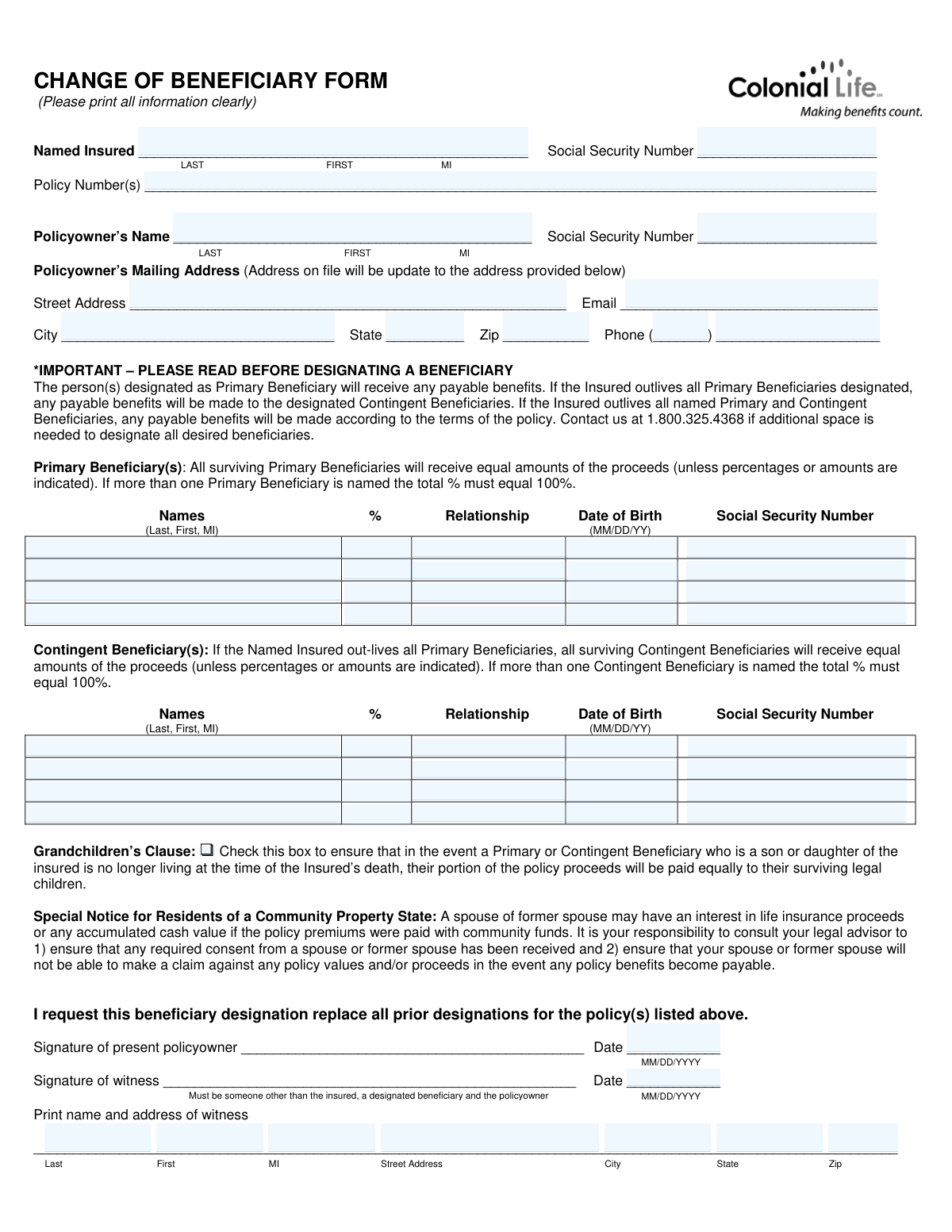
A Change of Beneficiary Form is a legal document used by a policyowner to officially name or change who will receive the policy's benefits upon the insured's death. It is critical for ensuring your assets are distributed according to your current wishes, as this designation replaces all prior ones. Today, this form can be filled out quickly and accurately using AI-powered services like Instafill.ai, which can also convert non-fillable PDF versions into interactive fillable forms.
Form 17075-16 is part of the
insurance forms, beneficiary forms, financial forms, estate planning forms and beneficiary change forms categories on Instafill.
Rather not fill this in by hand? Instafill is an online form filler that completes PDF forms automatically — upload the blank form, answer a few questions, and the AI fills every field.
Form specifications
| Form name: | Change of Beneficiary Form |
| Number of pages: | 1 |
| Language: | English |
Our AI automatically handles information lookup, data retrieval, formatting, and form filling.
It takes less than a minute to fill out Form 17075-16 using our AI form filling.
Securely upload your data. Information is encrypted in transit and deleted immediately after the form is filled out.
Instafill Demo: How to fill out PDF forms in seconds with AI
How to Fill Out Form 17075-16 Online for Free in 2026
Are you looking to fill out a FORM 17075-16 form online quickly and accurately? Instafill.ai offers the #1 AI-powered PDF filling software of 2026, allowing you to complete your FORM 17075-16 form in just 37 seconds or less.
Follow these steps to fill out your FORM 17075-16 form online using Instafill.ai:
- 1 Navigate to Instafill.ai and upload your Change of Beneficiary Form or select it from the template library.
- 2 Use the AI assistant to fill in the policyowner and named insured's information, such as name, Social Security Number, and policy number.
- 3 Enter the full details for each Primary Beneficiary, including their name, relationship to the insured, date of birth, SSN, and the percentage of benefits they are to receive.
- 4 Optionally, designate one or more Contingent Beneficiaries who will receive benefits if all primary beneficiaries are deceased.
- 5 Review all entered information for accuracy, paying close attention to names, percentages, and identification numbers.
- 6 Sign and date the form as the policyowner. Have a witness, who is not a beneficiary, also sign, date, and provide their contact information.
- 7 Download the completed form and submit it to the insurance provider via the method specified in the instructions, such as mail or fax.
Our AI-powered system ensures each field is filled out correctly, reducing errors and saving you time.
Why Choose Instafill.ai for Your Fillable Form 17075-16 Form?
Speed
Complete your Form 17075-16 in as little as 37 seconds.
Up-to-Date
Always use the latest 2026 Form 17075-16 form version.
Cost-effective
No need to hire expensive lawyers.
Accuracy
Our AI performs 10 compliance checks to ensure your form is error-free.
Security
Your personal information is protected with bank-level encryption.
Frequently Asked Questions About Form 17075-16
This form is used by a policyowner to update, add, or remove the individuals (beneficiaries) who will receive the policy's benefits upon the insured person's death. Submitting this form will replace all previous beneficiary designations on file.
The current policyowner must complete and sign the form. A witness, who cannot be the insured, a designated beneficiary, or the policyowner, must also sign it.
A Primary Beneficiary is the first person or group designated to receive the policy benefits. A Contingent Beneficiary only receives the benefits if all Primary Beneficiaries are no longer living at the time of the insured's death.
If you name multiple beneficiaries in either the Primary or Contingent section, the proceeds will be split equally among them unless you specify different percentages. If you do specify percentages, the total for each section must equal 100%.
You must provide each beneficiary's full legal name, their relationship to the insured, their date of birth, and their Social Security Number. Providing complete and accurate information helps ensure a smooth claims process.
Once this form is processed, it voids all prior beneficiary designations. You must list every person you want to be a beneficiary on this new form, even if they were named on a previous one.
You can mail the completed and signed form to Colonial Life, PO Box 100130, Columbia, SC 29202-1365, or fax it to 1.877.828.9430.
Colonial Life will mail you a letter of confirmation once the change has been received, approved, and completed in their system.
Yes, but proceeds cannot be paid directly to a minor. The funds will be held with interest until the child reaches the age of majority, unless a court-appointed legal guardian for the child's estate is in place.
Checking this box ensures that if one of your children who is named as a beneficiary passes away before you, their share of the proceeds will be paid equally to their own legal children (your grandchildren).
In community property states, a spouse or former spouse might have a legal interest in the policy proceeds. The form advises you to consult a legal advisor to ensure you have any required consent before making changes.
The witness must be someone other than the insured person, the policyowner, or any of the beneficiaries you have listed on the form. They must provide their signature, printed name, and address.
Yes, services like Instafill.ai use AI to accurately auto-fill form fields from your saved profile, which can save you time and help prevent errors. This ensures all required information is entered correctly.
You can use a service like Instafill.ai to fill out the form online. Simply upload the PDF, and the platform will allow you to type your information directly into the fields before printing for signature.
Tools like Instafill.ai can convert non-fillable or 'flat' PDFs into interactive, fillable forms. This allows you to easily type your information instead of having to print and fill it out by hand.
Compliance Form 17075-16
Validation Checks by Instafill.ai
1
Ensures at least one Primary Beneficiary is designated
This check verifies that the 'Primary Beneficiary(s)' section contains at least one complete entry, including a name. Designating a primary beneficiary is mandatory to ensure policy proceeds can be distributed as intended upon the insured's death. If no primary beneficiary is listed, the form submission will be rejected as incomplete, preventing the change from being processed.
2
Validates Primary Beneficiary percentages total 100%
This validation confirms that if percentages are assigned to multiple primary beneficiaries, the sum of those percentages equals exactly 100%. This is critical for ensuring the policy proceeds are distributed according to the policyowner's exact wishes without ambiguity. A failure to total 100% will result in an error, requiring the user to correct the allocations before the form can be accepted.
3
Validates Contingent Beneficiary percentages total 100%
Similar to the primary check, this rule ensures that if percentages are used for multiple contingent beneficiaries, their total is exactly 100%. This prevents disputes and delays in payment if all primary beneficiaries predecease the insured. If the percentages do not sum to 100%, the form will be flagged for correction.
4
Verifies Social Security Number format
This check ensures that all Social Security Number fields for the insured, policyowner, and beneficiaries are entered in a valid 9-digit format (e.g., XXXXXXXXX or XXX-XX-XXXX). Correct SSNs are crucial for accurate identification and tax reporting purposes. An invalid format will trigger an error and prevent submission until corrected.
5
Validates all date fields for correct format and plausibility
This validation checks that all date fields, including beneficiary Dates of Birth and signature dates, are in a valid format (e.g., MM/DD/YYYY) and represent real, non-future dates. Accurate dates are essential for identity verification, determining beneficiary age, and establishing the legal effective date of the change. Invalid dates will cause the form to be rejected.
6
Confirms Policyowner's signature is present
This check verifies that the 'Signature of present policyowner' field is signed. The policyowner's signature is a legal requirement to authorize the change of beneficiary, making it one of the most critical fields on the form. A missing signature will render the entire form invalid and the change will not be processed.
7
Ensures Witness is not an interested party
This validation cross-references the witness's printed name against the names of the policyowner, the insured, and all designated beneficiaries. The witness must be a neutral third party to prevent potential conflicts of interest or claims of undue influence. If the witness is identified as an interested party, the form will be rejected and a new, valid witness will be required.
8
Validates Policy Number is provided and exists
This check ensures the 'Policy Number(s)' field is not empty and that the number provided corresponds to a valid, active policy in the company's system. This is fundamental to applying the beneficiary change to the correct insurance policy. If the field is blank or the number is not found, the submission will fail, as the system cannot identify which policy to update.
9
Ensures full name and relationship are provided for each beneficiary
For every beneficiary listed (both primary and contingent), this check verifies that their full name and relationship to the insured are provided. This information is vital for correctly identifying the beneficiary and processing claims without delay or legal challenges. Incomplete beneficiary entries will result in the form being returned for completion.
10
Verifies Policyowner's full mailing address is complete
This check confirms that the policyowner's full mailing address (Street, City, State, Zip) is provided, as the form states this will update the address on file. A complete and accurate address is necessary for all future correspondence, including the confirmation letter for this change. A missing address component will halt the update process.
11
Validates the format of the Policyowner's email address
This rule checks if the provided email address follows the standard '[email protected]' format. While not always mandatory, a valid email provides a crucial and efficient channel for communication regarding the policy and the status of the change request. An incorrectly formatted email will trigger a warning or error, prompting the user for correction.
12
Validates State and Zip Code format in Policyowner's address
This check ensures the 'State' field contains a valid two-letter postal abbreviation and the 'Zip' field contains a valid 5-digit or 9-digit ZIP code. Correct formatting is essential for mail deliverability and updating the policyowner's official address in the system. An invalid state or zip code will cause an error and must be corrected.
13
Verifies Policyowner signature date is present and not in the future
This validation confirms that a date is entered next to the policyowner's signature and that the date is not a future date. This date establishes the legal effective date of the beneficiary change request. A missing or future date makes the request invalid and will cause the form to be rejected until a valid, current or past date is provided.
14
Ensures Witness's printed name and address are complete
This check verifies that the witness's full printed name and address are provided as required. This information is necessary to validate the identity and contact information of the witness in case of any future disputes or legal inquiries. Missing witness details will cause the form to be considered incomplete and rejected.
Common Mistakes in Completing Form 17075-16
Users often list multiple primary or contingent beneficiaries but fail to ensure the assigned percentages total exactly 100%. This can happen due to simple math errors or assuming an equal split will be applied automatically. An incorrect total will cause the form to be rejected, delaying the update and potentially leaving the old beneficiary designation in effect. To avoid this, double-check that the percentages for each group (Primary and Contingent) add up to 100% before signing.
The form explicitly states the witness must be someone other than the insured, a designated beneficiary, or the policyowner. People often ask a spouse or child who is listed as a beneficiary to witness the signature out of convenience. This invalidates the signature and the form, requiring resubmission. Always choose a neutral third party, like a neighbor or coworker not named on the form, to act as the witness.
A critical mistake is assuming this form adds to or modifies the existing beneficiary list. The form clearly states it replaces all prior designations, making them null and void. If you intend to keep a previous beneficiary, you must include their full information on this new form. Failing to do so will unintentionally disinherit them, leading to significant legal and emotional distress after your passing.
Policyowners frequently provide a beneficiary's name but omit their Social Security Number, date of birth, or relationship. This information is vital for the insurance company to correctly identify the beneficiary and prevent fraud or delays during the claims process. Leaving these fields blank can lead to rejection of the form or significant hurdles for your heirs. Ensure every required field for each listed beneficiary is filled out completely and accurately.
While well-intentioned, naming a minor child as a direct beneficiary without establishing a trust or legal guardianship is a major error. As the instructions note, life insurance companies cannot legally pay proceeds directly to a minor. This forces the company to hold the funds until the child reaches the age of majority, preventing them from accessing the money for their care. To avoid this, consult a legal advisor about setting up a trust or a custodian under the Uniform Transfers to Minors Act (UTMA).
The form is often a non-fillable PDF, leading people to print and fill it out by hand. Rushed or unclear handwriting can cause names, numbers, and addresses to be misread by data entry personnel. This can result in incorrect beneficiary records or rejection of the form, defeating the purpose of the update. To prevent this, print legibly in block letters using ink. Alternatively, AI-powered tools like Instafill.ai can convert flat PDFs into fillable forms, allowing you to type information clearly and avoid legibility issues.
The form has separate fields for the 'Named Insured' (the person whose life is insured) and the 'Policyowner' (the person who owns and controls the policy). These are often the same person, but not always. Filling out these sections incorrectly can cause confusion and processing delays. Carefully identify who the insured is and who the policyowner is, and fill in their respective information in the correct fields.
Designating a beneficiary as 'My Spouse' or using a nickname like 'Jenny Smith' instead of their full legal name 'Jennifer Lynn Smith' creates ambiguity. This can cause major delays and require legal intervention for your heirs to prove their identity and claim the proceeds. Always use the full, legal name (Last, First, Middle Initial) as it appears on official documents like a driver's license or birth certificate. AI form-filling tools can help by prompting for full names and validating the format.
It's a simple but surprisingly common mistake to forget to sign or date the form before mailing it. An unsigned or undated form is legally invalid and will be immediately rejected by the insurance company, requiring you to complete and submit it all over again. Before sending the form, perform a final review to ensure the policyowner's signature and the date are present in the designated spaces.
The form specifies the date of birth format for beneficiaries as 'MM/DD/YY'. Many people instinctively write a four-digit year (YYYY) out of habit, which can cause data entry errors or require clarification. This small inconsistency can slow down the processing of your request. Pay close attention to the required format for all dates on the form to ensure smooth processing.
Saved over 80 hours a year
“I was never sure if my IRS forms like W-9 were filled correctly. Now, I can complete the forms accurately without any external help.”
Kevin Martin Green
Your data stays secure with advanced protection from Instafill and our subprocessors




Robust compliance program
Transparent business model
You’re not the product. You always know where your data is and what it is processed for.
ISO 27001, HIPAA, and GDPR
Our subprocesses adhere to multiple compliance standards, including but not limited to ISO 27001, HIPAA, and GDPR.
Security & privacy by design
We consider security and privacy from the initial design phase of any new service or functionality. It’s not an afterthought, it’s built-in, including support for two-factor authentication (2FA) to further protect your account.
Fill out Form 17075-16 with Instafill.ai
Worried about filling PDFs wrong? Instafill securely fills change-of-beneficiary-form forms, ensuring each field is accurate.
