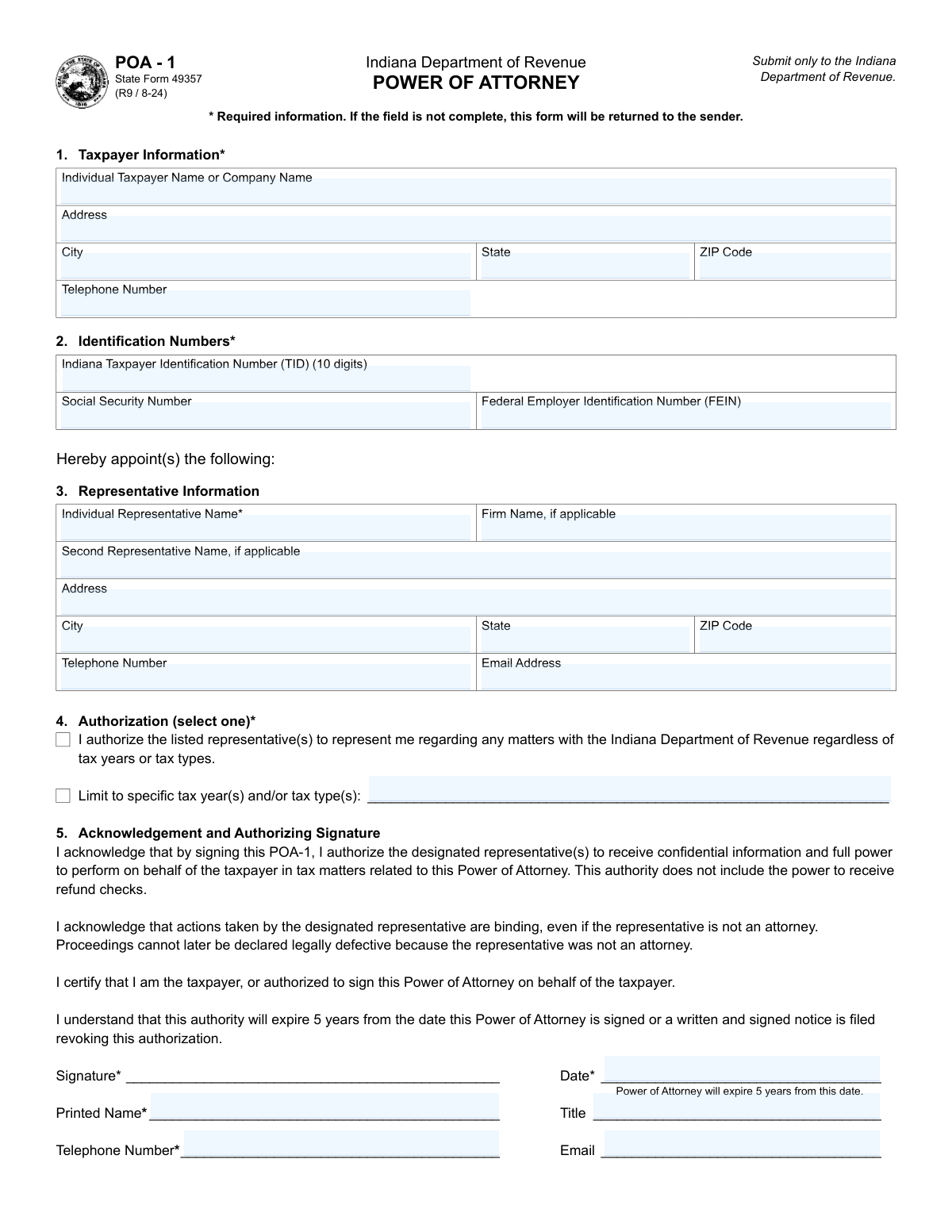
Yes! You can use AI to fill out Form POA-1, Indiana Department of Revenue Power of Attorney
The Indiana Power of Attorney, Form POA-1 (State Form 49357), is a legal document used by a taxpayer to grant an individual or firm the authority to receive confidential tax information and act on their behalf in matters before the Indiana Department of Revenue. This authorization is crucial for allowing tax professionals, lawyers, or other trusted individuals to handle your state tax issues. Today, this form can be filled out quickly and accurately using AI-powered services like Instafill.ai, which can also convert non-fillable PDF versions into interactive fillable forms.
POA-1 is part of the
power of attorney forms category on Instafill.
Our AI automatically handles information lookup, data retrieval, formatting, and form filling.
It takes less than a minute to fill out POA-1 using our AI form filling.
Securely upload your data. Information is encrypted in transit and deleted immediately after the form is filled out.
Form specifications
| Form name: | Form POA-1, Indiana Department of Revenue Power of Attorney |
| Number of fields: | 26 |
| Number of pages: | 1 |
| Language: | English |
More forms in Power of attorney forms
Instafill Demo: How to fill out PDF forms in seconds with AI
How to Fill Out POA-1 Online for Free in 2026
Are you looking to fill out a POA-1 form online quickly and accurately? Instafill.ai offers the #1 AI-powered PDF filling software of 2026, allowing you to complete your POA-1 form in just 37 seconds or less.
Follow these steps to fill out your POA-1 form online using Instafill.ai:
- 1 Navigate to Instafill.ai and upload your Form POA-1 or select it from the form library.
- 2 Provide your taxpayer information, including your name, address, and identification numbers (TID, SSN, or FEIN).
- 3 Enter the required information for up to two representatives, such as their names, addresses, and contact details.
- 4 Define the scope of authorization by either granting full power for all tax matters or limiting it to specific tax years and types.
- 5 Review the information auto-filled by the AI for accuracy, including taxpayer details, representative information, and authorization level.
- 6 Electronically sign and date the form in the 'Acknowledgement and Authorizing Signature' section to certify the authorization.
- 7 Download the completed POA-1 and submit it to the Indiana Department of Revenue via the specified fax number or mailing address.
Our AI-powered system ensures each field is filled out correctly, reducing errors and saving you time.
Why Choose Instafill.ai for Your Fillable POA-1 Form?
Speed
Complete your POA-1 in as little as 37 seconds.
Up-to-Date
Always use the latest 2026 POA-1 form version.
Cost-effective
No need to hire expensive lawyers.
Accuracy
Our AI performs 10 compliance checks to ensure your form is error-free.
Security
Your personal information is protected with bank-level encryption.
Frequently Asked Questions About Form POA-1
This form allows a taxpayer to appoint an individual, such as a tax professional, to represent them before the Indiana Department of Revenue. This representative can receive confidential tax information and act on the taxpayer's behalf for specified tax matters.
Any individual or business taxpayer who wants to authorize another person to handle their tax matters with the Indiana Department of Revenue must complete this form. The taxpayer, not the representative, is responsible for filling out and signing the form.
No, a separate POA-1 form is required for each individual. Even if you file jointly, your spouse must complete and sign their own Power of Attorney form to appoint a representative.
You must provide your full name, address, phone number, and either your Social Security Number or FEIN, along with your Indiana Taxpayer ID (TID). You also need the name and address of your representative, and you must sign and date the form in Section 5.
In Section 4, you can either check a box to grant your representative authority for all tax matters or check the other box to limit their authority. If you limit it, you must list the specific tax types and/or tax years.
The POA-1 is effective for five years from the date you sign it. After five years, you must submit a new form if you wish to continue the authorization.
You must send a written and signed notice to the Indiana Department of Revenue to revoke the authorization. Simply filing a new POA-1 for a different representative will not automatically revoke a previous one.
You can submit the form by faxing it to 317-615-2605 or by mailing it to the Indiana Department of Revenue, P.O. Box 7230, Indianapolis, IN 46207-7230.
Yes, the Indiana Department of Revenue's online portal, INTIME, allows for electronic Power of Attorney (ePOA) requests. This is an alternative to filling out and submitting the paper POA-1 form.
No, you must name up to two specific individuals as your representatives, not the entire firm. You can, however, list the firm's name in the 'Firm Name, if applicable' field in Section 3.
The department will not accept a form that has been altered unless you initial next to the alteration. To avoid rejection, it is best to complete a new, clean POA-1 form if you need to make changes.
Yes, services like Instafill.ai use AI to help you accurately auto-fill form fields, which can save time and reduce errors. This is especially useful for ensuring all required fields are completed correctly.
You can use a service like Instafill.ai to fill out the form online. Simply upload the POA-1 form, and the platform will allow you to type your information directly into the fields before printing for signature and submission.
If you have a non-fillable or 'flat' PDF, you can upload it to a service like Instafill.ai. The tool can convert the non-fillable PDF into an interactive form that you can easily complete on your computer.
Compliance POA-1
Validation Checks by Instafill.ai
1
Mutually Exclusive Identification Number
This validation ensures that for a single taxpayer, either the Social Security Number (SSN) or the Federal Employer Identification Number (FEIN) is provided, but not both. This is critical because an entity is either an individual (using SSN) or a business (using FEIN), and providing both creates ambiguity in taxpayer identity. If both fields are filled, the system should return an error prompting the user to clear one of the fields.
2
Indiana TID Format and Length
This check verifies that the Indiana Taxpayer Identification Number (TID) field contains exactly 10 numeric digits. The form specifies this is a 10-digit number assigned by the state, so validating the length and numeric format is essential for correctly identifying the taxpayer account in the state's system. A submission with an incorrectly formatted TID will be rejected, as it cannot be matched to a valid account.
3
Exclusive Authorization Selection
This validation confirms that the user has selected only one of the two authorization options in Section 4: either the full authorization checkbox or the limited authorization checkbox. The form logic dictates these choices are mutually exclusive to prevent conflicting instructions. If both or neither are selected, the form is considered incomplete and an error message should be displayed, forcing the user to make a single, clear choice.
4
Conditional Requirement for Limited Authorization Details
This check ensures that if the user selects the 'Limit to specific tax year(s) and/or tax type(s)' checkbox, the corresponding text field for listing those limitations is not empty. This is a crucial logical check to guarantee that a declared intention to limit authority is accompanied by the actual limitations. If the box is checked but the details are missing, the form submission must be blocked until the user provides the specific tax years or types.
5
Signature Date Format and Validity
This validation verifies that the 'Date' field in the signature section is not only present but also formatted correctly as MM/DD/YYYY and represents a valid, non-future date. The signature date is legally significant as it establishes the start of the 5-year authorization period. An invalid or future date would make the document's effective period ambiguous, so the system must reject submissions with an improperly formatted or invalid date.
6
State Field Postal Abbreviation
This check validates that both the taxpayer and representative 'State' fields contain a two-letter, uppercase U.S. postal abbreviation. This standardization is necessary for mail delivery, address verification systems, and maintaining a clean database. Submissions with non-standard state entries (e.g., 'Indiana' instead of 'IN', or 'in') should be flagged with an error, requiring the user to correct the format.
7
Taxpayer ZIP Code Format
This validation ensures the 'Taxpayer ZIP Code' field contains exactly five numeric digits, as specified in the field instructions. Correct ZIP code formatting is essential for accurate mail processing and location-based data aggregation. If the field contains non-numeric characters, or is not five digits long, the submission should be halted with a message explaining the required format.
8
Representative Information Integrity
This check verifies that if a name is entered in the 'Individual Representative Name' field, then the corresponding required address fields (Address, City, State, ZIP Code) are also completed. A representative cannot be appointed without valid contact information for the Department of Revenue. If a representative's name is present but their address is incomplete, the form is invalid and should be rejected until the missing information is supplied.
9
Signature Block Completeness
This validation ensures that all required fields within the 'Acknowledgement and Authorizing Signature' section (Printed Name, Date, and Telephone Number) are filled out. The signature block legally finalizes the Power of Attorney, and missing information can invalidate the document. The system should treat the form as incomplete and prevent submission if any of these required signatory details are missing.
10
FEIN Structure Validation
This check confirms that the Federal Employer Identification Number (FEIN), if provided, adheres to the strict XX-XXXXXXX format. This includes verifying it contains nine digits and a hyphen after the second digit. Correct formatting is vital for matching the business entity with IRS records and ensuring data integrity. An entry that does not match this pattern should trigger an immediate format error.
11
SSN Structure Validation
This validation ensures the Social Security Number (SSN), if provided, consists of exactly nine numeric digits, with no dashes or spaces as per the instructions. This strict format is required for processing and matching the individual with federal and state records. Any entry containing non-numeric characters or an incorrect number of digits must be rejected to prevent data corruption and identity mismatch errors.
12
Required Telephone Number Format
This check validates that the required telephone number fields (Taxpayer and Signatory) contain a valid 10-digit phone number. The system should be able to parse various common formats (e.g., with parentheses, hyphens, or spaces) by stripping non-numeric characters and then verifying the result is 10 digits long. This ensures a usable contact number is on file, which is a requirement of the form.
13
Email Address Syntax
This validation checks that any value entered into an email field (e.g., Signatory Email, Representative Email) conforms to the standard email address format, such as '[email protected]'. While these fields are optional, if a user chooses to enter data, it must be valid to be useful and prevent database errors. An invalid format should prompt a warning to the user to either correct the entry or leave the optional field blank.
14
Taxpayer Information Completeness
This check verifies that all required fields in the 'Taxpayer Information' section are filled, including Name, Address, City, State, ZIP Code, and Telephone Number. This information is the primary identifier for the taxpayer and is fundamental to the entire document. A failure in this check means the Power of Attorney cannot be associated with any taxpayer, so the form submission must be blocked until all required taxpayer details are provided.
Common Mistakes in Completing POA-1
Taxpayers often confuse which identification number to use in Section 2, such as entering a Social Security Number (SSN) for a business entity instead of a Federal Employer Identification Number (FEIN), or vice-versa. Another common error is including dashes or spaces in the SSN or the 10-digit Indiana TID, which the instructions forbid. These mistakes lead to processing delays or outright rejection as the department cannot match the form to the correct taxpayer account. To avoid this, carefully read the instructions for each field and enter only the required number type in the specified format. AI-powered tools like Instafill.ai can help by auto-formatting numbers correctly and validating that the right type of ID is used for an individual versus a business.
A frequent error in Section 4 is checking the box to 'Limit to specific tax year(s) and/or tax type(s)' but then failing to write in the actual limitations. This ambiguity makes the Power of Attorney invalid because the scope of authorization is undefined, forcing the department to return the form. To prevent this, if you select the limited authorization option, you must clearly list the specific tax types (e.g., 'Individual Income Tax') and years (e.g., '2023') in the space provided. If you intend to grant full authority, check the first box instead.
Section 5 is critical, yet many filers forget one or more of the required elements: the signature, the date, the printed name, or the telephone number. An unsigned or undated form is legally invalid and will be immediately returned. This often happens due to rushing to complete the form. Always double-check that you have physically signed the form, printed your name legibly, entered the current date in MM/DD/YYYY format, and provided a valid phone number before submitting.
In Section 3, taxpayers sometimes enter the name of an accounting or law firm in the 'Individual Representative Name' field. The instructions explicitly state that only individuals can be named as representatives, not entire firms. This error will cause the form to be rejected, as the authorization must be granted to a specific person. To avoid this, enter the full legal name of the individual person who will represent you, and then list their associated firm in the separate 'Firm Name' field.
Married couples filing jointly often assume they can use a single POA-1 form for both individuals. However, the form's instructions clearly state, 'This form is for one person. A spouse (if applicable) will need a separate form.' Submitting one form for two people will result in it being invalid for one or both spouses. To ensure both spouses are properly represented, each must complete and sign their own separate POA-1 form.
In Section 4, filers are required to select only one authorization option: either grant unlimited authority or limit it to specific matters. A common mistake is checking both boxes, which creates a contradiction and invalidates the authorization request. The department cannot determine the taxpayer's intent and will return the form. Before submitting, review Section 4 to ensure only one box is checked.
When the taxpayer is a company, the person signing in Section 5 must have the legal authority to do so, such as being a responsible officer, owner, or manager. An employee without this specific authority signing the form will render it invalid. This mistake can lead to significant delays in handling business tax matters. Ensure the signatory holds an appropriate title as defined by Indiana code and that their title is entered correctly in the 'Title' field.
While the representative's name is often filled out correctly, filers sometimes omit parts of the address in Section 3, such as the city, state, or ZIP code. Since the department communicates with the representative via mail, an incomplete address will lead to returned correspondence and communication breakdowns. Always provide the representative's full, accurate mailing address across all corresponding fields. Using a form-filling tool like Instafill.ai can prevent this by ensuring all required address components are completed before finalization.
People often make small mistakes and try to correct them by crossing out information and writing in the new details. The form instructions specify that any alterations must be initialed by the taxpayer next to the change. Failing to initial a correction can lead the department to question the form's authenticity and reject it. To avoid this, either initial every change clearly or, for a cleaner result, start over with a fresh form. If the form is a non-fillable PDF, a tool like Instafill.ai can convert it into an easily editable version, allowing you to correct mistakes without messy alterations.
The form specifies certain formats for data entry, such as MM/DD/YYYY for the date and a 10-digit number for the phone. Filers may use other formats like 'August 15, 2024' or forget to include an area code, which can cause data entry errors on the department's end or trigger an automatic rejection. Adhering to the specified format is crucial for smooth processing. AI-powered form fillers like Instafill.ai automatically format dates, phone numbers, and other data to meet form-specific requirements, eliminating these simple but common errors.
Saved over 80 hours a year
“I was never sure if my IRS forms like W-9 were filled correctly. Now, I can complete the forms accurately without any external help.”
Kevin Martin Green
Your data stays secure with advanced protection from Instafill and our subprocessors

Robust compliance program
Transparent business model
You’re not the product. You always know where your data is and what it is processed for.
ISO 27001, HIPAA, and GDPR
Our subprocesses adhere to multiple compliance standards, including but not limited to ISO 27001, HIPAA, and GDPR.
Security & privacy by design
We consider security and privacy from the initial design phase of any new service or functionality. It’s not an afterthought, it’s built-in, including support for two-factor authentication (2FA) to further protect your account.
Fill out POA-1 with Instafill.ai
Worried about filling PDFs wrong? Instafill securely fills form-poa-1-indiana-department-of-revenue-power-of-attorney forms, ensuring each field is accurate.