Yes! You can use AI to fill out Relinquishment of control over assets to minor form

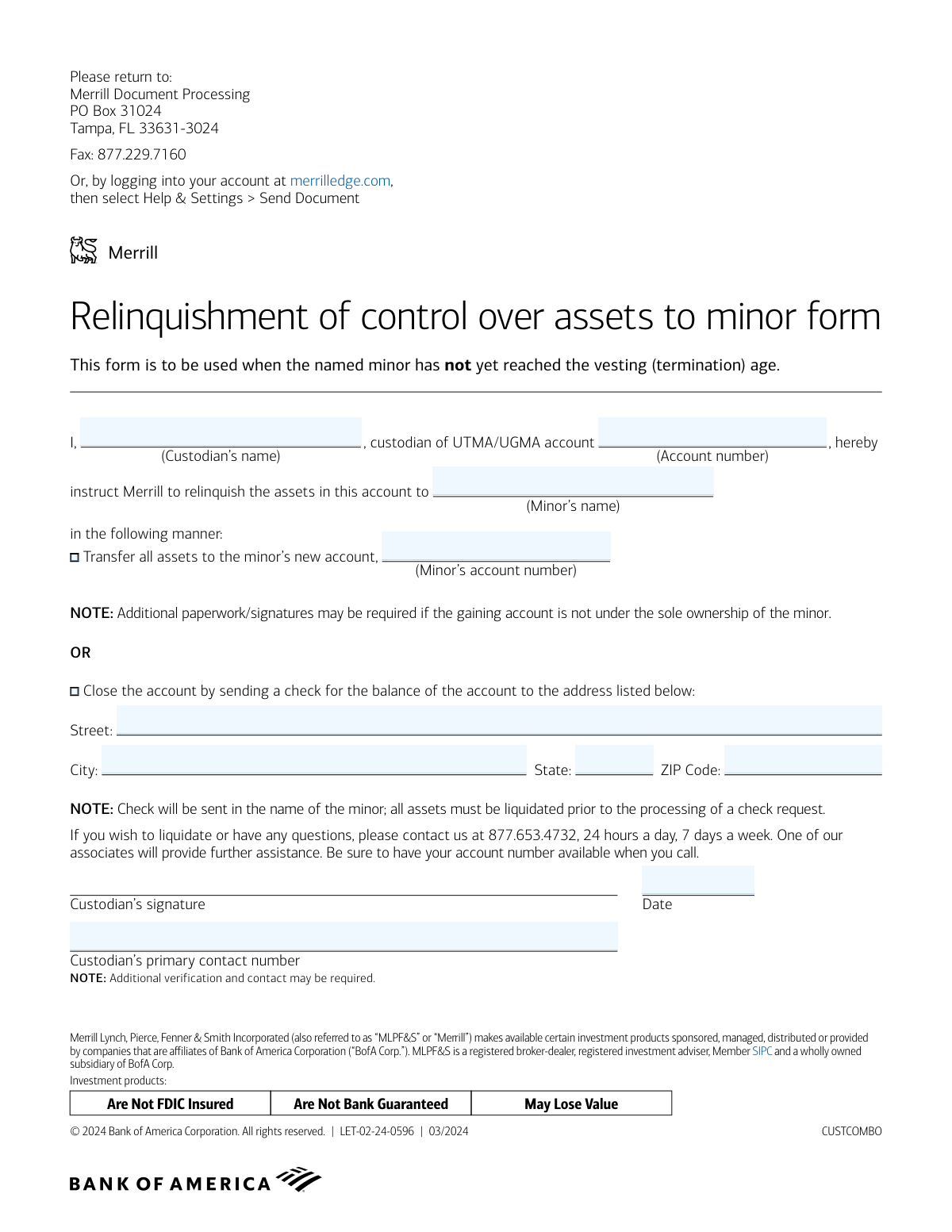
This form is a legal document provided by Merrill Lynch that allows a custodian of a Uniform Transfers to Minors Act (UTMA) or Uniform Gifts to Minors Act (UGMA) account to formally relinquish control and transfer the assets to the named minor before the standard termination age. It provides instructions for either transferring the assets to a new account in the minor's name or liquidating the assets and sending a check to the minor. Today, this form can be filled out quickly and accurately using AI-powered services like Instafill.ai, which can also convert non-fillable PDF versions into interactive fillable forms.
Our AI automatically handles information lookup, data retrieval, formatting, and form filling.
It takes less than a minute to fill out LET-02-24-0596 using our AI form filling.
Securely upload your data. Information is encrypted in transit and deleted immediately after the form is filled out.

Form specifications

Form name: Relinquishment of control over assets to minor form
Number of pages: 1
Language: English
main-image

Instafill Demo: How to fill out PDF forms in seconds with AI

How to Fill Out LET-02-24-0596 Online for Free in 2026

Are you looking to fill out a LET-02-24-0596 form online quickly and accurately? Instafill.ai offers the #1 AI-powered PDF filling software of 2026, allowing you to complete your LET-02-24-0596 form in just 37 seconds or less.
Follow these steps to fill out your LET-02-24-0596 form online using Instafill.ai:
  1. 1 Navigate to Instafill.ai and upload or select the Merrill Lynch 'Relinquishment of control over assets to minor form'.
  2. 2 Use the AI assistant to fill in your name as the custodian and the UTMA/UGMA account number.
  3. 3 Enter the full name of the minor who will be receiving the assets.
  4. 4 Select the method for relinquishing the assets: either transferring to a new account (and providing the new account number) or closing the account and issuing a check.
  5. 5 If a check is requested, provide the complete mailing address where it should be sent in the minor's name.
  6. 6 Review all the information for accuracy, then electronically sign and date the form as the custodian and add your contact number.
  7. 7 Download the completed form and submit it to Merrill Lynch via mail, fax, or their online document portal as instructed on the form.

Our AI-powered system ensures each field is filled out correctly, reducing errors and saving you time.

Why Choose Instafill.ai for Your Fillable LET-02-24-0596 Form?

Speed

Complete your LET-02-24-0596 in as little as 37 seconds.

Up-to-Date

Always use the latest 2026 LET-02-24-0596 form version.

Cost-effective

No need to hire expensive lawyers.

Accuracy

Our AI performs 10 compliance checks to ensure your form is error-free.

Security

Your personal information is protected with bank-level encryption.

Frequently Asked Questions About Form LET-02-24-0596

This form allows a custodian of a UTMA/UGMA account to legally transfer control of the account's assets to the minor, even before the minor has reached the official vesting or termination age.

The current custodian of the UTMA/UGMA account, who is the person legally managing the account for the minor, must complete and sign this form.

You will need the custodian's name, the UTMA/UGMA account number, the minor's name, and your contact phone number. Depending on how you transfer assets, you'll also need the minor's new account number or a mailing address.

You can either transfer all assets directly into a new account established for the minor, or you can close the account, liquidate all assets to cash, and have a check sent to the minor.

This means all investments like stocks and funds in the account must be sold and converted to cash before Merrill can process the request and issue a check. You can call Merrill for assistance with this process.

The form indicates that if the receiving account is not under the minor's sole ownership, additional paperwork and signatures may be required. It is best to contact Merrill to clarify the necessary steps.

You can submit the form by mailing it to the Merrill Document Processing center, faxing it to 877.229.7160, or uploading it directly through your merrilledge.com account.

You can call a Merrill associate 24/7 at 877.653.4732 for assistance. Make sure you have your account number available when you call.

Yes, the form notes that additional verification and contact may be required to process your request, so be prepared for a potential follow-up call from Merrill.

Yes, services like Instafill.ai use AI to accurately auto-fill form fields with your information, which can save you time and help reduce errors.

Simply upload the form to the Instafill.ai platform, and its AI will identify the fields and help you fill them in with your saved information. You can then review, sign, and download the completed document.

If you have a non-fillable or 'flat' PDF, you can upload it to a service like Instafill.ai. The platform can convert it into an interactive, fillable form that you can easily complete on your computer.

Compliance LET-02-24-0596
Validation Checks by Instafill.ai

1
Exclusive Relinquishment Method Selection
This check ensures that the user has selected exactly one method for relinquishing assets, either by transferring to a new account or by closing the account and sending a check. It is critical to prevent ambiguity in processing the request. If both or neither option is selected, the form submission will be rejected, and the user will be prompted to choose a single, clear instruction.
2
Custodian and Account Number Verification
This validation performs a backend check to confirm that the provided UTMA/UGMA account number exists and that the custodian's name on the form matches the legal custodian on record for that account. This is a crucial security measure to prevent unauthorized transactions and fraud. A mismatch will result in immediate rejection of the form and may trigger a security alert for manual review.
3
Conditional Requirement for Minor's New Account Number
This check enforces that the 'Minor’s account number' field is filled out if and only if the 'Transfer all assets' option is selected. This ensures that the system has a destination account for the transfer. If the transfer option is chosen without an account number, the submission will fail, prompting the user to provide the necessary information.
4
Conditional Requirement for Mailing Address
This validation ensures that the full mailing address (Street, City, State, ZIP Code) is provided if and only if the 'Close the account by sending a check' option is selected. This is necessary to know where to mail the liquidation check. If this option is selected without a complete address, the form will be considered incomplete and rejected.
5
Signature Date Validity
This check verifies that the 'Date' field is not empty, is in a valid date format (e.g., MM/DD/YYYY), and is not a future date. A valid, current, or past signature date is required for the form to be legally binding. An invalid format or a future date will cause the submission to fail, as it would invalidate the custodian's attestation.
6
Custodian Contact Number Format
This validation ensures the 'Custodian’s primary contact number' is in a valid 10-digit US phone number format. A valid contact number is essential for the firm to perform additional verification or ask clarifying questions as noted on the form. An improperly formatted number will be rejected to ensure the firm can reach the custodian if needed.
7
Minor's Age Eligibility Check
This validation performs a backend check against the minor's date of birth on file to confirm they have not yet reached the vesting (termination) age. The form explicitly states it is for this specific scenario. If the minor has already reached the vesting age, this form is inappropriate, and the submission will be rejected with instructions to use a different process.
8
Completeness of Core Information
This check verifies that the custodian's name, the UTMA/UGMA account number, and the minor's name are all provided. These fields are fundamental to identifying the parties and the account involved in the transaction. Missing any of this core information makes the request impossible to process, leading to an immediate rejection of the form.
9
Distinct Source and Destination Accounts
When the 'Transfer all assets' option is selected, this check ensures that the source 'Account number' and the destination 'Minor’s account number' are not the same. Transferring assets from an account to itself is an illogical action that indicates a user error. If the account numbers match, the submission will be flagged as an error, requiring the user to correct the destination account.
10
Valid State and ZIP Code Format
If a mailing address is provided, this check validates that the 'State' field contains a valid two-letter state abbreviation and the 'ZIP Code' field contains a valid 5-digit or 9-digit (ZIP+4) code. Correct formatting is essential for successful mail delivery of the check. An invalid state or ZIP code will result in a validation error, prompting the user to correct the address before submission.
11
Minor's New Account Ownership Review
If assets are being transferred to a new account, this validation flags the submission for manual review if the destination account is not under the sole ownership of the minor. The form notes that additional paperwork may be required in this case. This automated flag ensures compliance and prevents processing delays by routing the form to a specialist who can manage the extra requirements.

Common Mistakes in Completing LET-02-24-0596

Entering an Incorrect UTMA/UGMA Account Number

A simple typo or transposition of digits in the UTMA/UGMA account number is a frequent error that will cause the request to fail immediately. Merrill Lynch cannot identify the correct account to act upon, leading to rejection and delays. To prevent this, carefully cross-reference the account number with a recent statement. AI-powered tools like Instafill.ai can reduce manual entry errors by securely storing and filling this number, and can also help validate the format to catch obvious mistakes.

Using an Incomplete or Informal Name

Custodians or minors' names are often entered as nicknames or initials instead of the full legal name as it appears on the account. This causes a mismatch during identity verification, resulting in the form being rejected and delaying the asset transfer. Always use the full legal name as it is officially registered with Merrill Lynch. Using a form-filling tool can help by storing and accurately populating full legal names, ensuring consistency.

Selecting Both Transfer and Closure Options

Custodians sometimes mistakenly check both the 'Transfer all assets' and 'Close the account' boxes, creating an ambiguous instruction. The form requires a single, clear choice, and selecting both will result in the form being returned for clarification. This simple oversight can add weeks to the processing time, so be sure to select only one of the two options.

Omitting the Minor's New Account Number for Transfer

When choosing to transfer assets to a new account for the minor, it is common to select the option but forget to write in the new account number. Without this crucial piece of information, Merrill Lynch cannot execute the transfer, bringing the process to a halt. Before filling out the form, ensure the new account is fully opened and you have the correct account number ready.

Misunderstanding the Asset Liquidation Requirement

The form notes that all assets must be liquidated before a check can be issued, a detail many people miss. Custodians may submit the form expecting Merrill to handle the liquidation automatically, but this can cause delays or require a follow-up call to authorize the sales. To avoid this, contact Merrill Lynch first to liquidate any non-cash assets, then submit this form to request the check for the resulting cash balance.

Providing an Incomplete Mailing Address

If requesting the account be closed and a check mailed, any missing part of the address, such as a street suffix, apartment number, or ZIP code, will prevent the check from being delivered. This can result in a lost check and significant delays in the minor receiving their funds. AI form fillers like Instafill.ai can help prevent this by auto-populating addresses from a verified profile and validating them to ensure accuracy and completeness.

Forgetting the Custodian's Signature

An unsigned form is legally invalid and will be rejected immediately upon receipt. This is a simple but very common oversight that stops the entire process until a properly signed form is resubmitted. Since this form is a non-fillable PDF, tools like Instafill.ai can convert it into a fillable version, but you must always perform a final review to ensure a physical signature is present before sending.

Missing or Incorrectly Formatted Date

The signature date is a legal requirement that documents when the instruction was authorized, but it is often left blank or written in an ambiguous format. This can cause processing delays while the firm seeks clarification. To avoid this, always write the full date clearly in MM/DD/YYYY format. Form-filling tools can automatically insert the current date in the correct format, preventing this common oversight.

Ignoring the 'Additional Paperwork' Warning

The form warns that more paperwork may be needed if the receiving account is not solely owned by the minor (e.g., a joint account). Custodians often overlook this note, leading to unexpected delays when Merrill requests further documentation after the fact. If the new account has other owners, contact Merrill Lynch beforehand to determine what other forms or signatures are required to ensure a smooth transfer.
Saved over 80 hours a year

“I was never sure if my IRS forms like W-9 were filled correctly. Now, I can complete the forms accurately without any external help.”

Kevin Martin Green

Your data stays secure with advanced protection from Instafill and our subprocessors

Robust compliance program

Transparent business model

You’re not the product. You always know where your data is and what it is processed for.

ISO 27001, HIPAA, and GDPR

Our subprocesses adhere to multiple compliance standards, including but not limited to ISO 27001, HIPAA, and GDPR.

Security & privacy by design

We consider security and privacy from the initial design phase of any new service or functionality. It’s not an afterthought, it’s built-in, including support for two-factor authentication (2FA) to further protect your account.

Fill out LET-02-24-0596 with Instafill.ai

Worried about filling PDFs wrong? Instafill securely fills relinquishment-of-control-over-assets-to-minor-form forms, ensuring each field is accurate.