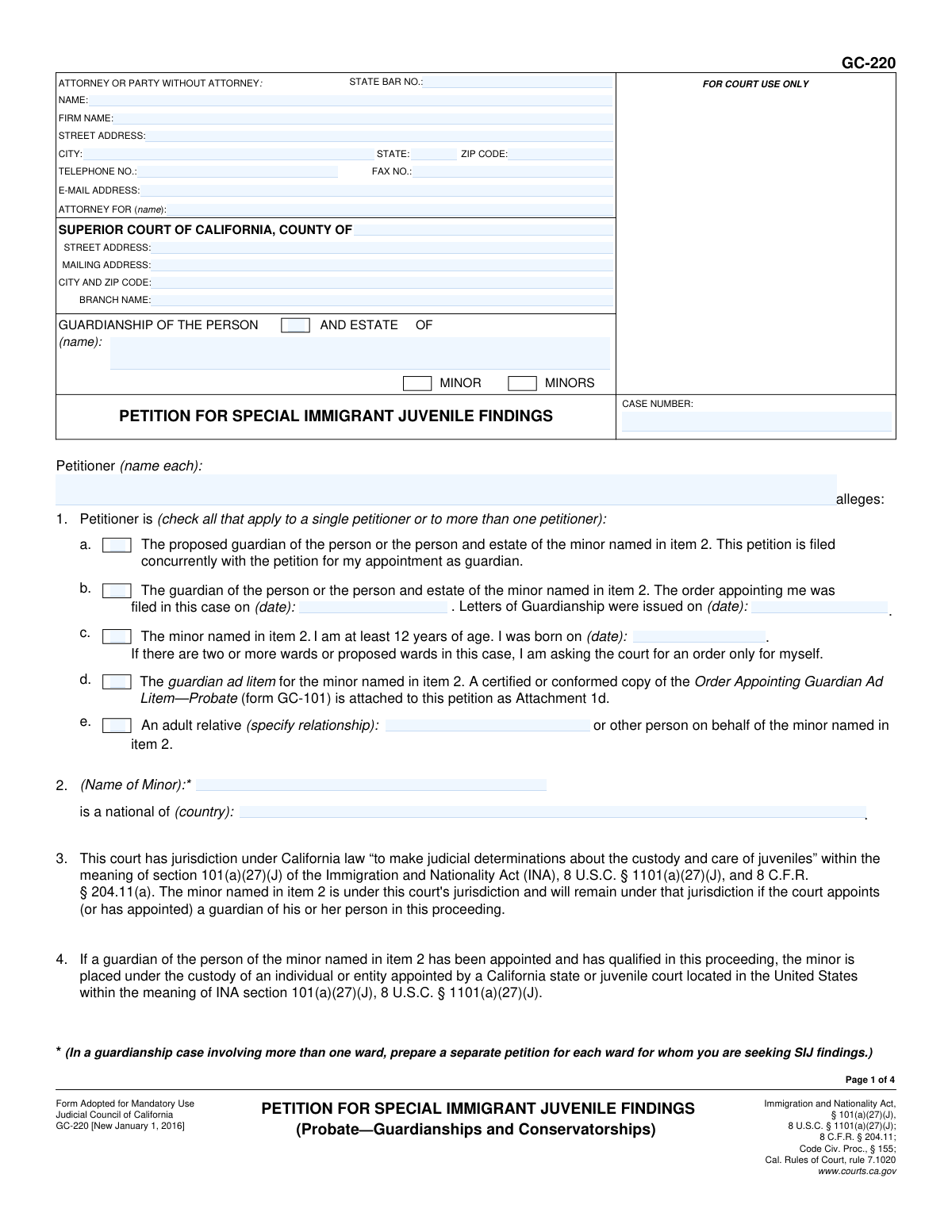
Yes! You can use AI to fill out Form GC-220, Petition for Special Immigrant Juvenile Findings (Probate—Guardianships and Conservatorships)
Form GC-220, Petition for Special Immigrant Juvenile Findings, is a mandatory California Judicial Council form filed in probate court as part of a guardianship proceeding. It requests that the court make specific findings that a minor has been subject to abuse, neglect, or abandonment by one or both parents, and that it is not in the minor's best interest to return to their home country. These state court findings are a critical prerequisite for a minor to apply for Special Immigrant Juvenile (SIJ) status with U.S. immigration authorities. Today, this form can be filled out quickly and accurately using AI-powered services like Instafill.ai, which can also convert non-fillable PDF versions into interactive fillable forms.
GC-220 is part of the
guardianship forms, immigrant petition forms, ATO forms and probate forms categories on Instafill.
Our AI automatically handles information lookup, data retrieval, formatting, and form filling.
It takes less than a minute to fill out GC-220 using our AI form filling.
Securely upload your data. Information is encrypted in transit and deleted immediately after the form is filled out.
Form specifications
| Form name: | Form GC-220, Petition for Special Immigrant Juvenile Findings (Probate—Guardianships and Conservatorships) |
| Number of fields: | 72 |
| Number of pages: | 4 |
| Language: | English |
More forms in Guardianship forms
Instafill Demo: How to fill out PDF forms in seconds with AI
How to Fill Out GC-220 Online for Free in 2026
Are you looking to fill out a GC-220 form online quickly and accurately? Instafill.ai offers the #1 AI-powered PDF filling software of 2026, allowing you to complete your GC-220 form in just 37 seconds or less.
Follow these steps to fill out your GC-220 form online using Instafill.ai:
- 1 Navigate to Instafill.ai and upload or select the GC-220 form.
- 2 Use the AI assistant to automatically populate court information, party details, and the case number in the header section.
- 3 Identify the petitioner by checking the appropriate box (e.g., proposed guardian, current guardian, the minor) and provide any required dates or relationship details.
- 4 Enter the minor's full name and country of nationality as specified in Item 2.
- 5 In Item 5, check the boxes indicating whether reunification is not viable with one or both parents due to abuse, neglect, or abandonment, and provide a detailed factual statement in the space provided.
- 6 In Item 6, specify the country the minor should not be returned to and provide a factual explanation of why it is not in their best interest.
- 7 Review all auto-filled information for accuracy, e-sign the declaration, and download the completed form for filing with the court.
Our AI-powered system ensures each field is filled out correctly, reducing errors and saving you time.
Why Choose Instafill.ai for Your Fillable GC-220 Form?
Speed
Complete your GC-220 in as little as 37 seconds.
Up-to-Date
Always use the latest 2026 GC-220 form version.
Cost-effective
No need to hire expensive lawyers.
Accuracy
Our AI performs 10 compliance checks to ensure your form is error-free.
Security
Your personal information is protected with bank-level encryption.
Frequently Asked Questions About Form GC-220
This form is used to petition a California court to make specific legal findings about a minor, which are required for the minor to apply for Special Immigrant Juvenile (SIJ) status with U.S. immigration authorities.
The petition can be filed by a proposed or appointed guardian, the minor (if they are at least 12 years old), a guardian ad litem, or another adult relative acting on the minor's behalf.
Yes, the form explicitly states that you must prepare and file a separate GC-220 petition for each minor for whom you are seeking SIJ findings.
Yes, Item 1a on the form allows a proposed guardian to file this petition concurrently with the initial petition for appointment as a guardian.
You must provide specific facts explaining why the minor cannot be reunited with one or both parents due to abuse, neglect, abandonment, or another legal basis recognized under California law.
In this section, you must state the facts that show why it is not in the minor's best interest to be returned to their or their parents' previous country of nationality or last habitual residence.
The form allows you to attach additional pages for more detailed facts. You can use form MC-025 (Attachment to Judicial Council Form) and check the appropriate box indicating an attachment is included.
All petitioners listed on the form must sign the declaration under penalty of perjury. If an attorney is representing the petitioner, the attorney must also sign.
After the petition is filed, the court will review the information and may schedule a hearing. If the court agrees with the petition, it will issue an order with the necessary findings for the minor's SIJ application.
Yes, services like Instafill.ai use AI to auto-fill form fields accurately and save time. While AI can help with standard information, you must provide the specific factual details for your case yourself.
You can use a service like Instafill.ai to complete the form online. Simply upload the PDF, and the platform will convert it into an interactive, fillable form that you can complete and download.
If you have a non-fillable or 'flat' PDF, you can use a tool like Instafill.ai. It can convert the non-fillable PDF into an interactive form that you can easily fill out on your computer.
Guardianship of the 'person' gives you authority over the minor's care and custody. Guardianship of the 'person and estate' gives you authority over both their personal care and their finances or property.
Compliance GC-220
Validation Checks by Instafill.ai
1
Minor's Age Verification for Petitioner
Validates that if the petitioner is identified as the minor in item 1c, their provided date of birth confirms they are at least 12 years of age. This is a legal requirement for the minor to petition on their own behalf. If the calculated age is less than 12, the submission should be blocked with an error message explaining the age requirement.
2
Exclusive Petitioner Type Selection
Ensures that only one checkbox is selected from the petitioner options in Item 1 (1a, 1b, 1c, 1d, 1e). These options are mutually exclusive, as a petitioner can only fit one of these roles at a time for the purpose of this petition. A validation failure would prompt the user to select only one applicable role.
3
Conditional Date Fields for Appointed Guardian
Checks that if the petitioner selects checkbox 1b ('The guardian of the person...'), both the 'order filed' date and the 'Letters of Guardianship were issued' date fields are filled. These dates are essential evidence for the petitioner's standing. If the box is checked but the dates are missing, the form cannot be submitted.
4
Logical Date Sequence for Guardianship
Verifies that the 'Letters of Guardianship were issued' date (Item 1b) is on or after the 'order appointing me was filed' date. Letters of Guardianship cannot be issued before a court order is filed. An invalid sequence indicates a data entry error and must be corrected before submission.
5
Conditional Relationship Specification
Ensures that if checkbox 1e ('An adult relative...') is selected, the corresponding text field to specify the relationship is not empty. This context is critical for the court to understand the petitioner's connection to the minor. Failure to specify the relationship would result in a validation error requiring the user to provide the information.
6
Mutually Exclusive Minor/Minors Selection
Validates that in the case header, either the 'MINOR' checkbox or the 'MINORS' checkbox is selected, but not both. This ensures clarity on whether the petition concerns a single child or multiple children. If both are selected, an error should prompt the user to choose only one.
7
Reunification Parent Selection Logic
Checks that in Item 5, either 'one parent' or 'both parents' is selected, but not both, as they are mutually exclusive options. Furthermore, it validates that one of these must be selected to proceed with specifying the reasons for non-reunification. The subsequent reason checkboxes should be disabled until a parent selection is made.
8
Reunification Reason Dependency
Verifies that if 'one parent' or 'both parents' is checked in Item 5, at least one of the reason checkboxes ('abuse', 'neglect', 'abandonment', 'another legal basis') is also checked. The petition must state a legal basis for the finding. If a parent option is selected without a reason, the submission should be flagged as incomplete.
9
Specification for 'Another Legal Basis'
Ensures that if the 'another legal basis' checkbox in Item 5 is selected, the corresponding text field to specify the basis is filled out. This field is mandatory when the checkbox is ticked to provide the court with the necessary legal justification. A blank specification field will trigger a validation error.
10
Mandatory Factual Support for Findings
Validates that the text areas for 'Facts in support' in Item 5 and Item 6 are not empty. These narrative sections are crucial for the court to understand the circumstances and make a ruling. The form is legally insufficient without these detailed explanations, so submission should be blocked if they are blank.
11
Attachment Count Consistency
Checks if the 'number of pages attached' field contains a number greater than zero when any of the form's attachment checkboxes are checked (e.g., Attachment 1d, 5, or 6). This cross-references the user's claim of attaching documents with the declared page count, preventing discrepancies. A mismatch would trigger a warning to review the attachments and count.
12
Case Header Information Consistency
Ensures that the 'Subject Name' and 'Case Number' fields are filled and consistent across all pages of the document. This is critical for correct filing and record-keeping. The system should autofill or validate these fields on each page header to prevent clerical errors that could delay the case.
13
Attorney State Bar Number Requirement
Validates that if the 'ATTORNEY FOR' field is filled, the 'STATE BAR NO.' field is also filled with a valid number format. This confirms the filer is a licensed attorney in good standing. If the filer is a party without an attorney, this field can be blank, but if an attorney is named, the bar number is mandatory.
14
Valid Date Format and Plausibility
Performs a check on all date fields (e.g., Item 1b dates, Item 1c birth date, signature dates) to ensure they are in a valid format (e.g., MM/DD/YYYY) and represent a real, plausible date. The validation should reject future dates (except where appropriate), non-existent dates (e.g., 02/30/2023), and improperly formatted text.
15
Mandatory Minor Information
Ensures that the 'Name of Minor' and 'is a national of (country)' fields in Item 2 are both completed. This information is fundamental to the petition for Special Immigrant Juvenile Findings, as it identifies the child and their country of origin, which is central to the legal arguments. The form cannot be processed without this core information.
Common Mistakes in Completing GC-220
The case caption, including the minor's name, case number, and the 'Minor' vs 'Minors' checkbox, is repeated at the top of every page. Filers often fill this out on the first page but forget to complete it consistently on pages 2, 3, and 4. This can lead to confusion, misfiling of pages by the court clerk, and an unprofessional appearance that may cause the filing to be scrutinized more heavily. To avoid this, meticulously check that the header on every single page is filled out and is identical to page one. AI-powered tools like Instafill.ai can prevent this by automatically populating repetitive fields across all pages of the document.
The form includes a checkbox for 'MINORS' (plural), which often misleads petitioners into thinking they can file a single petition for multiple siblings. However, a critical footnote on page 1 explicitly states, 'prepare a separate petition for each ward for whom you are seeking SIJ findings.' Ignoring this instruction results in an improper filing that the court will reject, forcing the petitioner to start over and file individual petitions, which wastes significant time and money. Always read all footnotes and instructions on the form; a separate GC-220 petition is mandatory for each child.
In Items 5 and 6, the form requires detailed facts to support the findings about non-reunification and best interest. A common error is to provide legal conclusions like 'The parent was neglectful' or 'It is unsafe for the minor to return.' These statements are insufficient because they don't give the judge the specific, concrete facts needed to make their own legal determination. This often leads to the petition being denied or delayed for a hearing to present more evidence. To avoid this, describe specific events with dates, locations, and actions, as if telling a story (e.g., 'From May to June 2023, the minor's father left the minor, age 13, alone for three consecutive weeks without providing food or money.').
Item 1 requires the petitioner to define their legal standing by selecting from options 'a' through 'e'. A frequent mistake is choosing the wrong status, such as checking box 1b ('The guardian...was appointed') when the guardianship petition is being filed at the same time as the SIJ petition (which requires checking box 1a). This error misrepresents the petitioner's legal relationship to the minor and the procedural posture of the case. This can cause the court to reject the petition for lack of standing, leading to significant delays. Carefully read each option to ensure it accurately reflects your current situation.
If the petitioner checks box 1b, indicating they are the already-appointed guardian, they must provide two specific dates: the date the appointment order was filed and the date the Letters of Guardianship were issued. People often leave these fields blank, guess the dates, or confuse the two. An incomplete or incorrect petition cannot be processed because the court cannot verify the petitioner's authority to act. To prevent this, have copies of the 'Order Appointing Guardian' and the 'Letters of Guardianship' in front of you when filling out the form to ensure the dates are entered exactly as they appear on the documents.
The petition frequently references attachments, such as the 'Order Appointing Guardian Ad Litem' (Attachment 1d) or continuation pages for factual statements (Attachments 5 and 6). Filers may check the box indicating an attachment is included but then forget to physically attach the document to the filing. This renders the petition incomplete and prevents the court from considering the essential information in the missing document, which can be fatal to the case. After completing the form, use it as a final checklist to gather and attach all referenced documents, and be sure to enter the correct total number of attached pages in Item 7.
The form requires signatures from the attorney (if any) and ALL petitioners listed in the caption, under penalty of perjury on page 4. A common failure is having only one of multiple petitioners sign, or the attorney signing but the petitioners forgetting to. An unsigned or incompletely signed petition is invalid and will be rejected immediately by the court clerk. Before filing, double-check that every individual named as a 'Petitioner' has signed and dated the form.
The top section of the form requires identifying the filer. Individuals representing themselves (in 'pro per') often get confused and either leave this section blank or incorrectly fill out the 'ATTORNEY FOR (name):' line. This can cause critical court notices to be lost or improperly served, potentially leading to missed hearings. If you are representing yourself, you should enter your own name and contact information, and in the 'ATTORNEY FOR' field, you can write 'In Pro Per' or simply your own name again. AI-powered form fillers like Instafill.ai can help correctly populate these fields based on whether you are an attorney or a self-represented party.
Item 5 allows the petitioner to allege that reunification is not viable with 'one parent' or 'both parents.' If 'one parent' is selected, the accompanying factual statement must be very specific about which parent (e.g., the mother or the father) and provide facts that apply only to that parent. A common mistake is to write a general narrative that doesn't clearly distinguish between the parents' actions. This ambiguity prevents the judge from making the precise finding required for SIJS, leading to delays or denial. Clearly state, 'Reunification with the minor's father, [Father's Name], is not viable because...'
Sometimes petitioners can only find a non-fillable PDF scan of the form and are forced to print and complete it by hand. This often results in illegible entries that the court clerk or judge cannot decipher, especially in the detailed factual narrative sections. An illegible filing can be rejected outright, or worse, critical information could be misinterpreted, leading to an incorrect court order. To avoid this, always seek out the official fillable PDF from the court's website. If one is not available, services like Instafill.ai can convert a flat PDF into a fillable version, ensuring all your entries are typed, clear, and professional.
Item 6 requires specifying the country to which it is not in the minor's best interest to return, defined as the 'minor's or the parent's previous country of nationality or country of last habitual residence.' This can be complex; a minor may be a citizen of Country A but have lived their entire life in Country B. Filers may mistakenly list only the country of citizenship and omit the country of residence. This omission can create problems later with the federal immigration application (USCIS), which requires the court order to be precise. It is best practice to list both the country of nationality and the country of last habitual residence if they are different.
Saved over 80 hours a year
“I was never sure if my IRS forms like W-9 were filled correctly. Now, I can complete the forms accurately without any external help.”
Kevin Martin Green
Your data stays secure with advanced protection from Instafill and our subprocessors

Robust compliance program
Transparent business model
You’re not the product. You always know where your data is and what it is processed for.
ISO 27001, HIPAA, and GDPR
Our subprocesses adhere to multiple compliance standards, including but not limited to ISO 27001, HIPAA, and GDPR.
Security & privacy by design
We consider security and privacy from the initial design phase of any new service or functionality. It’s not an afterthought, it’s built-in, including support for two-factor authentication (2FA) to further protect your account.
Fill out GC-220 with Instafill.ai
Worried about filling PDFs wrong? Instafill securely fills form-gc-220-petition-for-special-immigrant-juvenile-findings-probateguardianships-and-conservatorships forms, ensuring each field is accurate.