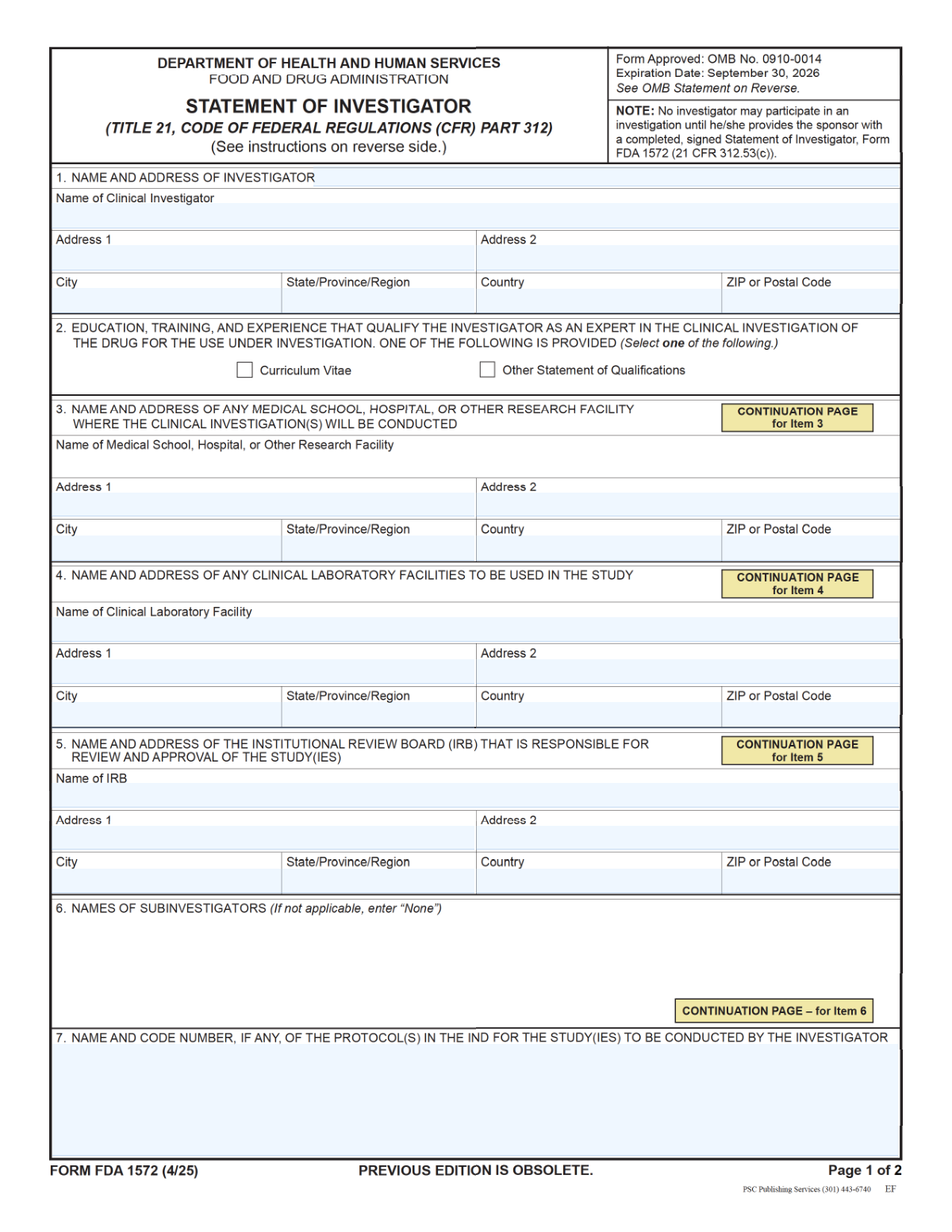
Yes! You can use AI to fill out FDA Form 1572, Statement of Investigator

FDA Form 1572, Statement of Investigator, is a U.S. Food and Drug Administration form completed by a clinical investigator participating in a drug study conducted under an Investigational New Drug (IND) application. It captures essential details such as the investigator’s name and address, the research facility, clinical laboratory, IRB information, and the protocol name(s)/code number(s), and it includes the investigator’s signature and date to confirm regulatory commitments. Sponsors rely on this form to document investigator qualifications and oversight arrangements and to support compliance with FDA regulations during inspections and audits. Today, this form can be filled out quickly and accurately using AI-powered services like Instafill.ai, which can also convert non-fillable PDF versions into interactive fillable forms.
Our AI automatically handles information lookup, data retrieval, formatting, and form filling.
It takes less than a minute to fill out FDA 1572 using our AI form filling.
Securely upload your data. Information is encrypted in transit and deleted immediately after the form is filled out.

Form specifications

Form name: FDA Form 1572, Statement of Investigator
Number of pages: 2
Filled form examples: Form FDA 1572 Examples
Language: English
main-image

Instafill Demo: filling out a legal form in seconds

How to Fill Out FDA 1572 Online for Free in 2026

Are you looking to fill out a FDA 1572 form online quickly and accurately? Instafill.ai offers the #1 AI-powered PDF filling software of 2026, allowing you to complete your FDA 1572 form in just 37 seconds or less.
Follow these steps to fill out your FDA 1572 form online using Instafill.ai:
  1. 1 Go to Instafill.ai and upload the FDA Form 1572 PDF (or select it from the form library).
  2. 2 Let the AI detect the form fields and confirm the form version, then choose whether to import data from a profile, CV, or prior 1572.
  3. 3 Enter or verify Item 1 (Clinical Investigator name and mailing address), ensuring spelling and address formatting are correct.
  4. 4 Complete the study location details, including Item 3 (medical school/hospital/research facility address) and Item 4 (clinical laboratory facility name and address).
  5. 5 Provide Item 5 (IRB name and address) and Item 7 (protocol name(s) and code number(s)), checking for consistency with the protocol/IND documentation.
  6. 6 Review the auto-filled output for completeness, then add the investigator’s signature, printed name/title, and the signature date on page 2.
  7. 7 Run final validation, export the completed form as a signed PDF, and share/download it for sponsor submission and records.

Our AI-powered system ensures each field is filled out correctly, reducing errors and saving you time.

Why Choose Instafill.ai for Your Fillable FDA 1572 Form?

Speed

Complete your FDA 1572 in as little as 37 seconds.

Up-to-Date

Always use the latest 2026 FDA 1572 form version.

Cost-effective

No need to hire expensive lawyers.

Accuracy

Our AI performs 10 compliance checks to ensure your form is error-free.

Security

Your personal information is protected with bank-level encryption.

Frequently Asked Questions About Form FDA 1572

This form captures the clinical investigator’s identity and key study site details (research facility, lab, and IRB) along with the protocol name/code and the investigator’s signature/date. It is typically used to document who is conducting the clinical investigation and where oversight and testing will occur.

The clinical investigator (the person responsible for conducting the study at the site) should complete the investigator information and sign/date the form. Site staff may help prepare addresses and protocol details, but the investigator should review for accuracy before signing.

Have the investigator’s full legal name and mailing address, the research facility address, the clinical laboratory name/address, the IRB’s official name/address, and the protocol name(s) and code number(s). You’ll also need the signature date in mm/dd/yyyy format.

If the form provides both a single-line field and separate fields, follow the form’s instructions or your sponsor’s preference—often the separate fields are used for clarity and the single-line field may auto-populate or be optional. If unsure, complete the separate fields and ensure the single-line entry matches exactly.

Enter the investigator’s full name as given name, middle initial(s) if used, and family name. Use the same name format consistently across the signature and printed name/title fields.

Use Address Line 2 for secondary details like apartment, suite, floor, building, department, or mail stop. If there are no additional details, you can leave Address Line 2 blank.

Use the physical location where the clinical investigation will be conducted (e.g., hospital, clinic, or research facility). Include the street address and any building/floor/suite details so the site can be clearly identified.

This form appears to provide space for one lab name/address; if multiple labs are involved, list the primary lab here and follow sponsor instructions for adding additional labs (e.g., attach a separate sheet or provide an addendum). Make sure the lab listed matches the study’s lab arrangements.

Enter the IRB’s full official name and its mailing address (street/P.O. box, city/state or province/region, country, and ZIP/postal code). Use the IRB information exactly as it appears on IRB documentation to avoid delays.

Enter each protocol’s full name and its code/protocol number, separating multiple entries with commas or semicolons. Keep the names and numbers exactly as provided by the sponsor/IND documentation.

Use mm/dd/yyyy (for example, 02/13/2026). The date should reflect when the investigator actually signed the form.

The signature field allows handwritten or electronic signature, as long as it is the investigator’s signature and is applied according to your organization’s and sponsor’s requirements. Confirm any specific e-signature rules with the sponsor or regulatory team.

Enter the investigator’s printed full name and, if applicable, professional title/credentials (e.g., MD, PhD). This should match the signer and help clearly identify the investigator.

Yes—AI form-filling tools can help reduce manual typing and errors by auto-filling fields from your provided information. Services like Instafill.ai use AI to map your details to the correct form fields and save time.

Upload the PDF to Instafill.ai, provide or import the investigator/site/IRB/lab details, and let the AI auto-fill the matching fields for review before downloading. If the PDF is flat/non-fillable, Instafill.ai can convert it into an interactive fillable form so you can complete and sign it more easily.

Compliance FDA 1572
Validation Checks by Instafill.ai

1
Investigator full name completeness and structure (Item 1 — Name of Clinical Investigator)
Validates that the investigator name is present and appears to be a full legal name, including at least a given name and family name, with optional middle initial(s). This reduces ambiguity and ensures the signer can be uniquely identified for regulatory and audit purposes. If the field is missing or contains only a single token (e.g., just a last name), the submission should be rejected or flagged for correction.
2
Item 1 single-line name/address matches component fields
Checks that the single-line 'Name and Mailing Address' field is consistent with the separately captured investigator name and address components (name, address line 1/2, city, country). This prevents conflicting records where the single-line entry differs from the structured fields used for downstream processing and mailings. If mismatches exceed minor formatting differences (e.g., punctuation), the system should require reconciliation before acceptance.
3
Investigator mailing address minimum required elements (Item 1 address fields)
Ensures the investigator mailing address includes required elements: Address Line 1, City, and Country (and Address Line 2 only if applicable). A complete address is necessary for official correspondence and verification. If any required element is missing or blank, the form should fail validation and prompt the user to complete the address.
4
Address Line 1 format validation (street/P.O. box) for all address blocks
Validates that Address Line 1 for the investigator, facility (Item 3), laboratory (Item 4), and IRB (Item 5) contains a plausible deliverable location (e.g., street number + street name, or a P.O. Box) and is not only a building name or department. This improves deliverability and reduces returned mail and data quality issues. If Address Line 1 lacks key address indicators (e.g., no number and no 'PO Box'), the submission should be flagged for correction.
5
City field validation (no invalid characters; not empty where required)
Checks that city/locality fields (Item 1 City, Item 3 City, and the city portion of Items 4 and 5 combined fields) are populated where required and contain only valid characters (letters, spaces, hyphens, apostrophes). This prevents parsing failures and ensures consistent geographic data for reporting. If the city is missing or contains clearly invalid content (e.g., only numbers or symbols), validation should fail.
6
Country field normalization and allowed values (Items 1, 4, 5)
Validates that country entries are present where required and match an approved country list (e.g., ISO-3166 names) or can be reliably normalized (e.g., 'USA' → 'United States'). Standardized country values are important for regulatory routing, address validation, and analytics. If the country cannot be mapped to an allowed value, the submission should be rejected or require user selection from a controlled list.
7
ZIP/Postal code format validation (Item 3; Items 4 and 5 combined fields)
Ensures postal codes are present where required and match country-appropriate patterns (e.g., US 5-digit or ZIP+4; Canada A1A 1A1; other countries variable length). Correct postal codes improve deliverability and support automated address verification. If the postal code is missing or does not match the expected pattern for the provided country, the system should block submission or request correction.
8
City/State or Province combined field parsing and validation (Items 4 and 5)
Validates that the 'City and State/Province/Region' fields contain both components and can be parsed (e.g., 'Boston, MA' or 'Toronto, ON'), not just a city or just a state. This is necessary for consistent storage in structured databases and for accurate location identification. If parsing fails or one component is missing, the submission should be flagged and the user prompted to enter both values in the required format.
9
Country and ZIP/Postal combined field parsing and validation (Items 4 and 5)
Checks that the 'Country and ZIP or Postal Code' fields include both a recognizable country and a postal code, separated in a consistent way (e.g., comma). This supports reliable extraction into structured fields and downstream address validation. If either component is missing or cannot be parsed, validation should fail and require correction.
10
Clinical laboratory facility name required and non-generic (Item 4)
Ensures the clinical laboratory facility name is provided and is not a placeholder or overly generic value (e.g., 'N/A', 'TBD', 'Lab', or only a city name). A specific facility name is required for study documentation, oversight, and audit trails. If the name is missing or appears to be a placeholder, the system should reject the submission or require confirmation with a valid name.
11
IRB name required and non-placeholder (Item 5 - IRB Name)
Validates that the IRB name is present and appears to be an official entity name rather than a placeholder (e.g., 'IRB', 'Unknown', 'TBD'). Accurate IRB identification is critical for compliance and for verifying ethical review responsibility. If invalid or missing, the form should not be accepted until corrected.
12
Protocol name(s) and code number(s) presence and delimiter rules (Item 7)
Checks that at least one protocol name/code is provided and that multiple entries are separated using commas or semicolons as instructed. This ensures protocols can be reliably split and indexed for tracking and regulatory association with the IND. If the field is empty or uses ambiguous separators (e.g., line breaks without delimiters), the system should prompt the user to correct formatting.
13
Protocol entry quality check (detect missing name or missing code when expected)
Validates that each listed protocol entry contains sufficient identifying information (a meaningful name and/or a code number) and is not just a bare delimiter or placeholder. This reduces the risk of incomplete protocol identification that could hinder oversight and record matching. If an entry is too short, contains only punctuation, or appears to be 'TBD/N/A', validation should fail or require user confirmation and correction.
14
Signature presence and signature-to-printed-name consistency (Page 2)
Ensures the investigator signature field is present (handwritten image or valid e-signature token) and that the printed name/title corresponds to the investigator identified in Item 1 (allowing for minor differences like middle initial or credentials). This prevents unauthorized signing and supports legal/regulatory enforceability of the attestation. If the signature is missing or the printed name clearly refers to a different person, the submission should be rejected and routed for correction.
15
Signature date format and validity (Page 2 — Date)
Validates that the date is provided in mm/dd/yyyy format and represents a real calendar date (e.g., not 02/30/2026). Correct date formatting is essential for audit trails and for determining the effective date of the investigator’s commitments. If the date is missing, incorrectly formatted, or invalid, the system should block submission and request a corrected date.
16
Signature date logical reasonableness (not in the future; not unreasonably old)
Checks that the signature date is not in the future relative to submission/processing time and is not unreasonably far in the past based on business rules (e.g., older than a configured threshold). This helps detect data entry errors and ensures the attestation is timely for the study documentation. If the date violates these rules, the submission should be flagged for review or rejected depending on policy.

Common Mistakes in Completing FDA 1572

Using the single-line Item 1 field but omitting required address parts

People often type only the investigator’s name (or only the address) into the “Name and Mailing Address (single line)” field because it looks like a simple header line. This can result in an incomplete mailing address, causing delays in correspondence or rejection for missing required contact information. If you use the single-line option, include the full name plus complete mailing address in one continuous line (street/PO box, city, and country as applicable). AI-powered tools like Instafill.ai can help by validating that all required components are present even when entered in a single line.

Inconsistent investigator name across Item 1 fields

A common error is entering different versions of the investigator’s name across fields (e.g., “Bob Smith” in one place and “Robert J. Smith, MD” in another). This happens when people copy from email signatures or prior documents without standardizing the legal/professional name format. Inconsistencies can trigger verification issues, questions from reviewers, or mismatches with regulatory records. Use one consistent full name format (given name, middle initial(s) if used, family name) and keep credentials/titles only where requested; Instafill.ai can standardize names across repeated fields.

Putting suite/department details in Address Line 1 instead of Address Line 2

Many submitters cram all address details into Address Line 1, including suite, floor, building, or department, because they’re unsure what Address Line 2 is for. This can lead to formatting problems, truncated lines, or mail delivery issues if the system has character limits. Enter the street number and street name (or PO box) in Address Line 1 and put suite/floor/building/department in Address Line 2. Instafill.ai can automatically split and format addresses into the correct lines.

Missing or incorrect country entry for mailing addresses

People frequently leave the Country field blank (especially for domestic addresses) or use non-standard abbreviations that don’t match postal conventions. This happens because some forms don’t always require country for local mail, but this form explicitly asks for it in multiple sections. Missing/incorrect country information can cause routing errors and follow-up requests from reviewers. Always enter the full country name (e.g., “United States”) and keep it consistent; Instafill.ai can enforce standardized country values.

Mixing investigator, research facility, lab, and IRB addresses

Because Items 1, 3, 4, and 5 all request names and addresses, it’s common to accidentally paste the wrong organization’s address into the wrong section. This often happens when users copy from a single source document or reuse a previous submission without carefully checking each item label. The consequence is misidentification of the study site, lab, or IRB, which can create compliance concerns and delay approvals. Double-check each item’s purpose (investigator mailing address vs. study facility vs. lab vs. IRB), and consider using Instafill.ai to map data to the correct fields and flag mismatches.

Incorrect formatting for “City and State/Province/Region” combined fields

For Items 4 and 5, the form expects a combined entry like “Boston, MA,” but people often enter only the city, only the state, or use inconsistent separators (e.g., “Boston MA” or “MA - Boston”). This happens because other address sections split city and state into separate fields, so users assume the same here. Incorrect formatting can cause address standardization failures and manual clarification requests. Follow the example exactly (City, space, State/Province/Region) and let Instafill.ai format combined location fields correctly.

Entering ZIP/postal codes in the wrong format or using the wrong code

Users sometimes enter a ZIP+4 when the system expects a 5-digit ZIP, omit required characters for international postal codes, or accidentally use the investigator’s ZIP for the facility/IRB. This typically occurs when copying addresses from templates or when multiple sites share similar city/state information. Wrong postal codes can lead to returned mail and can raise questions about the accuracy of site information. Use the exact ZIP/postal code used by the local postal service for each specific address; Instafill.ai can validate postal code formats by country and reduce copy/paste mix-ups.

Using informal or incomplete facility/IRB names instead of official legal names

A frequent mistake is entering shorthand names (e.g., “General Hospital Lab” or “University IRB”) rather than the full official entity name. This happens because staff often use internal nicknames or abbreviations in daily communication. The consequence is ambiguity about which lab or IRB is responsible, which can delay review or require resubmission with corrected legal names. Enter the full official name as it appears on institutional documentation; Instafill.ai can store and reuse verified organization names to keep them consistent.

Not listing multiple protocols correctly in Item 7

When there are multiple protocols, people often list only one, forget the code numbers, or separate them with line breaks instead of commas/semicolons as instructed. This happens because users treat the field like a narrative description rather than a structured list. Missing or poorly separated protocol identifiers can cause confusion about which IND protocols the investigator is committing to and may trigger follow-up queries. Include each protocol name with its code/number and separate multiple entries with commas or semicolons; Instafill.ai can help format multi-protocol lists consistently.

Wrong date format or using the completion date instead of the signature date

Many people enter dates in dd/mm/yyyy (common outside the U.S.), write out the month (e.g., “13 Feb 2026”), or use the date the form was prepared rather than the date it was signed. This happens due to regional date habits and because forms are often drafted before signature. Incorrect dates can invalidate the attestation timing and lead to requests for correction or re-signature. Enter the investigator signature date in mm/dd/yyyy exactly; Instafill.ai can enforce date formatting and prompt for the correct “signed on” date.

Signature and printed name/title mismatch or missing credentials

A common issue is providing a signature that doesn’t match the printed name (e.g., signing with initials or a nickname) or leaving the printed name/title blank. This happens when the signer assumes the signature alone is sufficient or when someone else prepares the form and forgets to complete the printed name/title line. Mismatches can create identity verification problems and may require re-execution of the signature page. Ensure the signature corresponds to the printed full name and include the professional title/credentials as requested; Instafill.ai can cross-check the printed name against the entered investigator name to reduce discrepancies.
Saved over 80 hours a year

“I was never sure if my IRS forms like W-9 were filled correctly. Now, I can complete the forms accurately without any external help.”

Kevin Martin Green

Your data stays secure with advanced protection from Instafill and our subprocessors

Robust compliance program

Transparent business model

You’re not the product. You always know where your data is and what it is processed for.

ISO 27001, HIPAA, and GDPR

Our subprocesses adhere to multiple compliance standards, including but not limited to ISO 27001, HIPAA, and GDPR.

Security & privacy by design

We consider security and privacy from the initial design phase of any new service or functionality. It’s not an afterthought, it’s built-in, including support for two-factor authentication (2FA) to further protect your account.

Fill out FDA 1572 with Instafill.ai

Worried about filling PDFs wrong? Instafill securely fills fda-form-1572-statement-of-investigator forms, ensuring each field is accurate.