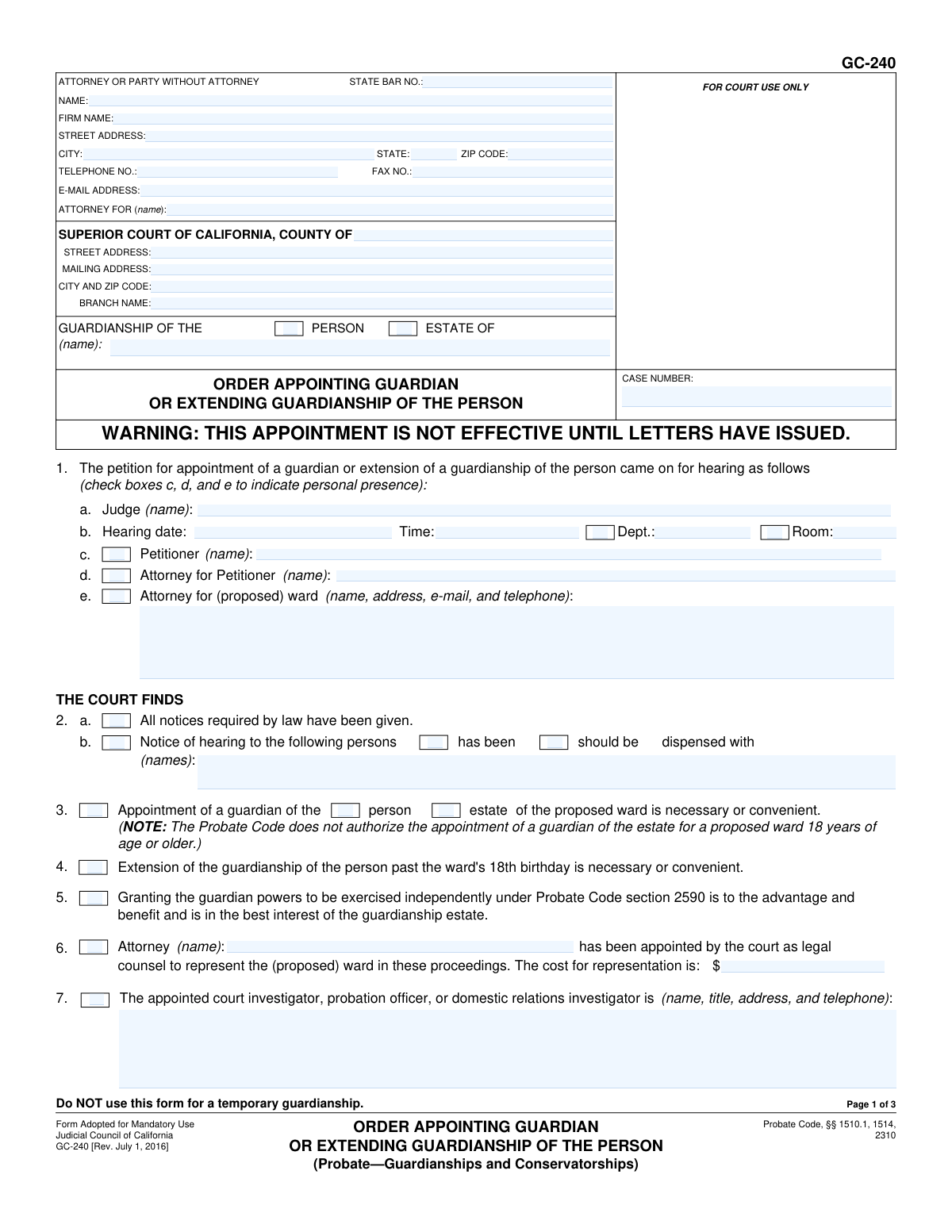
Yes! You can use AI to fill out Form GC-240, Order Appointing Guardian or Extending Guardianship of the Person

Form GC-240, Order Appointing Guardian or Extending Guardianship of the Person, is a legal order issued by a California Superior Court judge. It is used to formally appoint a guardian for a minor's personal care or financial affairs, or to extend a guardianship past the ward's 18th birthday, finalizing the court's decision from a hearing. Today, this form can be filled out quickly and accurately using AI-powered services like Instafill.ai, which can also convert non-fillable PDF versions into interactive fillable forms.
GC-240 is part of the guardianship forms category on Instafill.
Our AI automatically handles information lookup, data retrieval, formatting, and form filling.
It takes less than a minute to fill out GC-240 using our AI form filling.
Securely upload your data. Information is encrypted in transit and deleted immediately after the form is filled out.

Form specifications

Form name: Form GC-240, Order Appointing Guardian or Extending Guardianship of the Person
Number of fields: 103
Number of pages: 3
Language: English
main-image

Instafill Demo: How to fill out PDF forms in seconds with AI

How to Fill Out GC-240 Online for Free in 2026

Are you looking to fill out a GC-240 form online quickly and accurately? Instafill.ai offers the #1 AI-powered PDF filling software of 2026, allowing you to complete your GC-240 form in just 37 seconds or less.
Follow these steps to fill out your GC-240 form online using Instafill.ai:
  1. 1 Navigate to Instafill.ai and upload or select the GC-240 form.
  2. 2 Enter the court and case information, including the county, court address, and case number.
  3. 3 Provide the information for the attorney or party without an attorney, including name, address, and contact details.
  4. 4 Fill in the details from the court hearing, such as the judge's name, hearing date, and who was present.
  5. 5 Complete the 'THE COURT ORDERS' section by specifying the appointed guardian's name and address, bond requirements, and any other specific orders as detailed in attachments.
  6. 6 Carefully review all entered information for accuracy before generating the final document for the judge's signature and filing with the court.

Our AI-powered system ensures each field is filled out correctly, reducing errors and saving you time.

Why Choose Instafill.ai for Your Fillable GC-240 Form?

Speed

Complete your GC-240 in as little as 37 seconds.

Up-to-Date

Always use the latest 2026 GC-240 form version.

Cost-effective

No need to hire expensive lawyers.

Accuracy

Our AI performs 10 compliance checks to ensure your form is error-free.

Security

Your personal information is protected with bank-level encryption.

Frequently Asked Questions About Form GC-240

Form GC-240 is the official court order signed by a judge that appoints a guardian of a minor's person or estate. It can also be used to extend a guardianship of the person beyond the ward's 18th birthday in certain circumstances.

This form is a court order, not an application. It is typically prepared by an attorney or court staff to reflect the judge's decisions after a hearing, and is then signed by the judge to make the rulings official.

This means that even after the judge signs this order, the guardian's authority is not official until a separate document, called Letters of Guardianship (Form GC-250), is issued by the court clerk. The guardian must complete all required steps, such as filing a bond, before Letters can be issued.

A guardian of the person is responsible for the minor's care, custody, and personal decisions, like where they live and go to school. A guardian of the estate is responsible for managing the minor's finances, property, and other assets.

No, the form explicitly states, "Do NOT use this form for a temporary guardianship." You must use a different set of forms and procedures to petition for a temporary guardianship.

A bond is a type of insurance policy that protects the minor's assets from being lost or mismanaged by the guardian of the estate. If a bond is required, the guardian must purchase it from an authorized company before their appointment becomes effective.

A blocked account is a special bank or financial account where the minor's money is deposited. The funds in this account cannot be withdrawn by the guardian without a specific court order, which provides an extra layer of protection for the assets.

These are specific financial powers the court can grant to a guardian of the estate, allowing them to take certain actions without needing prior court approval for each transaction. Any powers granted are specified in an attachment to the order.

After the judge signs the GC-240, the person appointed as guardian must complete any conditions of the appointment, such as filing a bond. Once all conditions are met, they can obtain the official Letters of Guardianship from the court clerk, which allows them to act as guardian.

Generally, no; guardianships are for minors. However, this form can be used to extend a guardianship of the person for a ward who is turning 18 and is unable to care for themselves, but it cannot be used to appoint a guardian of the estate for someone 18 or older.

Yes, services like Instafill.ai use AI to help you accurately complete this form. AI can auto-fill fields with case information, reducing errors and saving time in preparing the proposed order for the judge's review and signature.

Simply upload the GC-240 PDF to the Instafill.ai platform. The AI will identify all the form fields, allowing you to easily type in the required information from the court's ruling, which the tool will place in the correct locations on the form.

If you have a non-fillable or 'flat' PDF, you can use a service like Instafill.ai. It can convert the flat PDF into an interactive, fillable form online, enabling you to easily type in all the necessary information before printing.

Compliance GC-240
Validation Checks by Instafill.ai

1
Ensures Consistency of Ward's Name Across Form
This validation compares the ward's name entered in the main header section with the ward's name entered in the order sections (e.g., item 8a, 8b, or 8c). The name must be identical in all instances to avoid legal ambiguity about who the order applies to. Inconsistent names could lead to challenges to the guardian's authority or rejection by the court clerk.
2
Requires Selection of Guardianship Type
This check verifies that at least one of the 'Person' or 'Estate' checkboxes is selected in the main 'GUARDIANSHIP OF THE' section at the top of the form. The entire purpose of the order is to appoint a guardian for either the person, the estate, or both. Failure to select a type makes the order ambiguous and legally unenforceable.
3
Validates Logical Exclusivity of Bond Options
This check ensures that only one of the primary bond options in item 10 is selected: either 'Bond is not required' (10a) or 'Bond is fixed at' (10b). If 10b is checked, a numeric dollar amount must also be provided. This prevents contradictory instructions regarding the financial security required for the guardianship estate.
4
Conditional Requirement for Blocked Account Details
This validation verifies that if the 'Deposits of $' checkbox (10c) is checked and an amount is entered, the name and location of the financial institution are also provided. A court order to block funds is unenforceable without specifying where the funds must be held. This ensures the order is complete and can be executed properly by the financial institution.
5
Validates Hearing Date Format and Plausibility
This check ensures the 'Hearing date' in item 1b is entered in a valid date format (e.g., MM/DD/YYYY) and represents a plausible date (not in the distant future or ancient past). This is essential for the order's legal validity, as it records the specific date the court made its findings. An invalid date would render the order defective.
6
Ensures State Bar Number is Numeric
Validates that the 'State Bar No.' field, if filled, contains only numeric digits. This ensures the number is a valid identifier for an attorney registered with the California State Bar. While the field is optional for self-represented parties, if a number is entered, it must be in the correct format for professional verification.
7
Ensures Estate Guardian is Appointed Only for Estate Guardianship
This validation ensures that the fields in item 8b (appointing a guardian of the ESTATE) are only filled out if the 'Estate' checkbox is selected in the header or in item 3. Appointing a guardian of the estate is a significant financial responsibility and should only be done when an estate guardianship is explicitly being established. This prevents accidental or erroneous appointments.
8
Validates Conditions for Guardianship Extension Past Age 18
This check enforces the rule that item 8c ('The appointment of... is extended past the ward's 18th birthday') can only be used for a guardianship of the PERSON. It also flags a warning based on the form's note that this is 'Not applicable to a proposed ward 18 years of age or older'. This prevents the improper use of the form for situations it is not designed for, such as adult conservatorships.
9
Completeness Check for Legal Services Payment Order
Verifies that if the main checkbox for item 11 ('For legal services rendered...') is checked, then a payee name, a payment amount, and at least one payer (parents or estate) are also specified. An incomplete payment order is ambiguous and cannot be enforced by the attorney or managed by the guardian. This check ensures all necessary components of the financial order are present.
10
Ensures Mutually Exclusive Selection for Notice Status
This validation ensures that for the persons listed in item 2b, only one of the status checkboxes ('has been' given or 'should be dispensed with') is selected. Selecting both options would create a contradictory and nonsensical finding in the court order. This check maintains the logical integrity of the court's findings on notice.
11
Validates Standard Phone Number Format
This check ensures that all telephone number fields are entered in a recognizable format, typically 10 digits with optional formatting characters like parentheses or hyphens. Correct and consistently formatted phone numbers are crucial for court staff and other parties to make contact when necessary. This prevents communication delays due to data entry errors.
12
Validates ZIP Code Format
This validation checks that all ZIP Code fields contain either a 5-digit or 9-digit (ZIP+4) numeric code. Correct ZIP codes are essential for ensuring mail from the court and other parties is delivered to the correct address. An invalid format could lead to returned mail and missed legal notices or deadlines.
13
Verifies Accuracy of Attachment and Checkbox Counts
This check automatically counts the number of boxes checked in items 9–16 and compares it to the number entered in the 'Number of boxes checked' field. It also flags if attachment-related boxes (12, 13, 14, 15) are checked but the 'Number of pages attached' is zero. This ensures the final submitted document is internally consistent and all referenced attachments are accounted for, which is critical for the court clerk's review.
14
Conditional Requirement for Petitioner/Attorney Name
This validation ensures that if the checkbox for item 1c (Petitioner) or 1d (Attorney for Petitioner) is checked, the corresponding name field is not empty. Conversely, it checks that the name field is not filled if the box is unchecked. This maintains the integrity of the form by accurately reflecting who was personally present at the hearing.

Common Mistakes in Completing GC-240

Incorrectly Identifying Guardianship Type in Caption

Users frequently confuse the 'PERSON' and 'ESTATE' checkboxes in the case caption at the top of each page. They may check 'ESTATE' when only a guardian of the person is being appointed, or vice versa. This mistake can lead to the creation of an incorrect or ambiguous court order, requiring amendment and causing significant delays. To avoid this, carefully review the petition and hearing outcome to confirm whether the guardianship pertains to the individual's personal/care decisions (Person), financial matters (Estate), or both, and check the corresponding boxes consistently on all pages.

Inconsistent Naming of Parties

A common error is entering the ward's or guardian's name inconsistently throughout the form, using nicknames, omitting middle names, or transposing first and last names. For example, using 'John A. Doe' in the caption but 'John Doe' in Item 8. This creates ambiguity and can cause issues with enforcement and record-keeping. Always use the full, legal name for each individual every time it is requested to ensure the final order is legally precise and valid.

Mishandling Attachment References

Filers often check a box for an attachment (e.g., Attachment 12, 13, 14, or 15) but forget to physically include the corresponding document with their submission. Conversely, they may include an attachment but fail to check the box on the form, making the order incomplete. This leads to rejection by the court clerk or a legally ineffective order. Always double-check that every referenced attachment is included and that every included attachment is referenced by its corresponding checkbox on the form.

Errors in Guardian Appointment Details (Item 8)

Item 8 is critical and prone to errors. Users may accidentally enter the ward's name in the field for the guardian, or vice versa. They also frequently provide incomplete contact information, such as a missing ZIP code or phone number. These mistakes can invalidate the appointment or make it impossible to contact the appointed guardian. Carefully proofread Item 8 to ensure the correct person is named as guardian with their complete, current address and telephone number.

Incorrectly Completing Bond Information (Item 10)

The bond section is a frequent source of confusion. Users may check 'Bond is not required' when one was ordered, or check 'Bond is fixed at' but leave the dollar amount blank. If a blocked account is ordered (10c), the institution's name and location are often omitted. These errors will halt the issuance of Letters of Guardianship. To prevent this, confirm the exact bond requirements from the court's ruling and fill in all required details, including the specific amount or financial institution.

Omitting Repetitive Header Information

The form requires the ward's name and case number to be entered in the header of every page (pages 1, 2, and 3). People often fill this out on the first page but forget the subsequent pages. If the pages of the order become separated, this omission makes it difficult to identify and reassemble the complete document, potentially causing serious administrative problems. It is crucial to fill out the header on every single page.

Forgetting Final Clerical Counts on Page 3

On the final page, the form asks for the 'Number of pages attached' and the 'Number of boxes checked in items 9–16'. These fields are often left blank. Court clerks use these counts to verify that the submitted order is complete and has not been altered. Omitting them can lead to the form being rejected or returned for correction, delaying the finalization of the guardianship. Always perform these final counts and fill in the totals before submitting.

Incomplete Attorney or Self-Represented Party Information

Attorneys sometimes forget to include their State Bar Number, and self-represented (pro per) parties are often unsure what to put in the top-left box. A pro per filer should enter their own name, address, and contact information; leaving it blank can lead to rejection. This section is the primary contact information for the case, and if it's incomplete or incorrect, you may not receive important notices from the court. Ensure all fields, including the State Bar number for attorneys, are filled out accurately.

Confusing 'Findings' with 'Requests'

This form is an 'Order' that reflects the judge's decisions after a hearing. A common mistake is for a party to fill out the 'THE COURT FINDS' section (Items 2-7) as if they are making a request. For example, checking 'should be dispensed with' for notice in Item 2b because they wish it were so, not because the judge actually ordered it. This can result in the proposed order being rejected as it does not accurately reflect the court's ruling. This section must only contain the facts and findings as stated by the judge in court.

Misunderstanding Conditional Checkboxes and Fields

The form contains many conditional fields, where checking a box is required to validate the information entered next to it (e.g., Item 1.c, 1.d, 1.e for presence at hearing). Users often type a name but forget to check the corresponding box, or vice versa. This makes the entry ambiguous and potentially invalid. To avoid this, treat the checkbox and the text field as a single unit; if you fill one, you must fill the other. AI-powered form-filling tools like Instafill.ai can help prevent these errors by enforcing the form's logical rules, ensuring that all necessary related fields and checkboxes are completed correctly.
Saved over 80 hours a year

“I was never sure if my IRS forms like W-9 were filled correctly. Now, I can complete the forms accurately without any external help.”

Kevin Martin Green

Your data stays secure with advanced protection from Instafill and our subprocessors

Robust compliance program

Transparent business model

You’re not the product. You always know where your data is and what it is processed for.

ISO 27001, HIPAA, and GDPR

Our subprocesses adhere to multiple compliance standards, including but not limited to ISO 27001, HIPAA, and GDPR.

Security & privacy by design

We consider security and privacy from the initial design phase of any new service or functionality. It’s not an afterthought, it’s built-in, including support for two-factor authentication (2FA) to further protect your account.

Fill out GC-240 with Instafill.ai

Worried about filling PDFs wrong? Instafill securely fills form-gc-240-order-appointing-guardian-or-extending-guardianship-of-the-person forms, ensuring each field is accurate.