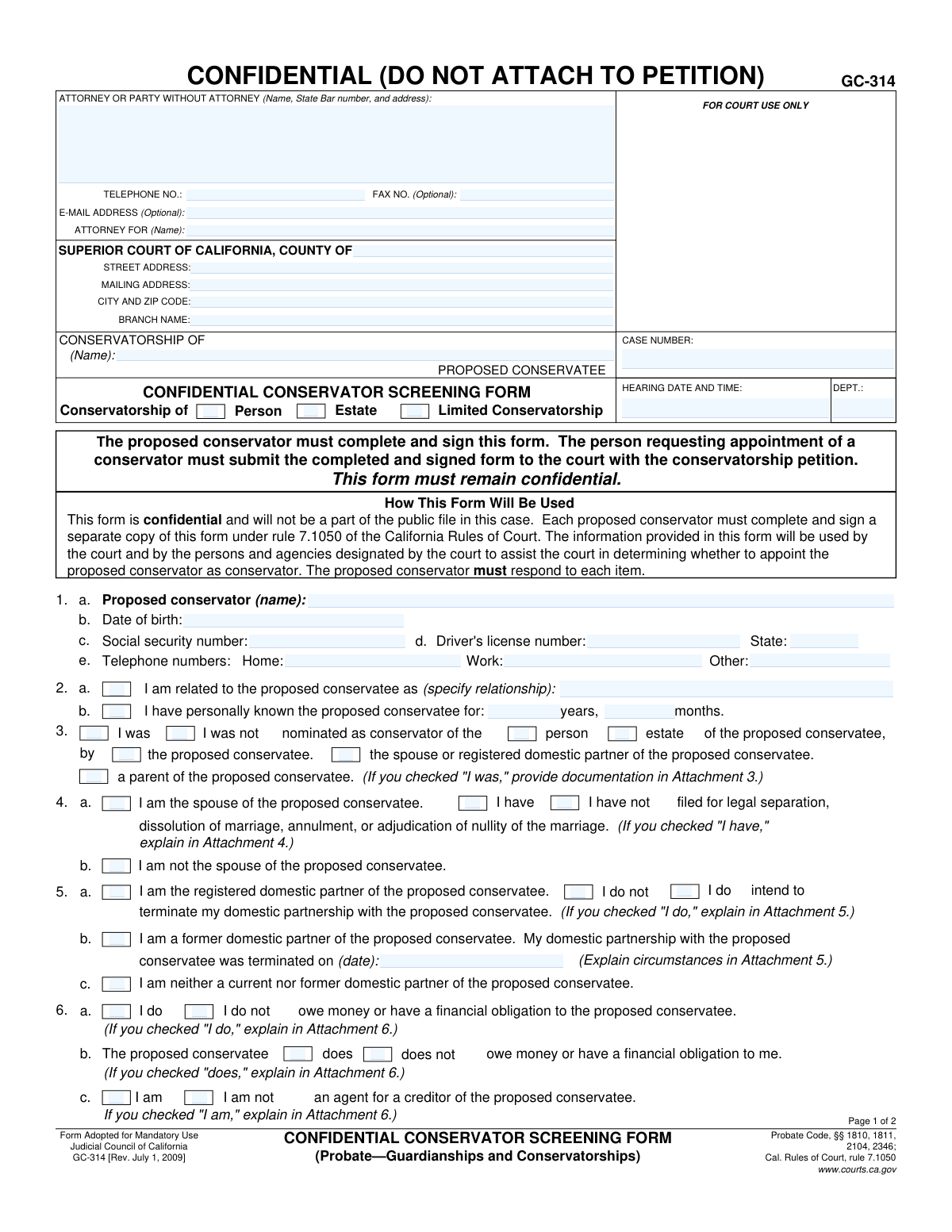
Yes! You can use AI to fill out Form GC-314, Confidential Conservator Screening Form (Probate—Guardianships and Conservatorships)

The California Form GC-314, Confidential Conservator Screening Form, is a crucial document required by the court for anyone proposed to act as a conservator. It gathers detailed personal, financial, and criminal history to help the court determine the candidate's suitability to manage the affairs of a conservatee. This confidential information ensures a thorough vetting process to protect the vulnerable individual. Today, this form can be filled out quickly and accurately using AI-powered services like Instafill.ai, which can also convert non-fillable PDF versions into interactive fillable forms.
GC-314 is part of the guardianship forms, ATO forms and probate forms categories on Instafill.
Our AI automatically handles information lookup, data retrieval, formatting, and form filling.
It takes less than a minute to fill out GC-314 using our AI form filling.
Securely upload your data. Information is encrypted in transit and deleted immediately after the form is filled out.

Form specifications

Form name: Form GC-314, Confidential Conservator Screening Form (Probate—Guardianships and Conservatorships)
Number of fields: 90
Number of pages: 2
Language: English
main-image

Instafill Demo: How to fill out PDF forms in seconds with AI

How to Fill Out GC-314 Online for Free in 2026

Are you looking to fill out a GC-314 form online quickly and accurately? Instafill.ai offers the #1 AI-powered PDF filling software of 2026, allowing you to complete your GC-314 form in just 37 seconds or less.
Follow these steps to fill out your GC-314 form online using Instafill.ai:
  1. 1 Navigate to Instafill.ai and upload or select the Form GC-314, Confidential Conservator Screening Form.
  2. 2 Provide your personal identification details, including your full name, date of birth, social security number, and contact information.
  3. 3 Detail your relationship to the proposed conservatee, how long you have known them, and your nomination status.
  4. 4 Answer the series of screening questions regarding your financial history, criminal background, any restraining orders, and fiduciary experience.
  5. 5 Disclose your status as a professional fiduciary and any potential conflicts of interest that could affect your duties.
  6. 6 Carefully review all the information entered by the AI for complete accuracy, then electronically sign and date the declaration under penalty of perjury.
  7. 7 Download the completed confidential form, ready for submission to the court along with the main conservatorship petition.

Our AI-powered system ensures each field is filled out correctly, reducing errors and saving you time.

Why Choose Instafill.ai for Your Fillable GC-314 Form?

Speed

Complete your GC-314 in as little as 37 seconds.

Up-to-Date

Always use the latest 2026 GC-314 form version.

Cost-effective

No need to hire expensive lawyers.

Accuracy

Our AI performs 10 compliance checks to ensure your form is error-free.

Security

Your personal information is protected with bank-level encryption.

Frequently Asked Questions About Form GC-314

This form is used by the California Superior Court to conduct a background check on a person proposed to be a conservator. The information helps the court determine if the individual is suitable for the appointment.

Every person who is being proposed as a conservator must complete and sign their own separate copy of this form. It must be submitted to the court along with the main conservatorship petition.

No, this form is confidential and will not be part of the public case file. It is used only by the court and designated agencies to evaluate your fitness as a potential conservator.

If you answer affirmatively to any of the background questions, you must provide a detailed explanation on a separate sheet of paper, labeled as the corresponding attachment number (e.g., Attachment 8). Be honest and thorough in your explanation.

Yes, you must provide this personal information as it is required by the court to conduct a thorough background check. This form is kept confidential to protect your privacy.

The completed and signed form should be submitted to the court along with the initial Petition for Conservatorship. However, it must be filed as a confidential document and should not be physically attached to the public petition.

Each proposed co-conservator must fill out and sign a separate GC-314 form. The court needs to screen every individual who will have fiduciary responsibility.

Not necessarily. The court will review the circumstances, recency, and nature of the event explained in your attachment to make a determination, so it is crucial to be completely honest and provide a full explanation.

A private professional fiduciary is someone who acts as a conservator or other fiduciary as their profession, often for people they are not related to. If you are one, you must provide your state license information as indicated in items 17 and 18.

Yes, services like Instafill.ai use AI to help you accurately auto-fill form fields with your personal information, which can save time and reduce errors.

You can use a service like Instafill.ai to upload the form and fill it out online. This allows you to type directly into the fields, save your progress, and ensure the form is neat and legible for the court.

If you have a non-fillable or 'flat' PDF, you can use a service like Instafill.ai. It can convert the document into an interactive, fillable form that you can easily complete on your computer.

Compliance GC-314
Validation Checks by Instafill.ai

1
Validate Social Security Number Format
This check ensures that the Social Security Number entered in item 1.c follows the standard nine-digit format, such as XXX-XX-XXXX or XXXXXXXXX. This is crucial for identity verification and background checks performed by the court. If the format is incorrect, the submission will be rejected, and the user will be prompted to enter a valid SSN.
2
Validate Proposed Conservator's Age
This check calculates the age of the proposed conservator based on the 'Date of birth' provided in item 1.b. It verifies that the proposed conservator is a legal adult, typically 18 years or older. Appointing a minor as a conservator is legally impermissible, so this check prevents invalid submissions from being processed.
3
Ensure Completeness of Conservatorship Type
This validation confirms that at least one of the conservatorship type checkboxes ('Person', 'Estate', 'Limited Conservatorship') has been selected at the top of the form. This information is fundamental as it defines the scope and nature of the proposed legal arrangement. A failure to select a type would make the petition ambiguous and requires the user to make a selection before proceeding.
4
Verify Driver's License State Abbreviation
This check validates that the 'State' field for the driver's license in item 1.d contains a valid two-letter U.S. state or territory abbreviation. Correct state information is necessary for accurate identity verification and background checks. An invalid entry would trigger an error, asking the user to correct the state code.
5
Enforce Conditional Explanation for Affirmative Answers
This check applies to questions 7 through 16 and 19-20. If an affirmative option is selected (e.g., 'I have' for item 8, 'Yes' for item 20), the system verifies that a corresponding explanation has been provided in the specified attachment. These explanations are mandatory for the court to assess potential risks and suitability, and failure to provide them will halt the submission until the required information is included.
6
Check for Mutually Exclusive Relationship Status
This validation ensures that for a single question, logically contradictory options are not selected simultaneously. For example, in item 4, a user cannot select both 'I am the spouse' and 'I am not the spouse'. This prevents data entry errors and ensures the submitted data is coherent and unambiguous for the court's review.
7
Validate Conditional Fiduciary License Status
This check enforces the dependency between items 17 and 18. If the user checks 'I am a private professional fiduciary' in item 17, the system then requires a response for item 18 regarding their license status. This is critical for ensuring professional fiduciaries meet state licensing requirements, and a failure to answer item 18 when required will block form submission.
8
Ensure Case Number Consistency Across Pages
This validation compares the 'CASE NUMBER' field on page 1 with the 'CASE NUMBER' field on page 2. It ensures that both entries are identical, preventing clerical errors and ensuring the document is correctly associated with the case file. A mismatch would prompt the user to correct the case number to ensure consistency.
9
Validate Declaration Date
This check verifies that the 'Date' provided next to the signature on page 2 is a valid date and is not set in the future. The declaration date legally establishes when the statements were attested to under penalty of perjury. An invalid or future date would render the declaration legally questionable and must be corrected to the present or a past date.
10
Validate Telephone Number Format
This check ensures that all telephone number fields (Attorney, Home, Work, Other) follow a recognizable format, such as (XXX) XXX-XXXX or XXXXXXXXXX. Accurate contact information is essential for the court and other parties to communicate with the filer. If an invalid format is detected, the user will be prompted to correct the entry.
11
Enforce Mandatory Response for Binary Questions
This validation ensures that for each required yes/no question (e.g., items 7-17, 20), exactly one of the two options has been selected. Leaving these questions unanswered creates ambiguity and fails to provide the court with a complete picture of the proposed conservator's background. The form cannot be submitted until all such mandatory questions are answered.
12
Require Termination Date for Former Domestic Partnership
This check is triggered if the user selects 'I am a former domestic partner of the proposed conservatee' in item 5.c. It verifies that the termination date field is filled with a valid past date. This date is a key piece of information for the court to understand the history of the relationship, and the form will be considered incomplete without it.
13
Require Corporation Name for Corporate Officer
This validation applies to item 19. If the user checks 'I am a responsible corporate officer authorized to act for...', the system verifies that the 'name of corporation' field has been filled out. This is necessary to identify the legal entity involved in the conservatorship. The submission will be blocked if the corporation's name is missing.
14
Validate Nomination Source Selection
This check ensures that if the user selects 'I was nominated as conservator' in item 3, they must also select at least one source of that nomination (e.g., 'by the proposed conservatee'). This detail is crucial for the court to understand the basis of the nomination. The form will be considered incomplete if the source is not specified when nomination is claimed.

Common Mistakes in Completing GC-314

Forgetting to Provide Required Attachments

Many questions, particularly in items 7 through 20, require a detailed explanation in a separate attachment if the affirmative box is checked (e.g., 'I have' or 'Yes'). Filers often check the box but forget to write and include the corresponding attachment. This omission renders the submission incomplete, leading to court inquiries, significant delays in the appointment process, and potential rejection of the form until the missing information is supplied.

Incorrectly Filling Out the Case Caption

Users frequently confuse the parties in the top section of the form, entering their own name (the proposed conservator) in the 'CONSERVATORSHIP OF' field, which is reserved for the proposed conservatee. This creates confusion and can lead to filing errors and administrative delays as court clerks must correct the record. To avoid this, carefully read each field label and ensure the proposed conservatee's name is used for the case caption, while the proposed conservator's name is entered in item 1.

Mishandling the Form's Confidentiality

The form is explicitly marked 'CONFIDENTIAL (DO NOT ATTACH TO PETITION)' and must be filed separately from the main public petition. A common procedural error is attaching this form directly to the Petition for Conservatorship, which improperly discloses sensitive personal information like Social Security and driver's license numbers to the public record. This mistake can compromise the proposed conservator's privacy and requires corrective action with the court clerk to have the document sealed.

Incomplete Disclosure of Criminal History

Questions 8 through 11 ask if the person has ever been 'charged with, arrested for, or convicted of' certain crimes. Many people mistakenly believe they only need to disclose actual convictions, and they omit arrests or charges that were later dismissed. Failing to disclose the full history as requested can be seen as a misrepresentation to the court and may jeopardize the appointment, as the court requires full transparency to assess a candidate's suitability.

Leaving Paired Checkboxes Blank

Most questions on the form, especially on page 2, are presented as a pair of checkboxes (e.g., 'I have' / 'I have not'). A frequent oversight is failing to check either box for a given question, leaving the answer ambiguous. An incomplete form will be returned by the court, halting the screening process until every question is definitively answered. To prevent this, review the form to ensure one box in every pair is checked.

Missing Signature or Date

The declaration at the bottom of page 2, 'I declare under penalty of perjury...', is legally invalid without a signature and date. Forgetting to sign and date the form is a critical error that will cause the court to reject the filing immediately. This simple oversight can delay the entire conservatorship hearing. Always double-check that you have physically signed and dated the form before submission.

Using One Form for Multiple Proposed Conservators

When two individuals are being proposed as co-conservators, they sometimes attempt to file a single screening form for both of them. The form's instructions clearly state, 'Each proposed conservator must complete and sign a separate copy of this form.' Submitting one form for multiple people will result in an incomplete filing for the second person, delaying their screening and appointment until a separate, completed form is provided.

Incorrect Personal Identifier Formats

Data entry errors in item 1, such as transposing numbers in a Social Security or driver's license number, or entering a date of birth in the wrong format, are very common. These mistakes can cause failures or delays in the mandatory background check process. To avoid this, carefully proofread all numbers and dates before submitting. AI-powered tools like Instafill.ai can help prevent these errors by automatically validating data formats as they are entered.

Ignoring Conditional Question Logic

The form contains questions with conditional logic, such as item 18, which should only be answered if 'I am' is checked in item 17. People often get confused and answer these subsequent questions even when they are not applicable. This creates contradictory or nonsensical information that a court reviewer must question, causing delays. Pay close attention to instructions like 'If you checked 'I am,' respond to item 18' to ensure you only answer relevant questions.

Misunderstanding 'Adverse Interest' (Item 16)

Item 16 asks about 'adverse interest,' a legal term that laypeople may not fully understand. A person might be a creditor to the conservatee (as disclosed in item 6) but fail to recognize this constitutes a potential adverse interest, incorrectly checking 'I do not have.' Non-disclosure of potential conflicts of interest is a serious issue that can lead the court to question the proposed conservator's fitness to serve and can be grounds for removal later.
Saved over 80 hours a year

“I was never sure if my IRS forms like W-9 were filled correctly. Now, I can complete the forms accurately without any external help.”

Kevin Martin Green

Your data stays secure with advanced protection from Instafill and our subprocessors

Robust compliance program

Transparent business model

You’re not the product. You always know where your data is and what it is processed for.

ISO 27001, HIPAA, and GDPR

Our subprocesses adhere to multiple compliance standards, including but not limited to ISO 27001, HIPAA, and GDPR.

Security & privacy by design

We consider security and privacy from the initial design phase of any new service or functionality. It’s not an afterthought, it’s built-in, including support for two-factor authentication (2FA) to further protect your account.

Fill out GC-314 with Instafill.ai

Worried about filling PDFs wrong? Instafill securely fills form-gc-314-confidential-conservator-screening-form-probateguardianships-and-conservatorships forms, ensuring each field is accurate.