
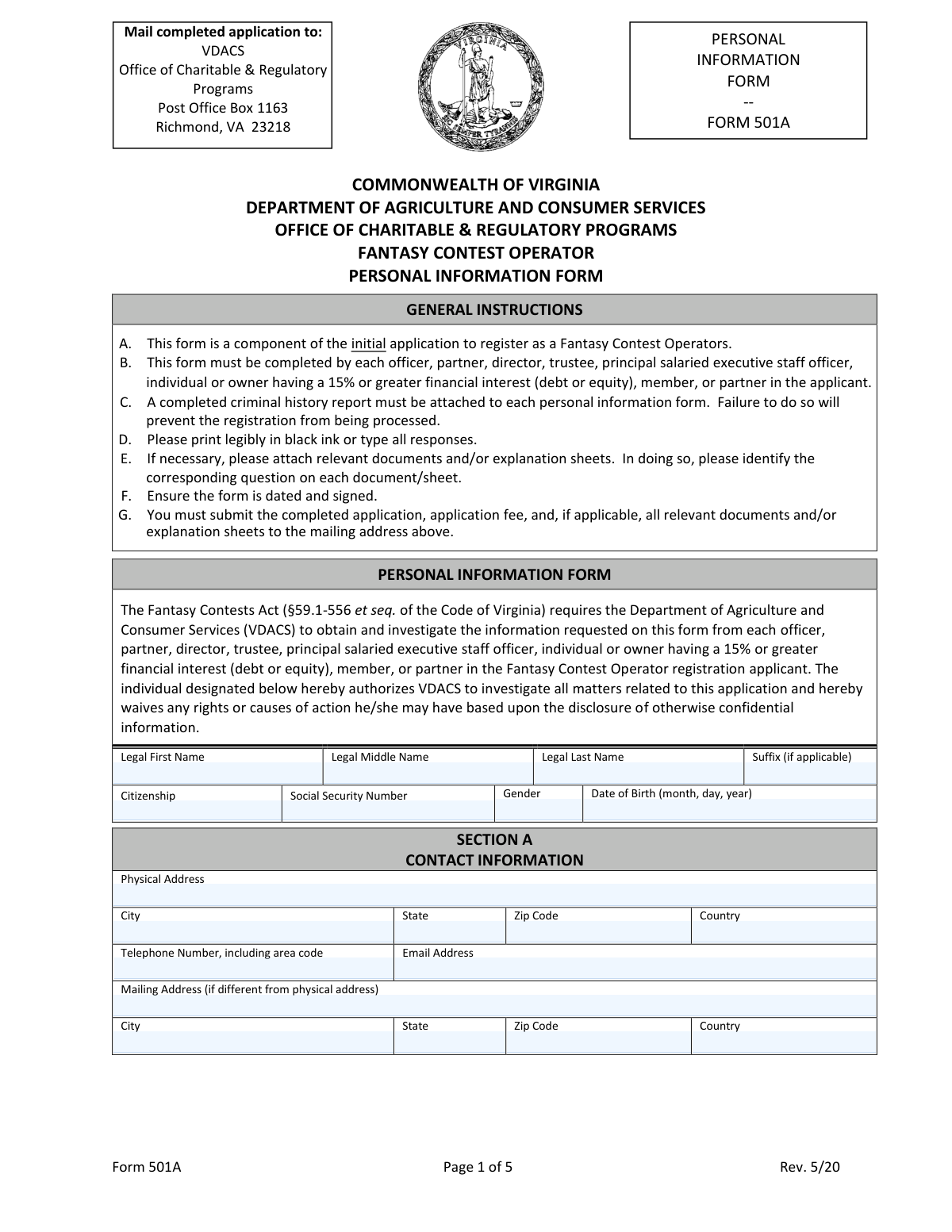
Yes! You can use AI to fill out Form 501A, Fantasy Contest Operator Personal Information Form (Commonwealth of Virginia, VDACS Office of Charitable & Regulatory Programs)
Don't type 93 fields by hand. Tell our AI about yourself, or upload a document you already have, and it fills every field in seconds. You check it, then download, print or sign.
The AI does the filling. You just check it.
No typing into boxes, nothing to install.
What this form asks for
The AI fills all of it, from your answers or your documents.
The AI checks your answers before you download
17 checks built for this form, so a wrong date or a missing answer is caught before anyone else sees it.
Validates that Legal First Name, Legal Last Name, Citizenship, Social Security Number, Date of Birth, and Gender are present (and Middle Name/Suffix are either provided or explicitly left blank if optional). These fields are core identifiers used for background checks and record matching. If any required identity field is missing, the submission should be rejected as incomplete and routed back for correction.
Checks that SSN is exactly 9 digits (optionally allowing hyphens in the standard ###-##-#### format) and is not an obviously invalid value (e.g., all zeros, 000-##-####, ###-00-####, ###-##-0000). This reduces failed background checks and prevents data-entry placeholders from being submitted. If validation fails, the form should be flagged for correction and not advanced to processing.
Ensures Date of Birth is provided in a valid month/day/year format and represents a real calendar date. Also checks for reasonable bounds (e.g., not in the future and not implying an implausible age such as under 18 or over 120, unless the program explicitly allows it). If invalid, the submission should be blocked because DOB is required for identity verification and criminal history searches.
Validates that the Telephone Number includes an area code and contains a valid count of digits (e.g., 10 digits for NANP numbers, with optional country code if non-U.S.). This ensures the agency can contact the individual for follow-up and reduces undeliverable communications. If the phone number fails validation, the record should be flagged and the applicant prompted to correct it.
Checks that Email Address matches a standard email pattern (local-part@domain) and does not contain invalid characters or missing domain components. Optionally validates domain structure (e.g., contains a dot and valid TLD length) to reduce obvious typos. If invalid, the submission should be flagged because email is a primary contact method for deficiencies and status updates.
Ensures Physical Address, City, State, Zip Code, and Country are all present and consistent (e.g., if Country is USA, State must be a valid U.S. state/territory and ZIP must be 5 digits or ZIP+4). This is important for jurisdictional checks and for matching residential history and criminal history requests. If inconsistent or incomplete, the form should be returned for correction.
And 11 more checks
- Mailing address conditional requirement and completeness
- Residential history coverage for the previous ten years (Section B)
- Residential history time period format and chronological logic
- Employment history completeness for the previous ten years (Section C)
- Employment time period format, ordering, and consistency with current status
- Yes/No questions require exactly one selection and conditional attachments (Section D)
- Criminal history search request confirmation logic (D-7) and jurisdiction alignment
- Mandatory criminal history report attachment present for each personal information form
- Financial interest disclosure completeness and numeric validation (Section E-1)
- Authority to Release Information form completion and notarization fields
- Applicant signature and date present on disclaimers/affidavits section
Let AI fill out your VA Form 501A
No typing. Every field filled in seconds, checked, ready to sign.
How to Fill Out VA Form 501A Online for Free in 2026
What the AI walks you through.
- Confirm you are a covered individual for the applicant (e.g., officer/director/partner/executive or 15%+ owner) and gather required documents, including a criminal history report for each jurisdiction where you lived in the last 10 years.
- Enter your personal identifiers and contact details (legal name, citizenship, SSN, gender, date of birth, physical and mailing address, phone, and email).
- Complete Section B (Residential History) by listing all physical addresses for the past 10 years with city, state, and date ranges.
- Complete Section C (Employment History) by listing your current and prior employment for the past 10 years, including employer name, address, title, dates, and duties.
- Answer Section D (Personal Background) yes/no questions and upload explanation sheets and supporting documents for any “Yes” responses; indicate whether criminal history searches were requested and attach the signed Authority to Release Information Form.
- Complete Section E (Financial Interest) by disclosing any 15%+ ownership/control and any other fantasy-contest-related business relationships or financial interests in the past 10 years, attaching explanation sheets where required.
- Review the disclaimers and affidavits, sign and date the form, ensure any required notarization is completed for the Authority to Release Information Form, and submit the full application package and fee to VDACS at the address provided.
Common Mistakes in Completing VA Form 501A
The ones the AI is built to catch.
Missing required criminal history report attachment
Not completing the form for every required individual (15%+ owners and key personnel)
Using nicknames or non-legal names instead of legal name fields
Incorrect or incomplete SSN and date of birth formatting
Residential history not covering the full 10-year period or missing time ranges
Employment history missing details, gaps, or not starting with current employment
Checking 'Yes' on background questions without attaching the required explanation sheet
Misunderstanding what must be disclosed (arrests, charges, investigations, disputes, lawsuits)
Not requesting criminal history searches for every jurisdiction of residence (D-7) or not directing results properly
Financial interest section completed inaccurately (15% threshold, percentage vs amount, instrument type)
Missing signature/date on the Personal Information Form or incomplete notarization on the Authority to Release Information form
Frequently Asked Questions About VA Form 501A
Is it really free for 7 days?
Can I fill other forms too?
How do I cancel?
How does the AI fill out VA Form 501A?
What happens to my information?
How complex is VA Form 501A to fill out?
What is Form 501A used for?
Who is required to complete Form 501A?
Do we submit one Form 501A for the company or one per person?
What documents must be attached to Form 501A?
What happens if I don’t include the criminal history report?
How do I complete the criminal history search requirement (Section D-7)?
Do I need to list my full residential history for the last ten years (Section B)?
How detailed should my employment history be (Section C)?
What should I do if I answer “Yes” to any background questions in Section D?
Do I have to disclose arrests or charges even if they didn’t result in a conviction (Section D-2)?
What does “15% or greater financial interest (debt or equity)” mean (Section E-1)?
What if I have no other fantasy contest-related business interests (Section E-2)?
Does the Authority to Release Information Form need to be notarized?
Where do I mail the completed Form 501A and related application materials?
What are the signature and update obligations at the end of the form?
Get your VA Form 501A filled out by AI
$0 today. Cancel before Nov 2 and you pay nothing.
Other forms like this one
ATO forms: Régie du logement Mandatory Form – LEASE of a Dwelling, Formato Solicitud de Afiliación (Persona Natural) – Cooperativa de Ahorro y Crédito Universidad Santo Tomás (USTACOOP), FDA Form 1572, Statement of Investigator, Form DE-160/GC-040, Inventory and Appraisal (Declaration of Representative/Guardian/Conservator or Small Estate Claimant and Declaration of Probate Referee), Tesorería General de la Seguridad Social (TGSS) — Mandato / Orden de domiciliación de adeudos directos SEPA para el pago de cuotas de la Seguridad Social (TC 1/15-3, 06-2022), California Department of Social Services Form RFA 07 (2/18), Resource Family Approval (RFA) Health Questionnaire (Mandatory), Dallas Area Rapid Transit Police Department Personal History Statement (Peace Officer / Telecommunicator), Fidelity Change of Account Ownership — Mutual Fund Only Accounts (Changing to a Trust, Estate, Guardian, or Conservator Account), Fidelity Change of Account Registration — Changing to a Trust, Estate, Guardian, or Conservator Brokerage Account, ENVIRONMENTAL MONITORING LABORATORY, LLC Employment Application, Distribution Due to Death for Spouse Beneficiary - Elevator Constructors Union Local No. 1 Annuity and 401(k) Fund, Elevator Constructors Union Local No.1 Annuity and 401(k) Fund Distribution Request Due to Qualified Domestic Relations Order, Incoming Rollover Election for Elevator Constructors Annuity and 401(k) Retirement Plan, Mandatory Distribution Processing Authorization, Alberta Precision Laboratories General Laboratory Requisition (Form 21302), Contrato de Trabajo Indefinido, Contrato de Trabajo en Prácticas (Código 420), Professional Practice Employment Contract, Anthem Blue Cross Respiratory Syncytial Virus Enrollment Form, Formato de Inscripción al Registro Federal De Contribuyentes a Través de Oficina Virtual, Form CMS-209, CLIA Laboratory Survey Report Form
charitable forms: Contribute to a Charitable Gift Account, Form 8283, Noncash Charitable Contributions, Fidelity Charitable 144/145 Contribution Form, Fidelity Charitable Letter of Authorization, Transfer of Assets Out - Partial Account or Charitable Gift Transfers, Schwab Charitable Fund Transfer of Assets, Charles Schwab Charitable Gift Donation - Letter Of Authorization for DTC Transfer, Sample IRA Distribution Letter for a Qualified Charitable Distribution (QCD), Charles Schwab Charitable Gift Transfer Letter of Authorization, Make a contribution - Vanguard Charitable, IRA Distribution to Charitable Beneficiary, IRA Distribution to Charitable Beneficiary, Fidelity Charitable Contribution Form, Fidelity Charitable Irrevocable Contribution Form and Letter of Instruction, Request for a Qualified Charitable Distribution (QCD) from a Brokerage Individual Retirement Account (IRA), Request for qualified charitable distribution from individual retirement account, Request for a Charitable Distribution from an Individual Retirement Account (IRA), Merrill Lynch One-Time Qualified Charitable Distribution, Individual Retirement Account (IRA) — Qualified Charitable Distribution Form, Fidelity Charitable Investment Advisor Program Application
Let AI fill out your VA Form 501A
Your trial starts once a card is added. You pay nothing before Nov 2.
Our AI already knows this form, all 93 fields of it. Skip the typing: tell it about yourself, or upload what you have, and it fills the whole form in seconds.
- AI fills every field on all 5 pages, tables and checkboxes included
- No typing into boxes: answer a few questions, or upload a document you already have, an old copy of this form, a photo of a document
- The AI checks the answers; you review and change anything before you download
- Download the finished PDF, print it, or sign it online
- Encrypted, and never used to train AI
Cancel before Nov 2 and you pay nothing.
A card is needed to start the trial. Cancel in two clicks from your account.
Terms · Privacy