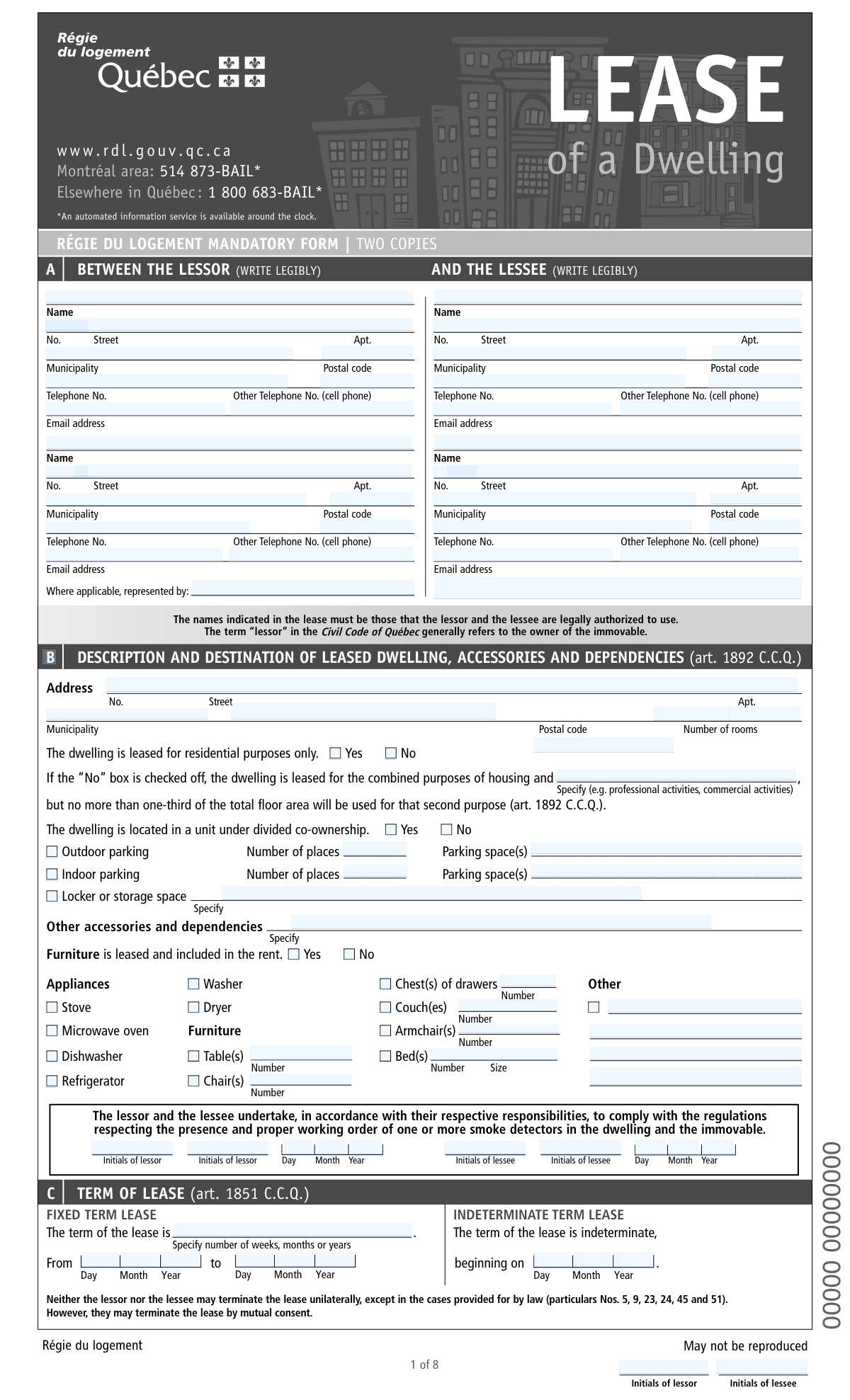
Yes! You can use AI to fill out Régie du logement Mandatory Form – LEASE of a Dwelling

This is the mandatory Québec residential lease ("Bail") form issued by the Régie du logement (now Tribunal administratif du logement) for leasing a dwelling for residential purposes. It records the parties’ identities and contact details, the dwelling description, lease term, rent and payment terms, included services/accessories, and key conditions (e.g., animals, access, by-laws). The form also contains mandatory legal notices and information that affect rights such as rent increases, renewal, and restrictions on applying to have rent fixed. Using the official form helps ensure the lease complies with the Civil Code of Québec and provides standardized disclosures and protections for both landlord and tenant.
Our AI automatically handles information lookup, data retrieval, formatting, and form filling.
It takes less than a minute to fill out Québec Dwelling Lease (RDL Mandatory Form) using our AI form filling.
Securely upload your data. Information is encrypted in transit and deleted immediately after the form is filled out.

Form specifications

Form name: Régie du logement Mandatory Form – LEASE of a Dwelling
Number of pages: 8
Filled form examples: Form Québec Dwelling Lease (RDL Mandatory Form) Examples
Language: English
main-image

Instafill Demo: filling out a legal form in seconds

How to Fill Out Québec Dwelling Lease (RDL Mandatory Form) Online for Free in 2026

Are you looking to fill out a QUÉBEC DWELLING LEASE (RDL MANDATORY FORM) form online quickly and accurately? Instafill.ai offers the #1 AI-powered PDF filling software of 2026, allowing you to complete your QUÉBEC DWELLING LEASE (RDL MANDATORY FORM) form in just 37 seconds or less.
Follow these steps to fill out your QUÉBEC DWELLING LEASE (RDL MANDATORY FORM) form online using Instafill.ai:
  1. 1 Enter the lessor (landlord) and lessee (tenant) identification details: legal names, addresses, phone numbers, and email addresses; add any representative/mandatary information if applicable.
  2. 2 Describe the leased dwelling: full address, number of rooms, residential-only or mixed use (if allowed), co-ownership status, and list accessories/dependencies (parking, locker/storage) and any included furniture/appliances with quantities.
  3. 3 Set the lease term: choose fixed-term (start and end dates) or indeterminate term (start date) and confirm required acknowledgements/initials where indicated.
  4. 4 Complete services and conditions: specify who pays for heating, electricity, water-related costs, snow removal, and other services; add any additional conditions/restrictions (e.g., animals, air conditioner, antenna, rules).
  5. 5 Fill in rent details: base rent amount, frequency (monthly/weekly), cost of services (if separate), total rent, subsidy status, payment date(s), method of payment, and place of payment.
  6. 6 Complete mandatory notices and restrictions sections: indicate any five-year new-building/change-of-destination restrictions, provide the required notice to a new lessee/sublessee about the lowest rent in the prior 12 months, and note any changes to services/conditions.
  7. 7 Review all entries, attach/complete any required schedules (e.g., Schedule 6 for personal services), then obtain signatures and dates from all required parties and ensure two copies are produced and delivered (including providing the tenant’s copy within the required timeframe).

Our AI-powered system ensures each field is filled out correctly, reducing errors and saving you time.

Why Choose Instafill.ai for Your Fillable Québec Dwelling Lease (RDL Mandatory Form) Form?

Speed

Complete your Québec Dwelling Lease (RDL Mandatory Form) in as little as 37 seconds.

Up-to-Date

Always use the latest 2026 Québec Dwelling Lease (RDL Mandatory Form) form version.

Cost-effective

No need to hire expensive lawyers.

Accuracy

Our AI performs 10 compliance checks to ensure your form is error-free.

Security

Your personal information is protected with bank-level encryption.

Frequently Asked Questions About Form Québec Dwelling Lease (RDL Mandatory Form)

This is Québec’s mandatory “Lease of a Dwelling” form used to create a residential lease between a lessor (landlord) and a lessee (tenant). It records the parties’ identities, the dwelling details, the lease term, rent, services, and key legal notices required by the Civil Code of Québec.

The lessor and all lessees who will be responsible for the lease should be listed and must sign. If someone is signing as a representative (mandatary) or in another role (e.g., surety), they must clearly indicate their capacity.

The form indicates it is a mandatory form in two copies. Typically, both the lessor and the lessee should each keep a signed copy for their records.

The lessor must give the lessee a copy of the lease within 10 days after entering into the lease (art. 1895 C.C.Q.).

The form states that the names indicated in the lease must be those that the lessor and the lessee are legally authorized to use. Use the legal name that matches official identification and legal documents.

Check “Yes” if the dwelling is leased for residential purposes only. If you check “No,” you must specify the second purpose (e.g., professional activities), and it cannot exceed one-third of the total floor area (art. 1892 C.C.Q.).

List any included items such as outdoor/indoor parking spaces (and how many), locker/storage space, and any other dependencies. If furniture or appliances are included in the rent, check the appropriate boxes and specify quantities where requested.

Use a fixed-term lease if there is a clear start and end date (e.g., from July 1 to June 30). Use an indeterminate-term lease if there is a start date but no end date, and indicate the beginning date.

In the “Services, taxes and consumption costs” section, mark whether each cost is borne by the lessor or the lessee. Be specific for each item (e.g., electricity, gas, water consumption tax, snow and ice removal for entrances/parking/balcony).

The form explains the lessor may not require postdated cheques unless the lessee agrees. It also states the lessor may not exact any other amount of money from the lessee (for example, a deposit for keys).

Complete the “Rent” section with the rent amount and whether it is per month or per week, then add any service costs and the total rent. Then fill in the date of payment, method of payment (cash, cheque, electronic transfer, etc.), and the place of payment.

This is a mandatory notice where the lessor declares the lowest rent paid for the dwelling in the 12 months before the new lease begins (or the rent fixed by the tribunal during that period). If the new rent is higher than declared, the new lessee/sublessee may apply to have the rent fixed within the deadlines stated on the form.

If the dwelling is in an immovable erected five years ago or less, or in an immovable converted to residential use within the last five years, the form indicates restrictions may apply to rent fixing/lease modification applications. In those cases, if the tenant refuses certain renewal modifications, they may have to vacate at the end of the lease (art. 1955 C.C.Q.).

If “solidarily liable” is checked “Yes,” each co-lessee can be held responsible for the full obligations under the lease, not just their share. Solidarity is not automatic; it must be expressly stipulated by checking the option on the lease.

If the dwelling will be used as a family residence and the lessee is married or in a civil union, the form allows the lessee (or spouse) to notify the lessor in writing. This matters because certain actions like subleasing, assigning, or terminating may require the spouse’s written consent once the lessor has been notified.

Compliance Québec Dwelling Lease (RDL Mandatory Form)
Validation Checks by Instafill.ai

1
Ensures Lessor and Lessee Legal Names Are Present and Legible
Validate that at least one lessor name and at least one lessee name are provided in the designated “WRITE LEGIBLY” fields and are not blank, initials-only, or placeholder text (e.g., “N/A”). This is critical because the form explicitly requires the names in the lease to be those the parties are legally authorized to use, and the lease may be unenforceable or disputed if parties are not clearly identified. If validation fails, the submission should be rejected or routed for manual review with a request to provide full legal names.
2
Validates Party Address Completeness (Street No., Street, Municipality, Postal Code, Apt.)
Check that each required address block for lessor and lessee includes street number, street name, municipality, and postal code; apartment/unit is required only when applicable. Complete addresses are necessary for legal notices, service of documents, and determining jurisdiction. If any required component is missing or malformed, the system should flag the specific address block and prevent final submission until corrected.
3
Validates Québec/Canadian Postal Code Format and Normalization
Validate postal codes against the Canadian format (e.g., A1A 1A1), allowing optional space and enforcing valid letter positions. Postal code accuracy supports proper notice delivery and reduces downstream mailing/identity errors. If the postal code fails format validation, the form should be blocked and the user prompted to correct it.
4
Validates Telephone Number Format for All Phone Fields
Validate that telephone numbers (primary and “Other telephone (cell phone)”) contain a valid North American numbering plan pattern (10 digits, optional country code +1, and common separators). Phone numbers are used for urgent contact (e.g., janitor contact, payment issues) and must be reliably dialable. If invalid, the system should require correction or allow omission only where the field is not mandatory for that role.
5
Validates Email Address Syntax for All Email Fields
Check that any provided email address conforms to standard email syntax (local@domain) and does not contain spaces or invalid characters. Email is often used for communications and recordkeeping; malformed emails cause delivery failures and disputes about notice. If invalid, the system should block submission for required email fields or warn and request correction for optional ones.
6
Ensures Dwelling Address and Key Dwelling Attributes Are Complete
Validate that the leased dwelling’s address (street number, street, municipality, postal code) is completed and that “Number of rooms” is provided as a positive number. The dwelling identification is central to the lease and required to avoid ambiguity about what is being rented. If missing or nonsensical (e.g., 0 rooms, negative, non-numeric), the submission should be rejected.
7
Residential-Only Use vs Combined Use: Conditional Second Purpose Requirement
If “The dwelling is leased for residential purposes only” is marked “No,” require the “Specify (e.g. professional activities, commercial activities)” field to be completed with a non-empty description. This is important because the form references legal limits (no more than one-third of floor area) and the second purpose must be explicit to interpret rights/obligations. If “No” is selected without a specified second purpose, the system should block submission and request the missing detail.
8
Divided Co-Ownership Selection and By-Laws Delivery Date Consistency
Validate that the “The dwelling is located in a unit under divided co-ownership” Yes/No selection is made, and if “Yes,” ensure the “DIVIDED CO-OWNERSHIP” by-laws delivery section includes a valid “Given on” date. This matters because by-laws applicability and tenant obligations depend on proper delivery, and missing dates create compliance and dispute risk. If inconsistent (Yes but no by-laws date), the system should flag the issue and require completion or an explicit explanation/override.
9
Parking Details Required When Parking Options Are Selected
If outdoor and/or indoor parking is checked, require “Number of places” to be a positive integer and require the “Parking space(s)” identifier/description field to be completed (e.g., space numbers). Parking is a material lease condition and missing identifiers can lead to conflicts over assigned spaces. If validation fails, the system should prevent submission until the count and identifiers are provided.
10
Furniture/Appliances Inventory Consistency and Quantity Validation
If “Furniture is leased and included in the rent” is marked “Yes,” validate that at least one furniture/appliance checkbox is selected and that any associated “Number” fields are positive integers (and “Size” is provided where required). This protects both parties by documenting what is included and reduces disputes at move-in/move-out. If “Yes” is selected but no inventory/quantities are provided, the system should require completion or change the furniture inclusion selection.
11
Lease Term Type Exclusivity and Required Dates (Fixed vs Indeterminate)
Validate that the lease term is defined as either a fixed term (with both “From” and “to” dates) or an indeterminate term (with a single “beginning on” date), but not both. Correct term definition is essential for renewal rules, notice periods, and enforceability. If both are filled or neither is filled, the system should block submission and prompt the user to complete exactly one term type.
12
Validates Date Fields Format and Chronological Order
Validate all date entries (e.g., lease start/end, by-laws “Given on,” notices, signatures) as real calendar dates in Day/Month/Year format and ensure logical ordering (e.g., fixed-term start date must be before end date). Date correctness is critical for determining payment periods, renewal timelines, and statutory notice windows. If a date is invalid or out of order, the system should flag the specific field and require correction.
13
Services/Taxes/Consumption Costs: Single Responsible Party Per Line
For each service line (e.g., heating, electricity, gas, snow removal), validate that exactly one of “Lessor” or “Lessee” is selected and that no line is left ambiguous when the form expects an allocation. Clear allocation prevents billing disputes and ensures the rent/services totals are interpretable. If both or neither are selected for a required line, the system should block submission and request a single selection.
14
Rent Amounts and Totals: Numeric, Non-Negative, and Consistent
Validate that “The rent is $,” “The total cost of services is $,” and “The total rent is $” are numeric currency values with at most two decimals and are not negative. Additionally, enforce consistency such that total rent equals base rent plus total cost of services when both components are provided for the same period. If values are missing, non-numeric, or inconsistent, the system should flag the discrepancy and require correction before submission.
15
Rent Frequency Consistency Across Rent, Services, and Total Rent
Validate that the selected frequency (per month/per week) is provided for each of rent, services cost, and total rent, and that the frequencies are consistent (or explicitly justified if the form allows differences). Frequency mismatches can cause incorrect payment expectations and accounting errors. If frequencies conflict (e.g., rent per month but total rent per week) without conversion/clarification, the system should block submission and request alignment.
16
Payment Schedule and Method Completeness and Logical Constraints
Validate that a payment date is specified for the first payment period and that either the default “1st day of the month/week” is selected or an alternate day is provided for other periods. Also validate that at least one method of payment is selected, and if “Other” is selected, a description is provided; if “postdated cheques” is marked “Yes,” ensure “Cheque” is selected as an allowed method. If any required payment scheduling/method information is missing or contradictory, the system should prevent submission until corrected.

Common Mistakes in Completing Québec Dwelling Lease (RDL Mandatory Form)

Using nicknames or non-legal names for lessor/lessee

People often write the name they commonly use (nickname, shortened name, business name without the legal entity) instead of the name they are legally authorized to use, even though the form explicitly requires legal names. This can create problems if there is a dispute, if enforcement is needed, or if the parties’ identities are challenged. Always use the full legal name exactly as it appears on government ID or corporate registration, and ensure it matches the names shown elsewhere in the lease and any supporting documents.

Mixing up the repeated identity blocks (lessor vs. lessee vs. representative)

Because the form repeats similar contact sections multiple times, people frequently enter the lessee’s information in the lessor section (or vice versa), or they fill the “represented by” section when no representative exists. This leads to misdirected notices, invalid service of documents, and confusion about who has authority to sign or receive communications. Carefully label each block before writing, and only complete “Where applicable, represented by” if someone is formally acting as mandatary/agent.

Incomplete civic address (missing apartment, municipality, or postal code formatting)

Applicants often provide only a street name, omit the apartment number, or write an incomplete/incorrect postal code (especially spacing and letter-number pattern). Incomplete addresses can delay delivery of legal notices and create ambiguity about the leased dwelling or the parties’ domiciles. Enter the full civic address (No., Street, Apt., Municipality) and write the postal code in the standard Canadian format (e.g., H2X 1Y4).

Phone/email fields left blank or inconsistent across sections

People sometimes skip the “Other Telephone No. (cell phone)” or email fields, or they provide different contact details in different parts of the form (e.g., one email for the lessee at the top and another later). This causes missed communications about repairs, notices, or payment issues and can complicate proof of contact attempts. Use one consistent set of contact details per person and include at least one reliable phone number and an email address where possible.

Not specifying the second purpose when “residential only” is marked No

When the dwelling is leased for combined purposes (housing plus another purpose), people check “No” but forget to specify the second purpose (e.g., professional activities) and/or ignore the one-third floor area limitation referenced on the form. This can create disputes about permitted use, insurance issues, and potential non-compliance with the lease destination rules. If “No” is checked, clearly describe the second purpose and ensure it stays within the allowed floor-area limit.

Parking/storage details missing or unclear (number of places and identifiers)

For outdoor/indoor parking and lockers/storage, people often check the box but leave the “Number of places” blank or fail to identify the specific space(s). This leads to conflicts with other tenants, uncertainty about what is included in rent, and difficulty enforcing rights to a particular spot. Always fill in the number of spaces and write the exact space/locker identifier (e.g., “Indoor space #12, locker B-07”).

Furniture/appliances list completed without quantities or with vague “Other” entries

The form provides checkboxes and “Number” fields, but many people check items (washer, fridge, bed, etc.) without entering quantities, sizes, or details, and they write “Other” without specifying what it is. This creates disputes at move-in/move-out about what was included and the condition/return of items. For every included item, indicate the quantity (and size/model if relevant) and describe “Other” precisely (e.g., “portable A/C 12,000 BTU”).

Term of lease errors (fixed vs. indeterminate, missing dates, or inconsistent duration)

A common mistake is selecting a fixed term but not completing both “From” and “to” dates, or writing a duration (e.g., “12 months”) that doesn’t match the actual dates. Others accidentally fill both fixed-term and indeterminate sections, creating ambiguity about renewal and notice periods. Choose only one lease type, enter complete dates in Day/Month/Year format, and double-check that the written duration aligns with the start and end dates.

Services/cost responsibility section left ambiguous (who pays what)

In the “SERVICES, TAXES AND CONSUMPTION COSTS” table, people frequently forget to mark whether the lessor or lessee pays for each item (heating, electricity, snow removal, etc.), or they mark both columns. This can cause billing disputes and unexpected costs after move-in. For each line item, check exactly one responsible party and clarify any shared or special arrangements in the “Specify” area or an attached schedule.

Rent math and frequency mismatches (rent vs. services vs. total rent)

People often enter a monthly rent amount but accidentally check “per week,” or they fill “rent” and “total cost of services” but the “total rent” doesn’t equal the sum. These inconsistencies can lead to payment disputes, incorrect notices of increase, and accounting problems. Confirm the payment frequency for each amount and ensure: Total rent = Base rent + Total cost of services (for the same period).

Payment details incomplete (date, method, place of payment not specified)

Many forms are returned or disputed because the “DATE OF PAYMENT,” “METHOD OF PAYMENT,” or “PLACE OF PAYMENT” fields are left blank or filled with vague wording (e.g., “by transfer” without details, or no address for place of payment). This creates uncertainty about when rent is due, how it must be paid, and where legal tender must be delivered. Specify the exact due date (e.g., “1st of each month”), select one method (or clearly list acceptable methods), and provide a complete place of payment (including if payment is by mail or electronic transfer).
Saved over 80 hours a year

“I was never sure if my IRS forms like W-9 were filled correctly. Now, I can complete the forms accurately without any external help.”

Kevin Martin Green

Your data stays secure with advanced protection from Instafill and our subprocessors

Robust compliance program

Transparent business model

You’re not the product. You always know where your data is and what it is processed for.

ISO 27001, HIPAA, and GDPR

Our subprocesses adhere to multiple compliance standards, including but not limited to ISO 27001, HIPAA, and GDPR.

Security & privacy by design

We consider security and privacy from the initial design phase of any new service or functionality. It’s not an afterthought, it’s built-in, including support for two-factor authentication (2FA) to further protect your account.

Fill out Québec Dwelling Lease (RDL Mandatory Form) with Instafill.ai

Worried about filling PDFs wrong? Instafill securely fills rgie-du-logement-mandatory-form-lease-of-a-dwellin forms, ensuring each field is accurate.