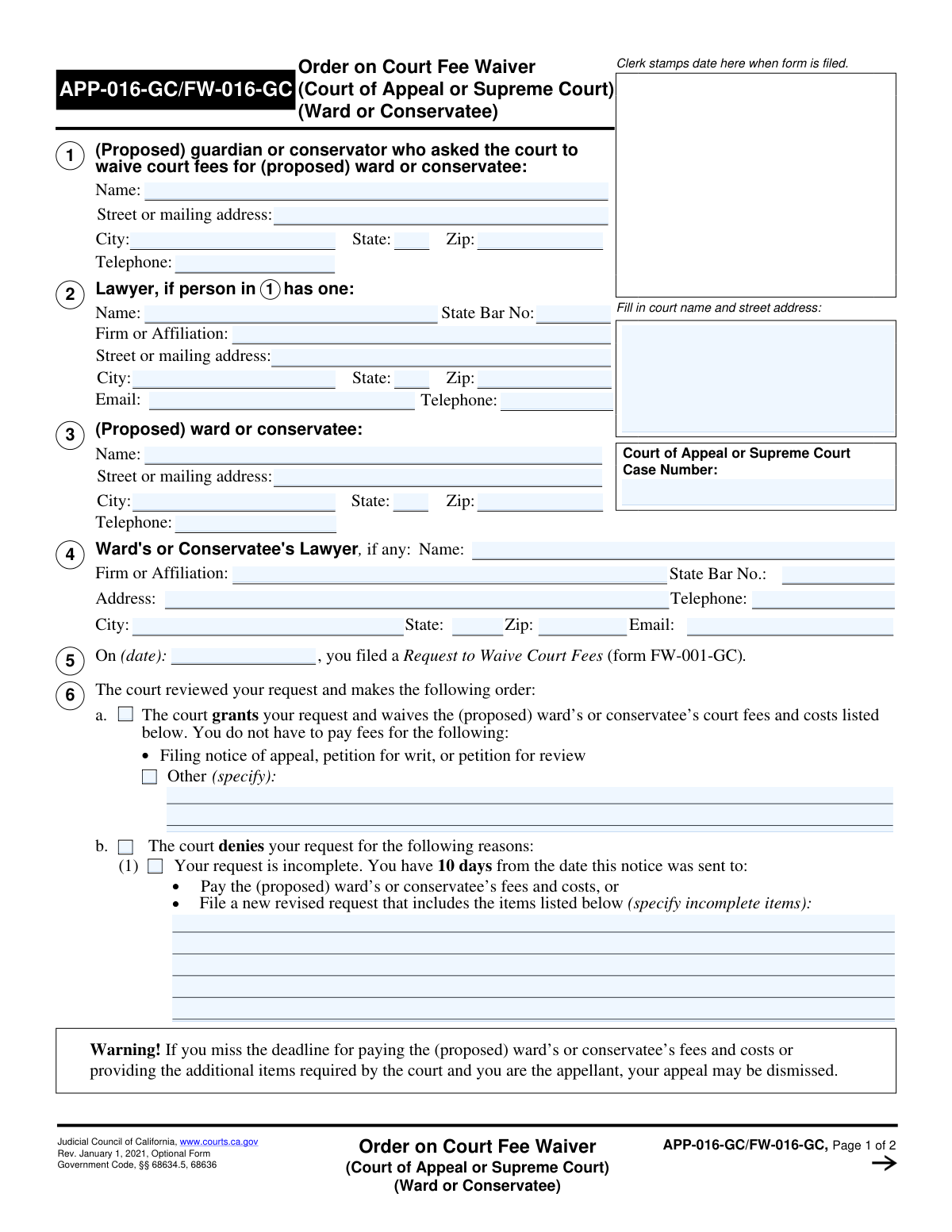
Yes! You can use AI to fill out Form FW-003-GC, Order on Court Fee Waiver (Guardianship or Conservatorship)

Form FW-003-GC, the Order on Court Fee Waiver (Guardianship or Conservatorship), is a judicial form used by California courts to issue a ruling on a request to waive court fees (Form FW-001-GC). It officially documents the court's decision, indicating whether the fee waiver is granted, denied, or if a court hearing is necessary to determine eligibility. Today, managing and completing such legal paperwork can be done quickly and accurately using AI-powered services like Instafill.ai, which can also convert non-fillable PDF versions into interactive fillable forms.
Our AI automatically handles information lookup, data retrieval, formatting, and form filling.
It takes less than a minute to fill out FW-003-GC using our AI form filling.
Securely upload your data. Information is encrypted in transit and deleted immediately after the form is filled out.

Form specifications

Form name: Form FW-003-GC, Order on Court Fee Waiver (Guardianship or Conservatorship)
Number of fields: 59
Number of pages: 2
Language: English
Categories: court forms, fee waiver forms, guardianship forms, ATO forms, UK court forms
main-image

Instafill Demo: How to fill out PDF forms in seconds with AI

How to Fill Out FW-003-GC Online for Free in 2026

Are you looking to fill out a FW-003-GC form online quickly and accurately? Instafill.ai offers the #1 AI-powered PDF filling software of 2026, allowing you to complete your FW-003-GC form in just 37 seconds or less.
Follow these steps to fill out your FW-003-GC form online using Instafill.ai:
  1. 1 Navigate to Instafill.ai and upload your FW-003-GC form or select it from the platform's template library.
  2. 2 Enter the court and case information, including the case number and the names of the parties involved (guardian/conservator and ward/conservatee).
  3. 3 Input the contact and representative information for all parties, including lawyers' details and state bar numbers.
  4. 4 Clearly indicate the court's decision by checking the box to either grant or deny the fee waiver request.
  5. 5 If the request is denied or requires further action, specify the reasons, list incomplete items, or provide details for a scheduled court hearing.
  6. 6 Review all entered information for accuracy, using the AI assistant to check for completeness and potential errors.
  7. 7 Date the form, indicate the signer's authority (Judicial Officer or Clerk), and then download, print, or save the completed document.

Our AI-powered system ensures each field is filled out correctly, reducing errors and saving you time.

Why Choose Instafill.ai for Your Fillable FW-003-GC Form?

Speed

Complete your FW-003-GC in as little as 37 seconds.

Up-to-Date

Always use the latest 2026 FW-003-GC form version.

Cost-effective

No need to hire expensive lawyers.

Accuracy

Our AI performs 10 compliance checks to ensure your form is error-free.

Security

Your personal information is protected with bank-level encryption.

Frequently Asked Questions About Form FW-003-GC

This form is the court's official Order on a Court Fee Waiver for a guardianship or conservatorship case. It communicates the judge's decision on whether to grant, deny, or request more information for a previously filed fee waiver request.

This form is completed by a judicial officer or a court clerk, not the public. You will receive this form as the official response to the 'Request to Waive Court Fees' (form FW-001-GC) that you submitted.

This indicates that your request has been approved. The court fees and costs listed on the form are waived, and the proposed ward or conservatee will not have to pay them.

The form will specify which items were missing or incomplete. You have 10 days to correct the issues and file a new, completed request form without having to pay a filing fee.

This means the judge needs to ask you questions or see more evidence before making a decision. The form will list the hearing date, time, and location, as well as any documents you must bring with you.

A 'ward' is generally a minor for whom a guardian is appointed. A 'conservatee' is an adult who is unable to care for themselves or their finances, for whom a conservator is appointed.

The court includes the contact information for the lawyers of all parties involved. This ensures all official notices and decisions are properly communicated to the legal representatives in the case.

If the court finds the ward or conservatee does not meet the financial requirements for a fee waiver, you will be required to pay the court fees to proceed with the case. The form should provide the specific reasons for the denial.

Processing times can vary by court, but you can typically expect to receive this order within a few days to a couple of weeks. If you are concerned about a delay, you can contact the court clerk's office for an update.

Yes, services like Instafill.ai use AI to help you accurately fill out the initial 'Request to Waive Court Fees' form. This can save time and help prevent your request from being denied due to common errors or incomplete information.

You can upload the blank request form (FW-001-GC) to the Instafill.ai platform. The service will then guide you through a series of simple questions and use your answers to automatically and accurately fill in the correct fields on the form.

If you receive a non-fillable PDF, you can use a tool like Instafill.ai to convert it into an interactive, fillable document. This makes it easier to add notes, manage, and store digitally for your records.

The order itself will list the specific documents the court wants to see. This often includes proof of income (pay stubs), proof of government benefits (like SSI or CalFresh), and bank statements to verify the financial information on your request.

If you fail to appear at the scheduled hearing, the judge will almost certainly deny your fee waiver request. If you cannot attend, you must contact the court clerk as soon as possible to see if you can reschedule.

Compliance FW-003-GC
Validation Checks by Instafill.ai

1
Mutually Exclusive Grant and Denial Status
This check ensures that the form submission does not simultaneously indicate that the fee waiver request is both granted and denied. A request can only have one final status. If both 'Court Grants Fee Waiver Request' and 'The court denies your request' are selected, the form is logically inconsistent and cannot be processed, requiring the user to choose only one outcome.
2
Conditional Requirement for Specific Granted Items
This validation verifies that the 'Specific Granted Items' text field is filled out if, and only if, the 'Waive Other Fees' checkbox is selected. This prevents ambiguity by ensuring that a user who indicates other fees are waived also specifies what those fees are. A failure would prompt the user to either provide the specific items or uncheck the 'Waive Other Fees' box.
3
Conditional Requirement for Incomplete Items
This check ensures that the 'Incomplete Items to Revise' field is populated when the denial reason 'Your request is incomplete' is selected. This is critical for informing the applicant exactly what information is missing so they can correct and resubmit their request. If the box is checked but the field is empty, the submission is invalid as it provides no actionable feedback.
4
Conditional Requirement for Hearing Information
This validation confirms that if the 'The court needs more information. You must go to court...' option is checked, then the 'Hearing Date', 'Hearing Time', and 'Department' fields are all filled. These details are essential for the applicant to attend the required hearing. A failed validation would prevent submission until the necessary hearing information is provided.
5
Hearing Date Must Be in the Future
This check validates that the 'Hearing Date' provided is a valid date that occurs after the current date. Scheduling a hearing for a past date is a logical impossibility and a clear data entry error. This validation prevents confusion and ensures the applicant is notified of a valid, upcoming court appearance.
6
Request Filing Date Must Be in the Past or Present
This validation ensures the 'Request Filing Date' is a valid date that is on or before the current date. A filing date cannot be in the future, as it represents an action that has already occurred. This check maintains the chronological accuracy of the legal record and prevents data entry errors.
7
State Bar Number Format and Presence
This check verifies that if a 'Lawyer Name' is entered for either the guardian or the ward, the corresponding 'State Bar Number' field is also filled and follows a valid format (e.g., numeric, specific length). The state bar number is a unique identifier crucial for verifying a lawyer's credentials and standing. An invalid or missing number would halt processing until correct lawyer information is provided.
8
Mutually Exclusive Signatory Role
This validation ensures that only one of the signatory checkboxes, 'Judicial Officer' or 'Clerk, Deputy', is selected. A legal document is typically signed by one person in one official capacity. Selecting both creates ambiguity about who authorized the document, so the form should enforce a choice of one or the other.
9
Standard US Telephone Number Format
This check validates that all telephone number fields ('Guardian/Conservator', 'Lawyer', 'Ward/Conservatee') adhere to a standard format, such as (XXX) XXX-XXXX or XXX-XXX-XXXX. Consistent formatting is important for data integrity and ensures that the contact numbers are usable for communication by the court. An invalid format would trigger an error, prompting the user to correct the entry.
10
Valid Email Address Format
This validation ensures that any email address entered in the 'Lawyer Email' fields follows the standard '[email protected]' format. This is crucial for ensuring that electronic communications from the court are deliverable. An invalid email address would prevent important notices from being received, so the system must reject improperly formatted entries.
11
Valid ZIP Code Format
This check verifies that all zip code fields contain a valid 5-digit or 9-digit (ZIP+4) numeric format. Correct zip codes are essential for ensuring mail from the court is delivered accurately and without delay. An incorrectly formatted zip code would cause a validation failure, requiring the user to enter a valid US postal code.
12
Completeness of Ward or Conservatee Information
This validation ensures that the 'Ward or Conservatee Name' and their full address (Street, City, State, Zip) are all provided. This person is the subject of the legal proceeding, and their complete identification and location are fundamental requirements for the case file. Incomplete information would render the form invalid as the primary party is not properly identified.
13
Conditional Requirement for Ineligibility Reasons
This check ensures that if the 'Ward or Conservatee Not Eligible for Fee Waiver' box is checked, the 'Reasons for Ineligibility' text area must be filled out. The court must provide a justification for its decision to deny the waiver on these grounds. A failure to provide reasons would make the denial legally insufficient and would block form submission.
14
Case Number Completeness
This validation ensures that the 'Case Number' field is not empty. The case number is the primary identifier for the entire legal proceeding within the court system. Without it, the form cannot be correctly filed or associated with the existing case, making this a mandatory field for submission.

Common Mistakes in Completing FW-003-GC

Entering an Incorrect or Incomplete Case Number

Users often enter a lower court case number instead of the specific 'Court of Appeal or Supreme Court' number required. This mistake happens when filers are working on multiple related cases and use the wrong reference number. An incorrect case number can lead to the document being rejected by the clerk or filed in the wrong case, causing significant delays. To avoid this, always double-check the case number against official court correspondence for the specific appeal.

Confusing Guardian/Conservator and Ward/Conservatee Information

The form requires separate, detailed information for the guardian, the ward, and their respective lawyers. It is very common for filers to accidentally enter the guardian's address in the ward's section or vice-versa. This error can result in legal notices being sent to the wrong person, missed deadlines, and procedural defects in the case. Carefully read the header of each section before entering personal details to ensure the information corresponds to the correct individual.

Omitting the Lawyer's State Bar Number

Filers frequently leave the 'State Bar Number' field blank for one or both attorneys, often because they don't have the information readily available. This number is a crucial unique identifier used by the court to verify the attorney's credentials and good standing. Its absence forces court staff to look it up manually, delaying the processing of the form. Always gather all necessary details, including bar numbers, before you begin filling out the form.

Inconsistent Selections in the Grant/Denial Section

This form's logic can be tricky; users might check the box to deny a request but then fail to select a specific reason, or they might fill out details in both the 'Grant' and 'Denial' sections. This creates an ambiguous and legally unenforceable order, which will be rejected by the court. To prevent this, follow the form's instructions carefully: if you check a primary box, you must complete its required sub-fields and leave conflicting sections blank. AI-powered tools like Instafill.ai can help by enforcing such conditional logic automatically.

Providing Vague Details for Required Explanations

When the form requires specific details, such as in the 'Incomplete Items to Revise' or 'Reasons for Ineligibility' fields, users often provide vague, unhelpful answers like 'missing information' or 'income too high'. This ambiguity forces the recipient to guess what is actually needed, leading to further correspondence and delays. Always be explicit and list every specific document, fee, or reason with as much detail as possible to ensure clarity and prompt resolution.

Using an Incorrect Filing Date

The form asks for the date the original 'Request to Waive Court Fees' was filed, not the current date. People often mistakenly enter the date they are filling out the current form, which creates confusion about which underlying request the court's order pertains to. This can disrupt the court's record-keeping and may require clarification. Always refer to the file-stamped copy of the original request (form FW-001-GC) to ensure you are entering the correct date.

Entering an Incomplete Address

A frequent error is omitting crucial parts of an address, such as an apartment, suite, or unit number, or entering an incorrect ZIP code for one of the many parties listed. This seemingly small mistake can cause official court notices and orders to be returned as undeliverable. This can lead to missed hearings and deadlines, potentially jeopardizing the entire case. Using an address validation feature, often found in tools like Instafill.ai, can help ensure accuracy.

Omitting Required Court Hearing Details

If the court requires a hearing, the filer must check the corresponding box and then fill in the hearing date, time, and department. A common mistake is to check the box but forget to enter one or more of these crucial details. This renders the notice ineffective, as the party does not know when or where to appear, forcing the court to issue a corrected notice and causing delays. Always complete all associated fields when you select an option that requires more information.

Misattributing Lawyer Information Between Parties

The form has distinct sections for the 'Guardian's Lawyer' and the 'Ward's Lawyer.' Filers, especially when one party is self-represented, can get confused and enter attorney information in the wrong section or list the same attorney for both. This error creates significant confusion regarding legal representation and can lead to improper service of documents. To avoid this, carefully confirm which party each lawyer represents before entering their details into the correct section.

Illegible Handwriting on Non-Fillable PDFs

When a form is only available as a flat PDF, people must print and fill it out by hand, often leading to illegible entries for names, addresses, and case numbers. Poor handwriting can cause data entry errors by court clerks, leading to rejected filings, misdirected mail, and delays. To avoid this, it is best to use a fillable version of the form. If one is not available, a service like Instafill.ai can convert the flat PDF into a fillable format, ensuring all entries are clear and legible.
Saved over 80 hours a year

“I was never sure if my IRS forms like W-9 were filled correctly. Now, I can complete the forms accurately without any external help.”

Kevin Martin Green

Your data stays secure with advanced protection from Instafill and our subprocessors

Robust compliance program

Transparent business model

You’re not the product. You always know where your data is and what it is processed for.

ISO 27001, HIPAA, and GDPR

Our subprocesses adhere to multiple compliance standards, including but not limited to ISO 27001, HIPAA, and GDPR.

Security & privacy by design

We consider security and privacy from the initial design phase of any new service or functionality. It’s not an afterthought, it’s built-in, including support for two-factor authentication (2FA) to further protect your account.

Fill out FW-003-GC with Instafill.ai

Worried about filling PDFs wrong? Instafill securely fills form-fw-003-gc-order-on-court-fee-waiver-guardianship-or-conservatorship forms, ensuring each field is accurate.