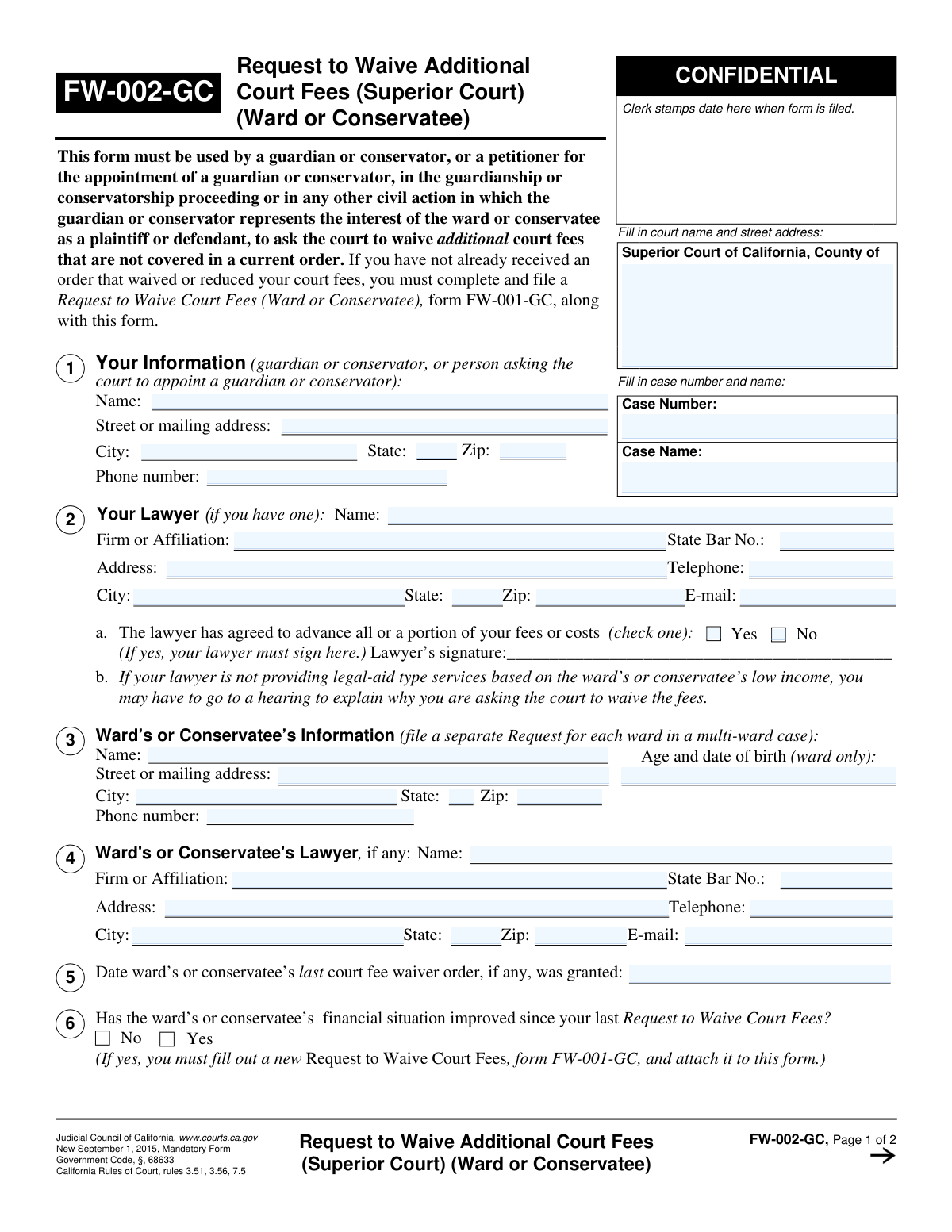
Yes! You can use AI to fill out Form FW-002-GC, Request to Waive Additional Court Fees (Superior Court) (Ward or Conservatee)
Form FW-002-GC, Request to Waive Additional Court Fees, is a legal document for the Superior Court of California filed by a guardian or conservator. It is used to request a waiver for court fees that are not covered by a previously granted fee waiver order, ensuring the ward or conservatee can continue to access the justice system without financial burden. Today, this form can be filled out quickly and accurately using AI-powered services like Instafill.ai, which can also convert non-fillable PDF versions into interactive fillable forms.
FW-002-GC is part of the
California court forms, fee waiver forms and superior court forms categories on Instafill.
Our AI automatically handles information lookup, data retrieval, formatting, and form filling.
It takes less than a minute to fill out FW-002-GC using our AI form filling.
Securely upload your data. Information is encrypted in transit and deleted immediately after the form is filled out.
Form specifications
| Form name: | Form FW-002-GC, Request to Waive Additional Court Fees (Superior Court) (Ward or Conservatee) |
| Number of fields: | 53 |
| Number of pages: | 1 |
| Language: | English |
Instafill Demo: How to fill out PDF forms in seconds with AI
How to Fill Out FW-002-GC Online for Free in 2026
Are you looking to fill out a FW-002-GC form online quickly and accurately? Instafill.ai offers the #1 AI-powered PDF filling software of 2026, allowing you to complete your FW-002-GC form in just 37 seconds or less.
Follow these steps to fill out your FW-002-GC form online using Instafill.ai:
- 1 Navigate to Instafill.ai and upload the FW-002-GC form or select it from the platform's document library.
- 2 Provide your information as the guardian, conservator, or petitioner, including your name, address, and phone number.
- 3 Enter the required information for the ward or conservatee, including their name, date of birth, and details of any prior fee waiver orders.
- 4 Fill in the court name, case name, and case number, along with information for your lawyer and the ward's or conservatee's lawyer, if applicable.
- 5 Indicate which additional fees you are requesting to have waived by checking the appropriate boxes and provide a written explanation for the request.
- 6 Carefully review all the information you have entered for accuracy, then date and electronically sign the declaration under penalty of perjury.
- 7 Download the completed form to print and file with the appropriate Superior Court clerk's office.
Our AI-powered system ensures each field is filled out correctly, reducing errors and saving you time.
Why Choose Instafill.ai for Your Fillable FW-002-GC Form?
Speed
Complete your FW-002-GC in as little as 37 seconds.
Up-to-Date
Always use the latest 2026 FW-002-GC form version.
Cost-effective
No need to hire expensive lawyers.
Accuracy
Our AI performs 10 compliance checks to ensure your form is error-free.
Security
Your personal information is protected with bank-level encryption.
Frequently Asked Questions About Form FW-002-GC
This form is used by a guardian or conservator to ask the court to waive additional court fees that are not covered by an existing fee waiver order for the ward or conservatee.
A guardian, a conservator, or a person petitioning for appointment as a guardian or conservator must fill out this form on behalf of the ward or conservatee.
Form FW-002-GC is for waiving *additional* fees when a waiver is already in place. If you don't have a current fee waiver order, you must file form FW-001-GC to make the initial request.
Yes, if the ward or conservatee's financial situation has improved since the last fee waiver was granted, you must complete and attach a new Request to Waive Court Fees (form FW-001-GC).
You must provide the ward or conservatee's name and contact information. For a ward, you must also include their age and date of birth.
You can request to waive fees for jury expenses, court-appointed interpreters, fees for a peace officer to testify, court-appointed experts, or other specific fees you list on the form.
Your lawyer only needs to sign if they have agreed to advance all or a portion of your court fees or costs. This confirms the arrangement to the court.
You must notify the court within five days of any improvement in their ability to pay fees. You should use form FW-010-GC for this notification.
Yes, the court can order the waived fees to be paid back from the ward or conservatee's estate. This is especially likely if they win a settlement of $10,000 or more.
You must file the form at the Superior Court of California for the county where your guardianship or conservatorship case is located.
In this section, you must briefly explain why the specific services you checked (like an expert or interpreter) are necessary for the case to proceed fairly.
Yes, services like Instafill.ai use AI to help you accurately auto-fill form fields with your saved information, which saves time and helps prevent errors.
You can use a service like Instafill.ai to upload the PDF, fill it out on your computer, and then download the completed document for printing and submission to the court.
Tools like Instafill.ai can convert non-fillable PDFs into interactive forms. You can upload the file to the service to make it easy to complete online.
Compliance FW-002-GC
Validation Checks by Instafill.ai
1
Ensures Case Information is Complete
This check verifies that the 'Case Number' and 'Case Name' fields are filled out on the first page. This information is essential for the court clerk to correctly file the document with the existing case record. A failure to provide this information will result in the form being rejected, as it cannot be associated with a specific legal proceeding.
2
Validates Requester's Contact Information
This validation ensures that the guardian or conservator's name, full address (street, city, state, zip), and phone number are provided in Section 1. Complete and accurate contact information is mandatory for the court to communicate with the filer regarding the request. If any part of this information is missing or invalid, the form may be returned, delaying the fee waiver process.
3
Verifies Ward's or Conservatee's Information
This check confirms that the ward's or conservatee's name and address are provided in Section 2. This is crucial for identifying the individual on whose behalf the fee waiver is being requested. Incomplete information could lead to confusion or rejection of the request, especially in cases involving multiple wards.
4
Checks Consistency of Ward's Age and Date of Birth
For wards, this validation ensures that both the 'Age' and 'Date of Birth' fields are filled out and are logically consistent with each other. This data helps the court confirm the subject is a minor and verifies their identity. A mismatch between the entered age and the calculated age from the date of birth will trigger an error, requiring the user to correct the information before submission.
5
Enforces Financial Change Conditional Logic
This check validates the response to question 4, 'Has the ward’s or conservatee’s financial situation improved...'. If the user selects 'Yes', the system must confirm that a new 'Request to Waive Court Fees' (form FW-001-GC) is attached. This is a mandatory requirement as an improved financial situation necessitates a full re-evaluation, and failure to attach the required form will lead to an automatic denial of the request for additional waivers.
6
Validates Lawyer Fee Advancement Signature Requirement
This check is triggered if the user selects 'Yes' to the question 'The lawyer has agreed to advance all or a portion of your fees or costs'. It verifies that a lawyer's signature has been provided in the corresponding signature field. This signature is a legal confirmation of the arrangement, and its absence when 'Yes' is checked makes the declaration incomplete and legally insufficient.
7
Validates California State Bar Number Format
For any lawyer information provided in Sections 5 or 6, this check ensures the 'State Bar No.' field contains a number in the valid format for California attorneys. This number is used to verify the lawyer's identity and their standing with the State Bar. An invalid number format would prevent proper verification and could cause the form to be rejected.
8
Ensures Header Consistency Across Pages
This validation compares the 'Case Number' and 'Name of (Proposed) Ward or Conservatee' fields in the header of Page 2 with the corresponding fields on Page 1. This ensures the pages of the document remain associated with the correct case and individual, which is critical for proper record-keeping. A mismatch could cause the second page to be misfiled or the entire document to be considered invalid.
9
Requires Specification for 'Other' Fees
In Section 7, if the 'Other' checkbox is selected, this validation ensures that the adjacent text field specifying the fee type is not empty. The court needs to know exactly what 'other' fees are being requested to make a determination. Failure to specify the fee type will result in that part of the request being ignored or the entire form being returned for clarification.
10
Requires Justification for Fee Waiver
This check verifies that the explanation field in Section 8 ('Why does the ward or conservatee need these other services?') is filled out if any fee waiver checkboxes in Section 7 are selected. The court requires a justification to evaluate the necessity of the requested services and associated fees. Without a reason, the court has no basis to grant the waiver, and the request will be denied.
11
Validates Declaration Date
This check ensures that the 'Date' field in the final declaration section is filled with a valid, properly formatted date that is not in the future. The date of signature is a critical legal component of the declaration under penalty of perjury. An invalid or missing date renders the declaration void and will cause the entire form to be rejected by the court.
12
Verifies Printed Name Matches Requester
This validation confirms that the name entered in the 'Print your name here' field matches the requester's name from Section 1. This consistency check ensures the person signing the declaration is the same person making the request. A discrepancy could indicate an error or an unauthorized signature, invalidating the form.
13
Ensures Signature is Provided
This check verifies that the 'Sign here' field contains a signature, whether digital or as an indicator for a required wet signature. The signature is the most critical part of the declaration, legally attesting that the provided information is true and correct. A form submitted without a signature is legally invalid and will be rejected immediately.
Common Mistakes in Completing FW-002-GC
This form, FW-002-GC, is exclusively for waiving *additional* court fees after a primary fee waiver has already been granted. A common error is using this form for an initial request, leading to automatic rejection. If no prior fee waiver order exists, you must complete and file form FW-001-GC. Always verify you have a pre-existing waiver before using this supplemental form.
The form has distinct sections for the filer's information (Section 1, the guardian/conservator) and the ward's or conservatee's information (Section 2). People often mistakenly enter their own details in the ward's section or vice versa. This creates significant confusion for the court clerk, causing processing delays or requiring the form to be resubmitted. Carefully read each section header to ensure the correct person's details are entered in the appropriate fields.
The case number is the court's primary tracking identifier for your file. Entering an incorrect number, omitting parts of it, or forgetting to fill it in on both page 1 and page 2 can cause the document to be rejected or lost. This mistake often happens due to a simple typo or referencing outdated documents. Always double-check the case number against the most recent official court correspondence before submitting.
Section 4 asks if the ward's financial situation has improved. If the answer is 'Yes,' you are required to attach a new, fully completed FW-001-GC form. A frequent mistake is checking 'Yes' but forgetting to attach the required form, which invalidates the request. This will result in denial and require you to start the process over.
The top of the second page requires the 'Name of (Proposed) Ward or Conservatee' and the 'Case Number' to be entered again. Filers often overlook this repetitive step, focusing only on the new questions. If the pages become separated during court processing, a blank header makes it impossible to associate the page with the correct case, which can nullify the entire request.
Section 8 asks which additional fees need to be waived and, crucially, why the services are needed. A common mistake is to check the boxes but provide a vague, one-sentence, or even blank explanation in box 8b. Without a clear and compelling justification, the judge has no basis to approve the request and is likely to deny it. Be specific about why each requested service is necessary for the case.
When listing an attorney, their State Bar Number is required. Furthermore, if you check 'Yes' in Section 5, indicating the lawyer has agreed to advance costs, the lawyer's signature is mandatory. Submitting the form without the bar number slows down verification, and missing the required signature will lead to immediate rejection of the form.
An unsigned or undated form is legally invalid. The declaration at the end of page 2 requires a physical signature, a printed name, and the date of signing. Forgetting any of these three elements is a frequent oversight made in the rush to complete paperwork, and it will cause the court clerk to reject the filing on the spot. Always do a final check for the signature before submitting.
The instructions in Section 2 clearly state to 'file a separate Request for each ward in a multi-ward case.' A guardian responsible for multiple wards may incorrectly try to list them all on a single form to save time. This violates court procedure and will result in the form being returned, delaying the fee waiver process for all involved wards.
The form requires the full, official name of the Superior Court and its street address. Filers often use informal names (e.g., 'Downtown Court') or omit the county, which can lead to the document being misrouted or rejected in counties with multiple court locations. To avoid this, use the exact court name and address as it appears on other official case documents. AI-powered tools like Instafill.ai can help prevent this by auto-populating correct court information.
While this is a fillable PDF, many people print it and fill it out by hand. Illegible handwriting can lead to critical data entry errors by court staff regarding names, addresses, or case numbers, potentially causing rejection. Using the computer to fill the fields ensures perfect legibility. If you only have a flat, non-fillable version, tools like Instafill.ai can convert it into a fillable form to ensure clarity.
Saved over 80 hours a year
“I was never sure if my IRS forms like W-9 were filled correctly. Now, I can complete the forms accurately without any external help.”
Kevin Martin Green
Your data stays secure with advanced protection from Instafill and our subprocessors

Robust compliance program
Transparent business model
You’re not the product. You always know where your data is and what it is processed for.
ISO 27001, HIPAA, and GDPR
Our subprocesses adhere to multiple compliance standards, including but not limited to ISO 27001, HIPAA, and GDPR.
Security & privacy by design
We consider security and privacy from the initial design phase of any new service or functionality. It’s not an afterthought, it’s built-in, including support for two-factor authentication (2FA) to further protect your account.
Fill out FW-002-GC with Instafill.ai
Worried about filling PDFs wrong? Instafill securely fills form-fw-002-gc-request-to-waive-additional-court-fees-superior-court-ward-or-conservatee forms, ensuring each field is accurate.