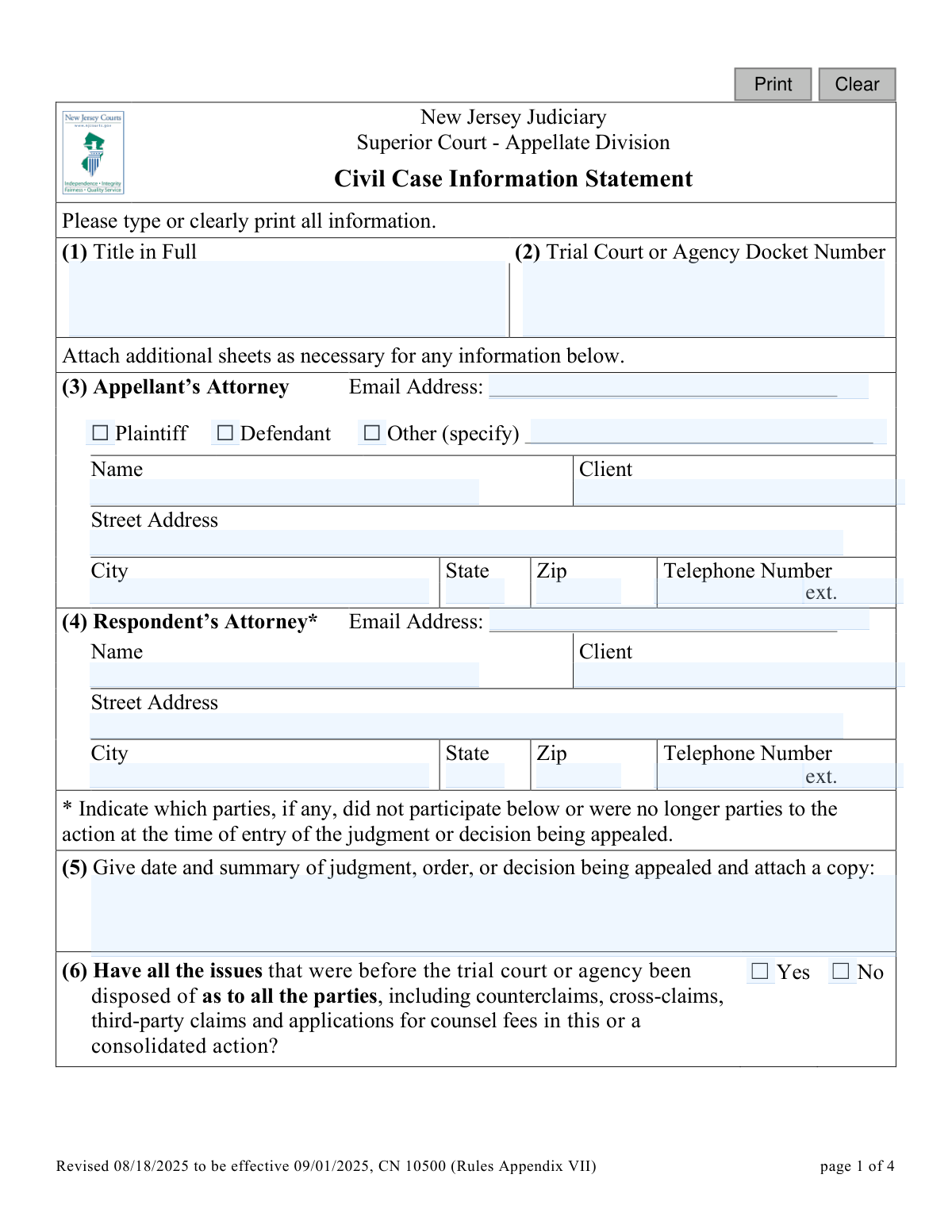
Yes! You can use AI to fill out New Jersey Judiciary Superior Court - Appellate Division Civil Case Information Statement
This form, officially known as the Civil Case Information Statement (CN 10500), is a required document for filing a civil, family, tax court, or state agency appeal with the New Jersey Superior Court's Appellate Division. It provides the court with a summary of the case, including the parties involved, the judgment being appealed, the procedural history, and the legal issues to be raised. The statement helps the court screen cases for potential settlement and manage its docket efficiently. Today, this form can be filled out quickly and accurately using AI-powered services like Instafill.ai, which can also convert non-fillable PDF versions into interactive fillable forms.
NJ Civil CIS (CN 10500) is part of the
civil court forms, New Jersey forms and superior court forms categories on Instafill.
Our AI automatically handles information lookup, data retrieval, formatting, and form filling.
It takes less than a minute to fill out NJ Civil CIS (CN 10500) using our AI form filling.
Securely upload your data. Information is encrypted in transit and deleted immediately after the form is filled out.
Form specifications
| Form name: | New Jersey Judiciary Superior Court - Appellate Division Civil Case Information Statement |
| Number of fields: | 63 |
| Number of pages: | 1 |
| Language: | English |
Instafill Demo: How to fill out PDF forms in seconds with AI
How to Fill Out NJ Civil CIS (CN 10500) Online for Free in 2026
Are you looking to fill out a NJ CIVIL CIS (CN 10500) form online quickly and accurately? Instafill.ai offers the #1 AI-powered PDF filling software of 2026, allowing you to complete your NJ CIVIL CIS (CN 10500) form in just 37 seconds or less.
Follow these steps to fill out your NJ CIVIL CIS (CN 10500) form online using Instafill.ai:
- 1 Navigate to Instafill.ai and upload or select the NJ Appellate Civil Case Information Statement.
- 2 Use the AI assistant to input the full case title, trial court docket number, and information for the appellant's and respondent's attorneys.
- 3 Provide details about the judgment or order being appealed, including the date and a summary, and attach a copy as required.
- 4 Answer the series of questions regarding the finality of the trial court's decision, the validity of any statutes, and provide a brief statement of facts and procedural history.
- 5 List the proposed issues for the appeal and disclose any pending or prior related appeals.
- 6 Indicate whether the case might benefit from a Civil Appeals Settlement Program (CASP) conference and provide a brief explanation.
- 7 Review all auto-filled information for accuracy, certify the redaction of confidential identifiers, and then e-sign and date the form before submission.
Our AI-powered system ensures each field is filled out correctly, reducing errors and saving you time.
Why Choose Instafill.ai for Your Fillable NJ Civil CIS (CN 10500) Form?
Speed
Complete your NJ Civil CIS (CN 10500) in as little as 37 seconds.
Up-to-Date
Always use the latest 2026 NJ Civil CIS (CN 10500) form version.
Cost-effective
No need to hire expensive lawyers.
Accuracy
Our AI performs 10 compliance checks to ensure your form is error-free.
Security
Your personal information is protected with bank-level encryption.
Frequently Asked Questions About Form NJ Civil CIS (CN 10500)
This form provides the New Jersey Superior Court's Appellate Division with essential information about your civil appeal, including case history, the issues you plan to raise, and details about the order you are appealing. It helps the court manage the case and screen it for potential settlement conferences.
The person or party filing the appeal (the Appellant) in a Civil, Family, Tax Court, or State Agency case must complete and submit this form. It should not be used for criminal appeals.
Yes, you must attach a copy of the judgment, order, or decision that you are appealing. If the order was certified as final, you may need to attach other relevant pleadings like the complaint.
If claims are still outstanding and the order is not certified as final, you generally cannot file a standard Notice of Appeal. Instead, you must seek permission to appeal by filing a Motion for Leave to Appeal.
In this section, you should list the specific legal arguments you plan to make in your appeal. Think of these as the main points or headings you will use in your appellate brief.
If you are representing yourself, enter your own name and contact information in the Appellant's Attorney section (Box 3), listing your name as the 'client'. You must also print and sign your name as the 'Counsel of Record' in boxes 19 and 21.
CASP is a program that uses mediation to help parties settle their appeals without a full court proceeding. You should indicate whether you believe a settlement conference could be beneficial for your case and briefly explain why.
You must black out or remove specific personal information from all submitted documents, such as Social Security numbers, driver's license numbers, and full financial account numbers, as required by Rule 1:38-7(b).
The form instructs you to first inquire with the trial judge's chambers to confirm whether an oral or written opinion was issued or if one will be filed. You must note the date of your inquiry on the form.
If your appeal challenges a New Jersey statute, regulation, or constitutional provision, you are required to serve a copy of your Notice of Appeal and this Case Information Statement on the Attorney General of New Jersey.
Yes, services like Instafill.ai use AI to accurately auto-fill form fields from your saved information, which can save you significant time and help prevent errors.
You can upload the Appellate Civil Case Information Statement PDF to Instafill.ai. The platform's AI will identify the fields, allowing you to fill them out online, save your progress, and download the completed form.
Services like Instafill.ai can convert flat, non-fillable PDFs into interactive, fillable forms. Simply upload the document, and the tool will make the fields editable for you to complete online.
Compliance NJ Civil CIS (CN 10500)
Validation Checks by Instafill.ai
1
Validates Email Address Format
This check ensures that the email addresses provided for the Appellant's Attorney (3) and Respondent's Attorney (4) follow a standard format (e.g., [email protected]). Proper email formatting is crucial for ensuring official communications and notifications from the court are successfully delivered. If an invalid format is entered, the system will prevent submission and prompt the user to correct the address.
2
Ensures Full Case Title is Provided
This validation verifies that the 'Title in Full' field (1) is not empty and does not contain the abbreviation 'et al.', as specified in the instructions. The complete and accurate case caption is essential for correct docketing and record-keeping by the court. A submission with an empty or abbreviated title will be flagged for correction.
3
Requires Specification for 'Other' Appellant Type
If a user checks the 'Other' box in section (3) to describe the appellant's role, this validation ensures the adjacent text field is filled out. This provides necessary context about the appellant's standing in the original case (e.g., 'Petitioner,' 'Intervenor'). Failure to specify the role will result in an error message requiring the user to provide this information.
4
Verifies Completeness of Appellant's Contact Information
This check confirms that all parts of the Appellant's contact information in section (3) are complete, including Name, Client, Street Address, City, State, Zip, and Telephone Number. This information is critical for case identification and for the court and other parties to communicate with the appellant. Incomplete submissions will be rejected until all required fields are populated.
5
Validates Judgment Date and Requires Attachment
This check ensures that a valid, non-future date is entered for the judgment being appealed in section (5) and confirms that a file has been uploaded. The date is critical for establishing the timeliness of the appeal, and the attached copy of the order is a mandatory part of the record. The form cannot be submitted if the date is invalid or the required document is not attached.
6
Enforces Finality of Judgment Logic
This validation enforces the conditional logic in section (6). If the user answers 'No' to the first question ('Have all the issues...been disposed of?'), they must then answer the subsequent question about finality certification. This logic is crucial because it helps determine if the filing should be a Notice of Appeal or a Motion for Leave to Appeal, guiding the filer to the correct legal procedure.
7
Requires Explanation for Claims Dismissed Without Prejudice
If the user answers 'Yes' to the question 'Were any claims dismissed without prejudice?' in section (6), this validation ensures the corresponding explanation field is filled out. This information is necessary for the appellate court to understand the full procedural posture of the case and any related agreements. The form will be considered incomplete until this explanation is provided.
8
Requires Date When Trial Findings Were Issued
In section (10), if the user checks 'Yes' for either 'oral findings' or 'written findings,' this validation ensures the corresponding date field is populated. These dates are an important part of the case's procedural history and for defining the record on appeal. The system will prompt the user to enter the date if the 'Yes' box is checked but the date field is left empty.
9
Requires Details for Related Pending or Prior Appeals
This validation checks if the user answered 'Yes' to any of the questions in sections (11), (12), or (13) regarding related appeals. If so, it ensures that the 'Case Name' and 'Appellate Division Docket Number' fields in section (14) are completed. This allows the court to manage related cases efficiently and avoid duplicative efforts, so a 'Yes' answer without details will trigger an error.
10
Validates Signature Date Format and Logic
This check ensures the signature date in section (20) is a valid calendar date and is not in the future. It also performs a logical comparison to verify the signature date is on or after the judgment date entered in section (5). This confirms the form was signed after the event being appealed, which is a fundamental requirement for a valid filing.
11
Verifies Trial Court Docket Number is Present
This validation ensures that the 'Trial Court or Agency Docket Number' field (2) is filled out. This number is the primary identifier for the case in the lower court and is absolutely essential for linking the appeal to the original proceedings. The form submission will be blocked if this critical identifier is missing.
12
Ensures Signature Name Fields are Completed
This validation verifies that the name fields in sections (18) 'Name of Appellant or Respondent' and (19) 'Name of Counsel of Record' are both filled out. These printed names are required for authentication and clear identification of the filing party, especially when a signature may be illegible. The form cannot be considered complete without this information.
Common Mistakes in Completing NJ Civil CIS (CN 10500)
The questions in Box 6 regarding finality are legally complex and often misunderstood, especially by self-represented litigants. Filers may incorrectly believe an order is final when it is interlocutory, requiring a Motion for Leave to Appeal instead of a Notice of Appeal. Filing an appeal from a non-final order can lead to its dismissal for lack of jurisdiction, wasting significant time and filing fees.
Box 5 explicitly requires the filer to attach a copy of the judgment, order, or decision being appealed. It is a common oversight to focus on filling out the form's fields and forget to include the required attachment. An incomplete submission will be delayed by the clerk's office, which will issue a deficiency notice until the document is provided.
The instructions for Box 1 demand the 'Title in Full' exactly as it appears on trial court documents, without using 'et al.' Filers often use this abbreviation out of habit from trial practice. This creates a mismatch with the official court record, causing administrative confusion and potential delays in processing the appeal.
Filers may check the certification box (17) as a routine step without properly redacting confidential personal identifiers from all submitted documents as required by Rule 1:38-7(b). This mistake can lead to the public disclosure of sensitive data like Social Security or bank account numbers, creating serious privacy risks. To avoid this, filers must meticulously review every page to ensure all confidential data is fully obscured before submission.
The 'Caution' note in Box 10 instructs filers to inquire with the trial judge about findings or an opinion before indicating that none were issued. People often skip this step and simply check 'No', providing incomplete information to the appellate court. This fails to inform the court of the basis for the trial judge's decision and may reflect poorly on the filer's diligence.
The form has confusing instructions for self-represented parties, who must list their own name as the 'client' in Box 3 and also as the 'Name of Counsel of Record' in Box 19. Many people get this wrong, filling only one field or leaving the 'client' field blank. This can cause processing errors and may result in the form being returned for correction.
A simple typographical error in the Trial Court Docket Number (Box 2) is a critical mistake that can derail the entire filing. If the appellate court cannot match the docket number to a trial court record, it cannot proceed with the appeal, leading to rejection or significant delays. Using an AI-powered form filler like Instafill.ai can help prevent such data entry errors by validating formats and ensuring accuracy.
Box 9 asks for 'proposed issues to be raised on the appeal as they will be described in appropriate point headings.' Instead of framing legal errors, filers often write a narrative of events or list personal grievances. This fails to properly frame the legal arguments for the court, which uses this section to screen the case and understand its legal basis.
When the form is printed and filled out by hand, illegible entries are a common problem. Filers also frequently leave fields blank or provide incomplete contact information. This can make it impossible for court staff to process the form or contact the filer, leading to rejection. To ensure clarity, the form should be typed; if it is a non-fillable PDF, a tool like Instafill.ai can convert it to a fillable version.
If an appeal questions the validity of a state statute, regulation, or constitutional provision (Box 7), the filer must serve a copy on the New Jersey Attorney General. Filers often check 'Yes' but are unaware of this separate, mandatory service requirement. Failure to properly serve the Attorney General is a procedural defect that can delay the appeal until service is corrected.
Saved over 80 hours a year
“I was never sure if my IRS forms like W-9 were filled correctly. Now, I can complete the forms accurately without any external help.”
Kevin Martin Green
Your data stays secure with advanced protection from Instafill and our subprocessors

Robust compliance program
Transparent business model
You’re not the product. You always know where your data is and what it is processed for.
ISO 27001, HIPAA, and GDPR
Our subprocesses adhere to multiple compliance standards, including but not limited to ISO 27001, HIPAA, and GDPR.
Security & privacy by design
We consider security and privacy from the initial design phase of any new service or functionality. It’s not an afterthought, it’s built-in, including support for two-factor authentication (2FA) to further protect your account.
Fill out NJ Civil CIS (CN 10500) with Instafill.ai
Worried about filling PDFs wrong? Instafill securely fills new-jersey-judiciary-superior-court-appellate-division-civil-case-information-statement forms, ensuring each field is accurate.