
Yes! You can use AI to fill out Superior Court of New Jersey Dissolution (FM) Case Management Order
Don't type 142 fields by hand. Tell our AI about yourself, or upload a document you already have, and it fills every field in seconds. You check it, then download, print or sign.
The AI does the filling. You just check it.
No typing into boxes, nothing to install.
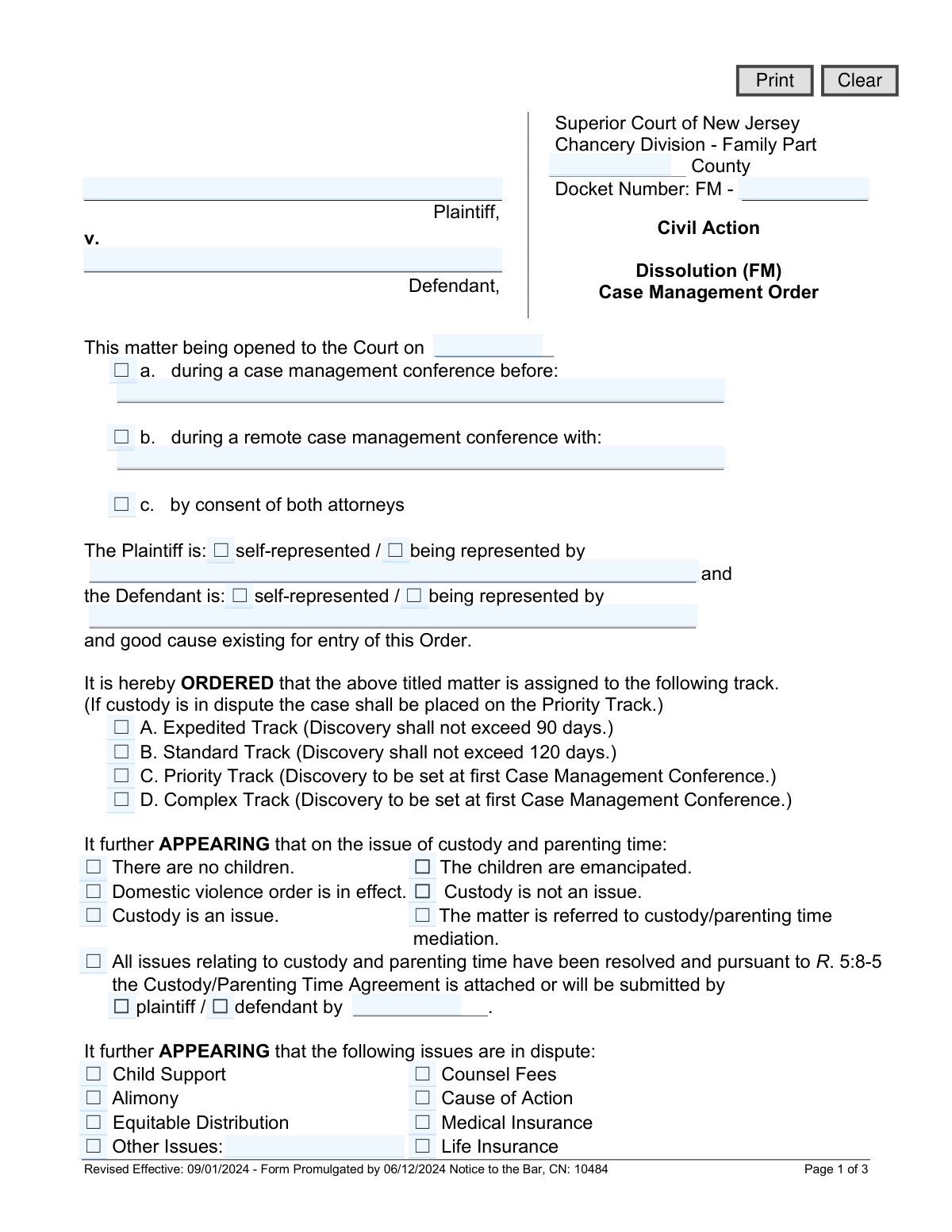
What this form asks for
The AI fills all of it, from your answers or your documents.
The AI checks your answers before you download
14 checks built for this form, so a wrong date or a missing answer is caught before anyone else sees it.
Checks that the Docket Number (caseDocket) is present and follows the required court format, typically 'FM -' followed by numbers. This ensures the order can be correctly filed and associated with the unique case record in the court's system. A malformed docket number would lead to filing rejection or misidentification of the case.
Verifies that the Plaintiff Name (plaNameFull) and Defendant Name (defNameFull) fields are not empty. These names are the primary identifiers for the parties involved in the legal action. An order lacking these fundamental details is legally incomplete and unenforceable.
This validation checks that if 'Custody is an issue' is selected, the case track is set to 'C. Priority Track'. This is a mandatory rule stated directly on the form to ensure cases involving children's welfare are handled with the appropriate urgency and resources. If another track is selected in this scenario, the filing may be rejected or require correction.
Checks that if a party is marked as 'being represented by', the corresponding attorney name field (plaRep or defRep) is filled. Conversely, if 'self-represented' is checked, the attorney name and contact information fields should be empty. This ensures clarity on legal representation and that all necessary parties and their contact details are correctly recorded.
Verifies that if the 'Other Issues' checkbox is selected in the 'issues are in dispute' section, the corresponding text field (othIssues) is not empty. This prevents ambiguity by ensuring that any additional disputed matters are clearly defined on the order. An empty field would leave the scope of the dispute unclear and potentially lead to future conflicts.
This validation confirms that exactly one track (Expedited, Standard, Priority, or Complex) is selected. The case must be assigned to a single, unambiguous discovery track to properly manage its progression and deadlines. Selecting multiple or no tracks would create confusion and halt case processing until clarified.
And 8 more checks
- Validates Task Assignment with Deadline
- Requires Submission Date for Resolved Custody Agreement
- Verifies Judge's Signature and Date
- Validates Attorney Email Address Format
- Ensures County is Specified
- Validates All Date Fields for Correct Format and Plausibility
- Validates Completeness of Early Settlement Panel Schedule
- Ensures Exclusive Expert Selection for Appraisals
Let AI fill out your Dissolution (FM) Case Management Order
No typing. Every field filled in seconds, checked, ready to sign.
How to Fill Out Dissolution (FM) Case Management Order Online for Free in 2026
What the AI walks you through.
- Navigate to Instafill.ai and upload the Dissolution (FM) Case Management Order or select it from the available templates.
- Enter the case information at the top, including the county, docket number, and the names of the plaintiff and defendant.
- Indicate how the order was opened (e.g., during a conference, by consent) and specify the representation status for both parties.
- Select the appropriate discovery track (Expedited, Standard, Priority, or Complex) and check the boxes for all issues in dispute, such as alimony, child support, and equitable distribution.
- Input the specific deadlines for filing Case Information Statements (CIS), exchanging interrogatories, completing depositions, and submitting various appraisals.
- Fill in the scheduled dates and times for the Early Settlement Panel and any future Case Management Conferences, along with the name of the assigned judge.
- Review all the information for accuracy, then download the completed order to be signed and filed with the court.
Common Mistakes in Completing Dissolution (FM) Case Management Order
The ones the AI is built to catch.
Mismatched Case Track and Custody Status
Incorrect or Incomplete Docket Number
Ambiguous Discovery Responsibilities
Missing or Illogical Discovery Deadlines
Incomplete Information in the Appraisals Table
Contradictory Selections Regarding Children
Omitting Key Scheduling and Assignment Information
Incomplete Attorney or Pro Se Contact Information
Failing to Specify Custody Agreement Submission Details
Frequently Asked Questions About Dissolution (FM) Case Management Order
Is it really free for 7 days?
Can I fill other forms too?
How do I cancel?
How does the AI fill out Dissolution (FM) Case Management Order?
What happens to my information?
How complex is Dissolution (FM) Case Management Order to fill out?
What is the Dissolution (FM) Case Management Order form?
Who fills out this form?
What does it mean that my case is assigned to a 'track'?
My spouse and I disagree on custody. How does this order address that?
What is a Case Information Statement (CIS) and why is there a deadline for it?
What are 'Interrogatories' and 'Depositions' mentioned in the order?
What is the 'Early Settlement Panel' scheduled in this order?
Why does the form have a section for appraisals?
Do I need to sign this Case Management Order?
What happens if I miss a deadline listed in this order?
Can AI tools help me with the documents required by this order?
How can I use Instafill.ai to fill out forms related to my case?
What if a PDF form I need to fill out for my case is not fillable?
Get your Dissolution (FM) Case Management Order filled out by AI
$0 today. Cancel before Nov 6 and you pay nothing.
Other forms like this one
superior court forms: FW-003, Order on Court Fee Waiver (Superior Court), FW-003, Order on Court Fee Waiver (Superior Court), Form FW-003, Order on Court Fee Waiver (Superior Court), Declaration of Facts of Death (California Superior Court), Form FW-003-GC, Order on Court Fee Waiver (Superior Court) (Ward or Conservatee), Superior Court of Chatham County, Georgia, Hearing Request Form, Form FW-006, Request for Hearing About Court Fee Waiver Order (Superior Court), Form FW-002, Request to Waive Additional Court Fees (Superior Court), Form FW-008, Order on Court Fee Waiver After Hearing (Superior Court), Form FW-002-GC, Request to Waive Additional Court Fees (Superior Court) (Ward or Conservatee), Form REC-001(N), Notice of Intent to Destroy Superior Court Records; Offer to Transfer Possession, Form REC-001(R), Request for Transfer or Extension of Time for Retention of Superior Court Records, Notice of Hearing on Request for Transfer or Extension of Time for Retention of Superior Court Records; Court Order; Release and Receipt of Superior Court Records, Form REC-002(R), Release and Receipt of Superior Court Records, Superior Court of New Jersey, Application for Appeal and Order, New Jersey Judiciary – Superior Court, Appellate Division Application for Permission to File Emergent Motion, New Jersey Judiciary Superior Court - Appellate Division Civil Case Information Statement, New Jersey Judiciary Superior Court - Appellate Division Criminal Case Information Statement, New Jersey Judiciary Superior Court - Appellate Division Notice of Appeal (CN: 10502), Affidavit of Service (Superior Court of New Jersey)
New Jersey forms: State of New Jersey Alternate Benefit Program Withdrawal Request Acknowledgement Receipt, Horizon Blue Cross Blue Shield of New Jersey Applied Behavior Analysis Supplemental Information Form, State of New Jersey Application for Employment (Form DPF-663), New Jersey Judiciary Plea Form (Plea 01), Supplemental Plea Form for Certain Sexual Offenses: Megan’s Law/Parole Supervision for Life/Community Supervision for Life (Plea 05), Financial Questionnaire to Establish Indigency, New Jersey Judiciary Resource Family Information Form, Foreclosure Case Information Statement (FCIS) - Appendix XII-B2, New Jersey Judiciary Records Request Form, Superior Court of New Jersey, Application for Appeal and Order, FL Certification of Requested Background Checks for Kinship Legal Guardianship, Certification of Caregiver as to Knowledge of Identity and/or Location of Parents, FL Order Judgment for Kinship Legal Guardianship, New Jersey Judiciary Certification of Repair and Plea of Guilty, Uniform Summary Support Order (USSO), New Jersey Judiciary Volunteer Application (CN 10293), Application to Take the New Jersey Court Interpreter Oral Examination, New Jersey Judiciary Attorney Fee Arbitration Request, Order to Show Cause with Temporary Restraints Pursuant to Rule 4:52, Tax Court of New Jersey, State Tax Complaint
Let AI fill out your Dissolution (FM) Case Management Order
Your trial starts once a card is added. You pay nothing before Nov 6.
Our AI already knows this form, all 142 fields of it. Skip the typing: tell it about yourself, or upload what you have, and it fills the whole form in seconds.
- AI fills every field on all 3 pages, checkboxes included
- No typing into boxes: answer a few questions, or upload a document you already have, an old copy of this form, a photo of a document
- The AI checks the answers; you review and change anything before you download
- Download the finished PDF, print it, or sign it online
- Encrypted, and never used to train AI
Cancel before Nov 6 and you pay nothing.
A card is needed to start the trial. Cancel in two clicks from your account.
Terms · Privacy