Yes! You can use AI to fill out Form REC-001(N), Notice of Intent to Destroy Superior Court Records; Offer to Transfer Possession

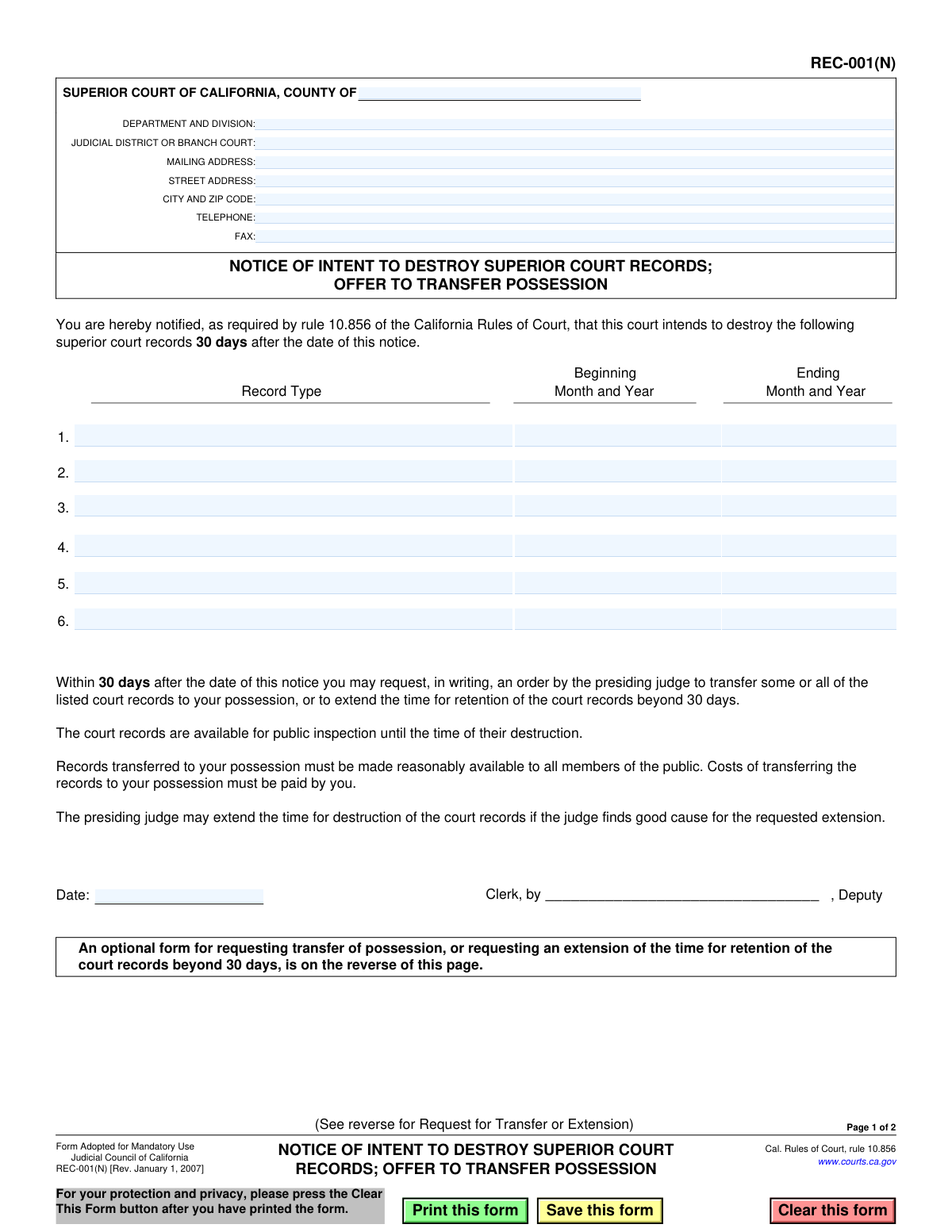
Form REC-001(N), Notice of Intent to Destroy Superior Court Records; Offer to Transfer Possession, is a legal document used by California Superior Courts to comply with rule 10.856. It serves as a public notice that specified court records will be destroyed, providing a 30-day window for entities to request the transfer of these records or an extension for their retention. Today, this form can be filled out quickly and accurately using AI-powered services like Instafill.ai, which can also convert non-fillable PDF versions into interactive fillable forms.
REC-001(N) is part of the California court forms and superior court forms categories on Instafill.
Our AI automatically handles information lookup, data retrieval, formatting, and form filling.
It takes less than a minute to fill out REC-001(N) using our AI form filling.
Securely upload your data. Information is encrypted in transit and deleted immediately after the form is filled out.

Form specifications

Form name: Form REC-001(N), Notice of Intent to Destroy Superior Court Records; Offer to Transfer Possession
Number of fields: 32
Number of pages: 1
Language: English
main-image

Instafill Demo: How to fill out PDF forms in seconds with AI

How to Fill Out REC-001(N) Online for Free in 2026

Are you looking to fill out a REC-001(N) form online quickly and accurately? Instafill.ai offers the #1 AI-powered PDF filling software of 2026, allowing you to complete your REC-001(N) form in just 37 seconds or less.
Follow these steps to fill out your REC-001(N) form online using Instafill.ai:
  1. 1 Navigate to Instafill.ai and upload Form REC-001(N) or select it from the template library.
  2. 2 Use the AI assistant to populate the Superior Court's name, county, address, and contact information in the header.
  3. 3 In the main table, list each category of records scheduled for destruction, specifying the 'Record Type', 'Beginning Month and Year', and 'Ending Month and Year'.
  4. 4 Enter the date the notice is being issued. The form will be signed by the Clerk or a deputy.
  5. 5 Carefully review all entered information, especially the record types and date ranges, to ensure complete accuracy.
  6. 6 Download the completed form for printing, signing, and posting as required by the California Rules of Court to provide public notice.

Our AI-powered system ensures each field is filled out correctly, reducing errors and saving you time.

Why Choose Instafill.ai for Your Fillable REC-001(N) Form?

Speed

Complete your REC-001(N) in as little as 37 seconds.

Up-to-Date

Always use the latest 2026 REC-001(N) form version.

Cost-effective

No need to hire expensive lawyers.

Accuracy

Our AI performs 10 compliance checks to ensure your form is error-free.

Security

Your personal information is protected with bank-level encryption.

Frequently Asked Questions About Form REC-001(N)

This form is a public notice from a California Superior Court announcing its plan to destroy specific, older court records. It also serves as an official offer to transfer possession of these records to an interested party before they are destroyed.

The Superior Court Clerk prepares and issues this notice to the public. If you wish to save the records, you would fill out the corresponding request form, which is often on the reverse side of this notice.

This notice informs you that certain court records will be destroyed. If you have an interest in preserving these records, you have the opportunity to request possession of them or ask the court to hold them for a longer period.

You must submit a written request to the court within 30 days of the date printed on the notice. After 30 days, the court can legally destroy the records.

You must submit a written request for an order from the presiding judge to transfer the records to you. You can use the optional 'Request for Transfer or Extension' form, usually found on the back of the notice, to make your request.

Yes, if your request to take possession of the records is approved, you are responsible for paying all costs associated with transferring them.

If you acquire the records, you are required to make them reasonably available to all members of the public for inspection.

Yes, you can request an extension of the retention period by writing to the presiding judge. However, the extension will only be granted if the judge finds you have provided 'good cause' for the request.

The notice contains a table listing the 'Record Type' and the date range (beginning and ending month and year) of the files scheduled for destruction.

If no one submits a request for transfer or extension within the 30-day window, the court will proceed with destroying the records as planned.

Yes, services like Instafill.ai use AI to help you accurately complete the 'Request for Transfer or Extension' form. These tools can auto-fill your information and ensure all necessary fields are filled out, saving time and reducing errors.

You can upload the REC-001(N) PDF to the Instafill.ai platform. The service will make the request form interactive, allowing you to type your information directly into the fields before downloading or printing the completed document.

If the form is a flat, non-fillable PDF, you can use a tool like Instafill.ai. It can convert the document into an interactive, fillable form online, so you can easily type in your information.

Compliance REC-001(N)
Validation Checks by Instafill.ai

1
Ensures County Name is Provided
This check verifies that the 'SUPERIOR COURT OF CALIFORNIA, COUNTY OF' field (CrtCounty) is not empty. The county is a critical piece of information that identifies the jurisdiction of the court issuing the notice. A submission without a county name is ambiguous and cannot be correctly processed or filed, leading to rejection.
2
Validates County Name
This check ensures the value entered in the 'COUNTY OF' field (CrtCounty) corresponds to one of the 58 official counties in California. Using a predefined list of valid counties prevents misspellings and ensures the notice is attributed to a legitimate court jurisdiction. An invalid county name would render the legal notice void.
3
Requires at Least One Record for Destruction
This validation ensures that at least one row in the record destruction table is completely filled out. A notice of intent to destroy records is meaningless if it does not specify any records. The form should be rejected if no records are listed, as its primary purpose is unfulfilled.
4
Validates Signature Date Presence
This check confirms that the 'Date' field (SigDate) in the signature block is filled. The date is legally significant as it marks the beginning of the 30-day period for public inspection and transfer requests. A missing date makes the notice invalid as the timeline for action cannot be determined.
5
Validates Signature Date Format and Plausibility
This check ensures the 'Date' field (SigDate) is a valid calendar date (e.g., MM/DD/YYYY) and is not a future date. A notice cannot be post-dated, as the 30-day response period begins from the date of notice. An invalid or future date would cause confusion and legal challenges, leading to form rejection.
6
Validates Record Date Range Format
This check verifies that the 'Beginning Month and Year' and 'Ending Month and Year' fields in the record table are entered in a consistent and valid format, such as 'Month YYYY' or 'MM/YYYY'. This ensures clarity and proper interpretation of the time period for the records being destroyed. Inconsistent or invalid formats would make the record identification ambiguous.
7
Ensures Logical Chronology of Record Dates
This validation confirms that for each listed record, the 'Ending Month and Year' is the same as or later than the 'Beginning Month and Year'. It is logically impossible for a record set's end date to precede its start date. An illogical date range would indicate a data entry error and must be corrected before acceptance.
8
Ensures Completeness of Record Rows
This check ensures that if any field in a given row of the record table is filled (Record Type, Beginning Date, or Ending Date), then all three fields in that same row must be filled. A partially completed row is ambiguous and does not provide the complete information required by law. The submission should be flagged for correction if any row is incomplete.
9
Validates Court Telephone Number Format
This check verifies that the 'TELEPHONE' field (Phone) follows a standard U.S. phone number format (e.g., (XXX) XXX-XXXX or XXX-XXX-XXXX). A valid phone number is necessary for the public to contact the court with inquiries. An improperly formatted number could prevent communication and should trigger a warning or error.
10
Validates Court Fax Number Format
This check verifies that the 'FAX' field (Fax) follows a standard U.S. phone number format. While less common, a valid fax number may be required for official correspondence or requests. An invalid format could lead to failed transmissions and should be flagged for review.
11
Ensures Court Address is Provided
This validation ensures the 'STREET ADDRESS' and 'CITY AND ZIP CODE' fields are completed. This physical address is where the public can inspect the records before their destruction, as stated in the notice. A missing address prevents the public from exercising their right to inspection, making the notice deficient.
12
Validates ZIP Code Format
This check ensures the ZIP code provided in the 'CITY AND ZIP CODE' field is a valid 5-digit or 9-digit (ZIP+4) format. A correct ZIP code is essential for any mail correspondence with the court and for accurately identifying the court's location. An invalid ZIP code can cause delivery failures and indicates a potential error in the address.
13
Ensures Record Type is Specified
This validation confirms that the 'Record Type' field is not empty for any row where dates have been entered. Simply providing a date range without describing the type of records (e.g., 'Civil Case Files', 'Small Claims Records') is insufficient. The notice must clearly state what is being destroyed to be legally compliant.

Common Mistakes in Completing REC-001(N)

Incorrect or Incomplete Court Identification

Users often enter a generic court name, like 'Superior Court,' instead of the full, official name including the specific county and branch as required. This mistake happens due to haste or not knowing the exact designation. An incorrect identifier can lead to the notice being invalid or misfiled, causing confusion for the public and legal entities trying to locate the records or the court itself. To avoid this, always use the full official name found on the court's website, such as 'SUPERIOR COURT OF CALIFORNIA, COUNTY OF LOS ANGELES'.

Confusing Court Department and Judicial District

The form has separate fields for 'DEPARTMENT AND DIVISION' and 'JUDICIAL DISTRICT OR BRANCH COURT.' Users may confuse these, enter the same information in both, or leave one blank. The department/division is for internal routing (e.g., 'Civil Division'), while the district/branch is the physical court location. Incorrectly filling these fields can cause confusion for the public and misdirection of any written responses. It's crucial to accurately identify both the specific internal division and the correct external branch court name.

Vague or Ambiguous Record Type Description

In the 'Record Type' column, court staff may enter overly broad terms like 'Case Files' or 'Records' instead of the specific type required by the retention schedule (e.g., 'Civil Limited Case Files,' 'Small Claims Records'). This ambiguity prevents interested parties, like historical societies or researchers, from knowing if the records are relevant to them, defeating the purpose of the notice. To prevent this, consult the official record retention schedule and use the precise, official classification for each record series being destroyed.

Inconsistent Date Formatting for Record Ranges

The form asks for 'Month and Year,' but users often enter dates in various inconsistent formats like '01/10,' 'Jan '10,' or just the year '2010.' This lack of standardization can create ambiguity about the exact period the records cover, leading to potential confusion and legal challenges to the destruction notice. Always use a full, unambiguous format like 'January 2010' consistently across all entries to ensure clarity. AI-powered form filling tools like Instafill.ai can help by standardizing date formats automatically.

Entering Illogical 'Beginning' and 'Ending' Dates

A common data entry error is to accidentally input a 'Beginning' date that is chronologically later than the 'Ending' date for a record set. This simple mistake, often caused by typos or copy-paste errors, renders the notice for that record set nonsensical and invalid. It requires careful proofreading to catch. To avoid this, double-check that the start date for each record series is before its end date. AI-powered form filling tools like Instafill.ai can be configured with validation rules to automatically flag such logical inconsistencies before submission.

Incomplete Record Destruction Entries

Users sometimes fail to fill out all three columns (Record Type, Beginning Date, Ending Date) for a given row, leaving one or more fields blank. This often happens when dealing with a large list of records. An incomplete entry is invalid and fails to provide proper notice for that record set, potentially halting its destruction and requiring a new, corrected notice to be issued. Ensure every row that describes a record set is fully completed with all required information.

Missing or Incorrect Signature Date

The date next to the clerk's signature is critically important as it starts the 30-day clock for public response. Forgetting to fill in this date or entering an incorrect one (e.g., a future date) invalidates the notice period. This can lead to legal challenges and require the entire notification process to be restarted. Always enter the exact date the notice is being signed and issued to ensure the 30-day window is clear and legally sound.

Failure to Obtain Authorized Signature

The form requires a signature by the 'Clerk, by ______, Deputy.' A notice that is unsigned, or signed by an unauthorized individual, is legally void. This oversight can happen in a busy office environment where paperwork is processed in batches. An invalid signature means the court has not officially issued the notice, and any subsequent destruction of records could be deemed improper. Always ensure the form is reviewed and signed by a duly authorized deputy clerk before it is posted or distributed.

Using an Obsolete Form Version

This form is marked '[Rev. January 1, 2007]'. Courts periodically update their forms to comply with new rules or laws. Using an outdated version, even if it looks similar, can lead to rejection because it may lack required fields or reference obsolete rules. This can cause significant delays. Always check the court's official website for the latest version of any form before use to ensure compliance.

Manual Data Entry Errors on a Flat PDF

Often, court forms are only available as non-fillable 'flat' PDFs, forcing staff to print and fill them out by hand or use clunky PDF editors. This process is prone to typos, illegible handwriting, and formatting errors, such as text not fitting in the designated boxes. These errors can make the notice look unprofessional and may render parts of it legally ambiguous. To avoid this, tools like Instafill.ai can convert non-fillable PDFs into interactive, fillable forms, enabling clean, typed entries and reducing the risk of manual data entry mistakes.
Saved over 80 hours a year

“I was never sure if my IRS forms like W-9 were filled correctly. Now, I can complete the forms accurately without any external help.”

Kevin Martin Green

Your data stays secure with advanced protection from Instafill and our subprocessors

Robust compliance program

Transparent business model

You’re not the product. You always know where your data is and what it is processed for.

ISO 27001, HIPAA, and GDPR

Our subprocesses adhere to multiple compliance standards, including but not limited to ISO 27001, HIPAA, and GDPR.

Security & privacy by design

We consider security and privacy from the initial design phase of any new service or functionality. It’s not an afterthought, it’s built-in, including support for two-factor authentication (2FA) to further protect your account.

Fill out REC-001(N) with Instafill.ai

Worried about filling PDFs wrong? Instafill securely fills form-rec-001n-notice-of-intent-to-destroy-superior-court-records-offer-to-transfer-possession forms, ensuring each field is accurate.

Related forms by category

California court forms Judicial Council of California Form SC-105, Request for Court Order and Answer (Small Claims), Judicial Council of California Form SC-120, Defendant’s Claim and ORDER to Go to Small Claims Court (Small Claims), Judicial Council of California Form SER-001, Request for Sheriff to Serve Court Papers, Judicial Council of California Form SER-001, Request for Sheriff to Serve Court Papers, Affidavit for Collection of Personal Property California Probate Code Section 13100, Form POS-040, Proof of Service—Civil, Declaration of Facts of Death (California Superior Court), declaration-of-marriage-for-court-proceeding-california-family-law, ADOPT-200, Adoption Request, ADOPT-200, Stepparent Adoption Request, ADOPT-210, Adoption Agreement, ADOPT-310, Contact After Adoption Agreement, Judicial Council of California Form ADOPT-200, Adoption Request, Form ADR-107, Mediation Attendance Sheet, Form ADR-110, Order Appointing Referee, Form ADR-109, Stipulation or Motion for Order Appointing Referee, Form ADR-102, Request for Trial De Novo After Judicial Arbitration, Form ADR-108, Referee's Report (Code Civ. Proc., §§ 638, 639), Form ADR-106, Petition to Confirm, Correct, or Vacate Contractual Arbitration Award, Form ADR-104, Rejection of Award and Request for Trial After Attorney-Client Fee Arbitration · + 557 more →
superior court forms FW-003, Order on Court Fee Waiver (Superior Court), FW-003, Order on Court Fee Waiver (Superior Court), Form FW-003, Order on Court Fee Waiver (Superior Court), Declaration of Facts of Death (California Superior Court), Form FW-003-GC, Order on Court Fee Waiver (Superior Court) (Ward or Conservatee), Superior Court of Chatham County, Georgia, Hearing Request Form, Form FW-006, Request for Hearing About Court Fee Waiver Order (Superior Court), Form FW-002, Request to Waive Additional Court Fees (Superior Court), Form FW-008, Order on Court Fee Waiver After Hearing (Superior Court), Form FW-002-GC, Request to Waive Additional Court Fees (Superior Court) (Ward or Conservatee), Form REC-001(R), Request for Transfer or Extension of Time for Retention of Superior Court Records, Notice of Hearing on Request for Transfer or Extension of Time for Retention of Superior Court Records; Court Order; Release and Receipt of Superior Court Records, Form REC-002(R), Release and Receipt of Superior Court Records