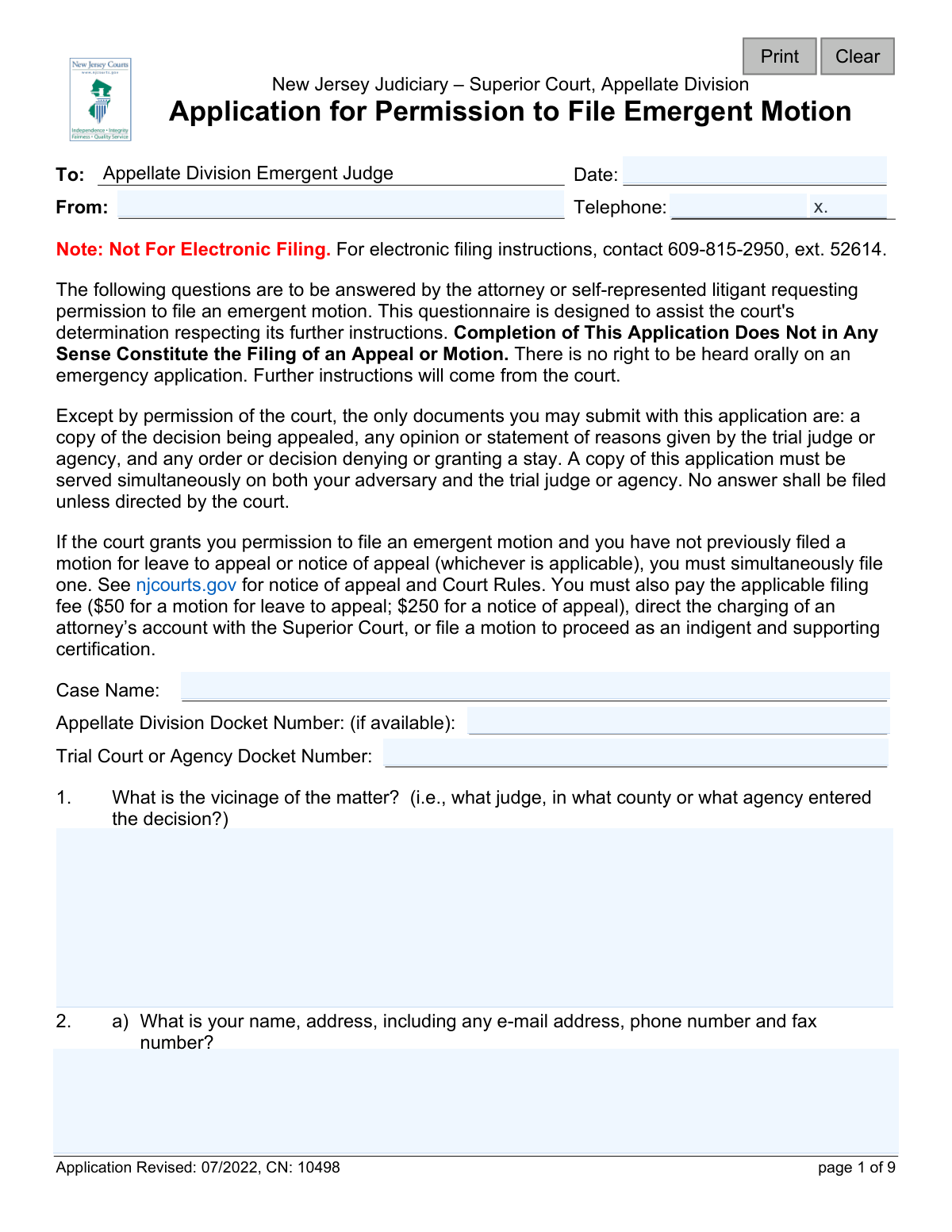
Yes! You can use AI to fill out New Jersey Judiciary – Superior Court, Appellate Division Application for Permission to File Emergent Motion
This form is a required application submitted to the New Jersey Superior Court, Appellate Division, to ask for permission to file a motion on an emergency basis. It requires the applicant to detail the nature of the emergency, the potential for irreparable harm, and the specific relief sought to help the court determine if the matter warrants expedited handling. Today, this form can be filled out quickly and accurately using AI-powered services like Instafill.ai, which can also convert non-fillable PDF versions into interactive fillable forms.
Our AI automatically handles information lookup, data retrieval, formatting, and form filling.
It takes less than a minute to fill out CN: 10498 using our AI form filling.
Securely upload your data. Information is encrypted in transit and deleted immediately after the form is filled out.
Form specifications
| Form name: | New Jersey Judiciary – Superior Court, Appellate Division Application for Permission to File Emergent Motion |
| Number of fields: | 43 |
| Number of pages: | 1 |
| Language: | English |
Instafill Demo: How to fill out PDF forms in seconds with AI
How to Fill Out CN: 10498 Online for Free in 2026
Are you looking to fill out a CN: 10498 form online quickly and accurately? Instafill.ai offers the #1 AI-powered PDF filling software of 2026, allowing you to complete your CN: 10498 form in just 37 seconds or less.
Follow these steps to fill out your CN: 10498 form online using Instafill.ai:
- 1 Navigate to Instafill.ai and upload or select the 'Application for Permission to File Emergent Motion' form.
- 2 Use the AI to automatically populate your personal details, case name, and relevant docket numbers from your records.
- 3 Clearly answer the questionnaire, providing detailed explanations for the nature of the emergency, the expected irreparable harm, and the specific relief you are seeking.
- 4 Indicate whether you have previously requested a stay from the trial court or agency and attach copies of any relevant orders or decisions as required.
- 5 Provide details on how and when you served the application to your adversary and the trial judge or agency.
- 6 Carefully review all auto-filled and manually entered information for completeness and accuracy, then certify the application with your signature and the date.
- 7 Download the completed form and submit it according to the court's instructions, noting that it is generally not for electronic filing without specific permission.
Our AI-powered system ensures each field is filled out correctly, reducing errors and saving you time.
Why Choose Instafill.ai for Your Fillable CN: 10498 Form?
Speed
Complete your CN: 10498 in as little as 37 seconds.
Up-to-Date
Always use the latest 2026 CN: 10498 form version.
Cost-effective
No need to hire expensive lawyers.
Accuracy
Our AI performs 10 compliance checks to ensure your form is error-free.
Security
Your personal information is protected with bank-level encryption.
Frequently Asked Questions About Form CN: 10498
This form is used to ask the New Jersey Superior Court, Appellate Division, for permission to file a motion on an emergency basis. It is for situations that require immediate court action to prevent irreparable harm.
No, completing this application is only a request for permission to file an emergent motion. It does not constitute the filing of an appeal or motion, and you must wait for further instructions from the court.
This form must be completed by an attorney or a self-represented litigant who needs to seek immediate relief from the Appellate Division to prevent a serious and irreversible injury.
You must attach a copy of the court order or agency decision you are appealing, any written opinion or reasons provided, and any decision on a prior request for a stay. No other documents should be submitted unless the court permits it.
The form states it is 'Not For Electronic Filing' and directs you to call for e-filing instructions. You must also serve a copy of the completed application on your adversary and the trial judge or agency at the same time you submit it.
Yes, before seeking a stay from the Appellate Division, you must first apply to the trial court or agency for a stay. You must attach the resulting order or decision to this application.
If permission is granted, you will receive an order with specific instructions on when and how to file your emergent motion papers. You will also need to file a notice of appeal or motion for leave to appeal and pay the required fees if you haven't already.
An order is interlocutory if there are still unresolved claims in the case at the trial level. If the order is interlocutory, you must file a motion for leave to appeal rather than a notice of appeal.
In this section, you must describe the specific, serious harm that will occur if the court does not intervene immediately. You must also state when you expect this harm to happen.
If there was a delay between the trial court's decision and your filing of this application, you must provide a clear explanation for the reasons for that delay in question 9.
Yes, services like Instafill.ai use AI to accurately auto-fill form fields with your information, which can save time and reduce errors. This is helpful for inputting case details, party information, and other repetitive data.
You can upload the PDF of the application to the Instafill.ai platform. Their service will make the form fillable online, allowing you to type your answers, add your signature, and download the completed document.
If you have a non-fillable or 'flat' PDF, you can use a service like Instafill.ai. It can convert the document into an interactive, fillable form that you can easily complete on your computer.
If your application is denied, the court will provide a reason, such as the absence of irreparable injury or a self-created emergency. You may still be permitted to file a motion in the ordinary course.
Compliance CN: 10498
Validation Checks by Instafill.ai
1
Application Date Format and Presence
This check ensures the 'Date' field at the top of the application is not empty and is entered in a valid date format (e.g., MM/DD/YYYY). This date is crucial for establishing the timeline of the emergent request and for the court's record-keeping. An invalid or missing date would render the application's timing ambiguous and could lead to its rejection.
2
Applicant Contact Information Completeness
Verifies that the applicant's name, address, e-mail address, and phone number are all provided in response to question 2a. This information is absolutely essential for the court to communicate instructions, scheduling updates, and the final disposition of the application. An application with incomplete contact details cannot be processed, as it would prevent necessary communication between the court and the filer.
3
Phone and Email Format Validation
This validation inspects the phone number and email address fields in question 2a to ensure they conform to standard formats (e.g., a 10-digit phone number and an email like '[email protected]'). Correct formatting is critical for automated systems and staff to successfully contact the applicant. Failed validation would prevent submission until the formats are corrected, avoiding communication errors.
4
Docket Number Presence and Format
Ensures the 'Trial Court or Agency Docket Number' is present, as it is a primary identifier for the case. It also checks that if the 'Appellate Division Docket Number' is provided, it conforms to the expected format. Accurate docket numbers are essential for the clerk's office to correctly file the application and associate it with the proper case record, and failure to provide them will halt processing.
5
Mandatory Narrative Field Completion
Validates that the text fields for question 4 ('nature of the emergency'), question 5 ('irreparable harm'), and question 6 ('relief sought') contain text and are not empty. These narratives form the entire basis for the emergent request, and their absence makes it impossible for a judge to evaluate the application's urgency or merit. The form would be rejected as incomplete if these fields are blank.
6
Attachment Verification for Appealed Decision
This check confirms that a file has been attached corresponding to the written order, judgment, or decision mentioned in question 7. The form explicitly states a copy must be attached, as it is the subject of the appeal and provides essential context for the judge. An application submitted without this core document is procedurally deficient and cannot be reviewed.
7
Conditional Logic for Prior Stay Application
This validation enforces the rule in question 8. If the applicant answers 'Yes' to 8a (confirming a stay was sought), they must then answer 8b. If 8b indicates an order was issued, the system must verify that a corresponding document is attached. This logic ensures compliance with the procedural requirement to seek relief from the trial court before approaching the Appellate Division.
8
Interlocutory vs. Final Order Procedural Path
This check enforces conditional logic based on the answer to question 10. If 'Yes' (the order is interlocutory), question 11 ('are you filing a motion for leave to appeal?') must be answered. If 'No' (the order is final), question 13 ('have you filed a notice of appeal?') must be answered. This validation ensures the applicant declares they are following the correct procedural path for their specific type of appeal.
9
Service of Application Confirmation
Validates that if the applicant answers 'Yes' to question 16a ('Have you served simultaneously a copy of this application...'), then the 'method of service' in 16b must be specified. Simultaneous service is a mandatory procedural step, so a 'No' answer to 16a or a blank field in 16b would indicate a failure to comply with court rules, likely resulting in the application's denial.
10
Conditional Requirement for Transcript Availability
Ensures that if the applicant answers 'Yes' to question 17a ('Have any transcripts been ordered?'), then the availability date or timeframe in 17b must be filled in. This information is critical for the court to manage its calendar and understand when the complete record will be available for review. Omitting this detail creates uncertainty and can delay the processing of the motion.
11
Signature Block Completion
Confirms that the signature date, printed name, and a signature are all provided in the certification section. The signature legally certifies the truthfulness and good faith of the application. An unsigned or undated application lacks legal validity and will be rejected immediately by the court.
12
Logical Check for Delay Explanation
This validation cross-references answers to questions 8a and 9. If the applicant did not seek a stay from the trial court (answered 'No' to 8a), the system checks that a compelling explanation for this omission is provided in question 9. Since seeking a stay below is a prerequisite, failing to do so without explanation is a significant procedural flaw that must be flagged.
Common Mistakes in Completing CN: 10498
Applicants often fail to specifically articulate the severe, irreversible harm that will occur without immediate court intervention, which is the core legal standard for emergent relief. Vague statements like 'the ruling is unfair' are insufficient and lead to an automatic denial, as confirmed by the 'Disposition - Denied' section of the form. To avoid this, you must precisely describe the nature of the harm, explain why it cannot be remedied later through the normal course of litigation, and state exactly when it is expected to occur.
Court rules mandate that an applicant must first request a stay from the trial court or agency that issued the order before seeking relief from the Appellate Division. Many filers skip this critical step, as noted in question 8, leading to an immediate procedural denial of their emergent application. To prevent this, always file for a stay in the lower court first and attach a copy of the signed order or other evidence of the ruling on that stay application.
Applicants sometimes wait too long after an adverse ruling to file this application, creating an emergency through their own inaction. The court views this as a 'self-generated' emergency and will deny the application, as it is unfair to the opposing party who is left with little time to respond. If a delay is unavoidable, you must provide a compelling explanation in question 9; otherwise, act immediately to avoid having your application rejected for untimeliness.
A frequent misunderstanding is believing this application *is* the emergent motion itself. The form is only a request for *permission* to file a motion, and its completion does not constitute the filing of an appeal or motion. This error causes filers to fail to prepare and submit the actual motion and notice of appeal upon receiving permission, rendering the entire process moot. Carefully read the instructions and be prepared to file all necessary subsequent documents immediately if permission is granted.
The application explicitly requires attaching a copy of the decision being appealed and any order related to a stay application (see questions 7 and 8). Applicants often forget to include these crucial documents, leaving the judge with no context to evaluate the merits of the emergency request. An application submitted without the required attachments is incomplete and will be denied. Always create a checklist and double-check that all required documents are included before submission.
Applicants frequently misclassify the order they are appealing as either final (ending the case) or interlocutory (a mid-case ruling), as addressed in questions 10-13. This mistake leads to filing the wrong subsequent documents—for example, a Notice of Appeal when a Motion for Leave to Appeal is required. Such a procedural error can be fatal to the appeal. Carefully review court rules to correctly classify the order before completing the application.
Questions 2 and 3 require complete contact details for all parties, including email, phone, and fax numbers. In an emergent situation, the court needs to communicate instructions rapidly, and missing or inaccurate information can cause critical delays or prevent contact altogether. This jeopardizes the application and can frustrate the court. AI-powered form filling tools like Instafill.ai can help prevent this by auto-populating saved contact information and flagging incomplete fields.
The form requires simultaneous service on both the opposing party ('adversary') and the trial judge or agency that issued the decision. A common oversight is forgetting to serve the trial judge, or failing to properly document the method of service in question 16. Improper service is a procedural defect that can lead to the rejection of the application. Always confirm that all parties have been served correctly and keep a record of how and when it was done.
In question 6, 'What relief do you seek?', applicants often provide generic answers like 'to reverse the order' instead of a specific, actionable request. The judge needs to know precisely what the applicant wants the court to do, such as 'a temporary stay of the eviction scheduled for [Date] pending the outcome of the appeal.' A vague request is unhelpful and suggests a lack of a clear legal strategy, making it less likely for the judge to grant meaningful relief.
The form states 'Not For Electronic Filing' on the first page, which can cause confusion as court procedures increasingly move online. Applicants may incorrectly try to email the application or file it through the wrong system, leading to it not being seen by the emergent judge in time. It is critical to follow the instructions precisely, which may involve hand-delivery or calling for specific instructions. Since this form is a non-fillable PDF, tools like Instafill.ai can convert it into an easily fillable version to ensure it is completed neatly and accurately before being printed for proper submission.
Saved over 80 hours a year
“I was never sure if my IRS forms like W-9 were filled correctly. Now, I can complete the forms accurately without any external help.”
Kevin Martin Green
Your data stays secure with advanced protection from Instafill and our subprocessors

Robust compliance program
Transparent business model
You’re not the product. You always know where your data is and what it is processed for.
ISO 27001, HIPAA, and GDPR
Our subprocesses adhere to multiple compliance standards, including but not limited to ISO 27001, HIPAA, and GDPR.
Security & privacy by design
We consider security and privacy from the initial design phase of any new service or functionality. It’s not an afterthought, it’s built-in, including support for two-factor authentication (2FA) to further protect your account.
Fill out CN: 10498 with Instafill.ai
Worried about filling PDFs wrong? Instafill securely fills new-jersey-judiciary-superior-court-appellate-division-application-for-permission-to-file-emergent-motion forms, ensuring each field is accurate.