Yes! You can use AI to fill out Form FW-008, Order on Court Fee Waiver After Hearing (Superior Court)

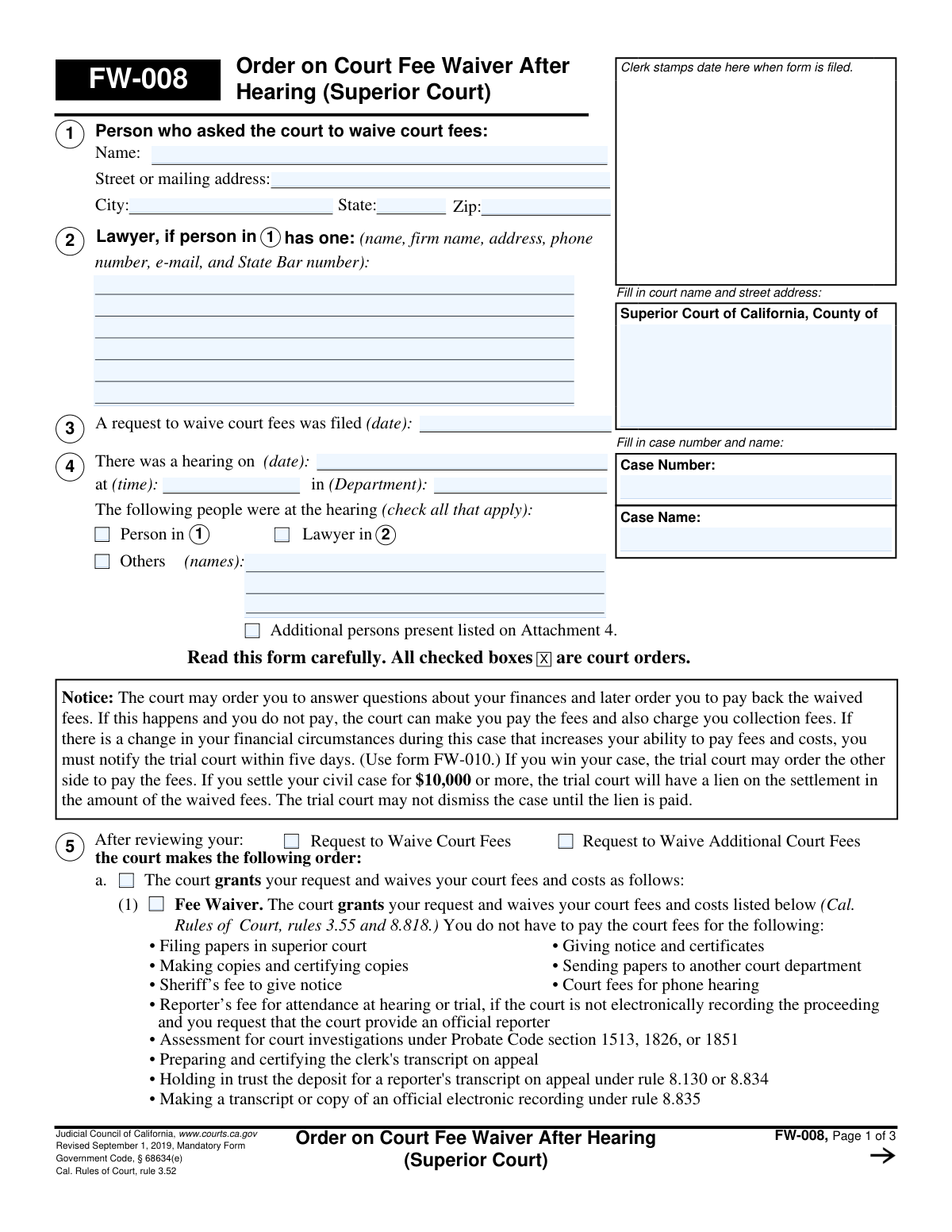
This is Form FW-008, an official Judicial Council of California form used by a Superior Court to issue its ruling after a hearing on a fee waiver request. The order specifies whether the request is granted, denied, or partially granted, and outlines the specific fees waived or the payment terms required. Today, this form can be filled out quickly and accurately using AI-powered services like Instafill.ai, which can also convert non-fillable PDF versions into interactive fillable forms.
FW-008 is part of the California court forms, fee waiver forms and superior court forms categories on Instafill.
Our AI automatically handles information lookup, data retrieval, formatting, and form filling.
It takes less than a minute to fill out FW-008 using our AI form filling.
Securely upload your data. Information is encrypted in transit and deleted immediately after the form is filled out.

Form specifications

Form name: Form FW-008, Order on Court Fee Waiver After Hearing (Superior Court)
Number of fields: 92
Number of pages: 1
Language: English
main-image

Instafill Demo: How to fill out PDF forms in seconds with AI

How to Fill Out FW-008 Online for Free in 2026

Are you looking to fill out a FW-008 form online quickly and accurately? Instafill.ai offers the #1 AI-powered PDF filling software of 2026, allowing you to complete your FW-008 form in just 37 seconds or less.
Follow these steps to fill out your FW-008 form online using Instafill.ai:
  1. 1 Navigate to Instafill.ai and upload or select the FW-008 form.
  2. 2 Provide the court, case name, and case number for the AI to populate in the header.
  3. 3 Enter the date of the fee waiver request, the hearing date and time, and indicate who was present at the hearing.
  4. 4 Select the appropriate checkbox under section 5 to indicate the court's order: granting the waiver, denying the waiver, or partially granting the waiver.
  5. 5 If the waiver is granted or partially granted, check the specific fees that are waived. If denied or partially granted, specify the reasons and any payment plan details, including the amount and start date.
  6. 6 The judicial officer must sign and date the order. The clerk will then complete the Clerk's Certificate of Service section.
  7. 7 Review all the information entered by the AI for accuracy and completeness before the form is officially filed and distributed.

Our AI-powered system ensures each field is filled out correctly, reducing errors and saving you time.

Why Choose Instafill.ai for Your Fillable FW-008 Form?

Speed

Complete your FW-008 in as little as 37 seconds.

Up-to-Date

Always use the latest 2026 FW-008 form version.

Cost-effective

No need to hire expensive lawyers.

Accuracy

Our AI performs 10 compliance checks to ensure your form is error-free.

Security

Your personal information is protected with bank-level encryption.

Frequently Asked Questions About Form FW-008

This form is the court's official decision on your request to have court fees waived. It is issued by a judge after a hearing and tells you if your request was granted, denied, or partially granted.

No, you do not fill out Form FW-008. A judge completes and signs this form to issue an order, and the court clerk files it.

Look at section 5 on the form. If the box next to item 5a, 'The court grants your request,' is checked, your fee waiver has been approved for the specific fees listed.

If your request was denied, you must pay all required court fees. The form will state the reason for the denial, such as your income being too high or failure to provide necessary information.

A partial grant means you are still responsible for paying a portion of your court fees. The order will specify which fees are waived and which you must pay, or it will state a percentage of the fees you are required to pay.

The form states you have 10 days after the clerk gives notice of the order to pay your fees. If the court ordered a payment plan, you must begin payments on the date specified in section 5b(2).

You are legally required to notify the court within five days if your financial situation changes in a way that increases your ability to pay fees. You must use Form FW-010 to provide this notification.

If you settle your civil case for $10,000 or more, the court has a legal claim (a lien) on that money for the amount of the fees that were waived. The waived fees must be paid from the settlement before the case can be dismissed.

If box 5a is checked, the form will list the specific fees that are waived. This can include initial filing fees, sheriff's fees, and potentially additional costs like jury fees or court reporter fees if those boxes are also checked.

As listed in section 5b, common reasons for denial include having an income that is too high, failing to provide all requested information, or not attending the scheduled court hearing.

No, because Form FW-008 is a court order completed by a judge, not by you. However, AI-powered services like Instafill.ai can help you accurately fill out the initial application form for a fee waiver.

You can upload your court form to the Instafill.ai platform, and its AI will help you auto-fill the fields with your information. This saves time, reduces errors, and allows you to download the completed form for filing.

Services like Instafill.ai can convert flat, non-fillable PDFs into interactive, fillable forms. You can then easily type your information directly into the fields online before printing.

Compliance FW-008
Validation Checks by Instafill.ai

1
Case Information Header Consistency
Ensures that the 'Case Number' and 'Case Name' fields are identical on all pages of the form (pages 1, 2, and 3). This is critical for document integrity and correct filing, as mismatched headers can lead to the pages being misfiled or separated. If validation fails, the system should flag the discrepancy and require the user to correct the information to match page 1.
2
Hearing Date Logical Order
Validates that the 'hearing on (date)' in section 3 is on or after the 'request to waive court fees was filed (date)'. A hearing cannot logically occur before the request that prompted it was filed. This check prevents data entry errors and ensures the timeline of events is legally sound. A failure would prompt the user to review and correct the dates.
3
Mandatory Court Order Selection
Verifies that exactly one of the primary court order options in section 5 ('a. Fee Waiver', 'b. The court denies your request', or 'c. The court partially grants your request') is checked. The form represents a single, definitive order, so it cannot be simultaneously granted, denied, and partially granted. A submission with zero or more than one option selected is invalid and must be corrected.
4
Conditional 'Others Present' Specification
Checks that if the 'Others' checkbox in section 4 ('The following people were at the hearing') is selected, the corresponding text field for their names is not empty. This ensures that when the presence of other individuals is noted, they are properly identified for the record. If the box is checked but the name field is blank, the form is incomplete and requires the user to provide the names.
5
Denial Reason Requirement
Ensures that if the court order in section 5b ('The court denies your request') is checked, at least one of the specific reasons for denial (i, ii, iii, iv, or v) is also checked. A denial order is incomplete without a stated justification. This validation enforces procedural correctness and ensures the applicant is informed of the basis for the decision.
6
Incomplete Request Denial Specification
Validates that if the denial reason 5b(i) ('Your request is incomplete') is checked, the corresponding text field specifying the 'missing items' is filled out. Simply stating the request is incomplete is insufficient; the court must specify what information is missing. Failure to provide this detail would render the order ambiguous and require correction.
7
Payment Plan Details Completeness
Verifies that if denial reason 5b(v) ('You may pay some court fees and costs over time') is selected, both the 'monthly payments of $' amount and the 'beginning (date)' fields are filled. A payment plan order is unenforceable without a specified payment amount and a start date. If either field is missing, the submission should be rejected as incomplete.
8
Partial Grant Percentage Value
Checks that if the partial grant option 5c(1) ('You must pay [X] percent of your court fees') is selected, the percentage field contains a numeric value strictly between 0 and 100. A value of 0 or 100 would correspond to a full grant or full denial, respectively, making this option illogical. This ensures the partial payment amount is valid and unambiguous.
9
Conditional 'Other' Field Population
This rule applies to multiple sections (5a, 5b, 5c). It ensures that whenever an 'Other' checkbox is selected (e.g., 'Other (specify)' or 'Other reasons stated'), the adjacent text field for specification is not left blank. This prevents incomplete orders where an 'Other' option is chosen without the required explanation, which is crucial for the clarity and legal standing of the document.
10
Partial Grant Waived Fees Selection
Ensures that if the partial grant option 5c(2) ('The court waives some fees') is checked, at least one of the specific fee checkboxes listed underneath it is also selected. The order must specify which fees are being waived for it to be actionable. An order that indicates 'some fees' are waived without specifying which ones is incomplete and must be corrected.
11
Clerk's Certificate of Service Completeness
Validates that the 'Clerk's Certificate of Service' section on page 3 is fully completed. This includes providing the 'Date', the 'Clerk's Name', and selecting one of the two methods of service ('I handed a copy...' or 'This order was mailed...'). This certification is essential proof of service, and its omission would invalidate the notice to the parties.
12
Date Field Format Validation
Verifies that all date fields on the form (e.g., request filed date, hearing date, payment start date) are entered in a valid and recognizable format, such as MM/DD/YYYY. This prevents data corruption and ensures dates are interpreted correctly by the court's systems. An invalid format would trigger an error, requiring the user to re-enter the date correctly.
13
Zip Code Format
Validates that the 'Zip' code field in the address section is a valid 5-digit or 9-digit (ZIP+4) US postal code. Correct formatting is essential for mail delivery of court notices. An invalid format could lead to returned mail and delays in the case. The system should reject entries that do not conform to the standard numeric format.

Common Mistakes in Completing FW-008

Forgetting to Fill Out Headers on Subsequent Pages

Users often fill out the case name and number on the first page but forget to repeat it on pages 2 and 3. This happens due to oversight when dealing with multi-page documents. If the pages become separated, the clerk's office cannot associate them with the correct case file, potentially rendering the order incomplete and causing processing delays. To avoid this, meticulously fill in the header on every single page; AI-powered tools like Instafill.ai can automate this by populating recurring information across all pages of a form.

Entering Inconsistent or Incorrect Case Information

A common data entry error is mistyping the case number or using a slightly different case name than what is on the official court record. This can lead to the order being rejected by the court clerk or, worse, filed in the wrong case, causing significant legal and administrative complications. Always double-check the case number and name against a previously filed document in your case, such as the initial complaint or summons, to ensure perfect accuracy.

Providing Incomplete Lawyer Information

When listing the lawyer in item 2, people sometimes omit crucial details like the State Bar number, full firm name, or a direct email address. This often occurs when the person filling out the form doesn't have the information readily available. An incomplete entry prevents the court and other parties from properly serving notices, which can lead to missed deadlines or hearings. Ensure you have the attorney's complete and correct information as it appears on their official record.

Failing to Specify the Reason for a Denial

When an order denies a fee waiver (item 5b), the form requires a specific reason. A common mistake is checking a box like 'Your request is incomplete' (5b(1)(a)) without specifying exactly which items are missing in the space provided. This leaves the applicant unable to correct their request, leading to further delays and repeated filings. To be effective, the order must clearly state the deficiency so the applicant knows what action to take.

Leaving Payment Plan Details Blank

If the court orders a payment plan (item 5b(2)), the monthly payment amount and the start date are required fields. People drafting the order may overlook these fields, leaving them blank. An order with an incomplete payment schedule is unenforceable, as the clerk cannot process payments and the applicant has no clear instruction on what they owe. Always ensure all monetary and date fields in this section are filled out completely.

Making an Ambiguous Partial Grant

Section 5c, for partially granting a request, has multiple options that are frequently filled out incorrectly or incompletely. A user might check the main box for a partial grant but fail to specify whether the applicant must pay a percentage of fees (5c(1)) or which specific fees are waived (5c(2)). This ambiguity creates confusion for both the applicant and the court clerk regarding which fees are due. To avoid this, carefully select and complete one of the specific sub-options to make the order clear and actionable.

Referencing an Attachment That Isn't Included

The form has several checkboxes indicating that more information is provided 'On Attachment' (e.g., Attachment 5c). A frequent error is checking one of these boxes but then failing to prepare, label, and file the corresponding attachment document. This makes the order incomplete and references a non-existent document, which can lead to rejection or confusion. If you check a box for an attachment, ensure the document is created and filed along with the form.

Using Illegible Handwriting on a Non-Fillable PDF

This form is often available as a non-fillable PDF, leading people to print it and fill it out by hand. Illegible handwriting, especially for names, dates, and numbers, can cause the court clerk to reject the form or enter incorrect data into the system. This can result in filing delays or inaccuracies in the court record. To prevent this, it is best to type directly onto the form. If the form is not fillable, tools like Instafill.ai can convert it into an interactive, fillable version, ensuring all entries are clear and legible.

Incorrectly Recording Hearing Details

In item 3, the date, time, and department of the hearing must be entered. Simple data entry mistakes, like transposing numbers in the date or writing down the wrong department, are common. An inaccurate record of the hearing can cause confusion, especially in complex cases with multiple court dates. Always refer to the official Notice of Hearing or the court's minute order to verify and accurately transcribe these details.

Failing to Check All Persons Present at the Hearing

Item 4 requires checking boxes for all individuals who attended the hearing. People may forget to check a box for the lawyer or neglect to write in the names of 'Others' who were present. This creates an incomplete official record of the proceeding. An inaccurate attendance record could become an issue later if there is a dispute about who received notice or was party to the discussion. Carefully review who was present and ensure every attendee is properly noted on the form.
Saved over 80 hours a year

“I was never sure if my IRS forms like W-9 were filled correctly. Now, I can complete the forms accurately without any external help.”

Kevin Martin Green

Your data stays secure with advanced protection from Instafill and our subprocessors

Robust compliance program

Transparent business model

You’re not the product. You always know where your data is and what it is processed for.

ISO 27001, HIPAA, and GDPR

Our subprocesses adhere to multiple compliance standards, including but not limited to ISO 27001, HIPAA, and GDPR.

Security & privacy by design

We consider security and privacy from the initial design phase of any new service or functionality. It’s not an afterthought, it’s built-in, including support for two-factor authentication (2FA) to further protect your account.

Fill out FW-008 with Instafill.ai

Worried about filling PDFs wrong? Instafill securely fills form-fw-008-order-on-court-fee-waiver-after-hearing-superior-court forms, ensuring each field is accurate.

Related forms by category

California court forms Judicial Council of California Form SC-105, Request for Court Order and Answer (Small Claims), Judicial Council of California Form SC-120, Defendant’s Claim and ORDER to Go to Small Claims Court (Small Claims), Judicial Council of California Form SER-001, Request for Sheriff to Serve Court Papers, Judicial Council of California Form SER-001, Request for Sheriff to Serve Court Papers, Affidavit for Collection of Personal Property California Probate Code Section 13100, Form POS-040, Proof of Service—Civil, Declaration of Facts of Death (California Superior Court), declaration-of-marriage-for-court-proceeding-california-family-law, ADOPT-200, Adoption Request, ADOPT-200, Stepparent Adoption Request, ADOPT-210, Adoption Agreement, ADOPT-310, Contact After Adoption Agreement, Judicial Council of California Form ADOPT-200, Adoption Request, Form ADR-107, Mediation Attendance Sheet, Form ADR-110, Order Appointing Referee, Form ADR-109, Stipulation or Motion for Order Appointing Referee, Form ADR-102, Request for Trial De Novo After Judicial Arbitration, Form ADR-108, Referee's Report (Code Civ. Proc., §§ 638, 639), Form ADR-106, Petition to Confirm, Correct, or Vacate Contractual Arbitration Award, Form ADR-104, Rejection of Award and Request for Trial After Attorney-Client Fee Arbitration · + 434 more →
fee waiver forms FW-003, Order on Court Fee Waiver (Superior Court), FW-003, Order on Court Fee Waiver (Superior Court), Form FW-003-GC, Order on Court Fee Waiver (Guardianship or Conservatorship), Form FW-003, Order on Court Fee Waiver (Superior Court), Form ATJ 601.9, Application for Waiver of Court Fees (Civil), Form JD-FM-75, Application for Waiver of Fees/Payment of Costs/Appointment of Counsel - Family, Form FW-003-GC, Order on Court Fee Waiver (Superior Court) (Ward or Conservatee), Form MC 20, Fee Waiver Request, Form MC 114, Request for Review of Denied Fee Waiver and Order, Form FW-001-GC, Request to Waive Court Fees (Ward or Conservatee), Form FW-006, Request for Hearing About Court Fee Waiver Order (Superior Court), Form FW-010, Notice to Court of Improved Financial Situation or Settlement, Form FW-002, Request to Waive Additional Court Fees (Superior Court), Form FW-002-GC, Request to Waive Additional Court Fees (Superior Court) (Ward or Conservatee), Form FW-007, Notice on Hearing About Court Fees, Form FW-020, Request for Court Reporter by Party with Fee Waiver
superior court forms FW-003, Order on Court Fee Waiver (Superior Court), FW-003, Order on Court Fee Waiver (Superior Court), Form FW-003, Order on Court Fee Waiver (Superior Court), Declaration of Facts of Death (California Superior Court), Form FW-003-GC, Order on Court Fee Waiver (Superior Court) (Ward or Conservatee), Superior Court of Chatham County, Georgia, Hearing Request Form, Form FW-006, Request for Hearing About Court Fee Waiver Order (Superior Court), Form FW-002, Request to Waive Additional Court Fees (Superior Court), Form FW-002-GC, Request to Waive Additional Court Fees (Superior Court) (Ward or Conservatee)