
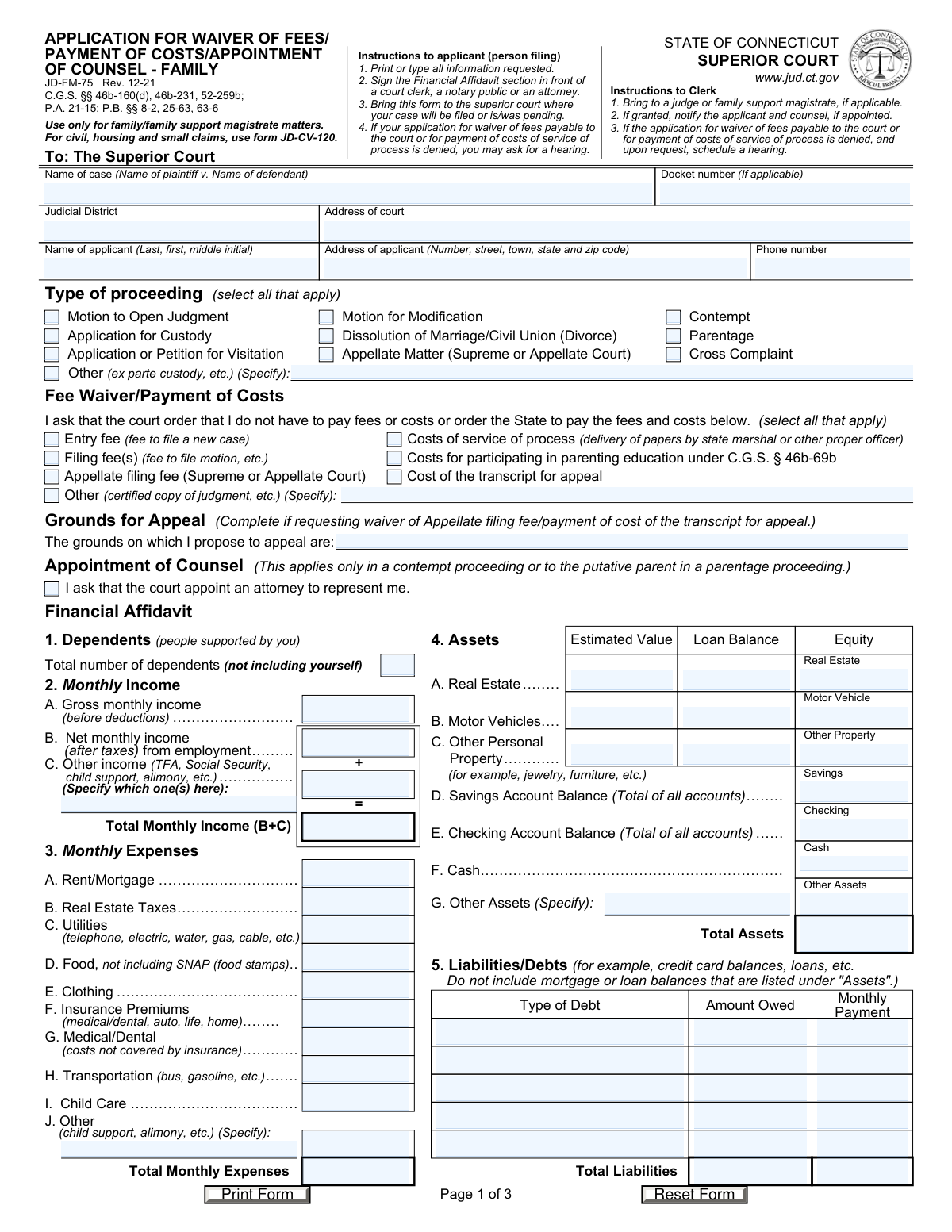
Yes! You can use AI to fill out Form JD-FM-75, Application for Waiver of Fees/Payment of Costs/Appointment of Counsel - Family
Don't type 88 fields by hand. Tell our AI about yourself, or upload a document you already have, and it fills every field in seconds. You check it, then download, print or sign.
The AI does the filling. You just check it.
No typing into boxes, nothing to install.
What this form asks for
The AI fills all of it, from your answers or your documents.
The AI checks your answers before you download
14 checks built for this form, so a wrong date or a missing answer is caught before anyone else sees it.
This validation ensures that the 'Total Monthly Income' field is the correct sum of 'Net monthly income (after taxes) from employment' and 'Other income'. This is a critical check to verify the applicant's financial data is arithmetically sound, as this total is a primary factor in determining eligibility for a fee waiver. If the calculation is incorrect, the form submission should be flagged for review or rejected, prompting the user to correct the values.
This check verifies that the 'Total Monthly Expenses' field accurately represents the sum of all individual expense lines (A through J). Accurate expense reporting is essential for the court to assess the applicant's financial hardship. An incorrect total could lead to a wrongful denial or approval of the waiver, so the system should automatically recalculate or prompt the user to fix the discrepancy.
This validation confirms that the 'Gross monthly income (before deductions)' is greater than or equal to the 'Net monthly income (after taxes)'. It is logically impossible for net income to exceed gross income. This check prevents common data entry errors and ensures the financial data is plausible, which is fundamental for a credible financial affidavit.
For each asset type (Real Estate, Motor Vehicle, Other Personal Property), this check validates that the 'Equity' field equals the 'Estimated Value' minus the 'Loan Balance'. This ensures the applicant's net worth in each asset is calculated correctly, providing a true picture of their available resources. If the equity is not calculated correctly, the system should highlight the error to the user for correction.
This validation enforces that if either 'Total Monthly Income' or 'Total Monthly Expenses' is reported as zero, the explanation field ('explain how you are supported') must be completed. A claim of zero income or expenses is highly unusual and requires a mandatory explanation for the court to understand the applicant's living situation. Failure to provide this explanation would render the financial affidavit incomplete and likely lead to denial.
This check ensures that if the 'Other (ex parte custody, etc.)' checkbox under 'Type of proceeding' is selected, the corresponding 'Specify' text field is not left empty. This is important for court clerks and judges to immediately understand the nature of the legal action without having to seek clarification. An incomplete submission would cause processing delays.
And 8 more checks
- Conditional 'Other' Income Source
- Conditional 'Grounds for Appeal' Statement
- Conditional 'Appointment of Counsel' Request
- Phone Number Format
- Total Assets Calculation
- Total Liabilities Calculation
- Future Date Prohibition
- Monetary Field Numeric Validation
Let AI fill out your JD-FM-75
No typing. Every field filled in seconds, checked, ready to sign.
How to Fill Out JD-FM-75 Online for Free in 2026
What the AI walks you through.
- Navigate to Instafill.ai and upload your PDF or select Form JD-FM-75 from their library.
- Provide the case and court information, including the case name, docket number, and court address.
- Select the type of proceeding (e.g., Dissolution of Marriage, Contempt) and check the boxes for the specific fees or costs you are requesting to have waived or paid by the state.
- Complete the detailed Financial Affidavit section by providing information on your dependents, monthly income, expenses, assets, and liabilities.
- If applicable, state the grounds for an appeal or check the box to request the appointment of an attorney.
- Review all the information populated by the AI for accuracy and completeness, making any necessary corrections.
- Download the completed form. Sign the Financial Affidavit in front of a court clerk, notary public, or attorney before submitting it to the correct superior court.
Common Mistakes in Completing JD-FM-75
The ones the AI is built to catch.
Confusing Gross and Net Monthly Income
Listing Asset-Related Loans in the Liabilities Section
Making Manual Calculation Errors
Omitting the Explanation for Zero Income or Expenses
Premature or Un-witnessed Signature
Miscalculating Asset Equity
Forgetting to Itemize 'Other' Income and Expenses
Omitting Small Financial Assets
Incorrectly Formatting Case Information
Including SNAP Benefits in Food Expenses
Frequently Asked Questions About JD-FM-75
Is it really free for 7 days?
Can I fill other forms too?
How do I cancel?
How does the AI fill out JD-FM-75?
What happens to my information?
How complex is JD-FM-75 to fill out?
What is the purpose of Form JD-FM-75?
Who needs to fill out this application?
What is the difference between 'Gross monthly income' and 'Net monthly income'?
What information do I need to provide for my assets?
Where do I list my credit card debt and other loans?
How do I submit this form and does it need to be signed in a special way?
What should I do if I have no income to report?
Can I use this form to get a court-appointed lawyer for my divorce case?
What happens if my application for a fee waiver is denied?
What documents should I gather before filling out this form?
Can AI tools help me fill out this form?
How can I use Instafill.ai to fill this form online?
The PDF form I have is not fillable. What can I do?
How do I calculate the 'Equity' for my property and vehicles?
Get your JD-FM-75 filled out by AI
$0 today. Cancel before Nov 4 and you pay nothing.
Other forms like this one
fee waiver forms: FW-003, Order on Court Fee Waiver (Superior Court), FW-003, Order on Court Fee Waiver (Superior Court), Form FW-003-GC, Order on Court Fee Waiver (Guardianship or Conservatorship), Form FW-003, Order on Court Fee Waiver (Superior Court), Form ATJ 601.9, Application for Waiver of Court Fees (Civil), Form FW-003-GC, Order on Court Fee Waiver (Superior Court) (Ward or Conservatee), Form MC 20, Fee Waiver Request, Form MC 114, Request for Review of Denied Fee Waiver and Order, Form FW-001-GC, Request to Waive Court Fees (Ward or Conservatee), Form FW-006, Request for Hearing About Court Fee Waiver Order (Superior Court), Form FW-010, Notice to Court of Improved Financial Situation or Settlement, Form FW-002, Request to Waive Additional Court Fees (Superior Court), Form FW-008, Order on Court Fee Waiver After Hearing (Superior Court), Form FW-002-GC, Request to Waive Additional Court Fees (Superior Court) (Ward or Conservatee), Form FW-007, Notice on Hearing About Court Fees, Form FW-020, Request for Court Reporter by Party with Fee Waiver
payment forms: Form 5405, Repayment of First-Time Homebuyer Credit, Form 1127, Application for Extension of Time for Payment of Tax Due to Undue Hardship, Form 1099-G, Certain Government Payments, Form 1099-K, Payment Card and Third Party Network Transactions, Form 1099-Q, Payments From Qualified Education Programs, Form SSA-8, Application for Lump-Sum Death Payment, Form 1845-0163, Borrower Defense to Repayment Application, application-and-contract-for-electric-facilities-w, Carer Payment and Carer Allowance – Medical Report (SA431) for a child under 16 years, Income-Driven Repayment (IDR) Plan Request (PAYE, IBR, and ICR) — William D. Ford Federal Direct Loan (Direct Loan) Program and Federal Family Education Loan (FFEL) Programs (OMB No. 1845-0102), Fidelity NetBenefits Distribution - Recurring Payments, Electronic Dividend and Interest Payment Authorization Form, Vanguard Super Apply for a financial hardship payment, Special Tax Notice Regarding Plan Payments, Empower Loan Payment Change Request Form, Empower Retirement Payment Request Form, Empower 401(k) Loan Prepayment Request Form, Special Tax Notice Regarding Plan Payments, Transamerica Automatic Payment Authorization, Excess Withdrawal Request and Form W-4R, Withholding Certificate for Nonperiodic Payments and Eligible Rollover Distributions
Let AI fill out your JD-FM-75
Your trial starts once a card is added. You pay nothing before Nov 4.
Our AI already knows this form, all 88 fields of it. Skip the typing: tell it about yourself, or upload what you have, and it fills the whole form in seconds.
- AI fills every field on all 3 pages, tables and checkboxes included
- No typing into boxes: answer a few questions, or upload a document you already have, an old copy of this form, a photo of a document
- The AI checks the answers; you review and change anything before you download
- Download the finished PDF, print it, or sign it online
- Encrypted, and never used to train AI
Cancel before Nov 4 and you pay nothing.
A card is needed to start the trial. Cancel in two clicks from your account.
Terms · Privacy