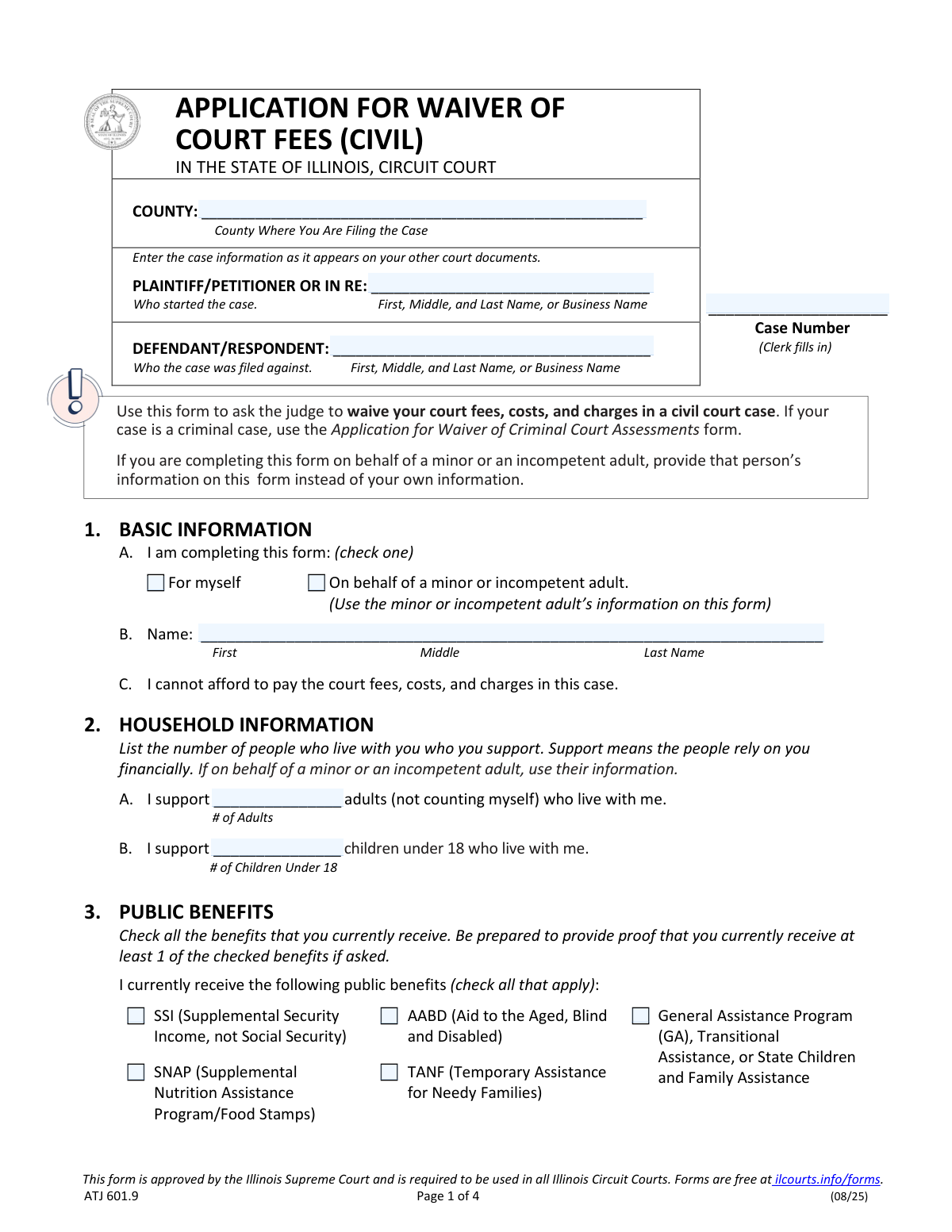
Yes! You can use AI to fill out Form ATJ 601.9, Application for Waiver of Court Fees (Civil)
Form ATJ 601.9, the Application for Waiver of Court Fees (Civil), is a legal document used in Illinois Circuit Courts by individuals who cannot afford to pay the required fees for civil cases. Filing this application allows a judge to review your financial situation—based on public benefits received or income and hardship—and potentially waive the costs, ensuring access to the justice system. Today, this form can be filled out quickly and accurately using AI-powered services like Instafill.ai, which can also convert non-fillable PDF versions into interactive fillable forms.
Our AI automatically handles information lookup, data retrieval, formatting, and form filling.
It takes less than a minute to fill out ATJ 601.9 using our AI form filling.
Securely upload your data. Information is encrypted in transit and deleted immediately after the form is filled out.
Form specifications
| Form name: | Form ATJ 601.9, Application for Waiver of Court Fees (Civil) |
| Number of fields: | 127 |
| Number of pages: | 4 |
| Language: | English |
| Categories: | civil court forms, court forms, fee waiver forms, UK court forms |
Instafill Demo: How to fill out PDF forms in seconds with AI
How to Fill Out ATJ 601.9 Online for Free in 2026
Are you looking to fill out a ATJ 601.9 form online quickly and accurately? Instafill.ai offers the #1 AI-powered PDF filling software of 2026, allowing you to complete your ATJ 601.9 form in just 37 seconds or less.
Follow these steps to fill out your ATJ 601.9 form online using Instafill.ai:
- 1 Navigate to Instafill.ai, then upload your Application for Waiver of Court Fees (Civil) or select it from the template library.
- 2 Provide your case information, including the county and the names of the plaintiff/petitioner and defendant/respondent.
- 3 Enter your basic and household information, specifying who is completing the form and how many people you support.
- 4 Indicate if you receive any public benefits like SSI, SNAP, or TANF. If you do, you may be able to skip the detailed financial sections.
- 5 If you do not receive public benefits, use the AI-guided interface to accurately input your income, expenses, and assets for the past month and year.
- 6 Optionally, add any further information about financial hardship that you want the judge to consider.
- 7 Review all the auto-filled information for accuracy, electronically sign the document, and download the completed Form ATJ 601.9 for filing with the court.
Our AI-powered system ensures each field is filled out correctly, reducing errors and saving you time.
Why Choose Instafill.ai for Your Fillable ATJ 601.9 Form?
Speed
Complete your ATJ 601.9 in as little as 37 seconds.
Up-to-Date
Always use the latest 2026 ATJ 601.9 form version.
Cost-effective
No need to hire expensive lawyers.
Accuracy
Our AI performs 10 compliance checks to ensure your form is error-free.
Security
Your personal information is protected with bank-level encryption.
Frequently Asked Questions About Form ATJ 601.9
This form is used to ask a judge in an Illinois Circuit Court to waive your court fees, costs, and charges in a civil case because you cannot afford to pay them. It is for people experiencing financial hardship.
No, this form is specifically for civil court cases. For criminal cases, you must use the 'Application for Waiver of Criminal Court Assessments' form.
If you are completing the form on behalf of a minor or an incompetent adult, you must use that person's information throughout the entire form, not your own.
No, if you receive SNAP or any other public benefit listed in Section 3, you can check the appropriate box and skip the detailed financial information in Sections 4 and 5. This automatically qualifies you for a full fee waiver.
If you do not receive any of the benefits in Section 3, you must complete the financial information in Section 4. This includes details about your income, expenses, and assets to demonstrate your financial situation to the judge.
You do not need to attach any documents when you first file the form. However, the form states you should be prepared to provide proof of your income, benefits, or expenses if the judge requests it later.
You must file the completed and signed form at the Circuit Court Clerk’s office in the county where your case is being heard. This can be done at any point during your case.
A judge will review your application. You will only need to attend a court hearing if the judge requires more information, and the court will notify you if this is necessary.
No, Section 5 is optional. However, it is a good place to explain any additional circumstances, like high medical debt or other issues, that make it difficult for you to pay court fees.
You must list your gross income, which is the total amount of money you earned before any taxes or other deductions were taken out.
Yes, services like Instafill.ai use AI to help you accurately auto-fill form fields, which can save time and reduce errors. This is especially useful for forms with many detailed sections.
Simply upload the Application for Waiver of Court Fees form to the Instafill.ai platform. The AI will identify all the fields, and you can answer simple questions to have your information automatically and accurately placed into the form.
If you have a non-fillable or 'flat' PDF, you can upload it to a service like Instafill.ai. The platform can convert the document into an interactive, fillable form that you can easily complete on your computer or phone.
For shared expenses like rent or utilities, you should only list the amount that you personally pay each month. Do not include the portion paid by your roommate or others.
Compliance ATJ 601.9
Validation Checks by Instafill.ai
1
Conditional Financial Disclosure Requirement
This validation checks the application's core logic. If the applicant checks any box in Section 3 (Public Benefits), then Sections 4 (Financial Information) and 5 (Hardship Information) must be disabled or hidden. Conversely, if no boxes are checked in Section 3, the system must ensure that Section 4 is completed. This is critical for ensuring the applicant follows the correct path based on their eligibility, preventing incomplete or unnecessary data entry.
2
Mutually Exclusive Income Status
This check ensures logical consistency within the income sections (4.B and 4.C). If the applicant checks the 'No income' box for either the monthly or yearly period, all other income source checkboxes and amount fields for that same period must be disabled and cleared. This prevents contradictory information, such as claiming no income while also listing income from employment, which would require manual review and clarification.
3
Income Amount Entry on Selection
This validation ensures that if an applicant checks a box indicating a specific source of income (e.g., 'My employment', 'Child Support'), the corresponding amount field must contain a valid, non-zero numeric value. This prevents submissions where an income source is indicated but the amount is missing. Failure to provide the amount would render the financial disclosure incomplete and require follow-up.
4
Monthly Income Total Calculation
This check automatically calculates and verifies the 'Total of all money received in the past month' field in Section 4.B. The system should sum all individual monthly income amounts entered by the user and compare it to the value in the total field. If they do not match, an error should be flagged to prompt the user to correct their entries, ensuring mathematical accuracy for the financial assessment.
5
Yearly Income Total Calculation
This validation automatically calculates and verifies the 'Total of all money received in the past 12 months' field in Section 4.C. The system will sum all individual yearly income amounts and ensure the total matches the user-entered or system-calculated total. This is crucial for maintaining the integrity of the financial data used to determine eligibility for a fee waiver.
6
Monthly vs. Yearly Income Consistency
This is a logical consistency check that compares the total monthly income (Section 4.B) with the total yearly income (Section 4.C). The system should flag a warning if the reported total yearly income is less than the reported total monthly income. While not always an error (e.g., recent job loss), it is a strong indicator of a data entry mistake and should be brought to the user's attention for confirmation.
7
Mutually Exclusive Expense and Asset Status
This validation applies to the Monthly Expenses (Section 4.D) and Items of Value (Section 4.E) sections. If the user checks the 'None of the above' box in either section, all other checkboxes and amount fields within that same section must be disabled and cleared. This prevents contradictory statements, such as claiming no expenses while also entering a rent amount.
8
Household Support Number Format
This validation ensures that the values entered in Section 2 for the number of adults and children supported are valid. The fields must only accept non-negative integers (0, 1, 2, etc.). This prevents users from entering text, decimals, or negative numbers, which would be invalid data for counting dependents and could affect eligibility calculations.
9
Signatory Role Selection and Requirement
This check ensures that the user has specified their role in completing the form by selecting either 'I am completing this form for myself' or 'I am a lawyer completing this form on behalf of a client'. This selection is mandatory because it dictates which set of contact information fields becomes required. Without this selection, the system cannot determine which data points are necessary for a complete submission.
10
Conditional Contact Information Completion
Based on the signatory role selected, this validation ensures the corresponding contact block is filled out. If 'for myself' is checked, the applicant's Phone Number and Address must be provided. If 'a lawyer' is checked, the Client Name, Lawyer Name, Attorney Number, Phone Number, and Address must be provided. This ensures the court has the correct contact information for all future correspondence.
11
Phone Number Format Validation
This check verifies that any phone number entered on the form (either for the applicant or the lawyer) conforms to a standard format. It should accept common formats like (XXX) XXX-XXXX, XXX-XXX-XXXX, or XXXXXXXXXX and reject entries with incorrect digit counts or non-numeric characters. This ensures the court has a valid, usable phone number for communication.
12
Email Address Format Validation
This validation ensures that any email address provided follows the standard '[email protected]' format. It checks for the presence of an '@' symbol and a period in the domain part. This is important because the form explicitly warns users to check their email for important court information, so the address must be valid to ensure delivery.
13
Required Applicant Name
This validation ensures that the applicant's name field in Section 1.B (First, Middle, Last Name) is not left empty. This is a fundamental requirement, as the application cannot be processed without knowing the identity of the person requesting the fee waiver. The check prevents the submission of an anonymous or incomplete application.
14
Required County Information
This check verifies that the 'COUNTY' field at the top of the form has been filled in. This information is critical for routing the document to the correct circuit court clerk's office within the state of Illinois. Submitting a form without the county would cause processing delays and potential rejection.
Common Mistakes in Completing ATJ 601.9
Applicants receiving public benefits (Section 3) are instructed to skip the detailed financial sections (4 and 5). A frequent error is ignoring this and filling out every section, which wastes time and can introduce conflicting information that confuses the court. This can lead to delays or requests for clarification. To avoid this, read the instructions at the end of each section carefully. AI-powered tools like Instafill.ai can automatically hide or show relevant sections based on your answers, ensuring you only fill out what is required.
The form explicitly distinguishes between SSI (Supplemental Security Income) and standard Social Security benefits, as only SSI provides automatic qualification for a full waiver. Applicants often mistakenly check the SSI box when they receive retirement or disability Social Security. This error leads to an incorrect assessment and will cause the application to be questioned or denied when proof is requested. Always verify the exact name of your benefit program before making a selection.
Section 4 clearly asks for 'gross (before taxes)' income, but many people enter their take-home (net) pay. This underreports their actual income and can be viewed as a misrepresentation if pay stubs are requested, potentially leading to a denial. Always use the pre-tax amount from your pay stubs. Advanced form-filling tools like Instafill.ai can provide helpful hints and validation to ensure you are entering the correct type of data in financial fields.
In Section 2, applicants often make two mistakes: including themselves in the adult count (the form says 'not counting myself') or including roommates who are not financially dependent. The form defines 'support' as financial reliance, so these errors misrepresent the applicant's financial burden. This can negatively impact the judge's assessment of their situation. Only count other adults and children who live with you and depend on you financially.
The Plaintiff/Petitioner and Defendant/Respondent names must exactly match other official court documents. Applicants sometimes use nicknames, abbreviations, or make spelling errors, which can prevent the clerk from linking the waiver application to the correct case file. This mistake can cause the document to be rejected, forcing the applicant to refile and leading to significant delays. Carefully copy all case information from your primary court filing.
People often fail to report income from side jobs, cash payments, or financial help from family in the 'Other income' section. The form requires all money received to be listed, and omitting sources is a false statement under penalty of perjury. This omission can lead to an immediate denial of the waiver and other legal consequences if discovered. To ensure your application is truthful, be thorough and report all sources of income, no matter how small or irregular.
When listing monthly expenses in Section 4.D, the form instructs applicants to list only the amount they personally pay. A common mistake is to list the total bill for shared expenses like rent or utilities, which inflates their expenses and provides an inaccurate financial picture. This can raise red flags during review and cause the judge to question the validity of the entire financial statement. Always calculate and report only your individual portion of any shared expense.
Forgetting to sign the form in Section 6 is a simple but critical error that renders the application invalid. Similarly, leaving contact information blank prevents the court from reaching you with questions. An unsigned or incomplete form will be rejected by the clerk, causing delays and requiring you to refile. If the form is a non-fillable PDF, tools like Instafill.ai can convert it to a fillable version and provide a final checklist to ensure critical fields like the signature are not missed.
Section 4 requires applicants to provide income details for both 'the past month' and 'the past 12 months'. Applicants frequently fill out only the monthly column, leaving the application incomplete. This forces the court to guess at the applicant's overall financial stability and will likely result in a request for more information, delaying the decision. Ensure both columns are filled out completely, even if it requires calculating the yearly total from monthly figures.
The 'Case Number' field at the top of the form is often marked '(Clerk fills in)'. Applicants filing a new case who do not have a number yet should leave this blank. Writing in a field explicitly reserved for the clerk can disrupt the court's filing process, potentially causing the form to be returned or misfiled. Always follow on-form instructions about who should complete a specific field to avoid administrative errors.
Saved over 80 hours a year
“I was never sure if my IRS forms like W-9 were filled correctly. Now, I can complete the forms accurately without any external help.”
Kevin Martin Green
Your data stays secure with advanced protection from Instafill and our subprocessors

Robust compliance program
Transparent business model
You’re not the product. You always know where your data is and what it is processed for.
ISO 27001, HIPAA, and GDPR
Our subprocesses adhere to multiple compliance standards, including but not limited to ISO 27001, HIPAA, and GDPR.
Security & privacy by design
We consider security and privacy from the initial design phase of any new service or functionality. It’s not an afterthought, it’s built-in, including support for two-factor authentication (2FA) to further protect your account.
Fill out ATJ 601.9 with Instafill.ai
Worried about filling PDFs wrong? Instafill securely fills form-atj-6019-application-for-waiver-of-court-fees-civil forms, ensuring each field is accurate.