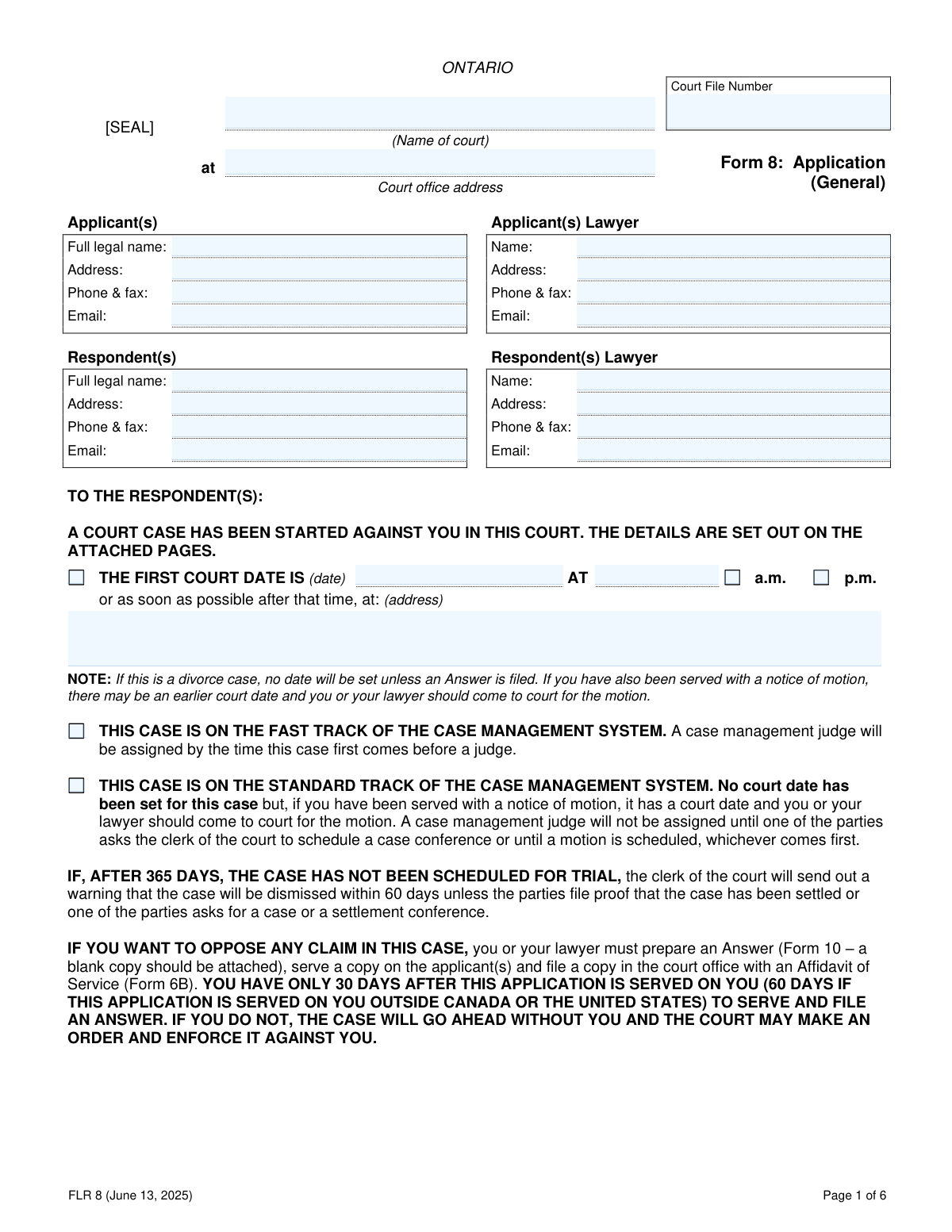
Yes! You can use AI to fill out ONTARIO Form 8: Application (General)
Form 8: Application (General) is a legal document used in the Ontario court system to start a family law proceeding. It outlines the applicant's claims against the respondent, which can include divorce, child or spousal support, decision-making responsibility for children, and division of property. This application formally notifies both the court and the respondent of the legal action being taken and the specific orders being sought. Today, this form can be filled out quickly and accurately using AI-powered services like Instafill.ai, which can also convert non-fillable PDF versions into interactive fillable forms.
Our AI automatically handles information lookup, data retrieval, formatting, and form filling.
It takes less than a minute to fill out FLR 8 using our AI form filling.
Securely upload your data. Information is encrypted in transit and deleted immediately after the form is filled out.
Form specifications
| Form name: | ONTARIO Form 8: Application (General) |
| Number of pages: | 6 |
| Language: | English |
Instafill Demo: How to fill out PDF forms in seconds with AI
How to Fill Out FLR 8 Online for Free in 2026
Are you looking to fill out a FLR 8 form online quickly and accurately? Instafill.ai offers the #1 AI-powered PDF filling software of 2026, allowing you to complete your FLR 8 form in just 37 seconds or less.
Follow these steps to fill out your FLR 8 form online using Instafill.ai:
- 1 Navigate to Instafill.ai and upload or select Form 8: Application (General).
- 2 Provide the court information, as well as the personal and legal representative details for both the applicant and respondent in the designated sections.
- 3 Complete the 'Family History' section with details about the applicant, respondent, relationship dates, and any children involved in the case.
- 4 In the 'Claim by Applicant' section, check the boxes corresponding to the specific legal claims you are making, such as divorce, support, or property division.
- 5 Detail the important facts that support your claims, providing specific information for divorce grounds (separation, adultery, cruelty) and other claims.
- 6 Carefully review all the information you have entered for accuracy, then complete the Applicant's Certificate and have your lawyer complete the Lawyer's Certificate, if applicable.
- 7 Download the completed form and follow the instructions for serving it on the respondent and filing it with the appropriate court office.
Our AI-powered system ensures each field is filled out correctly, reducing errors and saving you time.
Why Choose Instafill.ai for Your Fillable FLR 8 Form?
Speed
Complete your FLR 8 in as little as 37 seconds.
Up-to-Date
Always use the latest 2026 FLR 8 form version.
Cost-effective
No need to hire expensive lawyers.
Accuracy
Our AI performs 10 compliance checks to ensure your form is error-free.
Security
Your personal information is protected with bank-level encryption.
Frequently Asked Questions About Form FLR 8
Form 8 is used to start a family law case in an Ontario court. The person initiating the case, known as the Applicant, fills out this form to detail their claims, such as divorce, child or spousal support, or division of property.
The 'Applicant,' who is the person starting the court case, must complete and file this form. The other party in the case is referred to as the 'Respondent'.
As the Respondent, you have 30 days (or 60 if served outside Canada/US) to prepare an Answer (Form 10), serve it on the applicant, and file it with the court. If you do not respond, the court may make an order against you without your input, so it is crucial to seek legal advice.
Yes, if your application includes a claim for support or property, you must also complete and file a Financial Statement. Use Form 13 for support-only claims and Form 13.1 if property claims are involved.
The 'Fast Track' is for cases where a case management judge is assigned early to help move the case along efficiently. The 'Standard Track' is for other cases where a judge is only assigned after a party schedules a conference or a motion is filed.
On page 4, under 'CLAIM BY APPLICANT,' you must check the boxes that correspond to the orders you are seeking. You must also provide specific details of the order you want the court to make in the space provided.
You must disclose any previous written agreements on page 3 of the form. You will need to provide the date of the agreement and specify which of its terms, if any, are now in dispute.
You can file the completed application and all required documents either in person at the courthouse address listed on the form or online through the official Ontario government family claims portal.
The Applicant's Certificate is a mandatory declaration where you confirm you are aware of your legal duties. These duties include acting in the child's best interests, attempting to resolve issues out of court, and providing complete and accurate information.
Yes, services like Instafill.ai use AI to help you accurately auto-fill form fields, which can save you time and reduce errors. This is especially helpful for complex forms with many information fields.
To complete this form with Instafill.ai, you can upload the Form 8 PDF to their platform. The AI will identify all the fields, allowing you to provide your information once and have it automatically and accurately populate the entire document.
If you have a non-fillable PDF, you can use a service like Instafill.ai to help. It can convert flat, non-interactive PDFs into fillable forms that you can complete easily on your computer.
If you fail to file an Answer within the specified time, the case will proceed without your input. The court can make a legally binding order based solely on the Applicant's claims, which can then be enforced against you.
You must provide personal details for both yourself and the respondent, including birthdates and residency information. You also need to list key relationship dates (marriage, cohabitation, separation) and provide details for all children involved in the case.
Compliance FLR 8
Validation Checks by Instafill.ai
1
Ensures Relationship Dates are Chronologically Correct
This validation checks that the 'Separated on' date is not before the 'Married on' date or the 'Started living together on' date. It ensures the timeline of the relationship is logical and legally coherent, which is fundamental to the case facts. If the dates are out of sequence, the application will be flagged for correction as it represents a factual impossibility.
2
Validates Consistency between Age and Birthdate
This check calculates the age of the applicant, respondent, and any children based on their provided birthdate and compares it to the age entered in the 'Age' field. This is crucial for verifying identity and confirming eligibility for age-dependent claims like child support. A mismatch will trigger an error requiring the user to correct either the age or the birthdate to ensure data accuracy.
3
Requires Details for Prior Divorce Declaration
If the applicant or respondent checks 'Yes' for the 'Divorced before?' question, this validation ensures that the corresponding 'Place and date of previous divorce' field is not empty. This information is critical for the court to confirm its jurisdiction and to ensure there are no pre-existing legal bars to granting a new divorce. An application with a 'Yes' answer but no details will be considered incomplete.
4
Ensures Exclusive Selection of Case Management Track
This check verifies that exactly one of the two case management track options ('Fast Track' or 'Standard Track') is selected on page 1. It is mandatory to select one track for the court to properly manage the case timeline, and selecting both is a logical contradiction. The form cannot be filed until one, and only one, option is chosen.
5
Links Divorce Claim to Required Grounds
If the applicant checks box 00 for 'a divorce', this validation confirms that at least one of the grounds for divorce (Separation, Adultery, or Cruelty) is selected and its corresponding details are provided on page 5. A claim for divorce is legally insufficient without stated grounds. The application will be rejected if grounds are not specified for a divorce claim.
6
Mandates Lawyer's Certificate if Represented
If the 'Applicant(s) Lawyer' information section on page 1 is filled out, this validation ensures that the 'Lawyer’s Certificate' on page 6 is also completed with the lawyer's name and signature date. This certificate is a mandatory professional attestation required by law, confirming the lawyer has fulfilled their duties. The form is invalid if a lawyer is listed but has not completed their certificate.
7
Requires Specification for 'Other' Claim
If the applicant checks box 50, 'Other (Specify.)', this validation ensures the adjacent text field explaining the nature of the 'other' claim is not left blank. This prevents vague or unspecified claims from being submitted, ensuring the respondent and the court have clear notice of all matters in dispute. The form will be flagged as incomplete if the details are missing.
8
Ensures Full Details for Scheduled Court Date
If a date is entered in 'THE FIRST COURT DATE IS' field, this validation verifies that the time (with a.m. or p.m. selected) and the court address are also provided. Missing time or location information would render the notice to the respondent defective and could cause them to miss the hearing. The system should prevent submission until all parts of the court date information are complete.
9
Validates Selection of Financial Statement Notice Based on Claims
This check verifies that if any claim for support (boxes 01-03, 10-12) or property (boxes 22-24) is made on page 4, the corresponding checkbox on page 2 ('This case includes a claim for support' or 'This case includes a claim for property...') is also checked. This ensures the applicant acknowledges the mandatory requirement to file a specific Financial Statement (Form 13 or 13.1). A mismatch indicates a potential failure to follow critical procedural steps.
10
Verifies Completeness of Applicant and Respondent Information
This check ensures that the 'Full legal name' and 'Address' fields are filled out for both the applicant and the respondent on page 1. This information is legally required to properly identify the parties to the action and ensure proper service of documents can be effected. An application with missing party information cannot be processed by the court.
11
Validates Format of All Email Address Fields
This check ensures that any email address entered for the applicant, respondent, or their lawyers follows the standard '[email protected]' format. This is important for ensuring reliable electronic communication and service of documents, which is common in modern legal practice. An invalid format will trigger an error, preventing potential communication failures and delays.
12
Verifies Applicant's Signature and Date
This check confirms that the 'Applicant’s signature' and 'Date of signature' fields in the Applicant's Certificate section on page 6 are both filled. The applicant's signature is a declaration that they are aware of their legal duties and validates the entire application. An unsigned or undated application is not legally valid and will be rejected by the court clerk.
13
Prohibits Contradictory Relationship Status
This validation checks that the 'Never lived together' and 'Still living together' checkboxes are not selected simultaneously with a 'Separated on' date. These statuses are mutually exclusive and selecting them together creates a logical contradiction in the case facts. The user must select only one status that accurately reflects the relationship history.
14
Ensures Court File Number Consistency
This check verifies that the 'Court File Number' entered on page 1 is present and consistent on all subsequent pages where the field appears (pages 2, 3, 4, 5, and 6). This is essential for ensuring all pages of the document are correctly associated with the same case file upon submission and processing. A missing or mismatched number could lead to filing errors and administrative confusion.
Common Mistakes in Completing FLR 8
The Court File Number must be entered at the top of every page, but applicants often fill it in on the first page and forget the rest. This can cause pages to be misplaced by the court clerk, leading to administrative delays and potential rejection of the filing. To prevent this, meticulously check that the correct number is present on all six pages before submission. AI-powered tools like Instafill.ai can automatically populate repeating fields across all pages to ensure consistency.
The form requires the 'Full legal name' for all parties, but people frequently use nicknames, omit middle names, or have misspellings. This mistake can create significant problems with serving documents and enforcing court orders, as the name on the order must match official identification. Always use the full name as it appears on a birth certificate or passport to avoid future legal complications.
The 'Claim by Applicant' section on page 4 is divided by legislation (Divorce Act vs. Family Law Act), which confuses many applicants. A common error is checking boxes in the wrong column, such as claiming a divorce under the Family Law Act, which is legally impossible. This error will lead to the claim being rejected, requiring the filing of an amended application, which causes delays and additional costs.
On page 5, the form asks for 'details of the order that you want the court to make,' but many applicants provide overly general requests like 'child support' or 'parenting time.' This is insufficient for the court, which needs specific details like requested support amounts, a proposed parenting schedule, and the names of the children for each claim. Lack of detail weakens your position and forces the court to seek clarification, delaying a resolution.
When claiming divorce based on 'Adultery' or 'Cruelty,' the applicant must provide detailed supporting facts in the space provided on page 5. Simply stating 'the respondent was cruel' is not enough; specific incidents, dates, and the impact on the applicant are required to meet the legal threshold. Insufficient detail can result in the court denying the divorce on those grounds, forcing reliance on the one-year separation period instead.
The instructions on page 3 clearly state to 'List all children involved in this case, even if no claim is made for these children.' Applicants sometimes only list the minor children for whom they are seeking an order, forgetting adult children who may still be dependents. Failing to list all relevant children can complicate matters of support or inheritance and may require amending the application later.
The dates of marriage, cohabitation, and separation on page 3 are legally critical for determining property division rights and support entitlements. Applicants often provide approximate or incorrect dates from memory, which can lead to significant legal disputes. An error here can undermine the credibility of the entire application, so it is crucial to verify these dates using documents like marriage certificates or lease agreements.
Page 2 explicitly warns that if the case includes a claim for support or property, a separate Financial Statement (Form 13 or 13.1) MUST be completed and filed. Applicants often overlook this crucial step, believing Form 8 is all that is needed. Failure to file the correct financial statement will render the application incomplete, causing major delays and potentially having the case struck from the court roll.
The Applicant's Certificate and Lawyer's Certificate on page 6 require a signature and date to be valid. Self-represented litigants may miss the applicant's signature box, or lawyers may forget to complete their section. An unsigned or undated application is invalid and will be rejected by the court clerk, halting the entire legal process until a properly executed copy is filed.
On page 1, the applicant must choose between the 'Fast Track' and 'Standard Track' for case management. Many applicants are unsure of the difference and either leave both boxes blank or select the wrong one. This choice affects how quickly a judge is assigned and how the case proceeds, so an incorrect selection or omission can lead to procedural confusion and unnecessary delays. If the form is a non-fillable PDF, a tool like Instafill.ai can convert it into a fillable version to ensure all checkboxes are properly addressed.
Saved over 80 hours a year
“I was never sure if my IRS forms like W-9 were filled correctly. Now, I can complete the forms accurately without any external help.”
Kevin Martin Green
Your data stays secure with advanced protection from Instafill and our subprocessors

Robust compliance program
Transparent business model
You’re not the product. You always know where your data is and what it is processed for.
ISO 27001, HIPAA, and GDPR
Our subprocesses adhere to multiple compliance standards, including but not limited to ISO 27001, HIPAA, and GDPR.
Security & privacy by design
We consider security and privacy from the initial design phase of any new service or functionality. It’s not an afterthought, it’s built-in, including support for two-factor authentication (2FA) to further protect your account.
Fill out FLR 8 with Instafill.ai
Worried about filling PDFs wrong? Instafill securely fills ontario-form-8-application-general forms, ensuring each field is accurate.