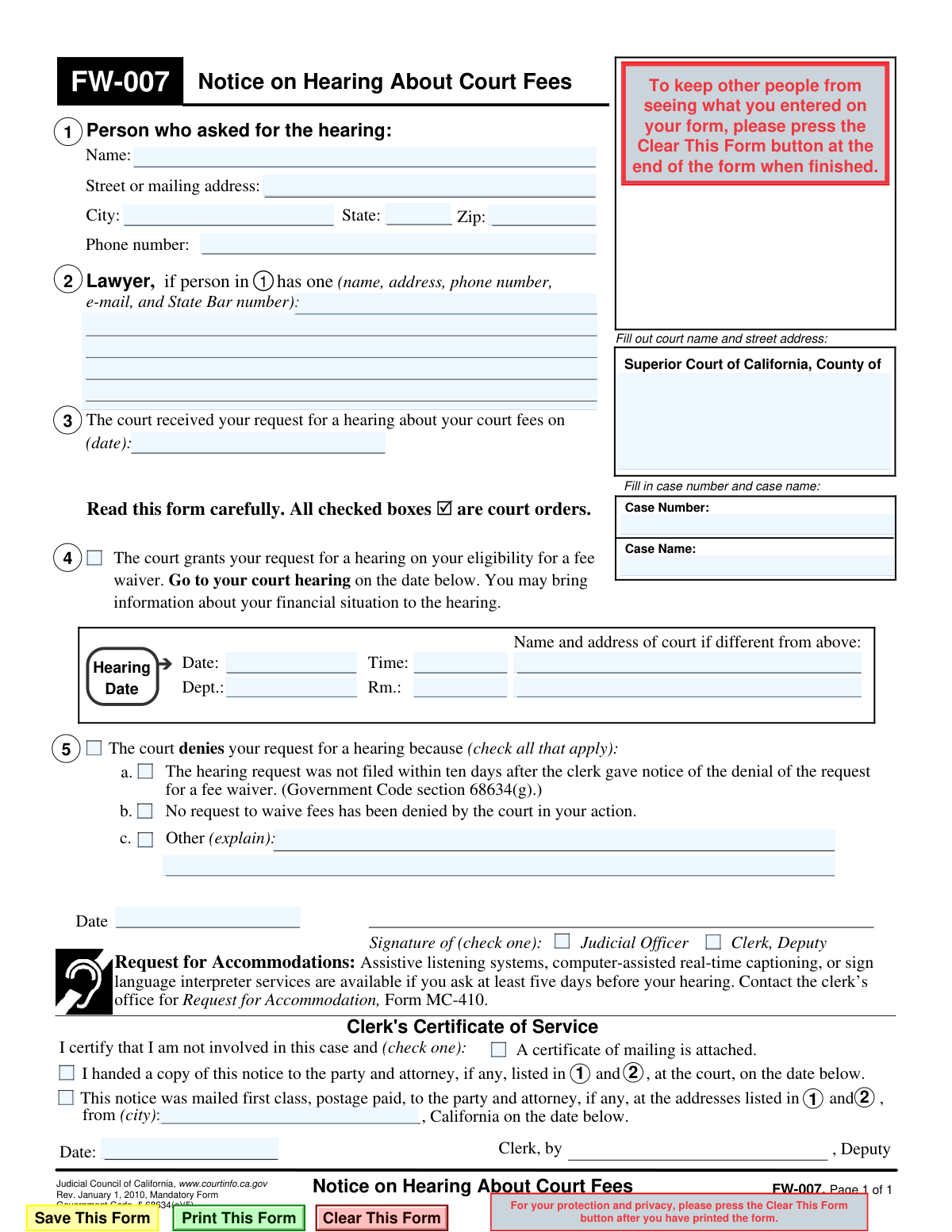
Yes! You can use AI to fill out Form FW-007, Notice on Hearing About Court Fees

This is Form FW-007, a mandatory California court form titled 'Notice on Hearing About Court Fees.' It is used by the court to officially notify an individual about the status of their request for a hearing concerning court fees. The form either sets a date, time, and location for the hearing or provides the legal reason for denying the hearing request. Today, this form can be filled out quickly and accurately using AI-powered services like Instafill.ai, which can also convert non-fillable PDF versions into interactive fillable forms.
FW-007 is part of the California court forms and fee waiver forms categories on Instafill.
Our AI automatically handles information lookup, data retrieval, formatting, and form filling.
It takes less than a minute to fill out FW-007 using our AI form filling.
Securely upload your data. Information is encrypted in transit and deleted immediately after the form is filled out.

Form specifications

Form name: Form FW-007, Notice on Hearing About Court Fees
Number of fields: 38
Number of pages: 1
Language: English
main-image

Instafill Demo: How to fill out PDF forms in seconds with AI

How to Fill Out FW-007 Online for Free in 2026

Are you looking to fill out a FW-007 form online quickly and accurately? Instafill.ai offers the #1 AI-powered PDF filling software of 2026, allowing you to complete your FW-007 form in just 37 seconds or less.
Follow these steps to fill out your FW-007 form online using Instafill.ai:
  1. 1 Navigate to Instafill.ai and upload or select Form FW-007, Notice on Hearing About Court Fees.
  2. 2 Enter the personal information of the person who requested the hearing, including their name, address, and phone number.
  3. 3 Input the court name, address, case number, and case name in the designated fields.
  4. 4 The court clerk or judicial officer will either fill in the hearing date, time, and location, or check the appropriate box to indicate why the hearing request was denied.
  5. 5 The form must be dated and signed by the judicial officer or court clerk.
  6. 6 Complete the Clerk's Certificate of Service section to certify how the notice was delivered to the relevant parties.
  7. 7 Review all the information entered by the AI and manually for accuracy before saving, printing, or filing the completed form.

Our AI-powered system ensures each field is filled out correctly, reducing errors and saving you time.

Why Choose Instafill.ai for Your Fillable FW-007 Form?

Speed

Complete your FW-007 in as little as 37 seconds.

Up-to-Date

Always use the latest 2026 FW-007 form version.

Cost-effective

No need to hire expensive lawyers.

Accuracy

Our AI performs 10 compliance checks to ensure your form is error-free.

Security

Your personal information is protected with bank-level encryption.

Frequently Asked Questions About Form FW-007

This is a notice sent by the court to inform you about the status of your request for a hearing on a fee waiver. It either grants your request and provides a hearing date or denies it and states the reason.

No, you do not fill out Form FW-007. The court clerk or a judicial officer completes and sends this form to you as an official notification.

You must go to your court hearing on the date, time, and in the department listed on the form. Be sure to bring any information or documents that support your financial situation, like pay stubs or bank statements.

This means the court will not hold a hearing to reconsider your fee waiver denial. You will be responsible for paying the required court fees.

Your request was denied because it was not submitted within the 10-day deadline after you received the notice that your initial fee waiver was denied. The court cannot consider late requests.

You must ask for accommodations at least five days before your hearing by contacting the clerk’s office. You will likely need to use Form MC-410, 'Request for Accommodations'.

Your Case Number and Case Name are pre-filled by the court in Section 3 of the form. Use this exact information in any future documents or communication about your case.

This is the court clerk's official certification that a copy of this notice was mailed or handed to you. It serves as the court's proof of when and how you were notified.

Yes, while you don't fill out this specific notice, AI services like Instafill.ai can help you understand its contents and can auto-fill other related court forms you may need for your hearing, saving time and ensuring accuracy.

You can upload Form FW-007 to better understand the notice. If you need to prepare other documents for your hearing, you can use Instafill.ai to quickly and accurately fill them out online.

Services like Instafill.ai can convert flat, non-fillable PDFs into interactive forms. Simply upload the PDF, and the tool will automatically make the fields fillable online.

You should bring any documents that prove your income, expenses, and assets. This can include recent pay stubs, tax returns, bank statements, and proof of any government benefits you receive.

If you miss your hearing, the court will likely deny your request for a fee waiver, and you will have to pay the court fees. It is very important to attend your hearing.

Compliance FW-007
Validation Checks by Instafill.ai

1
Case Number Presence and Format
This check ensures that the 'Case Number' field is not empty and conforms to the standard format used by the court system. Case numbers are critical for uniquely identifying and tracking legal proceedings. If the case number is missing or incorrectly formatted, the document cannot be correctly filed or associated with the existing case file, leading to processing delays or rejection.
2
Exclusive Selection of Hearing Grant or Denial
This validation verifies that the form indicates either a hearing has been granted OR that the request for a hearing has been denied, but not both. These are mutually exclusive outcomes. An error should be flagged if both the hearing date information is filled out and a denial reason is checked, as this represents a logical contradiction that makes the notice ambiguous and invalid.
3
Completeness of Hearing Details
If the form indicates that a hearing has been granted, this check ensures that the 'Date', 'Time', and 'Dept.' or 'Rm.' fields are all completed. Missing any of this information would render the notice ineffective, as the recipient would not know when or where to appear for their hearing. This validation prevents the issuance of incomplete and confusing notices.
4
Future Hearing Date
This validation confirms that the specified 'Hearing Date' is a valid date set in the future. A hearing date that is in the past is a logical impossibility and would invalidate the notice. This check is crucial to ensure the person receiving the notice is given proper and actionable information about a future court appearance.
5
Mandatory Denial Reason Selection
If the form indicates that the request for a hearing is denied, this check ensures that at least one of the reason checkboxes (a, b, or c) is selected. A denial without a stated reason is incomplete and may not be legally sufficient. This validation enforces the requirement to provide a basis for the court's decision.
6
Conditional Explanation for 'Other' Denial
This check is triggered if the denial reason 'c. Other' is selected. It validates that the corresponding text field explaining the 'other' reason is not empty. Simply checking 'Other' without an explanation provides no meaningful information and makes the denial reason unclear, so this rule ensures the necessary context is provided.
7
Filer's Full Address Completeness
This validation ensures that the name, street address, city, state, and zip code for the 'Person who asked for the hearing' are all filled out. This information is essential for official records and for mailing subsequent notices or orders to the correct party. An incomplete address could lead to failed communication and procedural delays.
8
Signature Authority Selection
This check verifies that one of the two checkboxes, 'Judicial Officer' or 'Clerk, Deputy', has been selected in the signature block. This designation is required to confirm who is authorizing the notice and to establish its official capacity. A notice without a clear signing authority is invalid.
9
Mandatory Signature Date
This validation ensures that the 'Date' field next to the signature of the Judicial Officer or Clerk is filled in. The signature date establishes when the order was officially made. Without this date, the timeline of events is unclear, and the document's legal validity could be challenged.
10
Certificate of Service Method Selection
This check ensures that one of the methods in the 'Clerk's Certificate of Service' section ('mailed first class' or 'handed a copy') is selected. This certificate is the official record of how the notice was delivered to the relevant parties. Failing to indicate the method of service makes it impossible to prove that proper notice was given.
11
Service Date Chronology
This validation compares the date in the 'Clerk's Certificate of Service' with the signature date from the main body of the form. It ensures the service date is on or after the signature date. It is logically impossible to serve a document before it has been signed and dated, so this check prevents chronological errors.
12
Valid Request Received Date
This check validates that the date entered for when 'The court received your request for a hearing' is a valid, non-future date. This date is the starting point for calculating deadlines, such as the 10-day filing window mentioned in denial reason 'a'. An invalid or future date would disrupt the legal timeline and make it impossible to correctly apply procedural rules.

Common Mistakes in Completing FW-007

Incorrect or Incomplete Case Number

Users often mistype or transpose digits in the case number or use an incorrect format. This is a critical error because it can lead to the notice being filed in the wrong case, causing significant delays and legal confusion. To prevent this, carefully copy the exact case number from a previous official court document, and consider using a tool like Instafill.ai to ensure the format is validated correctly.

Pre-filling the Hearing Date and Time

A person preparing this form as a proposed order might incorrectly fill in a desired hearing date, time, and department. These details are determined exclusively by the court clerk based on the court's official calendar. Submitting a form with this section pre-filled will cause confusion and requires the clerk to manually correct it, delaying the scheduling process.

Signing in the Judicial Officer's Signature Box

This form is a notice issued by the court, and the signature line is reserved for a Judicial Officer or a Deputy Clerk. A self-represented litigant might mistakenly sign this section, believing their signature is required for submission. This invalidates the form as a court order, forcing it to be rejected and resubmitted, thereby delaying the outcome of their request.

Using a General Court Address Instead of the Specific Courthouse

Litigants may list the main county courthouse address instead of the specific branch or location where their case is being heard. This can cause the document to be misrouted and create confusion about the actual hearing location. Always use the full, specific street address of the courthouse handling your case, which can be found on prior notices or the court's website.

Omitting or Providing Outdated Personal Contact Information

Forgetting to fill in a current mailing address or phone number in Section 1 is a common oversight. If the court's notice is sent to an old address, you may miss your hearing date or other critical information, potentially resulting in a negative outcome for your case. Always double-check that your contact information is complete and matches the address you have on file with the court.

Mistaking the Notice Form for a Request Form

Because this form deals with a hearing, a person may mistakenly believe this is the form used to *request* a hearing about a fee waiver. This is incorrect; the FW-007 is the *notice* the court sends *after* a decision is made on a request. Filing the wrong form wastes time and delays the actual request, which must be made on a different document.

Forgetting to Include Opposing Counsel's Information

The form requires contact information for any lawyers involved, including for the opposing party. A self-represented litigant may only fill in their own details and forget to include the name and address of the other party's attorney. This is a critical omission as the court clerk often uses this information to mail a copy of the notice, and failure to properly serve the opposing counsel can invalidate the notice.

Submitting a Form with Illegible Handwriting

When filling out a paper copy, unclear or messy handwriting can cause court clerks to misread names, addresses, or case numbers. This leads to data entry errors, returned mail, and documents being misfiled. To avoid this, use clear block letters or use a service like Instafill.ai, which can convert a flat, non-fillable PDF into a cleanly typed, fillable version.

Incorrectly Checking the Court's Decision Boxes

A litigant preparing a proposed order might check one of the boxes in Section 5, such as granting the hearing or stating a reason for denial. This section is for the judicial officer's ruling and must be left blank when the form is submitted. Pre-checking these boxes is inappropriate and will require the court to use a new form, delaying the official notice.

Neglecting the Certificate of Service

After the notice is signed by the court, it must be formally delivered ('served') to all parties, and proof of this service must be documented. People often overlook the 'Clerk's Certificate of Service' section, failing to ensure it is completed by the person who mails or hands out the notice. Improper service can render the notice legally ineffective and cause major procedural setbacks in the case.
Saved over 80 hours a year

“I was never sure if my IRS forms like W-9 were filled correctly. Now, I can complete the forms accurately without any external help.”

Kevin Martin Green

Your data stays secure with advanced protection from Instafill and our subprocessors

Robust compliance program

Transparent business model

You’re not the product. You always know where your data is and what it is processed for.

ISO 27001, HIPAA, and GDPR

Our subprocesses adhere to multiple compliance standards, including but not limited to ISO 27001, HIPAA, and GDPR.

Security & privacy by design

We consider security and privacy from the initial design phase of any new service or functionality. It’s not an afterthought, it’s built-in, including support for two-factor authentication (2FA) to further protect your account.

Fill out FW-007 with Instafill.ai

Worried about filling PDFs wrong? Instafill securely fills form-fw-007-notice-on-hearing-about-court-fees forms, ensuring each field is accurate.

Related forms by category

California court forms Judicial Council of California Form SC-105, Request for Court Order and Answer (Small Claims), Judicial Council of California Form SC-120, Defendant’s Claim and ORDER to Go to Small Claims Court (Small Claims), Judicial Council of California Form SER-001, Request for Sheriff to Serve Court Papers, Judicial Council of California Form SER-001, Request for Sheriff to Serve Court Papers, Affidavit for Collection of Personal Property California Probate Code Section 13100, Form POS-040, Proof of Service—Civil, Declaration of Facts of Death (California Superior Court), declaration-of-marriage-for-court-proceeding-california-family-law, ADOPT-200, Adoption Request, ADOPT-200, Stepparent Adoption Request, ADOPT-210, Adoption Agreement, ADOPT-310, Contact After Adoption Agreement, Judicial Council of California Form ADOPT-200, Adoption Request, Form ADR-107, Mediation Attendance Sheet, Form ADR-110, Order Appointing Referee, Form ADR-109, Stipulation or Motion for Order Appointing Referee, Form ADR-102, Request for Trial De Novo After Judicial Arbitration, Form ADR-108, Referee's Report (Code Civ. Proc., §§ 638, 639), Form ADR-106, Petition to Confirm, Correct, or Vacate Contractual Arbitration Award, Form ADR-104, Rejection of Award and Request for Trial After Attorney-Client Fee Arbitration · + 434 more →
fee waiver forms FW-003, Order on Court Fee Waiver (Superior Court), FW-003, Order on Court Fee Waiver (Superior Court), Form FW-003-GC, Order on Court Fee Waiver (Guardianship or Conservatorship), Form FW-003, Order on Court Fee Waiver (Superior Court), Form ATJ 601.9, Application for Waiver of Court Fees (Civil), Form JD-FM-75, Application for Waiver of Fees/Payment of Costs/Appointment of Counsel - Family, Form FW-003-GC, Order on Court Fee Waiver (Superior Court) (Ward or Conservatee), Form MC 20, Fee Waiver Request, Form MC 114, Request for Review of Denied Fee Waiver and Order, Form FW-001-GC, Request to Waive Court Fees (Ward or Conservatee), Form FW-006, Request for Hearing About Court Fee Waiver Order (Superior Court), Form FW-010, Notice to Court of Improved Financial Situation or Settlement, Form FW-002, Request to Waive Additional Court Fees (Superior Court), Form FW-008, Order on Court Fee Waiver After Hearing (Superior Court), Form FW-002-GC, Request to Waive Additional Court Fees (Superior Court) (Ward or Conservatee), Form FW-020, Request for Court Reporter by Party with Fee Waiver