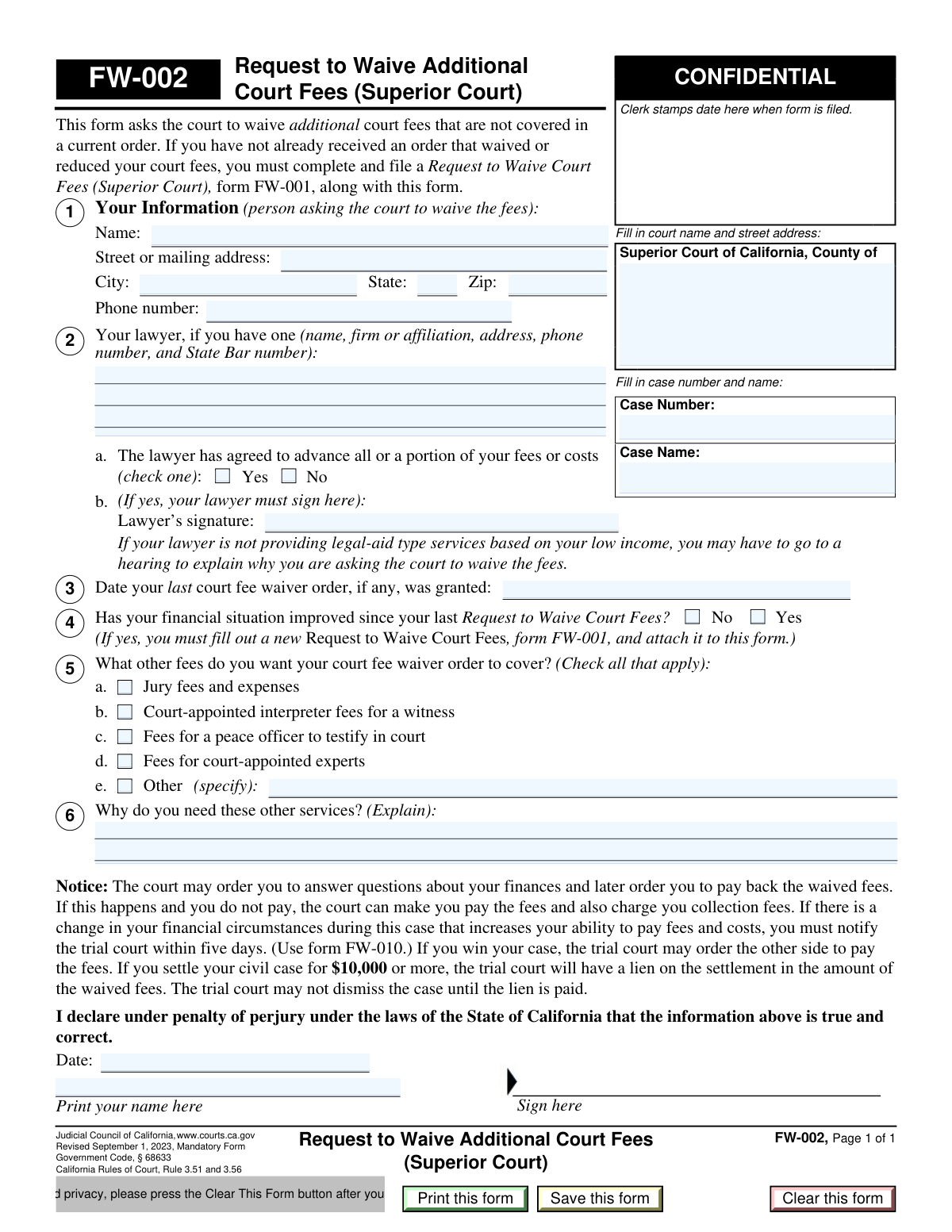
Yes! You can use AI to fill out Form FW-002, Request to Waive Additional Court Fees (Superior Court)
Form FW-002 is a Judicial Council of California form used by individuals in a court case who have already received a fee waiver but need to request a waiver for additional costs, such as jury fees, court-appointed interpreter fees, or expert witness fees. It serves as a supplement to the initial fee waiver request (Form FW-001) and requires the filer to explain why these extra services are necessary. Today, this form can be filled out quickly and accurately using AI-powered services like Instafill.ai, which can also convert non-fillable PDF versions into interactive fillable forms.
Our AI automatically handles information lookup, data retrieval, formatting, and form filling.
It takes less than a minute to fill out FW-002 using our AI form filling.
Securely upload your data. Information is encrypted in transit and deleted immediately after the form is filled out.
Form specifications
| Form name: | Form FW-002, Request to Waive Additional Court Fees (Superior Court) |
| Number of pages: | 1 |
| Language: | English |
| Categories: | court forms, superior court forms, UK court forms |
Instafill Demo: How to fill out PDF forms in seconds with AI
How to Fill Out FW-002 Online for Free in 2026
Are you looking to fill out a FW-002 form online quickly and accurately? Instafill.ai offers the #1 AI-powered PDF filling software of 2026, allowing you to complete your FW-002 form in just 37 seconds or less.
Follow these steps to fill out your FW-002 form online using Instafill.ai:
- 1 Navigate to Instafill.ai and upload or select Form FW-002, Request to Waive Additional Court Fees.
- 2 Provide the court and case information, including the court name, case number, and case name, as prompted by the AI.
- 3 Enter your personal information and details about your lawyer, if you have one.
- 4 Input the date of your last fee waiver order and confirm whether your financial situation has changed since that time.
- 5 Check the boxes for the additional fees you need waived and provide a clear explanation for why these services are necessary for your case.
- 6 Review all the information populated by the AI for accuracy, then date and e-sign the declaration under penalty of perjury.
- 7 Download the completed, signed Form FW-002 to file with the appropriate California Superior Court.
Our AI-powered system ensures each field is filled out correctly, reducing errors and saving you time.
Why Choose Instafill.ai for Your Fillable FW-002 Form?
Speed
Complete your FW-002 in as little as 37 seconds.
Up-to-Date
Always use the latest 2026 FW-002 form version.
Cost-effective
No need to hire expensive lawyers.
Accuracy
Our AI performs 10 compliance checks to ensure your form is error-free.
Security
Your personal information is protected with bank-level encryption.
Frequently Asked Questions About Form FW-002
This form is used to ask the court to waive extra fees that were not covered by your initial fee waiver order. These can include costs like jury fees, fees for court-appointed experts, or interpreter fees for a witness.
You should fill out this form if you have already been granted a court fee waiver but now need additional court services that have fees not covered by your existing waiver order.
You only need to attach a new FW-001 form if your financial situation has improved since your last fee waiver was approved. If your finances have not changed, you do not need to file a new FW-001.
If your financial situation has improved, you must check 'Yes' on question 4 and complete a new Request to Waive Court Fees (form FW-001). You must attach the new FW-001 to this FW-002 form when you file it.
You must provide your lawyer's name, firm, contact information, and State Bar number. You also need to state whether your lawyer has agreed to advance any of your court fees and have them sign the form if they have.
In this section, you need to clearly explain why the specific services you checked in Section 5 are necessary for your case. For example, explain why you need a court-appointed expert or an interpreter for a witness to present your case effectively.
You must file the completed form with the clerk at the Superior Court where your case is being heard. Be sure to fill in the court's name, address, and your case number at the top of the form.
Yes, it is possible. The court can order you to pay back the waived fees later if your financial situation improves, or if you win or settle your civil case for $10,000 or more.
If your ability to pay fees and costs increases during your case, you are required to notify the court within five days. You must use form FW-010, Notice to Court of Improved Financial Situation or Settlement, for this notification.
Yes, services like Instafill.ai use AI to help you accurately auto-fill forms like this one from your saved information, which can save you time and reduce errors.
Simply upload the FW-002 form to the Instafill.ai platform. The AI will identify the fields, and you can then fill them out interactively online or have the system auto-fill them with your saved profile information.
You can use a service like Instafill.ai, which can convert flat, non-fillable PDFs into interactive, fillable forms. This allows you to type your information directly into the fields before printing.
You can request to waive fees for jury services, court-appointed interpreters for witnesses, peace officer testimony, and court-appointed experts. You can also specify other fees by checking the 'Other' box and explaining what they are.
Compliance FW-002
Validation Checks by Instafill.ai
1
Ensures Case Information is Complete
This check verifies that both the 'Case Number' and 'Case Name' fields are filled out. This information is critical for the court clerk to correctly file the document and associate it with the proper legal case. A failure to provide this information would result in the form being rejected as it cannot be processed without a case reference.
2
Validates Applicant's Full Address
This validation ensures that the applicant's 'Street or mailing address', 'City', 'State', and 'Zip' fields are all completed. A complete and valid address is mandatory for all court filings to ensure the court can mail notices, orders, and other official correspondence to the correct location. An incomplete address will lead to rejection of the form.
3
Verifies ZIP Code Format
This check validates that the 'Zip' code field contains a valid 5-digit or 9-digit (ZIP+4) numeric format. An incorrectly formatted ZIP code can cause mail to be delayed or returned, preventing the applicant from receiving important court documents. This validation helps ensure the integrity of the applicant's contact information on record.
4
Conditional Lawyer Signature Requirement
This validation checks if the 'Lawyer’s signature' field is completed when the 'Yes' box in section 2a is checked, indicating the lawyer has agreed to advance fees. The lawyer's signature is a required attestation of this financial arrangement, which the court considers when ruling on the fee waiver. If 'Yes' is checked but the signature is missing, the form is considered incomplete and legally deficient.
5
Validates Date of Last Fee Waiver Order
This check ensures the date provided in Section 3, 'Date your last court fee waiver order', is a valid calendar date and occurs in the past. A future or invalid date is logically impossible and indicates a data entry error. This date provides context for the current request, and incorrect data could confuse the case record and delay processing.
6
Conditional FW-001 Attachment for Improved Finances
This validation is triggered if the applicant checks 'Yes' in Section 4, indicating their financial situation has improved. It verifies that a new 'Request to Waive Court Fees' (form FW-001) has been attached to the submission as required. Failure to attach the required FW-001 form will result in the rejection of this FW-002 request, as the court needs the new financial information to make a decision.
7
Requires Selection of at Least One Fee to Waive
This check ensures that the applicant has selected at least one checkbox in Section 5, specifying which additional fees they want the court to waive. The entire purpose of this form is to request a waiver for specific fees, so failing to select any makes the request void. The form cannot be processed if the court does not know what action is being requested.
8
Ensures 'Other' Fee Type is Specified
This validation verifies that if the 'Other (specify)' checkbox is selected in Section 5, the corresponding text field is not empty. The court needs to know the exact nature of the 'other' fee being requested for waiver. An empty specification field makes the request ambiguous and will prevent the court from ruling on it.
9
Requires Justification for Additional Services
This check ensures that the explanation field in Section 6, 'Why do you need these other services?', is filled out if any fee type is selected in Section 5. This justification is the primary evidence the judge will use to determine if the requested services are necessary for the case. Without this explanation, the request lacks a basis and will likely be denied.
10
Validates Declaration Date
This check verifies that the 'Date' field in the final declaration section is filled with a valid date that is on or before the submission date. The date confirms when the applicant declared the information to be true under penalty of perjury. An unsigned or undated declaration is legally invalid and will cause the entire form to be rejected.
11
Ensures Applicant Signature is Present
This validation confirms that the 'Sign here' field in the declaration section has been signed by the applicant. The signature is a legal requirement that makes the declaration binding under penalty of perjury. An unsigned form is not a valid legal document and will be immediately rejected by the court clerk.
12
Verifies Printed Name in Declaration
This check ensures the 'Print your name here' field in the declaration section is filled out and matches the applicant's name from Section 1. This clearly identifies the person making the sworn declaration. A missing printed name can create ambiguity about the declarant's identity, potentially invalidating the submission.
Common Mistakes in Completing FW-002
This form is for 'additional' fees, but filers often use it as an initial request or forget to attach a new FW-001 if their financial situation has improved as required by Section 4. This mistake happens due to overlooking the instructions at the top of the form. The consequence is an automatic rejection or denial of the request, causing significant delays. To avoid this, confirm you have a pre-existing fee waiver and attach a new FW-001 if you check 'Yes' in Section 4.
In Section 2, if 'Yes' is checked to indicate a lawyer is advancing costs, the lawyer's signature is mandatory. Filers often check the box but fail to obtain the signature, rendering this section incomplete. This leads to processing delays or denial as the court cannot verify the financial arrangement. Always secure your lawyer's signature on the form before filing if they have agreed to advance any costs on your behalf.
Section 6 requires a specific explanation for why additional services like experts or interpreters are needed. Many people provide generic answers like 'It is for my case,' which is insufficient for a judge to approve the expense. This results in the denial of the specific fee waiver, forcing the filer to pay out-of-pocket. To avoid this, clearly state what the service is for and why it is essential to presenting your case.
Forgetting to sign, print your name, and date the declaration at the bottom is a simple but critical error. An unsigned form is legally invalid and will be rejected immediately by the court clerk. This halts the entire process until a properly signed form is submitted. Always perform a final review of the form to ensure the declaration is fully completed before filing.
The Case Number and Case Name must be entered exactly as they appear in the court's records. People often make typos, use unofficial abbreviations, or leave these fields blank. This error can cause the document to be misfiled or rejected, meaning the request never reaches the judge for consideration. To prevent this, carefully copy the case information from a prior official court document.
Section 3 asks for the date of the last fee waiver order, which provides crucial context for the judge. Filers often leave this blank because they don't have the previous order handy. This omission forces court staff to search for the information, causing delays, or may lead to the request being returned as incomplete. Before filling out the form, locate your prior 'Order on Court Fee Waiver' (FW-003) and enter the date shown on it.
When checking the 'Other (specify)' box in Section 5, it is mandatory to write a description of the fee in the space provided. A common mistake is to check the box but leave the description field blank or write something too vague to be understood. This results in the court having no basis to grant the waiver for that unspecified fee. If you check 'Other,' always provide a concise and accurate description of the fee you need waived.
Section 4 is a critical checkpoint that is often misunderstood. Answering 'Yes' (your situation has improved) without attaching a new FW-001 form will lead to denial. Answering 'No' when your income has actually increased could be considered perjury. This mistake can have serious procedural and legal consequences. Be sure to answer honestly and follow the instructions precisely based on your answer. AI-powered form filling tools like Instafill.ai can help by flagging this conditional requirement to ensure you attach the necessary documents.
Many court forms are distributed as flat, non-fillable PDFs, forcing users to print them and fill them out by hand. This often leads to illegible handwriting, which can cause data entry errors by court clerks or rejection of the form. It also makes it easier to miss fields or make mistakes. To avoid this, use a tool like Instafill.ai that can convert any non-fillable PDF into an interactive, fillable form, ensuring clarity and completeness.
Saved over 80 hours a year
“I was never sure if my IRS forms like W-9 were filled correctly. Now, I can complete the forms accurately without any external help.”
Kevin Martin Green
Your data stays secure with advanced protection from Instafill and our subprocessors

Robust compliance program
Transparent business model
You’re not the product. You always know where your data is and what it is processed for.
ISO 27001, HIPAA, and GDPR
Our subprocesses adhere to multiple compliance standards, including but not limited to ISO 27001, HIPAA, and GDPR.
Security & privacy by design
We consider security and privacy from the initial design phase of any new service or functionality. It’s not an afterthought, it’s built-in, including support for two-factor authentication (2FA) to further protect your account.
Fill out FW-002 with Instafill.ai
Worried about filling PDFs wrong? Instafill securely fills form-fw-002-request-to-waive-additional-court-fees-superior-court forms, ensuring each field is accurate.