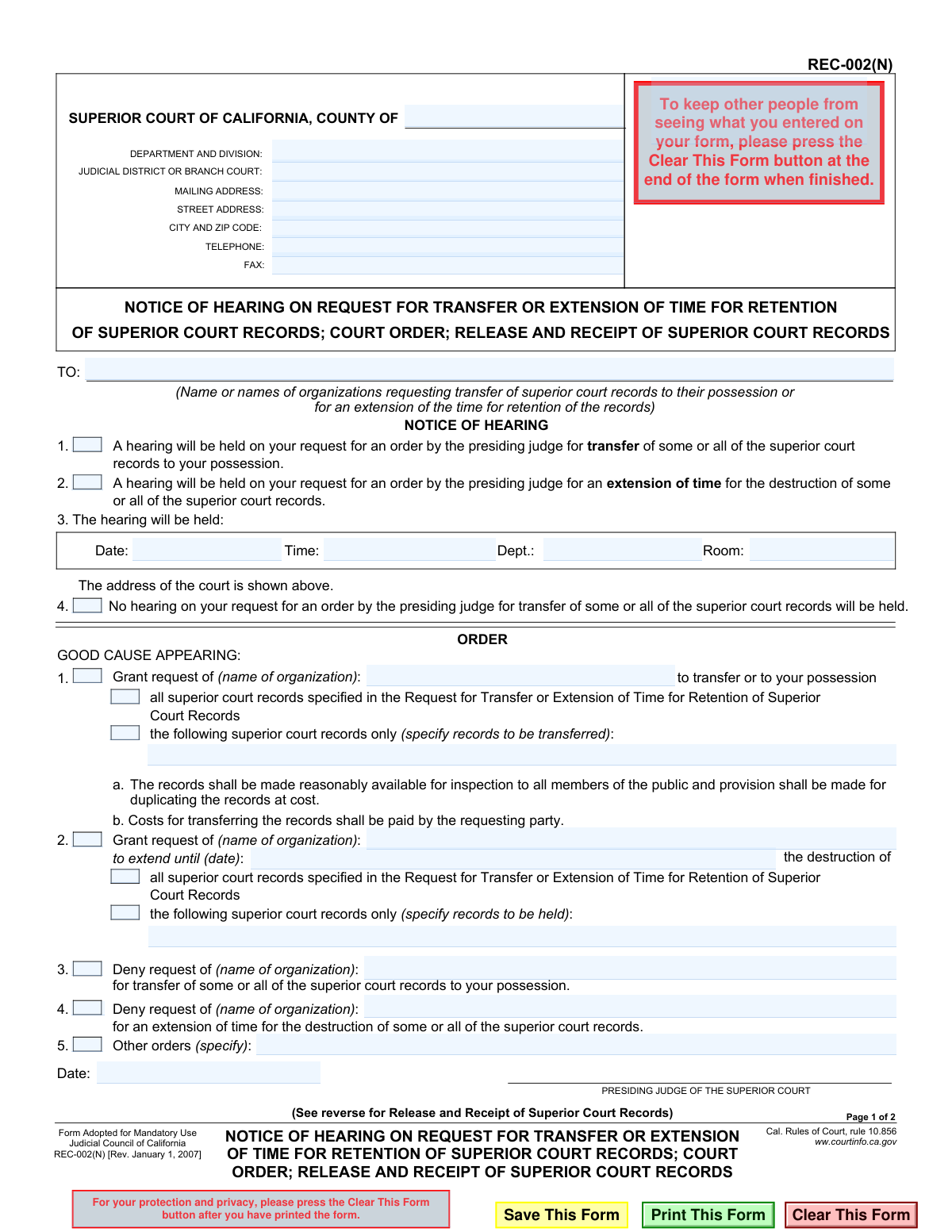
Yes! You can use AI to fill out Notice of Hearing on Request for Transfer or Extension of Time for Retention of Superior Court Records; Court Order; Release and Receipt of Superior Court Records
Form REC-002(N) is a mandatory California court form used to provide notice of a hearing concerning a request to transfer superior court records or extend their retention period. It also serves as the official court order, documenting the judge's decision to grant or deny the request. Today, this form can be filled out quickly and accurately using AI-powered services like Instafill.ai, which can also convert non-fillable PDF versions into interactive fillable forms.
REC-002(N) is part of the
California court forms, superior court forms and transfer request forms categories on Instafill.
Our AI automatically handles information lookup, data retrieval, formatting, and form filling.
It takes less than a minute to fill out REC-002(N) using our AI form filling.
Securely upload your data. Information is encrypted in transit and deleted immediately after the form is filled out.
Form specifications
| Form name: | Notice of Hearing on Request for Transfer or Extension of Time for Retention of Superior Court Records; Court Order; Release and Receipt of Superior Court Records |
| Number of fields: | 40 |
| Number of pages: | 1 |
| Language: | English |
Instafill Demo: How to fill out PDF forms in seconds with AI
How to Fill Out REC-002(N) Online for Free in 2026
Are you looking to fill out a REC-002(N) form online quickly and accurately? Instafill.ai offers the #1 AI-powered PDF filling software of 2026, allowing you to complete your REC-002(N) form in just 37 seconds or less.
Follow these steps to fill out your REC-002(N) form online using Instafill.ai:
- 1 Navigate to Instafill.ai and upload or select the REC-002(N) form.
- 2 Use the AI assistant to automatically populate the court's information, such as the county, address, and judicial district.
- 3 Enter the name of the organization requesting the transfer or extension of records in the 'TO:' section.
- 4 Indicate the purpose of the hearing by checking the appropriate box for either a request for transfer or an extension of time for destruction.
- 5 Fill in the specific details for the hearing, including the date, time, and department/room number.
- 6 The 'ORDER' section is completed by the court, but review the details of the request that will be considered, such as the specific records involved.
- 7 Once all information is entered, review the entire form for accuracy before it is finalized and signed by the presiding judge.
Our AI-powered system ensures each field is filled out correctly, reducing errors and saving you time.
Why Choose Instafill.ai for Your Fillable REC-002(N) Form?
Speed
Complete your REC-002(N) in as little as 37 seconds.
Up-to-Date
Always use the latest 2026 REC-002(N) form version.
Cost-effective
No need to hire expensive lawyers.
Accuracy
Our AI performs 10 compliance checks to ensure your form is error-free.
Security
Your personal information is protected with bank-level encryption.
Frequently Asked Questions About Form REC-002(N)
This form is a notice from the Superior Court of California informing you about a hearing on your request to transfer court records or extend their retention time. It also serves as the official court order granting or denying that request.
This form is sent to organizations or individuals who have already submitted a request to the court for the transfer of superior court records or for an extension of their destruction date.
No, this form is a notice sent to you by the court; you do not fill it out. You must read it to understand the status of your request and note any scheduled hearing dates.
Check the 'Notice of Hearing' section. If box 1 or 2 is checked and the date, time, and location in box 3 are filled in, you must attend a hearing.
Review the 'ORDER' section of the form. If the 'Grant request' box is checked, your request has been approved as specified in the order.
If the 'Deny request' box is checked in the 'ORDER' section, the presiding judge has not approved your request for the transfer or retention of the court records.
In the 'ORDER' section, the judge will check the box for 'the following superior court records only' and list the specific records that are approved for transfer or extended retention.
The form states that the costs for transferring the records shall be paid by the requesting party, which is your organization.
If your transfer request is granted, you must make the records reasonably available for public inspection and provide a way for them to be duplicated at cost.
While you don't fill out this specific notice, AI services like Instafill.ai can help you accurately complete the initial request form that leads to this notice. They use AI to auto-fill fields, saving time and reducing errors.
You can upload your form to the Instafill.ai platform. The service will help you fill in your information, case details, and the specifics of your request before you submit it to the court.
Services like Instafill.ai can convert flat, non-fillable PDFs into interactive, fillable forms. This allows you to easily type your information directly into the fields online before printing.
You must prepare for and attend the hearing at the specified date, time, and location. Be ready to explain why your request should be granted by the court.
Compliance REC-002(N)
Validation Checks by Instafill.ai
1
Validates County Name
Ensures the 'COUNTY OF' field (FillText16) contains a valid California county name. This is important for routing the document to the correct jurisdiction and maintaining accurate court records. A failure would prevent the form from being filed until a recognized county name is provided.
2
Ensures Recipient Organization is Specified
Verifies that the 'TO:' field (FillText6), which identifies the organization requesting the record transfer or extension, is not empty. This field is mandatory as it names the party to whom the notice is addressed. If this field is left blank, the notice is legally insufficient and cannot be processed.
3
Requires Selection of Hearing Purpose
Checks that at least one of the hearing purpose checkboxes (CheckBox12 for transfer or CheckBox11 for extension) is selected. This clarifies the subject of the hearing for all parties involved. If neither is selected, the notice is ambiguous and the system should prompt the user to specify the reason for the hearing.
4
Validates Hearing Date Format and Futurity
Confirms that the 'Date' field for the hearing (FillText5) is a valid calendar date in a standard format (e.g., MM/DD/YYYY) and that the date is in the future. This ensures proper and timely notification for the scheduled hearing. An invalid or past date would render the notice defective.
5
Validates Hearing Time Format
Checks that the 'Time' field for the hearing (FillText4) is entered in a recognized time format (e.g., HH:MM AM/PM). Correct formatting is essential for clarity and to prevent confusion about the hearing's start time. An invalid format would require correction before the form can be finalized.
6
Enforces Mutually Exclusive Order Actions
Prevents the selection of conflicting order outcomes for the same request type. For example, a request for transfer cannot be both granted (CheckBox10) and denied (CheckBox4). This logical check ensures the final court order is unambiguous and legally sound.
7
Enforces Mutually Exclusive Record Scope
Ensures that within a grant order, either 'all superior court records' (e.g., CheckBox9) or 'the following superior court records only' (e.g., CheckBox8) is selected, but not both. This prevents contradictory instructions regarding the scope of the records to be transferred or retained. The system should flag this as an error if both are checked.
8
Requires Specification for Partial Record Transfer
Validates that if the checkbox for transferring only specific records is selected (CheckBox8), the corresponding text field (FillText8) must be filled out. This ensures the order clearly identifies which records are approved for transfer. An empty specification field would make the order unenforceable.
9
Requires Specification for Partial Record Extension
Validates that if the checkbox for extending retention for only specific records is selected (CheckBox5), the corresponding text field (FillText11) must not be empty. This is critical for defining the exact scope of the extension order. Failure to specify the records would create ambiguity and require clarification.
10
Requires Specification for 'Other Orders'
Checks that if the 'Other orders' checkbox (CheckBox2) is selected, the accompanying text field (FillText14) must contain a description of the order. This is necessary to give effect to the judge's specific instructions that do not fit the standard options. The form is incomplete if this box is checked but the order is not specified.
11
Validates Extension 'Until' Date
If a request for an extension of time is granted (CheckBox7), this check ensures the 'extend until (date)' field (FillText10) contains a valid, future date. This date defines the new deadline for record destruction and must be clear and valid. An invalid or past date would make the extension order nonsensical.
12
Verifies Logical Order Date
Ensures the date the order is signed (FillText15) is a valid date and is on or after the scheduled hearing date (FillText5). An order cannot be dated before the hearing has taken place. This check maintains the logical and chronological integrity of the legal process.
13
Ensures Organization Name Consistency
Verifies that the organization name entered in any part of the 'ORDER' section (e.g., FillText7, FillText9, FillText12) is consistent with the name specified in the 'TO:' section (FillText6). This data integrity check prevents confusion and ensures the order correctly identifies the party in question. A mismatch should trigger a warning to the user.
14
Validates Court Phone Number Format
Checks that the court's telephone number (FillText22) follows a standard format, such as (XXX) XXX-XXXX or XXX-XXX-XXXX. This ensures the contact information on the notice is usable and professional. An improperly formatted number could cause communication issues for the public or other parties.
Common Mistakes in Completing REC-002(N)
A frequent error is for the applicant to fill in the 'Notice of Hearing' (section 3) or the 'ORDER' (section 4) sections. These parts of the form are reserved exclusively for the court to schedule hearings and issue rulings. Submitting a form with these sections filled out by the applicant will result in immediate rejection, as it demonstrates a misunderstanding of the legal process and attempts to usurp the court's function. To avoid this, only complete the sections designated for the applicant, which on this specific form is primarily receiving it, but on the initial request form, would be the applicant information and the specifics of the request.
Many users mistakenly believe this REC-002(N) form is the initial application to request a transfer or extension. This form is actually a 'Notice' and 'Order' issued by the court *in response* to a request. Filing this form to start the process is incorrect and will lead to the request never being processed. Applicants should locate and file the correct initial 'Request' form (e.g., REC-001) to begin the process.
Applicants sometimes enter the wrong county, judicial district, or court address at the top of the form. This can happen due to confusion between different county courts or using outdated information. This mistake can cause the filing to be sent to the wrong courthouse, leading to significant delays, missed deadlines, or the document being lost entirely. Always double-check the exact name and address of the specific Superior Court branch where the records are held before filling out the form.
In the 'TO:' field and within the 'ORDER' section, the full, legal name of the requesting organization is required. People often use informal names, acronyms, or abbreviations, which can create legal ambiguity about who is responsible for the records. This can delay the order as the court may require clarification. Always use the complete and official name of the entity as registered, ensuring there is no confusion about the party to the agreement.
When the court grants a request for specific records (Order items 1.a or 2.a), the description must be precise. This mistake originates from the applicant providing a vague description in their initial request, such as 'all records from 2020' instead of specific case numbers, date ranges, or record types. Vague descriptions make it impossible for court clerks to identify the correct records, leading to the court denying the request or issuing an order that cannot be fulfilled. Be as specific as possible in the initial request to ensure the final order is actionable.
The form addresses two distinct actions: transferring records to an organization's possession or extending the time before records are destroyed. Applicants sometimes fail to clearly specify which action they are requesting in their initial application. This ambiguity can lead the court to misinterpret the request, check the wrong box on the order, or deny the request for being unclear. Ensure your initial request document clearly states whether you are seeking a 'transfer' or an 'extension' to prevent this confusion.
This form is often available as a non-fillable PDF, forcing users to print it and fill it out by hand. Illegible handwriting is a common problem that can lead to court clerks making data entry errors when processing names, dates, or record identifiers. This can result in incorrect notices or orders. To prevent this, it is best to use a tool that can convert the document into a fillable format. For instance, AI-powered tools like Instafill.ai can make flat PDFs fillable, ensuring all entries are typed, clear, and legible.
This form version is from 2007. Courts periodically update their forms to comply with new rules and laws. Submitting an obsolete version can result in automatic rejection by the court clerk. Always check the official court website for the latest version of any form before filling it out. Using a service like Instafill.ai can help, as such platforms often provide access to the most current versions of official forms, reducing the risk of rejection due to outdated paperwork.
The order explicitly states that 'Costs for transferring the records shall be paid by the requesting party' and that records must be made available to the public. A common mistake is for an organization to file a request without being prepared to accept these financial and logistical responsibilities. This can lead to the request being denied or the organization being unable to comply with the order after it is granted. Applicants must fully understand and agree to these conditions before initiating the request.
Saved over 80 hours a year
“I was never sure if my IRS forms like W-9 were filled correctly. Now, I can complete the forms accurately without any external help.”
Kevin Martin Green
Your data stays secure with advanced protection from Instafill and our subprocessors

Robust compliance program
Transparent business model
You’re not the product. You always know where your data is and what it is processed for.
ISO 27001, HIPAA, and GDPR
Our subprocesses adhere to multiple compliance standards, including but not limited to ISO 27001, HIPAA, and GDPR.
Security & privacy by design
We consider security and privacy from the initial design phase of any new service or functionality. It’s not an afterthought, it’s built-in, including support for two-factor authentication (2FA) to further protect your account.
Fill out REC-002(N) with Instafill.ai
Worried about filling PDFs wrong? Instafill securely fills notice-of-hearing-on-request-for-transfer-or-extension-of-time-for-retention-of-superior-court-records-court-order forms, ensuring each field is accurate.