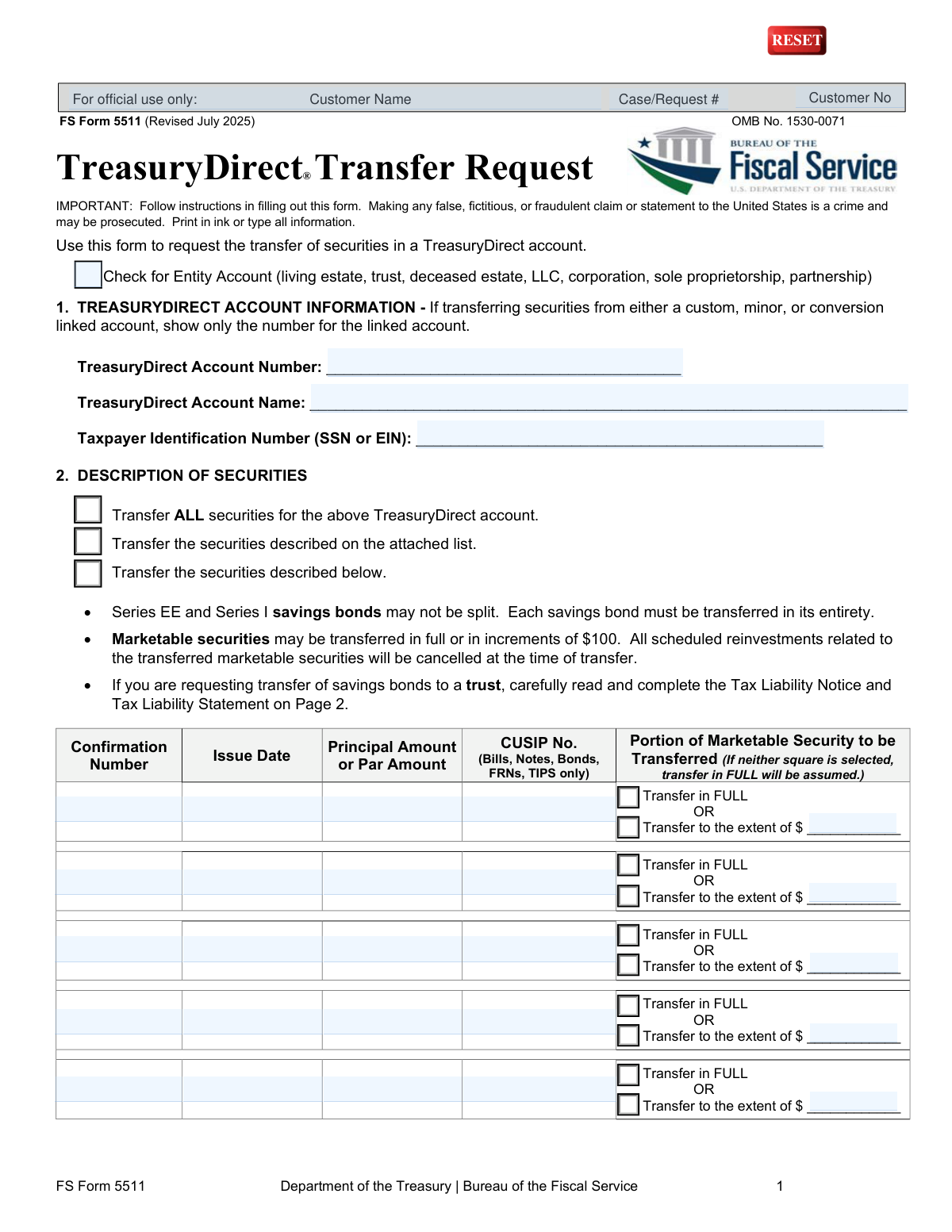
Yes! You can use AI to fill out FS Form 5511, TreasuryDirect® Transfer Request
FS Form 5511 is a Department of the Treasury form used by owners of a TreasuryDirect account to request the transfer of their securities, such as savings bonds, bills, and notes. It is a crucial document for legally moving these assets to another TreasuryDirect account, a trust, or a brokerage firm, ensuring proper documentation and tax reporting for the transaction. Today, this form can be filled out quickly and accurately using AI-powered services like Instafill.ai, which can also convert non-fillable PDF versions into interactive fillable forms.
Our AI automatically handles information lookup, data retrieval, formatting, and form filling.
It takes less than a minute to fill out FS Form 5511 using our AI form filling.
Securely upload your data. Information is encrypted in transit and deleted immediately after the form is filled out.
Form specifications
| Form name: | FS Form 5511, TreasuryDirect® Transfer Request |
| Number of pages: | 1 |
| Language: | English |
| Categories: | transfer forms |
Instafill Demo: How to fill out PDF forms in seconds with AI
How to Fill Out FS Form 5511 Online for Free in 2026
Are you looking to fill out a FS FORM 5511 form online quickly and accurately? Instafill.ai offers the #1 AI-powered PDF filling software of 2026, allowing you to complete your FS FORM 5511 form in just 37 seconds or less.
Follow these steps to fill out your FS FORM 5511 form online using Instafill.ai:
- 1 Navigate to Instafill.ai and upload your FS Form 5511 or select it from the platform's template library.
- 2 Provide your TreasuryDirect account information in Section 1, including the account number, name, and Taxpayer Identification Number (TIN).
- 3 In Section 2, describe the securities to be transferred by either checking 'Transfer ALL securities' or detailing specific securities with their confirmation numbers, issue dates, and amounts.
- 4 Complete Section 3 to transfer to another TreasuryDirect account or Section 4 to transfer to a financial institution, providing all required recipient details.
- 5 If transferring savings bonds to a trust, carefully read the Tax Liability Notice and complete the Tax Liability Statement on page 2.
- 6 Review all entered information for accuracy, then sign the form in the presence of an authorized certifying officer as required in Section 5. Note that a notary public is not an acceptable certifier.
- 7 Download the completed and certified form and mail it to the Treasury Retail Securities Services address provided in the instructions.
Our AI-powered system ensures each field is filled out correctly, reducing errors and saving you time.
Why Choose Instafill.ai for Your Fillable FS Form 5511 Form?
Speed
Complete your FS Form 5511 in as little as 37 seconds.
Up-to-Date
Always use the latest 2026 FS Form 5511 form version.
Cost-effective
No need to hire expensive lawyers.
Accuracy
Our AI performs 10 compliance checks to ensure your form is error-free.
Security
Your personal information is protected with bank-level encryption.
Frequently Asked Questions About Form FS Form 5511
This form is used to request the transfer of securities, such as savings bonds or marketable securities, from your TreasuryDirect account to another TreasuryDirect account or to a financial institution.
You need to fill out this form if you are the owner of a TreasuryDirect account and wish to transfer securities out of it. This applies to transfers for gifts, court orders, or moving securities to a brokerage firm.
No, Series EE and Series I savings bonds cannot be split and must be transferred in their entirety. However, marketable securities like bills and notes may be transferred in full or in increments of $100.
You must sign the form in the presence of an authorized certifying officer at a financial institution, such as a bank or credit union. A notary public's certification is not acceptable for this form.
Yes, if you are transferring savings bonds to a trust, you must read the Tax Liability Notice and complete the Tax Liability Statement on page 2. This section clarifies how the accumulated interest will be handled for tax purposes.
Mail the completed and certified form to Treasury Retail Securities Services, PO Box 9150, Minneapolis, MN 55480-9150. Do not send the form to the address listed for form-related comments.
No, this form cannot be used to transfer securities to a checking or savings account. Section 4 is specifically for transferring marketable securities (not savings bonds) to a brokerage or financial institution's book-entry system.
Yes, this transaction may be reportable to the Internal Revenue Service (IRS) and could result in a tax liability. You should consult a tax professional for advice regarding your specific situation.
All scheduled reinvestments related to the marketable securities you are transferring will be cancelled at the time of the transfer. You will need to set up new reinvestments in the recipient account if desired.
Processing can be delayed or rejected if you provide incorrect information, fail to obtain the required signature certification, or submit the form right before a Closed Book Period. Double-check all account numbers and recipient details before mailing.
Yes, services like Instafill.ai use AI to accurately auto-fill form fields with your information. This can save you time and help reduce the chance of errors on complex forms.
You can use a service like Instafill.ai to complete the form online. Simply upload the PDF, and the platform will make the fields fillable so you can type your information before printing for signature certification.
If you have a non-fillable PDF, you can use a tool like Instafill.ai to convert it into an interactive, fillable form. This allows you to easily type your information for a clean, legible submission.
Compliance FS Form 5511
Validation Checks by Instafill.ai
1
Source Account Information Completeness
This check ensures that all fields in Section 1, 'TREASURYDIRECT ACCOUNT INFORMATION', are completed. This includes the TreasuryDirect Account Number, Account Name, and Taxpayer Identification Number (TIN). This information is critical for identifying the source account from which securities will be transferred, and failure to provide it will result in an immediate rejection of the form.
2
Taxpayer ID Number (TIN) Format Validation
Validates that the Taxpayer Identification Number (SSN or EIN) in Section 1 is a valid 9-digit number. An SSN should follow an XXX-XX-XXXX format and an EIN should follow XX-XXXXXXX. This is essential for tax reporting purposes and for correctly identifying the account holder; an invalid format will prevent processing.
3
Security Description Exclusivity
This check verifies that only one method of describing the securities in Section 2 is chosen: 'Transfer ALL securities', 'Transfer the securities described on the attached list', or 'Transfer the securities described below'. Selecting more than one option creates ambiguity. If multiple options are selected, the form submission should be flagged for manual review or rejected.
4
Savings Bond Partial Transfer Prohibition
According to the form's rules, Series EE and Series I savings bonds cannot be split and must be transferred in their entirety. This validation checks that if a security listed in the Section 2 table is a savings bond, the 'Transfer in FULL' option is selected. Attempting a partial transfer of a savings bond will cause the transaction to fail.
5
Marketable Security Partial Transfer Increment
For marketable securities where a partial transfer is requested, this check validates that the specified dollar amount is an increment of $100. This is a specific rule for these security types. A non-compliant amount would cause the transfer to be rejected or delayed until corrected.
6
Transfer Destination Exclusivity
This validation ensures that information is provided in either Section 3 ('TRANSFER TO ANOTHER TREASURYDIRECT ACCOUNT') or Section 4 ('TRANSFER TO A FINANCIAL INSTITUTION'), but not both. The form can only process one type of transfer destination per request. Submitting with both sections filled will lead to rejection due to conflicting instructions.
7
Savings Bond Transfer Destination Restriction
This check confirms that if savings bonds are being transferred (as described in Section 2), Section 4 is not used as the destination. The form explicitly states Section 4 'does NOT apply to savings bonds'. A violation of this rule would result in a failed transaction as the system cannot process this request type.
8
Tax Liability Statement for Trust Transfers
If savings bonds are being transferred to a trust (as indicated by the recipient account type), this check verifies that the 'TAX LIABILITY STATEMENT' on page 2 is completed. The user must select either box 'a' or 'b'. Failure to complete this mandatory section for trust transfers will halt the process due to missing tax-related certification.
9
Financial Institution Routing Number Format
If Section 4 is used, this validation confirms the 'Routing Number' is a valid 9-digit ABA routing number. An incorrect or improperly formatted routing number will cause the electronic transfer to fail. This check prevents transfer failures and potential loss of funds in transit.
10
CUSIP Number Format Validation
For any marketable securities (Bills, Notes, Bonds, FRNs, TIPS) listed in Section 2, this check validates that the CUSIP number is a 9-character alphanumeric string. The CUSIP is a unique identifier for the security, and an invalid format will make it impossible to locate the correct security for transfer, causing the request to be rejected.
11
Signer Information Completeness
This check verifies that all personal information fields for the signer(s) in Section 5 are filled out, including Print Name, Social Security Number, full address, and contact information. This data is required for identity verification and legal certification of the request. Incomplete information will render the signature and certification invalid.
12
Signer's SSN Format Validation
This validation ensures the Social Security Number provided for the signer in Section 5 is in a valid 9-digit format. This is distinct from the account TIN and is used to verify the identity of the individual authorizing the transaction. An invalid SSN will cause the certification to fail.
13
Certification Section Completeness
This check ensures that the entire certification block in Section 5 is completed by an authorized certifying officer. This includes the name(s) of the person(s) who appeared, the date, the officer's signature and title, and the financial institution's stamp or seal. An incomplete certification invalidates the entire form, as it lacks the required legal guarantee.
14
Logical Date of Certification
This validation checks that the date of certification in Section 5 is on or after the date the form was signed by the account holder(s). A certification dated before the signature is logically impossible and would indicate a procedural error. Such a discrepancy would require the form to be re-signed and re-certified.
Common Mistakes in Completing FS Form 5511
The form explicitly states 'Notary certification is not acceptable,' yet many applicants use a notary public out of habit. This error results in immediate rejection because the transfer requires a Medallion Signature Guarantee from an authorized officer at a financial institution. To avoid this, take the unsigned form to your bank or brokerage firm and specifically request a signature guarantee for a securities transfer, ensuring they use their official stamp.
When transferring savings bonds to a trust, completing the 'Tax Liability Statement' on Page 2 is mandatory. Filers often skip this section due to its complex legal language, which halts the transfer process. Failure to select either box 'a' or 'b' to declare the tax ownership status will lead to rejection. Carefully read the notice and consult a tax advisor if needed before making your selection.
A simple typo in the recipient's TreasuryDirect Account Number in Section 3 is a frequent and critical error. This can cause the transfer to be rejected or, in a worst-case scenario, sent to the wrong account, creating a complex problem. Meticulously verify every digit of the recipient's account number and name against their official account information. AI-powered form fillers like Instafill.ai can help by validating number formats and reducing manual data entry errors.
In Section 4, filers often provide their standard checking or savings account ABA routing number. However, this section requires a specific book-entry routing number for securities, which is different. Using the wrong number will cause the transfer to fail. You must contact the receiving brokerage firm to get their exact book-entry delivery instructions, including the correct routing number and wire name.
Filers frequently omit crucial details in the securities table, such as the CUSIP number for marketable securities or the Confirmation Number for savings bonds. This incomplete information prevents the Treasury from identifying the specific assets to be transferred, leading to rejection or significant processing delays. Before filling, log into your TreasuryDirect account to gather all the necessary identifiers for each security you intend to transfer.
The form clearly states that Series EE and I savings bonds must be transferred in their entirety and cannot be split. Despite this, applicants sometimes try to specify a partial dollar amount for a savings bond transfer. Any such request will be automatically rejected, delaying the entire transaction. Always ensure you select 'Transfer in FULL' for any savings bonds listed in Section 2.
The instructions require the applicant to sign 'in the presence of a certifying officer.' A common mistake is signing the form at home beforehand, which invalidates the certification process as the officer must witness the act of signing. This will lead to the form being rejected. Always bring the unsigned form to the financial institution and sign it only when instructed to do so by the authorized officer.
For certain co-owned bonds with a 'Restricted registration,' the form requires signatures from both registrants. Filers often overlook this, submitting the form with only one signature, which is insufficient for authorizing the transfer. This results in an automatic rejection. Always verify the registration of your securities and ensure all required owners sign the form in Section 5.
This form is often a non-fillable PDF, forcing users to print and complete it by hand, which can result in illegible entries. Poor handwriting, using pencil, or stray marks can cause data entry errors or rejection. To ensure clarity, use a tool like Instafill.ai to convert the flat PDF into a fillable version, allowing you to type your information directly and produce a clean, professional document.
In Section 2, applicants sometimes create confusion by checking the 'Transfer ALL securities' box while also listing individual securities in the table below. These conflicting instructions force the processing agent to either guess the filer's intent or reject the form for clarification, causing delays. You must choose only one clear option: transfer all, transfer from an attached list, or list specific securities in the table.
Even if you do everything right, the form can be rejected if the certifying officer makes an error. It is common for an officer to forget their signature, title, date, or to apply the required official stamp or seal. Before leaving the financial institution, you should politely review the 'Signatures and Certifications' section to confirm it is fully and correctly completed to avoid a rejection down the line.
Saved over 80 hours a year
“I was never sure if my IRS forms like W-9 were filled correctly. Now, I can complete the forms accurately without any external help.”
Kevin Martin Green
Your data stays secure with advanced protection from Instafill and our subprocessors

Robust compliance program
Transparent business model
You’re not the product. You always know where your data is and what it is processed for.
ISO 27001, HIPAA, and GDPR
Our subprocesses adhere to multiple compliance standards, including but not limited to ISO 27001, HIPAA, and GDPR.
Security & privacy by design
We consider security and privacy from the initial design phase of any new service or functionality. It’s not an afterthought, it’s built-in, including support for two-factor authentication (2FA) to further protect your account.
Fill out FS Form 5511 with Instafill.ai
Worried about filling PDFs wrong? Instafill securely fills fs-form-5511-treasurydirect-transfer-request forms, ensuring each field is accurate.