Yes! You can use AI to fill out Form REC-002(R), Release and Receipt of Superior Court Records

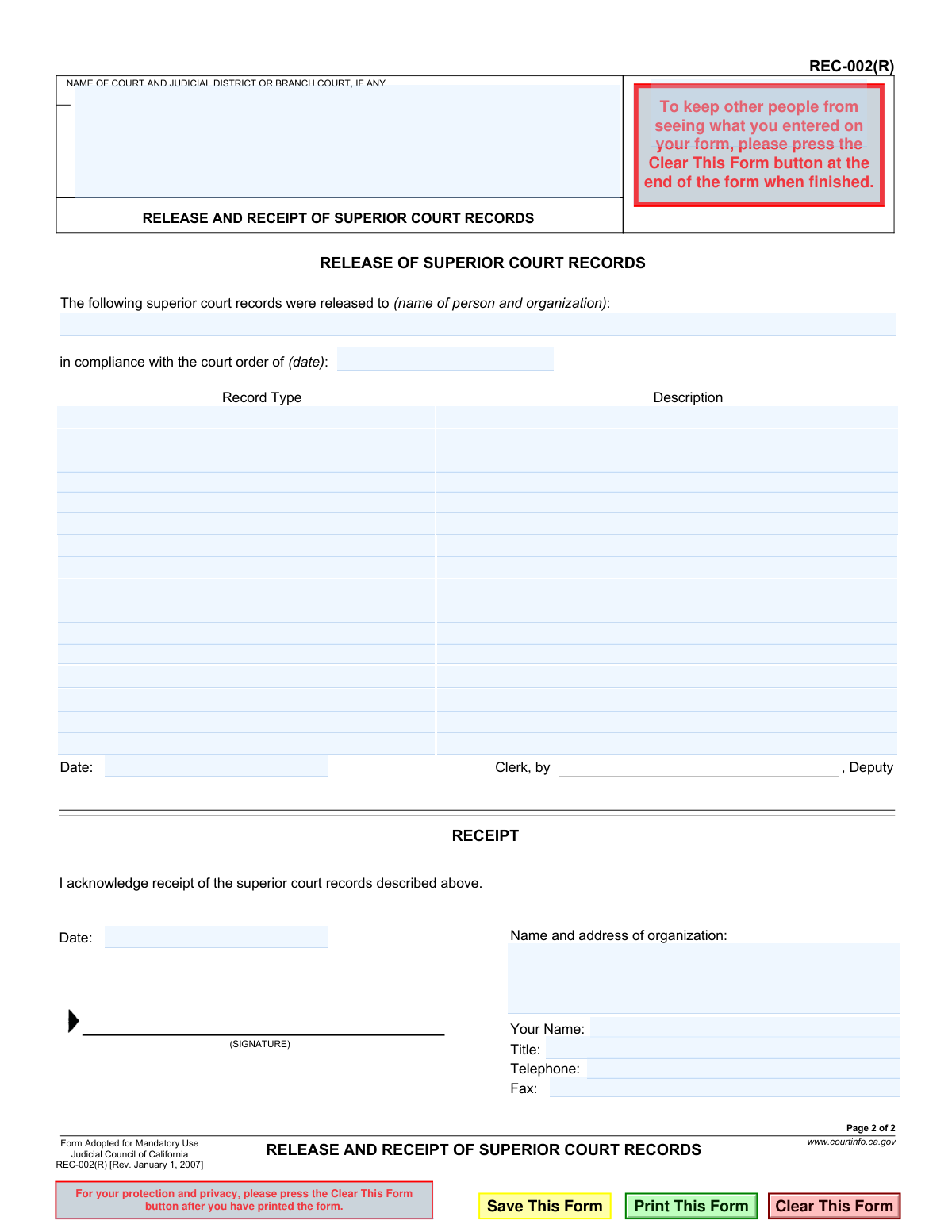
Form REC-002(R) is a legal document used by California Superior Courts to create an official record when court files or documents are released to an individual or organization. It serves as both the court's authorization for release and the recipient's formal acknowledgment of receipt, ensuring a clear chain of custody for sensitive legal materials. Today, this form can be filled out quickly and accurately using AI-powered services like Instafill.ai, which can also convert non-fillable PDF versions into interactive fillable forms.
REC-002(R) is part of the California court forms and superior court forms categories on Instafill.
Our AI automatically handles information lookup, data retrieval, formatting, and form filling.
It takes less than a minute to fill out REC-002(R) using our AI form filling.
Securely upload your data. Information is encrypted in transit and deleted immediately after the form is filled out.

Form specifications

Form name: Form REC-002(R), Release and Receipt of Superior Court Records
Number of fields: 48
Number of pages: 1
Language: English
main-image

Instafill Demo: How to fill out PDF forms in seconds with AI

How to Fill Out REC-002(R) Online for Free in 2026

Are you looking to fill out a REC-002(R) form online quickly and accurately? Instafill.ai offers the #1 AI-powered PDF filling software of 2026, allowing you to complete your REC-002(R) form in just 37 seconds or less.
Follow these steps to fill out your REC-002(R) form online using Instafill.ai:
  1. 1 Navigate to Instafill.ai and upload or select the REC-002(R) form.
  2. 2 Use the AI assistant to automatically fill in the court name and judicial district information.
  3. 3 Enter the details of the person and organization receiving the records, and specify the date of the court order authorizing the release.
  4. 4 Provide a detailed description of the specific superior court records being released in the appropriate section.
  5. 5 Complete the 'Receipt' portion by entering the recipient's name, organization details, title, and contact information.
  6. 6 Review all entered information for accuracy, then have the recipient sign and date the form to formally acknowledge receipt of the records.
  7. 7 Download, print, or securely share the completed REC-002(R) form for filing with the court and for your own records.

Our AI-powered system ensures each field is filled out correctly, reducing errors and saving you time.

Why Choose Instafill.ai for Your Fillable REC-002(R) Form?

Speed

Complete your REC-002(R) in as little as 37 seconds.

Up-to-Date

Always use the latest 2026 REC-002(R) form version.

Cost-effective

No need to hire expensive lawyers.

Accuracy

Our AI performs 10 compliance checks to ensure your form is error-free.

Security

Your personal information is protected with bank-level encryption.

Frequently Asked Questions About Form REC-002(R)

This form serves as an official record to document that specific superior court records have been released by the court and received by an authorized person or organization, as mandated by a court order.

The form is completed in two parts. A court clerk fills out the top 'RELEASE' section, and the person or organization representative receiving the records fills out and signs the bottom 'RECEIPT' section.

Yes, a court order is required. The form specifically asks for the date of the court order that authorizes the release of the records, so you must have this before the records can be given to you.

The clerk will fill in the court's name, the name of the person receiving the records, the date of the court order, and a description of the specific records being released.

You must provide your name, signature, title, the date, your organization's name and address, and your telephone and fax numbers to acknowledge you have received the records.

After you sign the receipt, the completed form is typically filed and retained by the court. It serves as proof that the records were transferred from the court's custody to yours.

If you are not representing an organization, you can write 'N/A' or 'Individual' in the organization field. It is always a good idea to confirm with the court clerk what they prefer.

Yes, the form states it is 'Adopted for Mandatory Use' by the Judicial Council of California. This means it is the standard, required form for this purpose in California Superior Courts.

Yes, AI-powered services like Instafill.ai can help you accurately auto-fill your personal and organizational information in the 'RECEIPT' section, which saves time and helps prevent errors.

Upload the REC-002(R) PDF to Instafill.ai, and its AI will identify the fields in the 'RECEIPT' section. You can then have it automatically populate your name, address, and contact details before printing the form to take to the court.

You can use a service like Instafill.ai to solve this problem. Upload the non-fillable PDF, and the platform will convert it into an interactive, fillable form that you can easily type into.

A court clerk or a deputy clerk will sign on that line. This signature confirms that they are the court official who released the records to you.

You will sign the 'RECEIPT' section at the courthouse at the moment you physically receive the records from the clerk. This confirms the transfer of custody.

Compliance REC-002(R)
Validation Checks by Instafill.ai

1
Court Name Presence
Checks that the 'NAME OF COURT AND JUDICIAL DISTRICT' field is not empty. This is critical for identifying the specific court releasing the records, ensuring proper jurisdiction and record-keeping. A failed validation would prevent submission, as the origin of the release would be unknown.
2
Recipient Identity in Release Section
Validates that the 'name of person and organization' field in the 'RELEASE' section is completed. It is essential to have a clear record of who the court authorized to receive the documents. If this field is empty, the form cannot be processed as the recipient is not identified.
3
Court Order Date Validity
Ensures the 'court order of (date)' field contains a valid, correctly formatted date (e.g., MM/DD/YYYY). This date provides the legal authority for the release, and an invalid format would make the record legally questionable. The system should reject submissions with improperly formatted or non-existent dates.
4
Record Listing Completeness
Verifies that at least one record is listed in the 'Description' and 'Record Type' table. A release form must specify which records are being transferred; otherwise, the form has no purpose. If no records are listed, the submission should be blocked with an error message.
5
Release Date Presence and Format
Checks that the 'Date' field under the 'RELEASE' section is filled with a valid date. This date marks the official time the records left the court's custody, which is crucial for the chain of custody. An invalid or missing date would halt submission until corrected.
6
Clerk Authentication
Validates that the 'Clerk, by, Deputy' field is filled out. This field represents the court official who is authorizing and executing the release of records. Without this information, the release lacks official court authentication, and the form should be considered incomplete.
7
Receiving Organization Details
Ensures the 'Name and address of organization' field in the 'RECEIPT' section is not blank. This information is vital for confirming which entity has taken responsibility for the received court records. A failure to provide this would result in an incomplete receipt and prevent submission.
8
Receipt Date Presence and Format
Validates that the 'Date' field in the 'RECEIPT' section is a properly formatted date. This date confirms when the recipient officially took possession of the records. An invalid or missing date breaks the chain of custody documentation and should trigger a validation error.
9
Chronological Date Consistency
Performs a logical check to ensure the 'Release Date' is on or before the 'Receipt Date'. It is logically impossible for records to be received before they are released by the court. A discrepancy would indicate a data entry error and should prevent the form from being submitted until the dates are corrected.
10
Receiving Person's Name for Signature
Verifies that the 'Your Name' field in the 'RECEIPT' section is completed. This field identifies the specific individual who is acknowledging receipt, which is required for accountability and serves as the printed name for the signature. The form is invalid without this name.
11
Telephone Number Format
Checks that the 'Telephone' number field follows a standard US format (e.g., 10 digits, possibly with parentheses, spaces, or hyphens). Correct formatting ensures that the contact information is valid and can be used if follow-up is needed. An improperly formatted number would prompt the user for correction.
12
Court Order Date Chronology
Verifies that the 'court order of (date)' occurs on or before the 'Release Date'. The court must issue an order before it can legally release records based on that order. This logical check prevents clerical errors and ensures the procedural steps are correctly documented.

Common Mistakes in Completing REC-002(R)

Forgetting the Signature

Individuals often complete all the text fields but forget the final, most crucial step: signing the document. This happens due to oversight or rushing to complete the form. An unsigned receipt is legally invalid and fails to acknowledge the transfer of records, potentially causing the release to be rejected or requiring the entire process to be repeated.

Confusing the Printed Name and Signature Fields

The form has separate fields for 'Your Name' (printed) and '(SIGNATURE)'. A frequent error is to sign in the printed name box or print one's name where the signature should be. This can invalidate the document, as the printed name serves for legibility while the signature is the legal mark of agreement. To avoid this, carefully read each field label before entering information.

Failing to Verify Information in the 'Release' Section

The recipient signs to acknowledge receipt of the records 'described above'. A serious mistake is signing without carefully reviewing the top section filled out by the court clerk, including the description of records and the court order date. By signing, you legally agree that the clerk's description is accurate, and failing to catch an error could mean you are held responsible for records you did not receive. Always double-check the clerk's entries before signing.

Using an Incorrect Date of Receipt

The date in the 'RECEIPT' section must be the exact date the records are physically or digitally received. People sometimes mistakenly enter the date they filled out the form, the date of the court order, or a future date. An incorrect date creates a false legal record of the transfer, which can lead to compliance issues or legal challenges later on. Always enter the current date at the moment of receipt.

Providing Incomplete Organization Name and Address

Users may use informal abbreviations for their organization's name or provide a partial address, omitting the city, state, or ZIP code. This creates ambiguity about the legal entity that has taken custody of the court records. An incomplete or incorrect address also prevents the court from sending follow-up correspondence. Always use the full, official legal name and complete mailing address of the organization.

Omitting the Recipient's Job Title

The 'Title' field is often left blank, especially if the person receiving the records doesn't think it's important. However, the title (e.g., 'Paralegal', 'Records Manager', 'Attorney') establishes the individual's authority to receive sensitive court documents on behalf of their organization. Omitting it can raise questions about the validity of the receipt and whether the records were released to an authorized person.

Illegible Handwriting on a Printed Form

When this form is printed and filled out by hand, illegible handwriting for names, titles, or contact numbers is a common problem. This can make it impossible for the court to identify the recipient or contact them if issues arise, effectively nullifying the contact information provided. To prevent this, print legibly in block letters or use a tool like Instafill.ai, which can convert a non-fillable PDF into a digital form for clean, typed entries.

Incorrect Formatting of Telephone or Fax Numbers

Data entry errors for phone and fax numbers are frequent, such as forgetting the area code, adding unnecessary characters, or transposing digits. This mistake prevents the court from being able to contact the recipient regarding the records. Using an AI-powered form filler like Instafill.ai can help prevent this by auto-formatting numbers into a standard, valid format, ensuring your contact details are correct.

Mistakenly Filling Out the Clerk's Section

A person receiving the records might mistakenly try to fill out the top 'RELEASE OF SUPERIOR COURT RECORDS' section, which is reserved for the court clerk. This can cause confusion and will require a new, clean form to be used. It's essential to understand that the recipient is only responsible for completing the 'RECEIPT' section at the bottom of the form after the clerk has completed their part.

Signing the Form Prematurely

A recipient might sign the receipt in anticipation of getting the records to save time. This is a risky mistake, as they are legally acknowledging receipt of documents they do not yet possess. If the actual release is delayed or the wrong documents are provided, they have already signed a binding receipt stating otherwise. The form should only be signed at the exact moment the records are successfully transferred into their possession.
Saved over 80 hours a year

“I was never sure if my IRS forms like W-9 were filled correctly. Now, I can complete the forms accurately without any external help.”

Kevin Martin Green

Your data stays secure with advanced protection from Instafill and our subprocessors

Robust compliance program

Transparent business model

You’re not the product. You always know where your data is and what it is processed for.

ISO 27001, HIPAA, and GDPR

Our subprocesses adhere to multiple compliance standards, including but not limited to ISO 27001, HIPAA, and GDPR.

Security & privacy by design

We consider security and privacy from the initial design phase of any new service or functionality. It’s not an afterthought, it’s built-in, including support for two-factor authentication (2FA) to further protect your account.

Fill out REC-002(R) with Instafill.ai

Worried about filling PDFs wrong? Instafill securely fills form-rec-002r-release-and-receipt-of-superior-court-records forms, ensuring each field is accurate.

Related forms by category

California court forms Judicial Council of California Form SC-105, Request for Court Order and Answer (Small Claims), Judicial Council of California Form SC-120, Defendant’s Claim and ORDER to Go to Small Claims Court (Small Claims), Judicial Council of California Form SER-001, Request for Sheriff to Serve Court Papers, Judicial Council of California Form SER-001, Request for Sheriff to Serve Court Papers, Affidavit for Collection of Personal Property California Probate Code Section 13100, Form POS-040, Proof of Service—Civil, Declaration of Facts of Death (California Superior Court), declaration-of-marriage-for-court-proceeding-california-family-law, ADOPT-200, Adoption Request, ADOPT-200, Stepparent Adoption Request, ADOPT-210, Adoption Agreement, ADOPT-310, Contact After Adoption Agreement, Judicial Council of California Form ADOPT-200, Adoption Request, Form ADR-107, Mediation Attendance Sheet, Form ADR-110, Order Appointing Referee, Form ADR-109, Stipulation or Motion for Order Appointing Referee, Form ADR-102, Request for Trial De Novo After Judicial Arbitration, Form ADR-108, Referee's Report (Code Civ. Proc., §§ 638, 639), Form ADR-106, Petition to Confirm, Correct, or Vacate Contractual Arbitration Award, Form ADR-104, Rejection of Award and Request for Trial After Attorney-Client Fee Arbitration · + 557 more →
superior court forms FW-003, Order on Court Fee Waiver (Superior Court), FW-003, Order on Court Fee Waiver (Superior Court), Form FW-003, Order on Court Fee Waiver (Superior Court), Declaration of Facts of Death (California Superior Court), Form FW-003-GC, Order on Court Fee Waiver (Superior Court) (Ward or Conservatee), Superior Court of Chatham County, Georgia, Hearing Request Form, Form FW-006, Request for Hearing About Court Fee Waiver Order (Superior Court), Form FW-002, Request to Waive Additional Court Fees (Superior Court), Form FW-008, Order on Court Fee Waiver After Hearing (Superior Court), Form FW-002-GC, Request to Waive Additional Court Fees (Superior Court) (Ward or Conservatee), Form REC-001(N), Notice of Intent to Destroy Superior Court Records; Offer to Transfer Possession, Form REC-001(R), Request for Transfer or Extension of Time for Retention of Superior Court Records, notice-of-hearing-on-request-for-transfer-or-extension-of-time-for-retention-of-superior-court-records-court-order