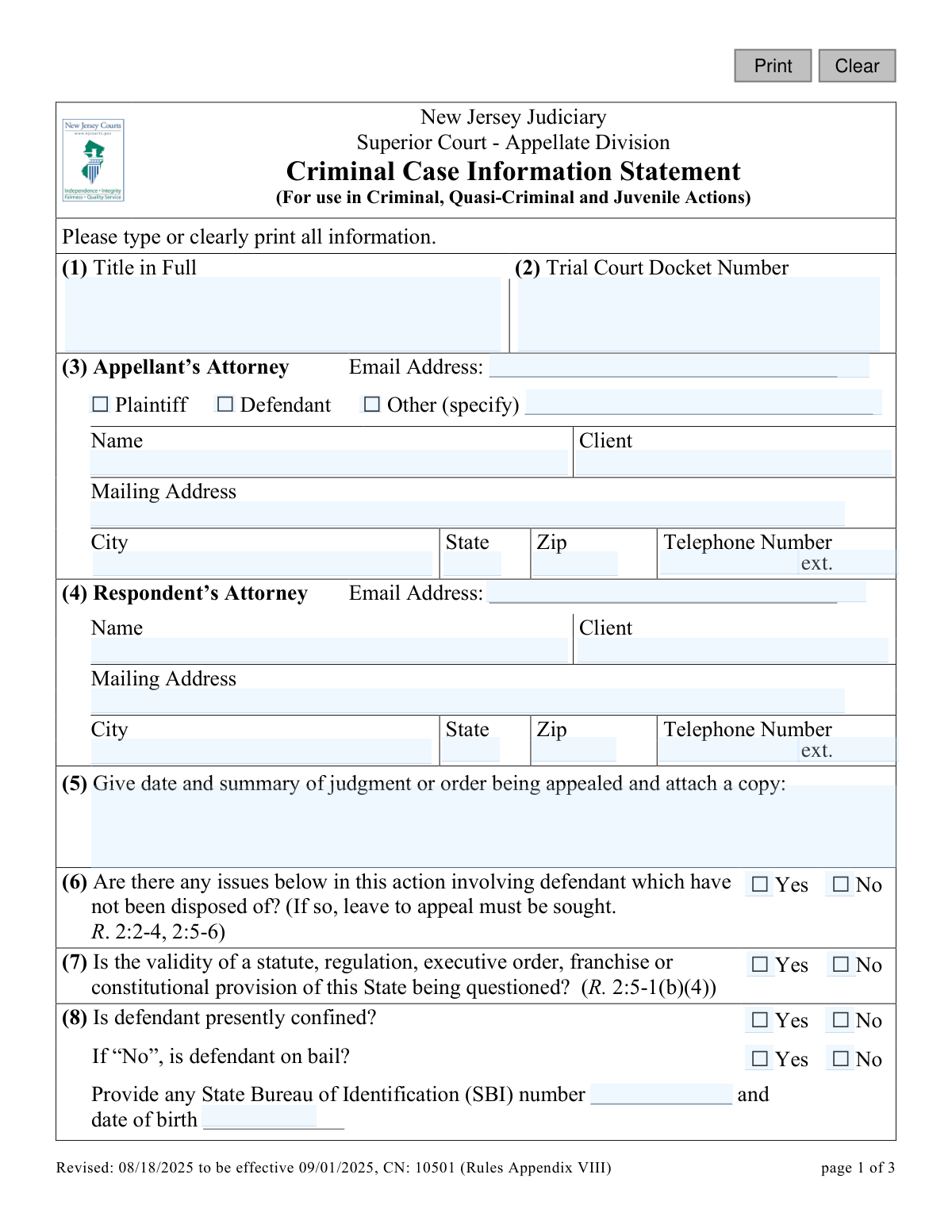
Yes! You can use AI to fill out New Jersey Judiciary Superior Court - Appellate Division Criminal Case Information Statement

This form, officially the Criminal Case Information Statement, is a required document for the New Jersey Judiciary when initiating an appeal in a criminal, quasi-criminal, or juvenile case. It provides the Superior Court's Appellate Division with a summary of the case, including party information, the judgment being appealed, procedural history, and the legal issues to be raised. Today, this form can be filled out quickly and accurately using AI-powered services like Instafill.ai, which can also convert non-fillable PDF versions into interactive fillable forms.
CN 10501 is part of the New Jersey forms and superior court forms categories on Instafill.
Our AI automatically handles information lookup, data retrieval, formatting, and form filling.
It takes less than a minute to fill out CN 10501 using our AI form filling.
Securely upload your data. Information is encrypted in transit and deleted immediately after the form is filled out.

Form specifications

Form name: New Jersey Judiciary Superior Court - Appellate Division Criminal Case Information Statement
Number of fields: 72
Number of pages: 1
Language: English
main-image

Instafill Demo: How to fill out PDF forms in seconds with AI

How to Fill Out CN 10501 Online for Free in 2026

Are you looking to fill out a CN 10501 form online quickly and accurately? Instafill.ai offers the #1 AI-powered PDF filling software of 2026, allowing you to complete your CN 10501 form in just 37 seconds or less.
Follow these steps to fill out your CN 10501 form online using Instafill.ai:
  1. 1 Navigate to Instafill.ai and upload or select the New Jersey Criminal Case Information Statement form.
  2. 2 Use the AI assistant to automatically populate information for the appellant and respondent, including attorney details, addresses, and contact numbers.
  3. 3 Enter the trial court docket number and provide a summary of the judgment or order being appealed, attaching a copy as required.
  4. 4 Answer the series of yes/no questions regarding case status, such as defendant confinement, co-defendants, and whether the validity of a state statute is being questioned.
  5. 5 Provide a brief statement of facts, procedural history, and list the proposed issues to be raised on appeal in the designated sections.
  6. 6 Review all auto-filled and manually entered information for accuracy, then provide your name, date, and signature in the certification section.
  7. 7 Download the completed, signed form, ready for filing with the New Jersey Superior Court, Appellate Division.

Our AI-powered system ensures each field is filled out correctly, reducing errors and saving you time.

Why Choose Instafill.ai for Your Fillable CN 10501 Form?

Speed

Complete your CN 10501 in as little as 37 seconds.

Up-to-Date

Always use the latest 2026 CN 10501 form version.

Cost-effective

No need to hire expensive lawyers.

Accuracy

Our AI performs 10 compliance checks to ensure your form is error-free.

Security

Your personal information is protected with bank-level encryption.

Frequently Asked Questions About Form CN 10501

This form provides the New Jersey Superior Court's Appellate Division with essential details about a criminal, quasi-criminal, or juvenile delinquency appeal. It summarizes the case, identifies the parties, and outlines the issues to be raised.

The person filing the appeal (the appellant), whether represented by an attorney or representing themselves, must complete and file this form. It is typically submitted along with the Notice of Appeal.

You are required to attach a copy of the judgment or order that you are appealing, as stated in section (5). If the trial judge issued a written opinion, you should attach a copy of that as well.

If you are representing yourself, enter your own name as the 'client' and also as the 'Name' in the attorney section. Provide your own contact information and check the box indicating you were the 'Defendant' in the trial court.

Briefly summarize the key events that occurred in the trial court leading to this appeal. This can include the charges, trial, verdict, and sentencing.

This refers to any motions or parts of your case at the trial level that have not yet been decided. If there are unresolved issues, you cannot file a standard appeal and must instead file a Motion for Leave to Appeal.

If the only issue is the appropriateness of your sentence, you must indicate this in section (9). Under court rule R. 2:9-11, you may not file briefs in this situation without first getting permission (leave) from the court.

The respondent is the State of New Jersey, so you should enter the contact information for the county prosecutor's office that handled the case in the trial court. You may also need to include the Office of the Attorney General, as specified in the instructions.

An SBI number is your State Bureau of Identification number, a unique ID used in the New Jersey criminal justice system. It can often be found on official court documents related to your case, such as the judgment of conviction.

This means you confirm that you have blacked out sensitive information like Social Security numbers, driver's license numbers, and financial account numbers from all documents submitted to the court. This is required to protect your privacy.

Yes, services like Instafill.ai use AI to accurately auto-fill form fields, which can save you time and help reduce errors. This is especially helpful for entering repetitive information like names and case details.

Simply upload the Appellate Criminal Case Information Statement PDF to the Instafill.ai platform. The AI will make the document interactive, allowing you to type your information directly into the fields before saving or printing.

You can use a service like Instafill.ai, which is designed to convert flat, non-fillable PDFs into interactive, fillable forms. This allows you to easily type your information instead of having to print the form and fill it out by hand.

Compliance CN 10501
Validation Checks by Instafill.ai

1
Validates Trial Court Docket Number Presence
This check ensures that the 'Trial Court Docket Number' field (2) is not empty. The docket number is a unique identifier crucial for linking the appeal to the original trial court case. Failure to provide this number will prevent the court from processing the filing as it cannot be correctly cataloged or associated with the proper case record.
2
Ensures Judgment Summary and Attachment
This validation verifies that a date and summary of the judgment are provided in field (5) and that a corresponding file has been uploaded. The form explicitly requires a copy of the judgment or order being appealed. If this information or the attachment is missing, the appellate court cannot review the basis for the appeal, leading to rejection of the filing.
3
Validates Email Address Format
This check confirms that the email addresses entered for the Appellant's Attorney (3) and Respondent's Attorney (4) follow a standard format (e.g., [email protected]). Correct email addresses are essential for all official electronic communication, service of documents, and notifications from the court. An invalid format would prevent successful submission and disrupt the case communication flow.
4
Conditional Requirement for Bail Status
This check enforces a logical rule on field (8). If the user answers 'No' to 'Is defendant presently confined?', they must then answer the follow-up question 'Is defendant on bail?'. This information is critical for the court to understand the defendant's current status, which can affect scheduling and other case management decisions. An incomplete answer will halt the submission.
5
Validates Date of Birth Format and Logic
This check ensures the 'date of birth' provided in field (8) is a valid date and is in the past. This data is a key personal identifier used to distinguish the defendant from other individuals with similar names. An invalid or future date would indicate a data entry error and cause the form to be rejected for correction.
6
Conditional Requirement for Co-defendant Information
This validation is triggered by the answer to 'Are there co-defendants?' (10). If the user selects 'Yes', the system verifies that the text box for their names and trial status is not empty. This information is vital for the court to manage related cases, identify potential conflicts, and consolidate appeals where appropriate, ensuring judicial efficiency.
7
Conditional Requirement for Trial Judge Findings Date
This check ensures that if the user answers 'Yes' to the trial judge issuing oral findings (13.1) or written findings (13.2), the corresponding date field is filled out. The date of the findings is a key piece of the procedural history. Missing dates make the record incomplete and can delay the appellate review process.
8
Conditional Requirement for Written Findings Attachment
This validation confirms that if the user answers 'Yes' to 'Did the trial judge issue written findings or an opinion?' (13.2), a file has been attached. The form explicitly states to 'Attach a copy.' The written opinion is a primary document for the appeal, and its absence would render the filing incomplete and unacceptable for review.
9
Conditional Requirement for Related Case Details
This check verifies that if the answer to any of questions (14), (15), or (16) regarding pending or prior appeals is 'Yes', then the details in section (17) must be provided. This information is mandatory for the court to identify and manage potentially overlapping or related legal issues. Failure to provide these details when required will result in a validation error.
10
Completeness of Signature Block
This validation ensures that all fields in the signature section (20-23), including 'Name of Appellant', 'Name of Counsel of Record', 'Date', and 'Signature', are completed. The signature block legally certifies the information provided and the filer's identity. An incomplete signature block invalidates the submission, making it legally insufficient.
11
Validates Signature Date is Not in the Future
This check ensures the date entered in the signature block (22) is the current date or a date in the recent past, but not a future date. A future date is a logical impossibility for a document being signed and submitted now. This validation prevents clear data entry errors and ensures the chronological integrity of the filing.
12
Checks for Ineligibility Based on Undisposed Issues
This is a critical path validation for question (6). If the user answers 'Yes' to 'Are there any issues below... which have not been disposed of?', the system should block submission and display a prominent warning. The form instructions state that in this situation, a 'Motion for Leave to Appeal' is required, not this form, making the current filing procedurally incorrect.
13
Ensures Required Narrative Fields are Not Empty
This check verifies that the 'brief statement of the facts and procedural history' (11) and 'proposed issues to be raised on the appeal' (12) are not left blank. These narrative sections are the core of the information statement, explaining the background and purpose of the appeal. An empty submission is useless and will be rejected.
14
Validates US Phone Number Format
This check ensures that the telephone numbers provided for the appellant's and respondent's attorneys (fields 3 and 4) adhere to a standard 10-digit format. A valid phone number is crucial for direct contact by court staff if urgent communication is needed. An incorrectly formatted number could delay case processing if the court cannot reach the parties.
15
Prohibits 'et al.' in Case Title
This validation inspects the 'Title in Full' field (1) to ensure it does not contain the abbreviation 'et al.'. The instructions explicitly require all party names to be written in full for clarity and accuracy in the court record. Using this abbreviation would violate the form's rules and result in the filing being returned for correction.

Common Mistakes in Completing CN 10501

Using an Incorrect or Abbreviated Case Title

In Box 1, filers often abbreviate the case title or use 'et al.' instead of listing all party names in full. This happens when copying from other documents or trying to save space, but the instructions explicitly forbid it. An incorrect title can cause filing delays and administrative confusion, as the appellate case must exactly match the trial court record. To avoid this, carefully copy the complete caption from the original complaint or indictment, including all parties and middle initials.

Providing Incomplete Respondent Attorney Information

A frequent error in Box 4 is listing only the county prosecutor's office and omitting the Attorney General's office. The instructions for adult criminal appeals require including both the county prosecutor and the Appellate Section of the Attorney General's Division of Criminal Justice. This omission can lead to improper service and delays, as all required parties must be notified. Always double-check Rule 2:5-1 and the form instructions to ensure all correct respondent representatives are listed.

Failing to Attach a Copy of the Judgment or Order

Filers often complete the summary of the judgment in Box 5 but forget to attach a physical copy of the document itself. This is a critical oversight, as the appellate court needs the actual order being appealed to establish jurisdiction and understand the basis of the appeal. Forgetting the attachment will result in a deficiency notice from the clerk's office, halting the appeal until the document is provided. Always create a checklist to ensure all required attachments are included with your submission.

Misstating the Finality of the Trial Court Action

In Box 6, a filer might incorrectly check 'No' when there are, in fact, unresolved issues pending in the trial court. This is a serious procedural error, as it leads to filing a Notice of Appeal when a Motion for Leave to Appeal is required. This mistake can result in the dismissal of the appeal for being premature or procedurally improper. Before answering, carefully review the case status to confirm that the judgment or order being appealed is final and disposes of all issues for all parties.

Omitting Defendant's SBI Number and Date of Birth

People often leave the State Bureau of Identification (SBI) number and date of birth fields in Box 8 blank, especially if the information is not readily available. These identifiers are crucial for the court and other agencies to accurately identify the defendant and access their record. Missing information can slow down case processing and create ambiguity. To prevent this, locate these details on prior court documents or official records before starting the form.

Writing an Argumentative Statement of Facts

In Box 11, which asks for a 'brief statement of the facts and procedural history,' filers may be tempted to argue the merits of their case. The purpose of this section is to provide a neutral, chronological summary of what happened in the trial court, not to persuade the appellate court. Submitting an argumentative or overly detailed history can be viewed as non-compliant with the form's intent. Stick to key dates and events, such as the date of indictment, motion dates, and the date of conviction or sentencing.

Listing Vague or Improperly Formatted Legal Issues

For Box 12, appellants often list their grievances in paragraph form instead of as distinct 'point headings' as required by court rules. This happens because self-represented litigants may not be familiar with the legal format specified in R. 2:6-2(a)(6). Vague or poorly framed issues can weaken the appeal from the outset and may not properly preserve the arguments for the court's review. It is best to frame each issue as a clear, concise legal question or a statement of error by the trial court.

Failing to Inquire with the Trial Judge About Findings

In Box 13, filers may assume no oral or written findings were issued if they didn't receive a copy, and check 'No' without further action. The form explicitly cautions filers to inquire with the trial judge to see if an opinion was placed on the record or will be filed later. Skipping this step and providing inaccurate information can cause procedural problems and shows a lack of diligence. Always contact the trial judge's chambers as instructed before completing this section.

Providing Incomplete Information on Related Cases

When answering 'Yes' to questions 14, 15, or 16 about related appeals, filers frequently fail to provide the complete case names and docket numbers in Box 17. This information is vital for the court to manage its caseload, identify conflicts, and consolidate related matters. Simply stating that a related case exists without providing the specific docket number is insufficient and will require the clerk to seek clarification, causing delays. AI-powered tools like Instafill.ai can help by ensuring that if you answer 'Yes' to a conditional question, you are prompted to fill out the required corresponding details.

Signing the Redaction Certification Without Redacting

Filers may sign the certification in Box 19 as a routine step without fully understanding its meaning or performing the required action. This signature certifies that all confidential personal identifiers (like Social Security numbers or bank accounts) have been redacted from all submitted documents. Submitting documents with unredacted confidential information after signing this certification violates court rules (Rule 1:38-7(b)) and can lead to sanctions. Always review every page you submit to black out sensitive data before signing.

Incorrectly Filling Out the Signature Section

A self-represented appellant can get confused by the signature lines in Boxes 20-23, which distinguish between the 'Appellant' and 'Counsel of Record'. They may sign one line but not the other, or only print their name without signing. The instructions clarify that a self-represented party should enter their name in both places (Box 20 and 21) and then sign in Box 23. An incomplete or incorrect signature block can invalidate the submission, and since this form is often a flat PDF, it can be difficult to correct. Using a tool like Instafill.ai can convert the PDF into a smart, fillable form and guide you to complete all necessary signature fields correctly.
Saved over 80 hours a year

“I was never sure if my IRS forms like W-9 were filled correctly. Now, I can complete the forms accurately without any external help.”

Kevin Martin Green

Your data stays secure with advanced protection from Instafill and our subprocessors

Robust compliance program

Transparent business model

You’re not the product. You always know where your data is and what it is processed for.

ISO 27001, HIPAA, and GDPR

Our subprocesses adhere to multiple compliance standards, including but not limited to ISO 27001, HIPAA, and GDPR.

Security & privacy by design

We consider security and privacy from the initial design phase of any new service or functionality. It’s not an afterthought, it’s built-in, including support for two-factor authentication (2FA) to further protect your account.

Fill out CN 10501 with Instafill.ai

Worried about filling PDFs wrong? Instafill securely fills new-jersey-judiciary-superior-court-appellate-division-criminal-case-information-statement forms, ensuring each field is accurate.

Related forms by category

New Jersey forms State of New Jersey Alternate Benefit Program Withdrawal Request Acknowledgement Receipt, Horizon Blue Cross Blue Shield of New Jersey Applied Behavior Analysis Supplemental Information Form, State of New Jersey Application for Employment (Form DPF-663), New Jersey Judiciary Plea Form (Plea 01), Supplemental Plea Form for Certain Sexual Offenses: Megan’s Law/Parole Supervision for Life/Community Supervision for Life (Plea 05), Financial Questionnaire to Establish Indigency, New Jersey Judiciary Resource Family Information Form, Foreclosure Case Information Statement (FCIS) - Appendix XII-B2, New Jersey Judiciary Records Request Form, Superior Court of New Jersey, Application for Appeal and Order, FL Certification of Requested Background Checks for Kinship Legal Guardianship, Certification of Caregiver as to Knowledge of Identity and/or Location of Parents, FL Order Judgment for Kinship Legal Guardianship, New Jersey Judiciary Certification of Repair and Plea of Guilty, Uniform Summary Support Order (USSO), New Jersey Judiciary Volunteer Application (CN 10293), Application to Take the New Jersey Court Interpreter Oral Examination, New Jersey Judiciary Attorney Fee Arbitration Request, Order to Show Cause with Temporary Restraints Pursuant to Rule 4:52, Tax Court of New Jersey, State Tax Complaint · + 158 more →
superior court forms FW-003, Order on Court Fee Waiver (Superior Court), FW-003, Order on Court Fee Waiver (Superior Court), Form FW-003, Order on Court Fee Waiver (Superior Court), Declaration of Facts of Death (California Superior Court), Form FW-003-GC, Order on Court Fee Waiver (Superior Court) (Ward or Conservatee), Superior Court of Chatham County, Georgia, Hearing Request Form, Form FW-006, Request for Hearing About Court Fee Waiver Order (Superior Court), Form FW-002, Request to Waive Additional Court Fees (Superior Court), Form FW-008, Order on Court Fee Waiver After Hearing (Superior Court), Form FW-002-GC, Request to Waive Additional Court Fees (Superior Court) (Ward or Conservatee), Form REC-001(N), Notice of Intent to Destroy Superior Court Records; Offer to Transfer Possession, Form REC-001(R), Request for Transfer or Extension of Time for Retention of Superior Court Records, Notice of Hearing on Request for Transfer or Extension of Time for Retention of Superior Court Records; Court Order; Release and Receipt of Superior Court Records, Form REC-002(R), Release and Receipt of Superior Court Records, Superior Court of New Jersey, Application for Appeal and Order, Superior Court of New Jersey Dissolution (FM) Case Management Order, New Jersey Judiciary – Superior Court, Appellate Division Application for Permission to File Emergent Motion, New Jersey Judiciary Superior Court - Appellate Division Civil Case Information Statement, New Jersey Judiciary Superior Court - Appellate Division Notice of Appeal (CN: 10502), Affidavit of Service (Superior Court of New Jersey) · + 23 more →