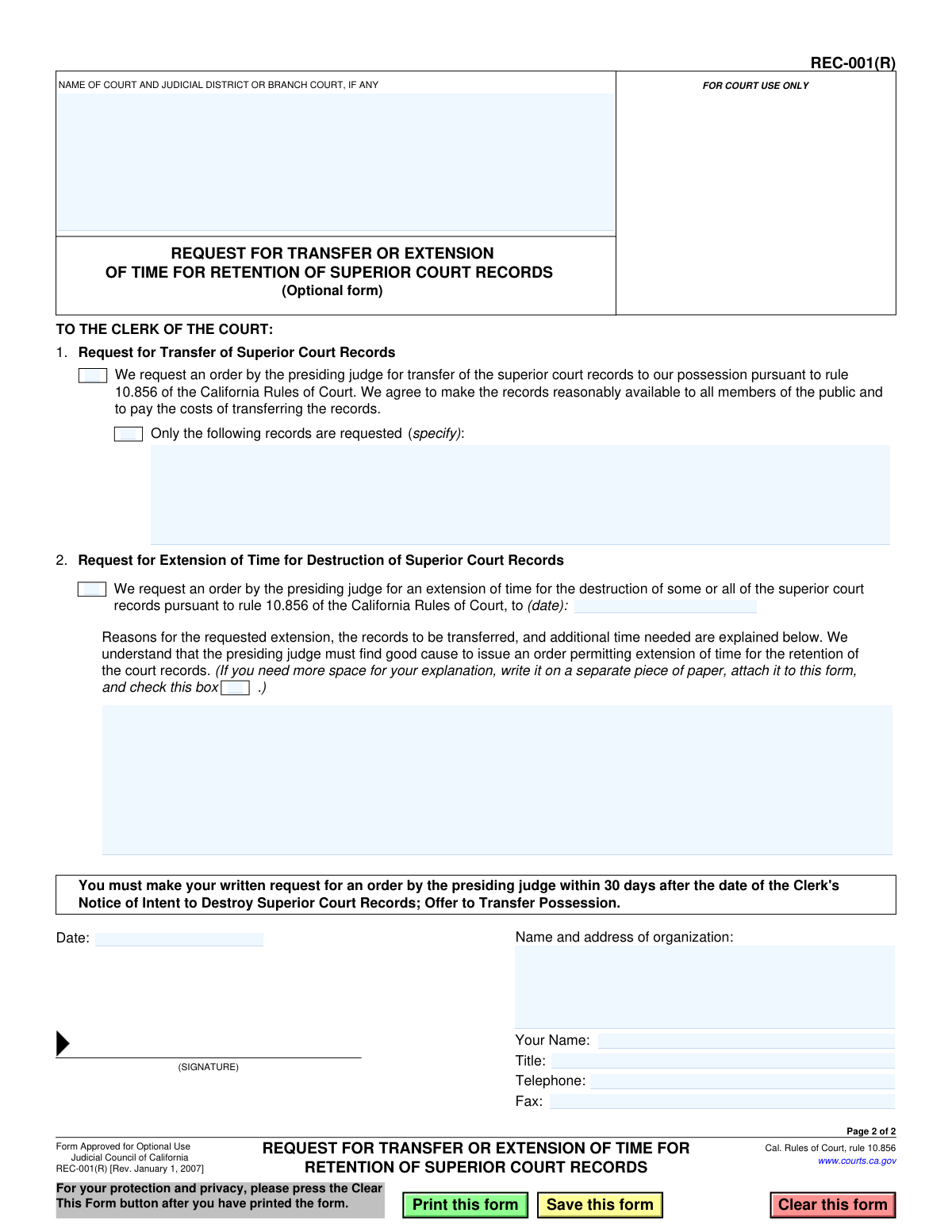
Yes! You can use AI to fill out Form REC-001(R), Request for Transfer or Extension of Time for Retention of Superior Court Records

Form REC-001(R) is an optional use form in California for formally petitioning a superior court to either transfer court records into your possession or to extend the time for their retention before they are destroyed, as per California Rules of Court, rule 10.856. It is a critical tool for historical societies, researchers, or other entities seeking to preserve or access court records. Today, this form can be filled out quickly and accurately using AI-powered services like Instafill.ai, which can also convert non-fillable PDF versions into interactive fillable forms.
REC-001(R) is part of the California court forms, superior court forms and transfer request forms categories on Instafill.
Our AI automatically handles information lookup, data retrieval, formatting, and form filling.
It takes less than a minute to fill out REC-001(R) using our AI form filling.
Securely upload your data. Information is encrypted in transit and deleted immediately after the form is filled out.

Form specifications

Form name: Form REC-001(R), Request for Transfer or Extension of Time for Retention of Superior Court Records
Number of fields: 19
Number of pages: 1
Language: English
main-image

Instafill Demo: How to fill out PDF forms in seconds with AI

How to Fill Out REC-001(R) Online for Free in 2026

Are you looking to fill out a REC-001(R) form online quickly and accurately? Instafill.ai offers the #1 AI-powered PDF filling software of 2026, allowing you to complete your REC-001(R) form in just 37 seconds or less.
Follow these steps to fill out your REC-001(R) form online using Instafill.ai:
  1. 1 Navigate to Instafill.ai and upload or select the Form REC-001(R), Request for Transfer or Extension of Time for Retention of Superior Court Records.
  2. 2 Enter the name of the court and the specific judicial district or branch court in the header section.
  3. 3 Choose your request type: check the box for Section 1 to request a transfer of records or the box for Section 2 to request an extension of time for destruction.
  4. 4 If requesting a transfer, specify the exact records you are requesting. If requesting an extension, provide the date until which you want the retention extended and a detailed explanation for the request.
  5. 5 Provide your organization's name and address, your personal name, title, and contact information including telephone and fax numbers.
  6. 6 Date the form and provide your signature. AI tools can assist in placing a secure digital signature.
  7. 7 Review all entered information for accuracy, then download the completed form to file with the Clerk of the Court within the required timeframe.

Our AI-powered system ensures each field is filled out correctly, reducing errors and saving you time.

Why Choose Instafill.ai for Your Fillable REC-001(R) Form?

Speed

Complete your REC-001(R) in as little as 37 seconds.

Up-to-Date

Always use the latest 2026 REC-001(R) form version.

Cost-effective

No need to hire expensive lawyers.

Accuracy

Our AI performs 10 compliance checks to ensure your form is error-free.

Security

Your personal information is protected with bank-level encryption.

Frequently Asked Questions About Form REC-001(R)

This form is used to formally request that superior court records scheduled for destruction are either transferred to your possession or that the court extends the time before they are destroyed.

Any person or organization that has received a 'Notice of Intent to Destroy Superior Court Records' and wishes to prevent those records from being destroyed should use this form.

Yes, you must submit your written request within 30 days after the date of the Clerk's 'Notice of Intent to Destroy Superior Court Records'.

A transfer (Section 1) means you are requesting to take physical possession of the records. An extension (Section 2) means you are asking the court to simply hold onto the records for a longer period before destroying them.

If you request a transfer, you agree to pay the costs of transferring the records and to make them reasonably available to all members of the public.

You must specify a new date for destruction and provide a written explanation showing 'good cause' for why the court should keep the records longer.

You must submit the form to the Clerk of the Court for the superior court that holds the records and issued the notice of destruction.

The presiding judge of the superior court reviews the request and must find good cause to issue an order granting a transfer or extension.

No, this form is specifically for superior court records in California, as governed by the California Rules of Court, rule 10.856.

If you need more space for your explanation, you can write it on a separate piece of paper, attach it to the form, and check the box in Section 2 to indicate an attachment is included.

Yes, services like Instafill.ai use AI to auto-fill form fields accurately and save time, which can be especially helpful for ensuring all required information is included.

You can use a service like Instafill.ai to upload the PDF, fill out all the fields electronically on your computer, and then download the completed document for printing and submission.

If you have a flat, non-fillable PDF, tools like Instafill.ai can convert it into an interactive form that you can easily type into and complete online.

Compliance REC-001(R)
Validation Checks by Instafill.ai

1
Ensures Court Name is Provided
Validates that the 'NAME OF COURT AND JUDICIAL DISTRICT OR BRANCH COURT' field is not empty. This information is essential for routing the request to the correct court jurisdiction. A submission without the court name cannot be processed and will be rejected.
2
Verifies at Least One Request Type is Selected
Checks that either the 'Request for Transfer' (Box 1) or the 'Request for Extension' (Box 2) is selected. The form is purposeless without a specific request being made. If neither box is checked, the user will be prompted to select one before submission.
3
Ensures Transfer Record Specification is Complete
If the 'Request for Transfer' checkbox is selected, this validation ensures the corresponding text field specifying the records is not empty. The court needs to know exactly which records are being requested for transfer. Failure to specify the records will result in an incomplete and unfulfillable request.
4
Ensures Extension Reason is Provided
If the 'Request for Extension' checkbox is selected, this validation confirms that the explanation field is filled out. The presiding judge requires 'good cause' to grant an extension, making this explanation mandatory for consideration. An empty reason field will lead to the rejection of the extension request.
5
Verifies Extension Date is Provided When Requested
When the 'Request for Extension' checkbox is selected, this check ensures that the target extension date is filled in. Without a specified date, the extension request is ambiguous and cannot be processed by the court. The form will be considered incomplete if this date is missing.
6
Validates Format of the Extension Date
This check ensures that the date provided in the 'Request for Extension' section is in a valid format, such as MM/DD/YYYY. An incorrectly formatted date can cause processing errors and delays. The system should reject invalid formats and prompt the user for correction.
7
Ensures Extension Date is in the Future
Validates that the requested extension date is a future date relative to the submission date. Requesting an extension to a date in the past is logically invalid and nonsensical. The system will flag any past or present dates as an error.
8
Confirms Signature Date is Present
This validation ensures that the 'Date' field in the signature section is filled out. The signature date legally attests to when the request was made and is a required component for a valid legal document. The form cannot be submitted without this date.
9
Validates Signature Date is a Valid and Non-Future Date
Checks that the signature date is a valid calendar date and is not set in the future. A future date would invalidate the signature's attestation of when the document was signed. The system should default to the current date or require a date that is today or in the recent past.
10
Ensures Organization Name and Address are Provided
Validates that the 'Name and address of organization' field is not empty. This information is critical for identifying the requesting entity and for any future correspondence from the court. A submission without this information is incomplete and cannot be properly filed.
11
Verifies Requester's Name is Provided
This check ensures the 'Your Name' field is filled out, identifying the individual submitting the request on behalf of the organization. This is a mandatory field for accountability and contact purposes. The form will be rejected if the name is missing.
12
Verifies Requester's Title is Provided
Validates that the 'Title' field is completed, providing context for the requester's authority to make the request on behalf of the organization. This information helps the court assess the legitimacy of the request. An empty title field may prompt a request for more information or cause delays.
13
Validates Telephone Number Format
This check ensures the provided telephone number follows a standard, valid format (e.g., (XXX) XXX-XXXX or XXXXXXXXXX). A correctly formatted phone number is crucial for the court to contact the requester if clarification is needed. Invalid formats will be flagged for correction to prevent communication issues.
14
Verifies Attachment Presence if Indicated
If the checkbox indicating that the explanation is continued on a separate piece of paper is checked, the system should verify that a file has actually been attached to the submission. This prevents submissions where an attachment is promised but not provided, which would render the explanation incomplete. If the box is checked but no file is attached, the user should be warned before final submission.

Common Mistakes in Completing REC-001(R)

Incorrect or Incomplete Court Name

Users often fail to provide the full, official name of the superior court, including the specific judicial district or branch as listed on the original notice. This ambiguity can cause the form to be misrouted, delayed, or rejected. To avoid this, applicants must verify the exact court name from the 'Notice of Intent to Destroy' or the court's official website. If the form is a non-fillable PDF, tools like Instafill.ai can convert it into an interactive version, making it easier to enter precise information.

Ambiguous Request Selection

The form requires a clear choice between requesting a transfer (Section 1) or an extension (Section 2). A common error is forgetting to check either box, or incorrectly checking both. This ambiguity makes the request invalid and leads to immediate rejection, forcing the applicant to refile and risk missing critical deadlines.

Vague Description of Records for Transfer

In Section 1, when requesting a transfer, users must specify the exact records. Many applicants provide a description that is too broad or unclear, such as 'all records for case X,' which is insufficient for the clerk to act upon. The request must include precise identifiers like case numbers, party names, and date ranges to be considered, otherwise it will be denied for lack of specificity.

Improperly Formatted or Missing Extension Date

When requesting an extension in Section 2, the user must provide a specific future date. Common mistakes include leaving the date blank, using an ambiguous format like 'in 6 months,' or entering a date that has already passed. This invalidates the request, as the court requires a clear end date. AI-powered tools like Instafill.ai can help by validating date formats automatically to prevent such errors.

Weak or Missing 'Good Cause' Justification

The form requires a detailed explanation of the 'good cause' for extending the record retention period. Applicants often provide a one-sentence or generic reason that fails to meet the legal standard, leading to denial. The explanation must be compelling, specific, and clearly state why the records are needed for a longer period, linking their retention to a specific, ongoing purpose.

Forgetting to Check the Attachment Box

If the explanation for the request is too long for the provided space and is continued on a separate page, the user must check the corresponding box. Failing to check this box can result in the attached document being overlooked or disregarded by the court clerk. This simple oversight can cause the request to be judged on incomplete information and likely denied.

Filing the Request After the 30-Day Deadline

The form explicitly states it must be filed within 30 days of the 'Clerk's Notice of Intent to Destroy.' This is a strict jurisdictional deadline that is frequently missed. Submitting the form even one day late will result in an automatic rejection of the request, and the records may be permanently destroyed as scheduled.

Incomplete Organization and Contact Details

Users sometimes provide a partial address for their organization or forget to include their title, phone number, or a legible name. This prevents the court from contacting the requester for clarification or to provide a copy of the judge's order. Using a tool like Instafill.ai can help by auto-filling saved contact information, ensuring all required fields are completed accurately and consistently.

Submitting an Unsigned Form

An unsigned form is legally invalid and will be rejected by the court clerk without review. This mistake often happens when filers are in a hurry and overlook the signature line after filling out the other details. Always perform a final check for a valid signature and date before submission to avoid automatic rejection.

Confusing Individual vs. Organization Name

The form has separate fields for the organization's name and address, and the individual filer's name. People sometimes put their personal name in the organization field or vice-versa. This creates confusion about who is making the request—the individual or the entity they represent—and can cause processing delays while the clerk seeks clarification.
Saved over 80 hours a year

“I was never sure if my IRS forms like W-9 were filled correctly. Now, I can complete the forms accurately without any external help.”

Kevin Martin Green

Your data stays secure with advanced protection from Instafill and our subprocessors

Robust compliance program

Transparent business model

You’re not the product. You always know where your data is and what it is processed for.

ISO 27001, HIPAA, and GDPR

Our subprocesses adhere to multiple compliance standards, including but not limited to ISO 27001, HIPAA, and GDPR.

Security & privacy by design

We consider security and privacy from the initial design phase of any new service or functionality. It’s not an afterthought, it’s built-in, including support for two-factor authentication (2FA) to further protect your account.

Fill out REC-001(R) with Instafill.ai

Worried about filling PDFs wrong? Instafill securely fills form-rec-001r-request-for-transfer-or-extension-of-time-for-retention-of-superior-court-records forms, ensuring each field is accurate.

Related forms by category

California court forms Judicial Council of California Form SC-105, Request for Court Order and Answer (Small Claims), Judicial Council of California Form SC-120, Defendant’s Claim and ORDER to Go to Small Claims Court (Small Claims), Judicial Council of California Form SER-001, Request for Sheriff to Serve Court Papers, Judicial Council of California Form SER-001, Request for Sheriff to Serve Court Papers, Affidavit for Collection of Personal Property California Probate Code Section 13100, Form POS-040, Proof of Service—Civil, Declaration of Facts of Death (California Superior Court), declaration-of-marriage-for-court-proceeding-california-family-law, ADOPT-200, Adoption Request, ADOPT-200, Stepparent Adoption Request, ADOPT-210, Adoption Agreement, ADOPT-310, Contact After Adoption Agreement, Judicial Council of California Form ADOPT-200, Adoption Request, Form ADR-107, Mediation Attendance Sheet, Form ADR-110, Order Appointing Referee, Form ADR-109, Stipulation or Motion for Order Appointing Referee, Form ADR-102, Request for Trial De Novo After Judicial Arbitration, Form ADR-108, Referee's Report (Code Civ. Proc., §§ 638, 639), Form ADR-106, Petition to Confirm, Correct, or Vacate Contractual Arbitration Award, Form ADR-104, Rejection of Award and Request for Trial After Attorney-Client Fee Arbitration · + 557 more →
superior court forms FW-003, Order on Court Fee Waiver (Superior Court), FW-003, Order on Court Fee Waiver (Superior Court), Form FW-003, Order on Court Fee Waiver (Superior Court), Declaration of Facts of Death (California Superior Court), Form FW-003-GC, Order on Court Fee Waiver (Superior Court) (Ward or Conservatee), Superior Court of Chatham County, Georgia, Hearing Request Form, Form FW-006, Request for Hearing About Court Fee Waiver Order (Superior Court), Form FW-002, Request to Waive Additional Court Fees (Superior Court), Form FW-008, Order on Court Fee Waiver After Hearing (Superior Court), Form FW-002-GC, Request to Waive Additional Court Fees (Superior Court) (Ward or Conservatee), Form REC-001(N), Notice of Intent to Destroy Superior Court Records; Offer to Transfer Possession, notice-of-hearing-on-request-for-transfer-or-extension-of-time-for-retention-of-superior-court-records-court-order, form-rec-002r-release-and-receipt-of-superior-court-records
transfer request forms Securities Transfer Request and Notification Form, Request for Transfer of Records (Adelaide Health Care) – AHC-0013-05-PS (Version 2), Fidelity Stock Plan Services (SPS) Transfer Request Form, Fidelity ABLE Account Rollover/Transfer Request Form, Rollover/Transfer Request — ABLE Account, 401(k) Program Request for Transfer, Vanguard VRPA Transfer Request Form, Oklahoma Pathfinder 457 Plan Incoming Transfer/Rollover Request Governmental 457(b) Plan, Rollover/Transfer Request — ABLE Account, Transamerica Transfer of Ownership Request Form (OWN-CCC 12/13), 1035 Exchange, Rollover or Transfer Request Form - Transamerica, TIAA Trust, N.A. Private Asset Management, Request for a Direct Transfer From IRA Contracts, Form F10983, Request For A Direct Transfer, Health Savings Account (HSA) Transfer Request, FS Form 5511, TreasuryDirect® Transfer Request, Computershare Alternative Investment Product Transfer Request, FS Form 5179, Legacy Treasury Direct Security Transfer Request, J.P. Morgan Securities LLC Account Transfer Request, notice-of-hearing-on-request-for-transfer-or-extension-of-time-for-retention-of-superior-court-records-court-order