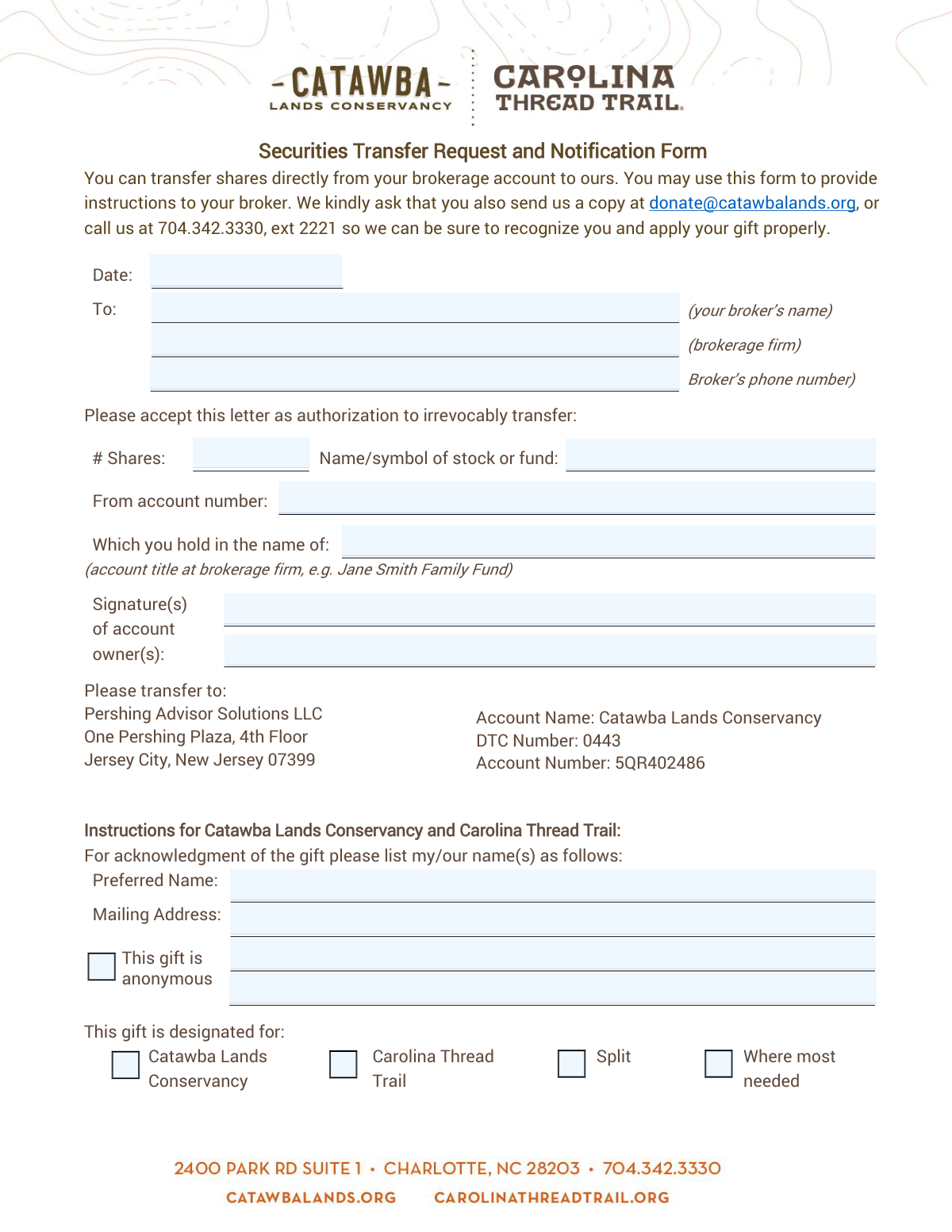
Yes! You can use AI to fill out Securities Transfer Request and Notification Form

This form serves as a formal letter of authorization to your brokerage firm, instructing them to transfer a specified number of securities from your account to another designated account, such as that of a non-profit organization like the Catawba Lands Conservancy. It ensures the transfer is executed correctly and the gift is properly acknowledged. Today, this form can be filled out quickly and accurately using AI-powered services like Instafill.ai, which can also convert non-fillable PDF versions into interactive fillable forms.
Our AI automatically handles information lookup, data retrieval, formatting, and form filling.
It takes less than a minute to fill out Securities Transfer Request using our AI form filling.
Securely upload your data. Information is encrypted in transit and deleted immediately after the form is filled out.

Form specifications

Form name: Securities Transfer Request and Notification Form
Number of pages: 1
Language: English
Categories: SEC forms, transfer forms, securities forms
main-image

Instafill Demo: How to fill out PDF forms in seconds with AI

How to Fill Out Securities Transfer Request Online for Free in 2026

Are you looking to fill out a SECURITIES TRANSFER REQUEST form online quickly and accurately? Instafill.ai offers the #1 AI-powered PDF filling software of 2026, allowing you to complete your SECURITIES TRANSFER REQUEST form in just 37 seconds or less.
Follow these steps to fill out your SECURITIES TRANSFER REQUEST form online using Instafill.ai:
  1. 1 Navigate to Instafill.ai and upload or select the Securities Transfer Request and Notification Form.
  2. 2 Provide your broker's contact information and your brokerage account details, including the account number and title.
  3. 3 Specify the details of the securities to be transferred, including the number of shares and the stock or fund name/symbol.
  4. 4 Electronically sign the form to provide authorization for the irrevocable transfer of the specified assets.
  5. 5 Indicate your preferences for gift acknowledgment, including your name and mailing address, and designate how the gift should be used.
  6. 6 Review all entered information for accuracy before downloading the completed form to send to your broker and the recipient organization.

Our AI-powered system ensures each field is filled out correctly, reducing errors and saving you time.

Why Choose Instafill.ai for Your Fillable Securities Transfer Request Form?

Speed

Complete your Securities Transfer Request in as little as 37 seconds.

Up-to-Date

Always use the latest 2026 Securities Transfer Request form version.

Cost-effective

No need to hire expensive lawyers.

Accuracy

Our AI performs 10 compliance checks to ensure your form is error-free.

Security

Your personal information is protected with bank-level encryption.

Frequently Asked Questions About Form Securities Transfer Request

This form authorizes your broker to transfer securities, like stocks or funds, from your brokerage account to Catawba Lands Conservancy as a donation. It also serves as a notification to the conservancy so they can properly acknowledge your gift.

Anyone who wishes to donate shares of stock or funds from their personal brokerage account to the Catawba Lands Conservancy should use this form to provide instructions to their broker.

You will need your brokerage account number, the exact name and ticker symbol of the stock or fund you're donating, the number of shares, and your broker's contact information.

You must send the original signed form to your broker to authorize the transfer. You should also send a copy to Catawba Lands Conservancy at [email protected] so they can anticipate and correctly attribute your gift.

Sending a copy ensures the organization is aware of your incoming donation, allowing them to identify the transfer and apply it according to your wishes. Without it, your gift might be received as an anonymous donation.

No, the recipient's brokerage information, including the DTC number (0443) and account number (5QR402486), is already pre-filled on the form for your convenience.

In the section 'Instructions for Catawba Lands Conservancy,' you can check a box to designate your gift for the Catawba Lands Conservancy, the Carolina Thread Trail, have it split, or applied where it is most needed.

Yes, you can make an anonymous donation by checking the 'This gift is anonymous' box at the bottom of the form. If you select this, your name will not be used for public acknowledgment.

Your signature as the account owner is required to authorize your broker to make the transfer. Ensure you sign in the 'Signature(s) of account owner(s)' field.

Yes, services like Instafill.ai use AI to accurately auto-fill form fields using your saved information, which can save you time and help prevent errors.

Simply upload the PDF form to the Instafill.ai platform. The AI will make the fields fillable, and you can quickly enter your information before downloading the completed document for submission.

If you have a non-fillable PDF, you can use a service like Instafill.ai. It can convert flat PDFs into interactive, fillable forms, allowing you to type your information directly into the fields.

In this field, you should write the official name of the security and its ticker symbol, for example, 'Microsoft Corp. / MSFT'. This ensures your broker transfers the correct asset.

Compliance Securities Transfer Request
Validation Checks by Instafill.ai

1
Valid and Current Request Date
Ensures the 'Date' field is a valid, correctly formatted date (e.g., MM/DD/YYYY) and is not a date far in the past. This is important for establishing a clear and timely instruction for the securities transfer. An invalid or old date could lead to processing delays or rejection of the request by the brokerage firm.
2
Broker Contact Information Completeness
Verifies that the 'your broker’s name', 'brokerage firm', and 'Broker’s phone number' fields are all filled out. This information is critical for the receiving institution to contact the correct broker to facilitate the transfer. Missing information would halt the process, as the authorization cannot be sent to the right party.
3
Broker Phone Number Format
Checks that the 'Broker’s phone number' field follows a standard North American phone number format (e.g., XXX-XXX-XXXX or (XXX) XXX-XXXX). A valid phone number format is essential for ensuring that the broker can be reached if there are questions or issues with the transfer request. An improperly formatted number could lead to communication failures.
4
Positive Share Quantity
Validates that the '# Shares' field contains a positive numerical value greater than zero. A transfer cannot be processed for zero, negative, or non-numeric quantities. This check prevents fundamental errors in the transfer instruction and ensures a valid amount of stock is specified.
5
Stock or Fund Identifier Presence
Ensures that the 'Name/symbol of stock or fund' field is not empty. The broker needs this specific identifier (either the full name or the ticker symbol) to know exactly which security to transfer from the account. Without this information, the transfer request is ambiguous and cannot be executed.
6
Source Account Details Completeness
Verifies that both the 'From account number' and 'account title at brokerage firm' fields are completed. These details are essential for the brokerage to identify the correct source account for the transfer. Failure to provide both the account number and title could result in the rejection of the request due to an inability to locate or verify the account.
7
Required Account Owner Signature
Checks for the presence of a signature in the 'Signature(s) of account owner(s)' field. A signature is a legal requirement to authorize the irrevocable transfer of assets. A form submitted without a signature is not legally binding and will be rejected immediately, as there is no proof of authorization from the account holder.
8
Exclusive Gift Designation Selection
Validates that exactly one option is selected from the gift designation checkboxes ('Catawba Lands Conservancy', 'Carolina Thread Trail', 'Split', 'Where most needed'). This ensures the donor's intent is clear and unambiguous for internal fund allocation. If zero or multiple options are selected, the form would be flagged for clarification to ensure the gift is used as the donor wishes.
9
Anonymous Gift Logical Consistency
Checks for a logical conflict between the 'This gift is anonymous' checkbox and the acknowledgment fields. If the anonymous box is checked, the 'Preferred Name' and 'Mailing Address' fields should be empty. This validation prevents contradictory instructions and ensures the donor's privacy preference is honored correctly. If a conflict exists, the submission should be flagged for manual review.
10
Conditional Acknowledgment Information
Ensures that if the 'This gift is anonymous' checkbox is NOT checked, the 'Preferred Name' and 'Mailing Address' fields are filled out. This is important for ensuring the organization can send a proper acknowledgment and tax receipt to the donor. Incomplete information would prevent the organization from thanking the donor and providing required documentation.
11
Mailing Address ZIP Code Format
Validates that the ZIP code provided in the 'Mailing Address' field is in a valid 5-digit or 9-digit (ZIP+4) format. A correct ZIP code is crucial for the successful delivery of mail, such as gift acknowledgments and tax receipts. An invalid format could result in returned mail and a failure to communicate with the donor.
12
Share Quantity Numeric Format
Verifies that the input for '# Shares' is strictly numeric, potentially allowing for decimal points for fractional shares but rejecting any letters or special symbols. This technical validation prevents data type errors during processing and ensures the instruction sent to the broker is machine-readable and accurate. Non-numeric input would cause an immediate processing failure.

Common Mistakes in Completing Securities Transfer Request

Providing an Incomplete or Incorrect Brokerage Account Number

Users often misremember, transpose digits, or provide a partial brokerage account number. This is the most critical piece of information for the broker to identify the source account, and any error will cause the transfer to fail immediately. This requires the donor to restart the entire process, causing significant delays. To avoid this, carefully copy the full account number from a recent brokerage statement. AI-powered tools like Instafill.ai can help by storing and accurately populating this sensitive information, reducing the risk of manual entry errors.

Using an Ambiguous Stock Name Instead of the Ticker Symbol

Donors might write a common company name like 'Apple' instead of the official ticker symbol, 'AAPL'. Many companies have multiple classes of stock or similarly named funds, so using an incorrect identifier can lead to the wrong securities being transferred or the request being rejected by the broker. Always use the specific ticker symbol found on your brokerage statement or platform to ensure accuracy and prevent delays.

Failing to Send a Copy of the Form to the Charity

The form explicitly asks the donor to send a copy to Catawba Lands Conservancy, but donors often assume their broker will handle all notifications. If the charity is not notified, they receive an unexpected stock gift and cannot issue a proper tax acknowledgment or apply the gift to the donor's intended designation. This creates significant administrative work for the charity to trace the gift's origin. Always email or mail a copy to the recipient organization as instructed on the form.

Mismatching the Account Title and Signature(s)

The signature must legally correspond to the official account title (e.g., 'John and Jane Doe' or 'Doe Family Trust'). A common mistake is having only one person sign a joint account or using a personal signature for a trust account. A mismatch between the account title on file and the signature provided will invalidate the authorization and cause the brokerage to reject the transfer. Always verify the exact account title and ensure all required parties sign as their names appear on the account.

Providing Contradictory Acknowledgment and Anonymity Requests

A frequent error is filling out the 'Preferred Name' for acknowledgment and also checking the 'This gift is anonymous' box. This creates a contradiction that confuses the charity, forcing them to contact the donor for clarification. This delays the acknowledgment process and creates unnecessary back-and-forth communication. Decide beforehand whether you wish to be acknowledged or remain anonymous and only complete the corresponding section of the form.

Submitting an Illegible, Hand-Written Form

Since this form is a non-fillable PDF, many users print it and fill it out by hand. Poor handwriting, especially with critical data like account numbers and share quantities, can easily be misread by the brokerage firm. This leads to failed transfers or incorrect transactions, causing significant delays and frustration. To prevent this, use a tool like Instafill.ai, which can convert flat PDFs into digitally fillable forms, ensuring all entries are clear, legible, and accurate.

Entering a Vague Quantity for the Number of Shares

Instead of a specific number, donors sometimes write ambiguous terms like 'All' or 'Half' in the '# Shares' field. Brokerages require a precise number of shares to execute a transfer and will often reject vague instructions to avoid the liability of misinterpreting the donor's intent. This rejection requires the donor to resubmit the form with a specific quantity, delaying the gift. Always state the exact, numeric quantity of shares you intend to transfer.

Leaving the Gift Designation Section Blank

The form provides checkboxes to direct the gift (Catawba Lands Conservancy, Carolina Thread Trail, etc.). Donors in a hurry may forget to check a box, which means the gift defaults to 'Where most needed'. While this is a valid option, it may not reflect the donor's true intent if they wished to support a specific program. This can lead to the funds being used in a way the donor didn't prefer. Carefully review and select the designation that aligns with your philanthropic goals.

Forgetting to Date the Form

The date field is often overlooked but is a critical component of a financial authorization letter. A missing date can lead a brokerage to question the form's validity and timeliness, potentially causing them to reject the request pending a properly dated submission. This simple omission can delay the entire transfer process. Always fill in the current date to ensure the document is processed without issue.

Confusing 'Preferred Name' with 'Account Title'

The form has separate fields for the legal 'account title' (for the broker) and the 'Preferred Name' (for the charity's acknowledgment). Donors sometimes put their informal name in the legal 'account title' field, which will cause a mismatch at the brokerage and a failed transfer. The 'account title' must be the exact legal name on the brokerage account, while the 'Preferred Name' is for how you'd like to be thanked by the charity.
Saved over 80 hours a year

“I was never sure if my IRS forms like W-9 were filled correctly. Now, I can complete the forms accurately without any external help.”

Kevin Martin Green

Your data stays secure with advanced protection from Instafill and our subprocessors

Robust compliance program

Transparent business model

You’re not the product. You always know where your data is and what it is processed for.

ISO 27001, HIPAA, and GDPR

Our subprocesses adhere to multiple compliance standards, including but not limited to ISO 27001, HIPAA, and GDPR.

Security & privacy by design

We consider security and privacy from the initial design phase of any new service or functionality. It’s not an afterthought, it’s built-in, including support for two-factor authentication (2FA) to further protect your account.

Fill out Securities Transfer Request with Instafill.ai

Worried about filling PDFs wrong? Instafill securely fills securities-transfer-request-and-notification-form forms, ensuring each field is accurate.