Yes! You can use AI to fill out Confidential Purchaser Questionnaire

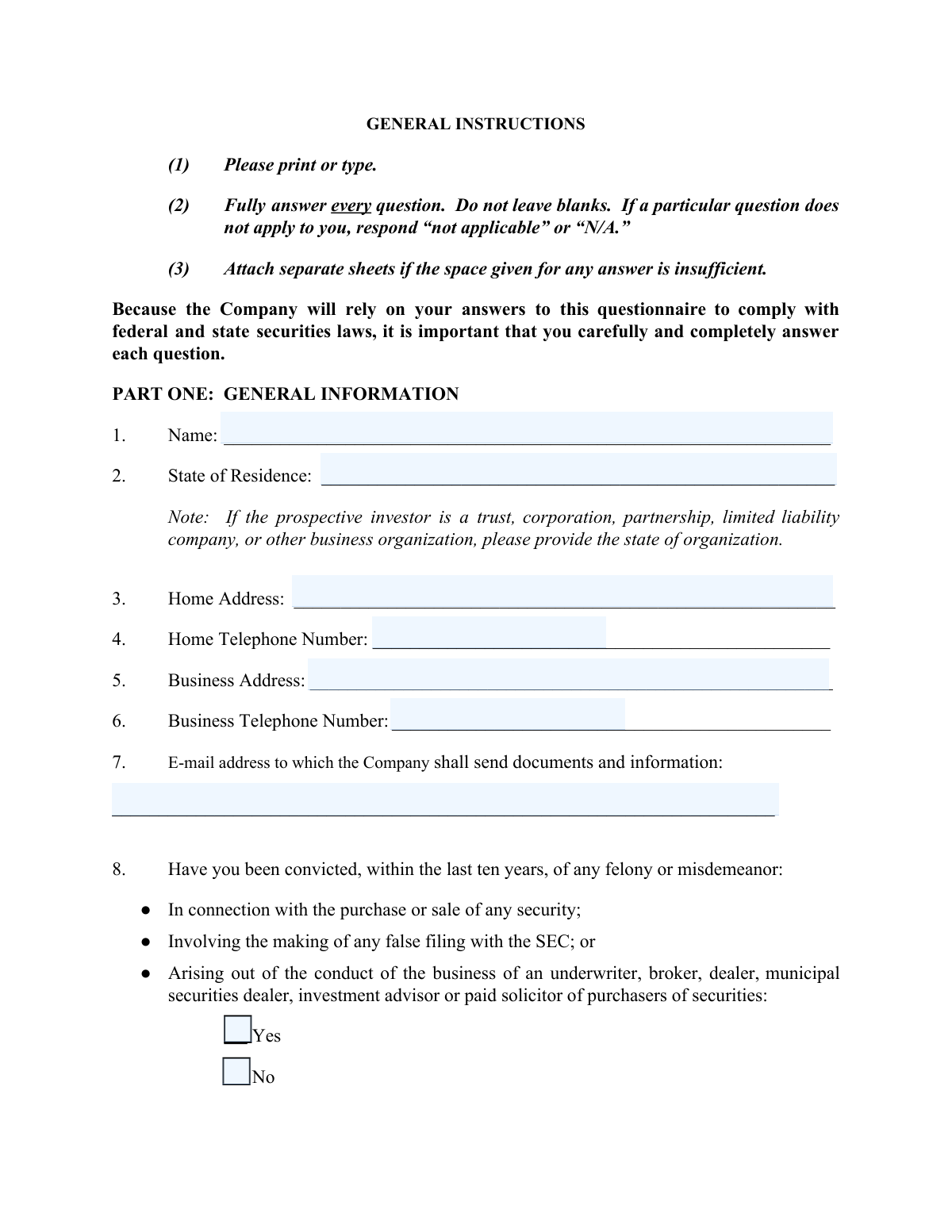
A Confidential Purchaser Questionnaire is a document that companies provide to potential investors to gather essential financial and background information. Its primary purpose is to verify that the individual or entity meets the specific criteria to be classified as an 'accredited investor,' a requirement for participating in certain private investment opportunities under securities regulations. Today, this form can be filled out quickly and accurately using AI-powered services like Instafill.ai, which can also convert non-fillable PDF versions into interactive fillable forms.
Our AI automatically handles information lookup, data retrieval, formatting, and form filling.
It takes less than a minute to fill out Purchaser Questionnaire using our AI form filling.
Securely upload your data. Information is encrypted in transit and deleted immediately after the form is filled out.

Form specifications

Form name: Confidential Purchaser Questionnaire
Number of pages: 1
Language: English
Categories: investment forms, financial disclosure forms, securities forms
main-image

Instafill Demo: How to fill out PDF forms in seconds with AI

How to Fill Out Purchaser Questionnaire Online for Free in 2026

Are you looking to fill out a PURCHASER QUESTIONNAIRE form online quickly and accurately? Instafill.ai offers the #1 AI-powered PDF filling software of 2026, allowing you to complete your PURCHASER QUESTIONNAIRE form in just 37 seconds or less.
Follow these steps to fill out your PURCHASER QUESTIONNAIRE form online using Instafill.ai:
  1. 1 Navigate to Instafill.ai and upload or select the Confidential Purchaser Questionnaire.
  2. 2 Use the AI assistant to automatically fill in your general information in Part One, including your name, contact details, and state of residence.
  3. 3 Answer the series of yes/no questions regarding your legal, regulatory, and securities history.
  4. 4 Carefully review the criteria for 'Accredited Investor Status' listed in Part Two.
  5. 5 Select and initial the category that accurately describes your status as an accredited investor based on net worth, income, or professional standing.
  6. 6 Digitally sign and date the representation section to certify that all the information you've provided is complete and accurate.
  7. 7 Review the entire completed questionnaire for accuracy before downloading or submitting it to the company.

Our AI-powered system ensures each field is filled out correctly, reducing errors and saving you time.

Why Choose Instafill.ai for Your Fillable Purchaser Questionnaire Form?

Speed

Complete your Purchaser Questionnaire in as little as 37 seconds.

Up-to-Date

Always use the latest 2026 Purchaser Questionnaire form version.

Cost-effective

No need to hire expensive lawyers.

Accuracy

Our AI performs 10 compliance checks to ensure your form is error-free.

Security

Your personal information is protected with bank-level encryption.

Frequently Asked Questions About Form Purchaser Questionnaire

This questionnaire is used by Briarcliff Development Company to determine if you qualify as an “accredited investor” under securities laws. This allows them to legally provide you with information about potential future investment opportunities.

You should complete this form if you are interested in receiving information from Briarcliff Development Company about possible investment projects. It is the first step to determine your eligibility to receive such information.

An accredited investor is a person or entity that meets specific income, net worth, or professional criteria defined by securities laws. Part Two of the form outlines the different categories, such as having a net worth over $1 million or a consistent annual income over $200,000.

To calculate your net worth, add up all your assets (e.g., stocks, business ownership, retirement plans) and subtract all your liabilities (debts). Importantly, the value of your primary residence must be excluded from this calculation.

No, completing this questionnaire does not obligate you to invest in any project. It is for informational purposes only, allowing the company to determine your eligibility to receive investment information in compliance with the law.

You can submit the signed form by emailing it to [email protected] or by mailing a physical copy to the address provided on the first page.

Yes, the company states that all information you disclose will be kept confidential. It will only be used to comply with securities laws and will not be shared unless required by a binding legal or administrative order.

The form instructions state that you should not leave any questions blank. If a question is not applicable to your situation, simply write “N/A” or “not applicable” in the answer space.

These questions are required to comply with federal securities regulations, specifically the 'bad actor' disqualification rules. They help the company verify that potential investors are not disqualified from participating in certain investment offerings.

If the prospective investor is an entity, you must provide its state of organization instead of a state of residence. You also need to complete questions 16 and 17 with the name and title of the person authorized to receive information on the entity's behalf.

Yes, services like Instafill.ai use AI to accurately auto-fill form fields with your information, which can save you time and help prevent errors. This is especially useful for entering recurring details like your name and address.

Simply upload the PDF to the Instafill.ai platform. The service will make the document interactive, and its AI can help you populate the fields, after which you can review, sign, and download the completed form for submission.

If you have a non-fillable or 'flat' PDF, you can use a tool like Instafill.ai to convert it into an interactive, fillable form. This allows you to easily type your answers directly into the document online.

Compliance Purchaser Questionnaire
Validation Checks by Instafill.ai

1
Mandatory Field Completion
Checks that all required fields in the questionnaire are filled out, as per the general instructions stating 'Fully answer every question'. Fields that are not applicable should be marked 'N/A'. This is critical for compliance with federal and state securities laws, which require complete information to determine investor eligibility. A submission with blank required fields will be rejected and returned to the user for completion.
2
Valid Email Address Format
Verifies that the email address provided in Part One, Question 7, follows the standard [email protected] format. This is essential for ensuring the company can reliably send legal documents, investment information, and other critical communications. An invalid email format will result in a validation error, preventing form submission until corrected.
3
Valid US Phone Number Format
Ensures that the Home Telephone Number (Question 4) and Business Telephone Number (Question 6) are entered in a recognizable US phone number format, such as (XXX) XXX-XXXX or XXX-XXX-XXXX. Correctly formatted numbers are necessary for contact and verification purposes. The system will reject entries that do not conform to a valid phone number pattern.
4
Conditional Explanation for Disclosures
This validation checks that if a user answers 'Yes' to any of the disclosure questions (Questions 8-15), the corresponding explanation text field is not left empty. This is a legal requirement to understand the context of the affirmative answer, which could impact investor eligibility under 'bad actor' disqualification rules. Failure to provide an explanation will block submission and prompt the user to provide the necessary details.
5
Exclusive Selection of Accredited Investor Status
Verifies that the user has initialed exactly one category in Part Two to define their accredited investor status. Selecting zero or more than one category creates ambiguity and makes it impossible to legally classify the investor. The form will return an error if the user does not make a single, unambiguous selection.
6
Execution Date Validity
Checks that the execution date provided in the 'Representation' section is a valid calendar date and is not set in the future. This date legally establishes when the representations were made by the investor. An invalid or future date would compromise the legal standing of the document, so the submission will be blocked until a valid, current or past date is entered.
7
Signature and Printed Name Consistency
Compares the 'Printed name' under the signature line with the 'Name' provided in Part One, Question 1. The names should match to confirm that the individual completing the questionnaire is the same person who is signing it. A mismatch could indicate a potential issue with identity or authorization and will flag the submission for review or rejection.
8
Required Entity Contact Information
This is a logical check that requires Part One, Questions 16 and 17 (entity contact person details) to be completed if the investor selects an entity-based accredited investor status in Part Two (e.g., categories 1, 2, 3, 7, or 8). This ensures the company has a specific point of contact for a non-individual investor. The form will be considered incomplete if an entity status is chosen without providing the corresponding contact details.
9
Valid State of Residence/Organization
Validates that the entry in 'State of Residence' (Question 2) is a recognized US state, territory, or a valid 'state of organization' for business entities. This information is crucial for determining which state's securities laws (Blue Sky Laws) apply to the potential investor. An invalid entry will prevent submission until a valid state is provided.
10
Full Name Requirement
Ensures the 'Name' field in Part One, Question 1, contains what appears to be a full name, such as at least two words. This is to prevent users from entering initials or incomplete names, which are insufficient for legal and identification purposes. Submissions with an apparently incomplete name will be flagged for correction.
11
Mandatory Selection for Yes/No Questions
For each of the binary questions (Questions 8-15), this check ensures that the user has selected either 'Yes' or 'No'. Leaving both options unchecked for any of these questions results in an incomplete and ambiguous record. This validation is critical for a complete 'bad actor' check, and the form cannot be submitted until all these questions are answered.
12
Bad Actor Disqualification Flag
This is a business rule validation that flags any submission where the user has answered 'Yes' to one or more of the questions from 8 to 15. While not a submission-blocking error, it triggers an internal alert for immediate manual review by the compliance team. These affirmative answers may indicate a 'bad actor' disqualification under SEC Rule 506(d), potentially making the investor ineligible for certain offerings.

Common Mistakes in Completing Purchaser Questionnaire

Incorrectly Calculating Net Worth

When selecting accredited investor status based on net worth (Category 5), applicants often mistakenly include the value of their primary residence. The form explicitly states to exclude the primary residence value from the calculation. This error leads to an incorrect attestation of accredited investor status, which can have significant legal and compliance consequences, and will result in the form being rejected.

Failing to Initial an Accredited Investor Category

A frequent and critical error is forgetting to initial any of the eight categories in Part Two. This section is the primary purpose of the questionnaire, as it establishes the applicant's legal status to receive investment information. Without an initialed category, the form is incomplete and the company cannot verify the applicant's accredited investor status, preventing them from receiving any investment opportunities.

Leaving Required Fields Blank

The general instructions explicitly state to answer every question and use 'N/A' or 'not applicable' if a question does not apply. Many applicants leave fields blank, particularly business addresses or phone numbers if they are retired or unemployed. This violates the form's instructions and can cause processing delays or rejection, as the reviewer cannot be certain if the information was missed accidentally or is truly not applicable.

Misinterpreting the Income Qualification

For applicants qualifying based on income (Category 6), a common mistake is using net (after-tax) income instead of gross (pre-tax) income, or forgetting to include capital gains and other investment distributions as specified in the note. This can lead to an individual incorrectly believing they do not qualify, or incorrectly attesting that they do. To avoid this, applicants should carefully review their total gross income from all sources for the past two years.

Incomplete 'Yes' Answers to Disqualification Questions

In Part One (questions 8-15), if an applicant checks 'Yes' to any question regarding past convictions, orders, or injunctions, they are required to provide a detailed explanation in the space provided. Applicants often check 'Yes' but fail to write the explanation. This makes the submission incomplete and will halt the review process until the necessary details are provided.

Using an Outdated or Incorrect Date

The signature line includes a pre-filled year of '2016', which applicants often overlook and fail to correct to the current year. Signing a legal representation with an incorrect date can call the validity and timing of the attestation into question. Applicants must cross out the old year and write the current one to ensure the document is accurately dated.

Missing Signature or Printed Name

Forgetting to sign or legibly print their name at the end of the questionnaire is a simple but critical mistake. An unsigned form is not a valid legal representation and has no binding effect. The company cannot rely on an unsigned document, making the entire submission invalid and requiring the applicant to resubmit a completed form.

Incorrect 'State of Residence' for Entities

When the prospective investor is a trust, corporation, or other business entity, applicants often mistakenly enter the individual representative's personal state of residence in question 2. The form includes a specific note to provide the entity's state of organization or formation. This error can lead to compliance issues related to state-specific securities laws ('blue sky' laws) and requires correction.

Illegible Handwriting on a Non-Fillable Form

This form is a flat PDF that cannot be typed into directly, forcing applicants to print and fill it out by hand. This frequently results in illegible handwriting, especially for complex names, addresses, and email addresses. An unreadable form can lead to data entry errors on the company's end, communication failures, and rejection of the submission. AI-powered tools like Instafill.ai can convert non-fillable PDFs into fillable versions, allowing for clear, typed responses and preventing this issue.

Choosing an Inapplicable Investor Category

The legal definitions for each accredited investor category in Part Two are complex, leading individuals to initial the wrong one. For example, a person representing a family trust might incorrectly initial a 'natural person' category (5 or 6) instead of the 'trust' category (7). This misclassification invalidates the accreditation status and requires a corrected submission. To prevent this, applicants should carefully read all category descriptions or consult with an advisor.
Saved over 80 hours a year

“I was never sure if my IRS forms like W-9 were filled correctly. Now, I can complete the forms accurately without any external help.”

Kevin Martin Green

Your data stays secure with advanced protection from Instafill and our subprocessors

Robust compliance program

Transparent business model

You’re not the product. You always know where your data is and what it is processed for.

ISO 27001, HIPAA, and GDPR

Our subprocesses adhere to multiple compliance standards, including but not limited to ISO 27001, HIPAA, and GDPR.

Security & privacy by design

We consider security and privacy from the initial design phase of any new service or functionality. It’s not an afterthought, it’s built-in, including support for two-factor authentication (2FA) to further protect your account.

Fill out Purchaser Questionnaire with Instafill.ai

Worried about filling PDFs wrong? Instafill securely fills confidential-purchaser-questionnaire forms, ensuring each field is accurate.