Yes! You can use AI to fill out Disposal of Security with Insignificant Value
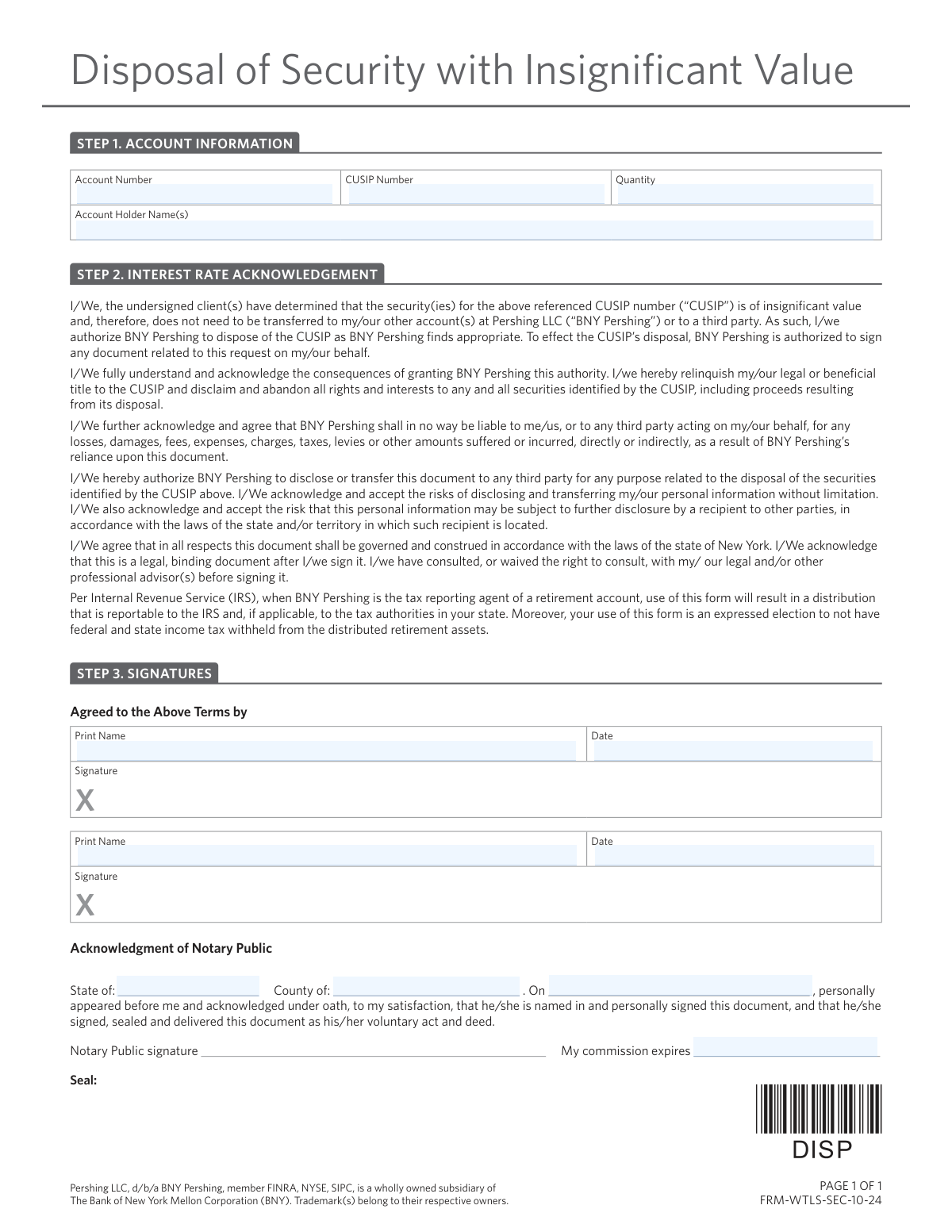
This form is a legal document for clients of BNY Pershing to declare that a specific security has insignificant value and to authorize BNY Pershing to dispose of it. By signing, the client relinquishes all rights and title to the security and indemnifies BNY Pershing from any liability related to its disposal. Today, this form can be filled out quickly and accurately using AI-powered services like Instafill.ai, which can also convert non-fillable PDF versions into interactive fillable forms.
FRM-WTLS-SEC-10-24 is part of the
investment forms, brokerage forms, asset management forms, SEC forms, securities forms and financial disposal forms categories on Instafill.
Rather not fill this in by hand? Instafill is an online form filler that completes PDF forms automatically — upload the blank form, answer a few questions, and the AI fills every field.
Form specifications
| Form name: | Disposal of Security with Insignificant Value |
| Number of pages: | 1 |
| Language: | English |
Our AI automatically handles information lookup, data retrieval, formatting, and form filling.
It takes less than a minute to fill out FRM-WTLS-SEC-10-24 using our AI form filling.
Securely upload your data. Information is encrypted in transit and deleted immediately after the form is filled out.
Instafill Demo: How to fill out PDF forms in seconds with AI
How to Fill Out FRM-WTLS-SEC-10-24 Online for Free in 2026
Are you looking to fill out a FRM-WTLS-SEC-10-24 form online quickly and accurately? Instafill.ai offers the #1 AI-powered PDF filling software of 2026, allowing you to complete your FRM-WTLS-SEC-10-24 form in just 37 seconds or less.
Follow these steps to fill out your FRM-WTLS-SEC-10-24 form online using Instafill.ai:
- 1 Navigate to Instafill.ai and upload or select the 'Disposal of Security with Insignificant Value' form.
- 2 Use the AI tool to automatically populate Step 1 with your Account Number, CUSIP Number, Quantity, and Account Holder Name(s).
- 3 Carefully read the acknowledgements in Step 2 to understand that you are relinquishing all rights to the security.
- 4 Provide your printed name, date, and signature in Step 3. If there are multiple account holders, ensure all parties sign.
- 5 If required, complete the 'Acknowledgment of Notary Public' section. The AI can guide you on how to get the document notarized.
- 6 Review the entire completed form for accuracy, then download the final document for submission to BNY Pershing.
Our AI-powered system ensures each field is filled out correctly, reducing errors and saving you time.
Why Choose Instafill.ai for Your Fillable FRM-WTLS-SEC-10-24 Form?
Speed
Complete your FRM-WTLS-SEC-10-24 in as little as 37 seconds.
Up-to-Date
Always use the latest 2026 FRM-WTLS-SEC-10-24 form version.
Cost-effective
No need to hire expensive lawyers.
Accuracy
Our AI performs 10 compliance checks to ensure your form is error-free.
Security
Your personal information is protected with bank-level encryption.
Frequently Asked Questions About FRM-WTLS-SEC-10-24
This form authorizes BNY Pershing to dispose of a security in your account that you have determined to be worthless or of insignificant value. It allows you to remove the security from your account without a formal transfer process.
You should use this form if you hold a security that has little to no market value and you wish to relinquish all ownership of it. This is an alternative to transferring the security to another account.
In Step 1, you must provide your full account number, the CUSIP number of the security, the quantity of shares or units you are disposing of, and the name(s) of the account holder(s).
A CUSIP is a unique nine-digit code that identifies a specific security. You can typically find the CUSIP number for your holding on your account statement.
By signing, you are giving up all legal and beneficial ownership of the specified security, including any potential proceeds from its disposal. You are also authorizing BNY Pershing to sign documents on your behalf to complete the disposal and releasing them from any liability.
Yes, if the security is in a retirement account, its disposal using this form is considered a distribution reportable to the IRS. By signing, you are also electing not to have federal or state income tax withheld.
Yes, the 'Acknowledgment of Notary Public' section in Step 3 must be completed. You need to sign the document in the presence of a licensed Notary Public who will then complete and seal that section.
No, the form is a legally binding document once signed and notarized. Upon submission, you permanently relinquish all rights to the security, so the decision cannot be reversed.
After you have filled out the form and had it notarized, you should submit it to BNY Pershing through your financial advisor. Contact your advisor directly for specific submission instructions and address details.
If the account is jointly owned, all account holders listed on the account must sign and date the form in Step 3 to provide their authorization.
No, by signing this form you abandon all rights and interests to the security, which includes any proceeds that may result from its disposal.
Yes, services like Instafill.ai use AI to accurately auto-fill form fields with your personal and account information, which saves time and helps reduce errors.
You can upload the PDF of this form to the Instafill.ai platform. Its AI will make the fields fillable and populate them with your saved information, which you can then review before downloading the completed form for printing and notarization.
If you have a non-fillable or 'flat' PDF, you can use a service like Instafill.ai. It can convert the document into an interactive, fillable form that you can easily complete on your computer.
Compliance FRM-WTLS-SEC-10-24
Validation Checks by Instafill.ai
1
Account Number Format and Completeness
This check ensures the 'Account Number' field is not empty and conforms to the standard format expected by BNY Pershing (e.g., a specific length, alphanumeric pattern). This is critical for correctly identifying the client's account for the transaction. If the format is incorrect or the field is blank, the form cannot be processed as the target account is unknown, leading to rejection of the request.
2
CUSIP Number Format Validation
Validates that the 'CUSIP Number' field contains a correctly formatted 9-character alphanumeric string, including a valid check digit. CUSIPs are the standard identifier for North American securities, and an incorrect one would mean attempting to dispose of the wrong asset. A failed validation prevents the transaction to avoid catastrophic errors in the client's portfolio.
3
Quantity is a Positive Number
This check verifies that the 'Quantity' field contains a numeric value greater than zero. A quantity of zero or a negative number is illogical for a disposal request. This validation prevents invalid or nonsensical transactions from being submitted, ensuring that a tangible amount of the security is specified for disposal.
4
Account and Security Holding Verification
This is a backend check to confirm that the specified 'Account Number' actually exists and holds at least the 'Quantity' of the security identified by the 'CUSIP Number'. This prevents fraudulent or erroneous disposal requests for assets the client does not own or for quantities they do not possess. A mismatch would result in immediate rejection of the form.
5
Account Holder Name Completeness
Ensures the 'Account Holder Name(s)' field is not left blank. This field is essential for verifying that the person signing the form is the actual owner of the account. An empty name field makes it impossible to cross-reference the signature with the account ownership, causing the form to be rejected for lack of proper authorization.
6
Required Signer Name and Date Presence
This validation confirms that at least the first 'Print Name' and 'Date' fields in the signature section are completed. These fields are legally required to attest that the account holder agrees to the terms. Missing a printed name or date invalidates the signature and renders the entire authorization void, leading to rejection.
7
Signature Date Logical Consistency
Verifies that the signature date(s) are valid, not in the future, and not unreasonably far in the past (e.g., older than 180 days). This ensures the authorization is current and reflects the client's present intent. A future date is impossible, and a very old date may no longer be considered valid, requiring a new form to be signed.
8
Signer Name Matches Account Holder
This check cross-references the printed name(s) in the signature section with the 'Account Holder Name(s)' listed in Step 1. The names must match to confirm the person signing is an authorized owner of the account. A mismatch indicates a potential unauthorized signature, which is a serious compliance issue and will cause the form to be rejected.
9
Conditional Second Signature Requirement
If the account is identified as a joint account (e.g., multiple names listed in 'Account Holder Name(s)'), this check ensures the second signature block ('Print Name', 'Date', and Signature) is also completed. For joint accounts, authorization from all owners is typically required to perform a transaction. Failure to provide all required signatures will result in the request being rejected as incomplete.
10
Notary Date Consistency Check
Validates that the date of notarization is on or after the client's signature date(s). A notary cannot legally acknowledge a signature that has not yet occurred. This check ensures the proper legal sequence of events, and a failure indicates a procedural error that invalidates the notarization, thus rejecting the form.
11
Notary Commission Expiration Check
This check ensures the notary's commission expiration date is in the future relative to the date of notarization. A notary cannot perform official acts with an expired commission. This validation is crucial for the legal standing of the document; if the commission was expired, the notarization is invalid and the form will be rejected.
12
Notary Location Completeness
Verifies that the 'State of' and 'County of' fields within the notary section are both filled out. This information is a required part of the notarial certificate and establishes the jurisdiction in which the act took place. Missing location data makes the notarization incomplete and legally deficient, leading to form rejection.
13
Signature Image Presence
This validation uses image analysis or a digital signature flag to confirm that the space marked with an 'X' for the signature has actually been signed. A printed name and date are not sufficient without a corresponding signature. The absence of a signature means the account holder has not legally executed the document, making the authorization invalid.
Common Mistakes in Completing FRM-WTLS-SEC-10-24
The CUSIP is a unique 9-character identifier for the security. Users often make transcription errors, such as transposing numbers or letters, when copying it from an account statement. An incorrect CUSIP will cause the request to be rejected or, in a worst-case scenario, lead to the disposal of the wrong asset. Always double-check this number character-by-character against your official account documents to ensure accuracy.
The name(s) entered in Step 1 must exactly match the account registration on file, including middle initials, suffixes (Jr., Sr.), and the names of all joint owners. People often use a nickname or omit a joint owner, leading to an immediate rejection of the form for not matching records. To avoid this, copy the name precisely as it appears on your BNY Pershing account statement.
Mistyping the account number is a frequent data entry error that prevents the form from being processed. This can happen due to misreading the number or simple typos. An incorrect account number means the firm cannot locate the security to be disposed of, causing the request to be rejected and requiring you to resubmit the form. AI-powered tools like Instafill.ai can help prevent this by auto-filling and validating account information from saved profiles.
If the account is held jointly (e.g., by a married couple), all account holders listed must sign the form in Step 3. It is a common oversight for only one owner to sign, which renders the authorization invalid. This will result in the form being returned and will delay the disposal process until all required signatures are obtained.
The purpose of notarization is for the notary to witness you signing the document or for you to acknowledge your signature in their presence. Many people sign the form at home and then take it to the notary, which invalidates the process. A notary cannot legally complete the acknowledgment if they did not witness the act, forcing you to fill out and sign a new form in their presence.
After the notary signs and stamps the form, the user may fail to check that all notary fields are complete, such as the commission expiration date, state, and county. If the notary's seal is missing, illegible, or any information is omitted, the document is not legally valid and will be rejected by BNY Pershing. Always review the notary's work for completeness before you leave their office.
The form explicitly states that for retirement accounts, this action is a reportable distribution to the IRS and that taxes will not be withheld. Users may rush through the legal text and not realize they are triggering a taxable event, which could have significant financial implications. It is crucial to read all acknowledgements and consult a tax advisor to understand the consequences before signing, especially for an IRA or other retirement account.
A simple but very common mistake is to print one's name on the 'Signature' line and sign on the 'Print Name' line. This happens when filling out the form too quickly and not reading the field labels. Such an error makes the signature invalid, and the form will be rejected, requiring you to complete and notarize a new one.
The 'Quantity' field requires the exact number of shares or units of the security to be disposed of. Users may guess the amount or leave it blank, leading to a mismatch with account records. If the quantity entered does not match the holding, the request will be rejected, causing delays. You must verify the exact quantity from your account statement before filling out the form.
This form is often provided as a non-fillable PDF, forcing users to print it and fill it out by hand. Poor handwriting can make critical information like the Account Number or CUSIP unreadable, leading to processing errors or rejection. To avoid this, print clearly in block letters or use a tool like Instafill.ai, which can convert flat PDFs into fillable forms for clean, typed entries.
Saved over 80 hours a year
“I was never sure if my IRS forms like W-9 were filled correctly. Now, I can complete the forms accurately without any external help.”
Kevin Martin Green
Your data stays secure with advanced protection from Instafill and our subprocessors




Robust compliance program
Transparent business model
You’re not the product. You always know where your data is and what it is processed for.
ISO 27001, HIPAA, and GDPR
Our subprocesses adhere to multiple compliance standards, including but not limited to ISO 27001, HIPAA, and GDPR.
Security & privacy by design
We consider security and privacy from the initial design phase of any new service or functionality. It’s not an afterthought, it’s built-in, including support for two-factor authentication (2FA) to further protect your account.
Fill out FRM-WTLS-SEC-10-24 with Instafill.ai
Worried about filling PDFs wrong? Instafill securely fills disposal-of-security-with-insignificant-value forms, ensuring each field is accurate.
