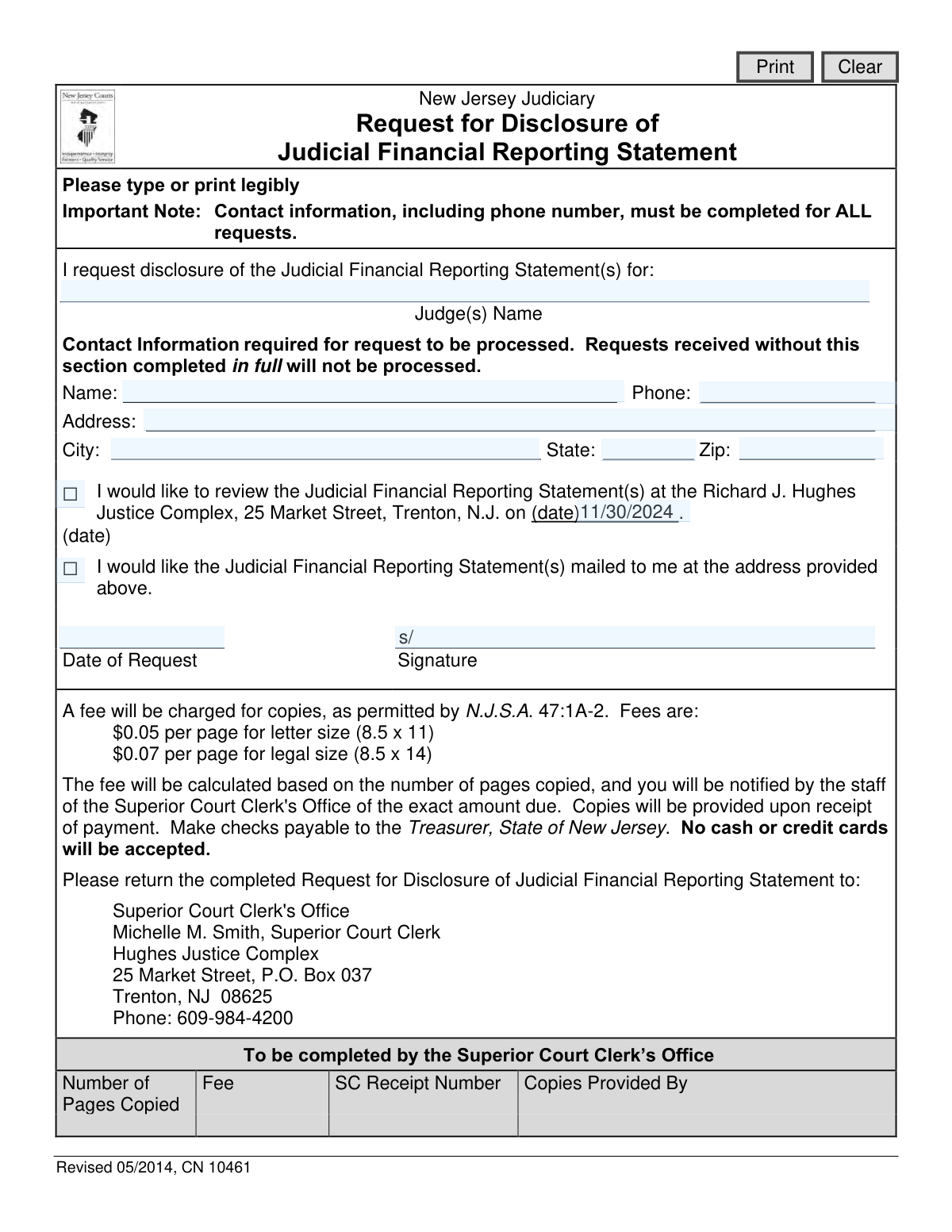
Yes! You can use AI to fill out Request for Disclosure of Judicial Financial Reporting Statement

The Request for Disclosure of Judicial Financial Reporting Statement is an official document used by the public to ask the New Jersey Judiciary for a copy of a judge's financial records. This process ensures transparency and accountability within the state's judicial system by allowing public oversight. Today, this form can be filled out quickly and accurately using AI-powered services like Instafill.ai, which can also convert non-fillable PDF versions into interactive fillable forms.
CN 10461 is part of the financial disclosure forms and New Jersey forms categories on Instafill.
Our AI automatically handles information lookup, data retrieval, formatting, and form filling.
It takes less than a minute to fill out CN 10461 using our AI form filling.
Securely upload your data. Information is encrypted in transit and deleted immediately after the form is filled out.

Form specifications

Form name: Request for Disclosure of Judicial Financial Reporting Statement
Number of fields: 14
Number of pages: 1
Language: English
main-image

Instafill Demo: How to fill out PDF forms in seconds with AI

How to Fill Out CN 10461 Online for Free in 2026

Are you looking to fill out a CN 10461 form online quickly and accurately? Instafill.ai offers the #1 AI-powered PDF filling software of 2026, allowing you to complete your CN 10461 form in just 37 seconds or less.
Follow these steps to fill out your CN 10461 form online using Instafill.ai:
  1. 1 Navigate to Instafill.ai and upload or select the 'Request for Disclosure of Judicial Financial Reporting Statement' form.
  2. 2 Use the AI assistant to accurately input your full contact information, including your name, address, and phone number.
  3. 3 Specify the full name of the judge or judges whose financial reporting statements you are requesting.
  4. 4 Indicate your preferred method of disclosure by checking the box to either review the statement in person or have it mailed to your address.
  5. 5 If you choose to review the document in person, provide the date you wish to do so.
  6. 6 Digitally sign and date the form to certify your request.
  7. 7 Review the completed form for accuracy, then download and mail it to the Superior Court Clerk's Office in Trenton, NJ, as instructed on the form.

Our AI-powered system ensures each field is filled out correctly, reducing errors and saving you time.

Why Choose Instafill.ai for Your Fillable CN 10461 Form?

Speed

Complete your CN 10461 in as little as 37 seconds.

Up-to-Date

Always use the latest 2026 CN 10461 form version.

Cost-effective

No need to hire expensive lawyers.

Accuracy

Our AI performs 10 compliance checks to ensure your form is error-free.

Security

Your personal information is protected with bank-level encryption.

Frequently Asked Questions About Form CN 10461

This form is used to formally request access to a New Jersey judge's financial disclosure statement. You can use it to either review the document in person or have a copy mailed to you.

Any member of the public who wishes to view or obtain a copy of a New Jersey judge's financial reporting statement can complete and submit this form.

You must provide the judge's name and your complete contact information, which includes your name, full address, and phone number. The form explicitly states that requests missing this information will not be processed.

The fee is $0.05 per letter-sized page and $0.07 per legal-sized page. The Superior Court Clerk's Office will calculate the total cost and notify you of the amount due.

Payment must be made by a check payable to the 'Treasurer, State of New Jersey'. Cash and credit cards are not accepted.

Mail the completed form to the Superior Court Clerk's Office, Hughes Justice Complex, 25 Market Street, P.O. Box 037, Trenton, NJ 08625.

Yes, you can opt to review the statement in person at the Richard J. Hughes Justice Complex in Trenton. Simply check the appropriate box and indicate the date you would like to visit.

The Superior Court Clerk's Office will process your request. If you requested copies, they will notify you of the total fee, and the copies will be sent after they receive your payment.

The form provides a line for 'Judge(s) Name,' which suggests this may be possible. For clarity, it is best to contact the Superior Court Clerk's Office at 609-984-4200 to confirm the procedure for multiple requests.

Yes, services like Instafill.ai use AI to accurately auto-fill form fields with your personal information, which saves time and helps ensure accuracy.

You can use a service like Instafill.ai to upload the PDF. It will convert the document into an interactive, fillable form that you can complete online and then print for mailing.

If you have a non-fillable 'flat' PDF, you can use a tool like Instafill.ai. It can convert the document into an interactive form, allowing you to type your information directly into the fields.

Yes, a signature and the date of the request are required fields on the form. An unsigned form may be considered incomplete and not processed.

Compliance CN 10461
Validation Checks by Instafill.ai

1
Ensures Judge's Name is Provided
Validates that the 'Judge(s) Name' field is not empty. This is the primary subject of the request, and without it, the request cannot be fulfilled. If this field is left blank, the form submission will be rejected with an error message prompting the user to specify the judge.
2
Validates Requester's Name and Phone Number are Provided
Checks that both the 'Name' and 'Phone' fields in the contact information section are filled out. The form explicitly states that requests without this information will not be processed, as this data is crucial for any follow-up communication or clarification. Failure to provide this information will block the submission.
3
Ensures Full Requester Address is Provided
Verifies that the 'Address', 'City', 'State', and 'Zip' fields are all completed. A full address is required for identity verification and is mandatory if the user requests the documents to be mailed. An incomplete address will result in a validation error, preventing submission until all parts of the address are entered.
4
Verifies a Disclosure Method is Selected
Ensures that the user has selected at least one of the two disclosure options: reviewing the statement in person or having it mailed. The request cannot be processed without knowing how the user wishes to receive the information. If neither option is checked, the user will be prompted to make a selection.
5
Ensures Only One Disclosure Method is Chosen
Validates that the user has not selected both the 'review in person' and 'mail statement' options simultaneously. These options are mutually exclusive, and selecting both creates ambiguity in how to process the request. If both are checked, an error will be displayed, requiring the user to choose only one method.
6
Validates US Phone Number Format
Checks if the value entered in the 'Phone' field conforms to a standard 10-digit US phone number format (e.g., XXX-XXX-XXXX or (XXX) XXX-XXXX). This ensures the contact number is valid and usable for communication. An incorrectly formatted number will trigger an error and must be corrected before submission.
7
Validates US ZIP Code Format
Ensures the 'Zip' field contains a valid 5-digit or 9-digit (ZIP+4) US postal code. A valid ZIP code is essential for mail delivery and for verifying the address. Submitting an invalid format will result in a validation failure, requiring the user to enter a correct postal code.
8
Validates Two-Letter State Abbreviation
Verifies that the 'State' field contains a valid two-letter US state or territory abbreviation. Using a standardized abbreviation prevents ambiguity and ensures address accuracy for mailing and record-keeping. An invalid entry will be flagged, and the user must provide a recognized two-letter code.
9
Ensures Request Date is a Valid Date
Validates that the 'Date of Request' field is not empty and contains a date in a recognized format (e.g., MM/DD/YYYY). This date is crucial for logging when the request was made. An empty or improperly formatted date field will prevent the form from being submitted.
10
Verifies Signature Field is Completed
Checks that the 'Signature' field has been filled out, representing the requester's authorization for the disclosure. A signature is a legal requirement for formal requests, confirming the user's intent. The form cannot be processed without this authorization, and a missing signature will block submission.
11
Validates In-Person Review Date is a Future Date
If the user opts to review the statement in person, this check ensures the provided date is not in the past. Appointments must be scheduled for a future date to allow for processing and preparation. A past date is illogical and will be rejected with an error message.
12
Ensures In-Person Review Date is Provided Only When Required
This validation enforces that the 'in-person review date' field is filled out if, and only if, the 'review in person' option is selected. If the option is checked, the date is mandatory. Conversely, if the option is not checked, the date field must be empty to avoid confusion.

Common Mistakes in Completing CN 10461

Incomplete or Missing Contact Information

Requesters often forget to fill out their name, address, or phone number. The form explicitly states that requests with an incomplete contact section will not be processed, leading to an automatic rejection and significant delays. To avoid this, meticulously review the form to ensure every field in the contact section is completed before submission. Using an AI-powered tool like Instafill.ai can help by automatically populating and validating these fields from a user's profile.

Illegible Handwriting

Despite the instruction to 'type or print legibly,' many submissions are difficult or impossible to read. This can lead to misinterpretation of the judge's name, the requester's contact details, or other critical information, causing the request to be delayed or sent to the wrong address. To prevent this, either type directly onto a fillable version of the form or print very clearly in block letters. If the form is a non-fillable PDF, a tool like Instafill.ai can convert it into a fillable version to ensure all entries are typed and legible.

Ambiguous or Incorrect Judge's Name

Providing a partial, misspelled, or incorrect name for the judge is a frequent error. The clerk's office cannot process the request without the exact, full name to identify the correct financial reporting statement. This mistake results in processing delays while the office attempts to clarify the information, or outright rejection if clarification is not possible. Always verify the judge's full name and correct spelling from an official source before completing the form.

Forgetting to Sign or Date the Request

An unsigned or undated form is considered invalid and will not be processed. This is a simple oversight that often happens when a person fills out the form in a hurry and forgets to perform a final review before sending it. This mistake requires the requester to resubmit the entire form, starting the process over. Always perform a final check to ensure the signature and current date are in their designated fields before mailing.

Incorrect Disclosure Method Selection

Requesters sometimes fail to check any box, or they check both the 'review in-person' and 'mail to me' boxes, creating confusion. Another common error is checking the in-person review box but forgetting to provide a requested date. Any of these mistakes will halt the process, as the clerk's office will not know how to proceed and will need to contact the requester for clarification. Carefully read and select only one of the two options to ensure your request is fulfilled as intended.

Sending Payment with the Initial Request

Some individuals mistakenly include a check with their initial request, assuming payment is required upfront. The form's instructions clearly state that the fee will be calculated based on the number of pages and that the requester will be notified of the exact amount due. Sending payment early creates unnecessary administrative work for the clerk's office, which may have to return the check, and can delay the processing of the actual request.

Filling Out the 'Official Use Only' Section

Applicants occasionally write in the section at the bottom of the form designated 'To be completed by the Superior Court Clerk’s Office'. This happens when filers do not read the section headers carefully and assume it is part of the main application. While it may not invalidate the form, it can cause confusion and slow down the internal processing workflow. Avoid this by reading every instruction and header on the form and only writing in the spaces designated for the requester.

Providing an Invalid Date for In-Person Review

When selecting the option to review the statement in person, requesters may enter a date that has already passed, use an ambiguous format like 'next Friday,' or leave the date field blank altogether. This makes it impossible for the clerk's office to schedule the appointment, leading to delays. When choosing this option, always write a specific future date in a clear MM/DD/YYYY format to ensure the appointment can be properly scheduled.

Incorrect Phone Number or ZIP Code

Simple data entry errors, such as transposing digits in a phone number or ZIP code, are very common. An incorrect phone number prevents the clerk's office from contacting you with questions or fee information, while an incorrect ZIP code can cause mailed documents to be delayed or lost. It is crucial to double-check these numbers for accuracy. AI form-filling tools like Instafill.ai can help prevent these errors by using validated data and standard formatting.
Saved over 80 hours a year

“I was never sure if my IRS forms like W-9 were filled correctly. Now, I can complete the forms accurately without any external help.”

Kevin Martin Green

Your data stays secure with advanced protection from Instafill and our subprocessors

Robust compliance program

Transparent business model

You’re not the product. You always know where your data is and what it is processed for.

ISO 27001, HIPAA, and GDPR

Our subprocesses adhere to multiple compliance standards, including but not limited to ISO 27001, HIPAA, and GDPR.

Security & privacy by design

We consider security and privacy from the initial design phase of any new service or functionality. It’s not an afterthought, it’s built-in, including support for two-factor authentication (2FA) to further protect your account.

Fill out CN 10461 with Instafill.ai

Worried about filling PDFs wrong? Instafill securely fills request-for-disclosure-of-judicial-financial-reporting-statement forms, ensuring each field is accurate.

Related forms by category

financial disclosure forms Selbstauskunft/ Vermögensaufstellung (Financial Self-Disclosure/Statement of Assets), Selbstauskunft - vertraulich - (Financial Self-Disclosure), Confidential Purchaser Questionnaire, Financial Disclosure Affidavit
New Jersey forms State of New Jersey Alternate Benefit Program Withdrawal Request Acknowledgement Receipt, Horizon Blue Cross Blue Shield of New Jersey Applied Behavior Analysis Supplemental Information Form, State of New Jersey Application for Employment (Form DPF-663), New Jersey Judiciary Plea Form (Plea 01), Supplemental Plea Form for Certain Sexual Offenses: Megan’s Law/Parole Supervision for Life/Community Supervision for Life (Plea 05), Financial Questionnaire to Establish Indigency, New Jersey Judiciary Resource Family Information Form, Foreclosure Case Information Statement (FCIS) - Appendix XII-B2, New Jersey Judiciary Records Request Form, Superior Court of New Jersey, Application for Appeal and Order, FL Certification of Requested Background Checks for Kinship Legal Guardianship, Certification of Caregiver as to Knowledge of Identity and/or Location of Parents, FL Order Judgment for Kinship Legal Guardianship, New Jersey Judiciary Certification of Repair and Plea of Guilty, Uniform Summary Support Order (USSO), New Jersey Judiciary Volunteer Application (CN 10293), Application to Take the New Jersey Court Interpreter Oral Examination, New Jersey Judiciary Attorney Fee Arbitration Request, Order to Show Cause with Temporary Restraints Pursuant to Rule 4:52, Tax Court of New Jersey, State Tax Complaint · + 158 more →