
Yes! You can use AI to fill out Financial Disclosure Affidavit
Don't type 114 fields by hand. Tell our AI about yourself, or upload a document you already have, and it fills every field in seconds. You check it, then download, print or sign.
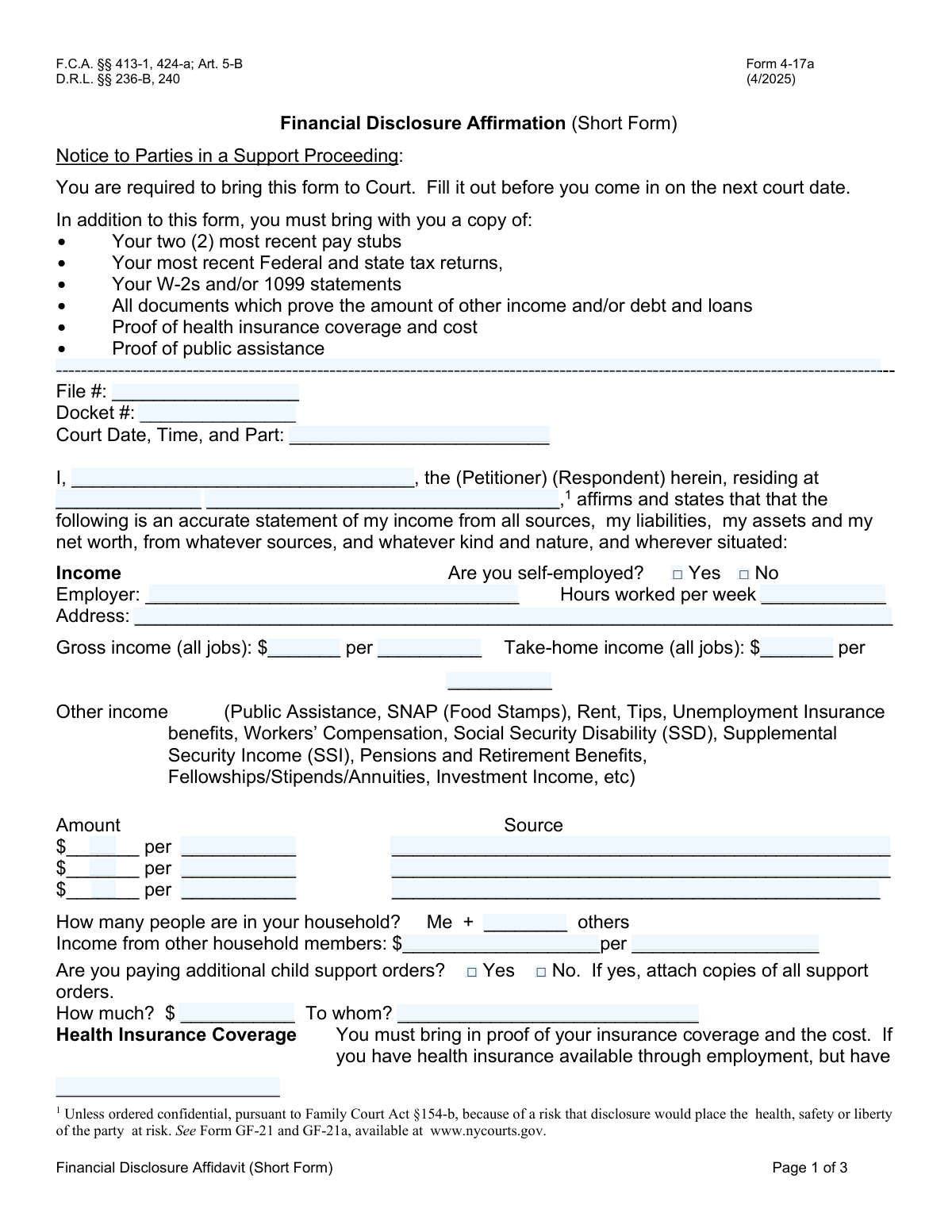
The AI does the filling. You just check it.
No typing into boxes, nothing to install.
What this form asks for
The AI fills all of it, from your answers or your documents.
The AI checks your answers before you download
14 checks built for this form, so a wrong date or a missing answer is caught before anyone else sees it.
This check ensures that the 'Gross income amount' is greater than or equal to the 'Take-home income amount' when their respective pay periods are identical. This is a logical consistency check to catch data entry errors, as net income cannot exceed gross income for the same period. If validation fails, the user should be prompted to review and correct the income amounts before submission.
This validation verifies that if the user checks 'Yes (paying additional child support orders)', they must also fill in the 'Additional Child Support Amount' and 'Recipient of Additional Child Support' fields. This is crucial for completeness, as simply indicating the existence of other orders without details is insufficient for legal and financial calculations. A failure would prevent submission and highlight the required detail fields.
This check ensures that the 'Other Household Members' Total Income Amount' and 'Income Frequency' fields are only filled if the 'Number of Other Household Members' is greater than zero. Conversely, if the number is greater than zero, these income fields become required. This prevents the submission of irrelevant data and ensures that when household members are declared, their financial contribution is also captured.
This validation ensures that the user selects either 'Yes (self-employed)' or 'No (not self-employed)', but not both. These options are mutually exclusive, and selecting both creates an ambiguous and invalid state for the user's employment status. If the user tries to select both, the system should automatically deselect the previous choice or show an error message.
This check validates that the value entered in 'Total monthly expenses' is the correct sum of all individual monthly expense fields (Housing, Utilities, Insurance, etc.). This serves as a cross-check to prevent mathematical errors by the user, ensuring the financial summary is accurate. If the user-entered total does not match the calculated sum, the system should flag the discrepancy and suggest auto-calculating the correct total.
This check ensures that the 'Vehicle Year' field contains a valid four-digit number that falls within a reasonable range, such as between 1900 and the current year plus one. This prevents typos like '202' or '99' and ensures the year is realistic for a vehicle. An invalid entry would trigger an error message asking the user to enter a valid 4-digit year.
And 8 more checks
- Flags Inconsistent Property Value and Mortgage Balance
- Requires Description for 'Other' Expense Amounts
- Ensures Affirmation Date is a Valid and Non-Future Date
- Validates Paired Completeness of Income Amount and Frequency
- Validates Health Insurance Cost Fields are Enabled Conditionally
- Ensures Asset Value and Description are Both Provided
- Requires 'Other' Health Coverage Description When Selected
- Validates Consistency of Printed Name and Party Name
Let AI fill out your Financial Disclosure Affidavit
No typing. Every field filled in seconds, checked, ready to sign.
How to Fill Out Financial Disclosure Affidavit Online for Free in 2026
What the AI walks you through.
- Navigate to Instafill.ai and upload or select the Financial Disclosure Affidavit form.
- Provide your personal details and the court case information, such as the docket and file numbers.
- Use the AI-powered tool to detail your employment, income from all sources, and any household contributions.
- List all your assets, including bank accounts, real estate, vehicles, and other valuable property.
- Enter your monthly expenses, covering housing, utilities, transportation, insurance, and personal spending, as well as any debts or loans.
- Review all the information for accuracy, then electronically sign and date the affirmation section to certify its truthfulness.
- Download, print, or securely share your completed affidavit as required by the court.
Common Mistakes in Completing Financial Disclosure Affidavit
The ones the AI is built to catch.
Confusing Gross and Net (Take-Home) Income
Mismatching Income Amount and Pay Period
Failing to Complete Conditional Follow-Up Fields
Forgetting to Sign and Date the Affirmation
Inconsistent Time Frames for Monthly Expenses
Omitting or Underreporting 'Other Income' Sources
Entering Incorrect or Incomplete Case Identifiers
Using a Nickname Instead of a Full Legal Name
Failing to Calculate and Enter Totals
Answering 'Yes/No' Checkboxes Inconsistently
Frequently Asked Questions About Financial Disclosure Affidavit
Is it really free for 7 days?
Can I fill other forms too?
How do I cancel?
How does the AI fill out Financial Disclosure Affidavit?
What happens to my information?
How complex is Financial Disclosure Affidavit to fill out?
What is the purpose of this form?
Who needs to fill out this form?
What is the difference between 'gross income' and 'take-home income'?
What should I list under 'Other Income'?
I'm self-employed. How do I fill out the employment and income sections?
Do I need to include the income of everyone living in my house?
How do I determine the 'market value' of my house or the 'value' of my car?
My monthly expenses change from month to month. Should I use an average?
What documents should I have ready to help me fill out this form?
Where do I find the 'Docket Number' and 'File Number'?
The form only has space for two debts, but I have more. What should I do?
Can an AI tool help me fill out this form?
How can I use Instafill.ai to complete this form online?
The PDF form I have isn't fillable. What can I do?
Get your Financial Disclosure Affidavit filled out by AI
$0 today. Cancel before Nov 10 and you pay nothing.
Other forms like this one
financial forms: Form 8938, Statement of Specified Foreign Financial Assets, Form 12.902(b), Family Law Financial Affidavit (Short Form), Form I-361, Affidavit of Financial Support, Form CJA-23, Financial Affidavit, Form 107, Statement of Financial Affairs, SBA Form 413, Personal Financial Statement, Personal Financial Statement (REV 06/2018) – Northwest Federal Credit Union, NSFAS Consent Form (National Student Financial Aid Scheme) – APP2026, International Student Application for Financial Aid 2026-2027 (International Student Application for Financial Assistance 2026-2027), State of Hawaii Department of Commerce and Consumer Affairs (DCCA) Contractors License Board – Application for Contractor's License (Sole Proprietor) (CT-36) with supporting forms (Experience Certificate CT-03, Contractors Financial Statement CT-02, and Chronological History of Projects/Project List), Colorado Judicial Department Form JDF 1111SC (Form 35.2), Sworn Financial Statement, Northwestern University Office of Undergraduate Financial Aid International Applicant Document Upload Cover Sheet, Vanguard Super Apply for a financial hardship payment, Selbstauskunft/ Vermögensaufstellung (Financial Self-Disclosure/Statement of Assets), Selbstauskunft - vertraulich - (Financial Self-Disclosure), Empower Financial Services, Inc. (EFSI) and Empower Advisory Group, LLC (EAG) Form CRS Customer Relationship Summary, Rollover Form (Principal Financial Group), Principal Financial 401(k) Withdrawal Form, Principal Financial Group Pre-Approved Basic Savings Plan - Plus, DoD 7000.14-R, Department of Defense Financial Management Regulation, Volume 12: Special Accounts, Funds and Programs
disclosure forms: Arizona Form 285, General Disclosure/Representation Authorization Form, Arizona Form 285-I, Individual Income Tax Disclosure/Representation Authorization Form, State of Florida Department of Highway Safety and Motor Vehicles (FLHSMV) Form HSMV 82993, Separate Odometer Disclosure Statement and Acknowledgment, C.A.R. Form FLD, Lead-Based Paint and Lead-Based Paint Hazards Disclosure, Acknowledgment and Addendum (Revised 11/10), DS 1891, Applicant/Vendor Disclosure Statement (State of California Department of Developmental Services), New York State Department of State (Division of Licensing Services) Property Condition Disclosure Statement (DOS-1614-f), Moving your Vanguard funds to a Vanguard Brokerage Account Disclosure statement, Moving your Vanguard funds to a Vanguard Brokerage Account Disclosure statement, Selbstauskunft/ Vermögensaufstellung (Financial Self-Disclosure/Statement of Assets), Vermögensaufstellung / Selbstauskunft (Statement of Assets / Self-Disclosure), Selbstauskunft - vertraulich - (Financial Self-Disclosure), ADP Compensation and Fee Disclosure Statement, Cigna Out-of-Network Referral Disclosure Form, Kaiser Permanente Authorization for Use or Disclosure of Patient Health Information, Fidelity Roth Individual Retirement Account Custodial Agreement and Disclosure Statement, Oklahoma Real Estate Commission Residential Property Condition Disclosure Exemption Form (RPCD EXEMPTION FORM), Oklahoma Real Estate Commission, Disclosure of Broker Duties & Responsibilities, Oklahoma Appendix A, Residential Property Condition Disclosure Statement, Form AD, Disclosure Regarding Real Estate Agency Relationship, Oklahoma Residential Property Condition Disclosure Statement (Appendix A)
financial disclosure forms: Selbstauskunft/ Vermögensaufstellung (Financial Self-Disclosure/Statement of Assets), Selbstauskunft - vertraulich - (Financial Self-Disclosure), Confidential Purchaser Questionnaire, Request for Disclosure of Judicial Financial Reporting Statement
affidavit forms: Affidavit for Collection of Personal Property California Probate Code Section 13100, Form I-864, Affidavit of Support Under INA, Form DS-5507, Affidavit of Physical Presence, Form 12.902(b), Family Law Financial Affidavit (Short Form), Form E, Affidavit of Personal Service, Form I-361, Affidavit of Financial Support, Form EX550, Affidavit (Order to attend for questioning/suspended committal order), Form CJA-23, Financial Affidavit, Affidavit and Representations Regarding Next of Kin (Preference Beneficiary Affidavit) (The Hartford) – Form LC-7086-17, Affidavit for Service by Publication/Posting (Circuit Court of Cook County, Illinois) (CCG 0013 A/B), In Forma Pauperis Affidavit/Petition (AOPC 622A) – Pennsylvania Magisterial District Court, In Forma Pauperis Affidavit Petition (AOPC 622A) — Pennsylvania Magisterial District Court, Form P3 (Rule 25-3(2)) — Affidavit of Applicant for Grant of Probate or Grant of Administration with Will Annexed (Short Form) (Supreme Court of British Columbia), Uniform Domestic Relations Form – Affidavit 1 AFFIDAVIT OF BASIC INFORMATION, INCOME, AND EXPENSES, TIAA Brokerage Durable Power Of Attorney Affidavit Of Full Force And Effect, Form L-4260, Property Transfer Affidavit, Affidavit - Supporting Documents Not Attached to Eviction Complaint, Missouri Motion and Affidavit in Support of Request to Proceed As a Poor Person, Form AOC-SP-300, Petition And Affidavit/Affirmation For Involuntary Commitment, Florida Supreme Court Approved Family Law Form 12.902(d), Uniform Child Custody Jurisdiction and Enforcement Act (UCCJEA) Affidavit
financial affidavit forms: TIAA Brokerage Durable Power Of Attorney Affidavit Of Full Force And Effect, Form 12.902(b), Family Law Financial Affidavit (Short Form), Form I-361, Affidavit of Financial Support, Form CJA-23, Financial Affidavit, Florida Family Law Rules of Procedure Form 12.902(c), Family Law Financial Affidavit (Long Form), Affidavit of Financial Information, Superior Court of Arizona in Maricopa County
Let AI fill out your Financial Disclosure Affidavit
Your trial starts once a card is added. You pay nothing before Nov 10.
Our AI already knows this form, all 114 fields of it. Skip the typing: tell it about yourself, or upload what you have, and it fills the whole form in seconds.
- AI fills every field on all 3 pages, tables and checkboxes included
- No typing into boxes: answer a few questions, or upload a document you already have, an old copy of this form, a photo of a document
- The AI checks the answers; you review and change anything before you download
- Download the finished PDF, print it, or sign it online
- Encrypted, and never used to train AI
Cancel before Nov 10 and you pay nothing.
A card is needed to start the trial. Cancel in two clicks from your account.
Terms · Privacy