Yes! You can use AI to fill out Oklahoma Pathfinder 457 Plan Incoming Transfer/Rollover Request Governmental 457(b) Plan
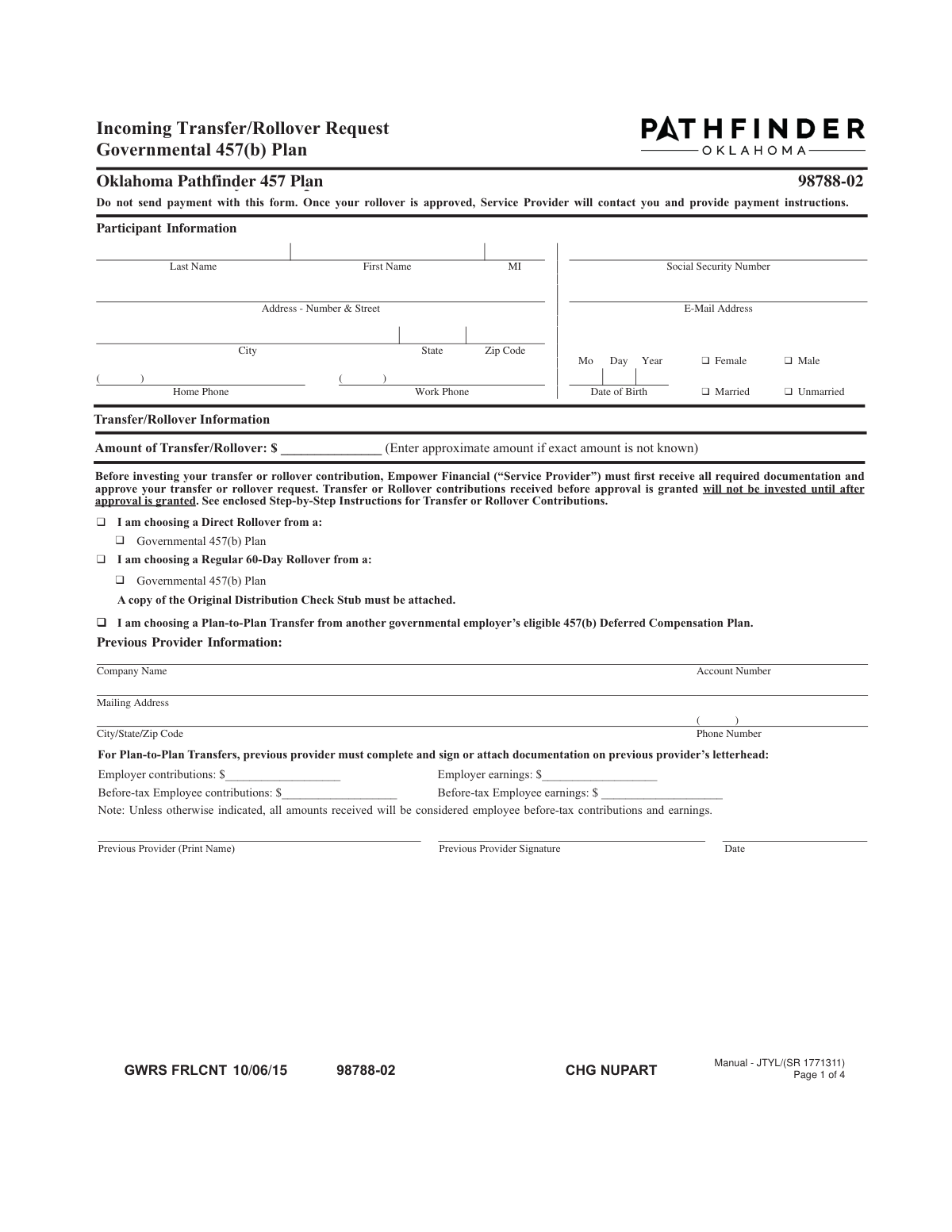
The Oklahoma Pathfinder 457 Plan Incoming Transfer/Rollover Request is a document used by participants to move funds from a previous retirement account into their current Governmental 457(b) plan. This process, known as a transfer or rollover, is essential for consolidating retirement assets, simplifying account management, and ensuring continuous tax-deferred growth. The form requires participant details, information about the previous provider, and instructions for investing the incoming funds. Today, this form can be filled out quickly and accurately using AI-powered services like Instafill.ai, which can also convert non-fillable PDF versions into interactive fillable forms.
Pathfinder 457 Incoming Rollover Form is part of the
government forms, government request forms, rollover forms, 457 plan forms, Oklahoma Pathfinder forms, government ID forms, government HR forms, transfer request forms and UK government forms categories on Instafill.
Rather not fill this in by hand? Instafill is an online form filler that completes PDF forms automatically — upload the blank form, answer a few questions, and the AI fills every field.
Form specifications
| Form name: | Oklahoma Pathfinder 457 Plan Incoming Transfer/Rollover Request Governmental 457(b) Plan |
| Number of pages: | 1 |
| Language: | English |
Our AI automatically handles information lookup, data retrieval, formatting, and form filling.
It takes less than a minute to fill out Pathfinder 457 Incoming Rollover Form using our AI form filling.
Securely upload your data. Information is encrypted in transit and deleted immediately after the form is filled out.
Instafill Demo: How to fill out PDF forms in seconds with AI
How to Fill Out Pathfinder 457 Incoming Rollover Form Online for Free in 2026
Are you looking to fill out a PATHFINDER 457 INCOMING ROLLOVER FORM form online quickly and accurately? Instafill.ai offers the #1 AI-powered PDF filling software of 2026, allowing you to complete your PATHFINDER 457 INCOMING ROLLOVER FORM form in just 37 seconds or less.
Follow these steps to fill out your PATHFINDER 457 INCOMING ROLLOVER FORM form online using Instafill.ai:
- 1 Navigate to Instafill.ai and upload or select the Pathfinder 457 Incoming Rollover Form.
- 2 Use the AI assistant to fill in your personal details in the 'Participant Information' section, such as your name, Social Security Number, and contact information.
- 3 Complete the 'Transfer/Direct Rollover Information' section by specifying the type of rollover, the approximate amount, and details about your previous provider.
- 4 In the 'Investment Option Information' section, select how you want to allocate the rolled-over funds, either matching your existing allocations or choosing new investment options.
- 5 Gather and attach the required supporting documents, such as a recent account statement from your previous plan provider.
- 6 Carefully review all the information for accuracy, then electronically sign and date the form to provide your consent and authorization for the transaction.
- 7 Submit the completed form and attachments as instructed, noting that payment should not be sent with the form; the service provider will contact you with payment instructions.
Our AI-powered system ensures each field is filled out correctly, reducing errors and saving you time.
Why Choose Instafill.ai for Your Fillable Pathfinder 457 Incoming Rollover Form Form?
Speed
Complete your Pathfinder 457 Incoming Rollover Form in as little as 37 seconds.
Up-to-Date
Always use the latest 2026 Pathfinder 457 Incoming Rollover Form form version.
Cost-effective
No need to hire expensive lawyers.
Accuracy
Our AI performs 10 compliance checks to ensure your form is error-free.
Security
Your personal information is protected with bank-level encryption.
Frequently Asked Questions About Pathfinder 457 Incoming Rollover Form
This form is used to request a transfer or rollover of funds from a previous employer's retirement plan, such as another governmental 457(b) plan, into your current plan serviced by Empower Retirement.
No, the form explicitly states, "Send no check with this form." After your transfer or rollover request is approved, Empower Retirement will contact you to provide payment instructions.
You must include your most recent account statement from your previous plan. If the statement doesn't specify the plan type (e.g., Governmental 457(b)), you must also have the previous plan administrator sign the certification section on page 2.
A Direct Rollover is when funds are sent directly from your old plan to your new one. For a Regular 60-Day Rollover, you receive the funds first and then have 60 days to deposit them into the new plan to avoid potential taxes and penalties.
If the investment section is left incomplete, the funds will be allocated according to your existing ongoing contribution elections. If you have no elections on file, the money will be invested in the plan's default investment option.
The completed form and required documentation should be sent to the Regular Mail, Overnight Express, or Fax address listed on the final page of the instructions. Do not send any payment to these addresses.
Funds received before your request is approved will not be invested and may be returned to the issuer. You must submit this form and receive approval before any funds are sent.
Yes, for a Plan-to-Plan Transfer, your previous provider must complete and sign the 'Previous Provider Information' section. For other rollovers, their signature may be required on the certification section if your account statement is missing key information.
If your initial rollover funds are not received within one year after this form is approved, you will need to submit a new form for approval. For a 60-day rollover, you must ensure the funds are received within 60 days from when you received the distribution.
The form allows you to enter an approximate amount if the exact amount is not known at the time of filling it out.
Yes, services like Instafill.ai use AI to accurately auto-fill form fields with your personal information, which can save you time and help reduce errors.
You can use a service like Instafill.ai to convert non-fillable PDFs into interactive, fillable forms. This allows you to easily type your information directly into the fields.
Simply upload the form to the Instafill.ai platform. The AI will make the document fillable and help you populate the fields with your saved information before you download the completed PDF for submission.
Compliance Pathfinder 457 Incoming Rollover Form
Validation Checks by Instafill.ai
1
Validates Social Security Number Format and Presence
This validation ensures the Social Security Number (SSN) is provided and follows the standard 9-digit format. The SSN is a critical and unique identifier for tax reporting and account security purposes. A missing or malformed SSN will result in immediate rejection of the form due to compliance and identification requirements.
2
Ensures Participant's Full Name is Provided
This check verifies that both the 'First Name' and 'Last Name' fields in the 'Participant Information' section are filled. A full name is the primary identifier for the account holder and is legally required for financial transactions. If the name is missing, the form cannot be processed as the identity of the participant cannot be confirmed.
3
Verifies Date of Birth is a Valid and Logical Date
This check confirms that the 'Date of Birth' is a real calendar date in MM/DD/YYYY format and is logically plausible (e.g., not in the future, and the participant is of a reasonable age). This is important for verifying identity and determining eligibility for certain retirement plan features. An invalid or illogical date will halt processing until a correction is provided.
4
Ensures Full Mailing Address is Complete
This validation verifies that the 'Address - Number & Street', 'City', 'State', and 'Zip Code' fields are all populated. A complete and accurate address is essential for mailing legal notices, statements, and other important correspondence. An incomplete address will cause the form to be flagged for correction to prevent misdirected mail.
5
Validates Exclusive Selection of Rollover/Transfer Type
This check ensures that exactly one checkbox is selected among 'Plan-to-Plan Transfer', 'Direct Rollover', or 'Regular 60-Day Rollover'. Selecting one type is fundamental to determining the required documentation and processing workflow. If zero or more than one option is selected, the form is ambiguous and will be rejected.
6
Conditional Validation for Plan-to-Plan Transfer Details
This check is triggered if 'Plan-to-Plan Transfer' is selected, and it verifies that the 'Previous Provider Information' section, including the provider's signature and date, is fully completed. This information is required to coordinate the transfer directly between financial institutions. Failure to provide these details will prevent the execution of the plan-to-plan transfer.
7
Verifies Attachment for 60-Day Rollover
This check confirms that if 'Regular 60-Day Rollover' is chosen, the form indicates that a copy of the original distribution check stub is attached. This documentation is necessary to verify the source and amount of the funds being rolled over within the IRS-mandated timeframe. The form will be considered incomplete and held if this documentation is missing.
8
Ensures Mutually Exclusive Investment Allocation Choice
This validation ensures the participant has selected either option (A) 'Existing ongoing allocations' OR provided details for option (B) 'Select Your Own Investment Options', but not both. This prevents conflicting instructions for how the incoming funds should be invested. If both or neither are selected, the form will be considered incomplete, and funds may be placed in a default option or returned.
9
Validates Investment Allocation Percentages Sum to 100%
This check verifies that if the participant chooses to 'Select Your Own Investment Options', the sum of all entered percentages equals exactly 100%. This is critical to ensure the entire rollover amount is allocated according to the participant's wishes. If the total is not 100%, the form will be rejected for correction to prevent allocation errors.
10
Requires Whole Number Percentages for Investment Allocations
This check ensures that all values entered in the investment allocation percentage fields are whole numbers, as explicitly stated on the form ('MUST INDICATE WHOLE PERCENTAGES'). This rule prevents processing errors and ambiguity in the allocation system. Any non-whole numbers will cause the form to be flagged as invalid.
11
Confirms Participant Signature and Date are Present
This validation confirms that the participant has signed and dated the form in the 'Participant Consent' section. The signature is a legal attestation that the provided information is correct and authorizes the transaction. A missing signature or date renders the entire form invalid and legally non-binding, causing immediate rejection.
12
Cross-Page Consistency of Participant Identifiers
This check verifies that the participant's Last Name and Social Security Number are consistent across the headers of all pages. This is a quality control measure to ensure that pages from different forms have not been accidentally combined during scanning or submission. Inconsistencies would require manual review and could significantly delay processing.
13
Verifies Previous Provider Account Number is Present
This check ensures the 'Account Number' field within the 'Previous Provider Information' section is filled out. This number is the primary identifier for the account at the relinquishing institution and is essential for locating and transferring the correct assets. Without the account number, the previous provider cannot process the rollover/transfer request, causing the transaction to fail.
14
Validates Previous Provider Signature for Plan-to-Plan Transfers
When a 'Plan-to-Plan Transfer' is selected, this check verifies that the 'Previous Provider Signature' and 'Date' fields are completed. This signature serves as an authorization from the relinquishing institution, confirming the details of the transfer. Without this authorization, the receiving institution cannot proceed with the transfer request.
Common Mistakes in Completing Pathfinder 457 Incoming Rollover Form
The form repeatedly warns in bold, capitalized letters, 'DO NOT SEND PAYMENT WITH THIS FORM.' This mistake happens when applicants assume they should include the rollover check with the application for efficiency. However, the funds cannot be accepted until the rollover request is formally approved, so any payment received beforehand will be returned, significantly delaying the investment process.
Applicants often confuse a 'Direct Rollover', 'Regular 60-Day Rollover', and 'Plan-to-Plan Transfer', checking the wrong box in the 'Incoming Transfer/Rollover Request' section. Each type has different rules, tax implications, and documentation requirements. Selecting the wrong one can lead to processing rejection, unexpected tax liabilities, or the need to restart the entire application process.
In the 'Investment Option Information' section, allocations must be made in whole percentages that total exactly 100%. Common errors include leaving the section blank, making mathematical mistakes, or using fractions. An incomplete or incorrect allocation will result in the funds being invested in the plan's default option, which may not align with the participant's risk tolerance or financial goals. AI-powered tools like Instafill.ai can help prevent this by validating that the total equals 100% before submission.
For 'Plan-to-Plan Transfers', the form requires a signature from the previous provider's administrator to authorize the release of funds and verify contribution types. Applicants frequently overlook this requirement, submitting the form with only their own signature. This is a critical omission that makes the form incomplete and will halt the transfer until a properly signed form is provided.
The 'Required Documentation' section is complex and often misunderstood, leading applicants to forget necessary attachments. A common failure is not including the most recent account statement from the prior plan or, if that statement is insufficient, failing to get the separate certification form signed by the previous plan administrator. This missing paperwork is a primary cause of processing delays, as the application is considered incomplete without it.
When choosing a 'Regular 60-Day Rollover', the applicant has a strict 60-day window from the date they receive the funds to deposit them into the new plan. People often underestimate the time needed for mail and processing, causing them to miss this critical deadline. Missing the window results in the entire distribution being treated as taxable income and may trigger a 10% early withdrawal penalty.
Since this form is a non-fillable PDF, it is often printed and completed by hand, leading to errors in the 'Participant Information' section. Illegible handwriting or simple mistakes in the Social Security Number, date of birth, or address can cause failed identity verification and significant delays. To avoid this, write clearly in block letters or use a tool like Instafill.ai, which can convert the flat PDF into a fillable version for clean, accurate data entry.
A missing signature and date in the 'Participant Consent' section on page 3 is a simple but frequent mistake. After filling out all the complex financial details, it's easy to overlook this final step. An unsigned form is legally invalid and will be immediately rejected, forcing the applicant to resubmit and delaying the entire rollover process.
For 'Plan-to-Plan Transfers', the form requires a specific breakdown of before-tax employee contributions, employer contributions, and their respective earnings. Applicants often don't have this information and either guess or leave it blank. The form states that if left blank, all funds are treated as employee pre-tax contributions, which can lead to an incorrect tax basis for the retirement account and potential tax issues in the future.
Saved over 80 hours a year
“I was never sure if my IRS forms like W-9 were filled correctly. Now, I can complete the forms accurately without any external help.”
Kevin Martin Green
Your data stays secure with advanced protection from Instafill and our subprocessors




Robust compliance program
Transparent business model
You’re not the product. You always know where your data is and what it is processed for.
ISO 27001, HIPAA, and GDPR
Our subprocesses adhere to multiple compliance standards, including but not limited to ISO 27001, HIPAA, and GDPR.
Security & privacy by design
We consider security and privacy from the initial design phase of any new service or functionality. It’s not an afterthought, it’s built-in, including support for two-factor authentication (2FA) to further protect your account.
Fill out Pathfinder 457 Incoming Rollover Form with Instafill.ai
Worried about filling PDFs wrong? Instafill securely fills oklahoma-pathfinder-457-plan-incoming-transferrollover-request-governmental-457b-plan forms, ensuring each field is accurate.
