Yes! You can use AI to fill out 401(k) Program Request for Transfer
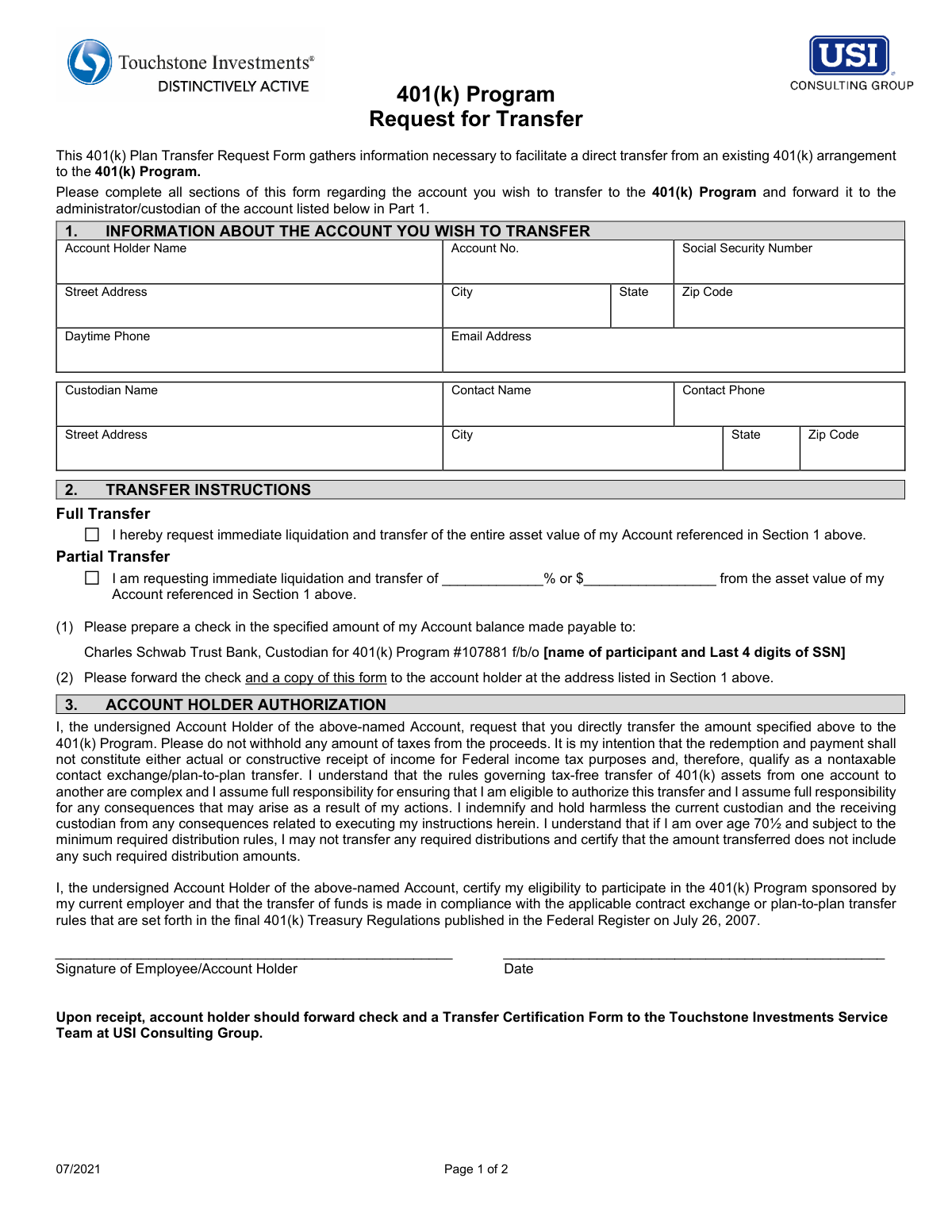
This form, provided by USI Consulting Group, is a formal request to initiate a direct transfer of assets from a current 401(k) plan to the 401(k) Program. It gathers essential information about the account holder and the existing custodian to ensure a smooth, non-taxable transfer of retirement funds. Today, this form can be filled out quickly and accurately using AI-powered services like Instafill.ai, which can also convert non-fillable PDF versions into interactive fillable forms.
401(k) Transfer Request is part of the
transfer forms and transfer request forms categories on Instafill.
Rather not fill this in by hand? Instafill is an online form filler that completes PDF forms automatically — upload the blank form, answer a few questions, and the AI fills every field.
Form specifications
| Form name: | 401(k) Program Request for Transfer |
| Number of pages: | 1 |
| Language: | English |
Our AI automatically handles information lookup, data retrieval, formatting, and form filling.
It takes less than a minute to fill out 401(k) Transfer Request using our AI form filling.
Securely upload your data. Information is encrypted in transit and deleted immediately after the form is filled out.
Instafill Demo: How to fill out PDF forms in seconds with AI
How to Fill Out 401(k) Transfer Request Online for Free in 2026
Are you looking to fill out a 401(K) TRANSFER REQUEST form online quickly and accurately? Instafill.ai offers the #1 AI-powered PDF filling software of 2026, allowing you to complete your 401(K) TRANSFER REQUEST form in just 37 seconds or less.
Follow these steps to fill out your 401(K) TRANSFER REQUEST form online using Instafill.ai:
- 1 Navigate to Instafill.ai and upload or select the 401(k) Program Request for Transfer form.
- 2 Use the AI assistant to automatically fill in Part 1 with your personal details, including name, address, SSN, and contact information.
- 3 Provide the details of the current custodian of the account you wish to transfer, such as the custodian's name and contact information.
- 4 In Part 2, specify the transfer instructions by indicating whether you are requesting a full or partial transfer of your account's asset value.
- 5 Carefully review all the information pre-filled by the AI for accuracy, particularly account numbers and personal identifiers.
- 6 Electronically sign and date the Account Holder Authorization in Part 3 to certify the request.
- 7 Download the completed form to forward it to your current plan administrator as instructed, and retain a copy for your records.
Our AI-powered system ensures each field is filled out correctly, reducing errors and saving you time.
Why Choose Instafill.ai for Your Fillable 401(k) Transfer Request Form?
Speed
Complete your 401(k) Transfer Request in as little as 37 seconds.
Up-to-Date
Always use the latest 2026 401(k) Transfer Request form version.
Cost-effective
No need to hire expensive lawyers.
Accuracy
Our AI performs 10 compliance checks to ensure your form is error-free.
Security
Your personal information is protected with bank-level encryption.
Frequently Asked Questions About 401(k) Transfer Request
This form is used to authorize the direct transfer of your retirement funds from an existing 401(k) account into the 401(k) Program administered by USI Consulting Group.
You should fill out this form if you are an eligible employee wanting to move your savings from a previous 401(k) plan into the 401(k) Program sponsored by your current employer.
You will need your personal details, Social Security Number, and the account number for the 401(k) you are transferring. You also need the name and contact information for the custodian of that existing account.
Yes, in Section 2 you can select 'Partial Transfer' and specify either the exact dollar amount or the percentage of the account value you wish to move.
First, you must send the completed form to the administrator of the account you are transferring *from* (the custodian listed in Section 1). They will process the request and issue a check.
After you receive the check from your old custodian, you must forward it along with a 'Transfer Certification Form' to the Touchstone Investments Service Team at USI Consulting Group.
No, this form is designed for a direct plan-to-plan transfer, which is intended to be a non-taxable event. The form specifically instructs the custodian not to withhold any taxes.
The check must be made payable to 'Charles Schwab Trust Bank, Custodian for 401(k) Program #107881 f/b/o [your name and Last 4 digits of SSN]'.
Yes, if you are subject to Required Minimum Distributions (RMDs), you cannot transfer any RMD amounts. You must certify that the funds being transferred do not include any such required distributions.
You should leave Section 4 blank. This section is for an authorized representative of USI Consulting Group to sign when they formally accept your transfer.
Yes, services like Instafill.ai use AI to accurately auto-fill form fields with your saved information, which can save you time and help prevent errors.
You can use a service like Instafill.ai to upload the PDF and fill it out electronically. The platform allows you to type directly into the fields, add your signature, and then download the completed form.
If you have a non-fillable PDF, you can upload it to a tool like Instafill.ai. It can convert flat PDFs into interactive, fillable forms, allowing you to complete them easily on your computer.
Compliance 401(k) Transfer Request
Validation Checks by Instafill.ai
1
Social Security Number Format Validation
Ensures the Social Security Number in Section 1 is entered in a valid format, such as XXX-XX-XXXX or XXXXXXXXX. This is critical for correctly identifying the account holder for tax and regulatory purposes. A failure to provide a correctly formatted SSN will prevent the system from processing the request and may lead to rejection of the form.
2
Exclusive Transfer Type Selection
Validates that the user has selected either the 'Full Transfer' option or the 'Partial Transfer' option, but not both. Selecting both creates ambiguity and makes the transfer instruction impossible to execute correctly. The form submission will be blocked if both or neither option is chosen, requiring the user to clarify their intent.
3
Partial Transfer Specification Logic
If 'Partial Transfer' is selected, this check ensures that a value is entered in EITHER the percentage field OR the dollar amount field, but not both. Providing both values is contradictory and can lead to processing errors. The system will require the user to specify the partial amount in only one format before the form can be accepted.
4
Account Holder Signature Requirement
Confirms that the 'Signature of Employee/Account Holder' field in Section 3 has been signed. A signature is a legal requirement to authorize the liquidation and transfer of assets from the current custodian. Without a signature, the request is not legally binding and cannot be processed.
5
Authorization Date Validity
Checks that the date provided next to the account holder's signature is a valid date and is not set in the future. The date documents when the authorization was given, which is crucial for legal and compliance records. An invalid or future date will cause the form to be rejected.
6
Account Holder Information Completeness
Verifies that all fields in the Account Holder section (Name, Account No., SSN, Street Address, City, State, Zip Code, Daytime Phone, Email) are filled out. This information is fundamental for identifying the correct account and communicating with the holder. Incomplete information will halt the process and require the user to provide all necessary details.
7
Custodian Information Completeness
Ensures all fields related to the current custodian (Custodian Name, Contact Name, Contact Phone, Street Address, City, State, Zip) are completed. This information is necessary for the new custodian to contact the old one and execute the transfer request. Missing custodian details will prevent the transfer from being initiated.
8
Phone Number Format Validation
Verifies that both the 'Daytime Phone' for the account holder and the 'Contact Phone' for the custodian are in a valid 10-digit format. Correct phone numbers are essential for communication between the parties to resolve any issues during the transfer process. An invalid format will block submission until corrected, preventing potential delays.
9
Email Address Format Validation
Checks that the 'Email Address' provided in Section 1 follows the standard [email protected] format. This is a primary method for sending confirmations and notifications regarding the transfer status. An invalid email address would mean the account holder does not receive critical updates, so the form cannot be submitted without a valid entry.
10
Partial Transfer Percentage Range
Validates that if a percentage is entered for a partial transfer, the value is a number greater than 0 and less than 100. A value of 100% would be a full transfer, and 0% is not a valid transfer amount. This check prevents illogical requests and ensures the user's intent is clear.
11
Positive Dollar Amount for Partial Transfer
If a dollar amount is specified for a partial transfer, this check ensures the value is a positive number greater than zero. A negative or zero dollar amount is not a valid transfer instruction and would be rejected. This validation prevents nonsensical data entry and ensures a valid financial transaction is requested.
12
Zip Code Format Validation
Validates that the Zip Code fields for both the account holder and the custodian contain either a 5-digit or 9-digit (ZIP+4) number. Correctly formatted zip codes are essential for mail delivery of the physical check and other correspondence. An incorrect format could lead to lost documents and significant delays.
13
State Field Abbreviation Validation
Ensures the 'State' fields for both the account holder and custodian addresses use a valid two-letter U.S. state or territory abbreviation. Using standardized abbreviations prevents address lookup failures and ensures documents are mailed to the correct jurisdiction. The form will prompt for correction if an invalid state code is entered.
14
Payee Name and SSN Consistency
This check verifies that the Account Holder Name and Social Security Number are available to correctly populate the payee line on the transfer check, which is 'f/b/o [name of participant and Last 4 digits of SSN]'. This ensures the check is correctly issued for the benefit of the right person, preventing misapplication of funds. If the source data in Section 1 is missing, the check cannot be created correctly.
Common Mistakes in Completing 401(k) Transfer Request
Users often confuse their former employer with the financial institution (the 'custodian') that actually holds their 401(k) assets, such as Fidelity or Vanguard. Providing the employer's name and address instead of the custodian's will cause the transfer request to be sent to the wrong entity, leading to significant delays or outright rejection. To avoid this, carefully review your old 401(k) statements to find the correct custodian name and their specific address for rollovers or transfers.
Section 2 requires the transfer check to be made payable to 'Charles Schwab Trust Bank... f/b/o [name of participant and Last 4 digits of SSN]'. A frequent error is failing to write in the personal participant name and the last four digits of the Social Security Number in the designated space. This omission can make it impossible for the new custodian to properly credit the funds to your new account, potentially causing the check to be rejected and returned. Always double-check that you have personalized this critical instruction.
In Section 2, individuals must choose between a 'Full Transfer' or a 'Partial Transfer', but not both. A common mistake is checking both boxes or, for a partial transfer, filling in both a percentage and a dollar amount, which creates ambiguity. This forces the custodian to halt the process and contact you for clarification, delaying the transfer. You must select only one option and provide only one value (either a percentage or a dollar amount) for a partial transfer.
The form instructs the user to send the completed request to the *current* administrator/custodian (listed in Part 1), not the new one. However, people often mistakenly send the form directly to USI Consulting Group, whose address is listed at the bottom. This error stops the transfer process before it can even begin, as the current custodian never receives the instruction to release the funds. Always follow the multi-step instructions precisely: send the request to the old custodian first.
Forgetting to sign and date the 'Account Holder Authorization' in Section 3 is one of the most common and critical errors. An unsigned or undated form is legally invalid and will be immediately rejected by the custodian, halting the entire transfer process. You must physically sign and date the form before submission to provide legal authorization for the transaction.
Simple typographical errors, such as transposing digits in the Social Security Number or the old 401(k) Account Number, are frequent mistakes. Because these numbers are the primary identifiers for you and your account, even a single wrong digit will result in a mismatch and cause the transfer request to fail. Carefully proofread these numbers before submitting the form. AI-powered tools like Instafill.ai can help prevent these errors by saving and accurately populating this sensitive information.
Since this form is a non-fillable PDF, it must be printed and completed by hand, often leading to illegible handwriting. If names, addresses, or account numbers cannot be clearly read by the processing agent, it can lead to data entry errors on their end or cause the form to be rejected for being unreadable. To prevent this, print legibly in block capital letters. Alternatively, services like Instafill.ai can convert flat PDFs into fillable forms, allowing you to type your information clearly and avoid handwriting issues altogether.
The form explicitly notes that individuals over age 70.5 (now 73) cannot transfer any Required Minimum Distribution (RMD) amounts. A mistake is for an eligible individual to request a full transfer early in the year before taking their RMD, or to not account for it in a partial transfer request. Attempting to roll over RMD funds is prohibited and can lead to tax penalties and processing complications. If you are subject to RMDs, you must satisfy your annual distribution before initiating the transfer.
The form states that the transfer check will be forwarded to the account holder's address listed in Section 1. If you have recently moved and provide an outdated address, the check—which could be for a very large sum—will be mailed to the wrong location. This creates a significant risk of loss or theft and will cause major delays in completing your rollover. Always verify that the address you provide is current and accurate.
In Section 1, the form asks for a 'Contact Name' and 'Contact Phone' at the current custodian. Many people leave this blank because they don't know a specific person to list. However, this information is crucial if the new administrator needs to follow up on the transfer status. Leaving it blank can slow down the process if any issues arise. It's best to call the custodian's general service line and ask for the contact information for their department that handles rollovers or plan-to-plan transfers.
Saved over 80 hours a year
“I was never sure if my IRS forms like W-9 were filled correctly. Now, I can complete the forms accurately without any external help.”
Kevin Martin Green
Your data stays secure with advanced protection from Instafill and our subprocessors




Robust compliance program
Transparent business model
You’re not the product. You always know where your data is and what it is processed for.
ISO 27001, HIPAA, and GDPR
Our subprocesses adhere to multiple compliance standards, including but not limited to ISO 27001, HIPAA, and GDPR.
Security & privacy by design
We consider security and privacy from the initial design phase of any new service or functionality. It’s not an afterthought, it’s built-in, including support for two-factor authentication (2FA) to further protect your account.
Fill out 401(k) Transfer Request with Instafill.ai
Worried about filling PDFs wrong? Instafill securely fills 401k-program-request-for-transfer forms, ensuring each field is accurate.
