Yes! You can use AI to fill out Form F10983, Request For A Direct Transfer
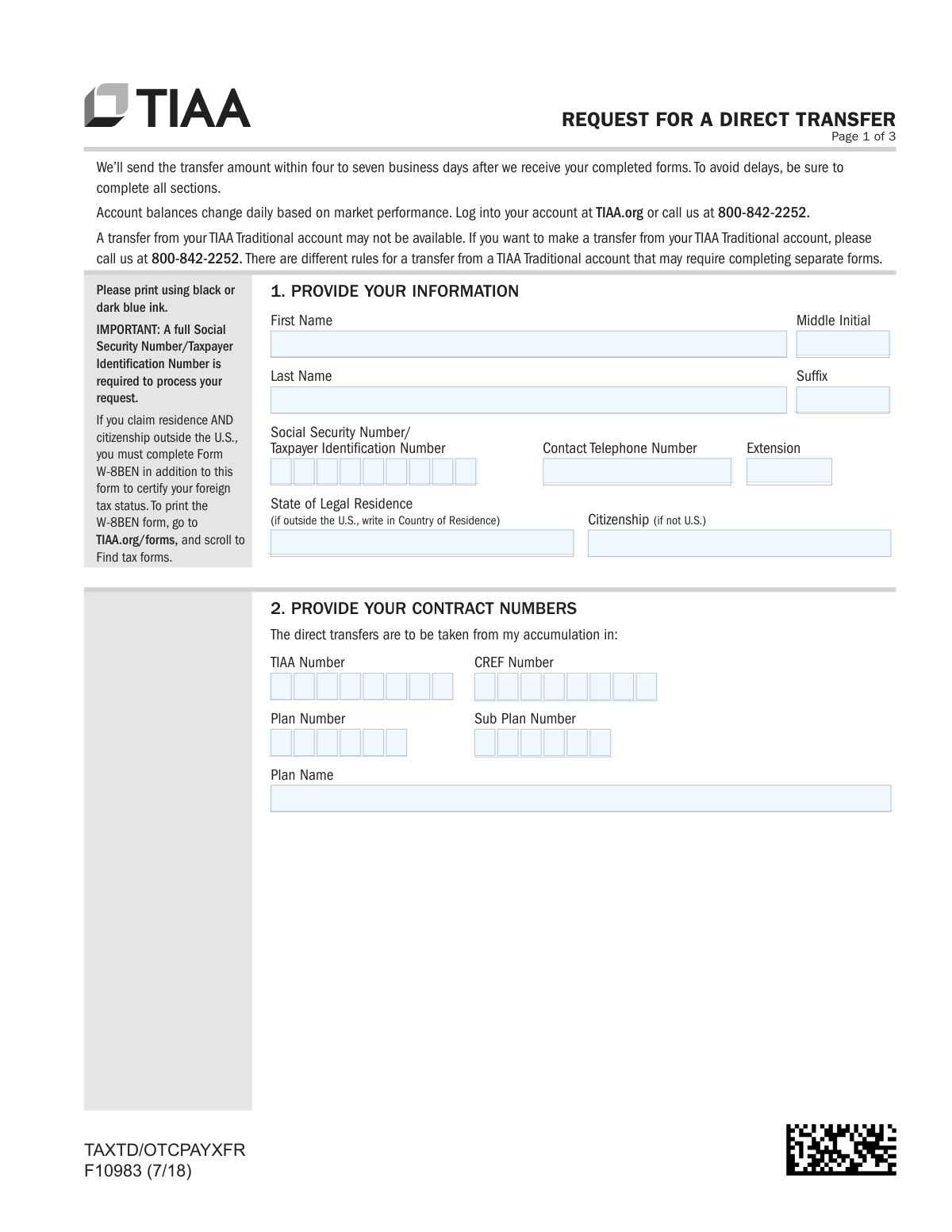
Form F10983, Request For A Direct Transfer, is a document used by TIAA account holders to authorize the movement of their retirement funds to a different financial institution. Completing this form is a crucial step for consolidating retirement accounts or moving investments to a new provider, ensuring the funds are transferred correctly and in compliance with financial regulations. Today, this form can be filled out quickly and accurately using AI-powered services like Instafill.ai, which can also convert non-fillable PDF versions into interactive fillable forms.
F10983 is part of the
transfer request forms category on Instafill.
Rather not fill this in by hand? Instafill is an online form filler that completes PDF forms automatically — upload the blank form, answer a few questions, and the AI fills every field.
Form specifications
| Form name: | Form F10983, Request For A Direct Transfer |
| Number of pages: | 1 |
| Language: | English |
Our AI automatically handles information lookup, data retrieval, formatting, and form filling.
It takes less than a minute to fill out F10983 using our AI form filling.
Securely upload your data. Information is encrypted in transit and deleted immediately after the form is filled out.
Instafill Demo: How to fill out PDF forms in seconds with AI
How to Fill Out F10983 Online for Free in 2026
Are you looking to fill out a F10983 form online quickly and accurately? Instafill.ai offers the #1 AI-powered PDF filling software of 2026, allowing you to complete your F10983 form in just 37 seconds or less.
Follow these steps to fill out your F10983 form online using Instafill.ai:
- 1 Navigate to Instafill.ai and upload or select Form F10983, Request For A Direct Transfer.
- 2 Use the AI assistant to automatically populate your personal details in Section 1, such as your name, Social Security Number, and contact information.
- 3 Enter your TIAA and CREF contract numbers, plan number, and plan name into Section 2.
- 4 In Section 3, specify the amount you wish to transfer, either as a full transfer or by indicating specific dollar amounts or percentages from each fund.
- 5 Provide the details of the receiving investment company in Section 4, including its name, address, and your new account number.
- 6 Carefully review all entered information for accuracy, then securely e-sign and date the form in Section 5 to authorize the direct transfer.
- 7 Download the completed form and submit it to TIAA following the instructions provided on the document.
Our AI-powered system ensures each field is filled out correctly, reducing errors and saving you time.
Why Choose Instafill.ai for Your Fillable F10983 Form?
Speed
Complete your F10983 in as little as 37 seconds.
Up-to-Date
Always use the latest 2026 F10983 form version.
Cost-effective
No need to hire expensive lawyers.
Accuracy
Our AI performs 10 compliance checks to ensure your form is error-free.
Security
Your personal information is protected with bank-level encryption.
Frequently Asked Questions About F10983
This form is used to authorize TIAA to transfer funds directly from your TIAA or CREF retirement account accumulations to an account at another investment company.
TIAA will send the transfer amount within four to seven business days after they receive your fully and correctly completed forms.
No, this form is likely not sufficient for a TIAA Traditional account transfer. You must call TIAA at 800-842-2252, as different rules and separate forms are required for these specific transfers.
You will need your personal information including your full Social Security Number, your TIAA/CREF contract numbers, and the receiving investment company's name, address, and your account number with them.
If you request a partial transfer but do not select specific funds, TIAA will automatically take the amount proportionately from all of your available funds.
Yes, if you claim both residence and citizenship outside the U.S., you are required to complete and submit Form W-8BEN along with this transfer request to certify your foreign tax status.
The fastest methods are to upload the form via the TIAA mobile app or on the TIAA.org website. You can also fax or mail the form, but these options will take longer to process.
No, TIAA does not accept digital signatures from third-party software like Adobe Acrobat. You must provide a handwritten signature in ink or use TIAA's own official digital signing experience.
You can find your contract and plan numbers by logging into your account on TIAA.org or by looking at a recent account statement. If you need help, you can call TIAA customer service.
Not necessarily, as your employer's retirement plan may restrict which investment companies are eligible to receive transfers. It is best to call TIAA to confirm if your chosen company is permitted.
Yes, services like Instafill.ai use AI to accurately auto-fill form fields, which can save you time and help you avoid common errors.
Simply upload the form to the Instafill.ai platform, and its AI will make the document interactive. You can then type your information directly into the fields before printing the completed form for submission.
You can use a service like Instafill.ai, which is designed to convert non-fillable PDFs into interactive, fillable forms. This allows you to easily type your information into the document.
Compliance F10983
Validation Checks by Instafill.ai
1
SSN/TIN Format and Requirement
This check verifies that the Social Security Number/Taxpayer Identification Number (SSNTIN) field is not empty and conforms to the standard 9-digit format (XXX-XX-XXXX or XX-XXXXXXX). This number is critical for tax reporting and uniquely identifying the account holder. If the field is empty or the format is invalid, the form submission will be rejected to prevent processing delays and ensure compliance with IRS regulations.
2
Personal Information Completeness
Validates that the user's First Name, Last Name, and State of Legal Residence fields in Section 1 are all completed. This basic information is essential for identifying the correct account holder and for legal and communication purposes. A failure in this check would halt processing until the required personal details are provided, as the request cannot be authenticated without them.
3
Source Account Identification
Ensures that at least one valid account identifier, such as a TIAA Number, CREF Number, or Plan Number, is provided in Section 2. The system must be able to locate the specific source account(s) from which the funds will be transferred. If no valid account number is provided, the request is ambiguous and cannot be processed, leading to rejection of the form.
4
Transfer Amount Selection Exclusivity
This validation ensures that in Section 3, the user selects only one of the two main transfer options: either 'transfer all available fund(s)' OR 'transfer the following amount(s)'. Selecting both options creates a conflicting instruction that cannot be executed. If both are selected, the form should be flagged as an error, requiring the user to clarify their intent before the transfer can be processed.
5
Specific Amount Entry Validation
If the user opts to transfer specific amounts in Section 3, this check verifies that at least one line item is completed with an Investment Account/Fund Name and a corresponding amount or percentage. This prevents a scenario where the user indicates they want to specify amounts but fails to provide any details. An empty selection would result in an error, as there are no instructions to execute.
6
Amount vs. Percentage Exclusivity per Fund
For each line item in the specific transfer amount table (Section 3), this check confirms that the user has entered either a dollar amount OR a percentage, but not both for the same fund. Providing both values for a single fund creates ambiguity. The validation is crucial for ensuring the transfer instruction is clear and executable, and a failure would require user correction.
7
Future Transfer Date Validity
This check is triggered if the user selects the option 'I would like the direct transfer made on a future date' in Section 3. It validates that the provided date is a complete, valid calendar date and that it occurs after the submission date. An invalid, incomplete, or past date would make the instruction impossible to follow, causing the form to be rejected until a valid future date is supplied.
8
Destination Company Information Completeness
Verifies that all fields in Section 4, including Investment Company Name, full Address, and Account Number, are filled out. This information is critical for ensuring the transferred funds are sent to the correct receiving institution and credited to the right account. Missing any of this information would result in a failed transfer and requires the form to be rejected until complete details are provided.
9
Signature and Date Requirement
Confirms that a signature is present in Section 5 and that the 'Today’s Date' field is completed with a valid, non-future date. The signature legally authorizes TIAA to perform the transfer, and the date establishes when the authorization was given. A missing signature or date invalidates the entire request, making it legally non-binding and therefore unprocessable.
10
Foreign Status and W-8BEN Trigger
Checks if the 'State of Legal Residence' is a foreign country and if the 'Citizenship' field is filled with a non-U.S. value. This is important for determining the user's tax status under regulations like FATCA. If a foreign status is identified, the system should flag that a completed Form W-8BEN is also required for the request to be in good order, preventing potential tax compliance issues.
11
Total Percentage Sum Validation
If the user chooses to transfer funds by percentage in Section 3, this validation calculates the sum of all entered percentage values. The total sum must not exceed 100%. This logical check prevents users from attempting to transfer more than the total value of their specified funds, which is an impossible action. If the sum exceeds 100%, the form is considered invalid.
12
Whole Number Validation for Amounts
This check ensures that any values entered in the 'Transfer Amount' (dollar) or 'Percent of Fund Value' fields are whole numbers, as explicitly instructed on the form. Entering decimals or non-numeric characters would contradict the form's rules and could cause calculation errors in the processing system. The validation enforces data integrity and adherence to the specified format, rejecting any entries with fractional values.
Common Mistakes in Completing F10983
The form repeatedly states that transfers from a TIAA Traditional account have different rules and may require separate forms, instructing the user to call a specific number. Many people miss this note and attempt to use this form anyway, leading to an automatic rejection of their request and significant delays. To avoid this, always call the provided number (800-842-2252) before filling out any paperwork if your transfer involves a TIAA Traditional account.
In Section 3, users must choose only one option: either transfer all available funds OR transfer specific amounts. A common error is to check the box for a full transfer while also filling in specific dollar or percentage amounts below. This creates ambiguity, forcing TIAA to halt the process and contact the user for clarification, which delays the transfer. To prevent this, carefully select only one of the two options.
The form explicitly states that non-TIAA digital signatures, such as those from Adobe Acrobat, are not accepted. Users accustomed to signing PDFs with standard software often make this mistake, which invalidates the form and leads to rejection. To avoid this, you must either print the form and sign it with ink or use TIAA's specific online digital signing tool as instructed.
While many forms only ask for the last four digits of a Social Security Number for verification, this form requires the full nine-digit SSN or Taxpayer Identification Number for processing. Providing an incomplete number is a critical error that will cause the form to be immediately rejected. Always double-check that the full, correct number has been entered in Section 1 to prevent processing failure.
The instructions in Section 1 require individuals who are residents AND citizens outside the U.S. to submit a separate Form W-8BEN. This is often overlooked, leading to processing holds, incorrect tax withholding, and compliance issues. To avoid this, carefully review your residency and citizenship status and, if applicable, download and complete the W-8BEN form from the TIAA website to submit along with this request.
When specifying transfer amounts for individual funds in Section 3, the form instructs users to indicate either a dollar amount OR a percentage, not both. A frequent mistake is filling in values in both columns for the same fund, which makes the request ambiguous and requires a follow-up. To ensure smooth processing, choose one format—either dollars or a percentage—for each fund you list.
The TIAA, CREF, Plan, and Sub Plan numbers requested in Section 2 are often long and complex, making transcription errors common. Entering an incorrect number will prevent TIAA from identifying the correct account for the transfer, causing the request to be delayed or rejected. To avoid this, carefully copy these numbers directly from an official account statement or by logging into your TIAA.org account.
In Section 4, any error in the receiving investment company's name, address, or account number can cause the transfer to fail. If the information is incorrect, the transfer may be rejected by the receiving firm, causing the funds to be returned and restarting the entire process. It is crucial to verify these details with the receiving institution before submitting the form, as even a small typo can cause a major delay.
A missing signature or date in Section 5 is a simple but very common mistake that renders the form legally invalid. The request cannot be processed without a valid signature and the date of signing, forcing a complete resubmission. Using a pre-submission checklist can help, and AI-powered tools like Instafill.ai can flag empty required fields like signatures to prevent this error. If the form is a non-fillable PDF, Instafill.ai can also make it fillable.
The submission instructions explicitly state to 'return ALL numbered pages including any pages you did not need to complete.' Many people mistakenly submit only the pages they filled out, which can lead to the submission being flagged as incomplete by the processing department. To avoid this delay, ensure all three pages of the form are included in your final upload, fax, or mailing.
Saved over 80 hours a year
“I was never sure if my IRS forms like W-9 were filled correctly. Now, I can complete the forms accurately without any external help.”
Kevin Martin Green
Your data stays secure with advanced protection from Instafill and our subprocessors




Robust compliance program
Transparent business model
You’re not the product. You always know where your data is and what it is processed for.
ISO 27001, HIPAA, and GDPR
Our subprocesses adhere to multiple compliance standards, including but not limited to ISO 27001, HIPAA, and GDPR.
Security & privacy by design
We consider security and privacy from the initial design phase of any new service or functionality. It’s not an afterthought, it’s built-in, including support for two-factor authentication (2FA) to further protect your account.
Fill out F10983 with Instafill.ai
Worried about filling PDFs wrong? Instafill securely fills form-f10983-request-for-a-direct-transfer forms, ensuring each field is accurate.
