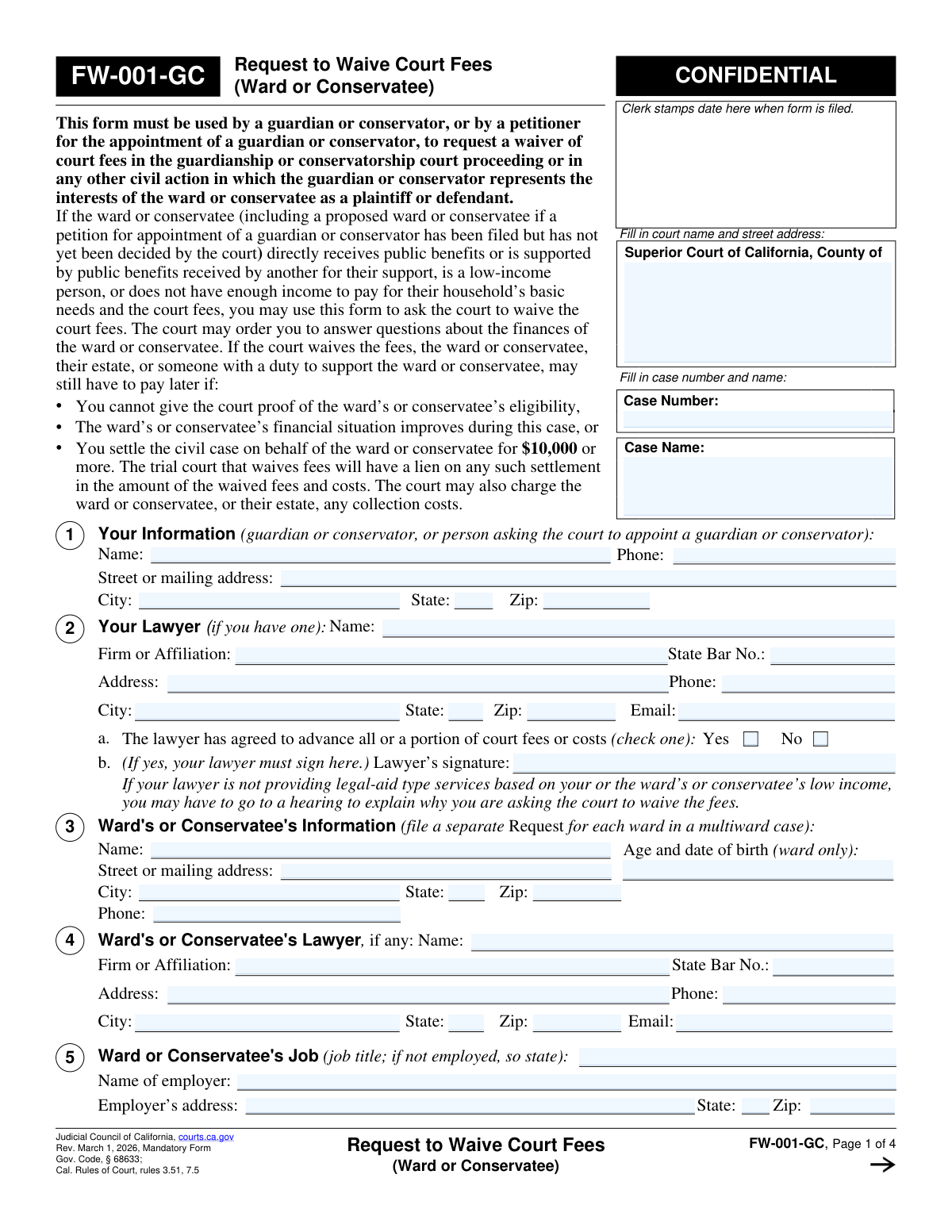
Yes! You can use AI to fill out Form FW-001-GC, Request to Waive Court Fees (Ward or Conservatee)

Form FW-001-GC, the Request to Waive Court Fees (Ward or Conservatee), is a legal document filed in California courts by a guardian, conservator, or petitioner for such an appointment. It is used to ask the court to waive fees for the ward or conservatee based on their financial situation, such as receiving public benefits or having an income below a certain threshold. This form is crucial for ensuring access to the justice system for individuals who cannot afford the associated costs. Today, this form can be filled out quickly and accurately using AI-powered services like Instafill.ai, which can also convert non-fillable PDF versions into interactive fillable forms.
FW-001-GC is part of the California court forms and fee waiver forms categories on Instafill.
Our AI automatically handles information lookup, data retrieval, formatting, and form filling.
It takes less than a minute to fill out FW-001-GC using our AI form filling.
Securely upload your data. Information is encrypted in transit and deleted immediately after the form is filled out.

Form specifications

Form name: Form FW-001-GC, Request to Waive Court Fees (Ward or Conservatee)
Number of fields: 257
Number of pages: 1
Language: English
main-image

Instafill Demo: How to fill out PDF forms in seconds with AI

How to Fill Out FW-001-GC Online for Free in 2026

Are you looking to fill out a FW-001-GC form online quickly and accurately? Instafill.ai offers the #1 AI-powered PDF filling software of 2026, allowing you to complete your FW-001-GC form in just 37 seconds or less.
Follow these steps to fill out your FW-001-GC form online using Instafill.ai:
  1. 1 Navigate to Instafill.ai and upload your FW-001-GC form or select it from their template library.
  2. 2 Provide your information as the guardian or conservator, along with details for your lawyer if you have one.
  3. 3 Enter the personal and employment information for the ward or conservatee.
  4. 4 Select the reason for the fee waiver request, such as receipt of public benefits, low household income, or inability to pay for basic needs and court fees.
  5. 5 If required based on your selection, complete the detailed financial sections regarding the ward or conservatee's household income, money, property, and expenses.
  6. 6 Review all the information populated by the AI for accuracy, then e-sign and date the declaration under penalty of perjury.
  7. 7 Download the completed, signed form and file it with the correct California Superior Court as indicated in your case.

Our AI-powered system ensures each field is filled out correctly, reducing errors and saving you time.

Why Choose Instafill.ai for Your Fillable FW-001-GC Form?

Speed

Complete your FW-001-GC in as little as 37 seconds.

Up-to-Date

Always use the latest 2026 FW-001-GC form version.

Cost-effective

No need to hire expensive lawyers.

Accuracy

Our AI performs 10 compliance checks to ensure your form is error-free.

Security

Your personal information is protected with bank-level encryption.

Frequently Asked Questions About Form FW-001-GC

This form is used by a guardian, conservator, or a petitioner for one of those roles to ask the court to waive court fees for a ward or conservatee who cannot afford to pay them.

A current guardian or conservator, or a person asking the court to appoint them as one, must fill out this form on behalf of the ward or conservatee.

No, this request is based on the ward's or conservatee's finances. You should not include your personal income or assets unless you are a parent of the ward or the spouse/registered domestic partner of the conservatee.

They can qualify in one of three ways: they receive public benefits like SSI or Medi-Cal, their household income is below a certain threshold, or their income is not enough to pay for basic needs and court fees.

Yes, the court can order the fees to be paid later if the ward's or conservatee's financial situation improves or if their civil case settles for $10,000 or more.

If you claim eligibility based on low income (8b) or inability to pay (8c), you must complete the detailed financial information sections 14 through 18 on page 4 of the form.

No, the form states that you must file a separate Request to Waive Court Fees for each ward in a multi-ward case.

If the income fluctuates, you should check the box in section 14 and complete the financial sections based on their average income over the past 12 months.

The court will review the request and issue an order granting or denying the fee waiver. The court may also order you to answer more questions about the ward's or conservatee's finances.

You are required to notify the court within five days if the ward's or conservatee's financial situation improves. You must use form FW-010-GC for this notification.

Yes, services like Instafill.ai use AI to help you accurately auto-fill form fields, which saves time and reduces the chance of errors.

You can use a service like Instafill.ai to upload the FW-001-GC PDF, fill it out interactively on your computer, and then download the completed document for printing and filing with the court.

If you have a non-fillable PDF, you can use a tool like Instafill.ai. It can convert flat PDFs into interactive, fillable forms that you can easily complete online.

Compliance FW-001-GC
Validation Checks by Instafill.ai

1
Conditional Lawyer Signature Requirement
This check verifies that if the lawyer has agreed to advance court fees (Section 2a, 'Yes' is checked), then the lawyer's signature field (2b) is not empty. This is crucial for confirming the financial arrangement and the lawyer's commitment. Failure to provide a signature when required will halt the submission and prompt the user to obtain the necessary signature.
2
Waiver Basis and Financial Disclosure Consistency
This validation ensures that the financial sections on page 4 are completed based on the reason selected in Section 8. If 8b is checked, sections 14-16 must be complete. If 8c is checked, sections 14-18 must be complete. This prevents incomplete applications and ensures the court has the necessary information to evaluate the request, avoiding automatic rejection.
3
Public Benefits Recipient Identification
If the waiver is requested based on receiving public benefits (Section 8a is checked), this validation confirms that at least one specific benefit program is selected and that the names and relationships of the recipients are provided. This is required to prove eligibility under this criterion. An incomplete section will trigger an error, requiring the user to specify the benefits and recipients.
4
Income Threshold Verification for Low-Income Basis
When Section 8b is checked, this validation compares the calculated 'Total monthly income and household income' (from page 4) against the official income limits provided in the table for the corresponding household size. This automatically checks for eligibility under the low-income guideline. If the income exceeds the limit, the form will flag the discrepancy, as the applicant may not qualify under this option.
5
Guardian vs. Conservator Section Exclusivity
This check ensures that information is provided for either a ward (Sections 9 and 10) or a conservatee (Sections 11-13), but not both. These sections are mutually exclusive based on the case type. Filling out conflicting sections would indicate a misunderstanding of the form and lead to processing delays or rejection.
6
Deceased Status Date Requirement
This validation ensures that if a parent (Section 10) or spouse/partner (Section 12) is marked as 'Deceased', the corresponding 'date of death' field is populated with a valid, past date. This provides necessary context for the court regarding family structure and support. A missing date will result in a validation error, prompting the user to provide the required information.
7
Total Income Calculation Accuracy
This check automatically sums the ward's/conservatee's monthly income (Section 15a) and the household's monthly income (Section 16a) and verifies that the totals in fields 15b, 16b, and the final 'Total monthly income and household income' are correct. This prevents mathematical errors that could lead to an incorrect assessment of financial eligibility. If the sums do not match, the system will highlight the fields for correction.
8
Total Expense Calculation Accuracy
This validation sums all monthly deductions and expenses listed in Section 18 (items a through n) and confirms that the calculated sum matches the value entered in the 'Total monthly expenses' field. This ensures the financial data presented to the court is accurate and internally consistent. A mismatch will require the user to review and correct the expense entries or the total.
9
Asset Value and Debt Logic
For each asset listed in Section 17 (vehicles, real estate, etc.), this check ensures that the 'Fair Market Value' is greater than or equal to the amount entered for 'How Much You Still Owe'. It is logically impossible to owe more on an asset than its market value in this context, and this check prevents data entry errors. An invalid entry would prompt the user to correct the values.
10
Mandatory Signature and Date
This check confirms that the form has been dated and signed by the petitioner on page 3. A signature under penalty of perjury is a legal requirement for the form to be valid. The system will prevent submission if the signature, printed name, or date fields are empty.
11
Ward's Age and Date of Birth Format
This validation examines the 'Age and date of birth' field in Section 3, ensuring it contains both a plausible age and a date in a valid format (e.g., MM/DD/YYYY). This is critical for establishing the subject's status as a minor for a guardianship case. An invalid or missing entry will block submission until corrected.
12
Support Order Details Completeness
If 'Yes' is checked for a support order in either Section 10 (for a ward) or Section 12 (for a conservatee), this validation ensures all related fields (e.g., Payor, Court, Case Number, Amount) are filled. This information is vital for the court to understand all sources of income and financial obligations. Incomplete details will trigger an error, requiring the user to provide the missing information.
13
Case Information Header Consistency
This check verifies that the 'Case Number' and 'Name of (Proposed) Ward or Conservatee' are present and consistent across all pages of the form (Pages 1, 2, 3, and 4). This is essential for correct filing and to ensure all pages of the document are associated with the same case. A mismatch or missing information would cause a validation failure.
14
California State Bar Number Format
This validation ensures that any entry in a 'State Bar No.' field (Sections 2 and 4) consists of a numeric value. California State Bar numbers are numeric, and this check prevents the entry of incorrect or improperly formatted text. An invalid format would prompt the user to enter a valid number.

Common Mistakes in Completing FW-001-GC

Confusing Guardian's Finances with Ward's/Conservatee's

The fee waiver is based on the financial situation of the ward or conservatee, not the person filing the form (unless they are a parent or spouse providing support). A common error is for the guardian or conservator to enter their own income and assets, which often leads to an incorrect assessment and denial of the request. To avoid this, carefully provide only the ward's or conservatee's financial details as instructed in the form's footnotes and notes on pages 2 and 4.

Incorrectly Completing the 'Reason for Waiver' Section

Applicants often check a box in Section 8 without providing the required follow-up information, rendering the application incomplete. For example, checking 8a (public benefits) but failing to list the recipient's name, or checking 8b/8c (income-based) without filling out the mandatory financial statement on page 4. This will cause the request to be rejected. Carefully read the instructions next to each option to ensure you complete all corresponding sections of the form.

Omitting Case Information on Subsequent Pages

The Case Name, Case Number, and the Ward's/Conservatee's Name must be filled in at the top of every page. People frequently complete this on page 1 but forget pages 2, 3, and 4. This can lead to pages being lost or misfiled by the court clerk, causing significant processing delays or rejection of the document. Always double-check that the header information is present and consistent on all pages before filing.

Miscalculating Household Size and Income

The form has a very specific rule to exclude the guardian's or conservator's income and not count them in the household size unless they are a parent of the ward or the spouse of the conservatee. Filers often mistakenly include their own income, which can push the total above the eligibility threshold for a low-income waiver (Section 8b). This leads to an incorrect calculation and likely denial. It is critical to read the instructions on pages 2 and 4 carefully to determine whose income must be included.

Reporting Net Income Instead of Gross Income

Section 15 specifically asks for 'Gross Monthly Income,' which is all income received before any taxes or deductions are taken out. A frequent mistake is to report net or 'take-home' pay, which understates the actual income and can be viewed as an inaccurate disclosure by the court. This can lead to denial or requests for clarification. Always use pre-tax income figures in Section 15 and list any payroll deductions separately in Section 18.

Leaving Financial Fields Blank on Page 4

When completing the detailed financial statement on page 4, applicants sometimes leave fields for income, assets, or expenses blank if they have nothing to report for that category. This creates ambiguity for the court, which cannot know if the information was forgotten or is zero. Always enter '0' or 'None' in any field that does not apply to ensure the form is complete and accurate, preventing delays or denial.

Filling Out the Wrong Sections for Guardianship vs. Conservatorship

The form has distinct sections for guardianship cases (Items 9-10 for the ward's estate and parents) and conservatorship cases (Items 11-13 for the conservatee's estate, spouse, and trusts). Applicants can get confused and fill out the incorrect sections or leave the required ones blank. This creates confusion and will cause the form to be returned for correction. Carefully read the bold headings to ensure you are completing only the sections that apply to your specific case type.

Forgetting to Sign and Date the Form

The signature and date on page 3 are a legal declaration that the information provided is true under penalty of perjury. An unsigned or undated form is legally invalid and will be immediately rejected by the court clerk, halting the entire fee waiver process. Always perform a final review of the form, paying special attention to the signature block on page 3 before you file it.

Forgetting to Include Necessary Attachments

The form requires attachments in certain situations, such as providing details about a trust (Section 13) or explaining unusual financial circumstances on form MC-025. Applicants often overlook these instructions, leading to an incomplete filing and requests for more information from the court, which delays a decision. Review the form for any mention of 'attach' or 'attachment' and ensure all required documents are included with your submission.

Submitting an Illegible or Poorly Formatted Form

If this form is printed and completed by hand, illegible handwriting can make it impossible for the court to process, leading to rejection. If the only version available is a non-fillable 'flat' PDF, typing over it can cause text to misalign with the fields. To avoid these issues, it is best to use the official fillable PDF from the court's website. AI-powered tools like Instafill.ai can also convert non-fillable PDFs into easy-to-use forms, ensuring all your entries are clear and perfectly aligned.
Saved over 80 hours a year

“I was never sure if my IRS forms like W-9 were filled correctly. Now, I can complete the forms accurately without any external help.”

Kevin Martin Green

Your data stays secure with advanced protection from Instafill and our subprocessors

Robust compliance program

Transparent business model

You’re not the product. You always know where your data is and what it is processed for.

ISO 27001, HIPAA, and GDPR

Our subprocesses adhere to multiple compliance standards, including but not limited to ISO 27001, HIPAA, and GDPR.

Security & privacy by design

We consider security and privacy from the initial design phase of any new service or functionality. It’s not an afterthought, it’s built-in, including support for two-factor authentication (2FA) to further protect your account.

Fill out FW-001-GC with Instafill.ai

Worried about filling PDFs wrong? Instafill securely fills form-fw-001-gc-request-to-waive-court-fees-ward-or-conservatee forms, ensuring each field is accurate.

Related forms by category

California court forms Judicial Council of California Form SC-105, Request for Court Order and Answer (Small Claims), Judicial Council of California Form SC-120, Defendant’s Claim and ORDER to Go to Small Claims Court (Small Claims), Judicial Council of California Form SER-001, Request for Sheriff to Serve Court Papers, Judicial Council of California Form SER-001, Request for Sheriff to Serve Court Papers, Affidavit for Collection of Personal Property California Probate Code Section 13100, Form POS-040, Proof of Service—Civil, Declaration of Facts of Death (California Superior Court), declaration-of-marriage-for-court-proceeding-california-family-law, ADOPT-200, Adoption Request, ADOPT-200, Stepparent Adoption Request, ADOPT-210, Adoption Agreement, ADOPT-310, Contact After Adoption Agreement, Judicial Council of California Form ADOPT-200, Adoption Request, Form ADR-107, Mediation Attendance Sheet, Form ADR-110, Order Appointing Referee, Form ADR-109, Stipulation or Motion for Order Appointing Referee, Form ADR-102, Request for Trial De Novo After Judicial Arbitration, Form ADR-108, Referee's Report (Code Civ. Proc., §§ 638, 639), Form ADR-106, Petition to Confirm, Correct, or Vacate Contractual Arbitration Award, Form ADR-104, Rejection of Award and Request for Trial After Attorney-Client Fee Arbitration · + 434 more →
fee waiver forms FW-003, Order on Court Fee Waiver (Superior Court), FW-003, Order on Court Fee Waiver (Superior Court), Form FW-003-GC, Order on Court Fee Waiver (Guardianship or Conservatorship), Form FW-003, Order on Court Fee Waiver (Superior Court), Form ATJ 601.9, Application for Waiver of Court Fees (Civil), Form JD-FM-75, Application for Waiver of Fees/Payment of Costs/Appointment of Counsel - Family, Form FW-003-GC, Order on Court Fee Waiver (Superior Court) (Ward or Conservatee), Form MC 20, Fee Waiver Request, Form MC 114, Request for Review of Denied Fee Waiver and Order, Form FW-006, Request for Hearing About Court Fee Waiver Order (Superior Court), Form FW-010, Notice to Court of Improved Financial Situation or Settlement, Form FW-002, Request to Waive Additional Court Fees (Superior Court), Form FW-008, Order on Court Fee Waiver After Hearing (Superior Court), Form FW-002-GC, Request to Waive Additional Court Fees (Superior Court) (Ward or Conservatee), Form FW-007, Notice on Hearing About Court Fees, Form FW-020, Request for Court Reporter by Party with Fee Waiver