
Yes! You can use AI to fill out Form MC 20, Fee Waiver Request
Don't type 44 fields by hand. Tell our AI about yourself, or upload a document you already have, and it fills every field in seconds. You check it, then download, print or sign.
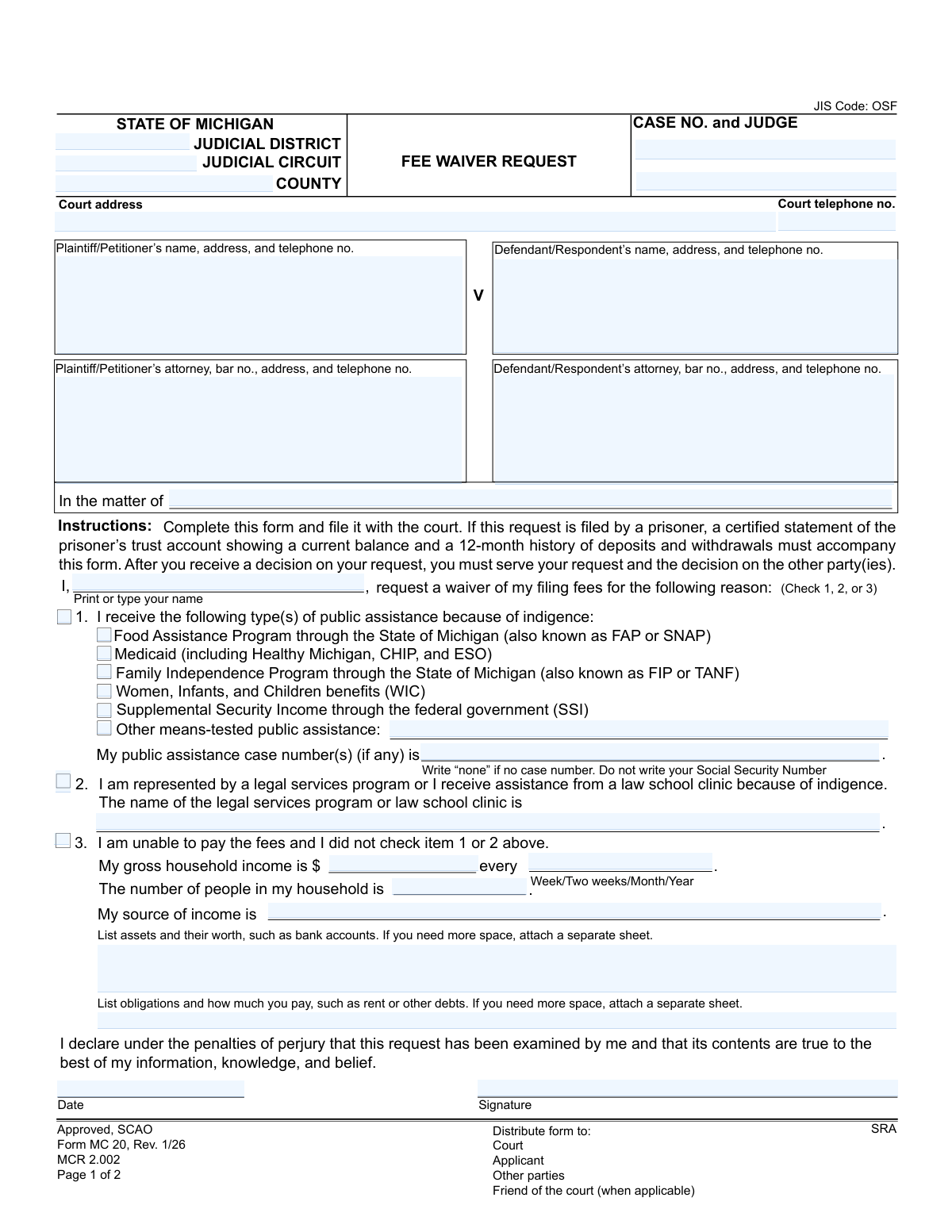
The AI does the filling. You just check it.
No typing into boxes, nothing to install.
What this form asks for
The AI fills all of it, from your answers or your documents.
The AI checks your answers before you download
14 checks built for this form, so a wrong date or a missing answer is caught before anyone else sees it.
This check ensures that the applicant selects only one of the three primary reasons for requesting a fee waiver (Public Assistance, Legal Services Representation, or General Inability to Pay). The form's structure implies these are mutually exclusive choices for justification. If more than one option is selected, the submission should be flagged for user correction to ensure a clear and singular basis for the court's review.
If the applicant indicates they receive public assistance (Option 1), this validation confirms that at least one specific program (e.g., FAP, Medicaid, WIC) is checked. This detail is essential for the court to verify eligibility under this criterion. A submission without a specified program would be considered incomplete and could not be properly evaluated.
This validation verifies that the 'public assistance case number(s)' field is filled if Option 1 is chosen, and critically, that it does not contain a Social Security Number. The form explicitly allows 'none' as an entry, but the field cannot be left blank. This check prevents the disclosure of sensitive information and ensures the application is complete for verification purposes.
When an applicant selects Option 2, claiming representation by a legal services program, this check ensures the 'name of the legal services program or law school clinic' field is filled. This information is mandatory for the court to confirm the applicant's representation and basis for indigence. An empty field would render the claim under Option 2 invalid.
This check validates that if Option 3 ('I am unable to pay') is selected, the 'My Gross Household Income' field contains a valid, non-negative numeric value. This figure is the primary data point for calculating financial hardship against federal poverty guidelines. A missing, non-numeric, or negative value would prevent the court from making a determination and result in rejection.
When an income amount is provided under Option 3, this validation ensures that one of the corresponding frequency options (Week, Two weeks, Month, or Year) is selected. This context is critical for standardizing the income data for an accurate poverty guideline comparison. An income amount without a specified frequency is ambiguous and makes the financial assessment impossible.
And 8 more checks
- Household Size Validation for Option 3
- Source of Income Requirement for Option 3
- Case Number Format and Presence
- Declaration Date Validity
- Printed Name Requirement
- Prisoner Trust Account Statement Verification
- Conditional Requirement for 'Other' Public Assistance
- Court Telephone Number Format
Let AI fill out your MC 20
No typing. Every field filled in seconds, checked, ready to sign.
How to Fill Out MC 20 Online for Free in 2026
What the AI walks you through.
- Navigate to Instafill.ai and upload the MC 20 Fee Waiver Request form or select it from their template library.
- Provide your personal details, case information, and court details (e.g., plaintiff/defendant names, case number, court address).
- Select the basis for your request: receipt of public assistance, representation by a legal services program, or general inability to pay.
- If applicable, enter the details of your public assistance (like FAP, Medicaid, SSI) and case number, or the name of your legal services provider.
- If claiming general inability to pay, input your gross household income, household size, sources of income, assets, and financial obligations.
- Review all the information auto-filled by the AI for accuracy, then e-sign and date the declaration under penalty of perjury.
- Download the completed form to file with the appropriate Michigan court and serve on other parties as required.
Common Mistakes in Completing MC 20
The ones the AI is built to catch.
Incomplete Court and Case Information
Failing to Select an Eligibility Reason
Ambiguous or Incomplete Income Reporting
Missing Public Assistance Case Number
Forgetting to Sign or Date the Declaration
Vague or Missing Asset and Obligation Details
Forgetting Required Prisoner Account Statement
Using a Social Security Number Incorrectly
Misunderstanding 'Gross Household Income'
Failing to Serve the Decision
Frequently Asked Questions About MC 20
Is it really free for 7 days?
Can I fill other forms too?
How do I cancel?
How does the AI fill out MC 20?
What happens to my information?
How complex is MC 20 to fill out?
What is the purpose of the Fee Waiver Request form (MC 20)?
Who is eligible to request a fee waiver?
How do I prove I'm eligible for a fee waiver?
Do I need to attach pay stubs or other financial documents?
I am a prisoner. Are there special instructions for me?
Where do I file the completed Fee Waiver Request form?
What happens after I submit the form?
What should I do if my fee waiver request is denied?
What if my financial situation improves after my fees are waived?
The form asks for a public assistance case number, but I don't have one. What should I write?
How do I fill out the section about my income and assets if I'm not on public assistance?
Can I use an AI tool to help me fill out this form?
How can I use Instafill.ai to complete my Fee Waiver Request online?
The PDF version of the form I found isn't fillable. What should I do?
Get your MC 20 filled out by AI
$0 today. Cancel before Nov 10 and you pay nothing.
Other forms like this one
fee waiver forms: FW-003, Order on Court Fee Waiver (Superior Court), FW-003, Order on Court Fee Waiver (Superior Court), Form FW-003-GC, Order on Court Fee Waiver (Guardianship or Conservatorship), Form FW-003, Order on Court Fee Waiver (Superior Court), Form ATJ 601.9, Application for Waiver of Court Fees (Civil), Form JD-FM-75, Application for Waiver of Fees/Payment of Costs/Appointment of Counsel - Family, Form FW-003-GC, Order on Court Fee Waiver (Superior Court) (Ward or Conservatee), Form MC 114, Request for Review of Denied Fee Waiver and Order, Form FW-001-GC, Request to Waive Court Fees (Ward or Conservatee), Form FW-006, Request for Hearing About Court Fee Waiver Order (Superior Court), Form FW-010, Notice to Court of Improved Financial Situation or Settlement, Form FW-002, Request to Waive Additional Court Fees (Superior Court), Form FW-008, Order on Court Fee Waiver After Hearing (Superior Court), Form FW-002-GC, Request to Waive Additional Court Fees (Superior Court) (Ward or Conservatee), Form FW-007, Notice on Hearing About Court Fees, Form FW-020, Request for Court Reporter by Party with Fee Waiver
Michigan court forms: Form MC 03, Answer, Civil, Form MC 02, Appearance, Form MC 6, Notice to Appear, Form MC 01, Summons, State of Michigan, Form MC 01a, Complaint, Form MC 01b, Motion for Second Summons and Order, State of Michigan Blank Court Form, Form MC 07, Default Request and Entry, Form MC 07a, Default Request, Entry, and Judgment (Sum Certain), Form MC 09, Dismissal, Form MC 09a, Dismissal, Nonservice/No Progress, Form MC 10, Judgment, Civil, Form MC 11, Subpoena, Order to Appear and/or Produce, Request and Writ for Garnishment (Periodic), Form MC 13, Request and Writ for Garnishment (Nonperiodic), Form MC 14, Garnishee Disclosure, Form MC 15, Motion and Affidavit for Installment Payments/To Amend Order for Installment Payments, Form MC 15a, Order Regarding Installment Payments, Form MC 16, Motion to Set Aside Order for Installment Payments, State of Michigan, Form MC 16a, Order on Motion to Set Aside Order for Installment Payments
Let AI fill out your MC 20
Your trial starts once a card is added. You pay nothing before Nov 10.
Our AI already knows this form, all 44 fields of it. Skip the typing: tell it about yourself, or upload what you have, and it fills the whole form in seconds.
- AI fills every field on both pages, checkboxes included
- No typing into boxes: answer a few questions, or upload a document you already have, an old copy of this form, a photo of a document
- The AI checks the answers; you review and change anything before you download
- Download the finished PDF, print it, or sign it online
- Encrypted, and never used to train AI
Cancel before Nov 10 and you pay nothing.
A card is needed to start the trial. Cancel in two clicks from your account.
Terms · Privacy