Yes! You can use AI to fill out Mandatory Distribution Processing Authorization
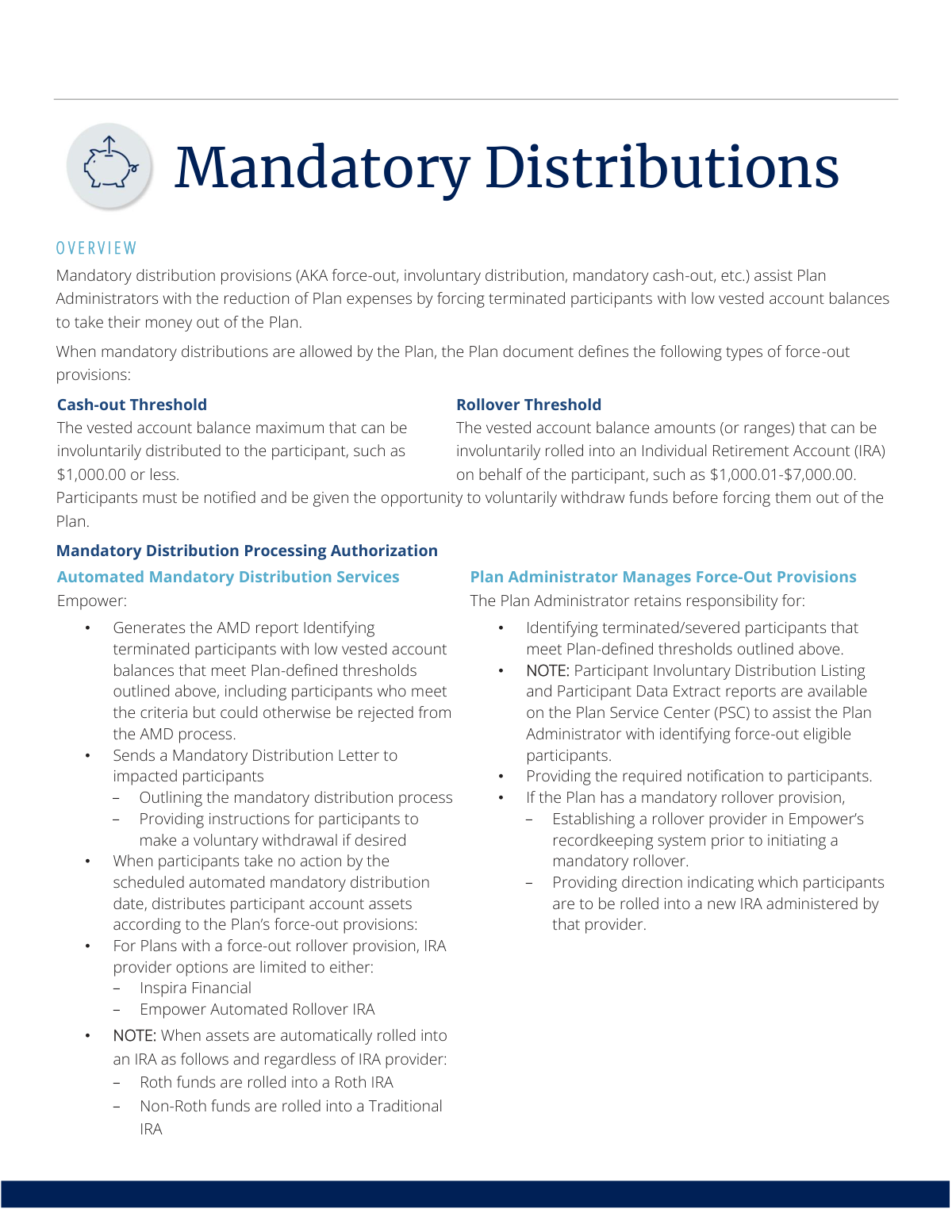
This document serves as an authorization for a retirement plan service provider to manage mandatory distributions, or 'force-outs,' for former employees with small vested account balances. It defines the cash-out and rollover thresholds and outlines the responsibilities of the service provider versus the Plan Administrator. Today, this form can be filled out quickly and accurately using AI-powered services like Instafill.ai, which can also convert non-fillable PDF versions into interactive fillable forms.
Mandatory Distribution Authorization is part of the
ATO forms and distribution forms categories on Instafill.
Rather not fill this in by hand? Instafill is an online form filler that completes PDF forms automatically — upload the blank form, answer a few questions, and the AI fills every field.
Form specifications
| Form name: | Mandatory Distribution Processing Authorization |
| Number of pages: | 1 |
| Language: | English |
Our AI automatically handles information lookup, data retrieval, formatting, and form filling.
It takes less than a minute to fill out Mandatory Distribution Authorization using our AI form filling.
Securely upload your data. Information is encrypted in transit and deleted immediately after the form is filled out.
Instafill Demo: How to fill out PDF forms in seconds with AI
How to Fill Out Mandatory Distribution Authorization Online for Free in 2026
Are you looking to fill out a MANDATORY DISTRIBUTION AUTHORIZATION form online quickly and accurately? Instafill.ai offers the #1 AI-powered PDF filling software of 2026, allowing you to complete your MANDATORY DISTRIBUTION AUTHORIZATION form in just 37 seconds or less.
Follow these steps to fill out your MANDATORY DISTRIBUTION AUTHORIZATION form online using Instafill.ai:
- 1 Navigate to Instafill.ai and upload or select the Mandatory Distribution Processing Authorization form.
- 2 Use the AI tool to automatically fill in the Plan Administrator and Plan Sponsor's information.
- 3 Specify the plan's defined cash-out and rollover thresholds for mandatory distributions.
- 4 Select the type of service desired, such as choosing between fully automated services by the provider or a process managed by the Plan Administrator.
- 5 If applicable, designate the IRA provider for involuntary rollovers, such as Inspira Financial or an Empower Automated Rollover IRA.
- 6 Review all entered information for accuracy, then electronically sign and submit the authorization to the recordkeeper.
Our AI-powered system ensures each field is filled out correctly, reducing errors and saving you time.
Why Choose Instafill.ai for Your Fillable Mandatory Distribution Authorization Form?
Speed
Complete your Mandatory Distribution Authorization in as little as 37 seconds.
Up-to-Date
Always use the latest 2026 Mandatory Distribution Authorization form version.
Cost-effective
No need to hire expensive lawyers.
Accuracy
Our AI performs 10 compliance checks to ensure your form is error-free.
Security
Your personal information is protected with bank-level encryption.
Frequently Asked Questions About Mandatory Distribution Authorization
A mandatory distribution, also known as a force-out, is when a retirement plan requires a terminated participant with a low account balance to take their money out of the plan, primarily to reduce administrative expenses.
These provisions typically affect former employees who have left the company and have a low vested account balance that falls within the thresholds defined by their specific retirement plan.
The cash-out threshold is the maximum balance (e.g., $1,000) that can be paid directly to you as a check. The rollover threshold is a higher balance range (e.g., $1,000.01 to $7,000) that will be automatically moved into an IRA if you don't take action.
Yes, the Plan Administrator must send you a notification letter explaining the process and providing you with a deadline to make a voluntary withdrawal or rollover before any forced distribution occurs.
If you take no action by the specified deadline, your funds will be automatically distributed. Depending on the balance, they will either be cashed out and sent to you or rolled over into an IRA chosen by the plan.
Your funds will be rolled into an Individual Retirement Account (IRA) with a provider selected by your plan, such as Inspira Financial or an Empower Automated Rollover IRA.
Your Roth funds are handled separately and will be rolled over into a Roth IRA, while any pre-tax (non-Roth) funds will be moved into a Traditional IRA.
Auto Portability is a service that automatically moves your funds from a force-out IRA into your new employer's retirement plan, as long as both your old and new plans participate in the Portability Services Network (PSN).
Yes, you will receive a notification before an auto-portability transfer occurs. This notice will include a deadline and instructions on how to opt-out if you wish to keep your funds in the IRA.
This document is an overview for Plan Administrators, sponsors, and advisors to understand the rules for managing mandatory distributions. It is not intended for use by individual plan participants.
Yes, services like Instafill.ai use AI to accurately auto-fill administrative forms related to distributions, which can save significant time and reduce the risk of errors.
A Plan Administrator can upload necessary forms to Instafill.ai, and the platform's AI will intelligently populate the fields using existing data, streamlining the entire administrative workflow.
You can use a service like Instafill.ai, which can instantly convert non-fillable PDFs into interactive, fillable forms that you can complete, sign, and manage easily online.
Compliance Mandatory Distribution Authorization
Validation Checks by Instafill.ai
1
Validates Cash-out Threshold Amount
This check ensures the value entered for the cash-out threshold is a valid, positive currency amount, such as $1,000.00. It is critical for correctly identifying participants with low balances who are eligible for an involuntary cash distribution. An invalid, negative, or zero value would lead to incorrect participant selection and processing failures.
2
Validates Rollover Threshold Range Consistency
This validation ensures the rollover threshold is a logical range where the minimum value is greater than the cash-out threshold (e.g., cash-out <= $1000, rollover starts at $1000.01). This prevents gaps or overlaps in eligibility criteria, which could cause participants to be incorrectly included or excluded from the mandatory rollover process. A logical failure here would break the tiered force-out structure.
3
Confirms Participant's Terminated Employment Status
This check verifies that any participant being considered for a mandatory distribution has an employment status of 'terminated' or 'severed' in the system. This is a fundamental eligibility requirement for the force-out process. Attempting to process an active employee would be a major compliance violation with potential legal and financial repercussions for the plan.
4
Verifies Vested Balance Falls Within Force-Out Limits
This check confirms that a participant's vested account balance is greater than zero and falls within either the cash-out or rollover threshold defined by the plan. It prevents the system from incorrectly distributing funds for participants with zero balances or balances too high to be eligible. Failure to validate this could result in unauthorized distributions and compliance issues.
5
Confirms Pre-Distribution Notification Was Sent
Before an automated distribution is executed, this check validates that a mandatory distribution notification was sent to the participant and the required waiting period has elapsed. This is a critical compliance step to provide the participant an opportunity to take voluntary action. Skipping this check could lead to regulatory penalties and participant complaints about unauthorized actions.
6
Checks for Intervening Voluntary Participant Action
On the scheduled date of an automated distribution, this validation verifies that the participant has not submitted their own voluntary withdrawal or rollover request. If a participant-initiated request exists, the automated process must be halted to prevent duplicate or conflicting transactions. This ensures that the participant's direct instructions always take precedence over automated plan rules.
7
Validates Selection of an Approved IRA Provider
When a mandatory rollover is processed, this check ensures the selected IRA provider is from the plan's approved list (e.g., 'Inspira Financial' or 'Empower Automated Rollover IRA'). Using an unapproved provider would violate the plan's terms and cause the transaction to fail. This validation maintains operational integrity and adherence to established service agreements.
8
Ensures IRA Provider is Established Before Rollover
This check confirms that the designated IRA provider has been fully configured and linked to the plan within the recordkeeping system before a mandatory rollover is initiated. This is a prerequisite to prevent transaction failures that would occur if the system attempted to send funds to an unrecognized or improperly set up provider. It ensures the operational readiness of the plan for force-out processing.
9
Ensures Correct IRA Type for Rollover Funds
This validation ensures that Roth funds are directed exclusively to a Roth IRA and non-Roth funds are directed to a Traditional IRA during a mandatory rollover. Mixing these fund types is a compliance violation with significant tax implications for the participant. The check prevents incorrect asset allocation and potential tax reporting errors.
10
Blocks Auto-Portability for Roth IRA Accounts
When an auto-portability transfer is triggered, this check verifies the source account is not a Roth IRA. The service rules described explicitly state that Roth IRAs are ineligible for this automated process. This validation prevents failed transactions and ensures compliance with the Portability Services Network's (PSN) operational guidelines.
11
Excludes IRAs with After-Tax Basis from Auto-Portability
This check identifies if a traditional IRA being considered for auto-portability contains any after-tax cost basis balances, which would make it ineligible for the service. This rule exists to prevent the complex tax tracking issues that would arise from automatically moving such funds. The validation ensures only eligible, fully pre-tax assets are transferred through the PSN network.
12
Verifies Participant Has Not Opted-Out of Auto-Portability
Before executing an automatic rollover from an IRA to a new employer's plan, the system must confirm the participant has not actively opted out of the service following notification. Participants must be given the choice to decline this transfer. This check respects the participant's decision and prevents unwanted account consolidation.
13
Validates New Employer's Participation in PSN
For an auto-portability transfer to proceed, this check confirms that the participant's new employer is an active member of the Portability Services Network (PSN). If the new plan is not part of the network, the automated transfer cannot occur. This validation is essential for the core logic of the auto-portability feature to function correctly.
Common Mistakes in Completing Mandatory Distribution Authorization
Plan administrators may enter overlapping or ambiguous monetary values for the cash-out and rollover thresholds on plan setup forms. For example, setting a cash-out limit of '$1,000 or less' and a rollover threshold of '$1,000.01-$7,000' is correct, but setting both to start or end at '$1,000' creates processing conflicts. This error leads to incorrect distributions, participant complaints, and compliance issues. To avoid this, always define distinct, non-overlapping monetary ranges and double-check the plan document settings before finalizing.
A frequent error is using a participant's total account balance, which includes unvested funds, to determine eligibility for a force-out. The rules are explicitly based on the vested account balance. This mistake can cause a plan to improperly force out a participant whose vested balance is above the threshold, or fail to include an eligible participant. Always ensure that any reports or data files used for this process are configured to filter and calculate based on the vested balance only.
When the Plan Administrator is responsible for manually managing force-outs, they may fail to run or properly analyze the necessary reports to find all eligible terminated participants. This oversight results in low-balance accounts remaining in the plan, which negates the cost-saving benefits of the provision and increases the plan's administrative burden. To prevent this, administrators should establish a recurring, documented schedule (e.g., quarterly) for running and reviewing the 'Participant Involuntary Distribution Listing' against termination records.
Initiating a force-out without first sending the required notification letter is a serious compliance failure. This mistake denies participants the opportunity to make a voluntary decision about their funds, such as rolling them over to an account of their choice. This can lead to participant complaints and potential legal challenges. Administrators must adhere to a strict, documented timeline for mailing notifications and allow the full response period to elapse before processing any involuntary distributions.
The process requires that for any mandatory rollovers, an IRA provider must be established in the recordkeeping system before initiating the transaction. Administrators, focused on the distribution itself, often forget this prerequisite setup step. This failure will cause the entire batch of rollovers to be rejected, leading to significant processing delays and manual rework. To avoid this, verifying the IRA provider setup should be a standard checklist item before beginning any force-out cycle.
Simple data entry errors on distribution forms, such as a misspelled name, incorrect Social Security Number, or an outdated address, are a primary cause of failed transactions. These mistakes result in returned checks, rejected transfers, and an inability to open the new IRA, creating significant administrative rework. To prevent this, data should be validated against a primary source; AI-powered tools like Instafill.ai can eliminate manual entry errors by populating forms directly and can even convert non-fillable PDF forms into interactive ones.
Mandatory distributions are only permitted for terminated participants, but this relies on their employment status being current in the recordkeeping system. If an administrator uses a stale data file, they risk attempting to force out an active employee (a compliance violation) or a rehired employee. To prevent this, it is critical to generate a fresh participant data report and cross-reference it with the latest HR and payroll records immediately before initiating the force-out process.
The rules clearly state that Roth funds must be rolled into a Roth IRA and non-Roth funds into a Traditional IRA. A common mistake is to fail to properly segregate these money types in the distribution instructions, which can cause them to be incorrectly combined or sent to the wrong type of account. This creates a significant tax and compliance issue for both the plan and the participant. Administrators must ensure their data files and instructions clearly distinguish between Roth and non-Roth balances for every affected participant.
A Plan Administrator, particularly one new to the plan, may incorrectly assume the mandatory distribution process is fully automated by the recordkeeper. This leads to complete inaction, allowing low-balance accounts to accumulate in the plan, which increases costs and fiduciary risk. To avoid this, administrators must review their service agreement to confirm whether they have elected 'Automated Mandatory Distribution Services' or if they are responsible for manually managing the entire process.
Administrators may misunderstand the auto-portability feature and incorrectly inform participants that all their funds will automatically move to their next employer's plan. However, the service explicitly excludes Roth IRA balances and after-tax basis amounts from being portable. This miscommunication sets false expectations for former employees. It is crucial for administrators to understand these limitations and communicate clearly that only specific pre-tax funds are eligible for the auto-portability service.
Saved over 80 hours a year
“I was never sure if my IRS forms like W-9 were filled correctly. Now, I can complete the forms accurately without any external help.”
Kevin Martin Green
Your data stays secure with advanced protection from Instafill and our subprocessors




Robust compliance program
Transparent business model
You’re not the product. You always know where your data is and what it is processed for.
ISO 27001, HIPAA, and GDPR
Our subprocesses adhere to multiple compliance standards, including but not limited to ISO 27001, HIPAA, and GDPR.
Security & privacy by design
We consider security and privacy from the initial design phase of any new service or functionality. It’s not an afterthought, it’s built-in, including support for two-factor authentication (2FA) to further protect your account.
Fill out Mandatory Distribution Authorization with Instafill.ai
Worried about filling PDFs wrong? Instafill securely fills mandatory-distribution-processing-authorization forms, ensuring each field is accurate.
