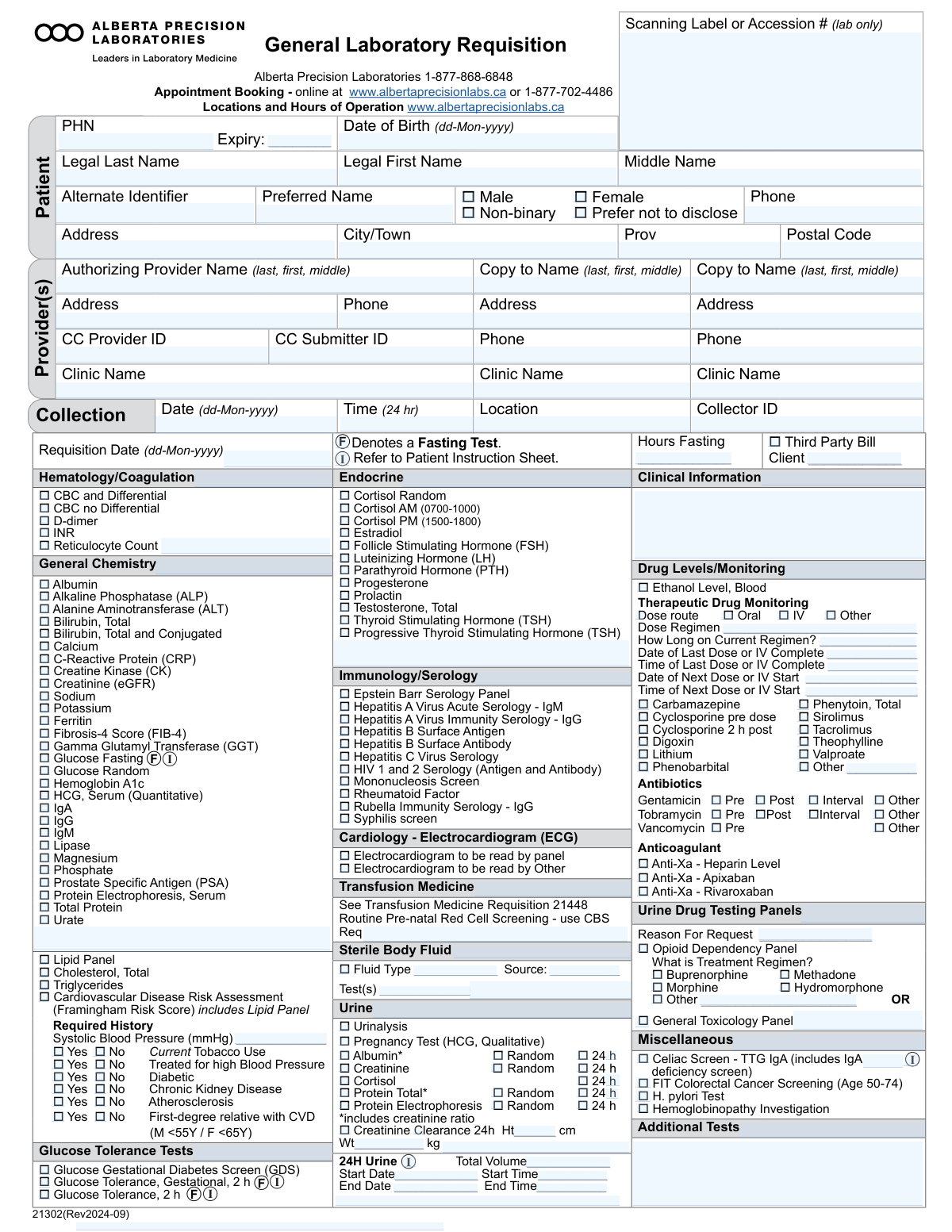
Yes! You can use AI to fill out Alberta Precision Laboratories General Laboratory Requisition (Form 21302)
The General Laboratory Requisition (Form 21302) is an official document used by physicians and other authorized providers in Alberta to request laboratory testing from Alberta Precision Laboratories. It includes sections for patient demographics, provider information, billing details, and a comprehensive checklist of available tests such as hematology, general chemistry, endocrine panels, and immunology. Today, this form can be filled out quickly and accurately using AI-powered services like Instafill.ai, which can also convert non-fillable PDF versions into interactive fillable forms.
Our AI automatically handles information lookup, data retrieval, formatting, and form filling.
It takes less than a minute to fill out Form 21302 using our AI form filling.
Securely upload your data. Information is encrypted in transit and deleted immediately after the form is filled out.
Form specifications
| Form name: | Alberta Precision Laboratories General Laboratory Requisition (Form 21302) |
| Number of pages: | 1 |
| Language: | English |
Instafill Demo: How to fill out PDF forms in seconds with AI
How to Fill Out Form 21302 Online for Free in 2026
Are you looking to fill out a FORM 21302 form online quickly and accurately? Instafill.ai offers the #1 AI-powered PDF filling software of 2026, allowing you to complete your FORM 21302 form in just 37 seconds or less.
Follow these steps to fill out your FORM 21302 form online using Instafill.ai:
- 1 Navigate to a service like Instafill.ai and upload or select the General Laboratory Requisition form.
- 2 Use the AI tool to automatically populate patient information, including their name, Personal Health Number (PHN), date of birth, and contact details.
- 3 Enter the authorizing provider's name, clinic, and contact information, as well as details for any additional providers who need a copy of the results.
- 4 Specify the specimen collection details, such as the date, time, location, and collector ID.
- 5 Check the boxes corresponding to the required tests across various categories like Hematology, General Chemistry, Endocrine, and Immunology.
- 6 Provide essential clinical information, patient history (e.g., for cardiovascular risk assessment), and any specific instructions related to fasting or therapeutic drug monitoring.
- 7 Review all the entered data for accuracy, then securely download, print, or share the completed requisition form.
Our AI-powered system ensures each field is filled out correctly, reducing errors and saving you time.
Why Choose Instafill.ai for Your Fillable Form 21302 Form?
Speed
Complete your Form 21302 in as little as 37 seconds.
Up-to-Date
Always use the latest 2026 Form 21302 form version.
Cost-effective
No need to hire expensive lawyers.
Accuracy
Our AI performs 10 compliance checks to ensure your form is error-free.
Security
Your personal information is protected with bank-level encryption.
Frequently Asked Questions About Form Form 21302
This form is used by healthcare providers to order a wide range of laboratory tests for a patient, including blood work, urine tests, and serology. It provides the lab with the necessary patient information, billing details, and the specific tests required for diagnosis and monitoring.
Your authorizing healthcare provider, such as a doctor, will select the required tests and fill in their professional details. You or the clinic staff are responsible for ensuring the patient information section is accurate and complete.
You will need your Personal Health Number (PHN) from your health card, your full legal name, date of birth, and current address and phone number. Your provider will handle the clinical and test-specific sections.
A fasting test requires you to avoid eating or drinking anything except water for a specific period before your sample is collected. Your provider will specify the number of hours you need to fast, which should be noted on the form.
You can book an appointment with Alberta Precision Laboratories online at www.albertaprecisionlabs.ca or by calling their booking line at 1-877-702-4486. This information is provided at the bottom of the form.
This section is used to calculate your Framingham Risk Score, which estimates your 10-year risk of heart disease. It requires a lipid panel blood test and specific health history details like blood pressure and smoking status.
The form has 'Additional Tests' or 'Other' fields in most sections where your healthcare provider can manually write in the names of any tests that are not pre-listed.
Providing the date and time of your last dose is critical for the lab to accurately interpret the medication levels in your blood. This ensures the results are meaningful for managing your treatment.
This section allows your primary provider to have a copy of your lab results automatically sent to other relevant healthcare professionals, such as a specialist. This helps coordinate your care between different doctors.
You must collect all your urine over a 24-hour period as instructed by the lab. It is essential to accurately record the collection start date/time, end date/time, and the total volume on the requisition form.
Yes, services like Instafill.ai use AI to accurately auto-fill form fields, which can save time and help prevent errors. AI can populate your personal information, but your provider must still select the required tests.
You can upload a digital copy of the General Laboratory Requisition to the Instafill.ai platform. The AI will identify the fields and help you fill in your personal details, which you can then save or print to take to the lab.
If you have a non-fillable or 'flat' PDF, you can use a service like Instafill.ai. It can convert the static form into an interactive, fillable version online, making it easy to complete your information digitally before printing.
Compliance Form 21302
Validation Checks by Instafill.ai
1
Ensures Core Patient Identifiers are Complete
This check verifies that the 'Legal Last Name', 'Legal First Name', 'Date of Birth', and 'PHN' fields are all populated. These fields are the minimum required for unambiguous patient identification and to prevent test results from being assigned to the wrong person. A failure would prevent the form from being processed until the missing information is supplied.
2
Verifies Logical Chronology of Key Dates
This check confirms that the 'Collection Date' is not before the patient's 'Date of Birth' and that the 'Requisition Date' is not after the 'Collection Date'. This maintains logical consistency, as a specimen cannot be collected before a patient is born or after the test was ordered. A failure indicates a significant data entry error that must be corrected to ensure the validity of the entire record.
3
Ensures At Least One Test is Ordered
This validation confirms that at least one checkbox for a specific test is selected, or a test name is entered in one of the 'Additional Tests' or 'Other' free-text fields. A requisition is useless without a test order, and submitting a blank one wastes resources. If no tests are selected, the submission should be blocked with an error message prompting the user to select a test.
4
Validates Standard Date Format (dd-Mon-yyyy)
This validation ensures that all date fields, such as 'Date of Birth', 'Collection Date', and 'Requisition Date', adhere strictly to the `dd-Mon-yyyy` format (e.g., 01-Jan-2023). Consistent date formatting is crucial for accurate age calculation, chronological checks, and preventing data entry errors. If the format is incorrect, the system should reject the entry and prompt the user for correction.
5
Conditional Requirement for Fasting Hours
This rule checks if any test requiring fasting (like 'Glucose Fasting' or 'Lipid Panel') has been ordered. If so, it validates that the 'Hours Fasting' field contains a numerical value, typically greater than a minimum threshold like 8 hours. This information is critical for the correct interpretation of test results, and its absence can render the results clinically useless.
6
Validates Cortisol Collection Time Window
This check ensures that if 'Cortisol AM (0700-1000)' is selected, the 'Collection Time' is between 07:00 and 10:00. Similarly, if 'Cortisol PM (1500-1800)' is selected, the time must be between 15:00 and 18:00. Cortisol levels are highly dependent on circadian rhythm, so collecting the sample at the correct time is essential for accurate diagnosis. A mismatch should trigger a warning or require justification.
7
Ensures Completeness of Therapeutic Drug Monitoring Data
This validation is triggered when any specific drug in the 'Therapeutic Drug Monitoring' or 'Antibiotics' sections is checked. It verifies that the 'Date of Last Dose or IV Complete' and 'Time of Last Dose or IV Complete' fields are populated. This information is absolutely critical for interpreting drug levels, as results are meaningless without knowing when the last dose was administered. Failure to provide this data should halt processing until it is supplied.
8
Validates Required History for Framingham Risk Score
This rule ensures that if the 'Cardiovascular Disease Risk Assessment (Framingham Risk Score)' is ordered, all associated required history fields are completed. This includes entering a 'Systolic Blood Pressure' and selecting 'Yes' or 'No' for 'Current Tobacco Use', 'Treated for high Blood Pressure', and 'Diabetic'. The risk score cannot be calculated without this complete dataset, so any missing information must be flagged as an error.
9
Enforces Age Requirement for FIT Screening
This validation calculates the patient's age based on the 'Date of Birth' and the 'Collection Date'. If the 'FIT Colorectal Cancer Screening (Age 50-74)' test is selected, the system verifies that the patient's age falls within the 50-74 year range. This check prevents inappropriate testing outside of established screening guidelines and a mismatch should generate a warning requiring provider confirmation.
10
Verifies Completeness of 24-Hour Urine Collection Data
This check is activated when any test marked as a '24 h' collection (e.g., 'Urine Albumin - 24 h', 'Creatinine Clearance 24h') is selected. It validates that the 'Start Date', 'Start Time', 'End Date', 'End Time', and 'Total Volume' fields are all filled. This data is essential for calculating the rate of excretion over a full day, and its absence makes the test results uninterpretable.
11
Ensures Authorizing Provider is Identified
This validation checks that the 'Primary Authorizing Provider Name' and 'Primary CC Provider ID' fields are both populated. This information is mandatory for legal and billing purposes, and it ensures that the test results are sent to the correct ordering physician. A submission without a valid, identifiable authorizing provider cannot be processed.
12
Validates Canadian Postal Code Format
This check ensures that the value entered in the 'Postal Code' field follows the standard Canadian format of 'LNL NLN' (Letter-Number-Letter Number-Letter-Number), with or without a space. Correct formatting is important for mail delivery and data quality in the patient record. An invalid format should be flagged for immediate correction.
13
Validates Height and Weight for Creatinine Clearance
This check is triggered when 'Creatinine Clearance 24h' is selected. It verifies that the 'Height' and 'Weight' fields are populated with valid numeric values. These measurements are required to calculate the patient's body surface area, which is a necessary component of the creatinine clearance formula, and missing this information prevents the lab from reporting a final result.
14
Ensures Single, Mutually Exclusive Gender Selection
This validation verifies that the user has selected at most one checkbox from the gender identity options ('Male', 'Female', 'Non-binary', 'Prefer not to disclose'). While not mandatory to select one, selecting multiple options is a logical error. This check prevents ambiguous or contradictory data entry for a fundamental demographic field.
Common Mistakes in Completing Form 21302
This mistake occurs when a TDM test is ordered, but critical supporting data like the 'Date/Time of Last Dose', 'Dose Regimen', or 'Route' of administration is missing. This information is essential for the lab to interpret the drug level correctly in the context of the patient's treatment. Without these details, the test result is often clinically uninterpretable, leading to delays in care, unnecessary repeat testing, and potential patient safety risks. To avoid this, always gather and record all TDM details at the time of collection; AI-powered tools like Instafill.ai can prompt for this required information when a TDM test is selected, ensuring completeness.
The form's 'Cardiovascular Disease Risk Assessment (Framingham Risk Score)' requires several mandatory history questions to be answered, including Systolic Blood Pressure, tobacco use, and diabetes status. People often check the main box for the assessment but forget to fill out the required 'Yes/No' history fields. This omission makes it impossible for the laboratory to calculate the risk score, rendering the primary request incomplete. To prevent this, ensure all required history fields are completed when ordering the risk score; this is an area where an intelligent form filler can validate that all dependent fields are filled before submission.
The form explicitly requires the 'dd-Mon-yyyy' format (e.g., 23-Jul-2024) for dates like Date of Birth and Collection Date. A common error is using other formats like MM/DD/YY or writing the month as a number, which can cause ambiguity (e.g., is 01-02-2024 Jan 2nd or Feb 1st?). This leads to data entry errors, potential patient identification mismatches, and incorrect age calculations. Always use the specified format; AI form-filling tools like Instafill.ai can automatically format dates correctly, eliminating this type of error.
When ordering tests on a 24-hour urine sample, it is mandatory to record the 'Start Date/Time', 'End Date/Time', and 'Total Volume'. Patients or collectors frequently omit one or more of these details, especially the total volume. Without this complete information, the lab cannot perform the quantitative calculations required for tests like 'Creatinine Clearance' or '24h Protein', invalidating the entire collection and forcing a inconvenient 24-hour recollection for the patient. Ensure all three components are meticulously recorded on the requisition.
The form has separate fields for 'Legal First Name' and 'Preferred Name'. A frequent mistake is entering a nickname or preferred name into the legal name field. This can cause a mismatch with the patient's Personal Health Number (PHN) and official medical records, leading to failed searches, duplicate charts, and delays in processing or reporting results. Always enter the name exactly as it appears on the patient's official ID or health card in the 'Legal Name' fields. The 'Preferred Name' field should be used for nicknames.
For tests marked with a fasting symbol, like 'Glucose Fasting' or 'Lipid Panel', it is crucial to indicate the number of 'Hours Fasting'. Often, a provider will check the test but leave the hours blank, or a patient will say they fasted without specifying the duration. This ambiguity compromises the clinical value of the test, as the interpretation depends on adherence to a specific fasting period (e.g., 8-12 hours). Always ask the patient for the specific duration and record it on the form to ensure accurate interpretation and avoid the need for a re-draw.
Several sections, such as 'Therapeutic Drug Monitoring' and 'Immunology/Serology', include an 'Other' checkbox with a line to write in a specific test. A common oversight is checking the 'Other' box but failing to write in the name of the requested test. This makes the order impossible to process, as the lab does not know what test to perform. To avoid this, always ensure that if you check an 'Other' box, you clearly and legibly write the full name of the intended test in the space provided.
The 'Collection Date' and 'Time (24 hr)' are among the most critical data points on the form, yet they are sometimes left blank. This information is vital for assessing specimen stability and for interpreting time-dependent tests (e.g., AM/PM Cortisol, drug levels). A missing collection time can lead to sample rejection and require the patient to return for a new collection. Always record the exact date and time of collection in the specified 24-hour format immediately after the sample is taken. AI tools like Instafill.ai can help by flagging these mandatory fields as empty.
The form requires provider names in 'last, first, middle' format and a 'CC Provider ID'. It's common for this to be entered incorrectly (e.g., 'Dr. John Smith') or for the crucial Provider ID to be omitted. This can cause significant delays in result delivery, as reports may be misdirected, misfiled in an electronic system, or sent to the wrong provider with a similar name. To ensure timely and accurate reporting, always use the specified name format and include the unique provider ID. If the form is a non-fillable PDF, a tool like Instafill.ai can convert it to a fillable version, making it easier to enter this information accurately.
The urine section allows for ordering tests like Albumin or Total Protein on either a 'Random' or '24 h' specimen. A frequent error is checking the main test box (e.g., 'Albumin') without selecting the corresponding specimen type. This ambiguity forces the lab to guess, potentially running the wrong analysis (e.g., a ratio on a sample that is part of a 24h collection), or to delay testing while seeking clarification. Always specify the specimen type ('Random' or '24 h') for any urine chemistry test to ensure the correct analysis and interpretation.
Saved over 80 hours a year
“I was never sure if my IRS forms like W-9 were filled correctly. Now, I can complete the forms accurately without any external help.”
Kevin Martin Green
Your data stays secure with advanced protection from Instafill and our subprocessors

Robust compliance program
Transparent business model
You’re not the product. You always know where your data is and what it is processed for.
ISO 27001, HIPAA, and GDPR
Our subprocesses adhere to multiple compliance standards, including but not limited to ISO 27001, HIPAA, and GDPR.
Security & privacy by design
We consider security and privacy from the initial design phase of any new service or functionality. It’s not an afterthought, it’s built-in, including support for two-factor authentication (2FA) to further protect your account.
Fill out Form 21302 with Instafill.ai
Worried about filling PDFs wrong? Instafill securely fills alberta-precision-laboratories-general-laboratory-requisition-form-21302 forms, ensuring each field is accurate.