Yes! You can use AI to fill out Anthem Blue Cross Respiratory Syncytial Virus Enrollment Form

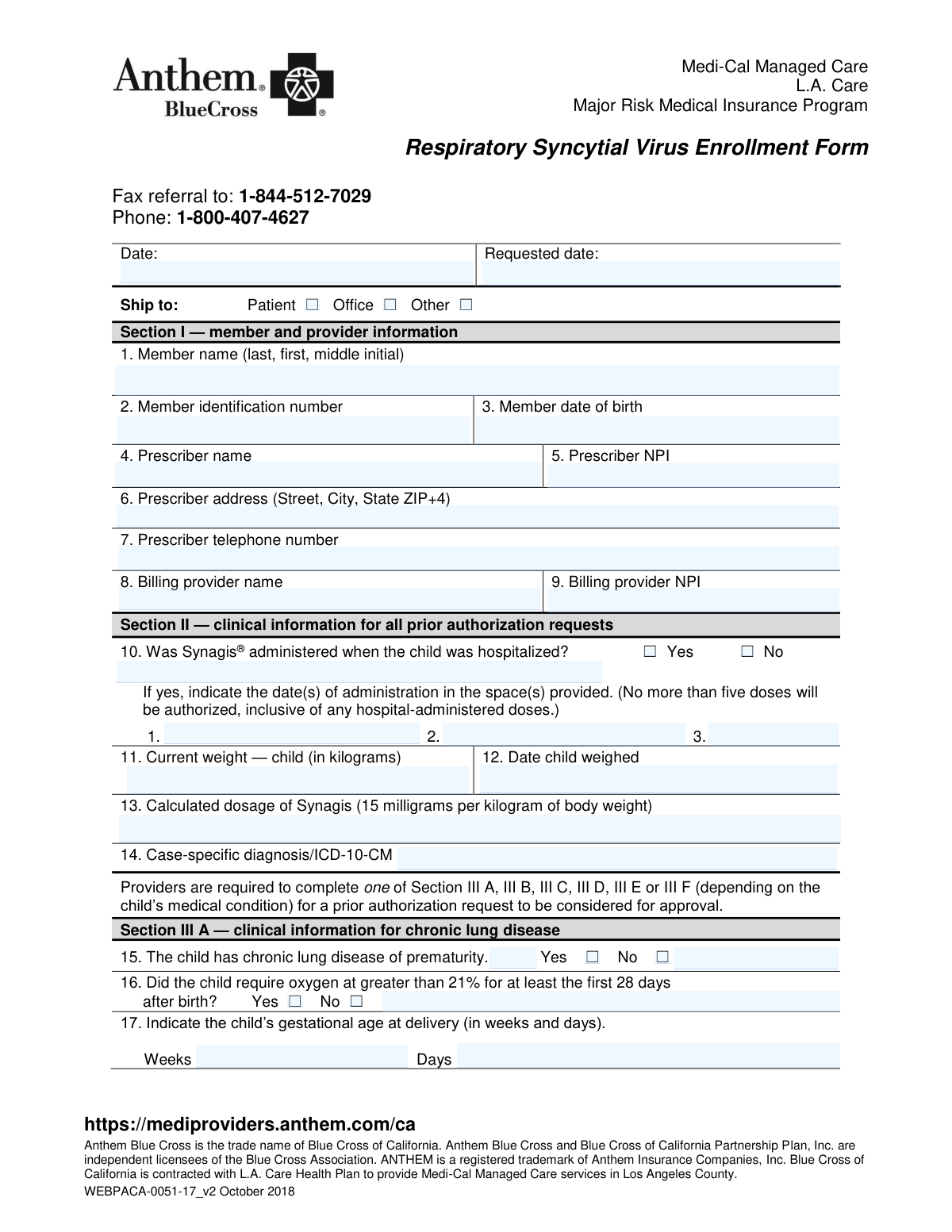
This form is a prior authorization request used by healthcare providers to enroll high-risk infants and young children in programs like Medi-Cal Managed Care and L.A. Care for preventative treatment against Respiratory Syncytial Virus (RSV), often with the drug Synagis®. It requires detailed clinical information to justify the medical necessity for the treatment based on specific risk factors like prematurity, chronic lung disease, or congenital heart disease. Today, this form can be filled out quickly and accurately using AI-powered services like Instafill.ai, which can also convert non-fillable PDF versions into interactive fillable forms.
Our AI automatically handles information lookup, data retrieval, formatting, and form filling.
It takes less than a minute to fill out WEBPACA-0051-17_v2 using our AI form filling.
Securely upload your data. Information is encrypted in transit and deleted immediately after the form is filled out.

Form specifications

Form name: Anthem Blue Cross Respiratory Syncytial Virus Enrollment Form
Number of pages: 2
Language: English
Categories: enrollment forms, ATO forms, IRA forms
main-image

Instafill Demo: How to fill out PDF forms in seconds with AI

How to Fill Out WEBPACA-0051-17_v2 Online for Free in 2026

Are you looking to fill out a WEBPACA-0051-17_V2 form online quickly and accurately? Instafill.ai offers the #1 AI-powered PDF filling software of 2026, allowing you to complete your WEBPACA-0051-17_V2 form in just 37 seconds or less.
Follow these steps to fill out your WEBPACA-0051-17_V2 form online using Instafill.ai:
  1. 1 Navigate to Instafill.ai and upload or select the Respiratory Syncytial Virus Enrollment Form.
  2. 2 Use the AI assistant to accurately fill in Section I with member (patient) and provider information.
  3. 3 Complete Section II by providing the necessary clinical details, such as hospitalization history, current weight, and diagnosis codes.
  4. 4 Select and fill out the appropriate subsection in Section III (A-F) that corresponds to the child's specific medical condition justifying the need for RSV prophylaxis.
  5. 5 Provide any additional supporting information in Section V if required.
  6. 6 The prescriber can then digitally sign and date the form in Section IV to authorize the request.
  7. 7 Review all the information for accuracy before downloading, printing, or faxing the completed form to the number provided.

Our AI-powered system ensures each field is filled out correctly, reducing errors and saving you time.

Why Choose Instafill.ai for Your Fillable WEBPACA-0051-17_v2 Form?

Speed

Complete your WEBPACA-0051-17_v2 in as little as 37 seconds.

Up-to-Date

Always use the latest 2026 WEBPACA-0051-17_v2 form version.

Cost-effective

No need to hire expensive lawyers.

Accuracy

Our AI performs 10 compliance checks to ensure your form is error-free.

Security

Your personal information is protected with bank-level encryption.

Frequently Asked Questions About Form WEBPACA-0051-17_v2

This form is used by healthcare providers to request prior authorization for Synagis®, a medication used to prevent serious RSV infection in high-risk infants and young children covered by L.A. Care or Anthem Blue Cross.

The child's prescribing healthcare provider must complete and sign this form, as it requires specific clinical information and a signature to be processed for prior authorization.

Once the form is completed and signed, you must fax it to the referral fax number listed at the top: 1-844-512-7029.

No, you only need to complete the one subsection in Section III that corresponds to the child's specific high-risk medical condition. Completing the correct section is required for the request to be considered.

You must provide the full name, address, telephone number, and National Provider Identifier (NPI) for both the prescribing provider and the billing provider in Section I.

The dosage is calculated as 15 milligrams per kilogram of the child's body weight. You must provide the child's current weight in kilograms (kg) and the date the child was weighed in questions 11 and 12.

You must check 'Yes' for question 10 and list the date(s) of administration. Note that a maximum of five doses will be authorized in total, including any doses given during hospitalization.

At the top of the form, you must check the box to indicate the desired shipping destination: the patient's home, the provider's office, or another specified location.

This space is for providing any extra diagnostic or clinical details that explain the medical necessity of the requested product. It is useful for complex cases or to add clarifying information.

Yes, services like Instafill.ai use AI to accurately auto-fill form fields from your records, which can save time and help prevent errors.

You can use a service like Instafill.ai to fill this form online. Simply upload the PDF, and the platform will make it interactive so you can complete the fields digitally.

If you have a non-fillable or 'flat' PDF, you can upload it to Instafill.ai. The service will convert it into an interactive, fillable form that you can easily complete, save, and print.

This section applies if the child is younger than 12 months at the start of RSV season and was born before 29 weeks' gestation. You must check 'Yes' and indicate the child's exact gestational age in weeks and days.

Compliance WEBPACA-0051-17_v2
Validation Checks by Instafill.ai

1
NPI Number Format Validation
This check verifies that the 'Prescriber NPI' and 'Billing Provider NPI' fields contain a valid 10-digit National Provider Identifier. The NPI is a unique identification number for covered health care providers, and its accuracy is critical for claim processing and provider verification. If the NPI is missing, incomplete, or fails the format check, the submission will be rejected as the provider cannot be authenticated.
2
Date Format and Chronological Sanity
Ensures all date fields, including 'Member date of birth', 'Date child weighed', and 'Date signed', are in a valid format (e.g., MM/DD/YYYY) and are chronologically logical. For instance, the 'Member date of birth' cannot be in the future, and the 'Date child weighed' must be on or before the 'Date signed'. This validation prevents data entry errors and ensures the timeline of events is accurate for clinical assessment, and failure will result in the form being returned for correction.
3
Section I Information Completeness
This check confirms that all fields in Section I, such as 'Member name', 'Member identification number', 'Member date of birth', and all prescriber information, are fully completed. This basic information is essential for identifying the patient and the responsible provider. An incomplete Section I will result in an immediate rejection of the form, as the request cannot be processed without this core data.
4
Conditional Hospitalization Date Requirement
If the 'Yes' box is checked for question 10 ('Was Synagis® administered when the child was hospitalized?'), this validation ensures that at least one administration date is entered. This information is crucial for tracking the total number of doses received to stay within the authorized limit of five. A 'Yes' response without a corresponding date will flag the form as incomplete and delay authorization until the information is provided.
5
Synagis Dosage Calculation Verification
This validation cross-references the 'Current weight — child' (field 11) with the 'Calculated dosage of Synagis' (field 13). It confirms that the dosage provided is the result of multiplying the child's weight in kilograms by 15 mg, as specified on the form. This check is a critical safety measure to prevent incorrect dosing, and any discrepancy will require clarification from the prescriber before the request can proceed.
6
Exclusive Section III Condition Selection
Verifies that the provider has completed only one of the clinical information sections (III A, III B, III C, III D, III E, or III F). The form requires a single primary justification for the prior authorization request. Submitting a form with multiple sections completed creates ambiguity and will cause the form to be returned for clarification on the primary diagnosis.
7
Gestational Age Value Constraints
This check validates that for gestational age entries (fields 17 and in Section III D), the 'Weeks' value is a clinically plausible number (e.g., between 20 and 45) and the 'Days' value is between 0 and 6. Accurate gestational age is a key determinant of eligibility for Synagis. An invalid or out-of-range value will cause the form to be rejected for data correction.
8
Preterm Infant Gestational Age Logic
If Section III D is completed, this check ensures the 'Gestational age at delivery' indicated is less than 29 weeks, 0 days, as per the criteria in question 21. This enforces a strict clinical rule for this specific eligibility path. If the gestational age is 29 weeks or greater, the request under this section will be invalid and likely denied.
9
Member Age Consistency with Clinical Criteria
This validation calculates the member's age from the 'Member date of birth' and compares it against the age requirement of the selected Section III condition (e.g., younger than 12 months for Section III D, younger than 24 months for Section III F). This is a critical logic check to ensure the patient meets the fundamental age criteria for the specific indication. A mismatch between the patient's age and the selected criteria will lead to an automatic rejection of the prior authorization request.
10
ICD-10-CM Code Format Validation
This check ensures that the 'Case-specific diagnosis/ICD-10-CM' field contains a value that follows the standard format for an ICD-10-CM code. A valid code is essential for medical necessity review, claims processing, and statistical tracking. An improperly formatted code will halt the review process until a valid diagnosis code is supplied by the provider.
11
Conditional Explanation Field Requirement
Verifies that if 'Yes' is checked for Section III E (neuromuscular disease) or 'Other - Yes' is checked for Section III F (immunocompromised), the corresponding free-text field explaining the condition is filled out. This ensures that necessary clinical justification is provided when a non-specific category is chosen. Failure to provide the required explanation will render the submission incomplete and require follow-up with the prescriber.
12
Signature and Date of Signature Presence
This check confirms that both the 'Prescriber signature' (field 24) and 'Date signed' (field 25) are present. A dated signature is a legal and medical requirement, attesting that the prescriber has reviewed and confirmed the accuracy of the submitted information. A missing signature or date will invalidate the entire request, and the form will be returned.

Common Mistakes in Completing WEBPACA-0051-17_v2

Entering Weight in Pounds Instead of Kilograms

The form explicitly requires the child's weight in kilograms (kg) to calculate the correct Synagis dosage. Administrative staff often mistakenly enter the weight in pounds (lbs), which is more common in the US. This error leads to a significant dosage miscalculation (over 2x the correct amount), resulting in automatic rejection of the request and potential safety concerns.

Incomplete or Incorrect Clinical Justification (Section III)

The form requires the provider to complete exactly one of the subsections from III A to III F to establish medical necessity. A common mistake is either skipping this section entirely or filling out multiple subsections, causing confusion. This failure to provide a clear, single clinical rationale will lead to processing delays or an outright denial of the prior authorization request.

Missing Conditional Details for 'Yes' Answers

Several fields require additional information if 'Yes' is selected, such as providing administration dates for hospitalizations (Question 10) or specifying the disease for neuromuscular conditions (Question 22). Applicants often check 'Yes' but forget to provide the mandatory follow-up details. This incomplete information makes it impossible to verify the claim, forcing the reviewer to pend the request and contact the provider for clarification.

Using Invalid or Non-Specific ICD-10-CM Codes

The 'Case-specific diagnosis/ICD-10-CM' field is critical for justifying the request, but providers sometimes enter outdated ICD-9 codes, non-specific codes, or codes that don't align with the selected clinical criteria in Section III. An incorrect diagnosis code is a primary reason for rejection, as it fails to establish the medical necessity for Synagis according to the payer's guidelines. Using an AI-powered tool like Instafill.ai can help validate codes against a current database.

Forgetting the Prescriber's Signature and Date

An unsigned or undated prior authorization form is legally invalid and will be rejected immediately upon receipt. This is one of the most frequent and easily avoidable errors, often happening when staff are rushing to fax the document. This oversight halts the entire process and can significantly delay a time-sensitive treatment for a vulnerable infant.

Confusing Prescriber and Billing Provider Information

The form requires separate information for the 'Prescriber' (Section I, fields 4-7) and the 'Billing Provider' (fields 8-9), including distinct NPI numbers. Staff may incorrectly copy the prescriber's information into the billing provider fields, especially if they are the same entity but have different billing credentials. This error can cause claim denials and significant administrative rework to correct the billing and provider data.

Improperly Documenting Gestational Age

Sections III A and III D require the child's gestational age to be broken down into 'Weeks' and 'Days'. A frequent error is to only enter the number of weeks (e.g., '28') and leave the 'Days' field blank. This ambiguity can affect eligibility, as the criteria are precise (e.g., 'born before 29 weeks, zero days'), and incomplete data may lead to a request for more information.

Manual Dosage Calculation Errors

Although the formula (15 mg/kg) is provided, manual calculation for the 'Calculated dosage of Synagis' field is prone to human error. A simple math mistake can lead to a dosage that doesn't match the provided weight, which is a red flag for reviewers. This discrepancy will cause the form to be flagged for manual review and clarification, delaying approval.

Forgetting to Select a 'Ship to' Destination

At the very top of the form, the sender must check a box to indicate the shipping destination: 'Patient', 'Office', or 'Other'. It's easy to overlook this small but crucial step while focusing on the complex clinical data. Failing to make a selection means that even after approval, the specialty pharmacy won't know where to send the medication, causing a preventable delay in dispensing.

Submitting an Unfillable, Handwritten Form

This form is often available as a flat PDF, leading to submissions that are handwritten, difficult to read, and prone to transcription errors by the receiving party. Illegible handwriting in critical fields like the Member ID or NPI number can make the form impossible to process. Using a tool like Instafill.ai can convert such non-fillable PDFs into clean, typeable forms, ensuring all data is clear, legible, and accurate, which drastically reduces processing errors.
Saved over 80 hours a year

“I was never sure if my IRS forms like W-9 were filled correctly. Now, I can complete the forms accurately without any external help.”

Kevin Martin Green

Your data stays secure with advanced protection from Instafill and our subprocessors

Robust compliance program

Transparent business model

You’re not the product. You always know where your data is and what it is processed for.

ISO 27001, HIPAA, and GDPR

Our subprocesses adhere to multiple compliance standards, including but not limited to ISO 27001, HIPAA, and GDPR.

Security & privacy by design

We consider security and privacy from the initial design phase of any new service or functionality. It’s not an afterthought, it’s built-in, including support for two-factor authentication (2FA) to further protect your account.

Fill out WEBPACA-0051-17_v2 with Instafill.ai

Worried about filling PDFs wrong? Instafill securely fills anthem-blue-cross-respiratory-syncytial-virus-enrollment-form forms, ensuring each field is accurate.