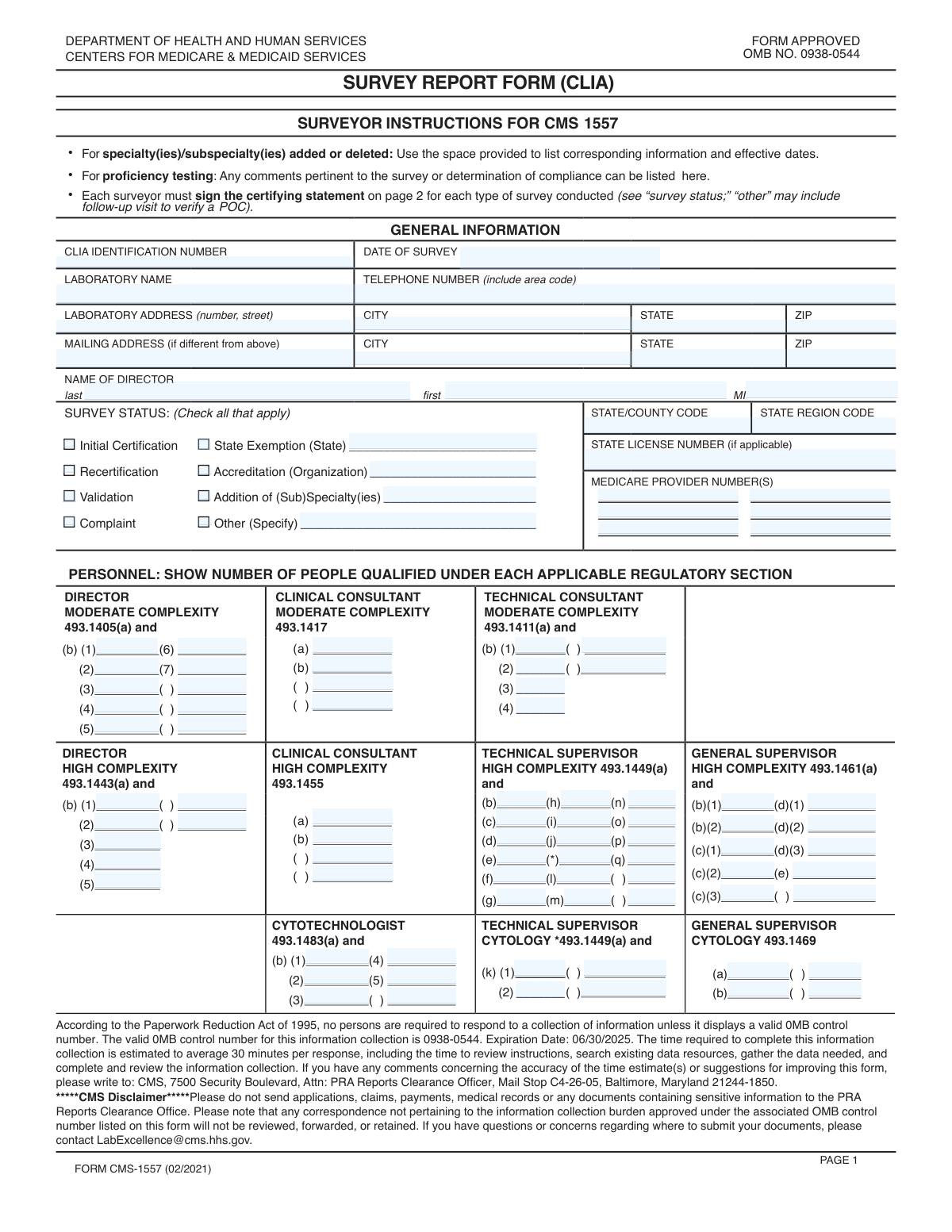
Yes! You can use AI to fill out Form CMS-209, CLIA Laboratory Survey Report Form

Form CMS-209 is a comprehensive report used by state and federal surveyors to record the results of inspections conducted at clinical laboratories under the Clinical Laboratory Improvement Amendments (CLIA). The form documents everything from laboratory demographics and personnel qualifications to the specific specialties and subspecialties offered, ensuring the lab meets federal standards for quality and safety. Today, this extensive form can be filled out quickly and accurately using AI-powered services like Instafill.ai, which can also convert non-fillable PDF versions into interactive fillable forms.
Our AI automatically handles information lookup, data retrieval, formatting, and form filling.
It takes less than a minute to fill out CMS-209 using our AI form filling.
Securely upload your data. Information is encrypted in transit and deleted immediately after the form is filled out.

Form specifications

Form name: Form CMS-209, CLIA Laboratory Survey Report Form
Number of fields: 297
Number of pages: 4
Language: English
Categories: CMS forms, labor forms, ATO forms
main-image

Instafill Demo: How to fill out PDF forms in seconds with AI

How to Fill Out CMS-209 Online for Free in 2026

Are you looking to fill out a CMS-209 form online quickly and accurately? Instafill.ai offers the #1 AI-powered PDF filling software of 2026, allowing you to complete your CMS-209 form in just 37 seconds or less.
Follow these steps to fill out your CMS-209 form online using Instafill.ai:
  1. 1 Navigate to Instafill.ai and upload or select the Form CMS-209.
  2. 2 Use the AI assistant to automatically populate the initial sections with laboratory identification details, including the CLIA number, laboratory name, address, and director information.
  3. 3 Select the appropriate survey status (e.g., recertification, complaint, validation) and provide any required specifics like accreditation organization or state exemption details.
  4. 4 Enter the counts for qualified personnel for moderate and high complexity testing, including directors, consultants, supervisors, and cytotechnologists, as prompted by the smart fields.
  5. 5 Systematically go through the 'Specialties/Subspecialties' section, checking boxes and filling in annual test volumes, effective dates, and proficiency testing information for each service the lab provides.
  6. 6 Complete the final sections by answering questions about immunohematology, listing reviewed regulation numbers, and reviewing all entered data for accuracy.
  7. 7 Electronically sign and date the form in the designated signature fields to finalize the survey report for submission.

Our AI-powered system ensures each field is filled out correctly, reducing errors and saving you time.

Why Choose Instafill.ai for Your Fillable CMS-209 Form?

Speed

Complete your CMS-209 in as little as 37 seconds.

Up-to-Date

Always use the latest 2026 CMS-209 form version.

Cost-effective

No need to hire expensive lawyers.

Accuracy

Our AI performs 10 compliance checks to ensure your form is error-free.

Security

Your personal information is protected with bank-level encryption.

Frequently Asked Questions About Form CMS-209

This form is used to document the findings of a laboratory survey for Clinical Laboratory Improvement Amendments (CLIA) certification. It captures detailed information about the lab's personnel, specialties, test volumes, and compliance status.

A surveyor typically completes this form during or after an on-site inspection. The laboratory director and administrative staff are responsible for providing the accurate information needed to fill it out.

The CLIA Identification Number is a unique 10-digit identifier assigned to your laboratory by the Centers for Medicare & Medicaid Services (CMS). This number can be found on your laboratory's official CLIA certificate.

Recertification is a routine survey for renewing certification, Validation is a survey to confirm the findings of an accrediting organization, and Complaint means the survey was triggered by a specific complaint filed against the laboratory.

You must count the number of individuals who meet the specific regulatory qualifications cited in each field, such as '493.1443(b)(1)'. Refer to the official CLIA regulations to determine which staff members qualify under each subsection.

These fields should only be completed if the 'Addition of (Sub)Specialty(ies)' box is checked in the 'Survey Status' section. Use them to record the date a new specialty was officially added or an existing one was removed.

If a subspecialty is not explicitly listed, check the 'Other' box within that main category (e.g., 'Other Chemistry'). You can then provide the required details like annual test volumes and accreditation information in the corresponding 'Other' fields.

The form provides space for six Medicare Provider Numbers. If your facility has more, list the primary ones on the form and attach a separate sheet with the additional numbers, making a note of the attachment.

For each applicable specialty, you must provide information about your laboratory's enrollment and performance in an approved Proficiency Testing (PT) program. This is required to verify the accuracy and reliability of your lab's testing.

Yes, services like Instafill.ai use AI to auto-fill form fields accurately and save time. This is especially helpful for repetitive information like the laboratory's name, address, and CLIA number.

Simply upload the form's PDF to the Instafill.ai platform. The AI will make all fields fillable, allowing you to type directly, click to auto-fill your saved information, and add digital signatures before downloading.

If you have a non-fillable or 'flat' PDF, you can use a service like Instafill.ai. Upload the document, and it will automatically convert it into an interactive, fillable form that you can complete on your computer.

The physical address is the actual street location where the laboratory operates and where surveys are conducted. The mailing address is the location where you receive official mail, which could be a P.O. Box or a different corporate office.

Compliance CMS-209
Validation Checks by Instafill.ai

1
CLIA Identification Number Format and Consistency
This check ensures that the 'CLIA Identification Number' fields contain a valid 10-character alphanumeric string, consistent with the standard format. It also verifies that the CLIA number entered in the 'Survey Identification' section matches the one in the 'Facility Information' section. This is critical for uniquely identifying the laboratory and preventing data mismatches that could lead to incorrect record-keeping or regulatory action.
2
Date of Survey is a Valid Past or Present Date
This validation confirms that the 'Date of Survey' is a valid calendar date and is not set in the future. A survey date cannot logically occur in the future, so this check prevents simple data entry errors. If the date is invalid or in the future, the form submission should be rejected to ensure the integrity of the survey timeline.
3
Mandatory Laboratory and Director Information
This check verifies that core identification fields such as 'Laboratory Name', 'Laboratory Address Street', 'Laboratory Address City', 'Laboratory Address State', 'Laboratory Address Zip Code', 'Director's Last Name', and 'Director's First Name' are not empty. This information is fundamental for identifying the laboratory and its leadership. Failure to provide this data would render the form incomplete and unusable for official purposes.
4
Survey Status Conditional Field Requirement
This validation enforces conditional logic for the 'Survey Status' section. For example, if the 'State Exemption' checkbox is selected, the 'State Exemption State' field must be populated. Similarly, checking 'Accreditation' requires filling out 'Accreditation Organization'. This ensures that when a specific survey type is indicated, the necessary clarifying details are also provided, preventing incomplete or ambiguous submissions.
5
Other Survey Status Specification
This check ensures that if the 'Other' checkbox is selected under 'Survey Status', the corresponding 'Other Survey Status Specify' text field must not be empty. This rule prevents users from selecting 'Other' without providing the required explanation. An empty specification field would make the survey's purpose unclear and require manual follow-up.
6
Personnel Count Fields are Non-Negative Integers
This validation ensures that all fields intended to capture a count of personnel (e.g., 'Director Moderate Complexity', 'Clinical Consultant', 'Technical Supervisor') contain only non-negative integers. Entering text, decimals, or negative numbers in these fields is invalid as they represent a count of people. This check maintains data quality for staffing and qualification analysis.
7
Valid US State and ZIP Code Formats
This check validates that all state fields (e.g., 'Laboratory Address State', 'Mailing State') contain a valid 2-letter US state or territory abbreviation and that all ZIP code fields are in a valid 5-digit or 9-digit (ZIP+4) format. Correct address formatting is essential for mail delivery, location verification, and data standardization. An invalid format would be rejected to ensure address data is accurate.
8
Specialty Addition Requires an Effective Date
This is a logical check that triggers if the 'Addition of (Sub)Specialty(ies)' box is checked. If it is, any specialty/subspecialty that is selected (e.g., 'Histopathology', 'Virology') must have a corresponding 'Added Effective Date' filled out. This rule ensures that the timeline for adding new services is properly and completely documented for regulatory and historical purposes.
9
Signature Date Logical Consistency
This validation verifies that all signature dates ('First Signature Date', 'Second Signature Date', 'Third Signature Date') are on or after the 'Date of Survey'. A signature cannot predate the event it is attesting to, so this check prevents logical impossibilities and ensures the chronological integrity of the form. A submission with an invalid signature date would be flagged for correction.
10
Page Numbering Integrity
This check ensures that the 'Current Page Number' is a positive integer and is less than or equal to the 'Total Pages'. This is a basic document integrity check to ensure the page numbering is logical and that the document is not missing pages. If the current page exceeds the total, it indicates a data entry or document assembly error.
11
Annual Test Volume is a Non-Negative Integer
This validation confirms that all 'Annual Test Volumes' fields across the various specialties contain only non-negative integers. Test volumes are quantitative data used for classification, workload analysis, and regulatory oversight. Allowing non-numeric or negative values would corrupt this data, so the validation ensures only valid numbers are submitted.
12
Exclusive Selection for Binary Questions
This check ensures that for binary question pairs like the 'Immunohematology Transfusion Question' ('Yes'/'No') and 'Blood Product Collection Question' ('Yes'/'No'), only one of the two options can be selected. This prevents contradictory or ambiguous answers. The system should treat these as radio buttons, and a submission with both or neither selected should be considered invalid.
13
Conditional Requirement for Specialty Details
This validation ensures that if a main specialty checkbox is selected (e.g., 'Microbiology', 'Chemistry', 'Pathology'), at least one associated field like 'Annual Test Volumes' or a sub-specialty checkbox must also be filled out. This prevents a user from indicating a laboratory performs a specialty without providing any of the required supporting details. An incomplete specialty section would be flagged for completion.
14
Added vs. Deleted Date Logic
This check validates that for any given specialty, the 'Deleted Effective Date' is not earlier than the 'Added Effective Date'. It is logically impossible for a specialty to be deleted before it was added. This rule ensures the chronological accuracy of the laboratory's service history and prevents data entry errors.

Common Mistakes in Completing CMS-209

Incorrectly Categorizing Personnel Counts

This form requires breaking down personnel counts by specific, complex regulatory subsections (e.g., Director High Complexity (b)(1), (b)(2), etc.). Users often misinterpret these codes or enter a total count in the first box instead of distributing them correctly. This leads to an inaccurate representation of the lab's staffing qualifications and can trigger compliance reviews or survey deficiencies. To avoid this, carefully match each staff member's qualifications to the exact regulation number cited in the form field and enter '0' for any categories with no qualifying personnel.

Incomplete Specialty/Subspecialty Sections

Users frequently check a box for a specialty (e.g., 'Microbiology') but then fail to complete the associated required fields like 'Annual Test Volumes' or 'Accredited Program'. This happens due to the form's length and the repetitive nature of these sections, leading to user fatigue and oversight. Incomplete sections cause processing delays and require follow-up communications to gather the missing data. Always complete all related fields for any specialty or subspecialty you select.

Ignoring Conditional Field Logic

The form contains many fields that are conditional upon another entry, such as filling 'Accreditation Organization' only after checking 'Accreditation'. A common error is either checking the box and forgetting the detail, or providing the detail without checking the primary box. This creates ambiguity and can invalidate the section. To prevent this, treat each checkbox and its dependent field as a single unit of information, ensuring both parts are completed together as required.

Mistyping the CLIA Identification Number

The CLIA Identification Number is the primary key for this entire record, but it is prone to simple transposition errors (e.g., typing '12D3456789' instead of '12D3546789'). A single incorrect digit can cause the submission to be rejected, misfiled, or associated with the wrong laboratory, leading to significant administrative delays and compliance issues. Always double-check this number against official documentation before submitting the form.

Leaving Numerical Fields Blank Instead of Using '0'

When a laboratory has no personnel or tests for a specific category, users often leave the corresponding numerical field blank. However, a blank field can be interpreted as missing data rather than a value of zero, prompting unnecessary clarification requests from the reviewing agency. This can delay the processing of the form. To ensure clarity, explicitly enter the digit '0' in all numerical fields that have a zero value, such as 'Annual Test Volumes' or personnel counts.

Inconsistent or Incorrect Date Formatting

With numerous date fields ('Date of Survey', 'Added Effective Date', 'Signature Date'), users often enter dates in inconsistent formats (e.g., MM/DD/YY, MM-DD-YYYY, Month DD, YYYY). This can cause data entry errors on the receiving end or be flagged by automated systems. These inconsistencies can lead to confusion about key timelines, such as when a specialty was added. It is crucial to use a consistent, unambiguous format like MM/DD/YYYY for all date entries.

Using Abbreviations for Official Names

When filling out fields like 'Laboratory Name' or 'Accreditation Organization', people often use common acronyms or abbreviations instead of the full, official legal name. This can create ambiguity and data matching problems in regulatory databases, potentially delaying certification or accreditation updates. Always use the complete, official name as it appears on legal documents or certificates to avoid any confusion.

Confusing Physical and Mailing Addresses

This form requests both a physical 'Laboratory Address' and a separate 'Mailing Address'. A common mistake is to only fill out the physical address, even when the mailing address is different (like a P.O. Box or corporate office), or to accidentally copy the physical address into the mailing address fields. This can result in critical correspondence, such as deficiency reports or certificates, being sent to the wrong location and missed. Carefully verify and enter both addresses correctly if they differ.

Failing to Specify 'Other' Selections

The form provides an 'Other' checkbox in several sections, such as 'Survey Status' and for various specialties, which is always paired with a 'Specify' field. A frequent error is checking 'Other' but failing to provide the required explanation in the corresponding text field. This makes the selection meaningless and requires the reviewer to follow up, delaying the entire process. If you select 'Other', always provide a clear and concise description in the associated specification field.

Inconsistent Annual Test Volume Data

The form asks for annual test volumes at both the main specialty level (e.g., 'Chemistry') and the subspecialty level (e.g., 'Routine Chemistry', 'Urinalysis'). Users may provide numbers that are logically inconsistent, such as the sum of subspecialty volumes not matching the total reported for the main specialty. This data inconsistency can trigger audits or requests for clarification. Ensure that all reported volumes are accurate and that totals are consistent with their constituent parts. AI-powered form filling tools like Instafill.ai can help prevent many of these errors by validating data formats, ensuring required fields are not missed, and flagging inconsistencies before submission. If the form is a non-fillable PDF, Instafill.ai can also convert it into an interactive, fillable version to streamline the process.
Saved over 80 hours a year

“I was never sure if my IRS forms like W-9 were filled correctly. Now, I can complete the forms accurately without any external help.”

Kevin Martin Green

Your data stays secure with advanced protection from Instafill and our subprocessors

Robust compliance program

Transparent business model

You’re not the product. You always know where your data is and what it is processed for.

ISO 27001, HIPAA, and GDPR

Our subprocesses adhere to multiple compliance standards, including but not limited to ISO 27001, HIPAA, and GDPR.

Security & privacy by design

We consider security and privacy from the initial design phase of any new service or functionality. It’s not an afterthought, it’s built-in, including support for two-factor authentication (2FA) to further protect your account.

Fill out CMS-209 with Instafill.ai

Worried about filling PDFs wrong? Instafill securely fills form-cms-209-clia-laboratory-survey-report-form forms, ensuring each field is accurate.