Yes! You can use AI to fill out Form GC-210(CA), Child Information Attachment to Probate Guardianship Petition
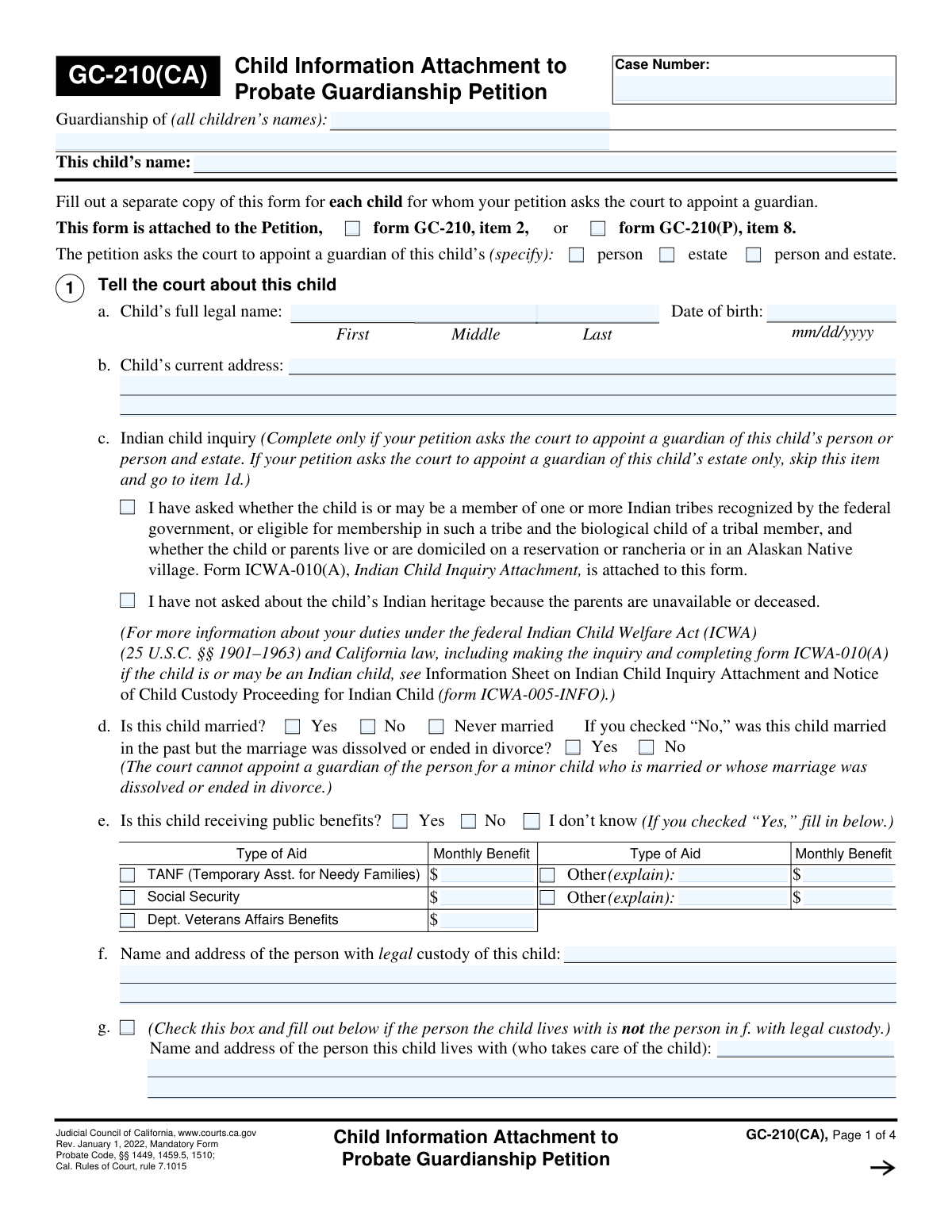
Form GC-210(CA), the Child Information Attachment to Probate Guardianship Petition, is a crucial legal document filed in California courts. It provides the judge with essential details about a specific child involved in a guardianship proceeding, including their identity, relatives, living situation, and any prior court involvement. This information is vital for the court to determine what is in the child's best interest when considering the appointment of a guardian, and a separate form must be completed for each child. Today, this form can be filled out quickly and accurately using AI-powered services like Instafill.ai, which can also convert non-fillable PDF versions into interactive fillable forms.
Our AI automatically handles information lookup, data retrieval, formatting, and form filling.
It takes less than a minute to fill out GC-210(CA) using our AI form filling.
Securely upload your data. Information is encrypted in transit and deleted immediately after the form is filled out.
Form specifications
| Form name: | Form GC-210(CA), Child Information Attachment to Probate Guardianship Petition |
| Number of fields: | 165 |
| Number of pages: | 4 |
| Language: | English |
More forms in ACH forms
Instafill Demo: How to fill out PDF forms in seconds with AI
How to Fill Out GC-210(CA) Online for Free in 2026
Are you looking to fill out a GC-210(CA) form online quickly and accurately? Instafill.ai offers the #1 AI-powered PDF filling software of 2026, allowing you to complete your GC-210(CA) form in just 37 seconds or less.
Follow these steps to fill out your GC-210(CA) form online using Instafill.ai:
- 1 Navigate to Instafill.ai and upload your Form GC-210(CA) or select it from the template library.
- 2 Provide the child's personal information in Section 1, including their full name, date of birth, address, and details regarding the Indian Child Welfare Act (ICWA) if applicable.
- 3 Complete Section 2 by listing the names and addresses of the child's relatives, such as parents, grandparents, and siblings.
- 4 Enter information about the proposed guardian in Section 3, detailing their relationship to the child and whether they were nominated by a parent.
- 5 Write clear explanations in Sections 4 and 5 detailing why the guardianship and the specific proposed guardian are in the child's best interest.
- 6 Answer the questions in Section 6 regarding parental consent for the guardianship.
- 7 Review all entered information for accuracy, then download the completed, ready-to-file Form GC-210(CA) to attach to your main guardianship petition.
Our AI-powered system ensures each field is filled out correctly, reducing errors and saving you time.
Why Choose Instafill.ai for Your Fillable GC-210(CA) Form?
Speed
Complete your GC-210(CA) in as little as 37 seconds.
Up-to-Date
Always use the latest 2026 GC-210(CA) form version.
Cost-effective
No need to hire expensive lawyers.
Accuracy
Our AI performs 10 compliance checks to ensure your form is error-free.
Security
Your personal information is protected with bank-level encryption.
Frequently Asked Questions About Form GC-210(CA)
Form GC-210(CA) is a mandatory attachment to a probate guardianship petition in California. You must use it to provide the court with detailed information about each child for whom you are seeking to establish a guardianship.
Yes, you must complete and attach a separate GC-210(CA) form for each individual child. Each form should contain information specific only to that child.
This section is required by the Indian Child Welfare Act (ICWA) to determine if the child has Native American heritage. You must ask the family about this, check the appropriate box, and attach Form ICWA-010(A), Indian Child Inquiry Attachment.
You must make a diligent effort to find the addresses for all required relatives, as they generally need to be given legal notice of the petition. If you cannot find an address after a thorough search, you may need to explain your efforts to the court.
In these sections, explain why the guardianship is necessary and why the proposed guardian is the best choice for the child. Include details about the child's needs, the proposed guardian's ability to provide a stable home, and any other facts that support your request.
The court asks about marital status because a guardian of the 'person' cannot be appointed for a minor who is married or was previously married. You may still be able to petition for guardianship of the 'estate' (the child's finances and property).
The person with 'legal custody' has the legal authority to make decisions for the child, while the person the child 'lives with' provides day-to-day care. These may be two different people, and the court needs to know the child's complete situation.
This form is an attachment and is not submitted by itself. You must file it along with your main Petition for Probate Guardianship (Form GC-210 or GC-210(P)) at the Superior Court in the appropriate county.
If a parent does not consent, the guardianship becomes a contested matter, and the court will hold a hearing to decide if appointing a guardian is in the child's best interest. Lack of consent does not automatically prevent the guardianship from being granted.
Depending on your answers, you may need to attach other documents, such as a written nomination from a parent (Attachment 3c) or the Indian Child Inquiry Attachment (Form ICWA-010(A)). You may also need to attach extra sheets if you run out of space for explanations.
Yes, AI-powered services like Instafill.ai can help you fill out this form more efficiently. They use AI to accurately identify and auto-fill form fields, which can save you significant time and reduce errors.
To fill this form online with Instafill.ai, you can upload the GC-210(CA) PDF to their platform. The service will make the form interactive, allowing you to easily type in your information and use AI-powered tools to complete it.
If you have a non-fillable or 'flat' PDF, you can use a service like Instafill.ai to convert it into an interactive, fillable form. This allows you to type your answers directly onto the document instead of printing and filling it out by hand.
Compliance GC-210(CA)
Validation Checks by Instafill.ai
1
Validates Child's Age from Date of Birth
Checks that the 'Date of birth' in item 1a is a valid date in mm/dd/yyyy format and is in the past. It also calculates the child's age to ensure they are a minor (under 18), as this form is for guardianship of a minor. If the date is invalid, in the future, or indicates the person is an adult, the submission should be flagged for review, as a probate guardianship may not be the correct proceeding.
2
Enforces Guardianship Type Selection
This validation ensures that at least one of the three guardianship type checkboxes ('person', 'estate', 'person and estate') is selected at the top of the form. This selection is fundamental to the entire petition, defining the scope of the guardian's authority. A failure to select a type would make the petition ambiguous and requires the user to make a selection before proceeding.
3
Prevents Guardianship of Person for Married Minor
This is a critical logical check based on the form's explicit instruction in item 1d. If the user indicates the child is married ('Yes') or was previously married ('Yes' to the follow-up question), the system must validate that guardianship of the 'person' or 'person and estate' is NOT requested. Appointing a guardian of the person for a married or emancipated minor is legally impermissible in this context, so a validation failure must block submission or show a critical warning.
4
Conditional Requirement for Public Benefits Details
This check ensures data integrity for item 1e. If the user checks 'Yes' for 'Is this child receiving public benefits?', then at least one benefit type must be specified (e.g., TANF, Social Security) or the 'Other (explain)' field must be completed, along with a corresponding monthly benefit amount. This is important for the court to understand the child's financial situation. A validation failure would prompt the user to provide the required details or change the answer to 'No' or 'I don't know'.
5
Conditional Requirement for ICWA Inquiry
This validation enforces the skip logic for the Indian Child Welfare Act (ICWA) inquiry in item 1c. The inquiry is mandatory only if guardianship of the 'person' or 'person and estate' is requested. The validation checks that if 'estate' only is selected, item 1c is skipped. Conversely, if 'person' or 'person and estate' is selected, it ensures one of the two options in 1c is checked and that form ICWA-010(A) is attached if applicable. This is crucial for legal compliance with federal and state law.
6
Validates Conditional Entry for Caregiver's Address
This check validates the logic for item 1g. The fields for the name and address of the person the child lives with should only be filled out if the checkbox in item 1g is checked. This indicates the child's physical custodian is different from their legal custodian (item 1f). This prevents submission of confusing or contradictory information and ensures the form is filled as designed.
7
Ensures Previous Court Case Details are Provided
This validation is tied to item 1h. If the checkbox indicating the child has been involved in other court cases is checked, the system must verify that at least one row describing a case (Type of Case, Court District, Case Number) is filled out. This information is vital for the court to identify related legal matters and prevent conflicting orders. A failure would prompt the user to either provide the case details or uncheck the box.
8
Verifies Parental Nomination Attachment
This check validates the response to item 3c, 'Did the child’s parent(s) nominate the proposed guardian(s)?'. If the user selects 'Yes', the system should require confirmation that a document labeled 'Attachment 3c' has been uploaded or included with the filing. This ensures that claims of parental nomination are properly substantiated with the required written proof for the court's consideration.
9
Validates 'Time Lived with Guardian' Field
This is a conditional logic check for item 3d. The field asking 'how long has the child lived with the proposed guardian(s)?' must only be enabled and required if the user answers 'Yes' to the preceding question. This prevents irrelevant data entry and ensures the form flow is logical. If 'No' or 'I don't know' is selected, the duration field should be empty and disabled.
10
Requires Explanation for Proposed Guardian's Relationship
This validation concerns item 3b, which defines the proposed guardian's relationship to the child. If the 'Relative' box is checked, the 'specify relationship(s)' text field must be filled. If the 'Not a relative' box is checked, the 'explain interest in or connection' text field must be filled. This ensures the court has a clear understanding of the proposed guardian's standing, which is a key factor in the appointment decision.
11
Ensures Consistent Header Information
The form has repeating header fields on each page, including 'Guardianship of (all children’s names)', 'This child’s name', and 'Case Number'. This validation ensures that the values entered into these fields are identical on every page of the document. Inconsistent information can cause confusion and processing errors, so maintaining consistency is crucial for a valid legal filing.
12
Validates Monetary Format in Benefit Amounts
This check applies to the 'Monthly Benefit' fields in item 1e. It verifies that the entered values are valid numerical or currency formats (e.g., '123.45', '500'). The validation should reject any non-numeric characters (except a single decimal point) to ensure data quality for financial assessments. This is important for the court to accurately assess the child's estate and financial needs.
13
Completeness Check for Parent Information
This validation checks that the 'Name' and 'Home Address' fields for both the Mother and Father in item 2 are completed. Because parents are legally required parties who must receive notice of the proceeding, this information is critical. If a field is left blank, the system should prompt the user to either provide the information or confirm that the parent is deceased or their whereabouts are unknown, which may trigger different legal notice requirements.
14
Cross-references Parent Names in Section 6
This validation performs a logical check between item 2 and item 6a. It verifies that the parent names entered in item 6a, regarding their agreement to the guardianship, match or are consistent with the Mother and Father names provided in the relatives list in item 2. This prevents typographical errors and ensures clarity about which parent's consent is being recorded. A mismatch would trigger a warning to review the names for accuracy.
Common Mistakes in Completing GC-210(CA)
The form explicitly states, 'Fill out a separate copy of this form for each child.' Petitioners sometimes try to list multiple children on a single form to save time, especially if the children's circumstances are similar. This will lead to an immediate rejection of the filing by the court clerk, as the court must maintain a separate, distinct record for each child. To avoid this, you must complete and file a unique GC-210(CA) form for every child included in the guardianship petition.
Each of the four pages of the form has a header for the Case Number, the names of all children in the petition, and the name of the specific child this form is for. People often fill this out on page one but forget to repeat it on pages two, three, and four. If the pages become separated at the courthouse, they cannot be reconnected to the correct file, rendering the submission incomplete. This can cause critical information to be lost and lead to significant delays or rejection of the entire filing.
Item 1c is a mandatory legal requirement that is often misunderstood. Petitioners may not realize they have an affirmative duty to inquire about the child's potential Native American heritage or fail to attach the required Form ICWA-010(A) if there is any possibility of Indian ancestry. Failure to comply with ICWA rules will halt all proceedings, as the court cannot make a guardianship order until this step is properly completed and documented, causing major delays.
Item 2 requires names and current home addresses for the child's parents, grandparents, and siblings. Petitioners often leave addresses blank or write 'unknown' if they are not in contact with a relative. The court requires this information to ensure all legally required parties receive notice of the hearing. Missing addresses will prevent the case from moving forward until the petitioner can prove they performed a diligent search for the missing person.
Items 4 and 5 ask for a detailed explanation of why the guardianship is in the child's best interest. Many people provide short, conclusory statements like 'to give the child a better life' instead of specific, factual reasons. A weak explanation can cause a judge to deny the petition or delay the hearing to request more evidence. You should describe the parents' inability to care for the child, the proposed guardian's stable home, and the specific ways the guardianship will benefit the child's health, safety, and welfare.
Items 1f and 1g make a distinction between the person with 'legal custody' (often based on a prior court order) and the person the child 'lives with.' Petitioners often list the same person in both or misunderstand the legal definition of custody. This ambiguity can confuse the court about the child's true living situation and who has legal authority, requiring clarification and delaying the case. It is crucial to accurately identify the person with a legal custody order versus the person providing daily care.
The form requires attachments for extra relatives or longer explanations, but people often fail to label them correctly or forget to include them at all. An attachment must be clearly labeled at the top with the form name (GC-210(CA)), the child's name, and the specific attachment number (e.g., 'Attachment 4'). Without proper labeling, the court may disregard the information or the clerk may reject the filing, deeming it incomplete.
Many items on the form require additional information if you check a specific box (e.g., 'If you checked “Yes,” fill in below.'). A common mistake is to check 'Yes' for public benefits (item 1e) but then fail to list the type and monthly amount. This renders the form incomplete and can lead to rejection or delays. To prevent this, carefully read all text surrounding a checkbox after you mark it. AI-powered tools like Instafill.ai can help by automatically prompting for required follow-up information.
In item 3c, if you check 'Yes' to indicate a parent nominated the proposed guardian, the form explicitly requires you to attach the written nomination. Petitioners frequently check the box based on a verbal agreement or forget to include the physical document with the filing. The court cannot verify the nomination without the document, which will delay the hearing until the written proof is submitted.
Item 1d asks about the child's marital status, and the form notes that a guardian of the person cannot be appointed for a married or divorced minor. Petitioners may not realize the legal significance of this and file a petition that is legally barred from the start. This results in a guaranteed denial for guardianship of the person, wasting the petitioner's time and filing fees. It is essential to read and understand this legal limitation before filing.
When a child has been involved in other court cases (item 1h), petitioners often provide incomplete information, such as listing 'divorce' without the county or case number. The court needs these details to review prior orders and avoid jurisdictional conflicts. Missing information forces court staff to conduct time-consuming searches or requires the judge to postpone the hearing until the petitioner provides the complete case information. Before filing, you should gather all prior court orders to ensure you can provide accurate details.
Saved over 80 hours a year
“I was never sure if my IRS forms like W-9 were filled correctly. Now, I can complete the forms accurately without any external help.”
Kevin Martin Green
Your data stays secure with advanced protection from Instafill and our subprocessors

Robust compliance program
Transparent business model
You’re not the product. You always know where your data is and what it is processed for.
ISO 27001, HIPAA, and GDPR
Our subprocesses adhere to multiple compliance standards, including but not limited to ISO 27001, HIPAA, and GDPR.
Security & privacy by design
We consider security and privacy from the initial design phase of any new service or functionality. It’s not an afterthought, it’s built-in, including support for two-factor authentication (2FA) to further protect your account.
Fill out GC-210(CA) with Instafill.ai
Worried about filling PDFs wrong? Instafill securely fills form-gc-210ca-child-information-attachment-to-probate-guardianship-petition forms, ensuring each field is accurate.