Yes! You can use AI to fill out Probate Case Cover Sheet – Certificate of Grounds for Assignment to District
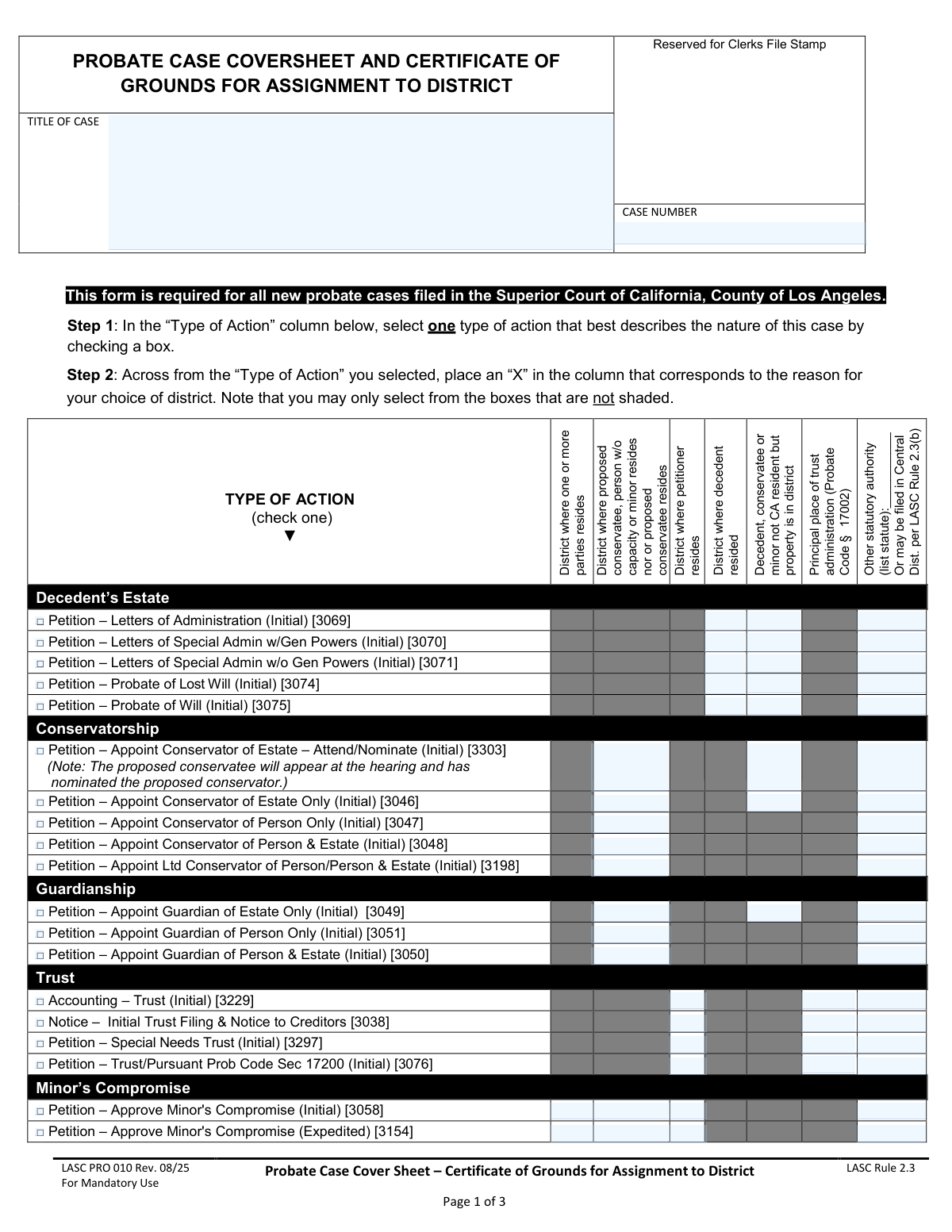
Form LASC PRO 010, the Probate Case Cover Sheet, is a mandatory document for initiating any new probate case in the Superior Court of California, County of Los Angeles. It is used to identify the type of probate action (such as a decedent's estate, conservatorship, or guardianship) and to certify the legal reason for filing the case in a particular court district. Today, this form can be filled out quickly and accurately using AI-powered services like Instafill.ai, which can also convert non-fillable PDF versions into interactive fillable forms.
LASC PRO 010 is part of the
probate forms category on Instafill.
Our AI automatically handles information lookup, data retrieval, formatting, and form filling.
It takes less than a minute to fill out LASC PRO 010 using our AI form filling.
Securely upload your data. Information is encrypted in transit and deleted immediately after the form is filled out.
Form specifications
| Form name: | Probate Case Cover Sheet – Certificate of Grounds for Assignment to District |
| Number of fields: | 168 |
| Number of pages: | 3 |
| Language: | English |
More forms in Probate forms
Instafill Demo: How to fill out PDF forms in seconds with AI
How to Fill Out LASC PRO 010 Online for Free in 2026
Are you looking to fill out a LASC PRO 010 form online quickly and accurately? Instafill.ai offers the #1 AI-powered PDF filling software of 2026, allowing you to complete your LASC PRO 010 form in just 37 seconds or less.
Follow these steps to fill out your LASC PRO 010 form online using Instafill.ai:
- 1 Navigate to Instafill.ai and upload or select the LASC PRO 010 form.
- 2 Enter the case title and case number (if assigned) in the designated fields.
- 3 In Step 1, select the checkbox for the 'Type of Action' that best describes your case (e.g., Decedent's Estate, Conservatorship, Trust).
- 4 In Step 2, mark the column that corresponds to the reason for your choice of court district, based on the action you selected.
- 5 Complete Steps 3, 4, and 5 by selecting the district, indicating any interpreter needs, and providing detailed information about the subject of the case (e.g., decedent, conservatee).
- 6 Electronically sign and date the declaration in the certification section to attest to the accuracy of the information provided.
- 7 Review the entire completed form for accuracy, then download, print, or e-file the document as required by the court.
Our AI-powered system ensures each field is filled out correctly, reducing errors and saving you time.
Why Choose Instafill.ai for Your Fillable LASC PRO 010 Form?
Speed
Complete your LASC PRO 010 in as little as 37 seconds.
Up-to-Date
Always use the latest 2026 LASC PRO 010 form version.
Cost-effective
No need to hire expensive lawyers.
Accuracy
Our AI performs 10 compliance checks to ensure your form is error-free.
Security
Your personal information is protected with bank-level encryption.
Frequently Asked Questions About Form LASC PRO 010
This form is a mandatory cover sheet for all new probate cases filed in the Los Angeles County Superior Court. It helps the court identify the type of case and assign it to the correct geographical district.
The person or their attorney who is starting a new probate, guardianship, or conservatorship case must complete and file this form along with their initial petition.
First, in the 'Type of Action' column, check the single box that best describes your case. Then, in that same row, place an 'X' in one of the unshaded columns to indicate the reason your case belongs in a specific district.
The shaded boxes indicate that a specific reason for choosing a district is not a valid option for that particular type of case. You must only select from the available, unshaded boxes in your chosen row.
The district you select in Step 3 must correspond to the reason you marked with an 'X' in Step 2. For example, if you marked 'District where decedent resided,' you must file in the court district that serves that location.
The 'subject' is the central person involved in the case. This is the decedent in an estate case, the ward in a guardianship, the conservatee in a conservatorship, or the trustor for a trust matter.
Filing in the incorrect district can cause significant delays, as your case may need to be transferred. This could also result in additional court fees, so it is crucial to select the correct district from the start.
These are internal case codes used by the court for clerical and statistical purposes. You only need to focus on selecting the correct written description of your petition.
Yes, Step 4 asks if the person filing the petition needs an interpreter. Step 5 separately asks if the subject of the case (e.g., the proposed conservatee) will require an interpreter for court hearings.
Yes, services like Instafill.ai use AI to help you accurately auto-fill form fields, which saves time and helps prevent common errors. This is especially useful for complex forms with many fields.
If your PDF is not fillable, you can use a service like Instafill.ai to make it interactive. The platform converts flat PDFs into online fillable forms that you can easily complete and download.
Simply upload the Probate Case Cover Sheet to the Instafill.ai website. Their technology will detect the fields, allowing you to type your information directly into the form online and then download the completed document.
Compliance LASC PRO 010
Validation Checks by Instafill.ai
1
Exclusive Type of Action Selection
This validation ensures that the user has selected exactly one 'Type of Action' checkbox from the entire list on pages 1 and 2. The form instructions explicitly state to 'check one', so selecting zero or more than one action would make the filing ambiguous and subject to rejection. If this check fails, the user should be prompted to select a single, specific cause of action that best describes their case.
2
Exclusive District Reason Selection
For the single 'Type of Action' row that is selected, this check verifies that exactly one corresponding 'Reason for District' has been marked with an 'X'. This is crucial for the court clerk to correctly assign the case to the proper venue based on a single, valid justification. A failure would occur if no reason is provided or multiple reasons are selected for the chosen action, leading to processing delays.
3
Logical Consistency between Action and Subject
This check verifies that the 'Subject of Case' selected in Step 5 is logically compatible with the 'Type of Action' selected in Step 1. For example, if a 'Decedent's Estate' action is chosen, the subject must be 'Decedent'. Similarly, a 'Guardianship' action requires the subject to be a 'Ward'. This prevents fundamental errors in the case filing that would require correction and resubmission.
4
Conditional 'Other statutory authority' Specification
This validation ensures that if the 'Other statutory authority' column is marked as the reason for district assignment, the corresponding text field to 'list statute' is not empty. The court needs the specific legal code or rule to verify that the chosen venue is appropriate under this catch-all category. Failure to provide the statute would render the justification incomplete and could lead to the case being mis-assigned or rejected.
5
Conditional Interpreter Language for Filer
This check ensures that if the 'Yes' box is checked in Step 4, indicating the filer requires an interpreter, the associated 'what language?' text field is filled out. This information is vital for court administration to arrange for the correct interpreter for hearings and other proceedings. If the language is not specified, the court cannot fulfill the request, causing delays and potential legal issues.
6
Conditional Interpreter Language for Subject
This validation confirms that if the 'Yes' box is checked in Step 5, indicating the subject of the petition requires an interpreter, the corresponding language field is completed. This is critical for ensuring due process and clear communication with the conservatee, ward, or other subject. An empty language field would prevent the court from arranging necessary services, halting case progress.
7
Declaration Date Validity
This check validates that the 'Declaration Execution Date' is a complete, valid date and is not set in the future. A declaration is a sworn statement of facts as of the date of signing, so a future or invalid date would nullify its legal effect. This ensures the document is legally sound and ready for court processing upon submission.
8
Mailing Address Completeness
This validation triggers if the 'Mailing Address: same as above' checkbox is left unchecked. It ensures that all required mailing address fields (Street, City, State, Zip Code) are filled out completely. An incomplete mailing address would prevent the court and other parties from sending legally required notices, jeopardizing the case and violating due process requirements.
9
Exclusive Subject of Case Selection
This check verifies that exactly one checkbox is selected in Step 5 to identify the subject of the case (e.g., Conservatee, Ward, Decedent). The entire case revolves around a single primary subject, and selecting multiple or none would create critical ambiguity. This validation ensures the filing clearly identifies the person or entity at the center of the probate matter.
10
Conditional 'Other' Subject Specification
This validation ensures that if the 'Other' checkbox is selected as the 'Subject of Case' in Step 5, the adjacent text field is not empty. The court needs to know the specific nature of the subject if they do not fit into the standard categories. An empty field would leave a critical piece of case information missing, requiring clarification and delaying the filing.
11
Signature Field Presence
This check verifies that the 'Signature of Attorney or Self-Represented Party' field is not empty. A signature under penalty of perjury is required to certify the truthfulness of the information on the form. An unsigned cover sheet is invalid and will be immediately rejected by the court clerk, halting the filing process.
12
Service Consent Prerequisite Check
This validation ensures that the 'Accept service by Email' checkbox can only be checked if a valid email address has been provided, and the 'Accept service by Cell Phone' checkbox requires a cell phone number. This prevents a user from consenting to a method of service for which they have not provided the necessary contact information. It ensures that consent for electronic service is actionable and not based on missing data.
13
Minor's Date of Birth for Guardianship/Compromise
This check ensures that if the 'Type of Action' is a 'Guardianship' or 'Minor's Compromise', the 'Date of Birth' field in the 'Identification (For Minors)' section is completed. This date is essential to establish the subject's status as a minor, which is the basis for the court's jurisdiction in these case types. An invalid or missing date would prevent the court from verifying eligibility for the requested action.
14
District Selection Consistency
This validation verifies that one of the district checkboxes in Step 3 ('Central' or 'North') is selected and that the 'Assigned District' text field within the declaration statement is filled and matches the checkbox selection. This ensures there is no ambiguity about the intended filing district. A mismatch or missing selection would cause confusion and require manual correction by the clerk.
15
Case Title Completeness
This validation ensures the 'TITLE OF CASE' field is not left empty. The case title is the primary identifier for the legal action and is used on all subsequent documents and court records. A missing title would make the filing fundamentally incomplete and it would be rejected by the court clerk.
Common Mistakes in Completing LASC PRO 010
The form explicitly instructs the user to select only one 'Type of Action' in Step 1. Filers, especially those unsure of the exact petition type, sometimes check multiple boxes, believing it covers all possibilities. This will lead to the form being rejected by the court clerk for being ambiguous, causing delays in opening the case. To avoid this, carefully review the petition types and choose the single most accurate one that describes your initial filing.
A frequent error involves checking a 'Type of Action' box in one row, but then placing the 'X' for the district reason in a different row. The instructions require the 'X' to be placed 'across from the Type of Action you selected'. This mistake breaks the logical link between the case type and the reason for its venue, making the form invalid and leading to rejection. Always ensure your checkmark and your 'X' are on the same horizontal line.
The grid on pages 1 and 2 contains shaded boxes to indicate that a specific reason for district assignment is not legally permissible for that type of action. Filers often overlook this and place an 'X' in a shaded area. This is an automatic reason for the court to reject the cover sheet, as it demonstrates an invalid basis for the chosen courthouse. Always ensure your 'X' is placed in a white, unshaded box for your selected row.
When the reason for district assignment falls under 'Other statutory authority', the form requires the filer to write in the specific statute or rule. Many people either place an 'X' and leave the line blank or are unsure what to write. An empty citation makes the selection invalid. This can cause the filing to be rejected or mis-assigned. Before filing, identify the exact Probate Code section or Local Rule that permits your choice of venue and write it clearly on the line provided.
Filers may enter an informal or incomplete case title, such as 'The Smith Family Trust' instead of the required legal format like 'The Smith Family Revocable Trust, dated January 1, 2020'. For estates, it must be precise, such as 'Estate of John David Smith, Deceased'. An incorrect title can cause significant clerical errors, problems with record-keeping, and difficulty linking subsequent filings to the correct case, requiring later correction and causing delays.
The declaration at the bottom of page 2, where the filer certifies the information is true and correct, is a critical legal component. Forgetting to date and sign this section is a very common oversight. An unsigned or undated form is legally invalid and will be immediately rejected by the court clerk, halting the entire filing process until a properly executed form is submitted.
The form requires a two-part process: selecting a reason for a district in the grid (Step 2) and then checking the box for that specific district in Step 3. A common mistake is to select a reason in the grid that points to the Central District (e.g., decedent resided there) but then check the box for the North District in Step 3. This contradiction will cause the filing to be rejected for improper venue assignment.
In Step 5, filers often provide only a primary name for the decedent, conservatee, or minor, omitting crucial identifiers like middle names, suffixes (Jr., Sr.), or all known aliases (AKAs). This incomplete information can create ambiguity and cause problems with record-matching, background checks, and providing legal notice. To prevent delays, provide the subject's full legal name and list all other names they have been known by.
On page 3, filers may check the boxes to accept service by email or text message without fully understanding the legal implications. This action constitutes formal consent to receive official court notices and documents electronically instead of by physical mail. Conversely, failing to check these boxes when you prefer electronic communication can slow down your case. Understand that checking these boxes is a legally binding agreement on how you will receive information.
This form is often provided as a non-fillable PDF, tempting users to print and fill it out by hand. Poor handwriting can result in illegible names, dates, or selections that the court clerk cannot accurately enter into the system, leading to rejection. This forces the filer to start over, wasting time and money. To avoid this, use a tool to type directly onto the form. AI-powered form-filling tools like Instafill.ai can convert any flat PDF into a fillable version, ensuring every entry is perfectly clear and legible.
The form has two separate questions about interpreter needs: Step 4 for the person filing the petition and Step 5 for the subject of the case (e.g., the proposed conservatee). A common error is to fill out only one section when both individuals require an interpreter, or to fill out the wrong section. This can result in a lack of necessary interpreters at the hearing, causing mandatory continuances and significant delays in the case.
Saved over 80 hours a year
“I was never sure if my IRS forms like W-9 were filled correctly. Now, I can complete the forms accurately without any external help.”
Kevin Martin Green
Your data stays secure with advanced protection from Instafill and our subprocessors

Robust compliance program
Transparent business model
You’re not the product. You always know where your data is and what it is processed for.
ISO 27001, HIPAA, and GDPR
Our subprocesses adhere to multiple compliance standards, including but not limited to ISO 27001, HIPAA, and GDPR.
Security & privacy by design
We consider security and privacy from the initial design phase of any new service or functionality. It’s not an afterthought, it’s built-in, including support for two-factor authentication (2FA) to further protect your account.
Fill out LASC PRO 010 with Instafill.ai
Worried about filling PDFs wrong? Instafill securely fills probate-case-cover-sheet-certificate-of-grounds-for-assignment-to-district forms, ensuring each field is accurate.