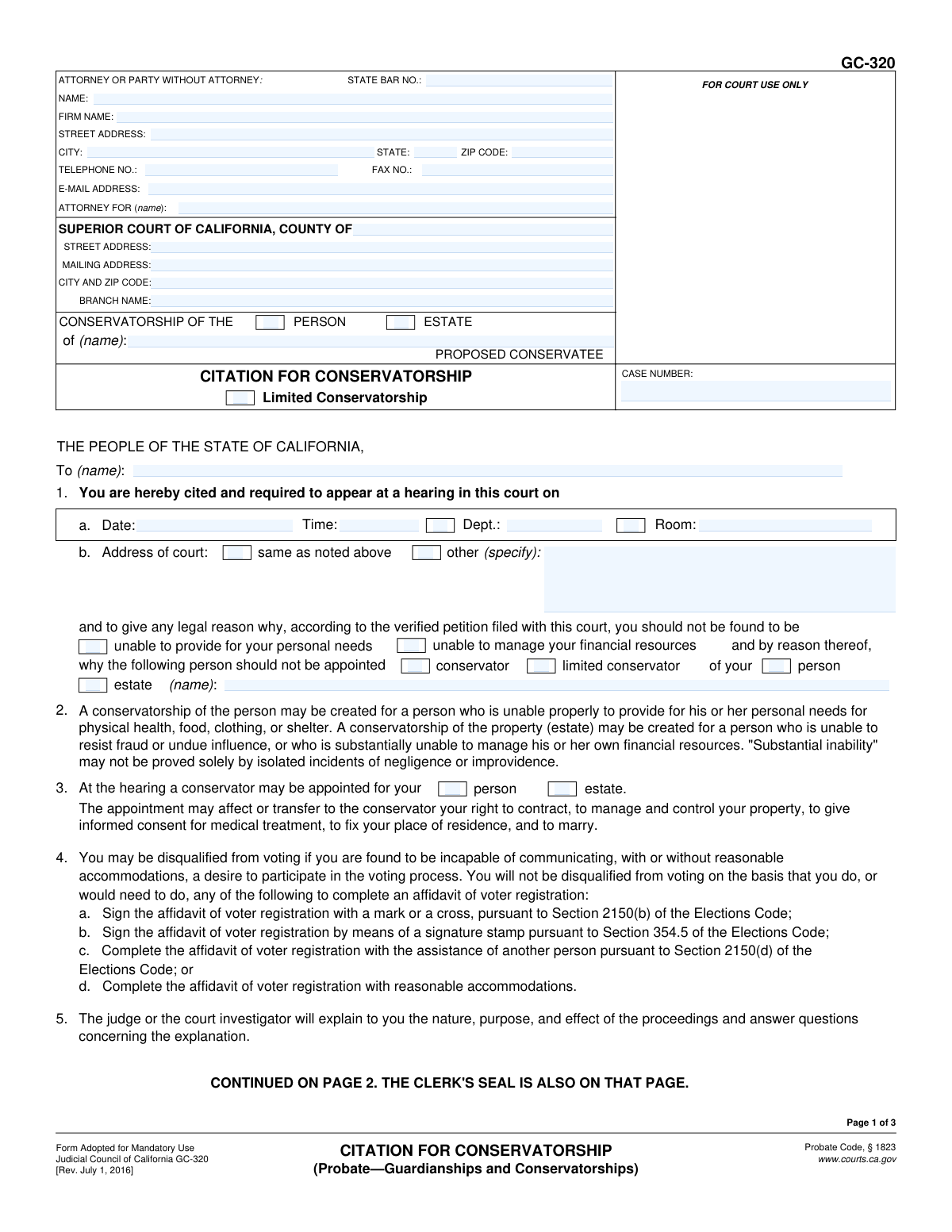
Yes! You can use AI to fill out Form GC-320, Citation for Conservatorship (Probate—Guardianships and Conservatorships)
California Form GC-320, Citation for Conservatorship, is a legal document issued by the court to inform a person (the proposed conservatee) that a legal proceeding has been initiated to establish a conservatorship over their person or estate. It details the date and location of the court hearing where the matter will be decided and explains the rights of the proposed conservatee. This form is a critical step in the legal process, ensuring the individual is properly notified and has the opportunity to respond. Today, this form can be filled out quickly and accurately using AI-powered services like Instafill.ai, which can also convert non-fillable PDF versions into interactive fillable forms.
Our AI automatically handles information lookup, data retrieval, formatting, and form filling.
It takes less than a minute to fill out GC-320 using our AI form filling.
Securely upload your data. Information is encrypted in transit and deleted immediately after the form is filled out.
Form specifications
| Form name: | Form GC-320, Citation for Conservatorship (Probate—Guardianships and Conservatorships) |
| Number of fields: | 82 |
| Number of pages: | 3 |
| Language: | English |
More forms in Guardianship forms
Instafill Demo: How to fill out PDF forms in seconds with AI
How to Fill Out GC-320 Online for Free in 2026
Are you looking to fill out a GC-320 form online quickly and accurately? Instafill.ai offers the #1 AI-powered PDF filling software of 2026, allowing you to complete your GC-320 form in just 37 seconds or less.
Follow these steps to fill out your GC-320 form online using Instafill.ai:
- 1 Navigate to Instafill.ai and upload or select the Form GC-320, Citation for Conservatorship.
- 2 Enter the Superior Court information, including the county, branch name, and address, along with the case number.
- 3 Provide the name of the proposed conservatee and the attorney or party information in the designated fields.
- 4 Fill in the details of the court hearing, including the date, time, department, and room number.
- 5 Specify the reasons for the conservatorship and the proposed conservator's name as listed in the petition.
- 6 After serving the document, complete the 'Proof of Service' section with details of who was served, when, where, and by what method.
- 7 Use the AI assistant to review all entered information for completeness and accuracy before downloading the final document for filing.
Our AI-powered system ensures each field is filled out correctly, reducing errors and saving you time.
Why Choose Instafill.ai for Your Fillable GC-320 Form?
Speed
Complete your GC-320 in as little as 37 seconds.
Up-to-Date
Always use the latest 2026 GC-320 form version.
Cost-effective
No need to hire expensive lawyers.
Accuracy
Our AI performs 10 compliance checks to ensure your form is error-free.
Security
Your personal information is protected with bank-level encryption.
Frequently Asked Questions About Form GC-320
This form is an official court notice informing you that a petition has been filed to appoint a conservator for you. It legally requires you to appear at a court hearing to respond to this petition.
The Citation is served on the 'proposed conservatee,' who is the person for whom a conservatorship is being considered. It serves as the official notification of the legal proceedings against them.
You are required to appear at the court hearing detailed on the first page of the form. You have the right to attend the hearing, oppose the petition, and be represented by a lawyer.
A conservatorship of the person is for someone unable to provide for personal needs like health or shelter. A conservatorship of the estate is for someone who cannot manage their own finances or resist fraud.
A conservatorship can transfer your rights to contract, manage your property, give medical consent, choose where you live, and marry to the conservator. The judge will explain the specific effects at your hearing.
You have the right to hire your own attorney. If you are unable to retain one, the court will appoint an attorney to represent you, and you must pay for that attorney if you are able.
The Proof of Service section must be completed by the person who delivered the Citation to you. It is filed with the court as legal proof that you were properly notified of the hearing.
The hearing date, time, department, room, and court address are all listed in section 3 on the first page of the form. Carefully check this section for all the necessary details.
Yes, the form states that you have the right to a jury trial if you wish. You should inform the court or your attorney if you want to exercise this right to have a jury decide on the matter.
Yes, for the person petitioning the court, services like Instafill.ai use AI to accurately auto-fill form fields. This can save time and help reduce errors before the form is filed with the court clerk for issuance.
You can use a service like Instafill.ai to easily complete this form online. Simply upload the form, and the platform will make it interactive so you can type your information directly into the fields before printing.
If you have a non-fillable PDF, you can use a tool like Instafill.ai to help. Uploading the flat PDF to the platform will convert it into an interactive, fillable form that you can complete on your computer.
A limited conservatorship is specifically for adults with developmental disabilities. It grants the conservator power over only certain aspects of the person's life, allowing the conservatee to retain independence in other areas.
You would only be disqualified from voting if the court finds you are incapable of communicating a desire to participate in the voting process. Needing assistance to register to vote does not disqualify you.
Compliance GC-320
Validation Checks by Instafill.ai
1
Case Number Consistency Across Pages
This check ensures that the 'Case Number' entered on page 1, page 2, and page 3 of the form are identical. It is critical for maintaining document integrity and ensuring all pages are correctly associated with the same legal case file. If the numbers do not match, the form could be rejected by the court clerk, causing delays in the legal proceeding.
2
Conditional Attorney State Bar Number
This validation verifies that if the 'Attorney For (name)' field is filled, the 'State Bar No.' field is also filled and contains a valid number. This is important to confirm the filing party is a licensed attorney in good standing. If a party is self-represented (pro se), both fields should be blank; a mismatch could lead to rejection or questions about legal representation.
3
Hearing Address Specificity
This check ensures that if the 'other (specify)' checkbox for the court address is selected, the corresponding 'Other Court Address' text field is not empty. It prevents ambiguity about the hearing location, which is essential information for the cited person. Failure to provide the specific address when 'other' is indicated would make the citation defective.
4
Conservatorship Type Selection
This validation requires that at least one of the 'Person' or 'Estate' checkboxes is selected in the main header under 'CONSERVATORSHIP OF THE'. This defines the fundamental scope of the proposed conservatorship. Without this information, the court and the cited person would not know what rights are being considered for transfer, making the petition incomplete.
5
Exclusive Proof of Service Method
This check validates that exactly one method of service is selected in the 'Proof of Service' section (e.g., 'personally delivering', 'by mailing', 'other'). Allowing multiple selections would create ambiguity about how service was legally performed. This ensures a clear and legally defensible record of service, which is a cornerstone of due process.
6
Conditional Personal Service Details
This validation ensures that if the 'by personally delivering the copies' checkbox is selected, the 'Personal delivery date' and 'Personal delivery time' fields are both completed. These details are legally required to establish when and where the service occurred. Omitting this information would invalidate the proof of personal service.
7
Conditional Registered Process Server Information
This check verifies that if the 'Registered California process server' checkbox is selected, the 'Registration Number', 'County', and 'Registration Expiration Date' fields are all filled. This information is necessary for the court to verify the server's credentials. Incomplete information could lead the court to question the validity of the service.
8
Process Server Registration Validity
This validation ensures that the 'Registration Expiration Date' for a registered process server is a date in the future. Serving documents with an expired registration is not legally valid and would nullify the proof of service. This check prevents the submission of legally deficient service documents.
9
Future Hearing Date
This check validates that the 'Hearing Date' is a valid date and is set in the future. Scheduling a hearing for a past date is a logical impossibility and would render the citation invalid. This ensures the form provides actionable and correct information to the person being cited.
10
Proof of Service Declaration Requirement
This validation ensures that in the 'Proof of Service' section, exactly one of the two final checkboxes ('I declare under penalty of perjury...' or 'I am a California sheriff or marshal...') is selected. This declaration is a non-negotiable legal requirement that attests to the truthfulness of the service information. Failure to make this declaration invalidates the entire Proof of Service.
11
Proposed Conservatee Name Consistency
This check verifies that the name entered in the 'CONSERVATORSHIP OF THE PROPOSED CONSERVATEE' field is consistent on all pages of the document. This is crucial for avoiding ambiguity and ensuring the legal action is directed at the correct individual. Inconsistencies could lead to case dismissal or significant delays.
12
Completeness of Conservatorship Justification
This validation ensures that at least one of the checkboxes in section 3 ('unable to provide for your personal needs' or 'unable to manage your financial resources') is selected. This specifies the legal grounds for seeking the conservatorship. Without this justification, the petition lacks a fundamental legal basis and would be considered incomplete by the court.
Common Mistakes in Completing GC-320
Individuals filing without a lawyer (pro se) often get confused and fill out fields meant for attorneys, such as the 'State Bar No.' or 'Attorney For' name. This happens due to the section's dual purpose. Incorrectly filling this section can cause confusion at the clerk's office and may lead to processing delays. To avoid this, a party without an attorney should only fill in their personal contact information and leave all attorney-specific fields blank.
The case number is often assigned by the court clerk when the petition is first filed and is placed at the top of page one. A common oversight is failing to copy this exact case number onto the headers of pages two and three. This omission can lead to pages being misfiled or separated from the main document, causing significant administrative delays. Always double-check that the case number is present and correct on all pages of the form after it has been assigned.
The form requires the filer to specify whether the conservatorship is for the 'Person,' the 'Estate,' or both in multiple locations (header, section 3, section 4). People frequently make inconsistent selections, such as checking 'Person' in the header but only 'Estate' in a later section. This ambiguity can lead to court rejection or the need for clarification, delaying the hearing. It is crucial to review the entire form to ensure the scope is checked consistently throughout.
The person who initiates the conservatorship case (the petitioner) is a party to the proceeding and is legally prohibited from serving the citation and signing the Proof of Service on page 3. This mistake is common among those unfamiliar with legal procedure and will invalidate the service, requiring the process to be repeated. To avoid this, the petitioner must have a non-party who is at least 18 years old serve the documents and complete the Proof of Service form.
The Proof of Service section requires precise details about how, when, and where the documents were delivered, but filers often omit the exact time of service, the full address, or the date. This lack of specificity can be grounds for a legal challenge to the validity of the service, potentially forcing a new hearing date. The server must meticulously record all details of the service to ensure the form is legally sufficient. AI-powered tools like Instafill.ai can help by flagging mandatory fields to prevent such omissions.
Filers sometimes use a nickname or an incomplete version of the proposed conservatee's name in the header and throughout the form. As this is a formal legal document, the full, legal name as it appears on official identification (like a birth certificate or driver's license) must be used. Using an incorrect name can create legal ambiguity and may require the filing of amended documents, causing delays.
In section 3, the form asks whether a 'conservator' or 'limited conservator' should be appointed. These are legally distinct types of conservatorships, yet people sometimes check both boxes out of confusion. This indicates a fundamental misunderstanding of the relief being sought and will require clarification, potentially delaying the proceedings. You must understand the difference and select only the one that applies to your specific petition.
When serving by mail, the form indicates that other documents may be required, such as a 'Notice and Acknowledgment of Receipt' (form POS-015) or a 'return receipt' for out-of-state service. Servers often check the box for mail service but forget to include and attach these crucial supporting documents with their filing. This failure renders the service incomplete and legally invalid, necessitating that service be performed again.
The Proof of Service is not valid unless the person who served the papers signs and dates it, and checks the box to declare the information is true under penalty of perjury. Forgetting this final step is a frequent and critical error that nullifies the entire Proof of Service. This requires the form to be re-signed and re-filed, delaying the case. Using a checklist or a guided form-filling tool can help prevent this simple but consequential mistake.
In section 2, the form asks for the hearing location, providing a checkbox for 'same as noted above' or 'other'. People may incorrectly assume the hearing is at the main courthouse address listed in the header when it is actually scheduled for a different branch or department. This can cause the cited person to miss their hearing, leading to default judgments or other serious legal consequences. Always verify the exact hearing location from the court notice and fill out this section carefully.
Many court forms are only available online as non-fillable, flat PDFs, forcing users to print them and fill them out by hand. This often leads to illegible handwriting, mistakes, and an unprofessional appearance, which can result in processing delays or rejection by the court clerk. To avoid this, you can use a service like Instafill.ai to convert the flat PDF into a smart, fillable form, ensuring all entries are typed, legible, and properly formatted.
Saved over 80 hours a year
“I was never sure if my IRS forms like W-9 were filled correctly. Now, I can complete the forms accurately without any external help.”
Kevin Martin Green
Your data stays secure with advanced protection from Instafill and our subprocessors

Robust compliance program
Transparent business model
You’re not the product. You always know where your data is and what it is processed for.
ISO 27001, HIPAA, and GDPR
Our subprocesses adhere to multiple compliance standards, including but not limited to ISO 27001, HIPAA, and GDPR.
Security & privacy by design
We consider security and privacy from the initial design phase of any new service or functionality. It’s not an afterthought, it’s built-in, including support for two-factor authentication (2FA) to further protect your account.
Fill out GC-320 with Instafill.ai
Worried about filling PDFs wrong? Instafill securely fills form-gc-320-citation-for-conservatorship-probateguardianships-and-conservatorships forms, ensuring each field is accurate.