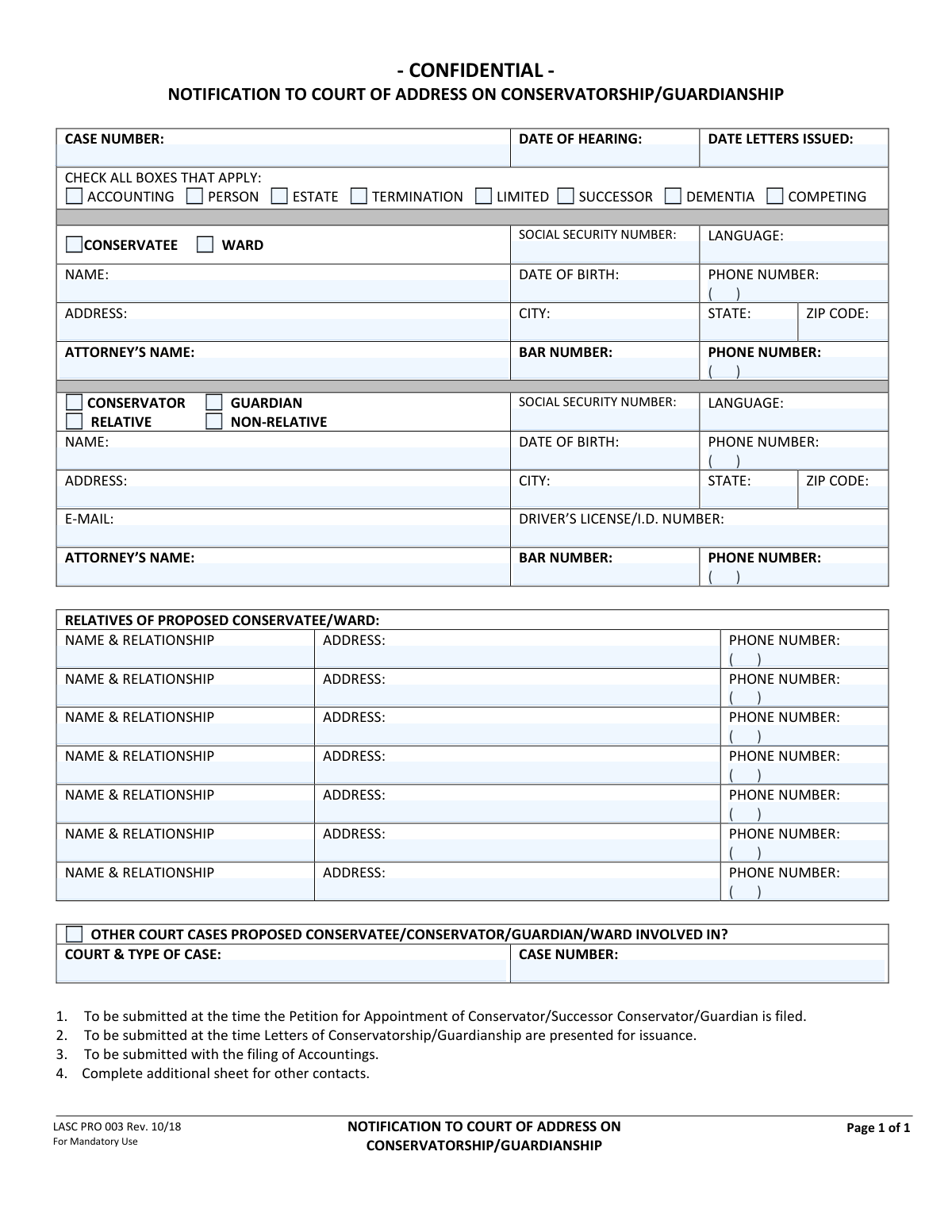
Yes! You can use AI to fill out LASC PRO 003, NOTIFICATION TO COURT OF ADDRESS ON CONSERVATORSHIP/GUARDIANSHIP

Form LASC PRO 003, Notification to Court of Address on Conservatorship/Guardianship, is a mandatory, confidential document used in Los Angeles Superior Court probate cases. It serves to provide the court with current contact and identifying information for the conservatee/ward, the proposed conservator/guardian, and their relatives, which is critical for proper notice and case management. Today, this form can be filled out quickly and accurately using AI-powered services like Instafill.ai, which can also convert non-fillable PDF versions into interactive fillable forms.
LASC PRO 003 is part of the court forms, guardianship forms, ATO forms and UK court forms categories on Instafill.
Our AI automatically handles information lookup, data retrieval, formatting, and form filling.
It takes less than a minute to fill out LASC PRO 003 using our AI form filling.
Securely upload your data. Information is encrypted in transit and deleted immediately after the form is filled out.

Form specifications

Form name: LASC PRO 003, NOTIFICATION TO COURT OF ADDRESS ON CONSERVATORSHIP/GUARDIANSHIP
Number of fields: 67
Number of pages: 1
Language: English
main-image

Instafill Demo: How to fill out PDF forms in seconds with AI

How to Fill Out LASC PRO 003 Online for Free in 2026

Are you looking to fill out a LASC PRO 003 form online quickly and accurately? Instafill.ai offers the #1 AI-powered PDF filling software of 2026, allowing you to complete your LASC PRO 003 form in just 37 seconds or less.
Follow these steps to fill out your LASC PRO 003 form online using Instafill.ai:
  1. 1 Navigate to Instafill.ai and upload or select the LASC PRO 003 form.
  2. 2 Provide the case information, including the case number, hearing date, and the nature of the proceeding by checking the appropriate boxes.
  3. 3 Enter the confidential personal information for the proposed conservatee or ward, such as their name, date of birth, and address.
  4. 4 Input the detailed information for the proposed conservator or guardian, including their contact details, relationship to the ward, and attorney information if applicable.
  5. 5 List the names, addresses, and phone numbers for up to seven relatives of the proposed conservatee/ward.
  6. 6 Disclose any other court cases that the parties are involved in, providing the court name and case number.
  7. 7 Review all the information auto-filled by the AI for accuracy and completeness before finalizing the document for submission to the court.

Our AI-powered system ensures each field is filled out correctly, reducing errors and saving you time.

Why Choose Instafill.ai for Your Fillable LASC PRO 003 Form?

Speed

Complete your LASC PRO 003 in as little as 37 seconds.

Up-to-Date

Always use the latest 2026 LASC PRO 003 form version.

Cost-effective

No need to hire expensive lawyers.

Accuracy

Our AI performs 10 compliance checks to ensure your form is error-free.

Security

Your personal information is protected with bank-level encryption.

Frequently Asked Questions About Form LASC PRO 003

This form, titled 'Notification to Court of Address on Conservatorship/Guardianship,' is used to provide the court with confidential contact and background information for all parties involved in a conservatorship or guardianship case.

The person petitioning for the appointment of a conservator/guardian, or the person filing an accounting, must complete and submit this form. It provides the court with essential, up-to-date information on all parties.

This form must be submitted at several key points: when filing the initial Petition for Appointment, when Letters of Conservatorship/Guardianship are presented for issuance, and with the filing of any subsequent accountings.

The form is confidential because it contains sensitive personal information like Social Security numbers, dates of birth, and addresses. This status ensures the information is protected and used only for official court purposes.

A 'Conservatee' is an adult who the court has determined is unable to care for themselves or manage their finances. A 'Ward' is a minor (under 18) who is under the care of a court-appointed guardian.

The court requires this information to conduct necessary background checks and to properly identify all parties involved in the case. This sensitive information is kept confidential by the court.

You must make a reasonable effort to obtain the current contact information for all required relatives. If you are unable to find it after a diligent search, you may note that the information is 'Unknown' and be prepared to explain your search efforts to the court.

The form instructions state to 'Complete additional sheet for other contacts.' You can attach a separate page with the same information format for any additional relatives you need to list.

You should disclose any other court cases (such as civil, criminal, family law, or other probate matters) that the proposed conservatee, ward, conservator, or guardian is currently involved in. This helps the court get a complete picture of any related legal issues.

Check 'Person' if the conservatorship or guardianship is for making personal decisions like healthcare and housing. Check 'Estate' if it is for managing financial affairs, property, and assets. You may need to check both.

Yes, services like Instafill.ai use AI to accurately auto-fill form fields from your saved information. This can save you significant time and help reduce errors when completing complex forms.

Simply upload the LASC PRO 003 PDF to the Instafill.ai platform. The AI will make the document interactive, allowing you to fill it out easily online or auto-fill the fields with your saved data.

If you have a flat, non-fillable PDF, you can use a service like Instafill.ai. It can convert the document into an interactive, fillable form that you can complete, sign, and download.

Compliance LASC PRO 003
Validation Checks by Instafill.ai

1
Social Security Number Format
This validation ensures that the Social Security Number for both the proposed conservatee/ward and the proposed conservator/guardian is entered in the correct XXX-XX-XXXX format. It is crucial for correctly identifying individuals in confidential court records and for background checks. If the format is incorrect, the system will reject the entry and prompt the user to re-enter the number correctly to prevent data entry errors.
2
Date Chronology Verification
This check verifies that the 'Date Letters Issued' is on or after the 'Date of Hearing'. It is illogical for letters of conservatorship/guardianship to be issued before the hearing that grants them. This validation prevents logical impossibilities in the case timeline. If the date of issuance is before the hearing date, the user will receive an error message requiring them to correct one or both dates.
3
Exclusive Role Selection for Protected Person
This validation ensures that either 'Conservatee' or 'Ward' is selected, but not both. These roles are typically mutually exclusive, with 'Conservatee' referring to an adult and 'Ward' to a minor. This check maintains the logical integrity of the filing and clarifies the legal status of the protected person. If both or neither are selected, the form submission will be blocked until the user makes a single, valid selection.
4
Conditional Requirement for Conservator/Guardian Information
This check ensures that if the 'CONSERVATOR' or 'GUARDIAN' box is checked, then essential fields like 'Name', 'Date of Birth', and 'Address' in that section are mandatory. This information is critical for identifying and vetting the proposed fiduciary. Failure to provide this information when a role is selected would render the notification incomplete, so the system will prevent submission until the required fields are filled.
5
Exclusive Relationship Status for Fiduciary
This validation confirms that for the proposed conservator/guardian, either 'RELATIVE' or 'NON-RELATIVE' is selected, but not both. This status is a key piece of information for the court in understanding the relationship dynamics. The check prevents contradictory or ambiguous data. If both or neither box is checked, the user will be prompted to select exactly one option.
6
Attorney Bar Number Dependency
This validation requires that if an 'Attorney's Name' is provided (for either the conservatee or the conservator), the corresponding 'Bar Number' field must also be filled. A bar number is the unique identifier for a licensed attorney and is essential for verification. This rule ensures that when an attorney is listed, their credentials can be confirmed. If the name is present but the bar number is missing, an error will be triggered.
7
Conditional Requirement for Other Court Cases
This check verifies that if the 'Other court cases...' checkbox is selected, the 'Court & Type of Case' and 'Case Number' fields must be filled out. This ensures that an affirmative declaration of other legal involvement is accompanied by the necessary details for the court to investigate further. If the box is checked but the details are omitted, the submission will be flagged as incomplete and the user will be required to provide the information.
8
Standard Phone Number Format
This validation checks that all phone number fields on the form adhere to a standard format, such as (XXX) XXX-XXXX or XXX-XXX-XXXX. Consistent formatting is important for database integrity and for ensuring that automated systems or court personnel can successfully use the number for contact. An invalid format will result in an error message, asking the user to correct the entry.
9
ZIP Code Format Validation
This check ensures that all ZIP Code fields contain a valid 5-digit or 9-digit (ZIP+4) numeric format. Correct postal codes are essential for ensuring that official notices and correspondence are delivered successfully to all parties. If the entry does not match a valid ZIP code format, the system will prompt the user to correct it before proceeding.
10
Date of Birth Plausibility
This validation ensures that any 'Date of Birth' entered is a valid date that occurs in the past and is not in the future. This simple logical check prevents obvious data entry errors for a critical piece of identifying information. If a future date is entered, the system will display an error and require the user to enter a valid past date.
11
Purpose of Filing Selection
This validation ensures that at least one checkbox is selected from the 'CHECK ALL BOXES THAT APPLY' section (e.g., Accounting, Person, Estate). This section defines the reason for the notification, and submitting the form without this information would make its purpose unclear to the court. If no box is checked, the user will be prompted to select at least one option to clarify the nature of the filing.
12
Relative Information Completeness
This check ensures that if a 'NAME & RELATIONSHIP' is provided for any of the relatives, the corresponding 'ADDRESS' and 'PHONE NUMBER' fields are also completed. This prevents partial or unusable entries for individuals who must receive legal notice. If a relative's name is entered without their contact details, the system will halt submission and require the missing information to be filled in.
13
Email Address Format
This validation verifies that the 'E-mail' address provided for the proposed conservator/guardian follows the standard '[email protected]' format. An invalid email address is useless for electronic communication and service of documents. The check prevents typos and incorrectly formatted entries, ensuring the provided email is syntactically correct. If the format is invalid, the user will be notified to correct it.
14
State Field Validation
This check validates that the 'STATE' fields contain either a recognized two-letter state abbreviation (e.g., CA, NY) or a valid full state name. This ensures address accuracy for mailing legal notices and other official correspondence. An invalid entry could lead to misdirected mail, so the system will cross-reference the input against a list of valid states and prompt for correction if a match is not found.

Common Mistakes in Completing LASC PRO 003

Saved over 80 hours a year

“I was never sure if my IRS forms like W-9 were filled correctly. Now, I can complete the forms accurately without any external help.”

Kevin Martin Green

Your data stays secure with advanced protection from Instafill and our subprocessors

Robust compliance program

Transparent business model

You’re not the product. You always know where your data is and what it is processed for.

ISO 27001, HIPAA, and GDPR

Our subprocesses adhere to multiple compliance standards, including but not limited to ISO 27001, HIPAA, and GDPR.

Security & privacy by design

We consider security and privacy from the initial design phase of any new service or functionality. It’s not an afterthought, it’s built-in, including support for two-factor authentication (2FA) to further protect your account.

Fill out LASC PRO 003 with Instafill.ai

Worried about filling PDFs wrong? Instafill securely fills lasc-pro-003-notification-to-court-of-address-on-conservatorshipguardianship forms, ensuring each field is accurate.