Yes! You can use AI to fill out Form GC-140, Order Appointing Temporary Guardian (Probate—Guardianships and Conservatorships)

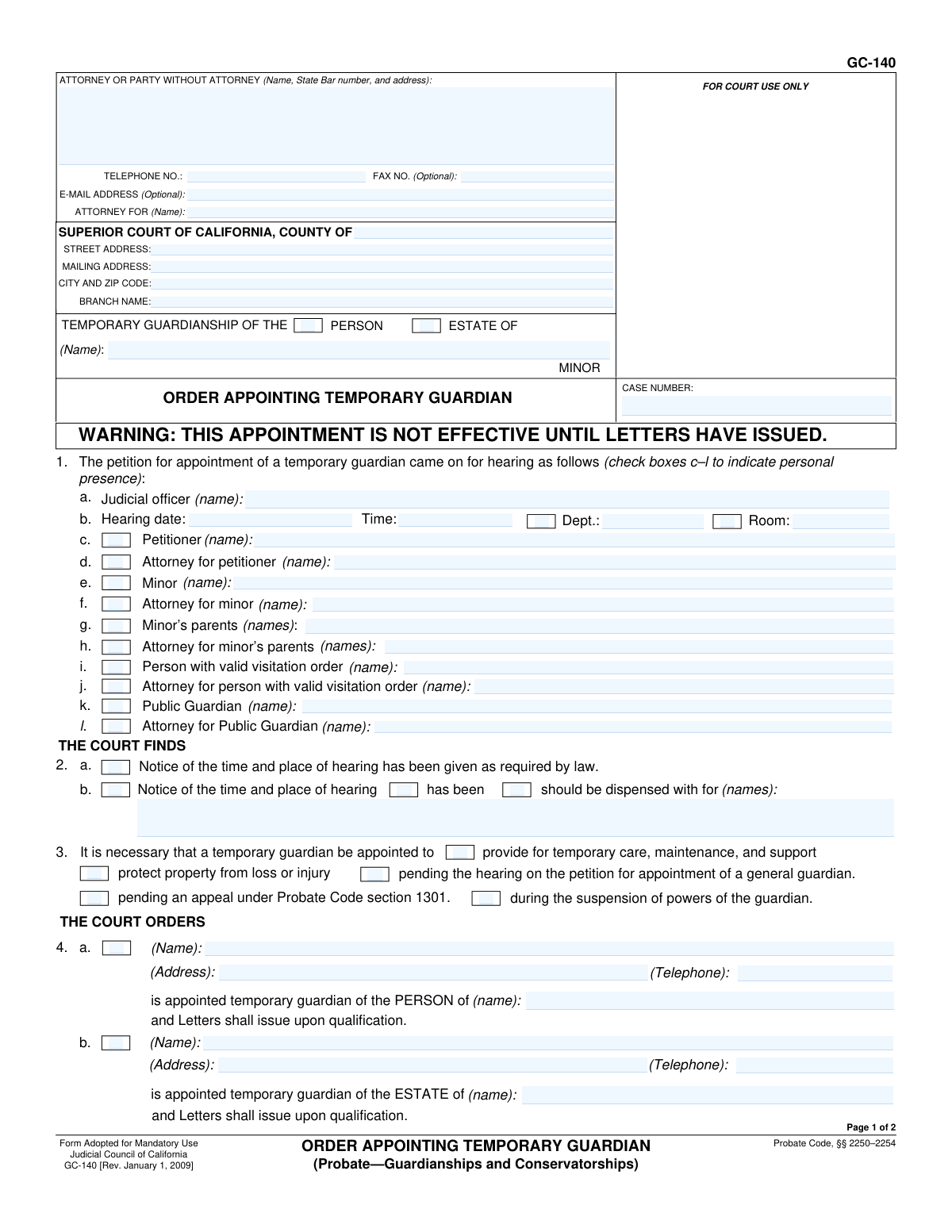
Form GC-140, Order Appointing Temporary Guardian, is a mandatory California court form used to formalize the court's decision to appoint a temporary guardian for a minor. This order specifies whether the guardianship is for the minor's person (care and custody) or estate (finances and property), and outlines the guardian's powers and any required bonds. Completing this form accurately is crucial for the order to be legally effective. Today, this form can be filled out quickly and accurately using AI-powered services like Instafill.ai, which can also convert non-fillable PDF versions into interactive fillable forms.
GC-140 is part of the guardianship forms, ATO forms and probate forms categories on Instafill.
Our AI automatically handles information lookup, data retrieval, formatting, and form filling.
It takes less than a minute to fill out GC-140 using our AI form filling.
Securely upload your data. Information is encrypted in transit and deleted immediately after the form is filled out.

Form specifications

Form name: Form GC-140, Order Appointing Temporary Guardian (Probate—Guardianships and Conservatorships)
Number of fields: 87
Number of pages: 2
Language: English
main-image

Instafill Demo: How to fill out PDF forms in seconds with AI

How to Fill Out GC-140 Online for Free in 2026

Are you looking to fill out a GC-140 form online quickly and accurately? Instafill.ai offers the #1 AI-powered PDF filling software of 2026, allowing you to complete your GC-140 form in just 37 seconds or less.
Follow these steps to fill out your GC-140 form online using Instafill.ai:
  1. 1 Navigate to Instafill.ai and upload or select Form GC-140.
  2. 2 Provide the court and case information, such as the county, branch name, and case number, allowing the AI to place it in the correct fields.
  3. 3 Enter the details of the hearing, including the date, judicial officer, and the names of all parties present as indicated on the form.
  4. 4 Input the court's findings and the specific orders for the appointment, including the name of the temporary guardian and whether the guardianship is for the person, estate, or both.
  5. 5 Specify the court's orders regarding bond requirements, additional powers granted to the guardian, and the expiration date of the order.
  6. 6 Review all the information auto-filled by the AI to ensure it accurately reflects the court's order.
  7. 7 Download the completed form to be signed by the judicial officer and filed with the court.

Our AI-powered system ensures each field is filled out correctly, reducing errors and saving you time.

Why Choose Instafill.ai for Your Fillable GC-140 Form?

Speed

Complete your GC-140 in as little as 37 seconds.

Up-to-Date

Always use the latest 2026 GC-140 form version.

Cost-effective

No need to hire expensive lawyers.

Accuracy

Our AI performs 10 compliance checks to ensure your form is error-free.

Security

Your personal information is protected with bank-level encryption.

Frequently Asked Questions About Form GC-140

Form GC-140 is a California Judicial Council form that a judge signs to officially appoint a temporary guardian for a minor. It is the court's order, not an application, and it specifies the terms of the appointment, such as the guardian's powers and whether a bond is required.

While an attorney or party might prepare a draft of this form, it is ultimately completed and signed by the judicial officer (judge) to make it an official court order. It documents the decisions made at the hearing for the temporary guardianship.

A guardian of the 'person' is responsible for the minor's physical care, such as housing, health, and education. A guardian of the 'estate' is responsible for managing the minor's finances, property, and assets. The court can appoint a guardian for one or both roles.

After the judge signs the GC-140 Order, the court clerk issues a separate document called 'Letters of Temporary Guardianship.' The 'Letters' are the official proof of the guardian's authority to act, and the appointment is not legally effective until this document is issued.

A temporary guardian is appointed for urgent reasons, as noted in Section 3 of the form. This is typically to provide for a minor's immediate care and support or to protect their property from loss while a petition for a long-term general guardian is pending.

A bond is a form of insurance that protects the minor's estate from financial loss due to mismanagement by the guardian. Section 6 of the form will indicate the judge's decision: whether a bond is required and for what amount, if it's waived, or if funds must be placed in a blocked account instead.

The order is temporary and has a specific end date, which the judge writes in Section 9. The appointment automatically expires on that date unless the court modifies it with a new order.

This means the judge has determined that, due to an emergency or other good cause, it was not necessary to provide formal legal notice of the hearing to certain individuals before appointing the temporary guardian. This is an exception to the standard rule requiring notice.

Yes, services like Instafill.ai use AI to help you accurately prepare the form for the judge's review and signature. AI can auto-fill case information, party details, and other fields, which saves time and helps prevent errors.

You can use a service like Instafill.ai to fill out the form online. Simply upload the form, and the platform will provide an interactive, user-friendly interface to guide you through completing all the necessary fields before you print it for submission.

If you have a flat, non-fillable PDF, you can use a service like Instafill.ai. Their technology can convert the static PDF into an interactive, fillable form that you can easily complete on your computer.

You will need the court and case information, the full name and address of the appointed guardian, the minor's name, and the specific orders made by the judge at the hearing. This includes details about the bond, any special powers, and the expiration date of the order.

This section is for the judge to grant the temporary guardian specific authority beyond what is normally provided by law. For example, the judge could grant the power to make specific medical decisions or handle a particular financial transaction, which must be detailed on the form or an attachment.

Compliance GC-140
Validation Checks by Instafill.ai

1
Validates Case Number Format
This check ensures the 'Case Number' field is entered in a format consistent with court standards, which often includes a mix of letters, numbers, and dashes. It prevents data entry errors and ensures the order can be correctly filed and associated with the proper case record. If the format is invalid, the user will be prompted to correct the entry to match the expected pattern.
2
Ensures Hearing Date is in the Past
This validation confirms that the 'Hearing Date' entered in section 1.b is a valid calendar date and that it occurs on or before the current date. Since this is an order resulting from a hearing that has already taken place, a future date would be a logical impossibility. A validation failure would require the user to enter a past or present date.
3
Conditional Requirement for Attorney State Bar Number
This check verifies that if an attorney is identified in the 'ATTORNEY OR PARTY WITHOUT ATTORNEY' section, the 'State Bar number' field is filled out. The State Bar number is a critical identifier for a licensed attorney in California. This validation ensures proper identification of legal counsel and fails if the filer is an attorney but the number is missing.
4
Requires at Least One Guardianship Type
This validation ensures that at least one of the 'PERSON' or 'ESTATE' checkboxes is selected at the top of the form under 'TEMPORARY GUARDIANSHIP OF THE'. An order must specify what is being guarded, either the minor's physical well-being (person) or their finances (estate), or both. The form is incomplete and legally ambiguous if neither is selected.
5
Conditional Completion of Guardian Appointment Details
This check enforces a logical link between the guardianship type and the appointment details in section 4. If 'PERSON' is checked in section 4.a, then the guardian's name, address, and telephone number must be provided in that section. Likewise, if 'ESTATE' is checked in section 4.b, its corresponding details must be filled. This prevents an order from being issued without identifying the appointed guardian.
6
Mutually Exclusive Bond Options in Section 6
This validation ensures that the user selects either '6a. Bond is not required' or '6b. Bond is fixed at', but not both. These two options are mutually exclusive, as a bond cannot be both required and not required simultaneously. An error will be flagged if both boxes are checked, forcing the user to make a single, clear choice.
7
Conditional Requirement for Bond Amount
This check verifies that if the '6b. Bond is fixed at' checkbox is selected, the corresponding amount field contains a valid, positive numerical value. An order setting a bond is incomplete without specifying the exact dollar amount. This validation prevents the submission of an ambiguous order and ensures the financial requirement is clearly stated.
8
Conditional Completion of Blocked Account Details
This validation ensures that if checkbox '6c. Deposits of...' is checked, the 'Deposit amount' and 'specify institution and location' fields are both filled. An order to create a blocked account is unenforceable without specifying the amount to be deposited and the financial institution where it will be held. Failure to provide this information would render the order incomplete.
9
Validates Order Expiration Date Logic
This check confirms that the 'Order expiration date' in section 9 is a valid date and is set in the future. A temporary order, by its nature, has a limited duration, so the expiration date must be after the date the order is signed. This prevents the creation of an order that is already expired or has an invalid end date.
10
Verifies Checkbox Count in Item 10
This validation automatically counts the number of checkboxes marked within sections 4 through 9 and compares it to the number entered by the user in 'Item 10'. This serves as a crucial cross-check to ensure the user has accurately tallied their selections, reducing clerical errors on the final court document. If the counts do not match, the user is prompted to correct the number in item 10.
11
Ensures Attachment Count is Consistent
This check verifies that if any checkbox indicating an attachment is used (e.g., 'attachment 6c', 'attachment 7', 'attachment 8'), the 'Number of pages attached' in item 11 is greater than zero. This prevents a user from referencing an attachment that has not been included. If an attachment is indicated but the page count is zero, the submission will be flagged for correction.
12
Conditional Name Entry for Persons Present
This validation ensures that for every checkbox marked in section 1 (c-l) to indicate a person's presence at the hearing, the corresponding name field is filled out. For example, if the 'Petitioner' box is checked, the petitioner's name must be entered. This ensures the court record accurately reflects who was present at the hearing.
13
Validates Phone Number Format
This check ensures that all telephone number fields, such as for the attorney and appointed guardians, adhere to a standard format (e.g., including an area code). Proper formatting is essential for ensuring the contact information is valid and usable for court communications. An invalid format would trigger an error, prompting the user to re-enter the number correctly.
14
Ensures Completeness of Notice Dispensation
This validation confirms that if the checkbox 'should be dispensed with' in section 2.b is checked, the corresponding text field for names is not empty. The order must specify for whom notice is being dispensed. This check prevents an incomplete or ambiguous order regarding legal notice requirements.

Common Mistakes in Completing GC-140

Incorrect Court Address and Branch Name

Users often mistakenly enter their personal address or a generic county address instead of the specific street address and branch name of the courthouse where the hearing occurred. This error can lead to the order being misfiled, rejected by the clerk, or sent to the wrong court location, causing significant processing delays. To avoid this, always verify the exact courthouse address and branch name from the court's official website or case documents before filling out the form.

Inconsistent or Incomplete Case Number

Filers frequently enter the case number without the required prefixes, suffixes, dashes, or leading zeros that are part of the official court record. An incorrectly formatted case number can cause the document to be rejected by the court's e-filing system or misrouted by the clerk, delaying the issuance of Letters of Guardianship. It is crucial to copy the case number exactly as it appears on previous court filings to ensure the document is correctly associated with the case file.

Failing to Check Presence Boxes in Section 1

In section 1, filers often write the names of attendees (items c-l) but forget to check the corresponding box to confirm their personal presence. This creates ambiguity in the court record as to whether the person was actually present at the hearing. An incomplete record can be questioned later, so it is vital to check the box for every person listed as present to ensure the record is accurate and complete.

Ambiguous Selections for Notice Dispensation

In section 2.b, a common mistake is to check that notice 'should be dispensed with' but fail to write in the names of the specific individuals for whom notice is waived. This makes the court's finding legally incomplete and unenforceable, as it is unclear who is affected by the order. Always list the full names of all persons for whom notice is being dispensed to create a clear and binding order.

Choosing Between 'Person' and 'Estate' Guardianship Incorrectly

A critical error is selecting only guardianship of the 'PERSON' (4.a) when the guardian also needs to manage the minor's finances, which requires selecting 'ESTATE' (4.b). This mistake severely limits the guardian's authority and often necessitates a return to court to amend the order, wasting time and money. Carefully consider whether the guardianship involves physical care, financial management, or both, and check all applicable boxes.

Contradictory Bond Orders in Section 6

Filers sometimes check both 'Bond is not required' (6.a) and 'Bond is fixed at: $' (6.b) simultaneously. This creates a direct contradiction that makes the order invalid until corrected, halting the appointment process. The court clerk will reject the form, and the filer will need to submit a corrected version. You must choose only one option regarding the bond to ensure the order is clear and enforceable.

Incomplete Blocked Account Details

When ordering deposits into a blocked account (6.c), users often fail to provide the full name and location of the financial institution. A vague entry like 'Wells Fargo' is insufficient for the bank to execute the order, as they need a specific branch address. This prevents the account from being properly set up and delays the finalization of the guardianship estate.

Vague Description of Additional Powers

In section 7, when specifying additional powers, users may write generic phrases like 'to handle all affairs.' Such language is legally insufficient and will likely be rejected by the judge, as orders require specificity. Failure to be specific means the guardian will lack the legal authority they need, requiring another court appearance to obtain the necessary powers.

Incorrect Tally of Checked Boxes or Attachments

In items 10 and 11, filers often miscount the number of checked boxes (in sections 4-9) or the total number of attached pages. Court clerks use these totals as a quick verification tool to ensure the document is complete and hasn't been altered. An incorrect count can lead to the form being flagged for review or rejected, delaying its entry into the court record.

Missing Attorney State Bar Number

Attorneys filling out the form on behalf of a client sometimes forget to include their State Bar number in the top-left 'Attorney or Party Without Attorney' box. This is a mandatory piece of information for attorneys in California and its omission will cause the form to be rejected by the clerk's office. AI-powered form filling tools like Instafill.ai can help prevent these errors by validating data formats and ensuring all required fields are completed. For non-fillable PDFs, Instafill.ai can also convert them into an interactive, fillable version, reducing the chance of manual entry mistakes.
Saved over 80 hours a year

“I was never sure if my IRS forms like W-9 were filled correctly. Now, I can complete the forms accurately without any external help.”

Kevin Martin Green

Your data stays secure with advanced protection from Instafill and our subprocessors

Robust compliance program

Transparent business model

You’re not the product. You always know where your data is and what it is processed for.

ISO 27001, HIPAA, and GDPR

Our subprocesses adhere to multiple compliance standards, including but not limited to ISO 27001, HIPAA, and GDPR.

Security & privacy by design

We consider security and privacy from the initial design phase of any new service or functionality. It’s not an afterthought, it’s built-in, including support for two-factor authentication (2FA) to further protect your account.

Fill out GC-140 with Instafill.ai

Worried about filling PDFs wrong? Instafill securely fills form-gc-140-order-appointing-temporary-guardian-probateguardianships-and-conservatorships forms, ensuring each field is accurate.