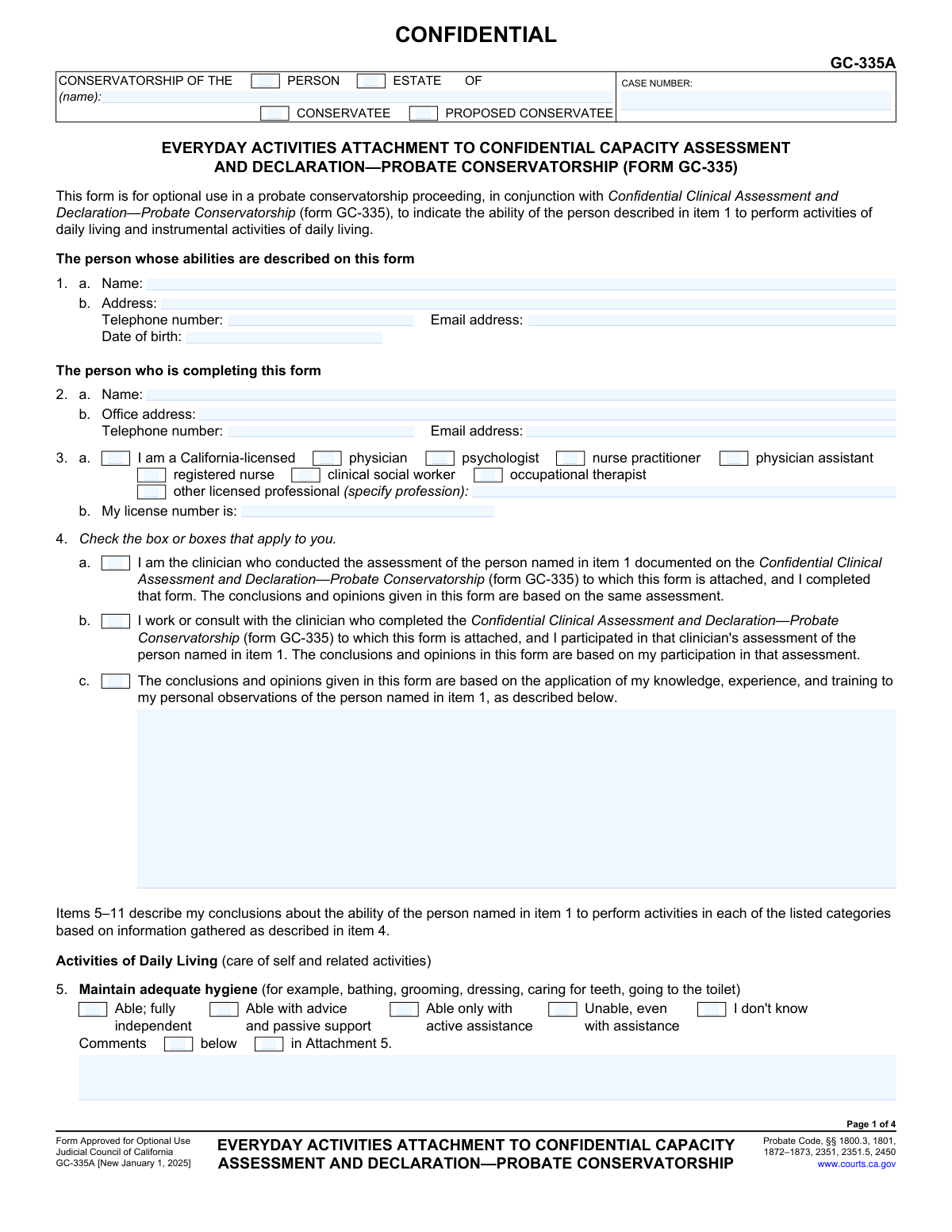
Yes! You can use AI to fill out Form GC-335A, Everyday Activities Attachment to Confidential Capacity Assessment and Declaration—Probate Conservatorship
Form GC-335A, the Everyday Activities Attachment, is an optional form used in California probate conservatorship proceedings in conjunction with Form GC-335. It allows a licensed professional to provide a detailed assessment of a proposed conservatee's ability to perform activities of daily living (e.g., hygiene, eating) and instrumental activities (e.g., financial management, medical decisions). This declaration helps the court understand the individual's functional capacity when determining the need for a conservatorship. Today, this form can be filled out quickly and accurately using AI-powered services like Instafill.ai, which can also convert non-fillable PDF versions into interactive fillable forms.
Our AI automatically handles information lookup, data retrieval, formatting, and form filling.
It takes less than a minute to fill out GC-335A using our AI form filling.
Securely upload your data. Information is encrypted in transit and deleted immediately after the form is filled out.
Form specifications
| Form name: | Form GC-335A, Everyday Activities Attachment to Confidential Capacity Assessment and Declaration—Probate Conservatorship |
| Number of fields: | 180 |
| Number of pages: | 4 |
| Language: | English |
More forms in ACH forms
Instafill Demo: How to fill out PDF forms in seconds with AI
How to Fill Out GC-335A Online for Free in 2026
Are you looking to fill out a GC-335A form online quickly and accurately? Instafill.ai offers the #1 AI-powered PDF filling software of 2026, allowing you to complete your GC-335A form in just 37 seconds or less.
Follow these steps to fill out your GC-335A form online using Instafill.ai:
- 1 Navigate to Instafill.ai and upload or select Form GC-335A.
- 2 Enter the case information, including the name of the conservatee or proposed conservatee and the court case number.
- 3 Provide the personal and professional details of the clinician completing the form, including name, address, and license information.
- 4 Indicate the basis for the assessment by checking the appropriate box describing your role and observations.
- 5 Use the interactive checkboxes to rate the individual's ability for each listed activity of daily living and instrumental activity of daily living, from 'Able; fully independent' to 'Unable, even with assistance'.
- 6 Add any required comments or specify if attachments are included for any of the assessed activities.
- 7 Review the entire form for accuracy, then electronically sign and date the declaration before saving or printing for submission to the court.
Our AI-powered system ensures each field is filled out correctly, reducing errors and saving you time.
Why Choose Instafill.ai for Your Fillable GC-335A Form?
Speed
Complete your GC-335A in as little as 37 seconds.
Up-to-Date
Always use the latest 2026 GC-335A form version.
Cost-effective
No need to hire expensive lawyers.
Accuracy
Our AI performs 10 compliance checks to ensure your form is error-free.
Security
Your personal information is protected with bank-level encryption.
Frequently Asked Questions About Form GC-335A
Form GC-335A is an optional attachment used in California probate conservatorship cases to provide the court with a detailed assessment of a person's ability to perform everyday activities, such as personal care, managing finances, and making medical decisions.
This form must be completed by a California-licensed professional, such as a physician, psychologist, registered nurse, or occupational therapist, who has assessed the proposed conservatee. A family member or the person petitioning for conservatorship cannot fill out this form.
No, Form GC-335A is for optional use. It serves as a supplement to the main Confidential Capacity Assessment and Declaration (Form GC-335) to provide more specific details on the person's functional abilities.
Form GC-335 provides a general capacity assessment, while this form, GC-335A, focuses specifically on the person's ability to perform Activities of Daily Living (ADLs) and Instrumental Activities of Daily Living (IADLs).
'Able with advice and passive support' means the person can perform the task with verbal cues or reminders. 'Able only with active assistance' means the person requires direct, hands-on physical help from someone else to complete the task.
You will need the proposed conservatee's personal details, the court case number, and your own professional license information. The core of the form requires your clinical assessment of the individual's abilities across various daily tasks.
If you cannot make a determination about the person's ability in a specific area, you should check the 'I don't know' box for that item. It is important to only report on abilities you have actually assessed or observed.
This form should be attached to Form GC-335 and filed with the court as part of the conservatorship case file. As it is a confidential document, it must be handled according to the court's rules for protecting sensitive information.
The form is confidential because it contains sensitive and private medical information about an individual's health and functional capacity. This designation helps protect the person's privacy during the legal proceedings.
For any item, you can check the box indicating comments are in an attachment (e.g., 'in Attachment 5'). Then, write your detailed notes on a separate page, label it clearly, and state the total number of attached pages in item 13.
Yes, services like Instafill.ai use AI to help you accurately auto-fill form fields with case and personal information, which saves time and reduces errors. However, the professional assessment and opinions must be provided by the licensed declarant.
You can use a service like Instafill.ai to upload the PDF and complete it online. The platform allows you to easily enter information, check boxes, and then save or print the finished document for submission.
If you have a non-fillable or 'flat' PDF, you can use a tool like Instafill.ai. It can convert the document into an interactive, fillable form that you can easily complete on your computer.
Compliance GC-335A
Validation Checks by Instafill.ai
1
Exclusive Conservatee Status Selection
This validation ensures that for the person named in the header, either the 'CONSERVATEE' or 'PROPOSED CONSERVATEE' checkbox is selected, but not both. This is critical for correctly identifying the legal status of the individual in the court proceeding. A failure would prompt the user to select exactly one of these two options.
2
Validate Conservatee Date of Birth
This check verifies that the 'Date of birth' in item 1 is a valid, fully-formatted date (MM/DD/YYYY) and that the date is in the past. This ensures data accuracy and prevents nonsensical entries like future dates. If the date is invalid or in the future, the system will reject the entry and prompt for a correction.
3
Mandatory Clinician License Type Selection
This validation confirms that at least one checkbox is selected under item 3a, specifying the clinician's professional license type (e.g., physician, psychologist). This is a required piece of information to establish the declarant's credentials and legal standing to make the assessment. If no license type is selected, the form submission will be blocked until a selection is made.
4
Conditional 'Other' Profession Specification
This check is linked to item 3a. If the 'other licensed professional' checkbox is selected, this validation ensures that the corresponding text field specifying the profession is not empty. This prevents incomplete declarations where the specific credentials of the clinician are unknown. Failure to specify the profession would result in an error message requiring the user to provide the information.
5
Validate Clinician License Number Presence
This validation ensures that the 'My license number is:' field in item 3b is filled out. The license number is essential for the court to verify the clinician's credentials with the relevant California state licensing board. An empty field would halt submission and require the user to enter the license number.
6
Mandatory Basis for Assessment Selection
This check verifies that the user has selected at least one of the options in item 4 (a, b, or c). This selection is crucial as it defines the context and basis for all the opinions given in the form. If no option is selected, the assessment lacks a proper foundation, and the form cannot be considered complete.
7
Exclusive Rating for Each Activity
For each activity listed in items 5 through 11, this validation ensures that exactly one of the five capability ratings (from 'Able; fully independent' to 'I don't know') is selected. This prevents ambiguity and ensures a complete assessment for every listed activity. If a question has zero or more than one rating selected, an error will be flagged for that specific item.
8
Conditional Comment Field Population
This validation rule applies to all activities in items 5 through 11. If a user checks the 'Comments below' box for any activity, this check ensures the corresponding text comment field is not empty. This prevents a user from indicating comments will be provided without actually providing them. A failure would prompt the user to either enter comments or uncheck the box.
9
Exclusive Comment Location Selection
For each activity in items 5-11, this check ensures that the user has not selected both 'Comments below' and 'Comments in Attachment'. The user must choose one location for their comments to avoid confusion and ensure all information is easily found. If both are checked, an error message will ask the user to select only one.
10
Logical Attachment Page Count
This validation cross-references the entire form with item 13. If any 'Comments in Attachment' checkbox is selected anywhere on the form, this check ensures the 'Number of pages attached' in item 13 is a number greater than zero. This maintains logical consistency and prevents a declaration of attached pages when none are indicated. A mismatch would trigger a warning to the user.
11
Numeric Page Count
This check ensures that the value entered for 'Number of pages attached' in item 13 is a valid, non-negative integer (0, 1, 2, etc.). This prevents the user from entering text or special characters into a field that should only contain a number. An invalid entry would be rejected, and the user would be prompted to enter a whole number.
12
Required Declaration Date
This validation confirms that the 'Date' field in the final declaration section is not empty and contains a valid date. The signature date is legally significant as it attests to when the declaration was made under penalty of perjury. The form would be considered incomplete and invalid without this date.
13
Required Declarant Name
This check ensures the '(TYPE OR PRINT NAME)' field under the signature line is filled out. This is necessary to clearly identify the person making the declaration, especially if the signature is difficult to read. An empty name field would block submission until the declarant's name is provided.
14
Consistent Header Information
This validation verifies that the 'CONSERVATORSHIP OF (name)' and 'CASE NUMBER' fields are populated and consistent across the headers of all pages of the form. This is crucial for document management and ensuring that all pages of the assessment are correctly associated with the right case file. A mismatch or missing information on any page would flag an error to ensure document integrity.
Common Mistakes in Completing GC-335A
The case name, subject status, and case number must be filled out in the header of every page. People often complete the first page meticulously but then rush or forget the headers on subsequent pages, leading to inconsistent or missing data. This can cause the court clerk to reject the filing or misfile pages, delaying the conservatorship process. To avoid this, carefully review each page before submission; AI-powered tools like Instafill.ai can automatically populate recurring information across all pages of a document, ensuring consistency.
The clinician's license number in Item 3 is the primary credential that gives legal weight to this declaration. Forgetting to include it, or transcribing it incorrectly, can invalidate the entire assessment in the eyes of the court. This mistake often happens due to oversight or rushing. The consequence is a likely rejection of the form, requiring a corrected resubmission and causing significant delays.
In the header, the filer must check whether the individual is a 'Conservatee' or a 'Proposed Conservatee'. In new proceedings, the correct term is 'Proposed Conservatee.' Mistakenly checking 'Conservatee' can cause administrative confusion and may require correction, delaying the initial processing of the petition. It is crucial to select the box that accurately reflects the current legal status of the individual in the proceeding.
If a clinician checks box 4c, stating their conclusions are based on personal observations, they are required to describe those observations in the space provided. A common error is checking the box but failing to provide the corresponding narrative. This omission leaves the assessment unsupported by evidence, weakening its credibility and potentially leading the court to disregard the clinician's opinion. To prevent this, if you check 4c, immediately write a detailed, objective description of your observations.
In sections 5 through 11, each activity requires a rating. Clinicians sometimes skip an activity if they are unsure, leaving the row of checkboxes blank. However, the form explicitly provides an 'I don't know' option for this exact scenario. Leaving a row blank makes the form incomplete and can lead to requests for more information from the court, delaying the case.
For each assessment item, the form asks the user to check a box indicating whether comments are provided 'below' or in an 'attachment.' A frequent mistake is writing detailed comments but forgetting to check the corresponding box, or checking a box but providing no comments. This creates ambiguity for the court, which may overlook the comments or question the form's completeness. To avoid this, make it a two-step process: write the comment, then immediately check the correct indicator box.
When providing comments, clinicians sometimes use subjective or brief phrases like 'seems fine' or 'has trouble.' The court requires specific, objective, and behavior-based observations to make a legal determination (e.g., 'Patient was observed attempting to use a TV remote to pay a bill'). Vague comments lack evidentiary value and may be dismissed, weakening the petition. Always describe concrete actions and observations that support your assessment rating.
Item 13 asks for the total number of pages attached to the form. It's a simple clerical task that is surprisingly easy to get wrong, especially if attachments are added or removed during drafting. An incorrect count can lead the court to believe evidence is missing, potentially causing delays or requiring a new filing. Before signing, physically count all attached pages and ensure the number entered in Item 13 is accurate.
The declaration at the end of the form is legally binding, but it is often rushed. Common errors include forgetting to enter the date, failing to sign the form, or having a printed name that doesn't match the signature. Any of these mistakes can render the entire document invalid, leading to an automatic rejection by the court clerk and significant delays. Always perform a final check of the date, printed name, and signature before considering the form complete.
While this form is a fillable PDF, some users may print it and fill it out by hand. Poor or illegible handwriting, especially in the crucial comments and information sections, can make the form impossible for the court to process. If a name, license number, or critical observation cannot be read, the form will be rejected. To avoid this, always type directly into the fillable PDF. If you only have a flat, non-fillable version, a tool like Instafill.ai can convert it into a fillable format to ensure all entries are clear and legible.
Saved over 80 hours a year
“I was never sure if my IRS forms like W-9 were filled correctly. Now, I can complete the forms accurately without any external help.”
Kevin Martin Green
Your data stays secure with advanced protection from Instafill and our subprocessors

Robust compliance program
Transparent business model
You’re not the product. You always know where your data is and what it is processed for.
ISO 27001, HIPAA, and GDPR
Our subprocesses adhere to multiple compliance standards, including but not limited to ISO 27001, HIPAA, and GDPR.
Security & privacy by design
We consider security and privacy from the initial design phase of any new service or functionality. It’s not an afterthought, it’s built-in, including support for two-factor authentication (2FA) to further protect your account.
Fill out GC-335A with Instafill.ai
Worried about filling PDFs wrong? Instafill securely fills form-gc-335a-everyday-activities-attachment-to-confidential-capacity-assessment-and-declarationprobate-conservatorship forms, ensuring each field is accurate.