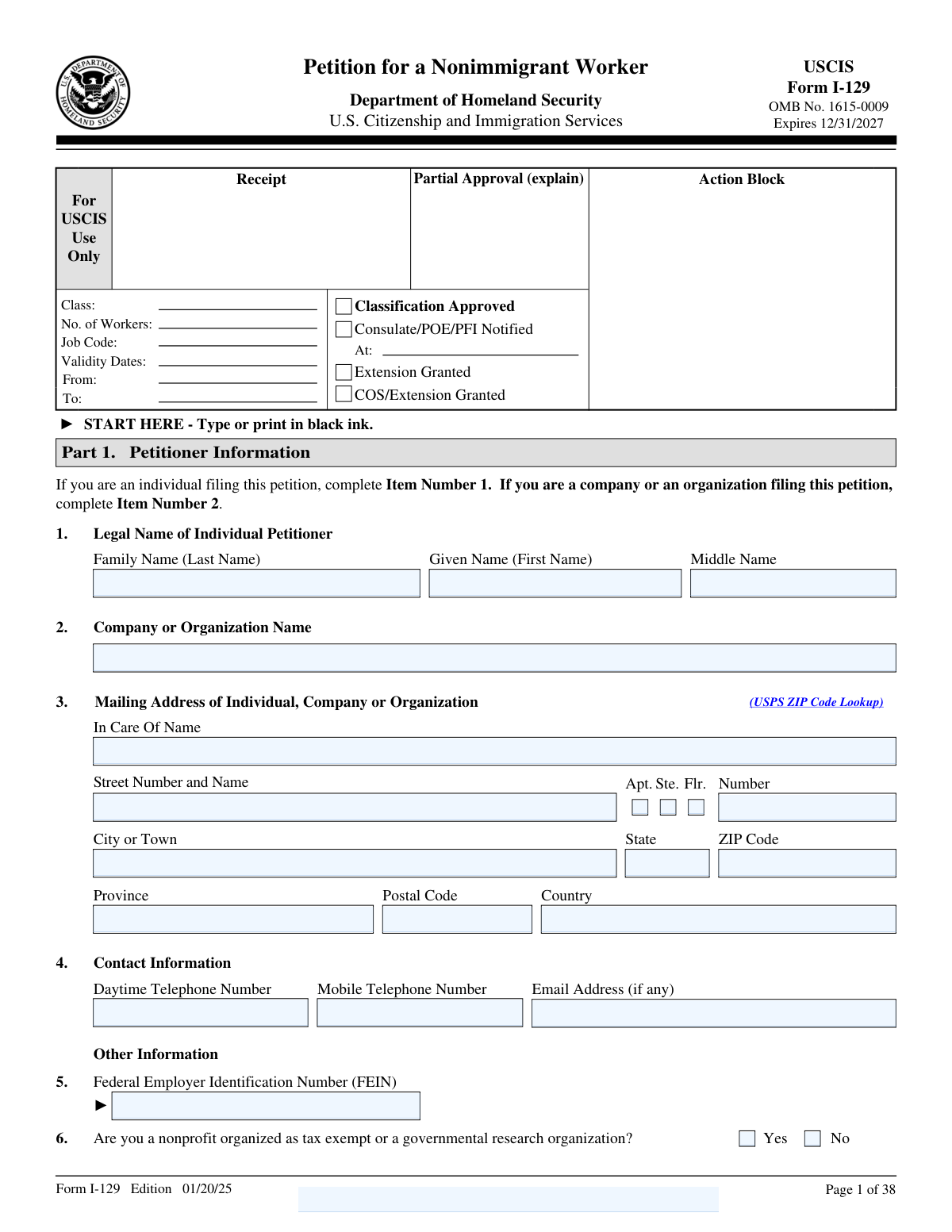
Yes! You can use AI to fill out Form I-129, Petition for a Nonimmigrant Worker

Form I-129, Petition for a Nonimmigrant Worker, is a key document filed by a U.S. employer with U.S. Citizenship and Immigration Services (USCIS) to sponsor a foreign national for temporary employment. It is essential for obtaining various nonimmigrant work visas, including H-1B, L-1, O-1, and P visas, allowing businesses to bring in talent for specialty occupations, intracompany transfers, or as individuals with extraordinary abilities. The approval of this petition is a mandatory prerequisite before the worker can apply for a visa or adjust their status if already in the U.S. Today, this extensive form can be filled out quickly and accurately using AI-powered services like Instafill.ai, which can also convert non-fillable PDF versions into interactive fillable forms.
I-129 is part of the immigrant petition forms category on Instafill.
Our AI automatically handles information lookup, data retrieval, formatting, and form filling.
It takes less than a minute to fill out I-129 using our AI form filling.
Securely upload your data. Information is encrypted in transit and deleted immediately after the form is filled out.

Form specifications

Form name: Form I-129, Petition for a Nonimmigrant Worker
Number of fields: 970
Number of pages: 38
Language: English
main-image

Instafill Demo: How to fill out PDF forms in seconds with AI

How to Fill Out I-129 Online for Free in 2026

Are you looking to fill out a I-129 form online quickly and accurately? Instafill.ai offers the #1 AI-powered PDF filling software of 2026, allowing you to complete your I-129 form in just 37 seconds or less.
Follow these steps to fill out your I-129 form online using Instafill.ai:
  1. 1 Navigate to Instafill.ai and upload or select Form I-129, Petition for a Nonimmigrant Worker.
  2. 2 Provide the petitioner's information in Part 1, including the employer's legal name, address, and Federal Employer Identification Number (FEIN).
  3. 3 Complete Part 2 to specify the requested nonimmigrant classification (e.g., H-1B, L-1) and the basis for the petition, such as new employment or a change of employer.
  4. 4 Enter the beneficiary's (the foreign worker's) personal details in Part 3, including their full name, date of birth, country of citizenship, and passport information.
  5. 5 Fill out the required supplement specific to the visa classification you are requesting (e.g., H Classification Supplement, L Classification Supplement), using AI guidance to navigate the correct sections.
  6. 6 Complete the petitioner's declaration and signature in Part 7. Use AI-powered review tools to check the entire petition for completeness and accuracy before signing.
  7. 7 Download the completed and signed Form I-129 package, including all supplements, ready for submission to USCIS with the required supporting evidence and filing fees.

Our AI-powered system ensures each field is filled out correctly, reducing errors and saving you time.

Why Choose Instafill.ai for Your Fillable I-129 Form?

Speed

Complete your I-129 in as little as 37 seconds.

Up-to-Date

Always use the latest 2026 I-129 form version.

Cost-effective

No need to hire expensive lawyers.

Accuracy

Our AI performs 10 compliance checks to ensure your form is error-free.

Security

Your personal information is protected with bank-level encryption.

Frequently Asked Questions About Form I-129

Form I-129 is used by a U.S. employer to petition for a foreign national to come to the United States temporarily to perform services, labor, or receive training. It covers various nonimmigrant classifications, including H-1B, L-1, O, P, and R visas.

The petitioner is the U.S. employer, company, or organization filing the form to sponsor a foreign worker. The beneficiary is the foreign national (the worker) for whom the petition is being filed.

No, you only need to complete and submit the specific supplement that corresponds to the visa classification you are requesting for the worker. For example, if you are filing for an H-1B worker, you must complete the H Classification Supplement.

Select 'Notify the consulate' if the beneficiary is outside the U.S. and needs a visa. 'Change of Status' is for a beneficiary already in the U.S. on a different valid status. 'Extend Stay' is for a beneficiary who already holds the requested status and needs more time.

You must provide the beneficiary's full name, date and country of birth, and passport information. If the beneficiary is currently in the U.S., you will also need their I-94 number, current nonimmigrant status, and status expiration date.

In Part 5, you must list all addresses where the beneficiary will work. If a work location is a third-party site, such as a client's office, you must check the 'Yes' box for that question and provide the name of the third-party organization.

This section is required for H-1B, H-1B1, L-1, and O-1A petitions to certify whether the employer needs an export license to release controlled technology or technical data to the foreign worker. The petitioner must review export regulations (EAR and ITAR) to make this determination.

Yes, for certain classifications like H-2A, H-2B, O, and P, you can include multiple beneficiaries if they will be performing the same services or receiving the same training. For other classifications like H-1B and L-1, a separate petition is required for each worker.

Form I-129 is only for the principal worker. To request status for the beneficiary's dependents (spouse and unmarried children under 21), you must file a separate Form I-539, Application To Extend/Change Nonimmigrant Status.

The required fees depend on the visa classification and petitioner details. The H-1B and L Classification Supplements contain specific questions to help you determine if you must pay these additional fees.

An authorized signatory of the petitioning company or organization must sign the petitioner's declaration in Part 7. If a third party, such as an attorney or accredited representative, prepared the form, they must also complete and sign the preparer's declaration in Part 8.

Yes, services like Instafill.ai use AI to auto-fill form fields accurately and save time, which is especially useful for a long and complex form like the I-129. These tools can help reduce errors by populating information from your saved profiles.

You can use a service like Instafill.ai to complete Form I-129 online. Simply upload the PDF to the platform, and it will become an interactive form where you can type your answers, save your progress, and ensure all sections are completed.

If you have a flat, non-fillable PDF, you can use a service like Instafill.ai to make it interactive. The platform's AI can convert the document into a fillable form, allowing you to easily type in all the required information on your computer.

Compliance I-129
Validation Checks by Instafill.ai

Common Mistakes in Completing I-129

Confusing Petitioner and Beneficiary Information

Filers often incorrectly enter the employer's information in Part 3 (Beneficiary Information) or the employee's information in Part 1 (Petitioner Information). The petitioner is the U.S. employer or agent filing the petition, while the beneficiary is the foreign worker who will receive the immigration benefit. This mistake can cause significant processing delays or an outright rejection, as it fundamentally misrepresents the parties involved. To avoid this, carefully read the headings for each part and double-check that the company's legal name and address are in Part 1 and the worker's full legal name and personal details are in Part 3.

Incorrectly Reporting Beneficiary's U.S. Status and I-94 Information

In Part 3, Item 6, filers frequently make errors entering the beneficiary's I-94 Arrival-Departure Record number, date of last arrival, or current nonimmigrant status expiration date. People may use an old I-94 number or misread the expiration, especially when it is marked 'D/S' (Duration of Status). An incorrect I-94 number or status history can lead to a Request for Evidence (RFE) or denial, as it impacts eligibility for an extension or change of status. Always retrieve the most current I-94 from the official CBP website and verify the status expiration date on the beneficiary's most recent I-797 approval notice or passport admission stamp.

Failing to Attach the Correct Classification-Specific Supplement

The Form I-129 is a core petition that must be filed with a specific supplement based on the visa classification being requested (e.g., H, L, O, P, R). A very common and fatal error is submitting the main form without the required supplement, or filling out the wrong one. This results in an immediate rejection of the entire petition because USCIS lacks the necessary information to adjudicate the case. Before filing, confirm the exact visa classification in Part 2, Item 1, and ensure the corresponding, fully completed supplement is attached.

Inconsistent or Missing Worksite Addresses

Petitioners often list their main corporate address in Part 1 but fail to list the actual physical location(s) where the beneficiary will work in Part 5, Item 3, if different. For classifications like H-1B, the worksite address is critical for compliance with Labor Condition Application (LCA) requirements. Failure to list all worksites can lead to petition denial and findings of non-compliance during site visits. Always list every intended work location, and if it's a third-party site, provide the name of that organization as requested.

Incorrectly Calculating and Paying H-1B or L-1 Fees

The H-1B and L-1 supplements have complex fee structures, including the ACWIA, Fraud Prevention, and Public Law 114-113 fees, with exemptions based on employer size, non-profit status, and petition type. Filers often misinterpret the questions on the 'H-1B Data Collection and Filing Fee Exemption Supplement' or the L Supplement, leading to incorrect fee payments. Submitting the wrong fee amount is one of the most common reasons for a petition to be rejected at intake. Carefully review each fee requirement and exemption criterion to ensure the correct total amount is paid with separate checks as instructed.

Missing or Unauthorized Signature in Part 7

The petition must be signed in Part 7 by an individual who is authorized to sign on behalf of the petitioning organization; this cannot be the beneficiary or an attorney who is only acting as the preparer. Petitions are frequently rejected for having a missing signature, a photocopied signature instead of an original one, or a signature from an unauthorized person. This simple oversight stops the entire process before it begins. Ensure a person with signatory authority for the company (e.g., an HR manager, executive, or in-house counsel) signs and dates the form in black ink.

Selecting Contradictory Options in Part 2 'Requested Action'

In Part 2, filers must select both a 'Basis for Classification' (Item 2) and a 'Requested Action' (Item 4), and these choices must be logical. For example, the form explicitly states that 'Change the status and extend the stay' can only be selected if 'New Employment' is checked. Selecting incompatible options, such as 'Continuation of employment' with 'Change of status,' will cause confusion and likely result in an RFE or denial. Carefully consider the beneficiary's situation to ensure the requested action aligns with the basis for the petition.

Incomplete Prior Stay History on H and L Supplements

The H and L Classification Supplements require a detailed list of the beneficiary's prior periods of stay in the U.S. in H or L status. Filers often provide incomplete lists, forget to exclude time spent in dependent statuses (like H-4 or L-2) as instructed, or fail to attach the required supporting evidence like copies of I-94s and I-797s. This information is crucial for determining if the beneficiary has reached their maximum time limit, and omissions can lead to denial. Meticulously document all relevant periods of physical presence in the U.S. in the specified status.

Vague or Generic Job Duty Descriptions

On supplements like the H Classification Supplement (Section 1) or L Classification Supplement (Section 1), petitioners provide job descriptions that are too generic and fail to establish eligibility. For an H-1B, the duties must clearly show the role requires a bachelor's degree in a specific field; for an L-1A, they must demonstrate managerial or executive functions. A vague description like 'will manage a team' is insufficient and will trigger an RFE. Provide a detailed breakdown of daily responsibilities, using percentages if possible, to clearly articulate the complexity and nature of the position.

Improper Use of Part 9 for Additional Information

When the form requires an explanation for a 'Yes' or 'No' answer (e.g., in Part 4), filers must use Part 9. Common mistakes include forgetting to provide the explanation entirely, or providing it without correctly identifying the corresponding Page Number, Part Number, and Item Number. This makes it difficult for the USCIS officer to connect the explanation to the question, potentially leading them to conclude the information is missing. To avoid this, always use Part 9 when instructed and clearly cross-reference the exact question you are elaborating on. AI-powered tools like Instafill.ai can help by automatically expanding fields and ensuring proper referencing.

Filing a Non-Fillable PDF without Conversion

Many petitioners download the I-129 as a flat, non-fillable PDF and attempt to fill it out by hand, leading to illegible entries, misaligned text, and data entry errors. Handwritten forms are more likely to be misinterpreted by USCIS data entry personnel, causing delays or incorrect information to be entered into the system. This can be a significant issue for a 38-page form with numerous supplements. To ensure clarity and accuracy, always use a fillable version of the form. If only a flat PDF is available, a service like Instafill.ai can convert it into a smart, fillable form, preventing legibility issues and enabling data validation.
Saved over 80 hours a year

“I was never sure if my IRS forms like W-9 were filled correctly. Now, I can complete the forms accurately without any external help.”

Kevin Martin Green

Your data stays secure with advanced protection from Instafill and our subprocessors

Robust compliance program

Transparent business model

You’re not the product. You always know where your data is and what it is processed for.

ISO 27001, HIPAA, and GDPR

Our subprocesses adhere to multiple compliance standards, including but not limited to ISO 27001, HIPAA, and GDPR.

Security & privacy by design

We consider security and privacy from the initial design phase of any new service or functionality. It’s not an afterthought, it’s built-in, including support for two-factor authentication (2FA) to further protect your account.

Fill out I-129 with Instafill.ai

Worried about filling PDFs wrong? Instafill securely fills form-i-129-petition-for-a-nonimmigrant-worker-2 forms, ensuring each field is accurate.