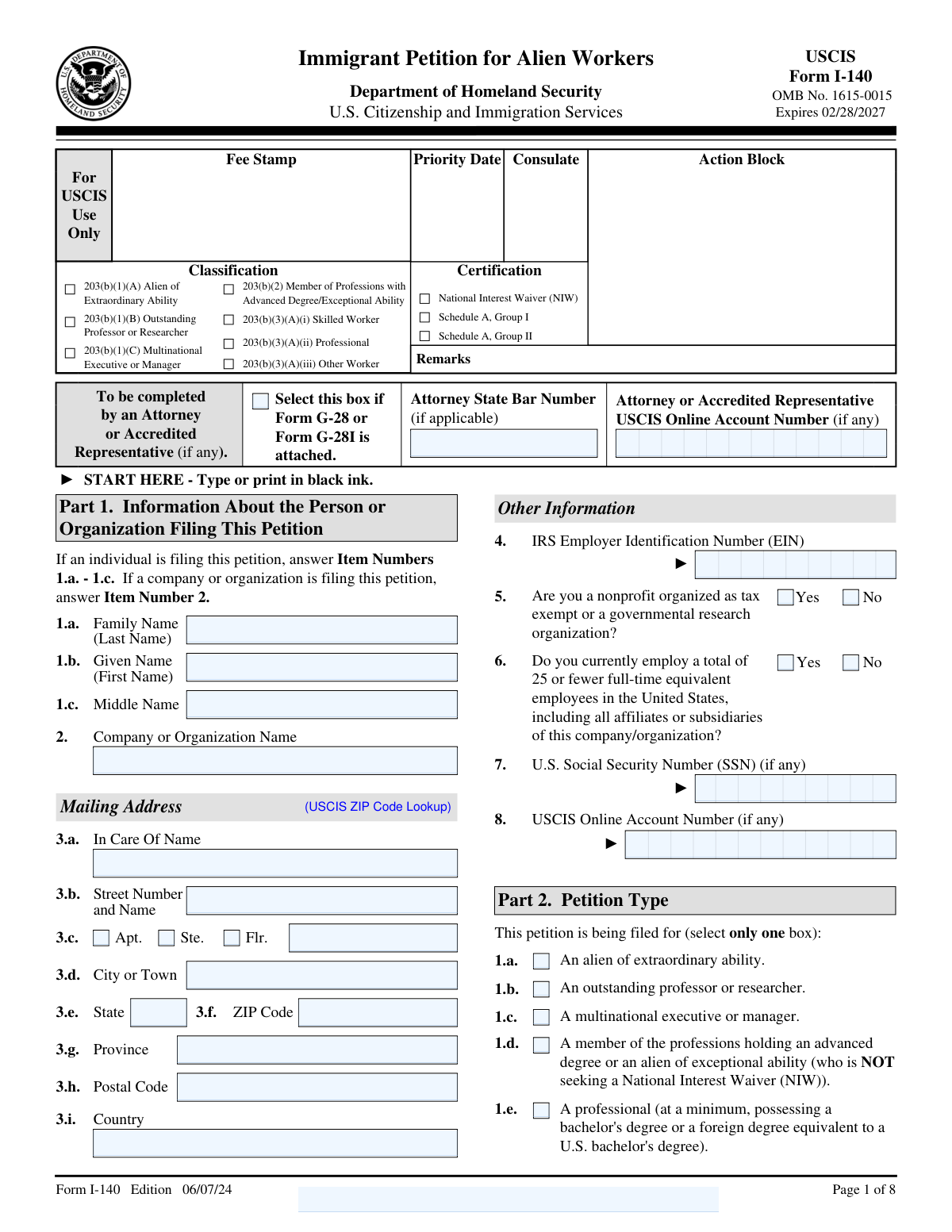
Yes! You can use AI to fill out Form I-140, Immigrant Petition for Alien Workers

Form I-140, Immigrant Petition for Alien Workers, is a U.S. Citizenship and Immigration Services (USCIS) form filed by an employer on behalf of a foreign worker to petition for them to become a permanent resident. This petition is a critical first step for many employment-based green card categories, as it establishes the worker's eligibility based on their professional qualifications and the job offer. Filing this form correctly is essential for the success of the green card application. Today this form can be filled out quickly and accurately using AI-powered services like Instafill.ai, which can also convert non-fillable PDF versions into interactive fillable forms.
I-140 is part of the immigrant petition forms category on Instafill.
Our AI automatically handles information lookup, data retrieval, formatting, and form filling.
It takes less than a minute to fill out I-140 using our AI form filling.
Securely upload your data. Information is encrypted in transit and deleted immediately after the form is filled out.

Form specifications

Form name: Form I-140, Immigrant Petition for Alien Workers
Number of fields: 262
Number of pages: 8
Language: English
main-image

Instafill Demo: How to fill out PDF forms in seconds with AI

How to Fill Out I-140 Online for Free in 2026

Are you looking to fill out a I-140 form online quickly and accurately? Instafill.ai offers the #1 AI-powered PDF filling software of 2026, allowing you to complete your I-140 form in just 37 seconds or less.
Follow these steps to fill out your I-140 form online using Instafill.ai:
  1. 1 Navigate to Instafill.ai and upload or select the Form I-140.
  2. 2 Use the AI assistant to accurately enter petitioner information, such as the company's name, address, and EIN, or the individual petitioner's details.
  3. 3 Input the beneficiary's personal details, including name, date of birth, address, and immigration history, letting the AI guide you through each section.
  4. 4 Specify the petition type and provide details about the proposed employment, such as job title, duties, and wage, with AI-powered validation to ensure completeness.
  5. 5 Add information for the beneficiary's spouse and children, if applicable, ensuring all dependent details are correctly linked to the main petition.
  6. 6 Review all the auto-filled information for accuracy, make any necessary corrections, and then electronically sign the form.
  7. 7 Download the completed, signed Form I-140 and gather all required supporting documents for submission to USCIS.

Our AI-powered system ensures each field is filled out correctly, reducing errors and saving you time.

Why Choose Instafill.ai for Your Fillable I-140 Form?

Speed

Complete your I-140 in as little as 37 seconds.

Up-to-Date

Always use the latest 2026 I-140 form version.

Cost-effective

No need to hire expensive lawyers.

Accuracy

Our AI performs 10 compliance checks to ensure your form is error-free.

Security

Your personal information is protected with bank-level encryption.

Frequently Asked Questions About Form I-140

Form I-140 is filed by a U.S. employer to petition for a foreign worker to gain permanent residency in the United States for a specific job. In some cases, such as for individuals with extraordinary ability or those seeking a National Interest Waiver, the worker can file the petition for themselves.

The petitioner is the U.S. employer or self-petitioning individual filing the form, with their information listed in Part 1. The beneficiary is the foreign worker who is the subject of the petition, and their details are provided in Part 3.

The petition type in Part 2 must match the employment-based (EB) category you are applying under, such as 'Alien of Extraordinary Ability' (EB-1) or 'Skilled Worker' (EB-3). This choice depends on the beneficiary's qualifications and, if applicable, the requirements of the certified labor certification.

Select 'Adjustment of Status' if the beneficiary is already in the U.S. and will apply for their Green Card without leaving the country. Choose 'Consular Processing' if the beneficiary is outside the U.S. or will apply for their immigrant visa at a U.S. embassy or consulate abroad.

It depends on the petition category; most EB-2 and EB-3 petitions require an approved PERM labor certification. Petitions for EB-1 categories and EB-2 National Interest Waivers (NIW) are exempt from this requirement.

You must provide the job title, SOC code, a nontechnical job description, and the offered wage. You also need to specify if the position is full-time, permanent, and whether it is a new role.

You must list your spouse and unmarried children under 21 in Part 7 of the form. Once your I-140 is approved, they can typically apply for permanent residence as your dependents.

Use Part 11, 'Additional Information,' at the end of the form for any extra details. Be sure to reference the page number, part number, and item number for the information you are adding.

If you have a non-fillable or 'flat' PDF, services like Instafill.ai can convert it into an interactive, fillable form. This allows you to easily type your information directly into the fields on your computer.

Yes, AI-powered services like Instafill.ai can help you complete Form I-140 accurately and efficiently. These tools can auto-fill information from your profile, reducing manual data entry and saving you time.

To fill out the form online, you can upload the Form I-140 PDF to a platform like Instafill.ai. The service will make it an interactive form that you can complete, save, and download directly from your web browser.

The Alien Registration Number (A-Number) is a unique nine-digit number assigned by USCIS to noncitizens. If the beneficiary has one, it can be found on their previous immigration documents, such as an Employment Authorization Document (EAD) or a prior USCIS approval notice.

In Part 4, you can indicate that you are filing without the original labor certification because it was previously submitted. You may also request that USCIS obtain a duplicate copy from the Department of Labor (DOL) if necessary.

The petitioner must sign the form. If the petitioner is a company, an authorized signatory, such as an HR manager or company executive, must sign on behalf of the organization.

Compliance I-140
Validation Checks by Instafill.ai

1
Petitioner Type Exclusivity
Validates that either individual petitioner information (Part 1, Items 1.a-1.c) or company/organization information (Part 1, Item 2) is provided, but not both. This ensures the form correctly identifies the single petitioning entity as either a person or an organization. If both sections are filled, the submission should be flagged for clarification to determine the correct petitioner.
2
Conditional Amendment Field Requirement
Checks that if the 'To amend a previously filed petition' box (Part 2, Item 2.a) is selected, the 'Previous Petition Receipt Number' field is populated. This is a critical logical check to ensure that amended petitions can be linked to the original filing. A failure would mean USCIS cannot locate the original case, causing significant processing delays or rejection.
3
Beneficiary Age and Arrival Date Consistency
Ensures the beneficiary's 'Date of Birth' (Part 3, Item 3) is a valid date in the past and occurs before the 'Date of Last Arrival' (Part 3, Item 10). This is a logical consistency check to prevent impossible data, such as arriving in the country before being born. An error here indicates a significant data entry mistake that invalidates the timeline of events.
4
Alien Registration Number (A-Number) Format
Validates that the 'Alien Registration Number (A-Number)' in Part 3, Item 8, follows the standard USCIS format, which is typically an 'A' followed by 8 or 9 digits. This ensures the identifier is syntactically correct and can be used to accurately look up the beneficiary's records in USCIS systems. An incorrectly formatted number will fail database lookups and halt case processing.
5
Passport Validity at Time of Entry
Verifies that the 'Expiration Date for Passport or Travel Document' (Part 3, Item 15) is on or after the 'Date of Last Arrival' (Part 3, Item 10). This check confirms that the beneficiary entered the United States using a valid travel document, which is a legal requirement for admission. A validation failure could indicate an issue with the beneficiary's legal status upon entry.
6
Processing Preference Completeness
Ensures that if the petitioner selects consular processing (Part 4, Item 1.a), the corresponding 'City or Town' (Item 1.b) and 'Country' (Item 1.c) fields are filled. This information is mandatory for USCIS to forward the approved petition to the correct U.S. Embassy or Consulate. Missing this information would leave the case stalled, as USCIS would not know where to send the case for visa processing.
7
Income Logical Comparison
Checks that the 'Gross Annual Income' (Part 5, Item 5) is greater than or equal to the 'Net Annual Income' (Part 5, Item 6). This is a basic accounting and logic check to ensure the financial data provided is plausible. A net income higher than gross income is a logical impossibility and suggests a data entry error or misunderstanding of the terms, which could cast doubt on the petitioner's financial stability.
8
Part-Time Hours Requirement
Validates that if the proposed employment is not full-time (Part 6, Item 4 is 'No'), then the 'hours per week' field (Part 6, Item 5) must be populated with a positive number. This ensures that for part-time positions, the expected work commitment is clearly defined. Failure to provide this number leaves a critical term of employment ambiguous, which could lead to a Request for Evidence (RFE).
9
Dependent Duplication Check
Scans all dependent entries in Part 7 to identify and flag any duplicates based on a combination of name and date of birth. The sample data shows 'Aditya Singh Parihar' listed twice, which is an error. This check prevents redundant data processing and potential confusion regarding the number of derivative beneficiaries.
10
Dependent Application Status Exclusivity
For each dependent listed in Part 7, this check verifies that 'Yes' has not been selected for both 'applying for adjustment of status' and 'applying for a visa abroad'. A person can only pursue one of these paths at a time for the same benefit. Selecting both indicates a user error that must be corrected to clarify the dependent's intended immigration process.
11
U.S. Social Security Number (SSN) Format
Validates that any U.S. Social Security Number provided (e.g., Part 1, Item 7 and Part 3, Item 9) consists of nine digits. This format check ensures that the data is structurally correct before it is used for identity verification or record-keeping. Submitting an incorrectly formatted SSN can cause failures in automated system checks and mismatches with government records.
12
IRS Employer Identification Number (EIN) Format
Ensures the 'IRS Employer Identification Number (EIN)' in Part 1, Item 4, is a nine-digit number, often formatted as XX-XXXXXXX. This is a critical identifier for the petitioning business. An invalid EIN format will prevent USCIS from verifying the petitioner's business legitimacy with the IRS, likely resulting in a rejection or RFE.
13
Signature Date Chronology
Verifies that the 'Date of Signature' in Part 8 is a valid date that is not in the future. The date should also be on or after the form's edition date (06/07/24), as it's impossible to sign a form version before it exists. This check ensures the attestation was made at a logical and valid time, upholding the integrity of the petitioner's certification.
14
Conditional Attorney Information
Checks that if the 'Form G-28 or Form G-28I is attached' box is selected, then the 'Attorney State Bar Number' and/or 'Attorney USCIS Online Account Number' fields are populated. This ensures that when legal representation is declared, the necessary identifying information for the representative is also provided. Missing this information would prevent USCIS from properly recognizing and communicating with the attorney of record.

Common Mistakes in Completing I-140

Incorrect Petitioner Identification in Part 1

When an employer is filing, the authorized signatory sometimes mistakenly enters their own name in the individual fields (Item 1) instead of the company's legal name in the organization field (Item 2). This error creates confusion about whether the petitioner is an individual or a company, which can lead to a Request for Evidence (RFE) to clarify the petitioning entity. To avoid this, employers must always enter the full legal name of the company in Item 2 and leave Item 1 blank.

Selecting the Wrong Petition Classification in Part 2

Applicants often select a petition category that does not align with their qualifications or the submitted evidence, such as choosing 'Alien of Extraordinary Ability' without meeting the stringent criteria. This is a fundamental error that almost always results in a petition denial after a lengthy review process. It is crucial to carefully review the requirements for each classification and select the one for which you can provide substantial documentation.

Inaccurate I-94 Arrival Information in Part 3

Entering an incorrect I-94 number, date of last arrival, or status can cause significant processing delays as USCIS struggles to verify the beneficiary's lawful presence in the U.S. A common mistake is writing 'D/S' for the expiration date when the form requires a specific date, or using an informal status abbreviation like 'H1B' instead of the official 'H-B'. Double-check the most recent I-94 record from the CBP website for complete accuracy before filling out these fields.

Omitting or Mismatching Full Legal Names

Applicants frequently shorten their names, omit middle names, or use variations that do not exactly match their passport and birth certificate. For example, entering 'Brijesh Parihar' when the legal name is 'Brijesh Singh Parihar' can create identity discrepancies across immigration documents, leading to RFEs and delays. Always use the full, complete legal name as it appears on official government-issued identification in all name fields for the petitioner, beneficiary, and dependents.

Incorrectly Completing Signature Sections (Part 8 vs. Part 10)

A self-petitioner who fills out their own form may incorrectly sign in both Part 8 (Petitioner's Signature) and Part 10 (Preparer's Signature). Part 10 should only be completed by a third party who prepared the form but is not the petitioner or their attorney. This error can cause confusion about who is legally attesting to the form's contents and may require clarification. If you prepare the form yourself, you must sign Part 8 and leave Part 10 entirely blank.

Duplicating Dependent Information in Part 7

When listing family members, it is easy to make a data entry error and list the same dependent multiple times, as seen in the sample where a son is listed as both Person 2 and Person 3. This suggests a lack of careful review and creates an inaccurate record, potentially causing confusion during the processing of dependent applications. Carefully review Part 7 to ensure each family member is listed only once with their correct and unique information.

Failing to Select a Processing Path for Dependents in Part 7

After entering a spouse or child's information in Part 7, petitioners often forget to select whether the dependent will be applying for Adjustment of Status (in the U.S.) or a visa abroad. Leaving these boxes unchecked, as shown in the sample form, creates ambiguity and can delay the processing of dependent benefits. For each family member listed, you must select one of the two options to indicate how they will immigrate.

Inconsistent Job and Wage Information in Part 6

Employer-sponsored petitions often contain mismatches between the Job Title, the SOC Code, the nontechnical description, and the wage offered. For instance, the SOC code might correspond to a senior manager, but the job description details entry-level tasks, which is a major red flag for adjudicators. Such inconsistencies can lead to an RFE or denial, as they question the legitimacy of the job offer and the employer's ability to pay. Ensure all elements in Part 6 are consistent with each other and the underlying labor certification.

Missing Foreign Address in Part 4

The form requires applicants currently in the United States to provide their last permanent address abroad, but this field is frequently left blank. Omitting this information can result in an RFE, as it is used to complete background checks and establish residency history. Even if you have been in the U.S. for a long time, you must provide the last physical address where you resided permanently outside the United States.

Confusing Petitioner and Beneficiary Information on Self-Petitions

On self-petitions (e.g., EB-1A or NIW), the same person is both the petitioner and the beneficiary, which can cause confusion. Applicants sometimes enter information in the wrong sections or provide inconsistent details between Part 1 (Petitioner) and Part 3 (Beneficiary). It is critical to enter your information accurately and consistently in both parts to avoid processing delays. AI-powered tools like Instafill.ai can help prevent this by auto-populating recurring information correctly across the form.
Saved over 80 hours a year

“I was never sure if my IRS forms like W-9 were filled correctly. Now, I can complete the forms accurately without any external help.”

Kevin Martin Green

Your data stays secure with advanced protection from Instafill and our subprocessors

Robust compliance program

Transparent business model

You’re not the product. You always know where your data is and what it is processed for.

ISO 27001, HIPAA, and GDPR

Our subprocesses adhere to multiple compliance standards, including but not limited to ISO 27001, HIPAA, and GDPR.

Security & privacy by design

We consider security and privacy from the initial design phase of any new service or functionality. It’s not an afterthought, it’s built-in, including support for two-factor authentication (2FA) to further protect your account.

Fill out I-140 with Instafill.ai

Worried about filling PDFs wrong? Instafill securely fills form-i-140-immigrant-petition-for-alien-workers forms, ensuring each field is accurate.