Yes! You can use AI to fill out Form I-129, Petition for a Nonimmigrant Worker
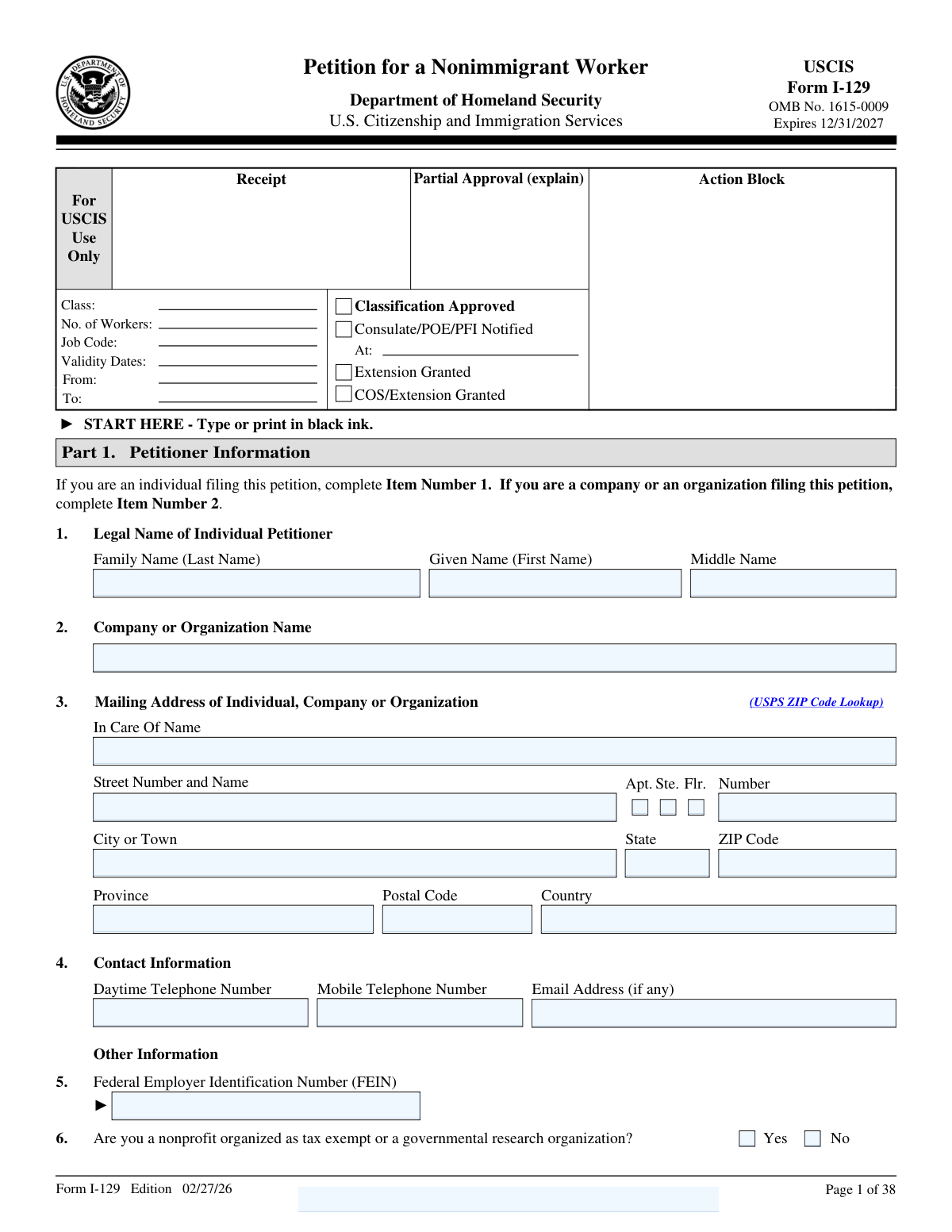
Form I-129, Petition for a Nonimmigrant Worker, is a key U.S. Citizenship and Immigration Services (USCIS) document that employers must file to hire a temporary nonimmigrant worker for a specific job. The form covers a wide range of visa categories, including H-1B for specialty occupations, L-1 for intracompany transferees, and O-1 for individuals with extraordinary ability. Its complexity lies in the various supplements required for each specific visa classification, detailing the petitioner, beneficiary, and the nature of the employment. Today, this form can be filled out quickly and accurately using AI-powered services like Instafill.ai, which can also convert non-fillable PDF versions into interactive fillable forms.
I-129 is part of the
immigrant petition forms category on Instafill.
Our AI automatically handles information lookup, data retrieval, formatting, and form filling.
It takes less than a minute to fill out I-129 using our AI form filling.
Securely upload your data. Information is encrypted in transit and deleted immediately after the form is filled out.
Form specifications
| Form name: | Form I-129, Petition for a Nonimmigrant Worker |
| Number of fields: | 980 |
| Number of pages: | 38 |
| Filled form examples: | Form I-129 Examples |
| Language: | English |
More forms in Immigrant petition forms
Instafill Demo: How to fill out PDF forms in seconds with AI
How to Fill Out I-129 Online for Free in 2026
Are you looking to fill out a I-129 form online quickly and accurately? Instafill.ai offers the #1 AI-powered PDF filling software of 2026, allowing you to complete your I-129 form in just 37 seconds or less.
Follow these steps to fill out your I-129 form online using Instafill.ai:
- 1 Navigate to Instafill.ai and upload or select Form I-129, Petition for a Nonimmigrant Worker.
- 2 Use the AI assistant to accurately fill in the petitioner's information, including the company or organization's legal name, address, and tax identification numbers.
- 3 Provide the beneficiary's personal details, such as name, date of birth, country of citizenship, and current immigration status if they are in the U.S.
- 4 Specify the nonimmigrant classification being requested (e.g., H-1B, L-1, O-1), the basis for the petition (e.g., new employment, change of employer), and the requested action.
- 5 Complete the required supplements for the specific visa classification, providing detailed information about the job, wages, work location, and the beneficiary's qualifications.
- 6 Review all sections of the main form and supplements for accuracy, then have the authorized signatory for the petitioner and any preparer sign and date the form.
- 7 Download the completed and signed Form I-129 package, ready for submission to USCIS with all required supporting evidence and filing fees.
Our AI-powered system ensures each field is filled out correctly, reducing errors and saving you time.
Why Choose Instafill.ai for Your Fillable I-129 Form?
Speed
Complete your I-129 in as little as 37 seconds.
Up-to-Date
Always use the latest 2026 I-129 form version.
Cost-effective
No need to hire expensive lawyers.
Accuracy
Our AI performs 10 compliance checks to ensure your form is error-free.
Security
Your personal information is protected with bank-level encryption.
Frequently Asked Questions About Form I-129
This form is a petition filed by a U.S. employer or agent on behalf of a foreign national who will come to the U.S. temporarily to work, perform services, or receive training. It is used for various nonimmigrant classifications, including H-1B, L-1, O, P, and R visas.
The petitioner is the U.S. employer, company, or agent filing the form to request permission to hire a foreign worker. The beneficiary is the foreign national (the worker) for whom the petition is being filed.
You will need to provide your company's legal name, mailing address, Federal Employer Identification Number (FEIN), and details about your business, such as the year it was established, number of employees, and annual income.
'New employment' is for a beneficiary who is either outside the U.S. or is in the U.S. in a different status and is starting a new job. 'Change of employer' is for a beneficiary who already holds the requested visa status and is moving from one employer to another.
If the beneficiary is in the U.S., you must provide their current U.S. address, I-94 Arrival-Departure Record Number, current nonimmigrant status and its expiration date, and passport details. Their Social Security Number, SEVIS number, or EAD number may also be required if applicable.
For certain classifications like H-1B, the employer must first file a Labor Condition Application with the U.S. Department of Labor. The case number from the approved LCA must be entered on this petition.
Yes, for certain classifications like H-2A, H-2B, O, and P, you can include multiple beneficiaries on one petition. You must indicate the total number of workers and may need to attach a list with each beneficiary's information.
This option is for a beneficiary who is currently in the U.S. in a different valid nonimmigrant status and wants to change to the new status requested in this petition. It allows them to remain in the U.S. and begin work without leaving the country.
For an L-1 petition, you must specify the qualifying relationship between the U.S. company and the foreign company where the beneficiary worked, such as parent, subsidiary, branch, or affiliate. You also need to detail the beneficiary's employment abroad.
An authorized signatory for the petitioning company or organization must sign the form in the petitioner's declaration section. If a preparer, such as an attorney, completed the form on your behalf, they must also sign in their designated section.
The form includes an 'Additional Information' section for this purpose. You can provide the extra details there, making sure to reference the specific page number, part number, and item number your answer corresponds to.
Yes, services like Instafill.ai use AI to help you accurately auto-fill form fields, which can save significant time and reduce the risk of errors on complex forms like this one.
You can upload the form to the Instafill.ai platform, which will make it interactive. By answering a series of simple questions, the AI will automatically and accurately populate the information into the correct fields on the form.
Services like Instafill.ai can convert flat, non-fillable PDFs into interactive, fillable forms. Simply upload your document to their platform to begin filling it out online.
Compliance I-129
Validation Checks by Instafill.ai
1
Petitioner Identity Exclusivity
This check ensures that the petitioner has provided either their 'Legal Name of Individual Petitioner' fields (Given, Middle, Family) or a 'Company or Organization Name', but not both. It is critical to establish a single, clear petitioning entity for legal and processing purposes. If both are filled, the form submission should be blocked and the user prompted to clarify whether the petitioner is an individual or an organization.
2
Federal Employer Identification Number (FEIN) Requirement and Format
This validation verifies that if a 'Company or Organization Name' is provided, the 'Federal Employer Identification Number (FEIN)' is also filled and follows the correct XX-XXXXXXX format. The FEIN is a mandatory identifier for business entities for tax and legal purposes in the U.S. Failure to provide a valid FEIN for a company petitioner will result in rejection, as it's essential for verifying the petitioner's legitimacy.
3
Employment Dates Chronology
This check validates that the 'Employment End Date' is on or after the 'Employment Start Date'. This is a logical consistency check to prevent impossible date ranges, which would indicate a data entry error. An invalid date range would make the petition nonsensical and lead to processing delays or automatic rejection.
4
Passport Expiration Date Validity
This validation ensures that the 'Date Passport or Travel Document Expires' is a future date. A valid, unexpired passport is a fundamental requirement for international travel and visa processing. Submitting a petition with an expired or soon-to-expire passport can lead to the denial of the petition or future visa applications.
5
Conditional Requested Action for New Employment
This check enforces the rule that the 'Change status and extend stay' option under 'Requested Action' can only be selected if 'New employment' is chosen as the 'Basis for Classification'. This is a critical logical check based on immigration regulations, as changing status is typically associated with starting new employment. An incorrect selection would lead to a request for evidence or denial of the petition for being logically inconsistent.
6
Income Logical Relationship
This validation ensures that the 'Gross Annual Income' is greater than or equal to the 'Net Annual Income' for the petitioning organization. This is a basic financial sanity check to ensure the data is accurate and credible. A net income higher than gross income is impossible and would signal a significant data entry error, potentially undermining the petitioner's financial viability claims.
7
Dependent Application Count Consistency
This check validates that if the user checks 'Yes' for 'Dependents Application Inquiry', the 'Number of Dependent Applications' field must contain a positive integer (e.g., > 0). Conversely, if 'No' is checked, the number field should be empty or zero. This ensures the form data is complete and internally consistent, preventing confusion about whether associated dependent applications are expected.
8
U.S. Social Security Number Format
This validation verifies that any field for a 'U.S. Social Security Number' adheres to the standard XXX-XX-XXXX format. Correct formatting is essential for data integrity and successful matching with government databases. An incorrectly formatted SSN can cause record-keeping errors and processing failures, and will be rejected by the system.
9
Beneficiary Location Dependent Fields
This check ensures that fields applicable only when a beneficiary is in the United States (e.g., 'Current Residential U.S. Address', 'I-94 Arrival-Departure Record Number', 'SEVIS Number') are only populated if the beneficiary's presence in the U.S. is affirmed. This prevents contradictory information where a beneficiary is stated to be abroad but has U.S.-specific data entered. Such inconsistencies can lead to requests for clarification or petition denial.
10
E-2 Investment Summation Accuracy
For petitions where 'E-2 Treaty Investor' is the 'Classification sought', this check verifies that the 'Total Investment' field correctly equals the sum of 'Cash Investment', 'Equipment Investment', 'Premises Investment', 'Inventory Investment', and 'Other Investment'. This ensures the mathematical accuracy of the total investment claim, which is a critical component of an E-2 petition. A discrepancy would require correction and could cast doubt on the validity of the financial data provided.
11
H-1B Cap Exemption Justification
This validation ensures that if 'Cap Exempt' is selected for the 'H-1B Petition Type', at least one of the corresponding 'Reason for Cap Exemption' checkboxes is also selected. A claim for cap exemption is a significant legal assertion that must be justified. Failing to provide a specific reason for the exemption will result in the petition being rejected or processed as a cap-subject petition, likely leading to its denial if the cap has been reached.
12
ZIP Code and State Correlation
For any U.S. address on the form, this check validates that the entered 'ZIP Code' is a valid code for the selected 'State'. This is a data quality check that helps prevent mail from being misdirected and ensures the accuracy of location information. An invalid ZIP/State combination would flag a data entry error that needs to be corrected before submission.
Common Mistakes in Completing I-129
Petitioners often select a 'Basis for Classification' (e.g., 'New employment') that is inconsistent with the 'Requested Action' (e.g., 'Extend stay'). This happens due to a misunderstanding of the nuanced legal distinctions between changing, extending, or amending a status. Such a contradiction can lead to a Request for Evidence (RFE) or an outright denial, as the adjudicator cannot determine the petitioner's actual intent. To avoid this, carefully read the instructions for each option and ensure they logically align with your situation.
A common error is entering the wrong type of tax ID for the petitioner. An individual petitioner might enter their Social Security Number (SSN) in the Federal Employer Identification Number (FEIN) field, or a company might provide an incorrect FEIN. This mistake delays verification of the petitioner's identity and financial viability, often resulting in an RFE. It is crucial to distinguish between an individual's SSN/ITIN and a business's FEIN and enter the correct number in the designated field.
When a beneficiary is already in the United States, petitioners frequently forget to provide their I-94 number, date of last arrival, current nonimmigrant status, and status expiration date. These fields are conditionally required and absolutely essential for USCIS to verify the beneficiary's lawful presence and eligibility for a change or extension of status. Omitting this information will automatically trigger an RFE, significantly delaying the case. AI-powered tools like Instafill.ai can help prevent this by highlighting required fields based on your answers.
Petitioners often make mistakes when entering financial figures like 'Gross Annual Income' and 'Net Annual Income', sometimes even listing a net income that is higher than the gross income. These inconsistencies raise red flags about the petitioner's financial stability and ability to pay the proffered wage, leading to scrutiny and RFEs. Always double-check financial data for accuracy and logical consistency before submitting the form. If the form is a non-fillable PDF, a tool like Instafill.ai can convert it into a fillable version, making data entry clearer.
For H-1B petitions, providing a valid, certified Labor Condition Application (LCA) case number is a strict prerequisite. Petitioners may forget to file the LCA with the Department of Labor before filing the I-129, enter a typo in the number, or use an LCA that doesn't match the job details in the petition. Any of these errors will result in an automatic rejection or denial of the H-1B petition, wasting time and filing fees. Ensure the LCA is certified and the number is transcribed perfectly.
The rules for H-1B cap exemption are complex, leading many to make errors. A petitioner might incorrectly claim to be a cap-exempt entity (like a non-profit affiliated with a university) without meeting the strict legal definition, or claim the U.S. Master's cap for a beneficiary with a foreign degree. These mistakes can lead to the petition being rejected if filed after the cap is reached, or denied for not meeting the claimed exemption criteria. It is vital to understand the specific requirements for each exemption category.
This lengthy form asks for information about both the petitioner (the employer or individual filing) and the beneficiary (the foreign worker). A frequent mistake is entering the petitioner's information in a section meant for the beneficiary, or vice-versa, especially for fields like names, addresses, and contact details. This confusion can create significant processing delays and RFEs as USCIS attempts to sort out the identities of the parties involved. Carefully read each field's label to ensure the data pertains to the correct individual or entity.
The form requires the petitioner to list the address where the beneficiary will actually work, which may be different from the petitioner's mailing address. If the beneficiary will work at multiple locations or an off-site third-party location, these addresses must also be listed and consistent with the certified LCA. Failure to disclose all work locations can lead to petition denial and findings of non-compliance with labor regulations. Using a form-filling tool like Instafill.ai can help ensure all address fields are properly completed and validated.
The form asks critical questions about the beneficiary's prior immigration history, including any time spent in removal proceedings or as a J-1 exchange visitor. Petitioners or beneficiaries may answer 'No' incorrectly, either by forgetting a past event or not understanding the question's scope. Answering these questions inaccurately can lead to a finding of willful misrepresentation, which carries severe consequences, including denial of the current petition and potential bars on future immigration benefits.
A simple but critical error is a missing signature from the petitioner or the preparer (if one was used). If an attorney or agency prepares the form, they must sign and complete the 'Preparer's Declaration' section; failure to do so can lead to the form's rejection. Likewise, the petitioner must sign in the correct section to attest to the petition's accuracy. Forgetting a signature or having the wrong party sign invalidates the submission and causes immediate processing halts.
Saved over 80 hours a year
“I was never sure if my IRS forms like W-9 were filled correctly. Now, I can complete the forms accurately without any external help.”
Kevin Martin Green
Your data stays secure with advanced protection from Instafill and our subprocessors

Robust compliance program
Transparent business model
You’re not the product. You always know where your data is and what it is processed for.
ISO 27001, HIPAA, and GDPR
Our subprocesses adhere to multiple compliance standards, including but not limited to ISO 27001, HIPAA, and GDPR.
Security & privacy by design
We consider security and privacy from the initial design phase of any new service or functionality. It’s not an afterthought, it’s built-in, including support for two-factor authentication (2FA) to further protect your account.
Fill out I-129 with Instafill.ai
Worried about filling PDFs wrong? Instafill securely fills form-i-129-petition-for-a-nonimmigrant-worker-1 forms, ensuring each field is accurate.



