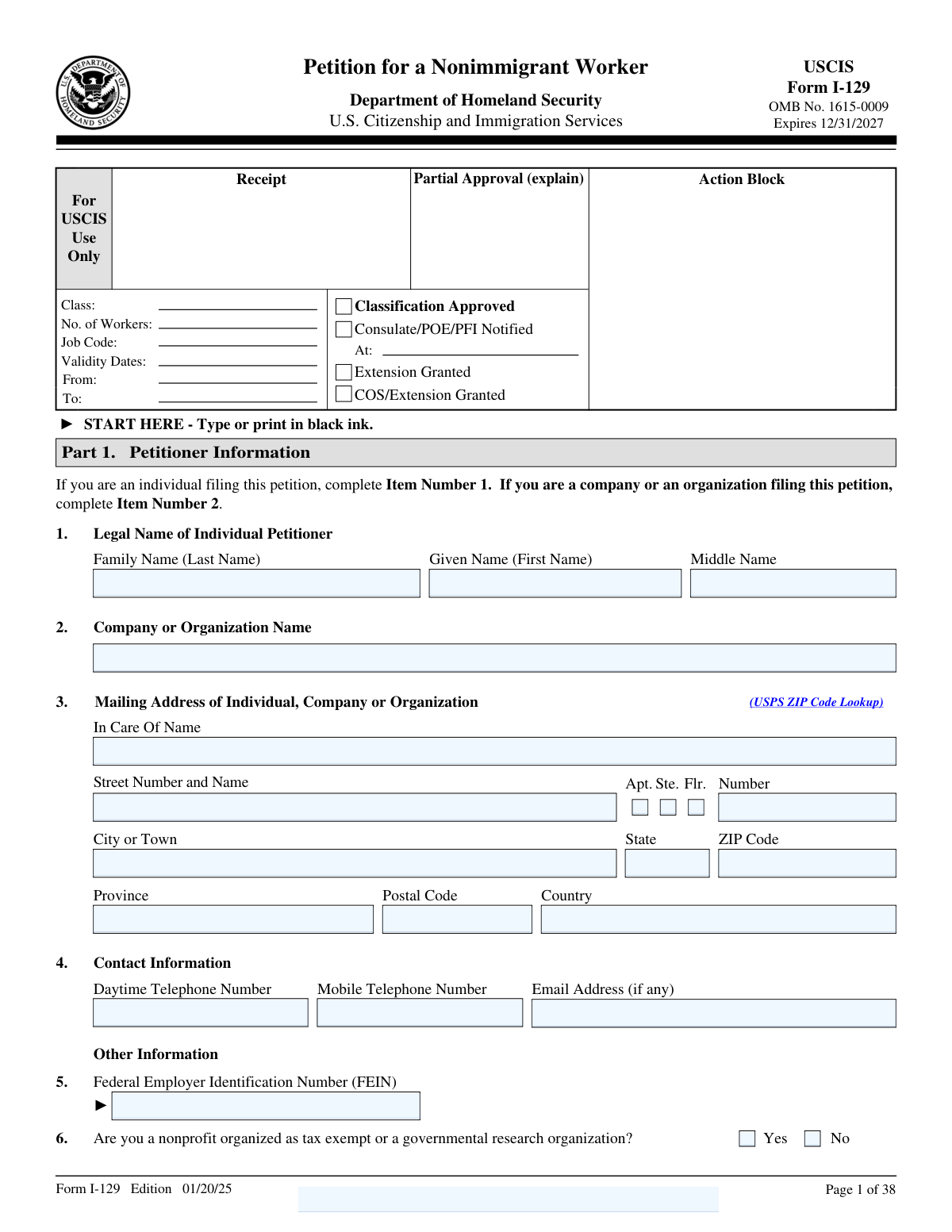
Yes! You can use AI to fill out Form I-129, Petition for a Nonimmigrant Worker
Form I-129 is a U.S. Citizenship and Immigration Services (USCIS) petition used to request nonimmigrant worker classification for one or more beneficiaries (where permitted), such as H-1B, L-1, O-1, and other categories that require an employer or petitioner filing. It collects information about the petitioner, the requested classification and action (new employment, extension, change of status, etc.), the beneficiary’s identity and immigration details, and the proposed job and worksite(s), and it includes required attestations and signatures. This form is important because USCIS uses it to determine eligibility for the requested work authorization/status and to route consular/port-of-entry processing or in-country change/extension requests. Today, this form can be filled out quickly and accurately using AI-powered services like Instafill.ai, which can also convert non-fillable PDF versions into interactive fillable forms.
Our AI automatically handles information lookup, data retrieval, formatting, and form filling.
It takes less than a minute to fill out I-129 using our AI form filling.
Securely upload your data. Information is encrypted in transit and deleted immediately after the form is filled out.
Form specifications
| Form name: | Form I-129, Petition for a Nonimmigrant Worker |
| Number of pages: | 8 |
| Language: | English |
| Categories: | immigration forms, employment forms, USCIS forms, work visa forms |
Instafill Demo: filling out a legal form in seconds
How to Fill Out I-129 Online for Free in 2026
Are you looking to fill out a I-129 form online quickly and accurately? Instafill.ai offers the #1 AI-powered PDF filling software of 2026, allowing you to complete your I-129 form in just 37 seconds or less.
Follow these steps to fill out your I-129 form online using Instafill.ai:
- 1 Go to Instafill.ai and upload the Form I-129 PDF (or select Form I-129 from the form library).
- 2 Enter or import petitioner details (individual or company/organization), including legal name, mailing address, FEIN (if applicable), and contact information.
- 3 Specify the requested nonimmigrant classification and the basis for filing (for example, new employment, extension, amended petition) and provide any prior receipt number if applicable.
- 4 Add beneficiary information (named or, for H-2A/H-2B where allowed, unnamed), including identity details, passport/I-94/status information, and current U.S. address if the beneficiary is in the United States.
- 5 Complete processing information (consulate/port of entry notification details, dependent filings, and prior petition/history questions) and provide explanations in the additional information section when required.
- 6 Fill in proposed employment and employer details (job title, LCA/ETA case number if applicable, worksite addresses/third-party placement, wages, hours, and intended employment dates) and complete the controlled technology release certification if required for the classification.
- 7 Review Instafill.ai’s validation checks, attach required supporting documents/supplements, then e-sign/print for wet signatures as required and download the finalized packet for filing with USCIS.
Our AI-powered system ensures each field is filled out correctly, reducing errors and saving you time.
Why Choose Instafill.ai for Your Fillable I-129 Form?
Speed
Complete your I-129 in as little as 37 seconds.
Up-to-Date
Always use the latest 2026 I-129 form version.
Cost-effective
No need to hire expensive lawyers.
Accuracy
Our AI performs 10 compliance checks to ensure your form is error-free.
Security
Your personal information is protected with bank-level encryption.
Frequently Asked Questions About Form I-129
Form I-129 (Petition for a Nonimmigrant Worker) is used by a U.S. employer (or sometimes an individual petitioner) to request that a foreign national work in the United States in a specific nonimmigrant classification (such as H-1B, L-1, O-1, etc.). It can also be used to request an extension of stay, change of status, or other actions depending on the case.
If you are an individual filing the petition, complete Item 1 (your legal name). If a company or organization is filing, complete Item 2 (Company or Organization Name) and provide the business details such as FEIN and address.
You must provide a mailing address (including apartment/suite/floor if applicable), city, state, ZIP/postal code, and country, plus a daytime phone number. An email address and mobile number are optional but recommended so USCIS can contact you more easily.
The FEIN (Federal Employer Identification Number) is the IRS-issued tax ID for the petitioning employer. If a company or organization is filing, you generally must provide the FEIN in Part 1.
Enter the classification symbol you are requesting (for example, H-1B, L-1A, O-1). The correct classification depends on the job and the beneficiary’s eligibility, and you may also need to attach the I-129 supplement relevant to that classification.
This tells USCIS why you are filing the petition—for example, “New employment” for a new job, “Change of employer” when the worker is moving to a different employer, or “Amended petition” when you are updating a previously filed/approved job. Select only one box that best matches your situation.
Choose one action that matches what you want USCIS to do, such as notifying a consulate/port of entry for visa processing, changing status and extending stay (only available when “New employment” is selected), or extending stay for someone already in the requested status. If the beneficiary is outside the U.S., you typically select the option to notify the office listed in Part 4.
Sometimes, but it depends on the classification and USCIS rules for that category. The form asks for the “Total number of workers included,” and you should follow the instructions for when multiple workers are allowed.
Most petitions are for “Named” beneficiaries, where you list each person’s name and details. “Unnamed” is only allowed for H-2A or H-2B petitions in specific situations where workers are not individually identified at filing.
You may need the beneficiary’s I-94 number, current nonimmigrant status, status expiration date (or D/S), U.S. residential address (no P.O. box), passport/travel document details, and possibly SEVIS or EAD numbers if applicable. These fields help USCIS evaluate eligibility for extension or change of status.
List the U.S. Consulate, Port of Entry, or Pre-flight inspection facility you want notified, including the city and the U.S. state or foreign country. This is used for visa issuance or admission processing if the beneficiary will apply abroad or if USCIS cannot grant a change/extension in the U.S.
Part 4 asks whether each person has a valid passport; if the answer is “No,” you must provide an explanation in Part 9 (Additional Information). USCIS may not be able to approve certain benefits without valid passport information, so explain clearly and include any supporting details.
Part 6 is required only for H-1B, H-1B1 (Chile/Singapore), L-1, and O-1A petitions. You must select either that no export license is required (EAR/ITAR) or that a license is required and the beneficiary will be prevented from accessing controlled technology until authorization is obtained.
Part 9 is for any explanations that don’t fit elsewhere (for example, prior denials, removal proceedings, missing passport explanation, or additional worksite addresses). Always reference the Page Number, Part Number, and Item Number you are explaining so USCIS can match your statement to the correct question.
Yes—AI tools can help organize your information and auto-fill fields accurately to save time (for example, Instafill.ai can map your answers to the correct I-129 fields). If your PDF is flat/non-fillable, Instafill.ai can convert it into an interactive fillable form and then help you complete it online by uploading the PDF, answering prompts, reviewing the populated fields, and exporting the completed form for signature and submission.
Compliance I-129
Validation Checks by Instafill.ai
1
Petitioner Type Exclusivity (Individual vs. Company/Organization)
Validates that the submission completes either the individual petitioner name fields (Family/Given/Middle) or the Company/Organization Name, but not both, consistent with the form’s instruction to complete Item 1 or Item 2. This prevents ambiguous petitioner identity and downstream mismatches in FEIN/SSN expectations. If both (or neither) are provided, the system should block submission and prompt the filer to select the correct petitioner type and complete only the applicable fields.
2
Petitioner Mailing Address Completeness and Secondary Unit Logic
Checks that the mailing address has the required components (Street Number and Name, City, State/Province as applicable, ZIP/Postal Code, Country) and that U.S. addresses include a valid State and ZIP Code. Also validates that Apt/Ste/Flr checkboxes are consistent with the presence of a unit number (if a box is checked, a unit number must be provided; if a unit number is provided, at least one box should be checked). If validation fails, the form should be rejected or flagged because USCIS correspondence may be undeliverable.
3
Petitioner Contact Information Format (Email and Phone Numbers)
Validates that the email address (if provided) matches a standard email format and that daytime/mobile telephone numbers contain only valid characters and a plausible length (e.g., 10 digits for U.S. numbers, or E.164-compatible for international). Reliable contact data is critical for RFEs, notices, and issue resolution. If invalid, the system should require correction before submission or mark the field as unusable and warn the filer.
4
FEIN Format and Conditional Requirement for Organizations
Ensures the FEIN is present when the petitioner is a company/organization and that it matches the expected 9-digit format (with or without hyphen). This supports identity verification and fee/accounting workflows and reduces rejections for missing employer identifiers. If the petitioner is an organization and FEIN is missing/invalid, the system should block submission and request a corrected FEIN (or a documented reason if the process allows exceptions).
5
Petitioner SSN/IRS Tax Number Format and Mutual-Exclusivity Guidance
Validates that the petitioner SSN (if provided) is 9 digits and not an obviously invalid pattern (e.g., all zeros), and that the Individual IRS Tax Number (e.g., ITIN) is in an acceptable format. For individual petitioners, at least one tax identifier may be expected depending on business rules; for organizational petitioners, these fields should typically be blank. If invalid or inconsistent with petitioner type, the system should flag the record and require correction to prevent identity and payment processing issues.
6
Nonprofit/Governmental Research Yes/No Single-Selection
Checks that exactly one of the 'Yes' or 'No' boxes is selected for nonprofit/governmental research organization status. This is important because it can affect eligibility, fee calculations, and supporting evidence requirements. If both or neither are selected, the system should prevent submission and prompt the filer to choose one.
7
Requested Nonimmigrant Classification Symbol Validity
Validates that the requested classification symbol is present and matches an allowed set/pattern (e.g., H-1B, L-1A, O-1, TN, etc.), including correct punctuation and suffixes where applicable. Correct classification drives which supplements, fees, and adjudication rules apply. If the symbol is missing or not recognized, the system should block submission and require a valid classification.
8
Basis for Classification Single-Selection and Consistency with Requested Action
Ensures exactly one basis for classification checkbox is selected (new employment, concurrent, change of employer, amended petition, etc.). Also enforces the form rule that 'Change the status and extend the stay' is available only when 'New employment' is selected as the basis. If multiple bases are selected or the requested action conflicts with the basis, the system should reject the submission and instruct the filer to correct the selections.
9
Requested Action Single-Selection and Part 4 Office Notification Dependency
Validates that exactly one requested action is selected and that when the action is 'Notify the office in Part 4,' the Part 4 office type and location fields are completed. This prevents approvals that cannot be routed to a consulate/POE/PFI and avoids adjudication delays. If the dependency is not met, the system should require completion of Part 4 processing information before allowing submission.
10
Total Number of Workers Must Be a Positive Integer and Match Beneficiary Listing
Checks that the total number of workers is a whole number greater than zero and is consistent with the number of beneficiaries provided (named on the form plus any Attachment-1 entries, or unnamed counts where permitted). This is essential for correct fee assessment and ensuring all beneficiaries are accounted for. If the count does not reconcile, the system should flag the discrepancy and require correction or an attachment update.
11
Named vs. Unnamed Beneficiary Selection Rules (H-2A/H-2B Only)
Validates that exactly one beneficiary type is selected (Named or Unnamed) and enforces that 'Unnamed' is only allowed for H-2A or H-2B classifications. If 'Named' is selected, beneficiary name fields must be completed; if 'Unnamed' is selected, individual name fields should be blank and the worker count must be provided. If these rules are violated, the system should block submission to prevent an ineligible filing configuration.
12
Beneficiary Core Biographic Data Completeness and Date Format
Ensures required beneficiary biographic fields are present for named beneficiaries: full legal name, date of birth, sex selection (exactly one), country of birth, and country of citizenship/nationality. All dates must be valid calendar dates in mm/dd/yyyy format. If missing or malformed, the system should reject the submission because USCIS cannot identify the beneficiary reliably.
13
Beneficiary U.S. Presence Block Completeness (I-94/Status/Passport Dates) When Applicable
If the filer provides any 'beneficiary is in the United States' fields (or if business rules indicate a change/extension request), validates that the set is complete and internally consistent: I-94 number present, current nonimmigrant status selected, status expiration is a valid date or 'D/S', and last arrival date is a valid date. Also checks passport/travel document number, issuance country, issue date, and expiration date are present and that expiration is after issue date. If incomplete or inconsistent, the system should require correction because eligibility for COS/EOS depends on accurate admission and status data.
14
Passport Validity Attestation vs. Passport Expiration Dates
Validates that if Part 4 indicates each person has a valid passport ('Yes'), then each named beneficiary’s passport expiration date is present and not in the past as of the submission date (or meets a configurable minimum validity threshold). If 'No' is selected, an explanation must be provided in Part 9. If the attestation conflicts with the entered passport data or explanation is missing, the system should flag the submission for correction to avoid immediate adjudication issues.
15
Conditional 'Yes' Answers Require Counts and/or Part 9 Explanations
For Part 4 questions that include 'If yes, how many?' (other petitions, dependent applications, replacement/initial I-94 applications, immigrant petitions), validates that a positive integer count is provided when 'Yes' is checked. For questions that instruct 'If yes, proceed to Part 9 and explain' (removal proceedings, prior nonimmigrant petition, prior grant/denial within 7 years, entertainment group 1-year issue), validates that Part 9 includes a page/part/item reference and a non-empty explanation. If missing, the system should block submission or mark as incomplete because USCIS requires these details to adjudicate.
16
Proposed Employment Dates and Compensation Logic
Validates that intended employment 'From' and 'To' dates are valid mm/dd/yyyy dates and that the 'To' date is after the 'From' date. Ensures wages include a numeric dollar amount greater than zero and a pay period value limited to allowed options (hour/week/month/year). If 'Other Compensation' is provided, it must include an explanation; if the explanation field is filled, it should not be only whitespace. If these checks fail, the system should require correction because employment terms are central to eligibility and compliance.
Common Mistakes in Completing I-129
Many filers mistakenly complete both Item 1 (individual legal name) and Item 2 (company/organization name), or they put a company name into the individual name fields. This creates ambiguity about who the actual petitioner is and can trigger USCIS requests for evidence (RFEs) or rejection for an improperly completed form. Avoid this by deciding up front whether the petitioner is an individual or an entity and completing only the corresponding section. AI-powered form filling tools like Instafill.ai can enforce conditional logic (only the correct section is fillable) and prevent conflicting entries.
The form explicitly states “do not list a P.O. Box” for the beneficiary’s current residential U.S. address, but people often reuse a mailing address or employer address out of habit. This can cause delays because USCIS may question whether the beneficiary’s physical residence is known/accurate, and it can complicate status-related adjudications. Use a real street address where the beneficiary actually lives; if a separate mailing address is needed, provide it only where the form allows. Instafill.ai can flag P.O. Box patterns and prompt for a physical address before submission.
I-129 requires dates in mm/dd/yyyy format, and certain fields allow “D/S” (for duration of status) instead of a date; filers frequently enter dd/mm/yyyy, omit leading zeros, or type “D/S” in a field that expects a date. Incorrect formatting can lead to data capture errors, RFEs, or internal inconsistencies (for example, a status expiration that appears earlier than the last arrival date). Always use mm/dd/yyyy exactly, and use “D/S” only where the form explicitly permits it (e.g., “Date Status Expires … or D/S”). Instafill.ai can automatically format dates correctly and validate that “D/S” is only used in allowed fields.
A common error is checking “Change the status and extend the stay” while not selecting “New employment,” even though the form notes this requested action is available only when “New employment” is checked. This mismatch can cause USCIS to treat the request as improperly filed or issue an RFE to clarify what benefit is being sought. Avoid this by confirming the logical pairing: pick exactly one basis (Part 2, Item 2) and exactly one requested action (Part 2, Item 4) that the instructions allow together. Instafill.ai can apply rule-based validation to prevent selecting disallowed combinations.
The form instructs filers to indicate “None” if no prior receipt number exists, but many people leave the field empty. Blank fields can be interpreted as an omission, leading to follow-up questions or an RFE, especially when other answers suggest prior filings. If there is no receipt number, type “None” exactly as instructed; if there is one, enter it precisely as issued (including letters and digits). Instafill.ai can detect empty required-by-instruction fields and auto-insert “None” when appropriate.
Filers sometimes check “Unnamed” for classifications other than H-2A/H-2B, or they check “Named” but fail to list the beneficiary names (or forget to use Attachment-1 for multiple workers). This can result in an incomplete petition package or a mismatch between the number of workers and the identities provided, delaying adjudication. Only select “Unnamed” if the petition is specifically H-2A or H-2B and you are allowed to file without naming each worker; otherwise select “Named” and provide full names for each beneficiary. Instafill.ai can guide the correct selection based on the requested classification and ensure the worker count matches the attached beneficiary list.
People often enter shortened names, omit middle names, or fail to list prior/maiden/alias names even though the form requests “all other names the beneficiary has used.” These inconsistencies can cause identity verification issues, background check delays, or RFEs when names don’t match passports, prior I-94 records, or SEVIS data. Use the beneficiary’s name exactly as shown on the passport biographic page and list all prior names (including maiden names and names from previous marriages) in the “other names used” section. Instafill.ai can standardize name formatting and prompt for missing alias/maiden name information when prior documents indicate it.
Passport numbers and I-94 numbers are frequently mistyped (transposed digits/letters) or entered with extra spaces, and filers sometimes confuse “country of citizenship” with “country of issuance.” Errors here can lead to USCIS being unable to match records, causing delays or RFEs, and can create problems at consular processing or admission. Copy these fields directly from the passport and the CBP I-94 record, and double-check that issuance/expiration dates are in mm/dd/yyyy. Instafill.ai can validate common passport/I-94 formats and reduce transcription errors by structured data entry.
When beneficiaries work off-site, filers often check “Yes” but fail to provide complete third-party organization names and full worksite addresses, or they list only the headquarters address. Missing or vague worksite details can trigger RFEs, especially for classifications where USCIS scrutinizes work location and control (e.g., third-party placements). Provide every work location that differs from the Part 1 address, indicate whether each is a third-party location, and include the third-party organization name when required; use Part 9 if more than two addresses are needed. Instafill.ai can ensure the “Yes” selection forces completion of the dependent fields and can help format addresses consistently.
Filers frequently enter a wage amount but forget to specify the pay period (hour/week/month/year), or they put a salary range instead of a single figure, or they mention bonuses/benefits without explaining them in “Other Compensation.” Inconsistent compensation information can raise credibility issues and lead to RFEs, and it may conflict with supporting documents like an LCA or offer letter. Enter a clear numeric wage and select the correct unit, and if there is additional compensation (bonuses, housing, per diem), briefly explain it in the “Other Compensation” field. Instafill.ai can enforce that wage entries include both amount and unit and can flag mismatches against typical LCA pay structures.
For H-1B, H-1B1 (Chile/Singapore), L-1, and O-1A petitions, filers sometimes leave Part 6 blank or mistakenly check both “license not required” and “license required.” This can cause the petition to be considered incomplete or inconsistent, leading to delays or RFEs because USCIS requires a single certification choice. Determine whether an EAR/ITAR license is required for the technology/technical data the beneficiary will access and select only one box. Instafill.ai can apply classification-based rules to require Part 6 only when applicable and prevent selecting both options.
A very common rejection reason is an absent or improperly placed signature/date—especially when a preparer completes the form but the authorized signatory does not sign Part 7, or the preparer forgets to sign Part 8 when applicable. USCIS can reject or delay the filing if required signatures are missing, which can be costly when deadlines are involved. Ensure the authorized signatory signs and dates Part 7, and if someone else prepared the form, that preparer completes and signs Part 8 as well (with correct contact details). Instafill.ai can provide a completion checklist and highlight signature-required sections before finalizing the packet.
Saved over 80 hours a year
“I was never sure if my IRS forms like W-9 were filled correctly. Now, I can complete the forms accurately without any external help.”
Kevin Martin Green
Your data stays secure with advanced protection from Instafill and our subprocessors

Robust compliance program
Transparent business model
You’re not the product. You always know where your data is and what it is processed for.
ISO 27001, HIPAA, and GDPR
Our subprocesses adhere to multiple compliance standards, including but not limited to ISO 27001, HIPAA, and GDPR.
Security & privacy by design
We consider security and privacy from the initial design phase of any new service or functionality. It’s not an afterthought, it’s built-in, including support for two-factor authentication (2FA) to further protect your account.
Fill out I-129 with Instafill.ai
Worried about filling PDFs wrong? Instafill securely fills form-i-129-petition-for-a-nonimmigrant-worker forms, ensuring each field is accurate.